2022 CADILLAC ESCALADE reset
[x] Cancel search: resetPage 127 of 508

Cadillac Escalade Owner Manual (GMNA-Localizing-U.S./Canada/Mexico-
15567102) - 2022 - CRC - 11/18/21
126 INSTRUMENTS AND CONTROLS
Service Electric Parking
Brake Light
This light should come on briefly
when the vehicle is turned on. If it
does not come on, have it fixed so it
will be ready to warn if there is a
problem.
If this light stays on or comes on
while driving, there is a problem with
the Electric Parking Brake (EPB). Take
the vehicle to a dealer as soon as
possible. In addition to the parking
brake, other safety functions that
utilize the EPB may also be degraded.
A message may also display in the
Driver Information Center (DIC). See
Electric Parking Brake0262.
Antilock Brake System
(ABS) Warning Light
This warning light should come on
briefly when the vehicle is turned on.
It is located on the center stack, below
the infotainment screen. If the light
does not come on, have it fixed so it
will be ready to warn if there is a
problem.
Engagement of the 4WD front axle
lock will disable ABS and illuminate
the ABS warning light. The ABS
warning light will turn off when the
front axle lock is disengaged.
If the light comes on while driving,
safely stop as soon as it is possible
and turn off the vehicle. Then turn on
the vehicle again to reset the system. If the ABS warning light stays on,
or comes on again while driving, the
vehicle needs service. A chime may
also sound when the light stays on.
If the ABS warning light is the only
light on, the vehicle has regular
brakes, but ABS is not functioning.
If both the ABS warning light and the
brake system warning light are on,
ABS is not functioning and there is a
problem with the regular brakes. See
your dealer for service.
See
Brake System Warning Light 0125.
Automatic Vehicle Hold
(AVH) Light
This light comes on when AVH is
actively holding the vehicle. See
Automatic Vehicle Hold (AVH) 0264.
Page 134 of 508

Cadillac Escalade Owner Manual (GMNA-Localizing-U.S./Canada/Mexico-
15567102) - 2022 - CRC - 11/18/21
INSTRUMENTS AND CONTROLS 133
Curve Speed Control Light
If equipped, this light may illuminate
green when ACC is actively controlling
the vehicle speed and detects a sharp
curve on the road ahead.
ACC automatically slows the vehicle
down while navigating the curve and
may increase speed out of the curve,
but will not exceed the set speed.
SeeAdaptive Cruise Control (Advanced)
0 275.
Super Cruise Light
This light comes on to show the
status of Super Cruise. See Super
Cruise 0286.
Door Ajar Light
This light comes on when a door is
open or not securely latched. Before
driving, check that all doors are
properly closed.
Information Displays
Driver Information
Center (DIC)
The DIC is displayed in the
instrument cluster. It shows the status
of many vehicle systems.
DIC information is broken down into
three main zones:
Control Panel : A touchscreen display
to left of the instrument cluster.
Left Zone : Displays on the
instrument cluster to the left of the
speedometer. Right Zone :
Displays on the
instrument cluster to the right of the
speedometer.
yorz: Use the thumbwheel to
scroll to the previous or next
selection.
V: Press the thumbwheel to open a
menu or select a menu item. Press
and hold to reset certain displays.
DIC Information Display Options
Select which info display to view on
the DIC through the Settings menu,
or by selecting show in cluster in the
Vehicle Information on the
Page 135 of 508

Cadillac Escalade Owner Manual (GMNA-Localizing-U.S./Canada/Mexico-
15567102) - 2022 - CRC - 11/18/21
134 INSTRUMENTS AND CONTROLS
infotainment display. SeeSettings
0 205 or
Vehicle Information 0136.
If the vehicle has a diesel engine, see
the Duramax diesel supplement for
more information.
DIC Information Displays
The following is the list of all possible
DIC information displays and their
locations. Some of the information
displays may not be available for your
particular vehicle.
Control Panel
Trip 1 or Trip 2 and Average Fuel
Economy : The Trip display shows the
current distance traveled, in either
kilometers (km) or miles (mi), since
the trip odometer was last reset. To
reset the current trip, touch and hold
the touchscreen display when trip
odometer is displayed.
The Average Fuel Economy display
shows the approximate average liters
per 100 kilometers (L/100 km) or
miles per gallon (mpg). This number
is calculated based on the number of
L/100 km (mpg) recorded since the last time this menu item was reset.
This number reflects only the
approximate average fuel economy
that the vehicle has right now, and
will change as driving conditions
change. The Average Fuel Economy
can be reset along with the trip
odometer by touching and holding the
touchscreen display when trip
odometer is displayed.
Left Zone
Time/Date :
Displays current date and
time information.
Auto Lane Change : Displays the
status of a driver-requested lane
change when Super Cruise is active.
See Super Cruise 0286.
Eff iciency Gauge : Displays a gauge
that is a guide to driving in an
efficient manner.
Efficient Driving is shown by a green
ball in the center of the gauge.
Inefficient driving is shown by a
yellow ball above the center of the
gauge. Aggressive braking is shown by
a yellow ball below the center of the
gauge. Average Speed :
Shows the average
speed of the vehicle in kilometers per
hour (km/h) or miles per hour (mph).
This average is calculated based on
the various vehicle speeds recorded
since the last reset of this value. The
average speed can be reset by
touching reset in vehicle information
screen.
Timer : This display can be used as a
timer. To start the timer, touch Start
while this display is active. The
display will show the amount of time
that has passed since the timer was
last reset. To stop the timer, touch
Stop briefly while this display is active
and the timer is running. To reset the
timer to zero, touch and hold Reset
while this display is active.
Off Road : Displays vehicle pitch and
roll information, road wheel angle,
and four-wheel drive (4WD) status.
Battery Voltage : Shows the current
battery voltage.
Trailer Brake : On vehicles with the
Integrated Trailer Brake Control
(ITBC) system, the trailer brake
display appears in the DIC.
Page 136 of 508

Cadillac Escalade Owner Manual (GMNA-Localizing-U.S./Canada/Mexico-
15567102) - 2022 - CRC - 11/18/21
INSTRUMENTS AND CONTROLS 135
TRAILER GAIN shows the trailer gain
setting. This setting can be adjusted
from 0.0 to 10.0 with either a trailer
connected or disconnected.
TRAILER OUTPUT shows the power
output to the trailer any time a trailer
with electric brakes is connected.
Output is displayed as a bar graph.
Dotted lines may appear in the
OUTPUT display if a trailer is not
connected.
Oil Life :Shows an estimate of the
oil's remaining useful life.
If REMAINING OIL LIFE 99% is
displayed, that means 99% of the
current oil life remains.
When the remaining oil life is low, the
CHANGE ENGINE OIL SOON message
will appear on the display. The oil
should be changed as soon as
possible. See Engine Oil0373. In
addition to the engine oil life system
monitoring the oil life, additional
maintenance is recommended. See
Maintenance Schedule 0455.
The Oil Life display must be reset
after each oil change. It will not reset
itself. Do not reset the Oil Life display
accidentally at any time other than when the oil has just been changed.
It cannot be reset accurately until the
next oil change. To reset, see
Engine
Oil Life System 0375.
Fuel Economy : Displays information
about current and average fuel
economy.
Oil Pressure : Shows the engine oil
pressure in kPa (kilopascals)
or psi (pounds per square inch).
Engine Hours : Shows the total
number of hours the engine has run.
Coolant Temperature : Shows the
temperature of the coolant in either
degrees Celsius (°C) or degrees
Fahrenheit (°F).
Transmission Fluid Temperature :
Shows the temperature of the
automatic transmission fluid in either
degrees Celsius (°C) or degrees
Fahrenheit (°F).
Air Filter Life : Shows an estimate of
the engine air filter’s remaining useful
life and the state of the system.
Engine Air Filter Life 95% means 95%
of the current air filter life remains.
Messages will display based on the
engine air filter life and the state of the system. When the REPLACE AT
NEXT OIL CHANGE message displays,
the engine air filter should be replaced
at the time of the next oil change.
When the REPLACE SOON message
displays, the engine air filter should
be replaced at the earliest
convenience.
The Air Filter Life display must be
reset after the engine air filter
replacement. To reset, see
Engine Air
Filter Life System 0377.
Brake Pad Life : This displays an
estimate of the remaining life of the
front and rear brake pads. Messages
will display based on brake pad wear
and the state of the system. Reset the
Brake Pad Life display after replacing
the brake pads. See Brake Pad Life
System 0384.
Tire Pressure : Shows the
approximate pressures of all four tires.
Tire pressure is displayed in either
kilopascal (kPa) or in pounds per
square inch (psi). If the pressure is
low, the value for that tire is shown in
amber. See Tire Pressure Monitor
System 0411 and
Tire Pressure Monitor Operation 0412.
Page 162 of 508

Cadillac Escalade Owner Manual (GMNA-Localizing-U.S./Canada/Mexico-
15567102) - 2022 - CRC - 11/17/21
INFOTAINMENT SYSTEM 161
Before driving:
.Become familiar with the operation,
center stack controls, steering wheel
controls, and infotainment display.
.Set up the audio by presetting
favorite stations, setting the tone,
and adjusting the speakers.
.Set up phone numbers in advance
so they can be called easily by
pressing a single control or by using
a single voice command.
See Distracted Driving 0231.
Overview
Infotainment System
The infotainment system is controlled
by using the infotainment display,
controls on the center console,
steering wheel controls, and voice
recognition. Infotainment Controls on the
Multifunction Controler (MFC)
1.l(Navigation)
.Press to access the navigation
screen.
.Press and hold to access the
Apple CarPlay or Android
Auto Map View, if connected,
regardless of active route
guidance.
2.e(Radio/Audio)
.Press to open the active audio
source page.
.Press and hold to access the
Apple CarPlay or Android Now
Playing View, if connected.
If the current audio source is
the radio, the Apple CarPlay
or Android Auto Now Playing
View with the audio source
plays the radio.
3.n(Power/Volume) Knob
.Press to turn the power on.
.Press and hold when the
system is on to turn the
power off and display
the time.
.Press to mute/unmute the
system when on.
.Turn to decrease or increase
the volume.
4.6(Phone)
.Press to access the
phone menu.
.Press and hold to access the
Apple CarPlay or Android
Auto Phone View,
if connected.
5.T(Vehicle Information)
.Press to access the vehicle
information.
Page 168 of 508

Cadillac Escalade Owner Manual (GMNA-Localizing-U.S./Canada/Mexico-
15567102) - 2022 - CRC - 11/17/21
INFOTAINMENT SYSTEM 167
Manual tuning can be done by:
.Touch7or6.
.Turn the Primary Knob on the
infotainment controls.
.Place a finger on the infotainment
display and swipe right or left.
Touch
Hto save the tuned station as
a favorite.
Stations
Touch!to list all available stations
or select Categories at the top of the
list to access the categories list. The
list contains categories associated
with the AM or FM stations. Touch a
category name to display a list of
stations for that category. Touching a
station from the list will tune the
radio to that station. Touch
Hto save the selected station
as a favorite.
Audio Settings
From the AM or FM audio source
main page, touch
*to display the
following:
.Front Passenger Volume
.Sound
.Adaptive Volume
.HD Radio
.RDS
.Manage Phones
.Metadata Corrector
.Reset Music Index
Front Passenger Volume
This setting allows the front seat
passengers to adjust the audio volume
of their headrest speakers
independently from the cabin volume.
Sound
Select and the following may display:
Equalizer : Touch to adjust Bass,
Midrange, and Treble, using the
options on the infotainment display. Fade/Balance :
Touch to adjust by
using the controls on the
infotainment display.
Sound Mode : Touch to select Front
or Rear and to adjust Surround or
Surround 3D.
Adaptive Volume
This feature will automatically adjust
the audio volume based on vehicle
speed and road noise.
Touch Off or On.
HD Radio
Enhances AM and FM radio with
digital channels for better sound
quality and information.
Touch Off or On.
RDS
Radio Data System (RDS) displays
information about the currently
playing radio content such as song or
program name.
Touch Off or On.
Page 169 of 508

Cadillac Escalade Owner Manual (GMNA-Localizing-U.S./Canada/Mexico-
15567102) - 2022 - CRC - 11/17/21
168 INFOTAINMENT SYSTEM
Manage Phones
Select to manage the vehicle
Bluetooth phone connections and
phone pairing.
Metadata Corrector
This feature, when on, will add and
correct information associated with
the media files on connected devices.
Touch Off or On.
Reset Music Index
Select to clear the metadata from the
connected USB devices.
Favorites
From the active audio source page,
choose
qFavorites from the list at
the left side to display a list of audio
favorites.
Favorites are stored by touching
H.
This will highlight indicating that it is
now saved as a favorite.
HD Radio Technology
If equipped, HD Radio is a free service
with features such as digital quality
sound, more stations available on a single frequency such as HD2 and
HD3, and display information such as
artist and song title.
From the Now Playing display, touch
the HD Radio icon to turn HD on
or off.
Station Access
To access HD Radio stations:
1. Tune the radio to the station. If HD Radio is turned on and the station
is broadcasting in HD Radio, the
radio will automatically tune to the
HD version of the current channel
(HD1) after several seconds. The
radio will also display icons
representing additional channels
(HD2, ...HD8), that may be
available. When the radio
successfully tunes to a HD station,
the HD logo will display and digital
audio will play.
2. Touch the display arrows or swipe the coverf low left/right to tune to
the previous or next HD Radio
station.
There may be a delay before the
station starts playing. The HD Radio station number is
indicated next to the HD logo.
HD Radio stations can be saved as
favorites.
For a list of all stations, see
www.hdradio.com.
HD Radio Troubleshooting
Digital Audio Delay :
Wait for the
signal to process. This can take
several seconds.
Volume Change, Audio Skip, Echo,
Digital Audio Lost : Station signal
strength may be weak, the station is
out of range, or the station may be
out of alignment. Verify proper
reception on another station.
If the HD Radio signal weakens while
listening to HD1, the radio will
automatically switch to the analog
version of the radio station.
If the HD Radio signal loses reception
while listening to stations HD2 to
HD8, the radio mutes until the signal
can be recovered or until the station is
changed.
Page 171 of 508
Cadillac Escalade Owner Manual (GMNA-Localizing-U.S./Canada/Mexico-
15567102) - 2022 - CRC - 11/17/21
170 INFOTAINMENT SYSTEM
Browsing Categories
Touch
(to show the following
categories:
.For You
.Music
.Sports
.News
.Talk
Touching a category will show the
channels associated with that
category.
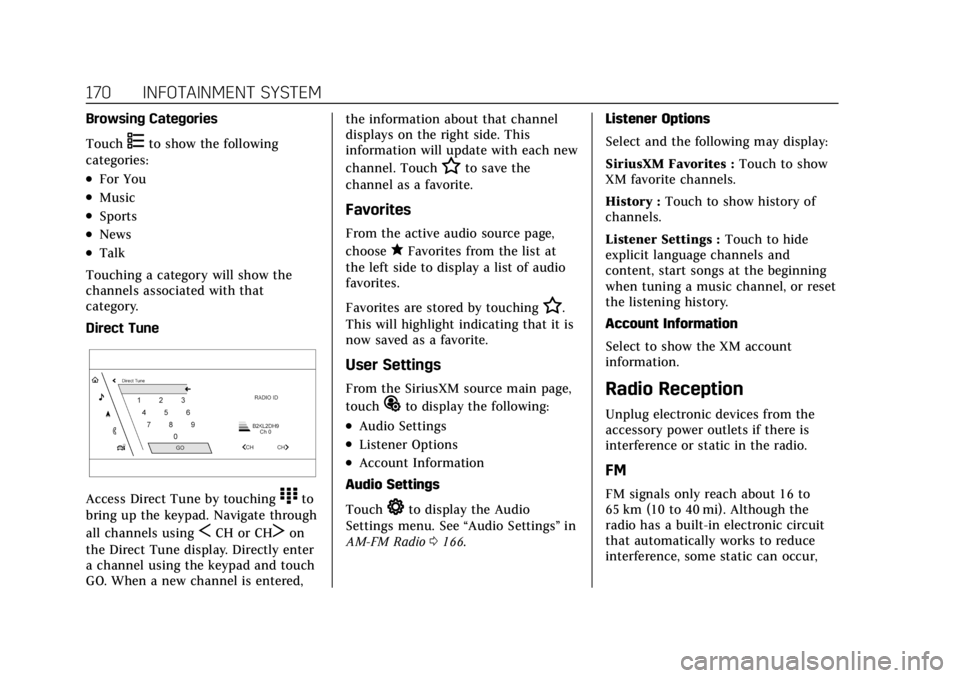
Direct Tune
Access Direct Tune by touching)to
bring up the keypad. Navigate through
all channels using
SCH or CHTon
the Direct Tune display. Directly enter
a channel using the keypad and touch
GO. When a new channel is entered, the information about that channel
displays on the right side. This
information will update with each new
channel. Touch
Hto save the
channel as a favorite.
Favorites
From the active audio source page,
choose
qFavorites from the list at
the left side to display a list of audio
favorites.
Favorites are stored by touching
H.
This will highlight indicating that it is
now saved as a favorite.
User Settings
From the SiriusXM source main page,
touch
%to display the following:
.Audio Settings
.Listener Options
.Account Information
Audio Settings
Touch
*to display the Audio
Settings menu. See “Audio Settings”in
AM-FM Radio 0166. Listener Options
Select and the following may display:
SiriusXM Favorites :
Touch to show
XM favorite channels.
History : Touch to show history of
channels.
Listener Settings : Touch to hide
explicit language channels and
content, start songs at the beginning
when tuning a music channel, or reset
the listening history.
Account Information
Select to show the XM account
information.
Radio Reception
Unplug electronic devices from the
accessory power outlets if there is
interference or static in the radio.
FM
FM signals only reach about 16 to
65 km (10 to 40 mi). Although the
radio has a built-in electronic circuit
that automatically works to reduce
interference, some static can occur,