2022 CADILLAC CT5 Controls
[x] Cancel search: ControlsPage 211 of 466

Cadillac CT5 Owner Manual (GMNA-Localizing-U.S./Canada-15268585) -
2022 - CRC - 10/11/21
210 CLIMATE CONTROLS
Climate Control Display
1. Driver and Passenger Temperature Controls
2. Driver and Passenger Temperature Displays
3. Fan Control
4. Sync (Synchronized Temperature)
5. Recirculation
6. Air Delivery Mode Control
7. Auto (Automatic Operation)
8. A/C (Air Conditioning)
9. On/Off (Power)
The fan, air delivery mode, air
conditioning, driver and passenger
temperatures, recirculation, and Sync settings can be controlled by touching
CLIMATE on the infotainment Home
Page or the climate button in the
climate control display application
tray. A selection can then be made on
the front climate control page
displayed. See the infotainment
manual.
Climate Control Status Display
The climate control status display
appears briefly when the center stack
climate controls are adjusted.
Climate Control Influence on Fuel
Economy
The climate control system depends
on other vehicle systems for heat and
power input. Certain climate control
settings can lead to higher fuel usage.
The following climate control settings
use more fuel:
.MAX air conditioning mode
.Defrost mode
.Extreme temperature settings, such
as 15° C (60° F) or 32° C (90° F)
.High fan speed settings
To help reduce fuel usage:
.Use the full automatic control as
described under “Automatic
Operation.”
.Select a temperature setting that is
higher in hot weather and lower in
cold weather.
.Turn off the air conditioning when
it is not needed.
.Only use defrost to clear the
windows.
Page 212 of 466

Cadillac CT5 Owner Manual (GMNA-Localizing-U.S./Canada-15268585) -
2022 - CRC - 10/11/21
CLIMATE CONTROLS 211
Automatic Operation
To place the system in
automatic mode:1. Press AUTO.
2. Set the driver and passenger temperature.
To find your comfort setting, start
with 22 °C (72 °F) and allow the
system time to stabilize. Then
adjust the temperature as needed
for best comfort.
To improve fuel efficiency and to cool
the vehicle faster, recirculation may be
automatically selected in warm
weather.
The recirculation light will not come
on when automatically controlled.
Press
@to manually select
recirculation; press it again to select
outside air.
Do not cover the solar sensor on the
top of the instrument panel near the
windshield. This sensor regulates air
temperature based on sun load. See
“Sensors ”later in this section.
Manual Operation
ON/OFF : Press to turn the climate
control system on or off. When the
system is off, outside air will be
prevented from entering the vehicle.
When the system is on, a button is
pressed, or knob is turned, the climate
control system will turn on and
deliver airflow per the current setting.
Q 9 R:Press the fan controls on the
center stack or the climate control
display to increase or decrease the fan
speed. Press and hold the controls to
adjust speed more quickly.
Press AUTO to return to automatic
operation.
Driver and Passenger Temperature
Control : The temperature can be
adjusted separately for the driver and
the passenger. Press
w/xto
increase or decrease the temperature.
SYNC : Press to link the passenger
and rear climate temperature settings,
if equipped, to the driver setting. The
SYNC indicator light will turn on.
When the passenger or rear climate
temperature settings are adjusted, the
SYNC indicator light is off. The driver side or passenger side
temperature display shows the
temperature setting increasing or
decreasing.
Air Delivery Mode Control :
Press
Y,
[, orzto change the direction of
the airf low. An indicator light comes
on in the selected mode button. All
three buttons or any combination of
the three buttons can be used to
select the air delivery mode.
Changing the mode cancels the
automatic operation and the system
goes into manual mode. Press AUTO
to return to automatic operation.
z: This mode clears the windows of
fog or moisture. Air is directed to the
windshield, outboard panel outlets,
and side window vents. The system
automatically forces outside air into
the vehicle and the air conditioning
compressor will run, unless the
outside temperature is close to
freezing.
Y: Air is directed to the instrument
panel outlets.
Page 213 of 466

Cadillac CT5 Owner Manual (GMNA-Localizing-U.S./Canada-15268585) -
2022 - CRC - 10/11/21
212 CLIMATE CONTROLS
[:Air is directed to the floor
outlets, with some to the windshield,
side window outlets, outboard panel
outlets, and second row floor outlets.
0: Press to clear the windshield of
fog or frost more quickly. Air is
directed to the windshield, outboard
panel outlets, and the side window
outlets. The air conditioning
compressor also comes on, unless the
outside temperature is below freezing.
Do not drive the vehicle until all
windows are clear.
See Air Vents 0213.
A/C : Press to turn the air
conditioning system on or off. An
indicator light comes on to show that
the air conditioning is enabled. If the
fan is turned off, the air conditioner
will not run. The A/C light will stay on
even if the outside temperatures are
below freezing.
@: Press to turn on recirculation.
An indicator light comes on. Air is
recirculated to quickly cool the inside
of the vehicle. It can also be used to
help reduce outside air and odors that enter the vehicle. The air conditioning
compressor also comes on when this
mode is activated.
Ionizer :
If equipped with an ionizer,
this feature helps to clean the air
inside the vehicle and remove
contaminants such as pollen, odors,
and dust. If the climate control
system is on and the ionizer is
enabled, the ionizer status indicator
will be lit on the climate control
display. To turn the ionizer on or off,
see “Climate and Air Quality” under
Vehicle Personalization 0126.
Rear Window Defogger
The rear window defogger uses a
warming grid to remove fog from the
rear window.
K:Press to turn the rear window
defogger on or off. An indicator light
on the button comes on to show that
the rear window defogger is on.
The rear window defogger only works
when the ignition is on. The defogger
turns off if the ignition is turned to
off or ACC/ACCESSORY.
Caution
Using a razor blade or sharp object
to clear the inside rear window can
damage the rear window defogger.
Repairs would not be covered by
the vehicle warranty. Do not clear
the inside rear window with sharp
objects.
Heated Mirror : If equipped with
heated outside mirrors, the mirrors
heat to help clear fog or frost from the
surface of the mirror when the rear
window defog button is pressed. See
Heated Mirrors 028.
Remote Start Climate Control
Operation : If equipped with remote
start, the climate control system may
run when the vehicle is started
remotely. The rear defog may come on
during remote start based on cold
ambient conditions. The rear defog
indicator light does not come on
during a remote start.
If equipped, the heated seats will turn
on if it is cold outside or the
ventilated seats will turn on if it is hot
outside. The heated and ventilated
Page 214 of 466

Cadillac CT5 Owner Manual (GMNA-Localizing-U.S./Canada-15268585) -
2022 - CRC - 10/11/21
CLIMATE CONTROLS 213
seat indicator lights may not come on
during a remote start. If equipped, the
heated steering wheel will come on in
a remote start if it is cold outside. The
heated steering wheel indicator light
may not come on.
Sensors
The solar sensor, located in the
defrost grille in the middle of the
instrument panel, monitors the solar
heat. Do not cover the solar sensor or
the system will not work properly.
There is also an exterior temperature
sensor behind the front grille. This
sensor reads the outside air
temperature and helps maintain thetemperature inside the vehicle. Any
cover on the front of the vehicle could
cause a false reading in the displayed
temperature.
The climate control system uses the
information from these sensors to
maintain comfort settings by
adjusting the outlet temperature, fan
speed, and air delivery mode. The
system may also supply cooler air to
the side of the vehicle facing the sun.
The recirculation mode will also be
used as needed to maintain cool
outlet temperatures.
Afterblow Feature
If equipped, under certain conditions,
the fan may stay on or may turn on
and off several times after you turn
off and lock the vehicle. This is
normal.
Air Vents
Adjustable air vents are in the center
and on the sides of the instrument
panel, and on the rear of the center
console storage.
Move the slider knobs to change the
direction of or to close off the airf low.Operation Tips
.Clear away any ice, snow, or leaves
from air inlets at the base of the
windshield that could block the
flow of air into the vehicle.
.Clear snow off the hood to improve
visibility and help decrease moisture
drawn into the vehicle.
.Keep the path under the front seats
clear of objects to help circulate the
air inside of the vehicle more
effectively.
.Use of non-GM approved hood
deflectors can adversely affect the
performance of the system. Check
with your dealer before adding
equipment to the outside of the
vehicle.
.Do not attach any devices to the air
vent slats. This restricts airf low and
may cause damage to the air vents.
Page 215 of 466

Cadillac CT5 Owner Manual (GMNA-Localizing-U.S./Canada-15268585) -
2022 - CRC - 10/11/21
214 CLIMATE CONTROLS
Maintenance
Passenger Compartment
Air Filter
The filter reduces dust, pollen, and
other airborne irritants from outside
air that is pulled into the vehicle. The
filter should be replaced as part of
routine scheduled maintenance. See
Maintenance Schedule0410.
See your dealer regarding replacement
of the filter.
Service
All vehicles have a label underhood
that identifies the refrigerant used in
the vehicle. The refrigerant system
should only be serviced by trained and
certified technicians. The air
conditioning evaporator should never
be repaired or replaced by one from a
salvage vehicle. It should only be
replaced by a new evaporator to
ensure proper and safe operation.
During service, all refrigerants should
be reclaimed with proper equipment.
Venting refrigerants directly to the
atmosphere is harmful to the environment and may also create
unsafe conditions based on inhalation,
combustion, frostbite, or other
health-based concerns.
The air conditioning system requires
periodic maintenance. See
Maintenance Schedule
0410.
Page 217 of 466

Cadillac CT5 Owner Manual (GMNA-Localizing-U.S./Canada-15268585) -
2022 - CRC - 10/11/21
216 DRIVING AND OPERATING
Rear Cross Traffic Alert (RCTA)System . . . . . . . . . . . . . . . . . . . . . . . . . . 304
Assistance Systems for Driving . . . . . . . . . . . . . . . . . . . . . . . . . . 304
Forward Collision Alert (FCA)
System . . . . . . . . . . . . . . . . . . . . . . . . . . 304
Automatic Emergency Braking (AEB) . . . . . . . . . . . . . . . . . . . 306
Front Pedestrian Braking (FPB) System . . . . . . . . . . . . . . . . . . . . . . . . . . 308
Side Blind Zone Alert (SBZA) . . . . 310
Lane Change Alert (LCA) . . . . . . . . 310
Lane Keep Assist (LKA) . . . . . . . . . . 312
Surround Vision Recorder . . . . . . . 314
Fuel
Top Tier Fuel . . . . . . . . . . . . . . . . . . . . . 316
Recommended Fuel (LSY 2.0L L4 Engine) . . . . . . . . . . . . . . . . . . . . . . . . . . 316
Recommended Fuel (LGY 3.0L V6 and LT4 6.2L
V8 Engines) . . . . . . . . . . . . . . . . . . . . . 316
Prohibited Fuels . . . . . . . . . . . . . . . . . . 317
Fuels in Foreign Countries . . . . . . . 317
Fuel Additives . . . . . . . . . . . . . . . . . . . . 317
Filling the Tank . . . . . . . . . . . . . . . . . . 317
Filling a Portable Fuel Container . . . . . . . . . . . . . . . . . . . . . . . . 319
Trailer Towing
General Towing Information . . . . 319
Driving Characteristics andTowing Tips . . . . . . . . . . . . . . . . . . . . . 320
Trailer Towing (LSY 2.0L L4 and LGY 3.0L V6 Engines Only) . . . . 323
Towing Equipment . . . . . . . . . . . . . . . 325
Conversions and Add-Ons
Add-On Electrical Equipment . . . 326
Driving Information
Driving for Better Fuel
Economy
Driving habits can affect fuel mileage.
Here are some driving tips to get the
best fuel economy possible:
.Set the climate controls to the
desired temperature after the engine
is started, or turn them off when
not required.
.Avoid fast starts and accelerate
smoothly.
.Brake gradually and avoid abrupt
stops.
.Avoid idling the engine for long
periods of time.
.When road and weather conditions
are appropriate, use cruise control.
.Always follow posted speed limits or
drive more slowly when conditions
require.
.Keep vehicle tires properly inflated.
.Combine several trips into a
single trip.
Page 251 of 466
Cadillac CT5 Owner Manual (GMNA-Localizing-U.S./Canada-15268585) -
2022 - CRC - 10/11/21
250 DRIVING AND OPERATING
2. From the center position, move theshift lever back.
.If the vehicle is in P (Park), press
the shift lock release button
while pulling the shift
lever back.
.D will illuminate in red.
.After releasing the shift lever, it
will return to the center
position.
To shift out of D (Drive): 1. Bring the vehicle to a complete stop.
2. Shift to the desired gear.
3. After releasing the shift lever, it will return to the center position.
Downshifting the transmission in
slippery road conditions could result
in skidding. See “Skidding”underLoss
of Control 0220.
Caution
Spinning the tires or holding the
vehicle in one place on a hill using
only the accelerator pedal may
damage the transmission. The
(Continued)
Caution (Continued)
repair will not be covered by the
vehicle warranty. If the vehicle is
stuck, do not spin the tires. When
stopping on a hill, use the brakes to
hold the vehicle in place.
If equipped with the 2.0L L4 engine,
engine speeds may be increased while
driving at highway speeds while the
engine is still warming up.
Manual Mode
Tap Shift Caution
Driving with the engine at a high
rpm without upshifting while using
Tap Shift, could damage the vehicle.
Always upshift when necessary
while using Tap Shift.
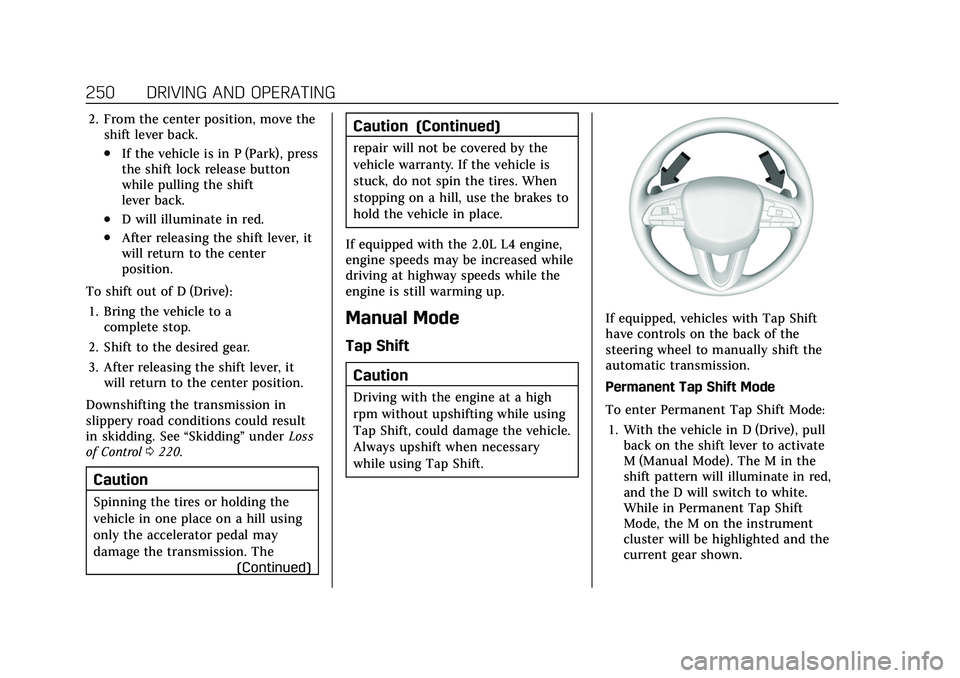
If equipped, vehicles with Tap Shift
have controls on the back of the
steering wheel to manually shift the
automatic transmission.
Permanent Tap Shift Mode
To enter Permanent Tap Shift Mode:1. With the vehicle in D (Drive), pull back on the shift lever to activate
M (Manual Mode). The M in the
shift pattern will illuminate in red,
and the D will switch to white.
While in Permanent Tap Shift
Mode, the M on the instrument
cluster will be highlighted and the
current gear shown.
Page 252 of 466

Cadillac CT5 Owner Manual (GMNA-Localizing-U.S./Canada-15268585) -
2022 - CRC - 10/11/21
DRIVING AND OPERATING 251
2. After releasing the shift lever, itwill return to the center position.
3. Pull the control toward you to shift. Pull the left control to
downshift, and the right control to
upshift. To shift to the lowest
available gear, pull and hold the
left control.
To exit Permanent Tap Shift Mode: 1. To exit M (Manual Mode) and return to D (Drive), pull back on
the shift lever. The D in the shift
pattern will illuminate in red, and
the M will switch to white.
2. After releasing the shift lever, it will return to the center position.
M (Manual Mode) can be exited to
return to D (Drive) at any speed by
pulling the lever rearward from the
center position. It is not necessary to
stop the vehicle or shift to N (Neutral)
or P (Park) prior to shifting back to
D (Drive). Temporary Tap Manual Shift Mode
To enter Temporary Tap Shift Mode:
1. With the transmission in D (Drive) and not in Permanent Tap Shift
Mode, the Tap Shift controls will
activate a Temporary Tap Manual
Shift Mode, allowing the
transmission to be manually
shifted. While in Temporary Tap
Shift Mode, the D on the
instrument cluster will be
highlighted and the current gear
shown.
2. To shift to the lowest available gear, press and hold the left
control.
3. To deactivate, hold the right control briefly. Automatic shifts
return after no manual shifts have
been done for seven to 10 seconds.
While using Tap Shift, the vehicle will
have firmer, quicker shifting. This can
be used for sport driving or when
climbing or descending hills, to stay in
gear longer, or to downshift for more
power or engine braking. The transmission will only allow
shifting into gears appropriate for the
vehicle speed and engine revolutions
per minute (rpm). The transmission
will not automatically shift to the next
higher gear if the engine rpm is too
high. It will only automatically shift to
the next lower gear if the engine rpm
is much too low.
Manual Transmission
If equipped, this is the shift pattern
for the manual transmission.