2022 ALFA ROMEO GIULIA clock
[x] Cancel search: clockPage 72 of 248

GETTING TO KNOW YOUR INSTRUMENT PANEL
70
To access and change the setting, turn and push
the Rotary Pad or press the desired setting on the
touchscreen.
Clock & Date
The following settings can be modified under the
“Clock & Date” menu:
Sync With GPS Time (if equipped): activates or
deactivates the clock synchronization through
the GPS. If the function is deactivated, the
options Set Time and Set Date are enabled
Set Time: set the time manually
Time Format: set the time format to either a
12-hour or a 24-hour clock
Set Date: set the date manually
Restore Clock & Date Settings: restores the
factory settings
To access and change the setting, turn and push
the Rotary Pad or press the desired setting on the
touchscreen.
Cluster
The following settings can be modified when this
mode is selected:
Warning Buzzer Volume: set the volume of the
warning buzzer on seven levels
Trip B: activate or deactivate the Trip function
Show Phone Info: activate/deactivate
repetition of the phone function screens also
on the instrument panel display
Show Audio Info: activate/deactivate
repetition of the audio function screens (Radio
and Media) also on the instrument panel
display
Show Nav Info (if equipped): activate/
deactivate repetition of the navigator function
screens also on the instrument panel display
Digital speed on all screens: activate/deacti -
vating of digital speed on the instrument panel
display screens other than the main screen
Consumption Bar: activate/deactivate the
consumption baron the display screens of the
instrument panel where it is available
Performance pages: choose, for each driving
mode, one of the two alternative contents
displayed in the screen
Custom areas: select which content to display
in each of the three customizable areas on the
display of the instrument panel: time, date,
outside temperature, radio information,
compass
Restore Cluster Settings: deletes the current
settings and restores the factory settings
To access and change the setting, turn and push
the Rotary Pad or press the desired setting on the
touchscreen.
WARNING LIGHTS AND
MESSAGES ON THE
INSTRUMENT PANEL
The following pages consist of warning lights and
messages.
NOTE:
The warning light turns on together with a
dedicated message and/or chime when
applicable. These indications are precau -
tionary and as such must not be considered as
exhaustive and/or alternative to the information contained in the Owner’s Manual,
which you are advised to read carefully in all
cases. Always refer to the information in this
section in the event of a failure indication.
The failure indicators appearing on the display
are divided into two categories: very serious
and less serious faults. Serious faults are
indicated by a repeated and prolonged
warning "cycle.” Less serious faults are
indicated by a warning "cycle" with a shorter
duration. You can stop the warning cycle in
both cases by pushing the button located on
the windshield wiper stalk. The instrument
panel warning light will stay on until the cause
of the failure is eliminated.
RED WARNING LIGHTS
Air Bag Warning Light
This warning light will illuminate to
indicate a fault with the air bag, and will
turn on for four to eight seconds as a
bulb check when the ignition is placed
in the ON/RUN or ACC/ON/RUN position. This
light will illuminate with a single chime when a
fault with the air bag has been detected, it will
stay on until the fault is cleared. If the light is
either not on during startup, stays on, or turns on
while driving, have the system inspected at an
authorized dealer as soon as possible.
Brake Warning Light
This warning light monitors various
brake functions, including brake fluid
level and parking brake application. If
the brake light turns on it may indicate
that the parking brake is applied, that the brake
fluid level is low, or that there is a problem with
the Anti-Lock Brake System reservoir.
22_GA_OM_EN_USC_t.book Page 70
Page 205 of 248
203
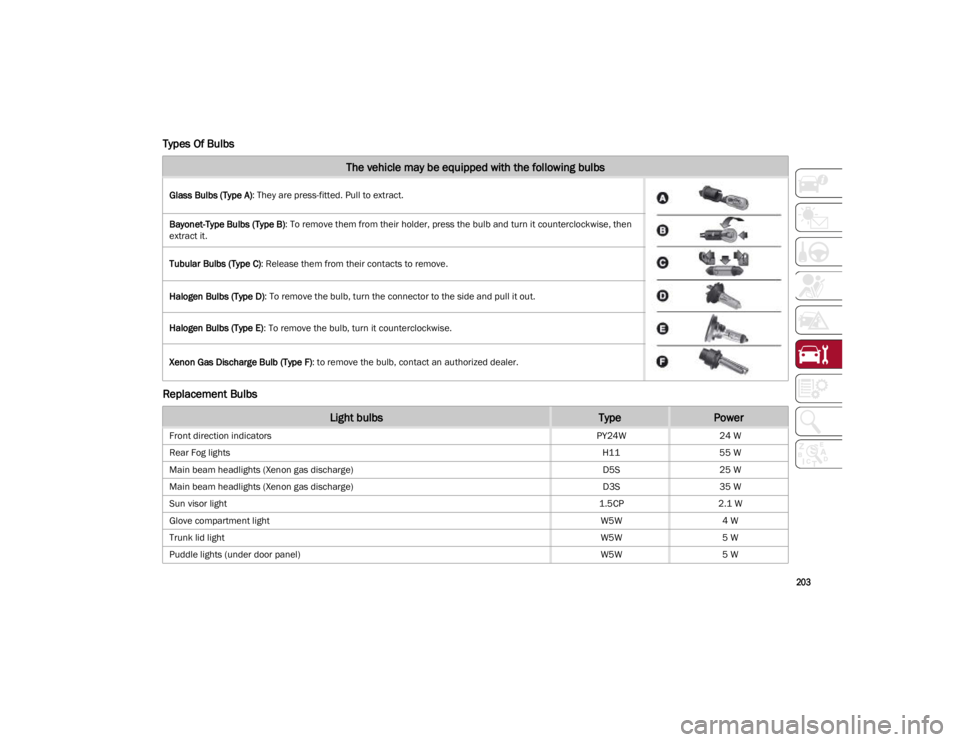
Types Of Bulbs
Replacement Bulbs
The vehicle may be equipped with the following bulbs
Glass Bulbs (Type A): They are press-fitted. Pull to extract.
Bayonet-Type Bulbs (Type B) : To remove them from their holder, press the bulb and turn it counterclockwise, then
extract it.
Tubular Bulbs (Type C) : Release them from their contacts to remove.
Halogen Bulbs (Type D) : To remove the bulb, turn the connector to the side and pull it out.
Halogen Bulbs (Type E) : To remove the bulb, turn it counterclockwise.
Xenon Gas Discharge Bulb (Type F) : to remove the bulb, contact an authorized dealer.
Light bulbsTypePower
Front direction indicators PY24W24 W
Rear Fog lights H1155 W
Main beam headlights (Xenon gas discharge) D5S25 W
Main beam headlights (Xenon gas discharge) D3S35 W
Sun visor light 1.5CP2.1 W
Glove compartment light W5W4 W
Trunk lid light W5W5 W
Puddle lights (under door panel) W5W5 W
22_GA_OM_EN_USC_t.book Page 203
Page 206 of 248
SERVICING AND MAINTENANCE
204
Replacing Exterior Bulbs
NOTE:
Only replace the bulb when the engine is off. Also
ensure that the engine is cold, to prevent the risk
of burns.
Direction Indicators
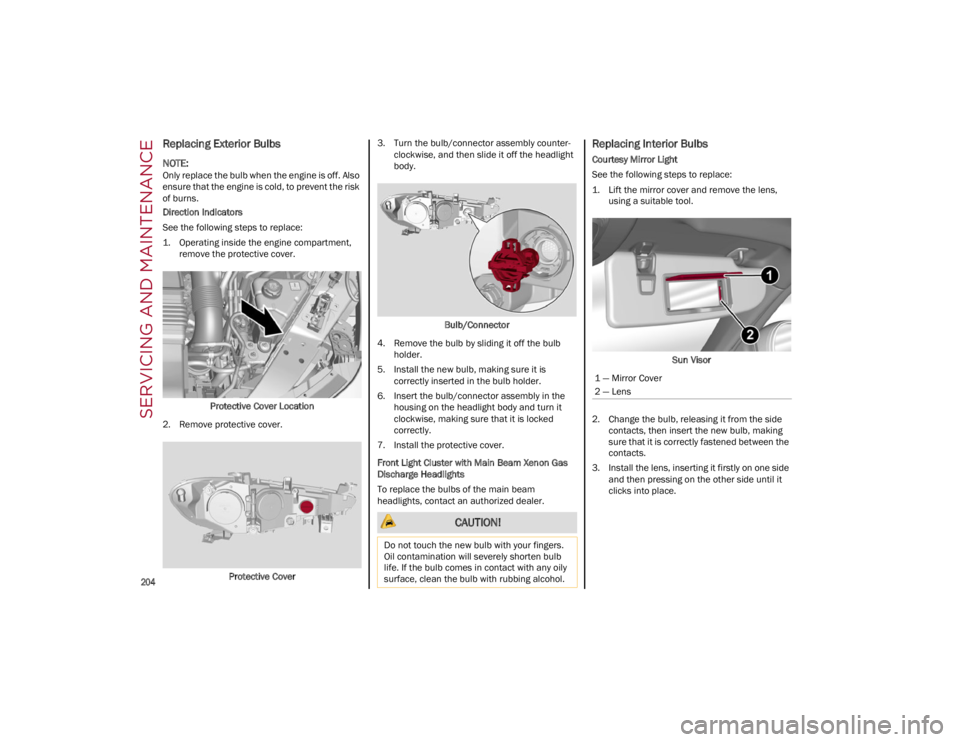
See the following steps to replace:
1. Operating inside the engine compartment,remove the protective cover.
Protective Cover Location
2. Remove protective cover.
Protective Cover 3. Turn the bulb/connector assembly counter
-
clockwise, and then slide it off the headlight
body.
Bulb/Connector
4. Remove the bulb by sliding it off the bulb holder.
5. Install the new bulb, making sure it is correctly inserted in the bulb holder.
6. Insert the bulb/connector assembly in the housing on the headlight body and turn it
clockwise, making sure that it is locked
correctly.
7. Install the protective cover.
Front Light Cluster with Main Beam Xenon Gas
Discharge Headlights
To replace the bulbs of the main beam
headlights, contact an authorized dealer.
Replacing Interior Bulbs
Courtesy Mirror Light
See the following steps to replace:
1. Lift the mirror cover and remove the lens, using a suitable tool.
Sun Visor
2. Change the bulb, releasing it from the side contacts, then insert the new bulb, making
sure that it is correctly fastened between the
contacts.
3. Install the lens, inserting it firstly on one side and then pressing on the other side until it
clicks into place.
CAUTION!
Do not touch the new bulb with your fingers.
Oil contamination will severely shorten bulb
life. If the bulb comes in contact with any oily
surface, clean the bulb with rubbing alcohol.
1 — Mirror Cover
2 — Lens
22_GA_OM_EN_USC_t.book Page 204
Page 223 of 248
221
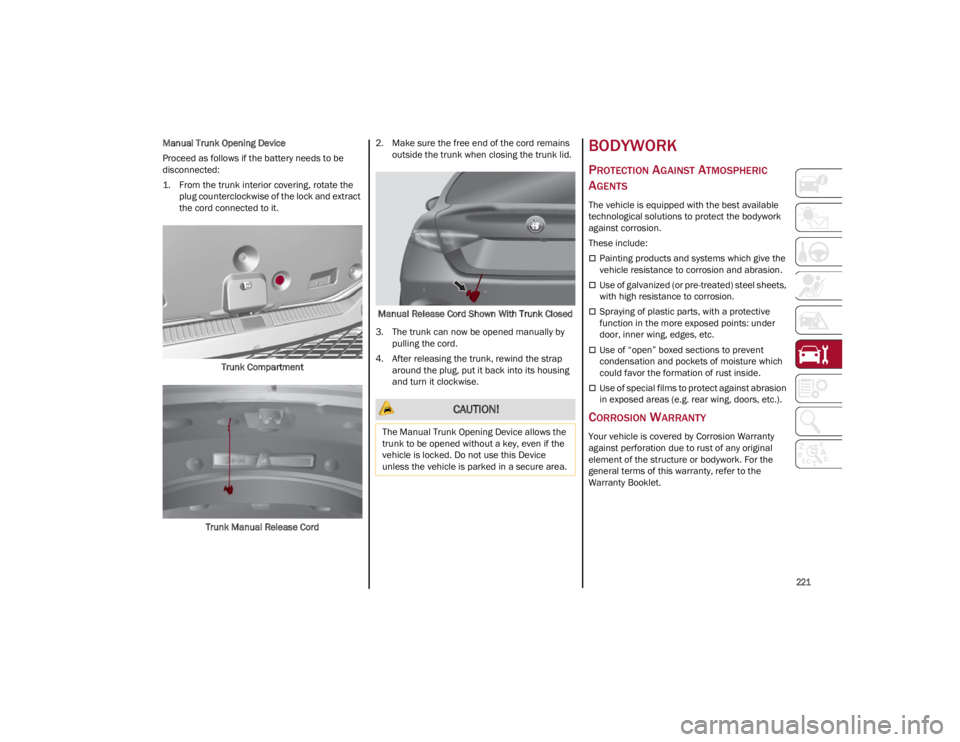
Manual Trunk Opening Device
Proceed as follows if the battery needs to be
disconnected:
1. From the trunk interior covering, rotate the plug counterclockwise of the lock and extract
the cord connected to it.
Trunk Compartment
Trunk Manual Release Cord 2. Make sure the free end of the cord remains
outside the trunk when closing the trunk lid.
Manual Release Cord Shown With Trunk Closed
3. The trunk can now be opened manually by pulling the cord.
4. After releasing the trunk, rewind the strap around the plug, put it back into its housing
and turn it clockwise.BODYWORK
PROTECTION AGAINST ATMOSPHERIC
A
GENTS
The vehicle is equipped with the best available
technological solutions to protect the bodywork
against corrosion.
These include:
Painting products and systems which give the
vehicle resistance to corrosion and abrasion.
Use of galvanized (or pre-treated) steel sheets,
with high resistance to corrosion.
Spraying of plastic parts, with a protective
function in the more exposed points: under
door, inner wing, edges, etc.
Use of “open” boxed sections to prevent
condensation and pockets of moisture which
could favor the formation of rust inside.
Use of special films to protect against abrasion
in exposed areas (e.g. rear wing, doors, etc.).
CORROSION WARRANTY
Your vehicle is covered by Corrosion Warranty
against perforation due to rust of any original
element of the structure or bodywork. For the
general terms of this warranty, refer to the
Warranty Booklet.
CAUTION!
The Manual Trunk Opening Device allows the
trunk to be opened without a key, even if the
vehicle is locked. Do not use this Device
unless the vehicle is parked in a secure area.
22_GA_OM_EN_USC_t.book Page 221