Page 386 of 656

uuWhen Driving uShifting
384
Driving
■Shift Operation1Shift Operation
NOTICE
When you change (D to (R and vice versa, come to
a complete stop and keep the brake pedal depressed.
Operating the shift button before the vehicle has
come to a complete standstill can damage the
transmission.
Use the gear position indicator and the shift button
indicator to check the gear position before selecting
a shift button.
If the indicator of the currently selected gear position,
or all the gear position indicators are blinking
simultaneously, there is a problem with the
transmission.
Avoid sudden acceleration and have the transmission
checked by a dealer as soon as possible.
The fuel supply may be cut of f if you drive at engine
speeds in or over the tac hometer’s red zone (engine
speed limit). If this happe ns, you may experience a
slight jolt.
When the engine speed is increased while the
transmission is in
( N, (P or (R, the fuel supply may
be cut off even without the engine speed entering
the tachometer’s red zone.
When shifting gears in extremely low temperatures
(−22°F/−30°C), there may be a short delay before the
shift is indicated in the di splay. Always confirm you
are in the correct gear before driving.
Gear Position Indicator
Tachometer\bT�SFE�[POe M (sequential mode) Indicator
Sequential Mode Gear
Selection Indicator
2.0 L engine models
3.0 L engine models
l (sequential mode) Indicator
Sequential Mode Gear
Selection Indicator
Gear Position Indicator
Tachometer\bT�SFE�[POe
22 ACURA TLX-31TGV6100.book 384 \b
Page 392 of 656

uuWhen Driving uShifting
390
Driving
■Sequential Mode Operation1Sequential Mode Operation
Each paddle shif t operation makes a single or double
gear change.
To change gears continuously, release the paddle
shifter before pulling it again for the next gear.
If the sequential mode gear selection indicator blinks
when you try to shift up or down, this means your
vehicle speed is not in its allowable gear range or the
protection of transmissi on system is necessary.
Slightly accelerate to shift up and decelerate to shift
down while the indi cator is blinking.
When the transmission is in
( S and SPORT ,
SPORT+*, or INDIVIDUAL mode, to prioritize the
engine performance enhanc ement, the transmission
may not allow for shifting up while the engine speed
is low.
Sequential Mode Gear
Selection Indicator
Downshifting when pulling
the paddle shifter.
(Changes to a lower gear)Upshifting when pulling
the paddle shifter.
(Changes to a higher gear)
Paddle Shifter
(Shift down) Paddle Shifter
(Shift up)
* Not available on all models
22 ACURA TLX-31TGV6100.book 390 \b
Page 395 of 656

393
uuWhen Driving uIntegrated Dynamics System
Continued
Driving
■Mode descriptions
Each mode has been crafted for different driv ing styles according to the following chart.
*1:Interior accent light only available if equipped. Interior accent light changes with Dynamic Mode only when Accent Light Theme is
set to Dynamic Mode .
2Customized Features P. 302
2 Lighting area of the accent light P. 395
ModeFunctionAccent Light Color*1
COMFORTMaximizes driver comfort through decreased steering effort and reduced ride
firmness (if Active Damper System is equipped)Blue
NORMALBalanced response for everyday useWhite
SPORTEnhances vehicle response through increased steering effort, heightened
throttle response, modified active sound control, and more responsive ride
and/or handling (if Active Damper System and/or SH-AWD ® is equipped)
When in SPORT, the Auto Idle Stop System w ill stay disabled regardless of
the Auto Idle Stop OFF button
2Auto Idle Stop P. 398
Red
SPORT+
Further enhances vehicle response for performance driving through
increased steering effort, maximized throttle response, maximum emotional
engine sound with active sound control, maximized ride and handling using
Active Damper System and SH-AWD ®, and enhanced control for Agile
Handling Assist, VSA ®, and Traction Control.Red
INDIVIDUALEach category can be customized separate ly to suit the driver’s preference
2Customizing the INDIVIDUAL Settings P. 396
Blue, white, or red
2Customizing the INDIVIDUAL
Settings P. 396
3.0 L engine models
22 ACURA TLX-31TGV6100.book 393 \b
Page 396 of 656
394
uuWhen Driving uIntegrated Dynamics System
Driving
■Next start-up mode
The mode for the next start-up is saved according to the following chart. Each keyless remote has its own mode saved.
*1:Interior accent light only available if equipped. Interior accent light changes with Dynamic Mode only when Accent Light Theme is
set to Dynamic Mode .
2Customized Features P. 302
2 Lighting area of the accent light P. 395
Last Dynamic ModeNext Dynamic ModeWelcome Accent Light Color*1
COMFORTCOMFORTBlue
NORMAL, SPORT, or SPORT+*NORMALWhite
INDIVIDUAL (via COMFORT )COMFORTBlue
INDIVIDUAL (via NORMAL , SPORT , or
SPORT+*)
NORMALWhite
* Not available on all models
22 ACURA TLX-31TGV6100.book 394 \b
Page 397 of 656
395
uuWhen Driving uIntegrated Dynamics System
Continued
Driving
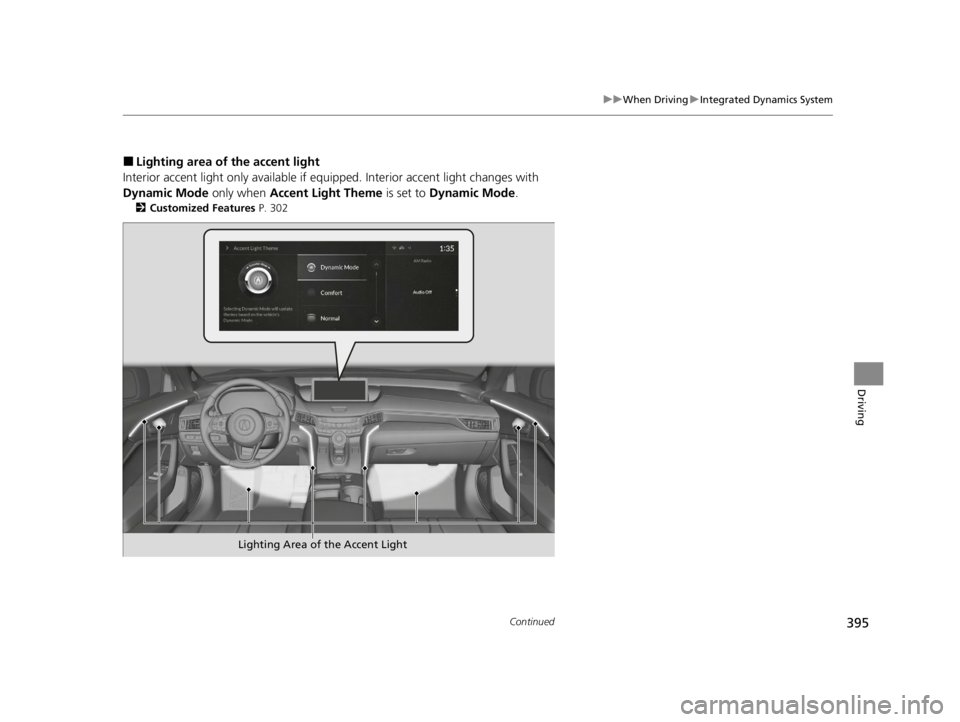
■Lighting area of the accent light
Interior accent light only available if equipped. Interior accent light changes with
Dynamic Mode only when Accent Light Theme is set to Dynamic Mode .
2Customized Features P. 302
Lighting Area of the Accent Light
22 ACURA TLX-31TGV6100.book 395 \b
Page 398 of 656
396
uuWhen Driving uIntegrated Dynamics System
Driving
You can customize the INDIVIDUAL settings linked to your current keyless remote . Each keyless remote has its own settings.
1. Push and hold the button to enter INDIVIDUAL mode and open the INDIVIDUAL settings.
2Selecting the Dynamic Mode P. 392
2.Drag to highlight the setting category icon and click the A-zone touchpad to display the setting screen.
3. Drag to highlight the desired setting and click the A-zone touchpad to change the setting.
u Press the button to return to INDIVIDUAL settings screen.
u Press the button to return to the audio/information screen.
2True Touchpad Interface P. 211
■Customizing the INDIVIDUAL Settings
Swipe to highlight the
setting category icon and
click the A-zone touchpad
INDIVIDUAL Setting screen When Engine is selected
Button
Current setting
22 ACURA TLX-31TGV6100.book 396 \b
Page 399 of 656

397
uuWhen Driving uIntegrated Dynamics System
Driving
*1:Interior accent light only available if equipped. Interior accent light changes with Dynamic Mode only when Accent Light Theme is
set to Dynamic Mode .
2Customized Features P. 302
2 Lighting area of the accent light P. 395
CategoryDescription
EngineSelect COMFORT , NORMAL , or SPORT for the engine throttle response and transmission shift response
SteeringSelect COMFORT , NORMAL , or SPORT for the steering effort
SuspensionSelect COMFORT , NORMAL , or SPORT for ride and/or handling:●The suspension stiffness with the Ac tive Damper System (if equipped)●The power distribution to the wheels with SH-AWD ® (if equipped)
Idle StopSet the Auto Idle Stop system to Enabled or Disabled. While Idle Stop is Disabled in INDIVIDUAL mode,
the Auto Idle Stop System will stay disabl ed regardless of the Auto Idle Stop OFF button
2 Auto Idle Stop P. 398
Lighting*1Set the interior accent lighting. COMFORT for blue, NORMAL for white, and SPORT for red
Reset to DefaultEngine , Steering , Suspension and Lighting is set to Normal, and Idle Stop is set to Enabled
22 ACURA TLX-31TGV6100.book 397 \b
Page 409 of 656
407
uuWhen Driving uAgile Handling Assist
Driving
Agile Handling Assist
Lightly brakes each of the front and rear wheels, as needed, when you turn the
steering wheel, and helps support the vehicle’s stability and performance during
cornering.1 Agile Handling Assist
The agile handling assist ca nnot enhance stability in
all driving situations. You still need to drive and
corner at speeds appropriate for the conditions and
always leave a sufficient margin of safety.
When the VSA ® system indicator comes on and stays
on while driving, the agil e handling assist does not
activate.
You may hear a sound coming from the engine
compartment while the agile handling assist is
activated. This is normal.
22 ACURA TLX-31TGV6100.book 407 \b