Page 112 of 656

uuGauges and Multi-Information Display uMulti-Information Display
110
Instrument Panel
■The Driver Attention Monitor resets when:
• The power mode is set to VEHICLE OFF.
• The driver unfastens the seat belt and op ens the door while the vehicle is stopped.
■For the Driver Attention Monitor to function:
• The vehicle must be traveling above 25 mph (40 km/h).
• The electric power steering (EPS) system indicator must be off.
■Depending on driving conditions or other factors, the Driver Attention
Monitor may not function in the following circumstances:
• The steering assist function of the Lane Keeping Assist System (LKAS) is active.
2Lane Keeping Assist System (LKAS) P. 450
•The condition of the road is poor, e.g. the surface is unpaved or bumpy.
• It is windy.
• The driver is frequently op erating the vehicle in an assertive manner such as
changing lanes or accelerating.
■Customizing
You can change the Driver Attention Monitor settings. Select Tactile/Audible
Alert, Tactile Alert , or OFF.
2Customized Features P. 302
1For the Driver Attention Monitor to function:
The bars on the multi-info rmation display remain
grayed out unless the Driv er Attention Monitor is
functioning.
22 ACURA TLX-31TGV6100.book 110 \b
Page 114 of 656
112
uuGauges and Multi-Information Display uHead-Up Display*
Instrument Panel
Head-Up Display*
Shows the currently selected Driving View information. You can choose which items
are displayed using the left selector wheel on the steering wheel. They are displayed
when the power mode is in ON.
2 To Change Head-Up Display Content P. 114
The display can be moved up and down to become level with your eyes.
To raise or lower the head-up display : Press and hold the or button until
the desired position is reached.
1 Head-Up Display*
When you unlock and open the driver’s door with a
remote transmitter, or keyless access system, the
head-up display adjusts auto matically to one of the
two preset positions.
34
/ Button34Head-Up Display Press and hold the button
to raise the display.3
Press and hold the button
to lower the display.4
* Not available on all models
22 ACURA TLX-31TGV6100.book 112 \b
Page 119 of 656

117
Controls
This chapter explains how to operate the various controls necessary for driving.
Clock.................................................. 118
Locking and Unlocking the Doors
Key .................................................. 120
Low Keyless Remote Signal Strength ... 122
Locking/Unlocking the Doors from the Outside .......................................... 123
Locking/Unlocking the Doors from the Inside ............................................. 132
Childproof Door Locks ..................... 134
Auto Door Locking/Unlocking .......... 135
Opening and Closing the Trunk ....... 136
Security System ................................ 139
Immobilizer System .......................... 139
Security System Alarm ...................... 139 Windows
........................................... 142
Moonroof .......................................... 145
Operating the Switches Around the Steering Wheel ENGINE START/STOP Button............. 146
Turn Signals ..................................... 149
Light Switches.................................. 150
Fog Lights
*...................................... 153
Daytime Running Lights ................... 153
Auto High-Beam .............................. 154
Wipers and Washers ........................ 157
Brightness Control ........................... 159
Rear Defogger/Heated Door Mirror Button .. 161Driving Position Memory System ...... 162 Adjusting the Steering Wheel .......... 164
Mirrors ............................................... 165
Interior Rearview Mirror ................... 165
Power Door Mirrors ......................... 166
Seats .................................................. 168
Front Seats ...................................... 168
Interior Convenience Items .............. 180
Interior Lights .................................. 180
Storage Items .................................. 182
Climate Control System Using Automatic Climate Control .... 197
Automatic Climate Control Sensors ... 201
* Not available on all models
22 ACURA TLX-31TGV6100.book 117 \b
Page 148 of 656

146
Controls
Operating the Switches Around the Steering Wheel
ENGINE START/STOP Button
■Changing the Power Mode1ENGINE START/STOP Button
ENGINE START/STOP Button Operating Range
You can start the engine when the keyless remote is
inside the vehicle.
The engine may also run if the keyless remote is close
to the door or window, even if it is outside the
vehicle.
ON mode:
The ENGINE START/STOP button is on (in red), if the
engine is running.
If the battery of the keyless remote is getting low, the
engine may not start when you press the ENGINE
START/STOP button. If the engi ne does not start,
refer to the following link.
2 If the Keyless Remote Battery is Weak
P. 604
Do not leave the power mode in ACCESSORY or ON
when you get out.
Operating RangeVEHICLE OFF (LOCK)
The button is off.
The power to all electrical components is turned off.
ACCESSORY
The button blinks (in red).
Operate the audio system and other accessories in this
position.
ON
The button blinks (in red).
All electrical components can be used.
Press the button.
22 ACURA TLX-31TGV6100.book 146 \b
Page 149 of 656
147
uuOperating the Switches Around the Steering Wheel uENGINE START/STOP Button
Continued
Controls
If you leave the vehicle for 30 to 60 minutes with the transmission in (P and the
power mode in ACCESSORY, the vehicle automa tically goes into the mode similar to
VEHICLE OFF (LOCK) to avoid draining the battery.
If you open the driver’s door when the pow er mode is set to ACCESSORY, a warning
beep sounds.
■Automatic Power Off
■Power Mode Reminder
22 ACURA TLX-31TGV6100.book 147 \b
Page 150 of 656

uuOperating the Switches Around the Steering Wheel uENGINE START/STOP Button
148
Controls
When the power mode is set to any mode
other than OFF and you remove the keyless
remote from the vehicle and shut the door, an
alarm will sound. If th e alarm continues to
sound, place the keyless remote in another
location.
■When the power mode is in
ACCESSORY
The alarm will sound from outside the vehicle.
■When the power mode is in ON
An alarm will sound both inside and outside
the vehicle. In addition, a warning indicator
will appear on the instrument panel.
■Keyless Remote Reminder1 Keyless Remote Reminder
When the keyless remote is within the system’s
operational range, and the driv er’s door is closed, the
warning function cancels.
If the keyless remote is taken out of the vehicle after
the engine has been st arted, you can no longer
change the ENGINE START/STOP button mode or
restart the engine. Always make sure if the remote is
in your vehicle when you operate the ENGINE
START/STOP button.
Removing the keyless remote from the vehicle
through a window does not activate the warning
buzzer.
Do not put the keyless remo te on the dashboard or in
the glove box. It may cause the warning buzzer to go
off. Under some other cond itions that can prevent
the vehicle from locating the remote, the warning
buzzer may also go off even if the remote is within
the system’s operational range.
22 ACURA TLX-31TGV6100.book 148 \b
Page 151 of 656
149
uuOperating the Switches Around the Steering Wheel uTurn Signals
Controls
Turn Signals
The turn signals can be used when the power
mode is in ON.
■(A): Turn signal
Push the lever up or down based on the
direction you want to turn, and the turn signal
will blink.
■(B): One-touc h turn signal
When you lightly push the lever up or down
and release it, the turn signal will blink 3
times.
1 (A): Turn signal
The turn signal indicator on the instrument panel will
blink when the external turn signal blinks.
2 Indicators P. 78
(A)
(B)
(B)
(A)
22 ACURA TLX-31TGV6100.book 149 \b
Page 152 of 656
150
uuOperating the Switches Around the Steering Wheel uLight Switches
Controls
Light Switches
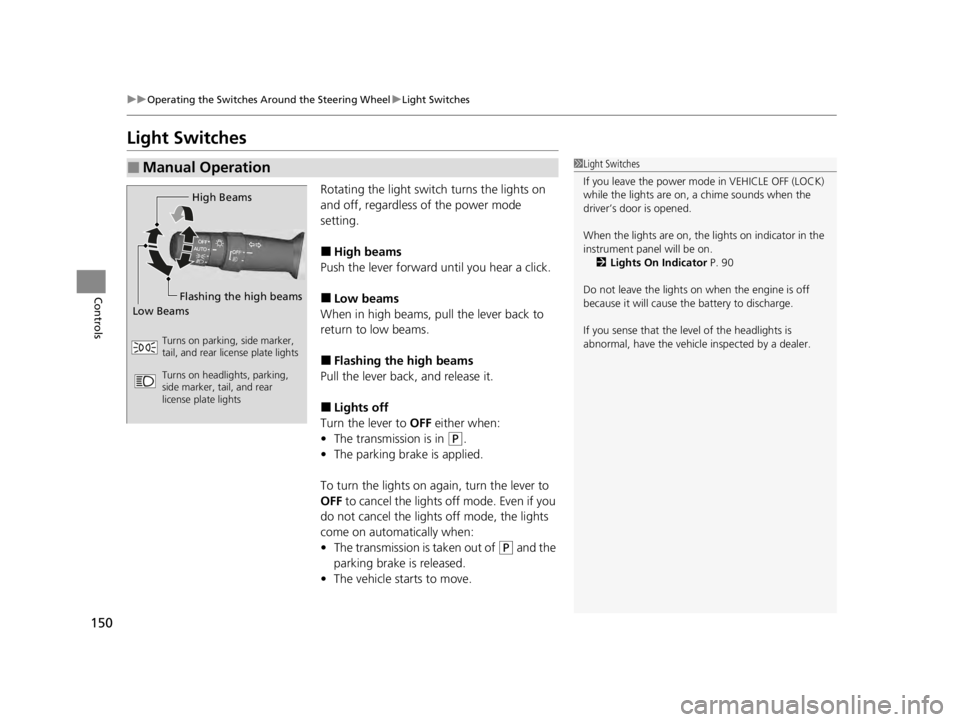
Rotating the light switch turns the lights on
and off, regardless of the power mode
setting.
■High beams
Push the lever forward until you hear a click.
■Low beams
When in high beams, pull the lever back to
return to low beams.
■Flashing the high beams
Pull the lever back, and release it.
■Lights off
Turn the lever to OFF either when:
• The transmission is in
(P.
• The parking brake is applied.
To turn the lights on again, turn the lever to
OFF to cancel the lights off mode. Even if you
do not cancel the lights off mode, the lights
come on automatically when:
• The transmission is taken out of
(P and the
parking brake is released.
• The vehicle starts to move.
■Manual Operation1Light Switches
If you leave the power mode in VEHICLE OFF (LOCK)
while the lights are on, a chime sounds when the
driver’s door is opened.
When the lights are on, the lights on indicator in the
instrument pane l will be on.
2 Lights On Indicator P. 90
Do not leave the lights on when the engine is off
because it will cause the battery to discharge.
If you sense that the le vel of the headlights is
abnormal, have the vehicl e inspected by a dealer.
High Beams
Flashing the high beams
Low Beams
Turns on parking, side marker,
tail, and rear license plate lights
Turns on headlights, parking,
side marker, tail, and rear
license plate lights
22 ACURA TLX-31TGV6100.book 150 \b


