Page 117 of 656

115
uuGauges and Multi-Information Display uHead-Up Display*
Instrument Panel
Shows your driving speed in mph or km/h.
Shows the current mode for ACC with Low Speed Follow, LKAS, and traffic jam
assistM
2 Adaptive Cruise Control (ACC) with Low Speed Follow P. 431
2 Lane Keeping Assist System (LKAS) P. 450
2 Traffic Jam Assist P. 459
Shows you turn-by-turn driv ing directions to your destination linked with the
navigation system or Android Auto.
2 Refer to the Navigation System Manual
2 Android Auto P. 272
Shows the current speed limit based on either information compiled through the
navigation system or speed limit signs captured by the front sensor camera.
■Vehicle Speed
■Current Mode for ACC with Low Speed Follow and, the
LKAS, and Traffic Jam Assist
■Turn-by-Turn Directions
■Speed Limit Information
1 Vehicle Speed
Switch between mph and km/h by using the multi-
information display or customized features on the
audio/information screen.
2 Speed/Distance Units P. 104
2 Customized Features P. 302
1Speed Limit Information
The speed limit disp layed on the screen may differ to
the actual speed limit.
The speed limit for some roads is not displayed.
You can select whether the source of the speed limit
information is the front sensor camera or the
navigation system.
You can also turn off speed limit information. 2 Customized Features P. 302
22 ACURA TLX-31TGV6100.book 115 \b
Page 211 of 656

209
uuAudio System uAudio Remote Controls
Features
Roll up or down:
To cycle through the modes, roll up or down and then press the left selector
wheel:
After an audio mode is selected, the left selector wheel can be operated for the
following functions.
• When listening to the radio
Move to the right: To select the next favorite radio station or channel.
Move to the left: To select the previous favorite radio station or channel.
• When listening to an iPod, USB flash drive, Bluetooth® Audio, or Smartphone
Connection
Move to the right: To skip to the next song.
Move to the left: To go back to the beginning of the current or previous song.1Audio Remote Controls
You can customize the items on the multi-
information display or the head-up display
*.
2 Customizing the Meter or Head-Up
Display
* P. 225
You cannot operate the a udio functions while the
following functions are be ing operated on the multi-
information display or head-up display
*.•Mode selection by pressing APPS button
•Navigation*
•Phone
•Select Driving View*
•Customize Apps
Navigation*
Phone
Select Driving View*
Customize Apps
Audio Modes
(FM Radio , USB Audio , etc.)
* Not available on all models
22 ACURA TLX-31TGV6100.book 209 \b
Page 214 of 656
212
uuAudio System Basic Operation uTrue Touchpad Interface
Features
■Flick
Flick (or drag) your finger up/down or left/
right to scroll in lists or change pages
throughout the system.
■Handwriting a character
Move your finger quickl y to trace a character
on the A-zone touchpad.
■Swipe with two fingers
Swipe (or drag) two fing ers across the screen
to move the map.
Models with navigation system
22 ACURA TLX-31TGV6100.book 212 \b
Page 216 of 656
214
uuAudio System Basic Operation uAudio/Information Screen
Features
Audio/Information Screen
Displays each mode status. From this display, you can go to various setup options.
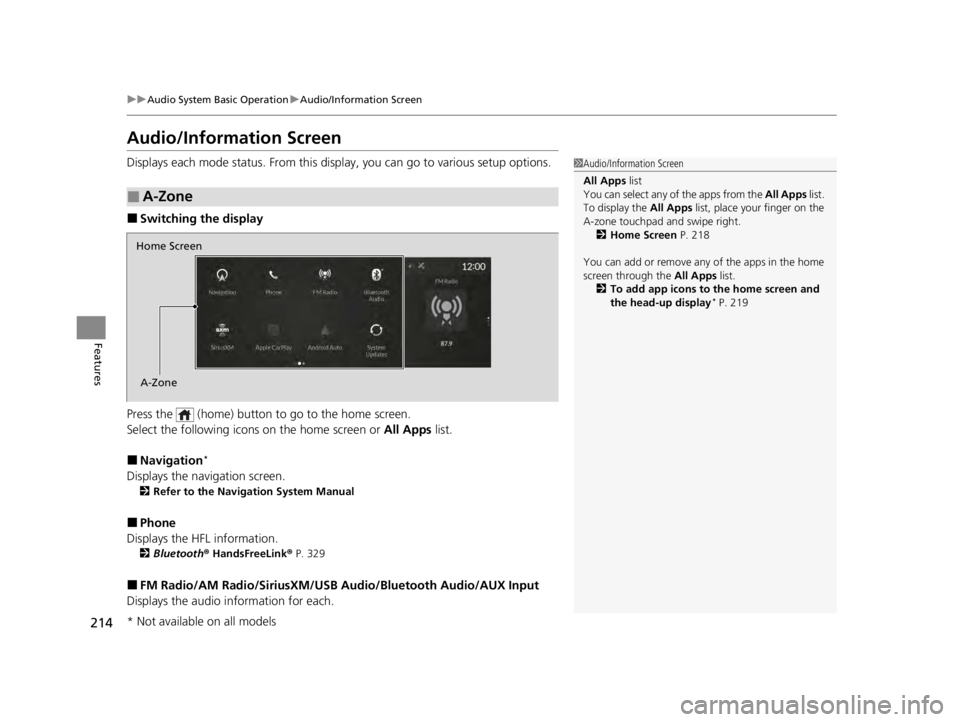
■Switching the display
Press the (home) button to go to the home screen.
Select the following icon s on the home screen or All Apps list.
■Navigation*
Displays the navigation screen.
2Refer to the Navigation System Manual
■Phone
Displays the HFL information.
2 Bluetooth ® HandsFreeLink ® P. 329
■FM Radio/AM Radio/SiriusXM/USB Audio/Bluetooth Audio/AUX Input
Displays the audio information for each.
■A-Zone
1Audio/Information Screen
All Apps list
You can select any of the apps from the All Apps list.
To display the All Apps list, place your finger on the
A-zone touchpad and swipe right. 2 Home Screen P. 218
You can add or remove any of the apps in the home
screen through the All Apps list.
2 To add app icons to the home screen and
the head-up display
* P. 219
Home Screen
A-Zone
* Not available on all models
22 ACURA TLX-31TGV6100.book 214 \b
Page 218 of 656
uuAudio System Basic Operation uAudio/Information Screen
216
Features
You can see the audio, HFL information, navigation mini map*, and clock
information on the B-zone using the B-zone touchpad.
■Switching the card
Swipe up or down on the B-zone touchpad to cycle through the following screen.
■B-Zone1 B-Zone
SiriusXM ® radio service notifications are displayed in
the B-zone.
B-Zone
1 Switching the card
The card in the B-zone wi ll change depending on the
screen displayed in the A-zone.
*1: Appears only when you set a destination on the
Apple CarPlay or Android Auto navigation function.
2 Apple CarPlay P. 268
2 Android Auto P. 272
Models without navigation systemNow Playing Audi–
Navigation*1
Clock
* Not available on all models
22 ACURA TLX-31TGV6100.book 216 \b
Page 226 of 656

uuAudio System Basic Operation uAudio/Information Screen
224
Features
You can use the handwriting input feature by using the A-zone touchpad when
searching for various audio system items (e.g., music, navigation route, phonebook
contact).
1.Write letters or numbers using the A-zone
touchpad.
u Search results appear on the screen.
2. Press the A-zone touchpad.
u If you re-enter letters or numbers, select
the input area on the upper side of the
screen.
3. Select a desired item, and then press the
A-zone touchpad.
■Searching Screen1Searching Screen
Delete a letter or number
Swipe left on the A-zone t ouchpad to delete a letter
or a number.
Input a space
Swipe right on the A-zone touchpad to input a space.
You can input lett ers or numbers by using the on-
screen keyboard. Select KEYBOARD on the upper
right of the screen.
When you return to the handwriting i nput screen,
select HANDWRITING .
You can input lett ers or numbers by using voice
control operation. Select the icon on the upper
left of the screen.
Input Area
22 ACURA TLX-31TGV6100.book 224 \b
Page 227 of 656
225
uuAudio System Basic Operation uAudio/Information Screen
Continued
Features
You can edit, show, or hide the audio, phone and navigation* contents on the multi-
information display or the head-up display*.
■To add or remove an items 1.Press the APPS button on the steering
wheel.
2. Roll down the left selector wheel to select
Customize Apps .
3. Move the left selector wheel left to select
Add/Remove.
4. Select an item then press the left selector
wheel.
u The checked items are displayed on the
multi-information display or the head-up
display
*.
■Customizing the Meter or Head-Up Display*
On Multi-Information Display
On Head-Up Display
*
* Not available on all models
22 ACURA TLX-31TGV6100.book 225 \b
Page 239 of 656
237
uuAudio System Basic Operation uVoice Control Operation
Features
■Sirius XM Commands
• Play XM radio
• Play XM
• Listen to on XM
• Play XM Channel
• Tune to
• Listen to on the
satellite radio
■USB Commands
• Play USB
• Play iPod
• Play genre
• Play
• Play
• Play
• Play
■Bluetooth ® Audio Commands
• Play Bluetooth
■AUX Commands
• Play AUX
2 Refer to the Navigation System Manual
•Help
• Cancel
• Repeat
Help provides guidance for the current
screen.
You can search for the desired item on each
search screen with your voice.
• Next Page
• Previous Page
• Back
• Go to
• Select
*1: Models with navigation system
■Navigation Commands*1
■Standard Commands
■Letter Input Commands
■List Commands
22 ACURA TLX-31TGV6100.book 237 \b


