Page 640 of 709
uuIf a Tire Goes Flat uChanging a Flat Tire
638
Handling the Unexpected
1. Push the rear edge of the handle on the
floor lid and open the lid.
2. Push the tabs to open the tool box lid.
3. Take the jack, wheel nut wrench, and jack
handle bar out of the tool box.
■Getting Ready to Replace the Flat Tire1Changing a Flat Tire
NOTICE
Do not use the jack if it doesn’t work properly. Call
your dealer or a prof essional towing service.
The wheel nut wrench supplied with your vehicle is
specially adapted to fit th e holder shaft. Do not use
any other tool.
Handle
Tool Box Lid
Tab
Tool Box
22 ACURA RDX-31TJB6300.book 638 ページ 2021年8月2日 月曜日 午前11時0分
Page 647 of 709

645
uuIf a Tire Goes Flat uTemporarily Repairing a Flat Tire
Continued
Handling the Unexpected
Temporarily Repairing a Flat Tire
If the tire has a large cut or is otherwise severely damaged, you will need to have the
vehicle towed. If the tire only has a small puncture, from a nail for instance, you can
use the temporary tire repair kit so that you can drive to the nearest service station
for a more permanent repair.
If a tire goes flat while driving, grasp the steering wheel firmly, and brake gradually
to reduce speed. Then, stop in a safe place.
1. Park the vehicle on a firm, level, and n on-slippery surface and apply the parking
brake.
2. Change the gear position to
(P.
3. Turn on the hazard warning lights an d set the power mode to VEHICLE OFF
(LOCK).
Vehicles with temporary tire repair kit
1 Temporarily Repairing a Flat Tire
The kit should not be used in the following situations.
Instead, contact a dealer or roadside assistance to
have the vehicle towed.
•The tire sealant has expired.
•More than one tire is punctured.•The puncture or cut is larger than 3/16 inch (4.8 mm).
•The tire side wall is damaged or the puncture is
outside the contact area.
•Damage has been caused by driving with the tire
extremely under inflated.
•The tire bead is no longer seated.
•The rim is damaged.
Do not remove a nail or screw that punctured the
tire. If you remove it from the tire, you may not be
able to repair the puncture using the kit.
NOTICE
Do not use a puncture-repairing agent other than the
one provided in the kit that came with your vehicle. If
a different agent is used, you may permanently
damage the tire pressure sensor.
When the puncture is:Kit Use
Smaller than 3/16 inch (4.8 mm)Yes
Larger than 3/16 inch (4.8 mm)No
Contact
Area
22 ACURA RDX-31TJB6300.book 645 ページ 2021年8月2日 月曜日 午前11時0分
Page 655 of 709
653
uuIf a Tire Goes Flat uTemporarily Repairing a Flat Tire
Continued
Handling the Unexpected
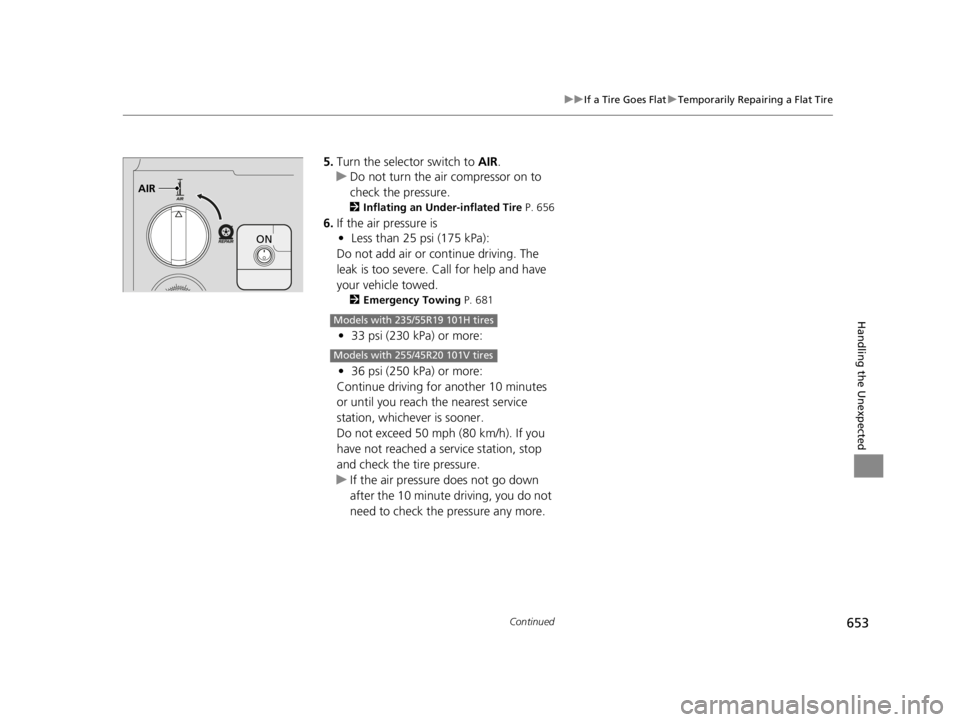
5. Turn the selector switch to AIR.
u Do not turn the air compressor on to
check the pressure.
2 Inflating an Under-inflated Tire P. 656
6.If the air pressure is
• Less than 25 psi (175 kPa):
Do not add air or continue driving. The
leak is too severe. Call for help and have
your vehicle towed.
2 Emergency Towing P. 681
•33 psi (230 kPa) or more:
• 36 psi (250 kPa) or more:
Continue driving for another 10 minutes
or until you reach the nearest service
station, whichever is sooner.
Do not exceed 50 mph (80 km/h). If you
have not reached a service station, stop
and check the tire pressure.
u If the air pressure does not go down
after the 10 minute driving, you do not
need to check the pressure any more.
AIR
ON
Models with 235/55R19 101H tires
Models with 255/45R20 101V tires
22 ACURA RDX-31TJB6300.book 653 ページ 2021年8月2日 月曜日 午前11時0分
Page 656 of 709

uuIf a Tire Goes Flat uTemporarily Repairing a Flat Tire
654
Handling the Unexpected
• Greater than 25 psi (175 kPa), but less
than 33 psi (230 kPa):
Turn the air compressor on to inflate
the tire until the tire pressure reaches
33 psi (230 kPa).
• Greater than 25 psi (175 kPa), but less
than 36 psi (250 kPa):
Turn the air compressor on to inflate
the tire until the tire pressure reaches
36 psi (250 kPa).
2 Inflating an Under-inflated Tire
P. 656
Then, drive carefully for 10 more minutes
or until you reach the nearest service
station, whichever is sooner. Do not
exceed 50 mph (80 km/h). If you have not
reached a service station, stop and check
the tire pressure.
u You should repeat this procedure as
long as the air pressure is within this
range.
7. Unplug the kit from the accessory power
socket.
8. Unscrew the sealant/air hose from the tire
valve stem. Reinstall the valve cap.
Models with 235/55R19 101H tires
Models with 255/45R20 101V tires
1Distributing the Sealant in the Tire
3WARNING
Running the engine with the vehicle in an
enclosed or even partly enclosed area can
cause a rapid buildup of toxic carbon
monoxide.
Breathing this colorless, odorless gas can
cause unconsciousness and even death.
Only run the engine to power the air
compressor with th e vehicle outdoors.
22 ACURA RDX-31TJB6300.book 654 ページ 2021年8月2日 月曜日 午前11時0分
Page 666 of 709

664
uuIf the Battery Is Dead uJump Starting Procedure
Handling the Unexpected
5. Connect the other end of the second
jumper cable to the engine mounting bolt
as shown. Do not connect this jumper cable
to any other part.
6. If your vehicle is connected to another
vehicle, start the assi sting vehicle’s engine
and increase its rpm slightly.
7. Attempt to start your vehicle’s engine. If it
turns over slowly, check that the jumper
cables have good metal-to-metal contact.
Once your vehicle’s engine has started, re move the jumper cables in the following
order.
1. Disconnect the jumper cable from your vehicle’s ground.
2. Disconnect the other end of the jumper cable from the booster battery -
terminal.
3. Disconnect the jumper cable from your vehicle’s battery + terminal.
4. Disconnect the other end of the jumper cable from the booster battery +
terminal.
Have your vehicle inspected by a n earby service station or a dealer.
■What to Do After the Engine Starts
22 ACURA RDX-31TJB6300.book 664 ページ 2021年8月2日 月曜日 午前11時0分
Page 675 of 709
673
uuIndicator, Coming On/BlinkinguIf the Transmission System Indicator Blinks along with the Warning Message
Handling the Unexpected
If the Transmission System Indicator Blinks along
with the Warning Message
■Reasons for the indicator to blink
The transmission is malfunctioning.
■What to do when the indicator blinks
• Immediately have your vehicle inspected by
a dealer.
• Change the gear position to
(N after
starting the engine.
u Check if the
(N position in the
instrument panel and the indicator on
the
(N button light/blink.
u The engine cannot be turned on unless
the parking brake is set.
2 Starting the Engine P. 443
1If the Transmission System In dicator Blinks along with the
Warning Message
You may not be able to start the engine.
Make sure to set the pa rking brake when parking
your vehicle.
Call a professional towing service if you need to tow
your vehicle. 2 Emergency Towing P. 681
22 ACURA RDX-31TJB6300.book 673 ページ 2021年8月2日 月曜日 午前11時0分
Page 683 of 709

681
Handling the Unexpected
Emergency Towing
Call a professional towing service if you need to tow your vehicle.
■Flatbed equipment
The operator loads your vehicle on the back of a truck.
This is the best way to transport your vehicle.
■Wheel lift equipment
The tow truck uses two pivoti ng arms that go under the front tires and lift them off
the ground. The rear tires remain on the ground. This is an acceptable way to
tow your vehicle.
1 Emergency Towing
NOTICE
Trying to lift or tow your vehicle by the bumpers will
cause serious damage. The bumpers are not designed
to support the vehicle’s weight.
Make sure the parking brake is released. If you
cannot release the parking brake, your vehicle must
be transported by the flatbed equipment.
2 Parking Brake P. 545
NOTICE
Improper towing such as towing behind a
motorhome or other motor vehicle can damage the
transmission.
Never tow your vehicle with just a rope or chain.
It is very dangerous, since ropes or chains may shift
from side to side or break.
2WD models
All models
2WD models
22 ACURA RDX-31TJB6300.book 681 ページ 2021年8月2日 月曜日 午前11時0分
Page 687 of 709
685
Information
This chapter includes your vehicle’s specifications, locations of identification numbers, and other
information required by regulation.
Specifications.................................... 686
Identification Numbers Vehicle Identification Number (VIN), Engine Number, and Transmission
Number ......................................... 688
Devices that Emit Radio Waves ....... 689
Reporting Safety Defects ................. 690Emissions Testing
Testing of Readiness Codes.............. 691
Warranty Coverages ........................ 693
Authorized Manuals ......................... 696
Client Service Information ............... 697
22 ACURA RDX-31TJB6300.book 685 ページ 2021年8月2日 月曜日 午前11時0分