Page 256 of 709

254
Features
Audio System
About Your Audio System
The audio system features AM/FM radio and SiriusXM® Radio service. It can also play
USB flash drives, and iPod, iPhone, iPad and Bluetooth® devices.
You can operate the audio sy stem from the True Touchpad Interface, buttons and
knobs on the panel, or the remote controls on the steering wheel.1About Your Audio System
iPod ®, iPad ®, iPhone ® and iTunes ® are trademarks of
Apple Inc.
State or local laws may prohibit the operation of
handheld electronic devi ces while operating a
vehicle.
SiriusXM ® Radio is available on a subscription basis
only. For more information on SiriusXM ® Radio,
contact a dealer. 2 General Information on the Audio System
P. 336
SiriusXM ® Radio is available in the United States and
Canada, except Ha waii, Alaska, and Puerto Rico.
SiriusXM ® is a registered trademark of SiriusXM
Radio, Inc.
After you turn the power mode to VEHICLE OFF
(LOCK) with the driver’s door closed, you can use the
audio system for up to 30 minutes per driving cycle.
However, whether you can continue using the audio
system depends on the batter y condition. Repeatedly
using this feature ma y drain the battery.
The audio system turns off when you open the
driver’s door.
Remote Controls iPod
USB Flash
Drive
22 ACURA RDX-31TJB6300.book 254 ページ 2021年8月2日 月曜日 午前11時0分
Page 262 of 709
260
Features
Audio System Basic Operation
You can use the audio system for 30 minutes when the power mode is set to
VEHICLE OFF (LOCK) with the driver’s door closed. The system will then turn off
automatically.
If you want to keep using it, we reco mmend that you turn the power mode to
ACCESSORY or ON.
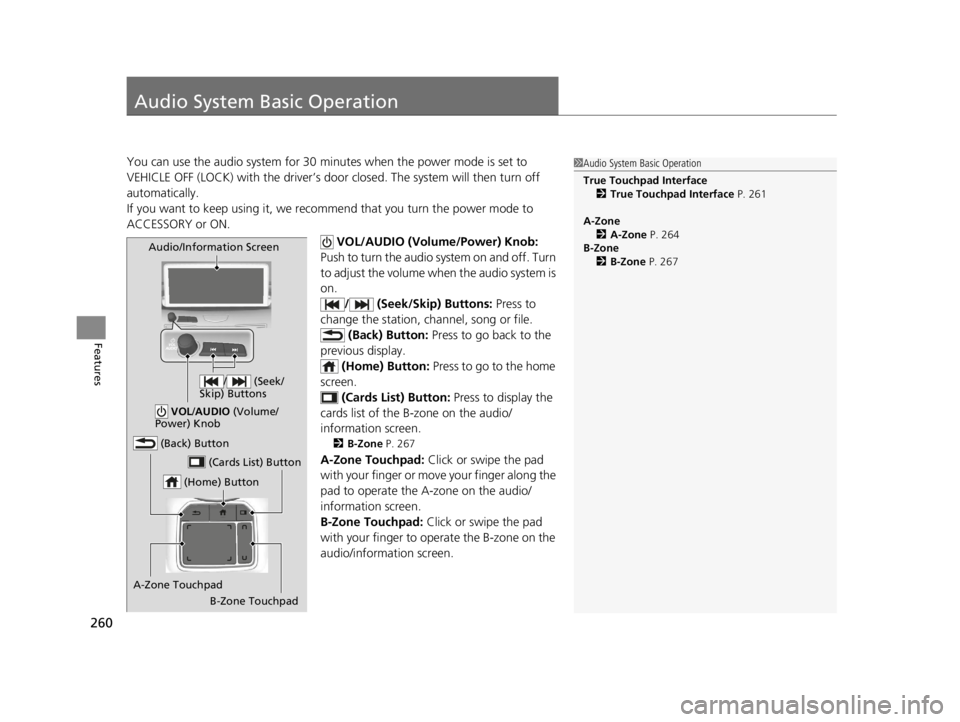
VOL/AUDIO (Volume/Power) Knob:
Push to turn the audio sy stem on and off. Turn
to adjust the volume when the audio system is
on. / (Seek/Skip) Buttons: Press to
change the station, channel, song or file. (Back) Button: Press to go back to the
previous display. (Home) Button: Press to go to the home
screen.
(Cards List) Button: Press to display the
cards list of the B-zone on the audio/
information screen.
2 B-Zone P. 267
A-Zone Touchpad: Click or swipe the pad
with your finger or move your finger along the
pad to operate the A-zone on the audio/
information screen.
B-Zone Touchpad: Click or swipe the pad
with your finger to operate the B-zone on the
audio/information screen.
1 Audio System Basic Operation
True Touchpad Interface
2 True Touchpad Interface P. 261
A-Zone 2 A-Zone P. 264
B-Zone 2 B-Zone P. 267
(Home) Button
(Back) Button
A-Zone Touchpad (Cards List) Button
Audio/Information Screen
/ (Seek/
Skip) Buttons
VOL /AUDIO (Volume/
Power) Knob
B-Zone Touchpad
22 ACURA RDX-31TJB6300.book 260 ページ 2021年8月2日 月曜日 午前11時0分
Page 269 of 709
Continued267
uuAudio System Basic Operation uAudio/Information Screen
Features
You can see the audio, HFL information, navigation mini map*, and clock
information on the B-zone using the B-zone touchpad.
■Switching the card
Swipe up or down on the B-zone touchpad to cycle through the following screen.
■B-Zone1 B-Zone
SiriusXM ® radio service notifications are displayed in
the B-zone.
B-Zone
1 Switching the card
The card in the B-zone wi ll change depending on the
screen displayed in the A-zone.
*1: Appears only when you set a destination on the
Apple CarPlay or Android Auto navigation function.
2 Apple CarPlay P. 322
2 Android Auto P. 327
Models without navigation systemNow Playing Audio
Navigation*1
Clock
* Not available on all models
22 ACURA RDX-31TJB6300.book 267 ページ 2021年8月2日 月曜日 午前11時0分
Page 285 of 709

Continued283
uuAudio System Basic Operation uSystem Updates
Features
5. Select Install Now or Install while
Vehicle OFF .
u A notification appears on the screen if
the update is su ccessful when Install
Now is selected.
u If you select Install while Vehicle OFF ,
proceed to steps 6 and 7.
6. Set the power mode to VEHICLE OFF
(LOCK).
u A notification will appear on the screen.
If you select Postpone Update , the
update will be postponed.
7. Exit from your vehicle.
u The system will start the firmware
update.
u If the update is succ essful, a notification
informing you of this fact will appear on
the screen the next time you set the
power mode to ON.1 How to update
The system may cancel the firmware update if the
battery is low on power, even if you have selected
Install while Vehicle OFF . If you want to install the
updated data, recharge th e battery or select Install
Now .
If you select Install Now , the system may reboot.
22 ACURA RDX-31TJB6300.book 283 ページ 2021年8月2日 月曜日 午前11時0分
Page 288 of 709

uuAudio System Basic Operation uSystem Updates
286
Features
■Update the audio system
1.Press the (home) button.
2. Select System Updates .
3. Select via USB .
u A notification appears on the screen.
4. Connect the USB device with the update
files into the USB port.
u A notification appears on the screen.
2 USB Ports P. 255
5.Select Install Now or Install while
Vehicle OFF .
u A notification appears on the screen if
the update is successful when Install
Now is selected.
u When you select Install while Vehicle
OFF go to step 6.
6. Set the power mode to VEHICLE OFF
(LOCK).
u A notification appears on the screen. If
you select Postpone Update , the
update is postponed.
7. Exit from your vehicle.
u The system will start the firmware
update.
u A notification appears on the screen if
the update is successful at the next time
you set the power mode to ON.
1Update the audio system
The system may stop the firmware update when
battery is low on power, even when you selected
Install while Vehicle OFF .
If you want to install the updated data, recharge the
battery or select Install Now.
22 ACURA RDX-31TJB6300.book 286 ページ 2021年8月2日 月曜日 午前11時0分
Page 326 of 709

uuAudio System Basic Operation uApple CarPlay
324
Features
■Connecting Apple CarPlay using the USB cable to the USB port in the
console compartment
1. Ensure Siri is enabled on your iPhone.
2. Connect the iPhone to the USB port using the USB cable.
2 USB Ports P. 255
uThe confirmation screen will be displayed.
3. Select Enable Apple CarPlay .
u If prompted on your device, click Allow to allow Apple CarPlay while your
phone is locked.
You may change the cons ent settings under the Connections settings menu.
■Set up Apple CarPlay wirelessly by Bluetooth® pairing
1. Ensure Siri is enabled on your iPhone.
2. Pair and connect the iPhone to the vehicle’s Bluetooth® HandsFreeLink ®.
2Phone Setup P. 395
3.A screen with option to select Continue with Bluetooth or Change to CarPlay
is provided.
4. Select Change to CarPlay .
5. Your iPhone will request your permission to accept wireless Apple CarPlay. Accept
the request to complete setup.
■Enabling Apple CarPlay1 Enabling Apple CarPlay
You can use the method below to access Apple
CarPlay settings. Here you can connect to/
disconnect from devices, de lete a device or change
permissions to enable or disable a device:
Press the (home) button Select Settings
Connections Apple CarPlay Select device
Use of user and vehicle information
The use and handling of user and vehicle information
transmitted to/from your iP hone by Apple CarPlay is
governed by the Apple iOS terms and conditions and
Apple’s Privacy Policy.
22 ACURA RDX-31TJB6300.book 324 ページ 2021年8月2日 月曜日 午前11時0分
Page 338 of 709

336
Features
General Information on the Audio System
SiriusXM® Radio Service
1. You need your radio ID ready before regist ering for subscription. To see the ID in
the screen, select channel up/down icons to Ch.0.
2. Have your radio ID ready, and either call or visit the SiriusXM® website to
subscribe.
Switch to the SiriusXM ® mode by using the audio remote controls on the steering
wheel, or through the audio/information screen, and stay in this mode for about 30
minutes until the service is activated. Make sure your vehicle is in an open area with
good reception.
Channel **** not subscribed. Ca ll SiriusXM to subscribe.
*1
You are not subscribed to the channel selected.
Subscription updated:
SiriusXM® radio is receiving information update from the network.
Channel Not Available:
No such channel exits, or the artist or title information is unavailable.
No Signal:
The signal is too weak in the current location.
Check Tuner:
There is a problem with the SiriusXM ® tuner. Contact a dealer.
Check Antenna:
There is a problem with the SiriusXM ® antenna. Contact a dealer.
*1 : ****part is variable characters, and w ill change depending upon where an subscribe.
■Subscribing to SiriusXM® Radio
■Receiving SiriusXM ® Radio
■SiriusXM ® Radio Display Messages
1 Subscribing to SiriusXM ® Radio
Contact Information for SiriusXM ® Radio:
•US: SiriusXM ® Radio at
www.siriusxm.com/subscribenow , or 1-866-635-
2349
•Canada: SiriusXM ® Canada at
www.siriusxm.ca/subscribe-now , or 1-877-209-
0079
1 Receiving SiriusXM ® Radio
The SiriusXM ® satellites are in orbit over the equator;
therefore, objects south of the vehicle may cause
satellite rece ption interruptions. Sa tellite signals are
more likely to be blocked by tall buildings and
mountains the farther north you travel from the
equator.
You may experience rece ption problems under the
following circumstances:
•In a location with an obstruction to the south of
your vehicle.
•In tunnels•On the lower level of a multi-tiered road
•Large items carried on the roof rack
22 ACURA RDX-31TJB6300.book 336 ページ 2021年8月2日 月曜日 午前11時0分
Page 340 of 709

uuGeneral Information on the Audio System uCompatible iPod, iPad, iPhone, and USB Flash Drives
338
Features
• A USB flash drive of 256 MB or higher is recommended.
• Some digital audio players may not be compatible.
• Some USB flash drives (e.g., a device with security lockout) may not work.
• Some software files may not allow for audio play or text data display.
• Some versions of playable file formats may be unsupported.
■Playable audio file
■USB Flash Drives
Format/CodecFile Type(s)
AAC LC3GPP (.3gp), MPEG-4 (.mp4, .m4a),
ADTS raw AAC (.aac, decode in Android
3.1+, encode in Android 4.0+, ADIF not
supported), MPEG-TS (.ts, not seekable,
Android 3.0+)
HE-AACv1 (AAC+)
HE-AACv2 (enhanced AAC+)
AAC ELD (enhanced low delay AAC)
AMR-NB
3GPP (.3gp)
AMR-WB
FLACFLAC (.flac) only
MIDI
Type 0 and 1 (.mid, .xmf, .mxmf), RTTTL/
RTX (.rtttl, .rtx), OTA (.ota), iMelody
(.imy)
MP3MP3 (.mp3)
OpusMatroska (.mkv)
PCM/WAVEWAVE (.wav)
VorbisOgg (.ogg), Matroska (.mkv, Android
4.0+)
1 USB Flash Drives
Files on the USB flash drive are played in their stored
order. This order may be different from the order
displayed on your PC or device.
22 ACURA RDX-31TJB6300.book 338 ページ 2021年8月2日 月曜日 午前11時0分
