Page 586 of 712

585
Maintenance
This chapter discusses basic maintenance.
Before Performing MaintenanceInspection and Maintenance ............ 586
Safety When Performing Maintenance ..587
Parts and Fluids Used in Maintenance Service ........................................... 588
Maintenance Minder
TM..................... 589
Maintenance Under the Hood Maintenance Items Under the Hood .. 595
Opening the Hood ........................... 596
Engine Compartment Cover ............. 598
Recommended Engine Oil ................ 599
Oil Check ......................................... 600
Adding Engine Oil ............................ 601 Changing the Engine Oi
l and Oil Filter .. 602
Engine Coolant ................................ 604
Transmission Fluid ............................ 606
Brake Fluid ....................................... 607
Refilling Window Washer Fluid......... 607
Replacing Light Bulbs ....................... 608
Checking and Maintaining Wiper Blades... 610Checking and Maintaining Tires
Checking Tires ................................. 615
Tire and Loading Information Label .. 616
Tire Labeling .................................... 616
DOT Tire Quality Grading (U.S. Vehicles).. 618
Wear Indicators ............................... 620
Tire Service Life ................................ 620
Tire and Wheel Replacement ........... 621
Tire Rotation .................................... 622
Winter Tires ..................................... 623
Battery ............................................... 624
Remote Transmitter Care Replacing the Button Battery ........... 626
Climate Control System Maintenance.. 628CleaningInterior Care .................................... 629
Exterior Care.................................... 631
Accessories and Modifications ........ 634
22 ACURA MDX-31TYA6000_02.book 585 ページ 2020年11月5日 木曜日 午前11時39分
Page 589 of 712

uuBefore Performing Maintenance uParts and Fluids Used in Maintenance Service
588
Maintenance
• The vehicle must be in a stationary condition.
u Make sure your vehicle is parked on leve l ground, the parking brake is set, and
the engine is off.
• Make sure that the radiator fan is stopped before inspec ting the engine
compartment.
u If you stop the engine while its temperature is high, the radiator fan may
operate automatically.
• Be aware that hot parts can burn you.
u Make sure to let the engine and exhaust system cool thoroughly before
touching vehicle parts.
• Be aware that moving parts can injure you.
u Do not start the engine unless instruct ed, and keep your hands and limbs away
from moving parts.
u Do not open the hood while the Auto Idle Stop function is activated.
Parts and Fluids Used in Maintenance Service
The use of Acura genuine parts and fluids is recommended when maintaining and
servicing your vehicle. Acura genuine parts are manufactured according to the same
high quality standards us ed in Acura vehicles.
■Vehicle Safety
1Parts and Fluids Used in Maintenance Service
NOTICE
Do not press the engine cover forcibly. This may
damage the engine cover and component parts.
22 ACURA MDX-31TYA6000_02.book 588 ページ 2020年11月5日 木曜日 午前11時39分
Page 597 of 712
596
uuMaintenance Under the Hood uOpening the Hood
Maintenance
Opening the Hood
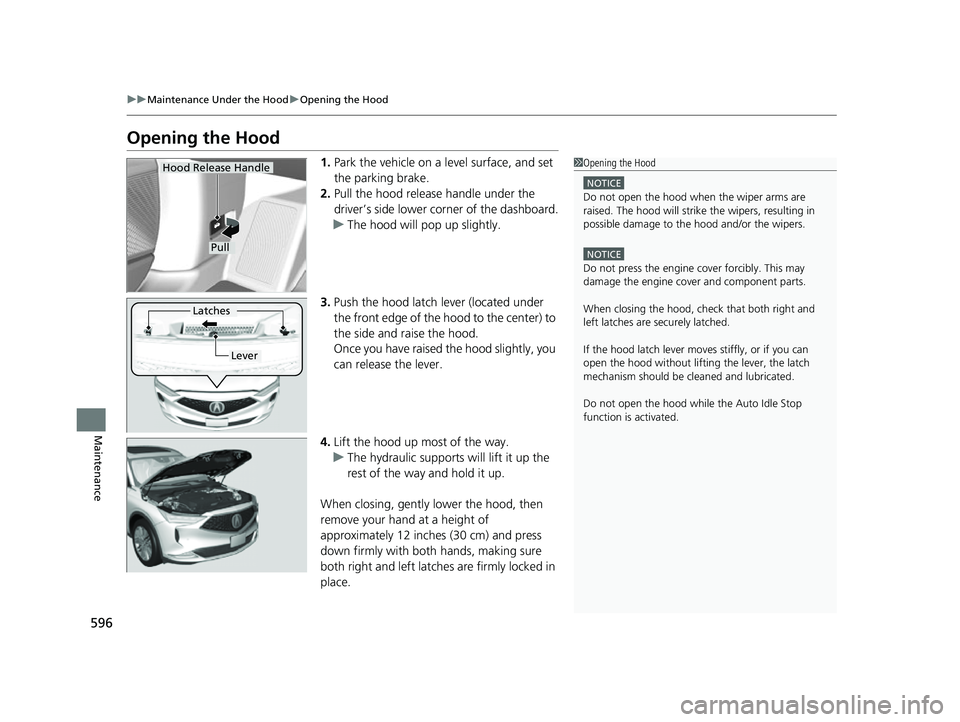
1. Park the vehicle on a level surface, and set
the parking brake.
2. Pull the hood release handle under the
driver’s side lower co rner of the dashboard.
u The hood will pop up slightly.
3. Push the hood latch lever (located under
the front edge of the hood to the center) to
the side and raise the hood.
Once you have raised the hood slightly, you
can release the lever.
4. Lift the hood up most of the way.
u The hydraulic supports will lift it up the
rest of the way and hold it up.
When closing, gently lower the hood, then
remove your hand at a height of
approximately 12 inches (30 cm) and press
down firmly with both hands, making sure
both right and left latche s are firmly locked in
place.1 Opening the Hood
NOTICE
Do not open the hood when the wiper arms are
raised. The hood will strike the wipers, resulting in
possible damage to the hood and/or the wipers.
NOTICE
Do not press the engine cover forcibly. This may
damage the engine cover and component parts.
When closing the hood, check that both right and
left latches are securely latched.
If the hood latch lever moves stiffly, or if you can
open the hood without lifti ng the lever, the latch
mechanism should be cl eaned and lubricated.
Do not open the hood while the Auto Idle Stop
function is activated.
Hood Release Handle
Pull
Lever
Latches
22 ACURA MDX-31TYA6000_02.book 596 ページ 2020年11月5日 木曜日 午前11時39分
Page 598 of 712
597
uuMaintenance Under the Hood uOpening the Hood
Maintenance
1Opening the Hood
NOTICE
If a warning message for “hood open” is displayed,
either right, left, or both hood locks are not correctly
locked in place.
If they are incorrectly locked in place, the hood may
open while driving.
Immediately stop in a safe place and close the hood
by pressing down on the front of the hood until both
locks are latche d and the warning disappears.
22 ACURA MDX-31TYA6000_02.book 597 ページ 2020年11月5日 木曜日 午前11時39分
Page 603 of 712

602
uuMaintenance Under the Hood uChanging the Engine Oil and Oil Filter
Maintenance
Changing the Engine Oil and Oil Filter
You must change the engine oil and oil filter regularly in order to maintain the
engine’s lubrication. The engine may be damaged if they are not changed regularly.
Change the oil and filter in accordance with the mainte nance message on the driver
information interface. 1.Run the engine until it reaches normal
operating temperature, and then turn the
engine off.
2. Open the hood and remove the engine oil
fill cap.
3. Remove the drain bolt and washer from
the bottom of the engine, and drain the
oil into a suitable container.1Changing the Engine Oil and Oil Filter
NOTICE
You may damage the environment if you do not
dispose of the oil in a suitable way. If you are
changing the oil by yourself , appropriately dispose of
the used oil. Put the oil in a sealed container and take
it to a recycling center. Do not throw the oil away
into a garbage can or onto the ground.
Drain Bolt
Washer
22 ACURA MDX-31TYA6000_02.book 602 ページ 2020年11月5日 木曜日 午前11時39分
Page 667 of 712

666
Handling the Unexpected
If the Battery Is Dead
Turn off the power to electric devices, such as audio and lights. Turn off the engine,
then open the hood. 1.Open the cover on the positive + terminal.
2. Connect the first jump er cable to your
vehicle’s battery + terminal.
3. Connect the other end of the first jumper
cable to the booster battery + terminal.
u Use a 12-volt booster battery only.
u When using an automotive battery
charger to boost your 12-volt battery,
select a lower charging voltage than 15-
volt. Check the charger manual for the
proper setting.
4. Connect the second jumper cable to the
booster battery - terminal.
■Jump Starting Procedure1If the Battery Is Dead
Securely attach the jumper cables clips so that they
do not come off when the e ngine vibrates. Also be
careful not to tangle the ju mper cables or allow the
cable ends to touch each other while attaching or
detaching the jumper cables.
Battery performance degrades in cold conditions and
may prevent the engi ne from starting.
3WARNING
A battery can explode if you do not follow
the correct procedure, seriously injuring
anyone nearby.
Keep all sparks, open flames, and smoking
materials away from the battery.
Booster Battery
22 ACURA MDX-31TYA6000_02.book 666 ページ 2020年11月5日 木曜日 午前11時39分
Page 669 of 712

668
Handling the Unexpected
Overheating
How to Handle Overheating
Overheating symptoms are as follows:
•The temperature gauge is at the mark or the engine suddenly loses power.
• The Engine temperature too hot. Do not drive. Allow engine to cool.
message appears on the driv er information interface.
• Steam or spray comes out of the engine compartment.
■First thing to do
1. Immediately park the vehicle in a safe place.
2. Turn off all accessories and turn on the hazard warning lights.
u No steam or spray present: Keep the engine running and open the hood.
u Steam or spray is present: Turn off the engine and wait until it subsides.
Then open the hood.
1 How to Handle Overheating
NOTICE
Continuing to drive with the temperature gauge at
the mark may damage the engine.
Continuing to drive with the Engine temperature
too hot. Do not drive. Allow engine to cool.
message on the driver information interface may
damage the engine.
3WARNING
Steam and spray from an overheated
engine can seri ously scald you.
Do not open the hood if steam is coming
out.
H
H
22 ACURA MDX-31TYA6000_02.book 668 ページ 2020年11月5日 木曜日 午前11時39分
Page 671 of 712
670
Handling the Unexpected
Indicator, Coming On/Blinking
If the Low Oil Pressure Warning Appears
■Reasons for the warning to appear
Appears when the engine oil pressure is low.
■What to do as soon as the warning
appears
1. Immediately park the vehicle on level
ground in a safe place.
2. If necessary, turn the hazard warning lights
on.
■What to do after parking the vehicle
1. Stop the engine and let it sit for
approximately three minutes.
2. Open the hood and check the oil level.
u Add oil as necessary.
2 Oil Check P. 600
3.Start the engine and check the low oil
pressure warning.
u The warning disappears: Start driving
again.
u The warning does not disappear within
10 seconds: Immediately stop the engine
and contact a dealer for repairs.
1If the Low Oil Pressure Warning Appears
NOTICE
Running the engine with low oil pressure can cause
serious mechanical damage almost immediately.
22 ACURA MDX-31TYA6000_02.book 670 ページ 2020年11月5日 木曜日 午前11時39分

