Page 460 of 632
458
uuAcuraWatchTMuCollision Mitigation Braking SystemTM (CMBSTM)
Driving
The system has three alert stages for a possible collision. However, depending on circumstances, the CMBSTM may not go through all of
the stages before initiating the last stage.
■Collision Alert Stages
Distance between vehiclesCMBSTM
The sensors detect a vehicleAudible & Visual WARNINGSBraking
Stage oneThere is a risk of a collision with the vehicle
ahead of you.
When in Long, visual and audible
alerts come on at a longer distance
from a vehicle ahead than in
Normal setting, and in Short, at a
shorter distance than in Normal.
—
Stage
twoThe risk of a collision has increased, time to
respond is reduced.
Visual and audible alerts.
Lightly
applied
Stage three The CMBSTM determines that a collision is
unavoidable.Forcefully applied
Your Vehicle Vehicle
Ahead
Normal
Short
Long
Your
Vehicle Vehicle
Ahead
Your
VehicleVehicle
Ahead
22 ACURA ILX-31TX66900.book 458 ページ 2021年4月26日 月曜日 午前11時27分
Page 462 of 632

uuAcuraWatchTMuCollision Mitigation Braking SystemTM (CMBSTM)
460
Driving
The system may automatically shut off and the CMBSTM indicator will come on under
certain conditions. Some examples of th ese conditions are listed below. Other
conditions may reduce some of the CMBS
TM functions.
2 Front Sensor Camera P. 496
2 Radar Sensor P. 498
■Environmental conditions
• Driving in bad weather (rain, fog, snow, etc.).
• Sudden changes between light and dark, such as an entrance or exit of a tunnel.
• There is little contrast between objects and the background.
• Driving into low sunlight (e.g., at dawn or dusk).
• Strong light is reflected onto the roadway.
• Driving in the shadows of trees, buildings, etc.
• Roadway objects or structures are misint erpreted as vehicles and pedestrians.
• Reflections on the interi or of the windshield.
• Driving at night or in a dark condition such as a tunnel.
■Roadway conditions
• Driving on a snowy or wet roadway (obs cured lane marking, vehicle tracks,
reflected lights, road spray, high contrast).
• Driving on curvy, winding, or undulating roads.
• The road is hilly or the vehicle is approaching the crest of a hill.
■CMBSTM Conditions and Limitations1CMBSTM Conditions and Limitations
Have your vehicle checked by a dealer if you find any
unusual behavior of the system (e.g., the warning
message appears too frequently).
22 ACURA ILX-31TX66900.book 460 ページ 2021年4月26日 月曜日 午前11時27分
Page 468 of 632
466
uuAcuraWatchTMuAdaptive Cruise Control (ACC)
Driving
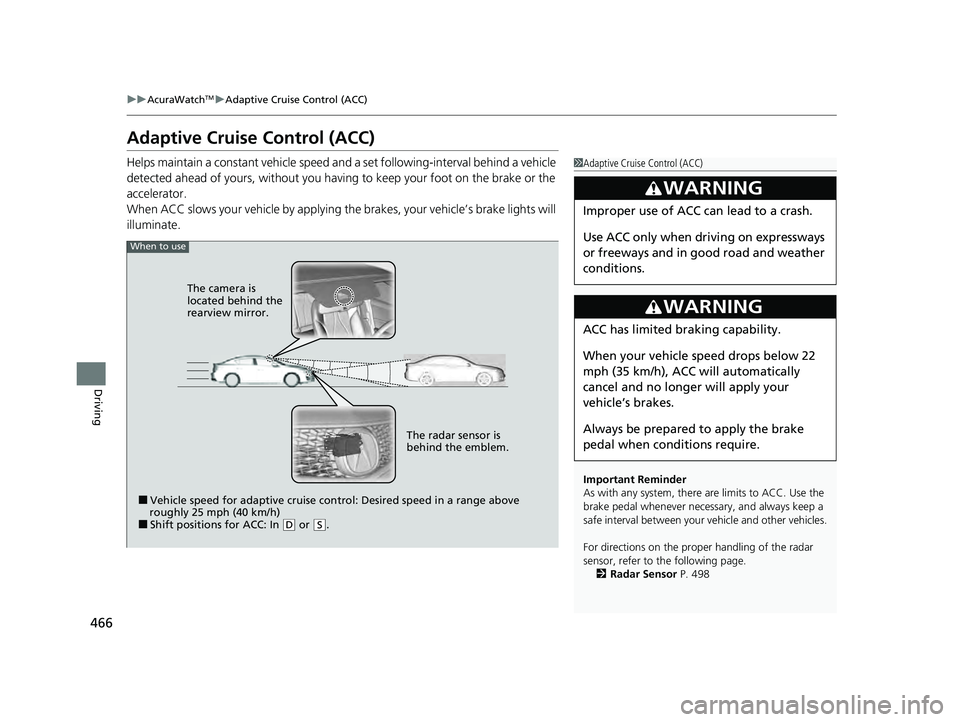
Adaptive Cruise Control (ACC)
Helps maintain a constant vehicle speed a nd a set following-interval behind a vehicle
detected ahead of yours, without you havi ng to keep your foot on the brake or the
accelerator.
When ACC slows your vehicle by applying the brakes, your vehicle’s brake lights will
illuminate.1 Adaptive Cruise Control (ACC)
Important Reminder
As with any system, there are limits to ACC. Use the
brake pedal whenever necessary, and always keep a
safe interval betw een your vehicle and other vehicles.
For directions on the prop er handling of the radar
sensor, refer to the following page. 2 Radar Sensor P. 498
3WARNING
Improper use of ACC can lead to a crash.
Use ACC only when driving on expressways
or freeways and in go od road and weather
conditions.
3WARNING
ACC has limited braking capability.
When your vehicle speed drops below 22
mph (35 km/h), ACC will automatically
cancel and no longer will apply your
vehicle’s brakes.
Always be prepared to apply the brake
pedal when conditions require.
When to use
■Vehicle speed for adaptive cruise control: Desired speed in a range above
roughly 25 mph (40 km/h)
■Shift positions for ACC: In ( D or (S. The radar sensor is
behind the emblem.
The camera is
located behind the
rearview mirror.
22 ACURA ILX-31TX66900.book 466 ページ 2021年4月26日 月曜日 午前11時27分
Page 473 of 632

Continued471
uuAcuraWatchTMuAdaptive Cruise Control (ACC)
Driving
The system may automatically shut off and the ACC indicator will come on under
certain conditions. Some examples of these conditions are listed below. Other
conditions may reduce some of the ACC functions.
2 Front Sensor Camera P. 496
2 Radar Sensor P. 498
■Environmental conditions
Driving in bad weather (r ain, fog, snow, etc.).
■Roadway conditions
Driving on a snowy or wet roadway (obscured lane marking, vehicle tracks, reflected
lights, road spra y, high contrast).
■Vehicle conditions
• The outside of the windshield is blocked by dirt, mud, leaves, wet snow, etc.
• An abnormal tire or wheel condition (inco rrect sizes, varied sizes or construction,
improperly inflated, compact spare tire
*, etc.).
• The camera temperature gets too high.
• The parking brake is applied.
• When the front grille is dirty.
• The vehicle is tilted due to a heavy load or suspension modifications.
• When tire chains are installed.
■ACC Conditions and Limitations1ACC Conditions and Limitations
Have your vehicle checked by a dealer if you find any
unusual behavior of the system (e.g., the warning
message appears too frequently).
* Not available on all models
22 ACURA ILX-31TX66900.book 471 ページ 2021年4月26日 月曜日 午前11時27分
Page 483 of 632

481
uuAcuraWatchTMuLane Keeping Assist System (LKAS)
Continued
Driving
Lane Keeping Assist System (LKAS)
Provides steering input to help keep the vehicle in the middle of a detected lane and
provides visual alert if the vehicle is detected drifting out of its lane.1Lane Keeping Assist System (LKAS)
Important Safety Reminders
The LKAS is for your convenience only. It is not a
substitute for your vehicle control. The system does
not work if you take y our hands off the steering
wheel or fail to steer the vehicle.
2 Multi-Information Display Warning and
Information Messages P. 91
Do not place objects on the instrument panel.
Objects may reflect on th e windshield and prevent
correct detection of the traffic lanes.
The LKAS only alerts you when lane drift is detected
without a turn signal in use. The LKAS may not detect
all lane markings or lane departures; accuracy will
vary based on weather, speed, and lane marker
condition. It is always your responsibility to safely
operate the vehicle an d avoid collisions.
The LKAS is convenient when it is used on freeways.
The LKAS may not work properly or may work
improperly under the certain conditions: 2 LKAS Conditions and Limitations P. 488
You can read about handling information for the
camera equipped with this system. 2 Front Sensor Camera P. 496
The LKAS may not function as designed while driving
in frequent stop and go traf fic, or on roads with
sharp curves.
■Steering input assist
The system applies torque to the steering to keep the vehicle between the left and
right lane lines. The applied torque becomes stronger as the vehicle gets closer to
either of the lane lines.
When you operate the turn signals to chan ge lanes, the system is suspended, and
resumes after the signals are off.
If you make a lane change without operating the turn signals, the LKAS alerts
activate, and torque is applied to the steering.
■Front Sensor Camera
Monitors the lane lines
■Tactile and visual alerts
Rapid vibrations on the
steering wheel and a
warning display alert you
that the vehicle is drifting
out of a detected lane.
22 ACURA ILX-31TX66900.book 481 ページ 2021年4月26日 月曜日 午前11時27分
Page 484 of 632
uuAcuraWatchTMuLane Keeping Assist System (LKAS)
482
Driving
Provides assistance to keep the vehicle in the center of the lane. When the vehicle
nears a white or yellow line, steering force of the electric power steering will become
stronger.
When the vehicle enters the warning area, the LKAS alerts you with slight steering
wheel vibration as well as a warning display.
■Lane Keep Support Function1 Lane Keeping Assist System (LKAS)
When it fails to detect lanes, the system will
temporarily be canceled. When a lane is detected, the
system will recover automatically.
■Lane Departure Warning Function
Warning Area
Warning Area
22 ACURA ILX-31TX66900.book 482 ページ 2021年4月26日 月曜日 午前11時27分
Page 495 of 632
Continued493
uuAcuraWatchTMuRoad Departure Mitigation (RDM) System
Driving
Press the RDM button to turn the system on
and off.
u The indicator in the button comes on and
the message appears on the multi-
information display when the system is
on.
■RDM On and Off1RDM On and Off
When you have selected Warning Only from the
customized options usi ng the multi-information
display or information screen
*, the system does not
operate the steering wheel and braking.
2 Customized Features P. 99, 316RDM Button
Indicator
* Not available on all models
22 ACURA ILX-31TX66900.book 493 ページ 2021年4月26日 月曜日 午前11時27分
Page 501 of 632
499Continued
Driving
Braking
Brake System
Use the parking brake to keep the vehicle stationary when parking.To apply:
Pull the lever fully up without pressing the
release button.
To release:
1.Pull the lever slightly, and press and hold
the release button.
2. Lower the lever down all the way, then
release the button.
■Parking Brake1Parking Brake
NOTICE
Release the parking brake fu lly before driving. The
rear brakes and axle can be damaged if you drive
with the parki ng brake applied.
If you start driving without fully releasing the parking
brake, a buzzer sounds as a warning, and Release
Parking Brake appears on the multi-information
display.
Always apply the parking brake when parking.
Release Button
22 ACURA ILX-31TX66900.book 499 ページ 2021年4月26日 月曜日 午前11時27分


