Page 448 of 632

uuWhen Driving uBlind spot information System*
446
Driving
■When the system detects a vehicle
Blind spot information System Alert Indicator:
Located on the outside rearview mirror on
both sides.
Comes on when:
•A vehicle enters the alert zone from behind
to overtake you with a speed difference of
no more than 31 mph (50 km/h) from your
vehicle.
• You pass a vehicle with a speed difference
of no more than 12 mph (20 km/h).
Blinks and a beeper sounds when:
You move the turn signal lever in the direction
of the detected vehicle. The beeper sounds
three times.1 Blind spot information System*
The blind spot information system alert indicator may
not come on under the following conditions:
•A vehicle does not stay in the alert zone for more
than two seconds.
•A vehicle is parked in a side lane.
•The speed difference betw een your vehicle and the
vehicle you are passing is greater than 6 mph (10
km/h).
•An object not detected by the radar sensors
approaches or passes your vehicle.
•A vehicle running in the adjacent lane is a
motorcycle or other small vehicle.
You can turn off the audible al ert, or all the blind spot
information system alert using the information screen
or multi-information display. 2 Customized Features P. 99, 316
The system is not active when the shift lever is in
( R.
Blind spot information sy stem may be adversely
affected when:
•Objects (guard rails, poles, trees, etc,.) are
detected.
•An object that does not re flect radio waves well,
such as a motorcycle, is in the alert zone.
•Driving on a curved road.
•A vehicle is moving from a far lane to the adjacent
lane.
•The system picks up external electrical interference.
Comes On
Blinks
* Not available on all models
22 ACURA ILX-31TX66900.book 446 ページ 2021年4月26日 月曜日 午前11時27分
Page 454 of 632
452
Driving
AcuraWatchTM
AcuraWatchTM is a driver support system which employs the use of two distinctly
different kinds of sensors: a radar sens or located behind the emblem and a front
sensor camera mounted to the interior side of the windshield, behind the rearview
mirror.
AcuraWatch
TM has following functions.
■The functions which do not require button operations to activate
• Collision Mitigation Braking SystemTM (CMBSTM) 2 P. 455
• Road Departure Mitigation (RDM) System 2 P. 491
■The functions which require bu tton operations to activate
• Adaptive Cruise Control (ACC)
2 P. 466
• Lane Keeping Assist System (LKAS) 2 P. 481
22 ACURA ILX-31TX66900.book 452 ページ 2021年4月26日 月曜日 午前11時27分
Page 458 of 632
456
uuAcuraWatchTMuCollision Mitigation Braking SystemTM (CMBSTM)
Driving
■How the system works
The system starts monitoring the roadway ah ead when your vehicle speed is about
3 mph (5 km/h) or above and will search for a vehicle in front of you. The radar sensor is
behind the emblem.
The CMBS
TM activates when:●The speed difference between your vehicle and a vehicle or pedestrian
detected in front of you becomes about 3 mph (5 km/h) and over with a chance
of a collision.
●Your vehicle speed is about 62 mph (100 km /h) or less and there is a chance of a
collision with an oncoming detected vehicle or a pedestrian in front of you. The camera is
located behind the
rearview mirror.
When to use
22 ACURA ILX-31TX66900.book 456 ページ 2021年4月26日 月曜日 午前11時27分
Page 465 of 632

463
uuAcuraWatchTMuCollision Mitigation Braking SystemTM (CMBSTM)
Continued
Driving
• When there is a group of people in front of your vehicle walking together side by
side.
• Surrounding conditions or belongings of the pedestrian alter the pedestrian’s
shape, preventing the system from recogn izing that the person is a pedestrian.
• When the pedestrian is shorte r than about 3.3 feet (1 meter) or taller than about
6.6 feet (2 meter) in height.
• When a pedestrian blends in with the background.
• When a pedestrian is bent over or squatting, or when their hands are raised or
they are running.
• When several pedestrians are walking ahead in a group.
• When the camera cannot correctly identify that a pedestrian is present due to an
unusual shape (holding luggage, body position, size).
■Automatic shutoff
The CMBSTM may automatically shut itself off and the CMBSTM indicator comes and
stays on when:
• The temperature inside the system is high.
• You drive off-road or on a mountain road, or curved and winding road for an
extended period.
• An abnormal tire condition is detected (incorrect tire sizes, flat tire, etc.).
• The camera behind the rearview mirror, or the area around the camera, including
the windshield, gets dirty.
Once the conditions that caused the CMBS
TM to shut off improve or are addressed
(e.g., cleaning), the system comes back on.
Limitations applicable to pedestrian detection only
22 ACURA ILX-31TX66900.book 463 ページ 2021年4月26日 月曜日 午前11時27分
Page 468 of 632
466
uuAcuraWatchTMuAdaptive Cruise Control (ACC)
Driving
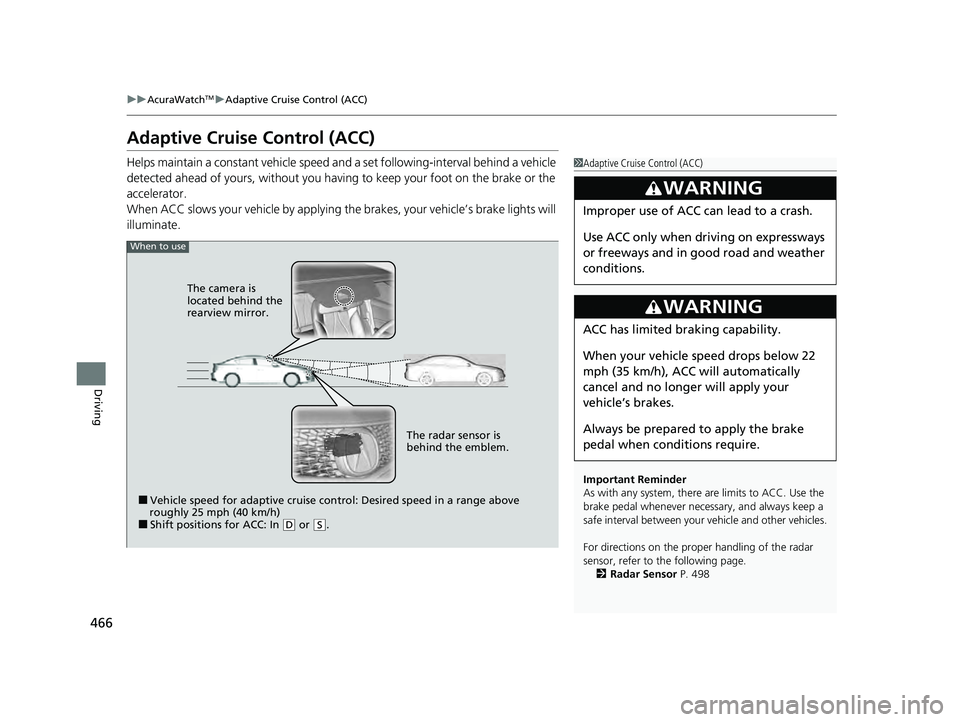
Adaptive Cruise Control (ACC)
Helps maintain a constant vehicle speed a nd a set following-interval behind a vehicle
detected ahead of yours, without you havi ng to keep your foot on the brake or the
accelerator.
When ACC slows your vehicle by applying the brakes, your vehicle’s brake lights will
illuminate.1 Adaptive Cruise Control (ACC)
Important Reminder
As with any system, there are limits to ACC. Use the
brake pedal whenever necessary, and always keep a
safe interval betw een your vehicle and other vehicles.
For directions on the prop er handling of the radar
sensor, refer to the following page. 2 Radar Sensor P. 498
3WARNING
Improper use of ACC can lead to a crash.
Use ACC only when driving on expressways
or freeways and in go od road and weather
conditions.
3WARNING
ACC has limited braking capability.
When your vehicle speed drops below 22
mph (35 km/h), ACC will automatically
cancel and no longer will apply your
vehicle’s brakes.
Always be prepared to apply the brake
pedal when conditions require.
When to use
■Vehicle speed for adaptive cruise control: Desired speed in a range above
roughly 25 mph (40 km/h)
■Shift positions for ACC: In ( D or (S. The radar sensor is
behind the emblem.
The camera is
located behind the
rearview mirror.
22 ACURA ILX-31TX66900.book 466 ページ 2021年4月26日 月曜日 午前11時27分
Page 480 of 632

uuAcuraWatchTMuAdaptive Cruise Control (ACC)
478
Driving
■Automatic cancellation
The beeper sounds and a me ssage appears on the multi-information display when
ACC is automatically canceled. Any of these conditions may cause the ACC to
automatically cancel:
• Bad weather (rain, fog, snow, etc.)
• When the radar sensor behind the emblem gets dirty.
• The vehicle ahead of you cannot be detected.
• An abnormal tire condition is detected, or the tires are skidding.
• Driving on a mountainous road, or driving off road for extended periods.
• Abrupt steering wheel movement.
• When the ABS, VSA ® or CMBS
TM is activated.
• When the ABS or VSA ® system indicator comes on.
• When you manually apply the parking brake.
• When the detected vehicle within the ACC range is too close to your vehicle.
• The camera behind the rearview mirror, or the area around the camera, including
the windshield, gets dirty.
1Automatic cancellation
Even though ACC has been automatically canceled,
you can still resume the prior set speed. Wait until the
condition that caused ACC to cancel improves, then
press the RES/ACCEL button.
22 ACURA ILX-31TX66900.book 478 ページ 2021年4月26日 月曜日 午前11時27分
Page 489 of 632
487
uuAcuraWatchTMuLane Keeping Assist System (LKAS)
Continued
Driving
■The LKAS may be automa tically suspended when:
• The system fails to detect lane lines.
• The steering wheel is quickly turned.
• You fail to steer the vehicle.
• Driving through a sharp curve.
• Driving at a speed in excess of approximately 90 mph (145 km/h).
Once these conditions no longer exist, the LKAS automatically resumes.
■The LKAS may be automatically canceled when:
• The camera temperature gets extremely high or low.
• The camera behind the rearview mirror, or the area around the camera, including
the windshield, gets dirty.
• The ABS or VSA ® system engages.
The beeper sounds if the LKAS is automatically canceled.
22 ACURA ILX-31TX66900.book 487 ページ 2021年4月26日 月曜日 午前11時27分
Page 493 of 632

491
uuAcuraWatchTMuRoad Departure Mitigation (RDM) System
Continued
Driving
Road Departure Mitigation (RDM) System
Alerts and helps to assist you when the system detects a possibility of your vehicle
unintentionally crossing over detected lane markings and/or leaving the roadway
altogether.
The front camera behind the rearview mirror
monitors left and right lane markings (in white
or yellow). If your vehicl e is getting too close to
detected lane markings without a turn signal
activated, the system, in addition to a visual
alert, applies steering torque and alerts you
with rapid vibrations on the steering wheel, to
help you remain within the detected lane.
2 Customized Features P. 99, 316
As a visual alert, the Lane Departure message
appears on the multi-information display.
If the system determines that its steering input
is insufficient to keep your vehicle on the
roadway, it may apply braking.
u Braking is applied only when the lane
markings are solid continuous lines.
The system cancels assisting operations wh en you turn the steering wheel to avoid
crossing over detected lane markings.
If the system operates several times with out detecting driver response, the system
beeps to alert you.
■How the System Works
1 Road Departure Mitigation (RDM) System
Important Safety Reminder
Like all assistance systems, the RDM system has
limitations.
Over-reliance on the RDM system may result in a
collision. It is always your responsibility to keep the
vehicle within your driving lane.
The RDM system only alerts you when lane drift is
detected without a turn signal in use. The RDM
system may not detect all la ne markings or lane or
roadway departures; accu racy will vary based on
weather, speed and lane marker condition. It is
always your responsibilit y to safely operate the
vehicle and avoid collisions.
You can read about handling information for the
camera equipped with this system.
2 Front Sensor Camera P. 496
The RDM system may not wo rk properly or may work
improperly under the certain conditions: 2 RDM Conditions and Limitations P. 494
There are times when you may not notice RDM
functions due to your opera tion of the vehicle, or
road surface conditions.
22 ACURA ILX-31TX66900.book 491 ページ 2021年4月26日 月曜日 午前11時27分


