Page 476 of 632
uuAcuraWatchTMuAdaptive Cruise Control (ACC)
474
Driving
Increase or decrease the vehicle speed using the RES/ACCEL or DECEL/SET buttons
on the steering wheel.
• Each time you press the button, the vehicl e speed is increased or decreased by
about 1 mph or 1 km/h accordingly.
• If you keep the button pressed, the vehicl e speed increases or decreases by about
5 mph or 5 km/h accordingly.
■To Adjust the Vehicle Speed1 To Adjust the Vehicle Speed
If a vehicle detected ahead is going at a speed slower
than your increased set speed, ACC may not
accelerate your vehicle. This is to maintain the set
interval between your vehi cle and the vehicle ahead.
You can switch the displayed set speed
measurements on the multi- information display or
information screen between mph and km/h.
2 Customized Features P. 99, 316
To increase speed
To decrease speed
22 ACURA ILX-31TX66900.book 474 ページ 2021年4月26日 月曜日 午前11時27分
Page 477 of 632
475
uuAcuraWatchTMuAdaptive Cruise Control (ACC)
Continued
Driving
Press the (interval) button to change the
ACC following-interval.
Each time you press th e button, the following-
interval (the interval behind a vehicle detected
ahead of you) setting cycles through extra
long, long, middle, and short following-
intervals.
Determine the most appropriate following-
interval setting based on your specific driving
conditions. Be sure to adhere to any
following-interval requirements set by local
regulation.
■To Set or Change Following-interval
Interval Button
22 ACURA ILX-31TX66900.book 475 ページ 2021年4月26日 月曜日 午前11時27分
Page 478 of 632
476
uuAcuraWatchTMuAdaptive Cruise Control (ACC)
Driving
The higher your vehicle’s following-speed is, the longer the short, middle, long or
extra long following-interval becomes. See the following examples for your
reference.
Following-intervalWhen the Set Speed is:
50 mph (80 km/h)65 mph (104 km/h)
Short
84 feet
26 meters 1.1 sec102 feet
31 meters 1.1 sec
Middle
111 feet
34 meters
1.5 sec139 feet
43 meters
1.5 sec
Long
155 feet
48 meters 2.1 sec202 feet
62 meters 2.1 sec
Extra
Long215 feet
66 meters 3.0 sec285 feet
87 meters 3.0 sec
22 ACURA ILX-31TX66900.book 476 ページ 2021年4月26日 月曜日 午前11時27分
Page 479 of 632
Continued477
uuAcuraWatchTMuAdaptive Cruise Control (ACC)
Driving
To cancel ACC, do any of the following:
• Press the CANCEL button.
• Press the MAIN button.
u ACC indicator goes off.
• Depress the brake pedal.
■To Cancel1To Cancel
Resuming the prior set speed: After you have
canceled ACC, you can resume the prior set speed
while it is still displayed. Press the RES/ACCEL button
when driving at a speed of at least 25 mph (40 km/h)
or more.
The set speed cannot be set or resumed when ACC
has been turned off using the MAIN button. Press
the MAIN button to activate the system, then set the
desired speed.
CANCEL
Button
MAIN
Button
22 ACURA ILX-31TX66900.book 477 ページ 2021年4月26日 月曜日 午前11時27分
Page 480 of 632

uuAcuraWatchTMuAdaptive Cruise Control (ACC)
478
Driving
■Automatic cancellation
The beeper sounds and a me ssage appears on the multi-information display when
ACC is automatically canceled. Any of these conditions may cause the ACC to
automatically cancel:
• Bad weather (rain, fog, snow, etc.)
• When the radar sensor behind the emblem gets dirty.
• The vehicle ahead of you cannot be detected.
• An abnormal tire condition is detected, or the tires are skidding.
• Driving on a mountainous road, or driving off road for extended periods.
• Abrupt steering wheel movement.
• When the ABS, VSA ® or CMBS
TM is activated.
• When the ABS or VSA ® system indicator comes on.
• When you manually apply the parking brake.
• When the detected vehicle within the ACC range is too close to your vehicle.
• The camera behind the rearview mirror, or the area around the camera, including
the windshield, gets dirty.
1Automatic cancellation
Even though ACC has been automatically canceled,
you can still resume the prior set speed. Wait until the
condition that caused ACC to cancel improves, then
press the RES/ACCEL button.
22 ACURA ILX-31TX66900.book 478 ページ 2021年4月26日 月曜日 午前11時27分
Page 481 of 632
Continued479
uuAcuraWatchTMuAdaptive Cruise Control (ACC)
Driving
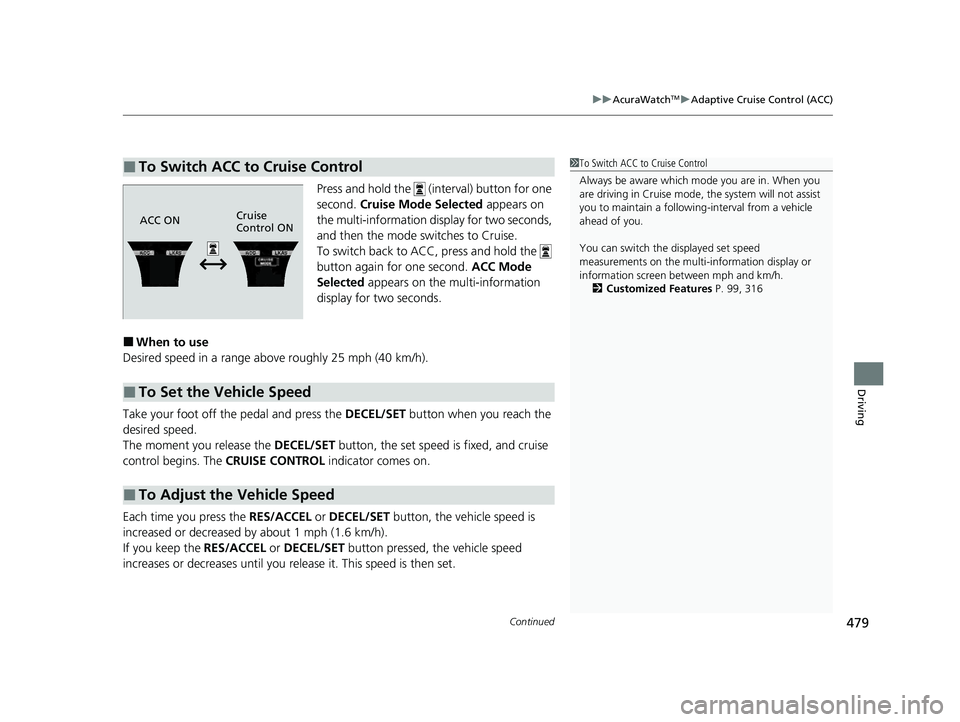
Press and hold the (interval) button for one
second. Cruise Mode Selected appears on
the multi-information display for two seconds,
and then the mode switches to Cruise.
To switch back to ACC, press and hold the
button again for one second. ACC Mode
Selected appears on the multi-information
display for two seconds.
■When to use
Desired speed in a range above roughly 25 mph (40 km/h).
Take your foot off the pedal and press the DECEL/SET button when you reach the
desired speed.
The moment you release the DECEL/SET button, the set speed is fixed, and cruise
control begins. The CRUISE CONTROL indicator comes on.
Each time you press the RES/ACCEL or DECEL/SET button, the vehicle speed is
increased or decreased by about 1 mph (1.6 km/h).
If you keep the RES/ACCEL or DECEL/SET button pressed, the vehicle speed
increases or decreases until you re lease it. This speed is then set.
■To Switch ACC to Cruise Control1To Switch ACC to Cruise Control
Always be aware which mode you are in. When you
are driving in Cruise mode, the system will not assist
you to maintain a following-interval from a vehicle
ahead of you.
You can switch the displayed set speed
measurements on the multi- information display or
information screen between mph and km/h.
2 Customized Features P. 99, 316
ACC ONCruise
Control ON
■To Set the Vehicle Speed
■To Adjust the Vehicle Speed
22 ACURA ILX-31TX66900.book 479 ページ 2021年4月26日 月曜日 午前11時27分
Page 482 of 632
uuAcuraWatchTMuAdaptive Cruise Control (ACC)
480
Driving
To cancel cruise control, do any of the following:
• Press the CANCEL button.
• Press the MAIN button.
• Depress the brake pedal.
The CRUISE CONTROL indicator goes off.
■To Cancel1To Cancel
Resuming the prior set speed:
After cruise control has be en canceled, you can still
resume the prior set speed by pressing the RES/
ACCEL button while driving at a speed of at least 25
mph (40 km/h) or more.
You cannot set or resume in the following situations:
•When vehicle speed is less than 25 mph (40 km/h).
•When the MAIN button is turned off.
At vehicle speeds of 22 m ph (35 km/h) or less, cruise
control is canceled automatically.
22 ACURA ILX-31TX66900.book 480 ページ 2021年4月26日 月曜日 午前11時27分
Page 614 of 632
612
uuEmissions Testing uTesting of Readiness Codes
Information
7. Select a nearby, lightly traveled major hi ghway where you can maintain a speed
of 50 to 60 mph (80 to 97 km/h) for at least 20 minutes. Drive on the highway in
(D. Do not use cruise control. When tra ffic allows, drive for 90 seconds without
moving the accelerator pedal. (Vehicle spee d may vary slightly; this is okay.) If you
cannot do this for a continuous 90 seconds because of traffic conditions, drive for
at least 30 seconds, then repeat it two mo re times (for a total of 90 seconds).
8. Drive in city or suburban traffic for at le ast 10 minutes. When traffic conditions
allow, let the vehicle coast for several se conds without using the accelerator pedal
or the brake pedal.
9. Park the vehicle and leave the engine off for 30 minutes.
22 ACURA ILX-31TX66900.book 612 ページ 2021年4月26日 月曜日 午前11時27分


