Page 364 of 632

uuBluetooth ® HandsFreeLink ®u HFL Menus
362
Features
Up to 15 speed dial numbers can be stored per phone.
To store a speed dial number:
1.Press the PHONE button or the button.
2. Rotate to select Phone Setup, then
press .
u Repeat the procedure to select Speed
Dial , then Add New .
3. Rotate to select a place to choose a
number from, then press .
By Phonebook :
u Select a number from the linked cell
phone’s imported phonebook.
By Call History :
u Select a number from the call history.
By Phone Number :
u Input the number manually.
4. When the speed dial is successfully stored,
you are asked to create a voice tag for the
number. Rotate to select Yes or No,
then press .
5. Using the button, follow the prompts to
say the name for the speed dial entry.
■Speed Dial1Speed Dial
You can use the audio preset buttons during a call to
store a speed dial number:
1. Press and hold the desired audio preset button
during a call.
2. The contact information for the active call will be
stored for the corresponding speed dial.
When a voice tag is stored, press the button to
call the number using the voice tag.
22 ACURA ILX-31TX66900.book 362 ページ 2021年4月26日 月曜日 午前11時27分
Page 368 of 632

uuBluetooth ® HandsFreeLink ®u HFL Menus
366
Features
■To make a call using redial
1. Press the PHONE button or the button.
2. Rotate to select Redial, then press .
u Dialing starts automatically.
■To make a call usin g the call history
Call history is stored by Dialed Calls,
Received Calls , and Missed Calls .
1. Press the PHONE button or the button.
2. Rotate to select Call History, then press
.
3. Rotate to select Dialed Calls, Received
Calls , or Missed Calls, then press .
4. Rotate to select a number, then press
.
u Dialing starts automatically.
■To make a call using a speed dial entry
1. Press the PHONE button or the button.
2. Rotate to select Speed Dial, then press
.
3. Rotate to select a number, then press
.
u Dialing starts automatically.
1To make a call using the call history
The call history displays the last 20 dialed, received, or
missed calls.
(Appears only when a phone is connected to HFL.)
1To make a call using a speed dial entry
On the Phone screen, the first six speed dials on the
list can be directly selected by pressing the
corresponding audio preset buttons (1-6).
Select More Speed Dial Lists to view another paired
phone’s speed dial list.
When a voice tag is stored, press the button to
call the number using the voice tag. 2 Speed Dial P. 362
Any voice-tagged speed dial entry can be dialed by
voice from any screen.
Press the button and follow the prompts.
22 ACURA ILX-31TX66900.book 366 ページ 2021年4月26日 月曜日 午前11時27分
Page 376 of 632

374
Features
Bluetooth® HandsFreeLink ®
Bluetooth® HandsFreeLink ® (HFL) allows you to place and receive phone calls using
your vehicle’s audio system, without handling your cell phone.
Using HFL
(Pick-up) button: Press to go directly to the phone menu screen, to dial a call or
to answer an incoming call. Press and hold to redial the last number dialed in the
phone’s history.
(Hang-up/back) button: Press to end a call, or to cancel a command.
(Talk) button: Press to give HFL voice commands.
PHONE button: Press to go directly to the phone menu screen.
Interface dial (ENTER/MENU button): Rotate to select an item on the screen,
then press . Move , , or to select secondary menu.
■HFL Buttons
1Bluetooth ® HandsFreeLink ®
Place your phone where y ou can get good reception.
To use HFL, you need a Bluetooth-compatible cell
phone. For a list of compatible phones, pairing
procedures, and special feature capabilities:
•U.S.: Visit www.handsfreeli nk.com/Acura, or call 1-
888-528-7876.
•Canada: For more info rmation on smartphone
compatibility, call 1-855-490-7351.
To use the system, the Bluetooth setting must be
On . If there is an active c onnection to Apple CarPlay,
HFL is unavailable. 2 Customized Features P. 316
Voice control tips:
•Aim the vents away from the ceiling and close the
windows, as noise coming from them may interfere
with the microphone.
•Press and release the but ton when you want to
call a number using a stored voice tag, a
phonebook name, or a numbe r. Speak clearly and
naturally after a beep.
•If the microphone picks up vo ices other than yours,
the command may be misinterpreted.
State or local laws may pr ohibit the operation of
handheld electronic devices while operating a
vehicle.
Models with two displays
Talk Button Volume up
Microphone
Hang-up/Back Button
Pick-up Button
Volume down
Interface
Dial PHONE
Button
22 ACURA ILX-31TX66900.book 374 ページ 2021年4月26日 月曜日 午前11時27分
Page 455 of 632
453
uuAcuraWatchTMu
Continued
Driving
■MAIN Button
Press to activate st andby mode for ACC and
LKAS. Or press to cancel these systems.
■LKAS Button
Press to activate or cancel the LKAS.
■RES/ACCEL / DECEL/SET Button
Press RES/ACCEL to resume the ACC or
increase the vehicle speed.
Press DECEL/SET to set the ACC or decrease
the vehicle speed.
■Interval Button
Press the (interval) button to change the
ACC following-interval.
■CANCEL Button
Press to cancel ACC.
■Operation Buttons for the ACC/LKAS
MAIN Button
CANCEL Button
Interval
ButtonLKAS
Button
RES/ACCEL /
DECEL/SET Button
22 ACURA ILX-31TX66900.book 453 ページ 2021年4月26日 月曜日 午前11時27分
Page 476 of 632
uuAcuraWatchTMuAdaptive Cruise Control (ACC)
474
Driving
Increase or decrease the vehicle speed using the RES/ACCEL or DECEL/SET buttons
on the steering wheel.
• Each time you press the button, the vehicl e speed is increased or decreased by
about 1 mph or 1 km/h accordingly.
• If you keep the button pressed, the vehicl e speed increases or decreases by about
5 mph or 5 km/h accordingly.
■To Adjust the Vehicle Speed1 To Adjust the Vehicle Speed
If a vehicle detected ahead is going at a speed slower
than your increased set speed, ACC may not
accelerate your vehicle. This is to maintain the set
interval between your vehi cle and the vehicle ahead.
You can switch the displayed set speed
measurements on the multi- information display or
information screen between mph and km/h.
2 Customized Features P. 99, 316
To increase speed
To decrease speed
22 ACURA ILX-31TX66900.book 474 ページ 2021年4月26日 月曜日 午前11時27分
Page 554 of 632

552
Maintenance
Remote Transmitter Care
Replacing the Remote Battery
If the indicator does not come on when the button is pressed, replace the battery.1.Remove the built-in key.
2. Remove the upper half of the cover by
carefully prying on the edge with a coin.
u Wrap a coin with a cloth to prevent
scratching the keyless remote.
u Remove carefully to avoid losing the
buttons.
3. Make sure to replace the battery with the
correct polarity.
1 Replacing the Remote Battery
NOTICE
An improperly disposed of battery can damage the
environment. Always conf irm local regulations for
battery disposalM
Replacement batteries are commercially available or
at a dealer.
3WARNING
CHEMICAL BURN HAZARD
The battery that powers the remote
transmitter can cause severe internal burns
and can even lead to death if swallowed.
Keep new and used batteries away from
children.
If you suspect that a child has swallowed
the battery, seek medical attention
immediately.
Models without remote control engine start system
Battery type: CR2032
Battery
22 ACURA ILX-31TX66900.book 552 ページ 2021年4月26日 月曜日 午前11時27分
Page 555 of 632

553
uuRemote Transmitter Care uReplacing the Remote Battery
Maintenance
If the indicator does not come on when the button is pressed, replace the battery.
1. Remove the built-in key.
u It may be helpful to lightly place masking
tape over the remote buttons to hold
them in place.
2. Remove the upper half of the cover by
carefully prying on the edge with a coin.
u Wrap a coin with a cloth to prevent
scratching the transmitter.
3. Press down on the center of the assembly
and remove the battery.
u When removing the button battery, be
careful not to touch parts around it.
4. Make sure to replace the battery with the
correct polarity.
1Replacing the Remote Battery
NOTICE
The Remote transmitter is equipped with two
batteries: A standard replaceable CR2032 coin
button battery and an in tegral non-replaceable
rechargeable battery. To prevent permanent damage
to the rechargeable battery, replace the CR2032
battery every three to four years.
Models with remote control engine start system
Models with remote control engine start system
Battery type: CR2032
Battery
22 ACURA ILX-31TX66900.book 553 ページ 2021年4月26日 月曜日 午前11時27分
Page 590 of 632
588
uuEngine Does Not Start uIf the Keyless Remote Battery is Weak
Handling the Unexpected
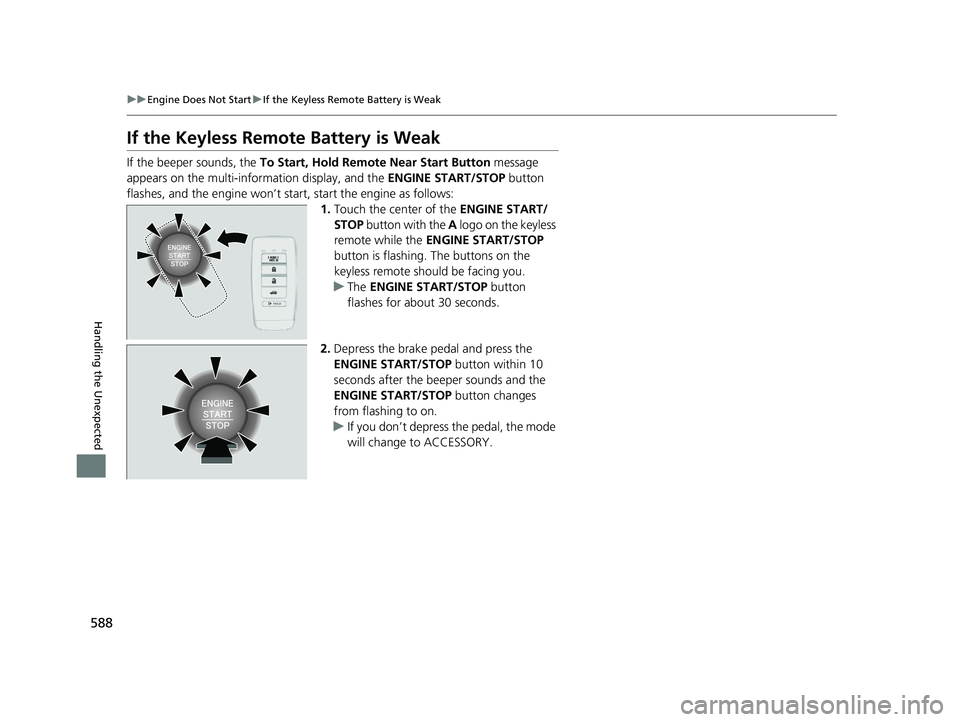
If the Keyless Remote Battery is Weak
If the beeper sounds, the To Start, Hold Remote Near Start Button message
appears on the multi-information display, and the ENGINE START/STOP button
flashes, and the engine won’t star t, start the engine as follows:
1.Touch the center of the ENGINE START/
STOP button with the A logo on the keyless
remote while the ENGINE START/STOP
button is flashing. The buttons on the
keyless remote should be facing you.
u The ENGINE START/STOP button
flashes for about 30 seconds.
2. Depress the brake pedal and press the
ENGINE START/STOP button within 10
seconds after the beeper sounds and the
ENGINE START/STOP button changes
from flashing to on.
u If you don’t depress the pedal, the mode
will change to ACCESSORY.
22 ACURA ILX-31TX66900.book 588 ページ 2021年4月26日 月曜日 午前11時27分