Page 28 of 632

26
Quick Reference Guide
Why does the beeper
sound when I open the
driver's door?The beeper sounds when:
●The power mode is in ACCESSORY.
●The exterior lights are left on.
Why does a beeper sound
when I walk away from the
vehicle after I close the
door?The beeper sounds if you move outside the walk away auto lock
operating range before the door completely closes.
2Locking the doors (Walk away auto lock ®) (P117)
Why does the beeper
sound when I start driving?The beeper sounds when:
●Driver and/or front passenger are not wearing their seat belts.
●The parking brake lever is not fully released.
I’m seeing an amber
indicator of a tire with an
exclamation point. What is
that?The Tire Pressure Monitoring Sy stem (TPMS) needs attention.
Check tire pressure.
2 If the Low Tire Pressure/TPMS Indicator Comes On or Blinks (P599)
Why do I hear a screeching
sound when I apply the
brake pedal?The brake pads may need to be replaced. Have your vehicle
inspected by a dealer.
22 ACURA ILX-31TX66900.book 26 ページ 2021年4月26日 月曜日 午前11時27分
Page 49 of 632

Continued47
uuAirbags uFront Airbags (SRS)
Safe DrivingThe airbags have advanced features to he lp reduce the likelihood of airbag related
injuries to smaller occupants. The driver’s advanced airbag system includes a
seat position sensor.
Based on information from this sensor and the
severity of the impact, the advanced airbag
system determines the optimal deployment of
the driver’s airbag.
The front passenger’s ad vanced airbag system
has weight sensors. The sensors are used for
occupant classification to activate or
deactivate the front passenger’s airbag.
For adult size occupant s, the system will
automatically activate the front passenger’s
airbag. If a small adult sits in the front
passenger seat and the system does not
recognize him/her as an adult, see
2 Passenger Airbag Off Indicator P. 53
■Advanced Airbags1Advanced Airbags
If there is a problem with the driver’s seat position
sensor or the passenger’s s eat weight sensors, the
SRS indicator will come on, and in the event of a
crash, the airbag will deploy (regardless of the driver’s
seating position or passenger’s occupant
classification) with a force corresponding to the
severity of the impact. 2 Supplemental Restraint System (SRS)
Indicator P. 52
For the advanced front airbags to work properly,
confirm that:
•The occupant is sitting in an upright position,
wearing the seat belt prope rly and the seat back is
not excessively reclined.
•The occupant is not leaning against the door or
center console.
•The occupant’s feet are plac ed on the floor in front
of them.
•There are no objects ha nging from the front
passenger’s seat.
•Only small, lightweight objec ts are in the seat back
pocket.
•The steering wheel and passenger’s side dashboard
are not obstructed by any object.
•No liquid has been spille d on or under the seat.
Driver’s
Seat
Position
Sensor
Passenger’s
Seat
Weight
Sensors
22 ACURA ILX-31TX66900.book 47 ページ 2021年4月26日 月曜日 午前11時27分
Page 55 of 632

Continued53
uuAirbags uAirbag System Indicators
Safe Driving■When the passenger airbag off
indicator comes on
The indicator comes on to alert you that the
passenger’s airbag has been turned off.
This occurs when the weight sensors
determine that a small child or infant is on the
passenger seat.
Children age 12 or under should always ride properly restrained in a back seat.
2 Child Safety P. 56
Objects placed on the seat can also cause the indicator to come on. If the indicator
is on in the event of a crash, the passenger’s airbag will not deploy.
If the passenger’s seat is empty, the pa ssenger’s airbag will not deploy and the
indicator will not come on.
■Passenger Airbag Off Indicator1 Passenger Airbag Off Indicator
To ensure the passenger is detected properly, confirm
that:
•The occupant is sitting in an upright position,
wearing the seat belt prope rly and the seat back is
not excessively reclined.
•The occupant is not leaning against the door or
center console.
•The occupant’s feet are plac ed on the floor in front
of them.
•There are no objects ha nging from the front
passenger’s seat.
•Only small, lightweight objec ts are in the seat back
pocket.
•No liquid has been spille d on or under the seat.
•There is no child seat or other object pressing
against the rear of the seat or seat back.
•There is no rear passenger pushing or pulling on
the back of the front passenger’s seat.
•There are no objects placed under or beside the
front passenger’s seat . Improperly positioned
objects can interfere with the advanced airbag
sensors.
•The floor mat behind the front passenger’s seat is
hooked to the floor mat anchor. An improperly
placed mat can interfere with the advanced airbag
sensors.
•The head restraint is not contacting the roof.
U.S. Canada
22 ACURA ILX-31TX66900.book 53 ページ 2021年4月26日 月曜日 午前11時27分
Page 80 of 632
78
uuIndicators u
Instrument Panel
IndicatorNameOn/BlinkingExplanationMessage
Turn Signal
Indicators
●Blinks when you operate the turn
signal lever.
●Blink along with all turn signals when
you press the hazard warning
button.
●Does not blink or blinks rapidly
2Replacing Light Bulbs P. 535
—
High Beam
Indicator●Comes on when the high beam
headlights are on.——
Auto High-Beam
Indicator●Comes on when all the operating
conditions of the Auto high-beam
are met.
2Auto High-Beam P. 147—
Lights On
Indicator●Comes on when the parking, tail,
and other external lights are on.2Light Switches P. 143—
Fog Light
Indicator*
●Comes on when the fog lights are
on.2Fog Lights* P. 146—
* Not available on all models
22 ACURA ILX-31TX66900.book 78 ページ 2021年4月26日 月曜日 午前11時27分
Page 89 of 632
87
uuIndicators uMulti-Information Display Warning and Information Messages
Continued
Instrument Panel
MessageConditionExplanation
●Appears when the transmission system temperature is
too high. The vehicle no longer moves.●Immediately stop in a safe place in (P.●Let the engine idle until the message disappears.
●Appears if any door or the trunk is not completely
closed.
●Appears if any door or the trunk is opened while driving.
The beeper sounds.
●Disappears when all doors and the trunk are closed.
●Appears when there is a problem with the headlights.●Appears while driving - The headlights may not be
on. When conditions allow you to drive safely, have
your vehicle checked by a dealer as soon as possible.
●Appears if there is a problem with the Auto high-beam.●Manually operate the headlight switch.●If you are driving with the high-beam headlights when
this happens, the headlights are changed to low beams.
22 ACURA ILX-31TX66900.book 87 ページ 2021年4月26日 月曜日 午前11時27分
Page 102 of 632
100
uuGauges and Multi-Information Display uMulti-Information Display
Instrument Panel
■Customization flow
Press the button to select Vehicle Settings and press the SEL/RESET button.
Vehicle Settings
“Trip A” Reset Timing
Language Selection
Adjust Outside Temp. Display
Memory Position Link
Door Unlock Mode
Keyless Access Light Flash
Driver Assist System Setup
Meter Setup
Driving Position Setup*
Keyless Access Setup
“Trip B” Reset Timing
Turn by Turn Display*
Forward Collision Warning Distance
ACC Forward Vehicle Detect Beep
Lane Keeping Assist Suspend Beep
Blind Spot Info*
Keyless Access Beep
ACC Display Speed Unit
Road Departure Mitigation Setting
SEL/RESET
SEL/RESET
SEL/RESET
SEL/RESET
SEL/RESET
SEL/RESET
Remote Start System On/Off*
* Not available on all models
22 ACURA ILX-31TX66900.book 100 ページ 2021年4月26日 月曜日 午前11時27分
Page 103 of 632
101
uuGauges and Multi-Information Display uMulti-Information Display
Continued
Instrument Panel
Exit
Door Setup
Maintenance Info.
Default All
Lighting Setup
Key And Remote Unlock Mode
Auto Door Lock
Auto Door Unlock
Keyless Lock Answer Back
Security Relock Timer
Interior Light Dimming Time
Headlight Auto Off Timer
Auto Light Sensitivity*
Maintenance Reset
SEL/RESET
SEL/RESET
SEL/RESET
SEL/RESET
Walk Away Auto Lock
* Not available on all models
22 ACURA ILX-31TX66900.book 101 ページ 2021年4月26日 月曜日 午前11時27分
Page 106 of 632
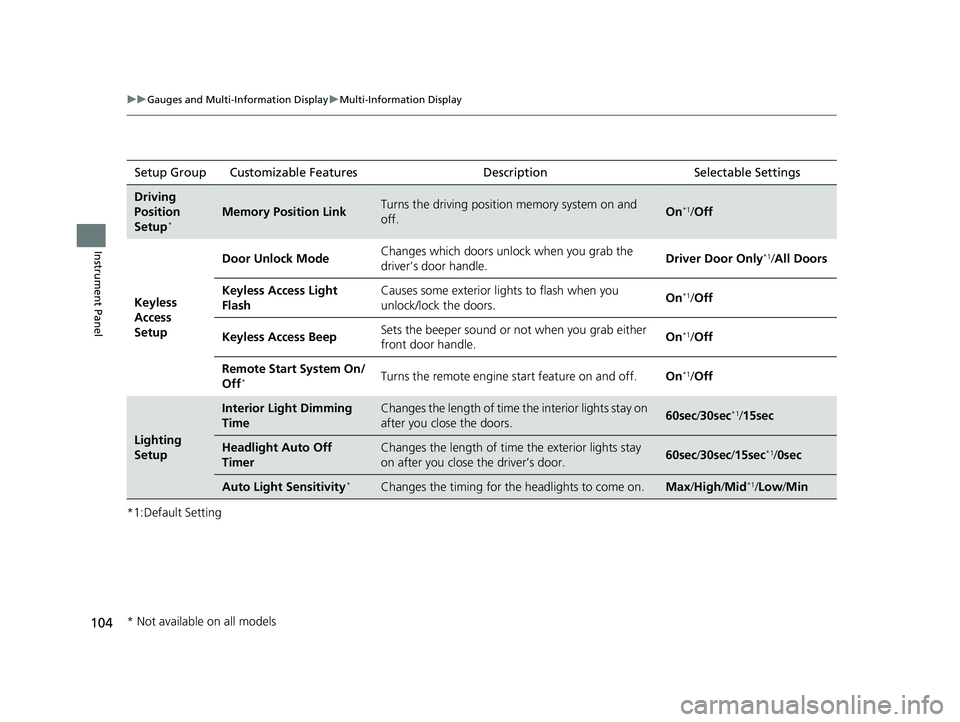
104
uuGauges and Multi-Information Display uMulti-Information Display
Instrument Panel
*1:Default SettingSetup Group Customizable Features
DescriptionSelectable Settings
Driving
Position
Setup
*Memory Position LinkTurns the driving position memory system on and
off.On*1/Off
Keyless
Access
Setup Door Unlock Mode
Changes which doors unlock when you grab the
driver’s door handle.
Driver Door Only
*1/
All Doors
Keyless Access Light
Flash Causes some exterior lights to flash when you
unlock/lock the doors.
On
*1/
Off
Keyless Access Beep Sets the beeper sound or not when you grab either
front door handle. On
*1/
Off
Remote Start System On/
Off
*Turns the remote engine start feature on and off. On*1/Off
Lighting
Setup
Interior Light Dimming
TimeChanges the length of time th e interior lights stay on
after you close the doors.60sec /30sec*1/15sec
Headlight Auto Off
TimerChanges the length of time the exterior lights stay
on after you close the driver’s door.60sec /30sec /15sec*1/ 0sec
Auto Light Sensitivity*Changes the timing for the headlights to come on.Max/High /Mid*1/Low/ Min
* Not available on all models
22 ACURA ILX-31TX66900.book 104 ページ 2021年4月26日 月曜日 午前11時27分


