2021 VOLVO V60 Ground light
[x] Cancel search: Ground lightPage 131 of 661

DISPLAYS AND VOICE CONTROL
129
New lines in free-text fields in handwriting mode
Create a new line by drawing above the characters in the handwriting field as shown in the illustration15
.
Writing blank spaces in free-text fields
Make a blank space by drawing a line from left to right 16
.
Related information
Using the center display keyboard (p. 124)
Changing the appearance of the center display The appearance of the center display can be changed by selecting a different theme.
1.
Tap Settings in the Top view.
2. Tap
My CarDisplaysDisplay
Themes.
3. Select a theme, e.g.
Minimalistic orChrome Rings.
In addition to these themes, you can also choose between
Normal and Bright. InNormal, the background of the screen is dark
and the text is light. This option is the default setting for all themes. If the bright version isselected, the background will be light and thetext will be dark. This option can, for example,make the screen easier to see in bright day-light conditions. These alternatives are always available for selection and are not affected by the ambientlighting.
Related information
Changing settings in the center display'sTop view (p. 130)
Activating and deactivating the center dis-play (p. 113)
Cleaning the center display (p. 608)
Turning off and adjusting the volume of the center displaysystem sounds
The volume of the center display system sounds can be adjusted or turned off com-pletely.
1. Tap Settings in the Top view in the center
display.
2. Tap
SoundSystem Volumes.
3. Pull the control under
Touch Sounds to
adjust the volume or turn off screen tap sounds. Pull the control to the desiredsound level.
Related information
Center display overview (p. 108)
Changing settings in the center display'sTop view (p. 130)
Sound settings (p. 448)
15
For Arabic keyboards, draw the same character, but in mirror image.
16 For Arabic keyboards, draw the line from right to left.
Page 144 of 661

DISPLAYS AND VOICE CONTROL
* Option/accessory.
142
Head-up display settings *
Adjusting settings for the head-up display.
Settings can be adjusted when the vehicle is started and a projected image is displayed onthe windshield.
Selecting display optionsSelect the functions to be shown in the head-up display. 1. Tap
Settings in the center display's Top
view.
2. Tap
My CarDisplaysHead-Up
Display Options.
3. Select one or more functions:
Show Navigation
Show Road Sign Information
Show Driver Support
Show Phone
This setting is stored as a personal setting in the driver profile.
Adjusting brightness and height position
1.Press the Head-up Display Adjustmentsbutton in the center display's Function view.
2. Adjust the brightness of the projected image and the height position in the driv-er's field of vision using the right-sidesteering wheel lever.
Decreasing brightness
Increasing brightness
Raising position
Lowering position
Confirm
The brightness of the graphic is automatically adapted to the light conditions in its back-ground. Brightness is also affected by adjust-ments to the brightness of the other displaysin the vehicle. The height position can be stored in the front power seat's * memory function using the key-
pad in the driver's door.
Page 162 of 661

LIGHTING
* Option/accessory.
160
Using home safe lighting
Some of the exterior lights remain on to illu- minate the area around the vehicle. This iscalled home safe lighting.
To activate home safe lighting:
1. Switch off the ignition.
2. Push the left-side steering wheel lever toward the dashboard and release.
3. Exit the vehicle and lock the doors. > A symbol in the instrument panel illumi-nates to indicate that the function is activated and exterior lighting switcheson: Parking lights, headlights, licenseplate lighting and outer door handle lighting *.
The length of time home safe lighting remains illuminated can be set in the center display.
Related information
Adjusting light functions via the centerdisplay (p. 151)
Welcome Light (p. 160)
Welcome Light
Approach lighting is activated when the vehi- cle is unlocked and can be used to providelight as you walk toward the vehicle.
The function is activated when the remote key is used for unlocking. The parking lights, ceil-ing lights, footwell lights and trunk/cargocompartment lights are activated in daylightconditions. In weak daylight or dark condi-tions, the license plate lighting and outer door handle lighting * will also be activated, with the
light directed toward the ground. If no door is opened, the lights will remain illu- minated for approx. 2 minutes. If a door isopened while the function is activated, the interior lighting and outer door handle lighting *
will remain on for a longer period of time. This function can be activated and deactivated in the center display.
Related information
Adjusting light functions via the centerdisplay (p. 151)
Using home safe lighting (p. 160)
Remote key (p. 238)
Interior Lighting
The passenger compartment is equipped with several different types of lighting, e.g.general lighting, adjustable ambient lightingand reading lights.
All lighting in the passenger compartment can be turned on and off manually within5 minutes after:
the engine has been switched off and theignition is in mode
0.
the vehicle is unlocked but has not beenstarted.
Front ceiling lighting
The controls in the ceiling console for the front read- ing lights and courtesy lighting.
Reading light left side
Passenger compartment lighting
Page 163 of 661

LIGHTING
}}
* Option/accessory.161
Courtesy lighting auto switch
Reading light right side
Reading lights
The reading lights on the right and left sides are switched on and off by briefly pressing thebuttons in the ceiling console. To adjust thebrightness, press and hold the button.
Passenger compartment lighting
Briefly press the button in the ceiling console to switch on or off the footwell lighting andceiling lighting.
Courtesy lighting auto switch
Activate the auto switch by briefly pressing the AUTO button in the ceiling console. With
Auto activated, the indicator light in the buttonand the courtesy lighting come on and areturned off as follows. Courtesy lighting is switched on when:
The vehicle is unlocked
The vehicle is switched off
A side door is opened.
Courtesy lighting is switched off when: The vehicle is locked
The engine is started
A side door is closed
A side door has been open for approx. 2 minutes.
Rear roof lightingReading lights are located in the rear sectionof the vehicle and can also be used as passen-ger compartment lighting.
Reading lights over the rear seat.
In vehicles with panoramic roofs
*, there are two lamp
units, one on each side of the ceiling.
Briefly press the button on the light to turn on or off the reading lights. To adjust the bright-ness, press and hold the button.
Glove compartment lightingThe glove compartment lighting comes on orgoes off when the glove compartment isopened or closed.
Vanity mirror lighting *The vanity mirror lighting comes on or goes offwhen the cover over the mirror is opened orclosed.
Ground lighting*The ground lighting comes on or goes offwhen a door is opened or closed.
Cargo compartment lightingThe cargo compartment lighting comes on orgoes off when the cargo compartment isopened or closed.
Ambient LightingThe ambient lighting comes on when thedoors are opened and goes out when the vehi-cle is locked. Ambient lighting brightness canbe adjusted in the center display and also fine-tuned using the thumb wheel in the dash-board.
Mood lighting*The vehicle is equipped with LEDs that pro-vide faint lighting in various colors. This light-ing is on when the engine is running. Mood
Page 329 of 661

DRIVER SUPPORT
}}
* Option/accessory.327
WARNING
No automatic system can guarantee 100% correct function in all situations.You should therefore never test use ofCity Safety in the direction of people,animals or vehicles – this could lead tosevere damage, serious personal injuryor even death.
City Safety warns the driver if there is arisk of collision, but the function cannotreduce the driver's reaction time.
Even if the warning distance has been set to
Early, warnings may be per-
ceived as late in certain situations – e.g. when there are large speed differ-ences or if the vehicle ahead suddenlybrakes heavily.
With the warning distance set to
Early,
warnings come further in advance. This may cause the warnings to come morefrequently than with warning distance
Normal, but is recommended since it
can make City Safety more effective.
Related information
City Safety
™ (p. 323)
City Safety limitations (p. 333)
Rear Collision Warning
* (p. 343)
Detecting obstacles with City Safety
City Safety 78
can help the driver detect other
vehicles, cyclists, large animals and pedes- trians.
VehiclesCity Safety can detect most vehicles that are stationary or are moving in the same directionas your vehicle. In some cases, it can alsodetect oncoming vehicles and crossing traffic. For City Safety to be able to detect a vehicle in the dark, its headlights and taillights must beon and clearly visible.
Cyclists
Examples of what City Safety would interpret to be a cyclist: clear body and bicycle shapes.
For good performance, the system's function for cyclist detection needs the clearest possi-ble information about the contours of the bicy-cle and of the cyclist's head, arm, shoulders,legs, torso and lower body in combinationwith normal human movements. If large portions of the cyclist's body or the bicycle itself are not visible to the function'scamera, it will not be able to detect a cyclist. The system can only detect adult cyclists rid- ing on bicycles intended for adults.
WARNING
City Safety is supplementary driver sup- port, but it cannot detect all cyclists in allsituations and, for example, cannot see:
partially obscured cyclists.
cyclists if the contrast to the cyclist's background is poor.
cyclists in clothing that hides theirbody contour.
bikes loaded with large objects.
Warnings and brake interventions may occur late or not at all. The driver is always responsible for ensuring that the vehicle isdriven correctly and with a safety distance suitable for the speed.
78 This function is not available on all markets.
Page 330 of 661

||
DRIVER SUPPORT
328
Pedestrians
Examples of what the system considers to be a pedestrian: clear body contours.
For good performance, the system's function for pedestrian detection needs the clearestpossible information about the contours of thepedestrian's head, arm, shoulders, legs, torsoand lower body in combination with normalhuman movements. In order to detect a pedestrian, there must be a contrast to the background, which coulddepend on clothing, weather conditions, etc. Ifthere is little contrast, the person may bedetected late or not at all, which may result ina delayed reaction from the system or no reac-tion at all. City Safety can detect pedestrians even in dark conditions if they are illuminated by thevehicle's headlights.
WARNING
City Safety is supplementary driver sup- port, but it cannot detect all pedestrians inall situations and, for example, cannot see:
partially obscured pedestrians, people in clothing that hides their body con-tour or pedestrians shorter than 80 cm(32 in.).
pedestrians if the contrast to thepedestrian's background is poor.
pedestrians who are carrying largeobjects.
Warnings and brake interventions may occur late or not at all. The driver is alwaysresponsible for ensuring that the vehicle isdriven correctly and with a safety distancesuitable for the speed.
Large animals
Examples of what City Safety would interpret as a large animal: stationary or moving slowly and withclear body contours.
For good performance, the system's function for detecting large animals (e.g. moose,horses, etc.) needs the clearest possible infor-mation about body contours. This entailsbeing able to detect the animal straight fromthe side in combination with normal move-ments for that animal. If parts of the animal's body are not visible to the function's camera, the system will not beable to detect the animal. City Safety can detect large animals even in dark conditions if they are illuminated by thevehicle's headlights.
Page 331 of 661
DRIVER SUPPORT
329
WARNING
City Safety is supplementary driver sup- port, but it cannot detect all large animalsin all situations and, for example, cannotsee: partially obscured larger animals.
larger animals seen from the front or from behind.
running or fast moving larger animals.
larger animals if the contrast to the ani-mal's background is poor.
smaller animals such as cats and dogs.
Warnings and brake interventions may occur late or not at all. The driver is alwaysresponsible for ensuring that the vehicle isdriven correctly and with a safety distancesuitable for the speed.
Related information
City Safety
™ (p. 323)
City Safety limitations (p. 333)
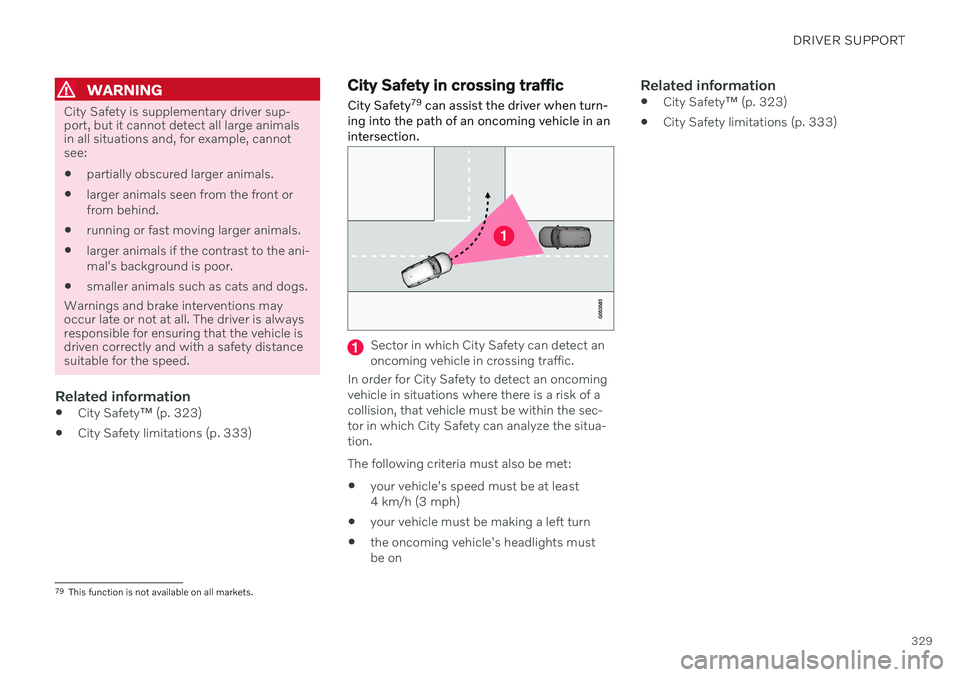
City Safety in crossing traffic City Safety 79
can assist the driver when turn-
ing into the path of an oncoming vehicle in an intersection.
Sector in which City Safety can detect an oncoming vehicle in crossing traffic.
In order for City Safety to detect an oncomingvehicle in situations where there is a risk of acollision, that vehicle must be within the sec-tor in which City Safety can analyze the situa-tion. The following criteria must also be met:
your vehicle's speed must be at least 4 km/h (3 mph)
your vehicle must be making a left turn
the oncoming vehicle's headlights mustbe on
Related information
City Safety
™ (p. 323)
City Safety limitations (p. 333)
79
This function is not available on all markets.