2021 VOLVO V60 steering
[x] Cancel search: steeringPage 273 of 661

DRIVER SUPPORT
}}
* Option/accessory.271
WARNING
If the temperature rises too high, the power steering may be forced to switch off com-pletely. In such a situation, the driver dis- play shows the message
Power steering
failure Stop safely along with a symbol.
Changing the level of steering wheel resistance *
In INDIVIDUAL drive mode, the level of steer- ing wheel resistance can be adjusted. 1.
Tap
Settings in the center display's Top
view.
2. Select
My CarDrive ModesSteering Force.
Steering wheel resistance settings can only be accessed if the vehicle is stationary or is mov-ing straight ahead at a low speed.
Related information
Driver support systems (p. 270)
Drive modes
* (p. 413)
Electronic Stability Control
The Electronic Stability Control (ESC 1
) func-
tion helps the driver avoid skidding and improves the vehicle's directional stability.
This symbol will be displayed in the instrument panel whenthe system is intervening. When the system has inter- vened to apply the brakes, apulsing sound may be heard
and the vehicle may accelerate more slowlythan expected when the accelerator pedal isdepressed.
The system consists of the following sub-func- tions:
Stability control 2
Spin control and active yaw control
Engine drag control
Trailer Stability Assist
WARNING
The function is supplementary driver support intended to facilitate drivingand help make it safer – it cannot han-dle all situations in all traffic, weatherand road conditions.
The driver is advised to read all sec-tions in the Owner's Manual about thisfunction to learn of its limitations,which the driver must be aware ofbefore using the function.
Driver support functions are not a sub-stitute for the driver's attention andjudgment. The driver is always respon-sible for ensuring the vehicle is drivenin a safe manner, at the appropriatespeed, with an appropriate distance toother vehicles, and in accordance withcurrent traffic rules and regulations.
Stability control 2This function helps control the driving andbraking force of each individual wheel in anattempt to stabilize the vehicle.
Spin control and active yaw controlThis function is active at low speeds andbrakes the wheels that are spinning to transfer
1
Electronic Stability Control
2 Also called traction control.
Page 277 of 661

DRIVER SUPPORT
275
Symbol Message Meaning
ESC Temporarily offThe system's functionality has been temporarily reduced due to high brake system tempera- tures. The function will be automatically reactivated when the brakes have cooled.
ESC Service requiredThe system is not functioning properly. Stop the vehicle in a safe place, turn off the engine and then restart it.
A text message can be erased by briefly press- ing the
button in the center of the right-
side steering wheel keypad. If the message persists: Contact a workshop ‒
an authorized Volvo workshop is recom- mended.
Related information
Electronic Stability Control (p. 271)
Page 279 of 661

DRIVER SUPPORT
}}
* Option/accessory.277
Activating or deactivating Connected Safety
For Connected Safety to be able to share information about road conditions with otherdrivers, the function must be activated. If youdo not wish to share information, the functioncan be deactivated.
Activate or deactivate the function using this button inthe center display's Functionview.
Illuminated button indicator light – the function is activated.
Extinguished button indicator light – thefunction is deactivated.
At activation, the driver must accept the spe-cial terms and conditions shown in the display before an Internet connection 12
can be estab-
lished. The driver must, for example, accept that data is sent from the vehicle using thedriver's cellular phone. Even when your vehicle is not connected to the Internet, you will still be notified if the sys-tem in your own vehicle detects slippery roadconditions. For Connected Safety to functionat full capacity, your vehicle needs to be con-nected to the Internet.
Related information
Connected Safety (p. 276)
Internet-connected vehicle
* (p. 500)
Terms of use and data sharing (p. 506)
Connected Safety limitations (p. 277)
Connected Safety limitations
Information on vehicles with activated hazard warning flashers or which have detected slip-pery road conditions is not always communi-cated between all vehicles in the affectedarea.
This may be the case if: No or insufficient Internet connection.
The maneuvers (steering wheel move- ments, acceleration or braking) made bythe vehicles on slippery surfaces are tooweak for friction between the tires androad to be detected.
Vehicles that have detected slippery roadconditions or activated hazard warningflashers have not activated the function.
Vehicles that have detected slippery roadconditions or activated hazard warningflashers are not equipped with the func-tion.
Insufficient GPS/satellite navigation mayprevent warnings.
Slippery road conditions were detected orhazard warning flashers were activated ona road that is not registered in the VolvoCars database.
Connected Safety is not developed on allmarkets and does not cover all areas. Con-
12
There may be a charge for transmitting data over the Internet, depending on your service plan.
Page 286 of 661

||
DRIVER SUPPORT
* Option/accessory.
284
WARNING
The function is supplementary driver support intended to facilitate drivingand help make it safer – it cannot han-dle all situations in all traffic, weatherand road conditions.
The driver is advised to read all sec-tions in the Owner's Manual about thisfunction to learn of its limitations,which the driver must be aware ofbefore using the function.
Driver support functions are not a sub-stitute for the driver's attention andjudgment. The driver is always respon-sible for ensuring the vehicle is drivenin a safe manner, at the appropriatespeed, with an appropriate distance toother vehicles, and in accordance withcurrent traffic rules and regulations.
Using engine braking instead of applying the brakes
Cruise Control regulates speed by lightly applying the brakes. On downgrades, it cansometimes be desirable to roll a bit faster andlet speed be reduced instead by engine brak-ing alone. The driver can temporarily disen-gage the Cruise Control braking function. To disengage CC:
–Press the accelerator pedal about halfway down and then release it.
> Cruise Control will automatically disen-
gage the automatic brake function and speed will only be reduced using theengine braking function.
Related information
Driver support systems (p. 270)
Selecting and activating cruise control(p. 284)
Deactivating cruise control (p. 285)
Cruise control standby mode (p. 286)
Adjusting set speed for driver support(p. 313)
Switching between cruise control and Adaptive Cruise Control
* in the center dis-
play (p. 293)
Selecting and activating cruise control The Cruise Control (CC 29
) function must be
selected and activated in order to regulate speed.
In order to start Cruise Control from standby mode, the vehicle's current speed must be30 km/h (20 mph) or higher.
1. Press the ◀ (1) or ▶ (3) button on the
steering wheel keypad and scroll to the cruise control symbol
(4).
> Gray symbol – cruise control is in standby mode.
29Cruise Control
Page 287 of 661
DRIVER SUPPORT
* Option/accessory.285
2.
When cruise control is selected, press
(2) on the steering wheel keypad to acti- vate.
> White symbol – cruise control starts
and the current speed is stored as the maximum speed. The lowest speedthat can be set is 30 km/h (20 mph).
Reactivating cruise control to the last stored speed
–When cruise control is selected, press on the steering wheel keypad to activate.
> The Cruise Control marking in theinstrument panel will change from GRAY to WHITE and the vehicle willthen return to the most recently setspeed.
WARNING
A noticeable increase in speed may follow when the speed is resumed with the
steering wheel button.
Related information
Cruise control (p. 283)
Deactivating cruise control (p. 285)
Cruise control standby mode (p. 286)
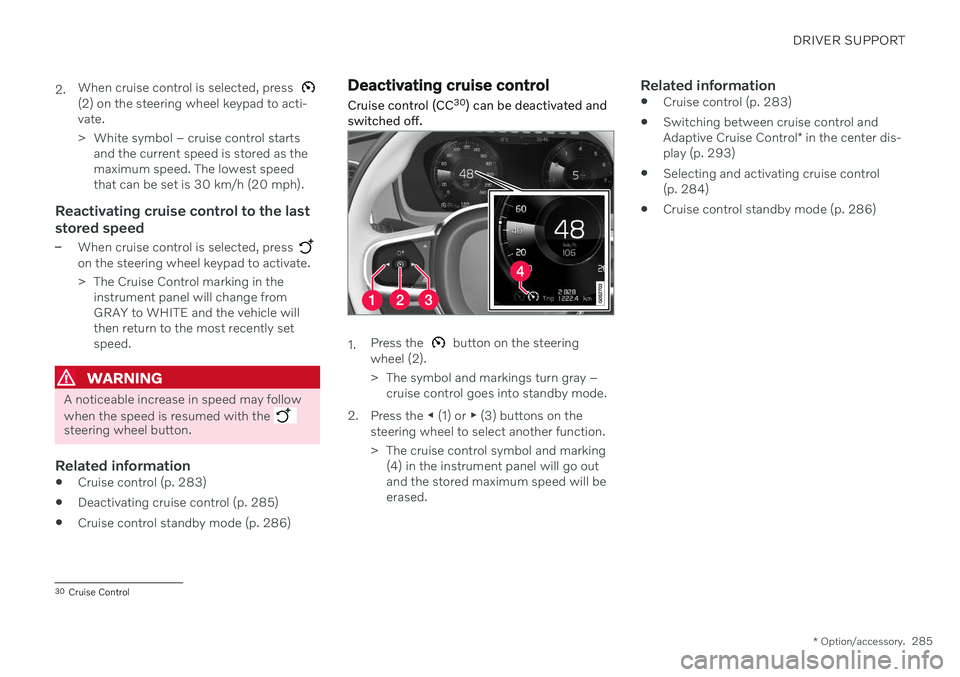
Deactivating cruise control
Cruise control (CC 30
) can be deactivated and
switched off.
1. Press the button on the steering
wheel (2).
> The symbol and markings turn gray – cruise control goes into standby mode.
2. Press the ◀ (1) or ▶ (3) buttons on the
steering wheel to select another function.
> The cruise control symbol and marking (4) in the instrument panel will go out and the stored maximum speed will beerased.
Related information
Cruise control (p. 283)
Switching between cruise control and Adaptive Cruise Control
* in the center dis-
play (p. 293)
Selecting and activating cruise control (p. 284)
Cruise control standby mode (p. 286)
30
Cruise Control
Page 292 of 661

||
DRIVER SUPPORT
* Option/accessory.
290 your vehicle's current speed must be at least 15 km/h (9 mph).
1. Press the ◀ (2) or ▶ (3) button on the
steering wheel keypad and scroll to the Adaptive Cruise Control symbol
(4).
> Gray symbol – Adaptive Cruise Control is in standby mode.
2. When Speed Limiter is selected, press
(1) on the steering wheel keypad to
activate.
> White symbol – Speed Limiter starts and the current speed is stored as the maximum speed.
Reactivating Adaptive Cruise Control to the last stored speed
–When Adaptive Cruise Control is selected, press
on the steering wheel keypad to
activate.
> The Cruise Control marking in the instrument panel will change from GRAY to WHITE and the vehicle willthen return to the most recently setspeed.
WARNING
A noticeable increase in speed may follow when the speed is resumed with the
steering wheel button.
Related information
Adaptive Cruise Control
* (p. 286)
Deactivating Adaptive Cruise Control
*
(p. 290)
Switching between cruise control and Adaptive Cruise Control
* in the center dis-
play (p. 293)
Adaptive Cruise Control
* limitations
(p. 292)
Deactivating Adaptive Cruise Control *41
Adaptive Cruise Control (ACC 42
) can be deac-
tivated and switched off.
1. Press the button on the steering
wheel (1).
> The symbol and markings turn gray – Adaptive Cruise Control goes into standby mode. The time interval indica-tor light and any symbols for the targetvehicle will go out.
40Adaptive Cruise Control
41 Depending on market, this function can be either standard or optional.
42 Adaptive Cruise Control
Page 293 of 661

DRIVER SUPPORT
}}
* Option/accessory.291
2. Press the
◀ (2) or ▶ (3) buttons on the
steering wheel to select another function.
> The Adaptive Cruise Control symbol and marking (4) in the instrument panel will go out and the stored maximumspeed will be erased.
WARNING
If Adaptive Cruise Control is in standby mode, the driver must intervene andregulate both speed and distance tothe vehicle ahead.
If the vehicle comes too close to a vehi-cle ahead when Adaptive Cruise Con-trol is in standby mode, the driver canbe warned of the short distance by the Distance Alert
* function.
Related information
Adaptive Cruise Control
* (p. 286)
Selecting and activating Adaptive CruiseControl
* (p. 289)
Switching between cruise control andAdaptive Cruise Control
* in the center dis-
play (p. 293)
Adaptive Cruise Control
* limitations
(p. 292)
Adaptive Cruise Control *43
standby
mode
Adaptive Cruise Control (ACC 44
) can be deac-
tivated and put in standby mode. This may happen automatically or be due to driverintervention.
Standby mode means that the function is selected in the instrument panel but not acti-vated. In standby mode, Adaptive Cruise Con-trol will not regulate speed or distance to thevehicle ahead.
Standby mode due to action by the
driver
Adaptive Cruise Control will be deactivatedand put in standby mode if any of the follow-ing occurs:
The brakes are applied.
The gear selector is moved to
N.
The vehicle is driven faster than the setspeed for more than 1 minute.
Temporarily increasing speed using the accel-erator pedal, e.g. when passing another vehi-cle, will not affect the setting. The vehicle willreturn to the set speed when the acceleratorpedal is released.
WARNING
If Adaptive Cruise Control is in standby mode, the driver must intervene andregulate both speed and distance tothe vehicle ahead.
If the vehicle comes too close to a vehi-cle ahead when Adaptive Cruise Con-trol is in standby mode, the driver canbe warned of the short distance by the Distance Alert
* function.
Automatic standby mode
WARNING
With automatic standby mode, the driver is warned by an acoustic signal and a mes-sage on the instrument panel.
The driver must then regulate vehicle speed, apply the brakes if necessary,and maintain a safe distance to othervehicles.
The function may automatically go intostandby mode if one of the following occurs: One of the systems that Adaptive Cruise Control is dependent on stops working,
43
Depending on market, this function can be either standard or optional.
44 Adaptive Cruise Control
Page 297 of 661

DRIVER SUPPORT
* Option/accessory.295
Symbol Message Meaning
The symbol is WHITE The vehicle is maintaining the stored speed.
Adaptive Cruise Contr. Unavailable
The symbol is GRAY Adaptive Cruise Control is in standby mode.
Adaptive Cruise Contr. Service required
The symbol is GRAYThe system is not functioning as intended. Contact a workshop
‒ an authorized Volvo
workshop is recommended.
Windscreen sensor Sensor blocked, see Owner's manualClean the windshield in front of the camera and radar sensors.
A text message can be erased by briefly press- ing the
button in the center of the right-
side steering wheel keypad. If the message persists: Contact a workshop
‒
an authorized Volvo workshop is recom- mended.
Related information
Adaptive Cruise Control
* (p. 286)
Contacting Volvo (p. 26)