2021 VOLVO V60 display
[x] Cancel search: displayPage 107 of 661
DISPLAYS AND VOICE CONTROL
}}
105
Service messages
The following table lists a selection of impor- tant service messages and what they mean.
Message Meaning
Stop safelyAStop and switch off the engine. Serious risk ofdamage - contact a workshop B
.
Turn off engineA Stop and switch off the engine. Serious risk ofdamage - contact a workshop
B
.
Service urgent Drive to work- shop
A Contact a workshop
B
to
have the vehicle inspec- ted immediately.
Service requiredA Contact a workshop
B
to
have the vehicle inspec- ted as soon as possible.
Regular main- tenance Book time for maintenanceTime for service - contact a workshop B
. Shown
before the next service date.
Regular main- tenance Time for main- tenanceTime for service - contact a workshop B
. Shown on
the next service date.
Message Meaning
Regular main- tenance Maintenance overdueTime for service - contact a workshop B
. Shown
when the date for service has passed.
Temporarily offA A function has been tem- porarily deactivated andwill be reactivated auto-matically while driving orafter the engine is restar-ted.
A
Part of message, shown along with information on the loca- tion of the problem.
B An authorized Volvo workshop is recommended.
Related information
Handling messages in the instrument panel (p. 105)
Handling messages saved from the instru- ment panel (p. 106)
Messages in the center display (p. 138)
Handling messages in the instrument panel
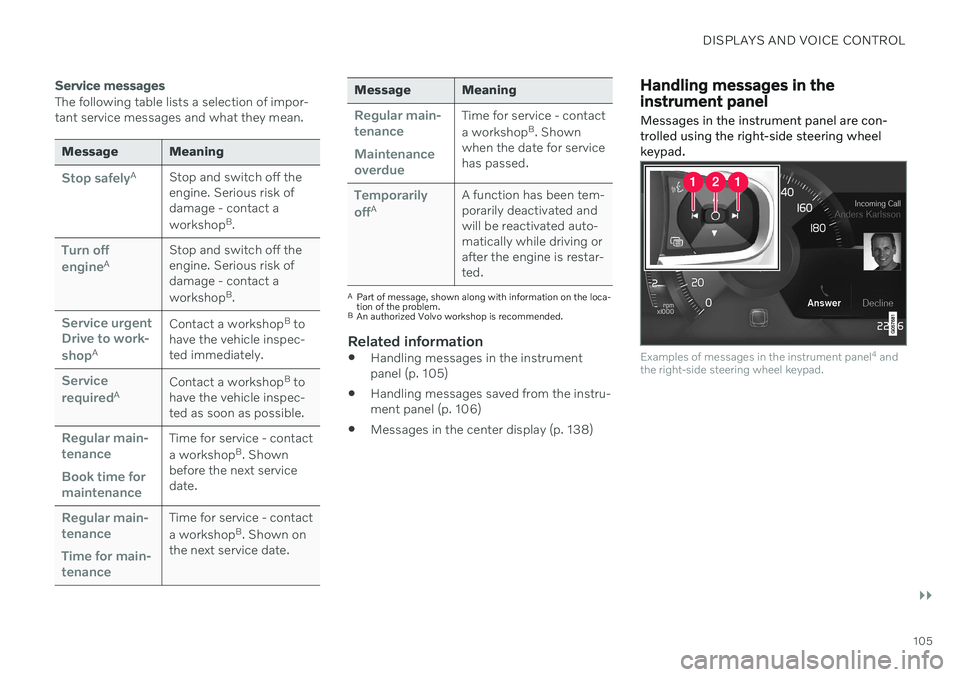
Messages in the instrument panel are con- trolled using the right-side steering wheelkeypad.
Examples of messages in the instrument panel 4
and
the right-side steering wheel keypad.
Page 108 of 661

||
DISPLAYS AND VOICE CONTROL
106
Examples of messages in the instrument panel5
and
the right-side steering wheel keypad. The illustration is generic - details may vary according to vehiclemodel.
Left/right
Confirm
Some messages in the instrument panel con- tain one or more buttons for e.g. confirmingthe message or accepting a request.
Handling new messages
For messages with buttons:
1. Navigate between the buttons by tapping left or right (1). 2. Confirm your selection by pressing con-
firm (2).
> The message will disappear from theinstrument panel.
For messages without buttons:
–Close the message by pressing confirm (2) or let the message automatically time-out after a short period.
> The message will disappear from the instrument panel.
Messages that need to be saved are stored in the
Car Status app, which can be opened
from the App view in the center display. The message
Vehicle message stored in Car
Status app will simultaneously appear in the
center display.
Related information
Messages in the instrument panel (p. 104)
Handling messages saved from the instru- ment panel (p. 106)
Messages in the center display (p. 138)
Handling messages saved from the instrument panel
Messages saved from the instrument panel and center displays are handled in the centerdisplay.
Saved messages can be viewed in the Car Status
app.
The messages displayed in the instrument panel thatneed to be saved are stored in the
Car Status app in the
center display. The message
Vehicle message stored in Car Status app will simulta-
neously appear in the center display.
4 With 8" instrument panel.
5 With 12" instrument panel.
Page 109 of 661

DISPLAYS AND VOICE CONTROL
107
Reading saved messages
To read a saved message immediately:
–Tap the button to the right of the messageVehicle message stored in Car Status app in the center display.
> The saved message will be displayed in the
Car Status app.
To read saved messages at a later time: 1. Open the
Car Status app from App view
in the center display.
> The app will open in the bottom tile of Home view.
2. Select the
Messages tab in the app.
> A list of saved messages will be dis- played.
3. Tap a message to expand/minimize it. > More information about the messagewill appear in the list and the image to the left of the app will display informa-tion about the message in graphic form.
Handling saved messages
In expanded form, some messages have two buttons available for booking service or read-ing the Owner's Manual. Booking service for saved messages:
–With the message in expanded form, tapRequest appoint./Call to make
Appointment6 for assistance booking
service. > With
Request appoint.: TheAppointments tab will open in the app
and create a request for a service/repair appointment. With
Call to make Appointment: The
phone app will open and call a service center to make an appointment forservice or repairs.
Reading the Owner's Manual for saved mes-sages:
–With the message in expanded form, tapOwner's manual to read relevant infor-
mation about the message in the Owner's Manual.
> The Owner's Manual will open in the center display and provide information related to the message.
Saved messages in the app are automatically deleted each time the engine is started.
Related information
Messages in the instrument panel (p. 104)
Handling messages in the instrument panel (p. 105)
Messages in the center display (p. 138)
6
Market dependent. Volvo ID and selected workshop also need to be registered.
Page 110 of 661

DISPLAYS AND VOICE CONTROL
108
Center display overview
Many of the vehicle's functions can be con- trolled from the center display. The center display and its possibilities are presentedbelow.
Three of the center display's basic views. Swipe to the right/left to access Function or App view
7
.
Page 111 of 661

DISPLAYS AND VOICE CONTROL
* Option/accessory.109
Function view ‒ vehicle functions that can
be activated or deactivated with one tap. Certain functions, called "trigger func-tions", open windows with settingsoptions. One example is the
Camera. Set-
tings for the head-up display * are also
started from Function view, but adjusted using the right-side steering wheel key-pad.
Home view ‒ the initial view displayed
when the screen is turned on.
App view – shows downloaded apps (third-party apps) as well as apps for inte-grated functions, such as
FM radio. Tap
an app icon to open that app.
Status bar ‒ current vehicle activities are
shown at the top of the screen. Network and connection information is shown tothe left of the status bar. Media-relatedinformation, the clock and informationabout background activities are shown tothe right.
Top view ‒ pull the tab down to open Top
view. From here, you can access Settings,Owner's manual, Profile and messages
stored in the vehicle. In certain cases, con- textual setting (e.g.
Navigation Settings)
and the contextual Owner's Manual (e.g.
Navigation Manual) can also be accessed
in Top view.
Navigation ‒ takes you to map navigation
with e.g. Sensus Navigation *. Tap the tile
to expand it.
Media ‒ most recently used media-related
apps. Tap the tile to expand it.
Phone ‒ used to access phone-related
functions. Tap the tile to expand it.
Fourth tile ‒ most recently used apps or
vehicle functions not associated with the other tiles. Tap the tile to expand it.
Climate row - information and direct inter- action to set temperature and seat heating for example *. Tap the symbol in the center
of the climate bar to open Climate view and additional setting options.
NOTE
The climate system can be used to cool down the media system in the center dis-play if needed. In these cases, the message
Climate system Cooling the
infotainment system will be shown in the
instrument panel.
Related information
Handling the center display (p. 110)
Navigating in the center display's views (p. 113)
Function view in the center display(p. 120)
Apps (p. 450)
Symbols in the center display status bar(p. 122)
Changing settings in the center display'sTop view (p. 130)
Opening contextual setting in the centerdisplay (p. 131)
Owner's Manual in the center display(p. 17)
Media player (p. 469)
Phone (p. 485)
Climate system controls (p. 210)
Turning off and adjusting the volume ofthe center display system sounds(p. 129)
Changing the appearance of the centerdisplay (p. 129)
Changing system language (p. 130)
Changing system units of measurement(p. 130)
Cleaning the center display (p. 608)
Messages in the center display (p. 138)
7
In right-hand drive vehicles, these views are mirror images of the ones shown here.
Page 112 of 661

DISPLAYS AND VOICE CONTROL
110
Handling the center displayMany of the vehicle's functions and features can be controlled and adjusted from the cen-ter display. The center display is atouchscreen that reacts to taps and othergestures.
Using the center display's touchscreen
The screen reacts differently depending on whether it is touched by dragging, swiping or tapping. It is possible to e.g. move betweendifferent views, mark objects and scroll in alist by touching the screen in various ways. An infrared light curtain just above the surface of the screen enables the screen to detectwhen a finger is directly in front of the screen.This technology makes it possible to use thescreen even while wearing gloves. Two people can interact with the screen at the same time, e.g. to adjust climate system set-tings for both the driver and passenger sides.
CAUTION
Do not use sharp objects on the screen as this could cause scratches.
The following table presents the various pro- cedures for using the screen:
Procedure Gesture Result
Tap once. Marks an object, confirms a selection or activates a function.
Double-tap. Zooms in on a digital object, such as a map.
Press and hold. Grabs hold of an object so it can be moved. Can be used to move apps or points on a map. Press and hold
your finger on the screen and drag the object to the desired position.
Tap once with two fingers.Zooms out from a digital object, such as a map.
Page 113 of 661

DISPLAYS AND VOICE CONTROL
}}
111
Procedure Gesture Result
Drag Moves between screen views or scrolls in a list, text or a view. Press and hold to drag apps or points on amap. Drag horizontally or vertically over the screen.
Swipe Moves between screen views or scrolls in a list, text or a view. Drag horizontally or vertically over thescreen. Note that touching the upper part of the screen could cause Top view to open.
Stretch Zooms in.
Pinch Zooms out.
Page 114 of 661

||
DISPLAYS AND VOICE CONTROL
112
Returning to Home view from another view
1. Briefly press the home button below thecenter display.
> The most recent Home view mode willbe displayed.
2. Press briefly again. > All of the Home view's tiles will returnto standard mode.
NOTE
In Home view's standard mode – short press on the Home button. An animationdescribing access to the various views isshown on the screen.
Scrolling in lists, articles or viewsA scroll indicator is displayed on the screen when it is possible to scroll up or down in theview. Swipe down/up anywhere in the view.
The scroll indicator will be shown in the center dis- play when it is possible to scroll in the view.
Using the center display controls
Temperature control.
Digital controls are available for many of the vehicle's functions. For example, to set thetemperature:
drag the control to the desired tempera-ture,
tap
+ or − to raise or lower the tempera-
ture by degrees, or
tap the desired temperature on the con- trol.
Related information
Activating and deactivating the center dis-play (p. 113)
Moving apps and buttons in the centerdisplay (p. 122)
Using the center display keyboard(p. 124)