2021 VOLVO V60 headlights
[x] Cancel search: headlightsPage 330 of 661

||
DRIVER SUPPORT
328
Pedestrians
Examples of what the system considers to be a pedestrian: clear body contours.
For good performance, the system's function for pedestrian detection needs the clearestpossible information about the contours of thepedestrian's head, arm, shoulders, legs, torsoand lower body in combination with normalhuman movements. In order to detect a pedestrian, there must be a contrast to the background, which coulddepend on clothing, weather conditions, etc. Ifthere is little contrast, the person may bedetected late or not at all, which may result ina delayed reaction from the system or no reac-tion at all. City Safety can detect pedestrians even in dark conditions if they are illuminated by thevehicle's headlights.
WARNING
City Safety is supplementary driver sup- port, but it cannot detect all pedestrians inall situations and, for example, cannot see:
partially obscured pedestrians, people in clothing that hides their body con-tour or pedestrians shorter than 80 cm(32 in.).
pedestrians if the contrast to thepedestrian's background is poor.
pedestrians who are carrying largeobjects.
Warnings and brake interventions may occur late or not at all. The driver is alwaysresponsible for ensuring that the vehicle isdriven correctly and with a safety distancesuitable for the speed.
Large animals
Examples of what City Safety would interpret as a large animal: stationary or moving slowly and withclear body contours.
For good performance, the system's function for detecting large animals (e.g. moose,horses, etc.) needs the clearest possible infor-mation about body contours. This entailsbeing able to detect the animal straight fromthe side in combination with normal move-ments for that animal. If parts of the animal's body are not visible to the function's camera, the system will not beable to detect the animal. City Safety can detect large animals even in dark conditions if they are illuminated by thevehicle's headlights.
Page 331 of 661
DRIVER SUPPORT
329
WARNING
City Safety is supplementary driver sup- port, but it cannot detect all large animalsin all situations and, for example, cannotsee: partially obscured larger animals.
larger animals seen from the front or from behind.
running or fast moving larger animals.
larger animals if the contrast to the ani-mal's background is poor.
smaller animals such as cats and dogs.
Warnings and brake interventions may occur late or not at all. The driver is alwaysresponsible for ensuring that the vehicle isdriven correctly and with a safety distancesuitable for the speed.
Related information
City Safety
™ (p. 323)
City Safety limitations (p. 333)
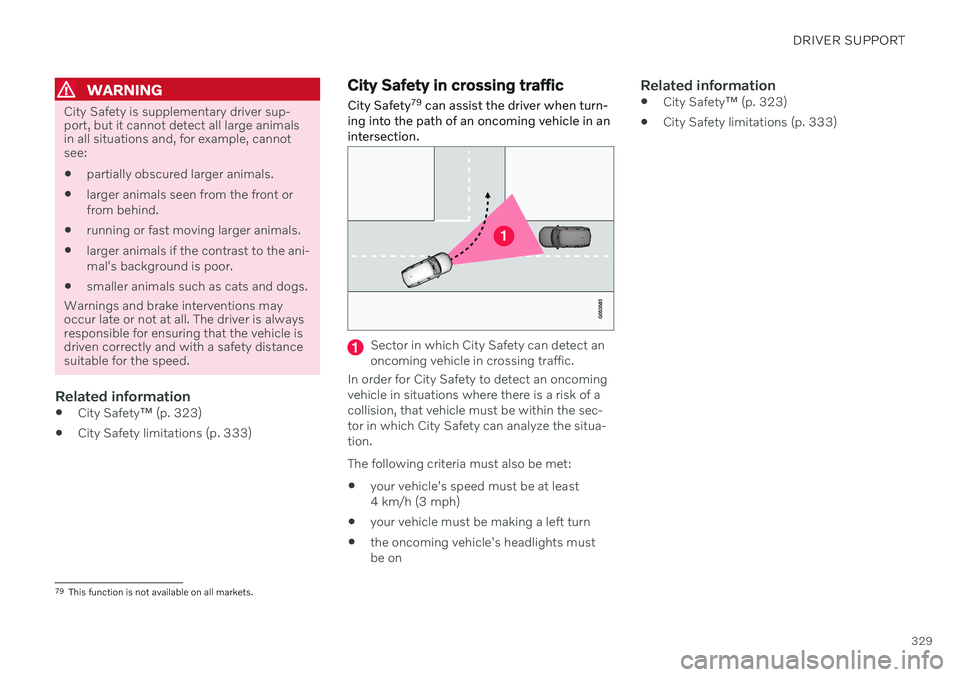
City Safety in crossing traffic City Safety 79
can assist the driver when turn-
ing into the path of an oncoming vehicle in an intersection.
Sector in which City Safety can detect an oncoming vehicle in crossing traffic.
In order for City Safety to detect an oncomingvehicle in situations where there is a risk of acollision, that vehicle must be within the sec-tor in which City Safety can analyze the situa-tion. The following criteria must also be met:
your vehicle's speed must be at least 4 km/h (3 mph)
your vehicle must be making a left turn
the oncoming vehicle's headlights mustbe on
Related information
City Safety
™ (p. 323)
City Safety limitations (p. 333)
79
This function is not available on all markets.
Page 332 of 661

DRIVER SUPPORT
330
Limitations of City Safety in crossing traffic
In certain situations, it may be difficult for
City Safety to help the driver avoid a collisionwith crossing traffic.
For example:
On slippery roads when Electronic Stabil- ity Control (ESC) is actively operating.
If an approaching vehicle is detected at alate stage.
If the oncoming vehicle is partiallyobstructed by another vehicle or object.
If the oncoming vehicle's headlights areoff.
If the oncoming vehicle is moving errati-cally and e.g. suddenly changes lanes at alate stage.
NOTE
The function uses the vehicle's camera and radar sensor, which has certain generallimitations.
Related information
City Safety in crossing traffic (p. 329)
City Safety limitations (p. 333)
Camera/radar sensor limitations (p. 383)
City Safety steering assistance for evasive maneuver City Safety steering assistance can help the driver steer away from a vehicle/obstaclewhen it is not possible to avoid a collision bybraking alone. City Safety steering assistanceis always activated and cannot be switchedoff.
Your vehicle swerves away
Slow-moving/stationary vehicle or obsta- cle.
City Safety helps provide assistance bystrengthening the driver's steering move-ments, but only if the driver has begun evasiveaction and the system detects that the driver'ssteering movements are not sufficient to avoida collision. The brake system is used simultaneously to further strengthen steering movements. The
Page 334 of 661

||
DRIVER SUPPORT
332City Safety will not intervene to automatically apply the brakes if it is possible for the driverto avoid a collision by steering the vehicle. However, if City Safety determines that an evasive maneuver would not be possible dueto traffic in the adjacent lane(s), the functioncan assist the driver by automatically startingto apply the brakes at an earlier stage.
Related information
City Safety
™ (p. 323)
City Safety limitations (p. 333)
City Safety braking for oncoming vehicles City Safety can help you apply the brakes for an oncoming vehicle in your lane.
If an oncoming vehicle veers into your lane and a collision is unavoidable, City Safety canhelp reduce your vehicle's speed to attempt tomitigate the force of the collision.
Own vehicle
Oncoming vehicles
The following criteria must be met for the function to work:
your vehicle's speed must be above4 km/h (3 mph)
the road must be straight
your lane must have clear side lane mark-ings
your vehicle must be positioned straight inyour lane
the oncoming vehicle must be positionedwithin your vehicle's lane markings
the oncoming vehicle's headlights mustbe on
the function can only handle “front-to-front” collisions
the function can only detect vehicles withfour wheels.
WARNING
Warnings and brake interventions due to an imminent collision with an oncomingvehicle always come very late.
Related information
City Safety
™ (p. 323)
City Safety limitations (p. 333)
Page 397 of 661

STARTING AND DRIVING
}}
* Option/accessory.395
Ignition modes The vehicle's ignition can be put in various modes (levels) to make different functionsavailable.
To enable the use of a limited number of func- tions when the engine is not running, the igni-tion can be put in one of three different levels:0, I and II. These levels are referred to as "igni-
tion modes" in the Owner's Manual. The following table shows which functions are available in each ignition mode:
Mode Functions
0 The odometer, clock and tem- perature gauge are illumi- nated A
.
The power
* seats can be
adjusted.
The power windows can be used.
The center display is activated and can be used A
.
The infotainment system canbe used A
.
In this mode, the functions are available for a limited time andthen switch off automatically.Mode Functions
I The panoramic roof, power windows, 12-volt electricalsocket in the passenger com-partment, Bluetooth, naviga-tion, phone, blower and wind-shield wipers can be used.
The power seats can beadjusted.
The 12-volt electrical socket
* in
the cargo compartment can beused.
Electrical current will be taken
from the battery in this ignitionmode.
II The headlights illuminate.
Warning/indicator lights illumi-nate for 5 seconds.
A number of other systems areactivated. However, seat andrear window heating can onlybe activated when the engineis running.
This ignition mode uses a lot of
current from the battery andshould be avoided wheneverpossible!
A Also activated when the door is opened.
Page 433 of 661

STARTING AND DRIVING
}}
431
Related information
Refilling coolant (p. 582)
Driving with a trailer (p. 434)
Preparing for a long trip (p. 424)
Battery drain
The electrical functions in the vehicle drain the battery to varying degrees. Avoid usingignition mode II when the engine is switched
off. Use ignition mode I instead, as this uses
less electrical current.
Note that certain accessories may also drain power from the electrical system. Do not usefunctions that use a lot of electrical currentwhen the engine is turned off. Examples ofsuch functions are: blower
headlights
windshield wipers
audio system (especially at high volume).
If the starter battery voltage is low, a message is shown in the driver display. The vehicle'senergy-saving function will then turn off orreduce certain functions, such as the blowerand/or the audio system.
–To charge the battery, start the engine and let it run for at least 15 minutes (drivingcharges the battery faster than letting theengine idle).
Related information
Starter battery (p. 584)
Ignition modes (p. 395)
Jump starting using another battery If the start battery is discharged, current from another battery can be used to start the vehi-cle.
Jumper cable connecting points. Engine compart- ment appearance may vary depending on vehiclemodel and equipment level.
To avoid short circuits or other damage, the following steps are recommended when jumpstarting the battery using another battery:
1. Put the ignition in mode
0.
2. Make sure the auxiliary battery (the bat- tery used to jump start the discharged battery) has a voltage of 12 volts.
Page 569 of 661

MAINTENANCE AND SERVICE
}}
567
Periodic maintenance helps minimize emissions
NOTE
Refer to your Service and Warranty Booklet for a comprehensive serviceand maintenance schedule up to240,000 km (150,000 miles). Thisprogram contains inspections and ser-vices necessary for the proper functionof your vehicle and includes compo-nents that affect vehicle emissions.
The Warranty and Service RecordsInformation booklet also containsdetailed information concerning thewarranties that apply to your vehicle.
On-board Diagnostic SystemOBD II is part of your vehicle's computerized engine management system. It stores diag-nostic information about your vehicle's emis-sion controls. It can light the Check Enginelight (MIL) if it detects an emission control"fault." A "fault" is a component or systemthat is not performing within an expectedrange. A fault may be permanent or temporary.OBD II will store a message about any fault.
Emission inspection readiness
How do states use
OBD II for emission
inspections?
Many states connect a computer directly to a vehicle's OBD II system. The inspector canthen read "faults." In some states, this type ofinspection has replaced the tailpipe emissiontest.
How can my vehicle fail OBD II emission
inspection?
Your vehicle can fail OBD II emission inspec- tion for any of the following reasons: If your Check Engine (MIL) light is lit, your vehicle may fail inspection.
If your vehicle's Check Engine light was lit,but went out without any action on yourpart, OBD II will still have a recorded fault.Your vehicle may pass or fail, dependingon the inspection practices in your area.
If you had recent service that required dis-connecting the battery, OBD II diagnosticinformation may be incomplete and "notready" for inspection. A vehicle that is notready may fail inspection.
How can I prepare for my next
OBD II
emission inspection?
If your Check Engine (MIL) light is lit or was lit but went out without service, have your vehicle diagnosed and, if necessary,serviced by a qualified Volvo technician.
If you recently had service for a lit CheckEngine light, or if you had service thatrequired disconnecting the battery, aperiod of driving is necessary to bring theOBD II system to "ready" for inspection.Two half-hour trips of mixed stop-and-go/highway driving are typically needed toallow OBD II to reach readiness. YourVolvo retailer can provide you with moreinformation on planning a trip.
Maintain your vehicle in accordance withyour vehicle's maintenance schedule.
Owner maintenancePeriodic maintenance requirements and inter-vals are described in your vehicle's Warrantyand Service Records Information booklet. The following points can be carried out between the normally scheduled maintenanceservices.
Each time the vehicle is refueled:
Check the engine oil level.
Clean the windshield, windshield wipers, headlights, and taillights.
Page 609 of 661

MAINTENANCE AND SERVICE
}}
* Option/accessory.607
Replacing bulbs
This vehicle is equipped with only LED 15
lights, which means it does not have any replaceable bulbs. Contact a workshop 14
if
you experience any problems with the light- ing. If there is a problem with an LED 15
light, the
entire lamp unit will normally need to be replaced.
NOTE
For information on lights not mentioned in the Owner's Manual, contact a Volvoretailer or an authorized Volvo workshop.
NOTE
Exterior lighting such as headlights and taillights may develop temporary conden-sation on the inside of the lens. This is nor-mal. All exterior lighting is designed toresist this. Condensation is normally ven-ted out of the lamp housing once the lighthas been lit for some period of time.
NOTE
Bulbs for Active Bending Lights * contain
traces of mercury and should therefore always be deposited at an authorized Volvoworkshop.
Cleaning the interior
Use cleaning agents and car care products recommended by Volvo. Clean regularly andtreat stains immediately. It is important tovacuum before using a cleaning agent.
CAUTION
Some colored clothing (for example, dark jeans and suede garments) maystain the upholstery. If this occurs, it isimportant to clean and treat theseparts of the upholstery as soon as pos-sible.
Never use strong solvents such aswasher fluid, gasoline, mineral spirit orconcentrated alcohol to clean the inte-rior as this can damage the upholsteryas well as other interior materials.
Never spray cleaning agent directlyonto components that have electricalbuttons and controls. Wipe insteadwith a damp cloth with cleaning agent.
Sharp objects and Velcro can damagethe car's textile upholstery.
Only use cleaning agent on the type ofmaterial it is intended for.
15
LED (Light Emitting Diode)
14 An authorized Volvo workshop is recommended.