2021 VOLVO V60 lock
[x] Cancel search: lockPage 268 of 661
||
KEY, LOCKS AND ALARM
266
Related information
Private Locking (p. 264)
Alarm The alarm emits sound and light signals if anyone without a valid remote key attemptsto break into the vehicle or interferes with thestart battery or alarm siren.
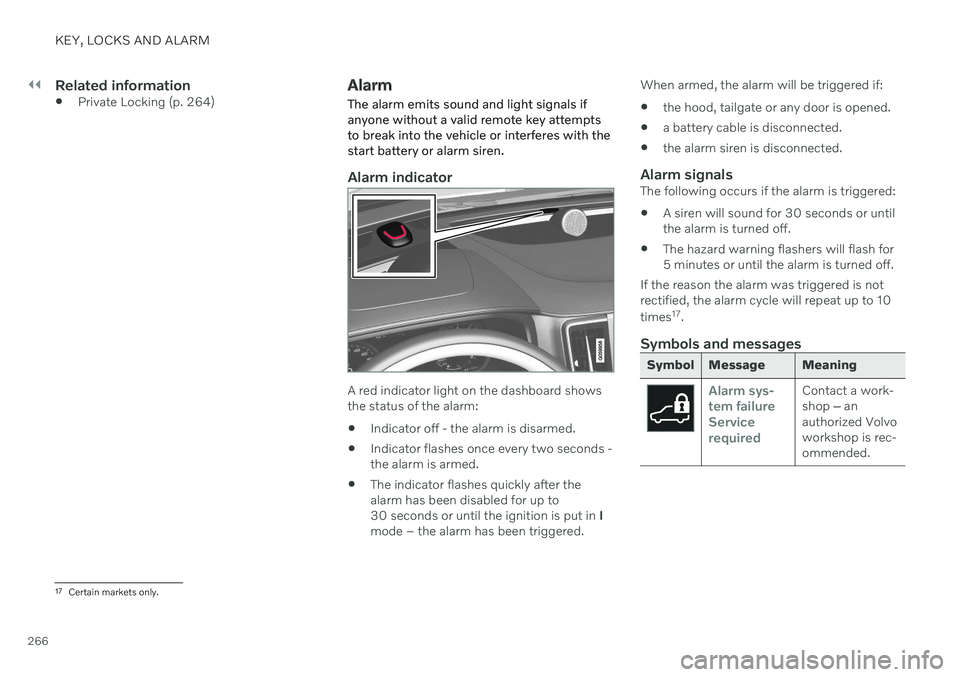
Alarm indicator
A red indicator light on the dashboard shows the status of the alarm:
Indicator off - the alarm is disarmed.
Indicator flashes once every two seconds -the alarm is armed.
The indicator flashes quickly after thealarm has been disabled for up to30 seconds or until the ignition is put in
I
mode – the alarm has been triggered. When armed, the alarm will be triggered if:
the hood, tailgate or any door is opened.
a battery cable is disconnected.
the alarm siren is disconnected.
Alarm signalsThe following occurs if the alarm is triggered:
A siren will sound for 30 seconds or untilthe alarm is turned off.
The hazard warning flashers will flash for5 minutes or until the alarm is turned off.
If the reason the alarm was triggered is notrectified, the alarm cycle will repeat up to 10 times 17
.
Symbols and messages
Symbol Message Meaning
Alarm sys- tem failureServicerequiredContact a work- shop ‒ an
authorized Volvoworkshop is rec-ommended.
17 Certain markets only.
Page 269 of 661

KEY, LOCKS AND ALARM
267
NOTE
Do not attempt to repair or alter any of the components in the alarm system yourself.Any such attempt could affect the termsand conditions of your insurance policy.
Related information
Arming and disarming the alarm (p. 267)
Arming and disarming the alarm
The alarm is armed when the vehicle is locked and disarmed when the vehicle isunlocked. The alarm can also be disarmedwithout a functioning key.
Arming and disarming the alarmThe alarm is armed when the vehicle is locked and disarmed when the vehicle is unlocked.
Disarming the alarm without a functioning remote key
The vehicle can be unlocked and disarmed even if the remote key is not functioning e.g. ifthe battery is discharged.
1. Open the driver's door using the detacha- ble key blade.
> This will trigger the alarm.
Location of the backup key reader in the cup holder.
2. Place the remote key on the key symbol inthe backup reader in the tunnel console's cup holder. 3. Turn the start knob clockwise and release.
> The alarm will be disarmed.
Turning off a triggered alarm
–Press the unlock button on the remote key or put the ignition into mode I by turning
the start knob clockwise and then releas-ing it.
Related information
Alarm (p. 266)
Page 274 of 661

||
DRIVER SUPPORT
* Option/accessory.
272 additional power to wheels that are not spin- ning. This function can also help prevent the wheels from spinning while the vehicle is accelerating.
Engine drag control
Engine drag control (EDC
3
) can help prevent
inadvertent wheel lock, e.g. after downshiftingor using engine braking when driving at lowspeeds on a slippery surface. Inadvertent wheel lock while driving could impair the driver's ability to steer the vehicle.
Trailer Stability Assist *4
Trailer Stability Assist (TSA
5
) is designed to
help stabilize a vehicle that is towing a trailer ifthe vehicle and trailer have begun to sway.
NOTE
Trailer Stability Assist is deactivated if ESC
Sport Mode is activated.
Related information
Driver support systems (p. 270)
Activating or deactivating Sport mode for Electronic Stability Control (p. 273)
Electronic Stability Control symbols andmessages (p. 274)
Trailer Stability Assist
* (p. 436)
Electronic Stability Control in sport mode The stability system (ESC 6
) is always acti-
vated and cannot be switched off. However, the driver can select
ESC Sport Mode,
which offers more active driving characteris- tics.
With the ESC Sport Mode sub-function
selected, intervention from the system is reduced and more lateral movement is permit-ted, giving the driver more control of the vehi-cle than usual. When
ESC Sport Mode is selected, the func-
tion may seem to be disabled even though it continues to assist the driver.
NOTE
When ESC Sport Mode is selected, the
trailer stabilizer (TSA 7
) is switched off.
ESC Sport Mode also helps provide more
traction, even if the vehicle gets stuck or is driving on a loose surface such as deep snowor loose sand.
3 Engine Drag Control4Trailer Stability Assist is included if the vehicle is equipped with a Volvo original towbar.5 Trailer Stability Assist
6 Electronic Stability Control
7 Trailer Stability Assist
Page 294 of 661

||
DRIVER SUPPORT
* Option/accessory.
292 such as Electronic Stability Control (ESC
45
).
The driver opens the door.
The driver unbuckles the seat belt.
The engine speed (rpm) is too low/high.
One or more of the wheels lose traction.
The brake temperature is high.
The parking brake is applied.
The camera and radar unit is covered by snow or heavy rain (the camera lens/radarwaves are blocked).
Your vehicle's speed goes below 5 km/h(3 mph) and ACC cannot determine if thevehicle ahead is stationary or if it isanother object, e.g. a speed bump.
Your vehicle's speed goes below 5 km/h(3 mph) and the vehicle ahead turns sothat ACC no longer has a vehicle to follow.
Related information
Adaptive Cruise Control
* (p. 286)
Selecting and activating Adaptive Cruise Control
* (p. 289)
Deactivating Adaptive Cruise Control
*
(p. 290)
Adaptive Cruise Control
* limitations
(p. 292)
Adaptive Cruise Control *46
limitations Adaptive Cruise Control (ACC 47
) may have
limited functionality in certain situations.
Steep roads and/or heavy loadsAdaptive Cruise Control is primarily intended to be driven on flat roads. The function maynot be able to maintain the correct time inter-val to the vehicle ahead when driving downsteep hills. The driver should be extra attentiveand prepared to apply the brakes. Do not use Adaptive Cruise Control if the vehi- cle is carrying a heavy load or towing a trailer.
Drive mode unavailableThe Off Road drive mode cannot be selected
if Adaptive Cruise Control is activated.
WARNING
This is not a collision avoidance sys- tem. The driver is always responsibleand must intervene if the system failsto detect a vehicle ahead.
The function does not brake for peopleor animals and does not brake for smallvehicles, such as bikes and motorcy-cles. Similarly, it does not brake for lowtrailers, oncoming, slow-moving or sta-tionary vehicles and objects.
Do not use the function in demandingsituations, such as in city traffic, atintersections, on slippery surfaces,with a lot of water or slush on the road,in heavy rain/snow, in poor visibility, onwinding roads, or on on/off ramps.
NOTE
The function uses the vehicle's camera and radar sensor, which has certain generallimitations.
Related information
Adaptive Cruise Control
* (p. 286)
Camera/radar sensor limitations (p. 383)
45
Electronic Stability Control
46 Depending on market, this function can be either standard or optional.
Page 297 of 661

DRIVER SUPPORT
* Option/accessory.295
Symbol Message Meaning
The symbol is WHITE The vehicle is maintaining the stored speed.
Adaptive Cruise Contr. Unavailable
The symbol is GRAY Adaptive Cruise Control is in standby mode.
Adaptive Cruise Contr. Service required
The symbol is GRAYThe system is not functioning as intended. Contact a workshop
‒ an authorized Volvo
workshop is recommended.
Windscreen sensor Sensor blocked, see Owner's manualClean the windshield in front of the camera and radar sensors.
A text message can be erased by briefly press- ing the
button in the center of the right-
side steering wheel keypad. If the message persists: Contact a workshop
‒
an authorized Volvo workshop is recom- mended.
Related information
Adaptive Cruise Control
* (p. 286)
Contacting Volvo (p. 26)
Page 304 of 661

||
DRIVER SUPPORT
* Option/accessory.
302 2. Press the
◀ (1) or ▶ (3) buttons on the
steering wheel to select another function.
> The Pilot Assist symbol and marking (4) in the instrument panel will go out and the stored maximum speed will beerased.
WARNING
With Pilot Assist in standby mode, the driver must intervene and steer andregulate both speed and distance tothe vehicle ahead.
If the vehicle comes too close to a vehi-cle ahead when Pilot Assist is instandby mode, the driver is insteadwarned of the short distance by the Distance Alert
* function.
Related information
Adaptive Cruise Control
* (p. 286)
Selecting and activating Adaptive CruiseControl
* (p. 289)
Switching between cruise control andAdaptive Cruise Control
* in the center dis-
play (p. 293)
Adaptive Cruise Control
* limitations
(p. 292)
Temporarily deactivating steering assis-tance with Pilot Assist
* (p. 303)
Pilot Assist *59
standby mode
Pilot Assist can be deactivated and put in standby mode. This may happen automati-cally or be due to driver intervention.
Standby mode means that the function is selected in the instrument panel but not acti-vated. In standby mode, Pilot Assist will notregulate the speed or distance to the vehicleahead or provide steering assistance.
Standby mode due to action by the
driver
Pilot Assist will be deactivated and put instandby mode if any of the following occurs:
The brakes are applied.
The gear selector is moved to
N.
A turn signal is used for more than1 minute.
The vehicle is driven faster than the setspeed for more than 1 minute.
Automatic standby mode
WARNING
With automatic standby mode, the driver is warned by an acoustic signal and a mes-sage on the instrument panel.
The driver must then regulate vehicle speed, apply the brakes if necessary,and maintain a safe distance to othervehicles.
The function may automatically go intostandby mode if one of the following occurs. One of the systems that Pilot Assist isdependent on stops working, such as Electronic Stability Control 60
.
The driver's hands are not on the steering wheel.
The driver opens the door.
The driver unbuckles the seat belt.
The engine speed (rpm) is too low/high.
One or more of the wheels lose traction.
The brake temperature is high.
The parking brake is applied.
The camera and radar unit is covered bysnow or heavy rain (the camera lens/radarwaves are blocked).
59
Depending on market, this function can be either standard or optional.
Page 306 of 661

DRIVER SUPPORT
* Option/accessory.
304
Pilot Assist *62
limitations
Pilot Assist functionality may be reduced in certain situations.
Pilot Assist is a driver support function designed to simplify driving and assist thedriver in many situations. However, the driveris always responsible for maintaining a suita-ble distance to vehicles or objects around itand ensuring that the vehicle is correctly posi-tioned in the traffic lane.
WARNING
In some situations, Pilot Assist may have trouble helping the driver properly or maybe deactivated automatically – we adviseagainst using Pilot Assist in such cases.Examples of such situations include:
the lane markings are unclear, worn, missing, cross each other, or there aremultiple sets of road markings.
the lane division changes, e.g. whenlanes split or merge, and at off-ramps.
when there is road construction andsudden changes to the road surface,e.g. when the lines may no longer markthe correct route.
edges or other lines than lane markingsare present on or near the road, e.g.curbs, joints or repairs to the road sur-face, edges of barriers, roadside edgesor strong shadows.
the lane is narrow or winding.
the lane contains ridges or holes.
weather conditions are poor, e.g. rain,snow or fog or slush or reduced visibil-
ity with poor light conditions, back- lighting, wet road surface, etc.
The driver should also note that Pilot Assist has the following limitations:
High curbs, roadside barriers, tempo- rary obstacles (traffic cones, safety bar-riers, etc.) are not detected. Alterna-tively, they may be detected incorrectlyas lane markings, with a subsequentrisk of contact between the vehicle andsuch obstacles. The driver is responsi-ble for ensuring that the vehicle main-tains a suitable distance from suchobstacles.
The camera and radar sensors do nothave the capacity to detect all oncom-ing objects and obstacles in trafficenvironments, e.g. potholes, stationaryobstacles or objects that completely orpartially block the route.
Pilot Assist does not "see" pedestrians,animals, etc.
The steering assistance is limited inforce, which means that Pilot Assistcannot always help the driver to steerand keep the vehicle within the lane.
In vehicles equipped with Sensus Navigation
*, the function is able to use
62
Depending on market, this function can be either standard or optional.
Page 308 of 661

DRIVER SUPPORT
* Option/accessory.
306
Pilot Assist *63
symbols and
messages
A number of symbols and messages relating to Pilot Assist may be displayed in the instru- ment panel and/or the head-up display *.
Symbol Message Meaning
Gray steering wheel symbol Indicates that steering assistance is deactivated. When Pilot Assist is providing steer-
ing assistance, the steering wheel is green.
Symbol for hands on the steering wheel The system cannot detect the driver's hands on the steering wheel. Place your handson the steering wheel and actively steer the vehicle.
Windscreen sensor Sensor blocked, see Owner's man- ualClean the windshield in front of the camera and radar sensors.
A text message can be erased by briefly press- ing the
button in the center of the right-
side steering wheel keypad. If the message persists: Contact a workshop
‒
an authorized Volvo workshop is recom- mended.
63 Depending on market, this function can be either standard or optional.