2021 VOLKSWAGEN UP! display
[x] Cancel search: displayPage 91 of 211

•Tow-starting and towing ⇒ Tow-starting and towing
Warning and indicator lamp
First read and observe the introductoryinformation and safety warnings⇒
Introduction
Lit upPossible causeSolution
Fault in the automated manual gearbox.
Do not drive on!
Seek expert assistance. Failure to do so can
cause considerable damage to the gearbox
⇒ Fault in the automated manual gearbox.
Gears in the automated manual gearbox
cannot be selected correctly.
Switch the ignition on and off. If the indicator
lamp remains lit up, the automated manual
gearbox should be checked by a qualified
workshop .
Automated manual gearbox temporarily
overheated.
Allow the gearbox to cool down in selector
lever position . If the indicator lamp
remains lit up, the automated manual
gearbox should be checked by a qualified
workshop .
Selector lever for the automated manual
gearbox in position and the brake
pedal not depressed.
To select a position, press the brake pedal
⇒ Braking, stopping and parking.
In conjunction with the yellow indicator
lamp for gearbox temperature :
automated manual gearbox overheated.
Depress the break pedal ⇒ Braking, stopping
and parking and allow the gearbox to cool
down. Do not perform pulling-away
manoeuvres in the meantime. If the indicator
lamp remains lit up, the automated manual
gearbox should be checked by a qualified
workshop .
In conjunction with the flashing display
on the instrument cluster: the selector
lever for the automated manual gearbox
is not in position , prompt to start the
engine.
Move the selector lever to and start the
engine ⇒ Starting and stopping the engine.
FlashesPossible causeSolution
Flashing: vehicle with an automated
manual gearbox is not secured from
rolling away.
Apply the handbrake ⇒ Braking, stopping
and parking.
You are prompted in conjunction with
the indicator lamp to depress the brake
pedal : prompt to start the engine.
Move the selector lever to and start the
engine ⇒ Starting and stopping the engine.
During forward travel: attempt to place
automated manual gearbox selector
lever into position .
Stop the car and move the selector lever to
position so that it can then be moved to
position .
The selector lever for the automated
manual gearbox has been moved to
position or but the brake pedal
was not depressed.
Depress the brake pedal ⇒ Braking,
stopping and parking, move the selector
lever to position and then back to the
required position or .
Rapid acceleration can cause loss of traction and skidding, particularly on slippery roads. This
can cause you to lose control of the vehicle, which can lead to accidents and serious injuries.
•The kickdown function or fast acceleration should only be used if the visibility, weather,
road and traffic conditions permit.
WARNING
Never ride the brake pedal. Do not overuse the brake pedal. Constant braking will cause the
brakes to overheat. This can considerably reduce the brake effect, increase the braking
distance and, in certain circumstances, cause the brake system to fail completely.
WARNING
•Never let the brakes rub by applying light pressure to the brake when it is not necessary to
brake. This will increase levels of wear.
•Before driving down a long, steep gradient, reduce speed and change to a lower gear or in
vehicles with an automated manual gearbox in Tiptronic mode, move the selector lever to a
lower position. This will make use of the engine braking effect and relieve the load on the
brakes. The brakes could otherwise overheat and possibly fail. The brakes should only be
used to slow or stop the vehicle.
NOTICE
Page 94 of 211

Fig. 97 Selector lever for the automated manual gearbox
Fig. 98 Gear shift pattern for the automated manual gearbox
First read and observe the introductoryinformation and safety warnings⇒
Introduction
To move the selector lever out of position N to position D or R, first depress and hold the brake
pedal.
The current gearbox position or the selected gear will be shown in the instrument cluster display if
the ignition is switched on.
Selector
lever
position
DesignationMeaning ⇒
Reverse gearReverse gear is selected.
May only be selected when the vehicle is stationary.
Neutral
The gearbox is in the neutral position. No force is transmitted
to the wheels and the braking effect of the engine is not
available.
Standard forward
driving position
All forward gears are shifted up and down automatically. The
timing of the gear shift is determined by the engine load, your
individual driving style and the speed of the vehicle.
Tiptronic position
for forward travel
(manual shift
programme)
All forward gears can be shifted up and down manually
⇒ Changing gear with Tiptronic. This remains the case until
the system does not perform or prevents a gear change due to
the current driving situation.
If the lever is moved accidentally to N when driving, take your foot off the accelerator. Wait
for the engine revs in the neutral position before selecting a position again.
Changing gear with Tiptronic
Engaging an incorrect selector lever position can cause you to lose control of the vehicle,
which can lead to accidents and serious injuries.
•Never depress the accelerator pedal when selecting a position.
•When the engine is running and a position has been selected, the vehicle starts moving as
soon as the accelerator is depressed.
•Never select the reverse gear while the vehicle is in motion.
WARNING
Unintentional vehicle movements can cause serious injury.
•The driver must never leave the driver seat when the engine is running and a position has
been selected. If you have to leave the vehicle while the engine is running, always firmly
apply the handbrake and move the selector lever to position N.
•Never select position R when the vehicle is in motion.
•Never leave the vehicle if the handbrake is not on. While the is engine running the vehicle
will roll downhill, irrespective of the position selected.
WARNING
Page 96 of 211

Fault in the automated manual gearbox
First read and observe the introductoryinformation and safety warnings⇒
Introduction
Emergency programme
There may be a fault in the system if warning and indicator lamps for the automated manual
gearbox light up in the vehicle cluster ⇒ Warning and indicator lamp. When certain faults occur, the
automated manual gearbox runs in an emergency programme. The vehicle can still be driven in the
emergency programme, but only at reduced speed and not in all gears.
With an automated manual gearbox it may then be the case that the vehicle can no longer be
driven in all gears.
In all cases the automated manual gearbox should be checked by a qualified workshop
immediately.
Overheating in the automated manual gearbox
The automated manual gearbox can overheat, for example if the vehicle regularly pulls off from the
starting position or in stop-and-go traffic. Overheating is indicated by a warning lamp displayed
in the instrument cluster. An acoustic warning may also be heard. Stop the vehicle and allow the
gearbox to cool down ⇒.
The vehicle does not move forwards or backwards even though a position
has been selected
If the vehicle will not move in the required direction, the system may have selected the position
incorrectly. Depress the brake pedal and reselect the position.
If the vehicle still does not move in the required direction, there is a system fault. Seek expert
assistance and have the system checked.
Gear-change indicator (manual gearbox)
First read and observe the introductoryinformation and safety warnings⇒
Introduction
In some vehicles, the instrument cluster will show which gear should be selected while the vehicle
is in motion to reduce fuel consumption.
DisplayMeaning
The current gear is optimal.
A higher gear is recommended.
A lower gear is recommended.
Rapid acceleration can cause loss of traction and skidding, particularly on slippery roads. This
can cause you to lose control of the vehicle, which can lead to accidents and serious injuries.
•Always adjust your driving style in accordance with the flow of traffic.
•The kickdown function or fast acceleration should only be used if the visibility, weather,
road and traffic conditions permit.
•You should never endanger other road users through the acceleration of your vehicle or
through your driving style.
WARNING
If you stop the vehicle on an incline, do not attempt to stop it from rolling back by depressing
the accelerator while a position is still selected. The automated manual gearbox could
overheat and be damaged.
NOTICE
•If the display indicates that the gearbox is overheating for the first time, the vehicle will
have to be parked safely or driven faster than 20 km/h (12 mph).
•If the lamp signal and acoustic warning are repeated approximately every 10 seconds, the
vehicle must immediately be parked safely and the engine switched off. Allow the gearbox
to cool down.
•In order to prevent damage to the gearbox, you should not drive on until the lamp goes out.
You should not pull away or drive the vehicle at very low speeds while the gearbox is
overheated.
NOTICE
Page 97 of 211

Driving in the correct gear can reduce fuel consumption.
The display on the gear-change indicator will disappear when the clutch pedal is depressed.
In some vehicles the gear recommendation may be displayed on the screen of the portable
navigation device (delivered by Volkswagen) ⇒ Accessories, modifications, repairs and renewal of
parts.
Braking, stopping and parking
Introduction
This chapter contains information on the followingsubjects:
⇒ Warning and indicator lamps
⇒ Handbrake
⇒ Parking
⇒ Information on the brakes
⇒ Brake assist systems
⇒ Brake fluid
The brake assist systems are the electronic brake pressure distribution system (EBV), anti-lock
brake system (ABS), the brake assist system (BAS), the electronic differential lock (EDS), traction
control (TC), the traction control system (TCS) and the electronic stabilisation programme (ESC).
Additional information and warnings:
•Pull-away assist systems ⇒ Pull-away assist systems
•Wheels and tyres ⇒ Wheels and tyres
•Accessories, modifications, repairs and renewal of parts ⇒ Accessories, modifications, repairs
and renewal of parts
The gear-change indicator is only designed to assist the driver and cannot replace the driver's
own judgement.
•The driver has full responsibility for selecting the correct gear in all situations, e.g. when
overtaking or when driving up and down hills.
CAUTION
Page 106 of 211

Driving with respect for the environment
Introduction
This chapter contains information on the followingsubjects:
⇒ An economic driving style
⇒ Driving in a fuel-efficient manner
Fuel economy, environmental impact and wear on the engine, brakes and tyres depend largely on
three factors:
•Personal driving style.
•Conditions of use (weather, road surface).
•Technical conditions.
Depending on your personal driving style, a few simple measures can help save fuel by up to 25%.
An economic driving style
First read and observe the introductoryinformation and safety warnings⇒
Introduction
Changing gear earlier
In principle, the highest gear is always the most economical gear. A rule of thumb for most vehicles:
at a speed of 30 km/h (19 mph) drive in 3rd gear, at 40 km/h (25 mph) in 4th gear and at 50 km/h
(31 mph) in 5th gear.
If the traffic and driving situation allows it, skipping gears when changing up a gear will also save
fuel.
Do not drive gears to their upper limit. Use first gear only for pulling away then quickly change up to
second gear. Avoid using the kickdown function in vehicles with an automated manual gearbox.
Vehicles with a gear display help to improve fuel economy by indicating the optimum time to
change gear.
Rolling to a stop
Taking your foot off the accelerator will interrupt the supply of fuel to the engine and decrease fuel
consumption.
Therefore, in situations such as approaching a red traffic light, let the vehicle roll without applying
the accelerator. Only press on the clutch pedal to disengage if the vehicle becomes too slow or if
the stopping distance is longer. The engine will then run at idling speed.
Switch off the engine in situations when the vehicle might be stationary for a long time, e.g. at a
level crossing. In vehicles with an active start/stop system, the engine will switch off automatically
when the vehicle is stationary.
Thinking ahead when driving, and driving with the flow of traffic
Applying the brake and accelerator too often will significantly increase fuel consumption. By thinking
ahead when driving and by maintaining a sufficient distance from the vehicle in front, simply
keeping your foot off the accelerator will stop the speed from fluctuating. This means that active
braking and accelerating is not always necessary.
Driving smoothly and evenly
Even more important than speed is smoothness: the more evenly you drive, the lower your fuel
consumption will be.
When driving on a motorway, it is much more effective to drive at a constant moderate speed than
to drive with constant acceleration and braking. As a rule, driving with a constant style will get you
to your destination just as quickly.
The cruise control system will help you to maintain a constant driving style.
Using additional equipment in moderation
It is always important to be comfortable in your vehicle, but it is also important to consider the
environment.
Some equipment will increase fuel consumption when switched on:
Adapt your speed and distance from the vehicles ahead to suit visibility, weather, road and
traffic conditions.
WARNING
Page 110 of 211

Indicator lamps
First read and observe the introductoryinformation and safety warnings⇒
Introduction
Lit upPossible causeSolution
The start/stop system is not available.
Automatic engine stop active.
The start/stop system is available, but an
automatic engine stop is not possible.
Check whether all technical requirements
have been fulfilled. If not, remedy any
shortfalls ⇒ Start/stop system.
Start/stop system cannot start the engine.
Start the engine again manually using the
vehicle key ⇒ Starting and stopping the
engine.
Fault in the alternator.⇒ Vehicle battery
FlashesPossible causeSolution
Start/stop system not available.Proceed to a qualified workshop.
Several warning and indicator lamps will light up briefly as a functional check when the ignition is
switched on. They will switch off after a few seconds.
Start/stop system
Fig. 103 In the upper part of the centre console: button for the start/stop system
First read and observe the introductoryinformation and safety warnings⇒
Introduction
When the start/stop system is active, the engine is switched off whenever the vehicle is stationary.
The engine then restarts automatically as soon as it is required.
The function is automatically activated every time the ignition is switched on. The instrument cluster
display shows information about the current status ⇒ Indicator lamps.
Always switch off the start/stop system manually when driving through water.
Vehicles with a manual gearbox
•When the vehicle is stationary, disengage the gear and release the clutch pedal. The engine is
stopped.
The intelligent technology of the pull-away assist systems cannot overcome the laws of
physics. Never let the extra convenience afforded by pull-away assist systems tempt you into
taking any risks when driving – this can cause accidents.
•Unintentional vehicle movements can cause serious injury.
•The pull-away assist systems cannot replace the full concentration of the driver.
•Always adapt your speed and driving style to suit visibility, weather, road and traffic
conditions.
•A pull-away assist system cannot hold the vehicle in all hill start situations or brake it
sufficiently on all slopes going downhill (e.g. if the ground is slippery or icy).
WARNING
Failure to observe the warning lamps could lead to your vehicle breaking down in traffic, and
to accidents and serious injuries.
•Never ignore any warning lamps that are lit up.
•Stop the vehicle as soon as it is possible and safe to do so.
WARNING
Failure to observe the illuminated indicator lamps could lead to the vehicle being damaged.
NOTICE
Page 114 of 211
FunctionWhat to do when the ignition is switched on
Switching the display
off manually
If applicable, press the portable navigation unit screen (delivered by
Volkswagen)
Switching off the
ParkPilot
automatically:
After shifting out of reverse gear.
Things to note about ParkPilot
•In some cases, the ParkPilot registers water and ice on the ultrasound sensors as an obstacle.
•The acoustic signal will become quieter after a few seconds if the distance remains the same.
The volume will remain constant if the acoustic warning is continuous.
•As soon as the vehicle moves away from the obstacle again, the intermittent acoustic warning is
switched off automatically. If the vehicle approaches the obstacle again, the acoustic warning is
switched on automatically.
•A Volkswagen dealership can adjust the volume of the acoustic signals.
If there is a function fault in the ParkPilot, an acoustic warning is emitted for approximately 3
seconds when switched on for the first time. The ParkPilot should be immediately checked by a
qualified workshop.
Acoustic and optical ParkPilot signals at the rear of the vehicle
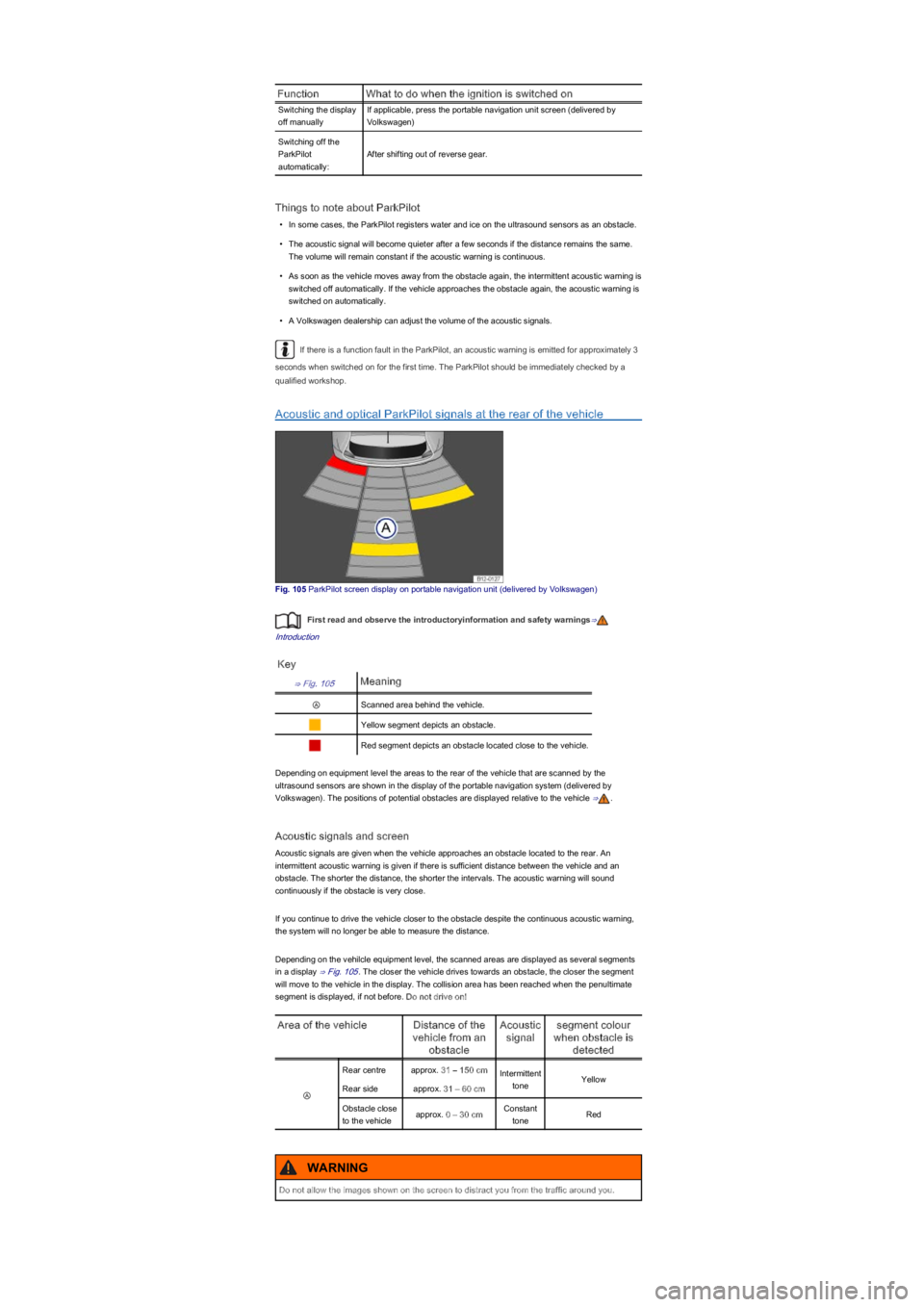
Fig. 105 ParkPilot screen display on portable navigation unit (delivered by Volkswagen)
First read and observe the introductoryinformation and safety warnings⇒
Introduction
Key
⇒ Fig. 105Meaning
ⒶScanned area behind the vehicle.
Yellow segment depicts an obstacle.
Red segment depicts an obstacle located close to the vehicle.
Depending on equipment level the areas to the rear of the vehicle that are scanned by the
ultrasound sensors are shown in the display of the portable navigation system (delivered by
Volkswagen). The positions of potential obstacles are displayed relative to the vehicle ⇒.
Acoustic signals and screen
Acoustic signals are given when the vehicle approaches an obstacle located to the rear. An
intermittent acoustic warning is given if there is sufficient distance between the vehicle and an
obstacle. The shorter the distance, the shorter the intervals. The acoustic warning will sound
continuously if the obstacle is very close.
If you continue to drive the vehicle closer to the obstacle despite the continuous acoustic warning,
the system will no longer be able to measure the distance.
Depending on the vehilcle equipment level, the scanned areas are displayed as several segments
in a display ⇒ Fig. 105. The closer the vehicle drives towards an obstacle, the closer the segment
will move to the vehicle in the display. The collision area has been reached when the penultimate
segment is displayed, if not before. Do not drive on!
Area of the vehicleDistance of the
vehicle from an
obstacle
Acoustic
signal
segment colour
when obstacle is
detected
Ⓐ
Rear centreapprox. 31 – 150 cmIntermittent
toneYellow
Rear sideapprox. 31 – 60 cm
Obstacle close
to the vehicleapprox. 0 – 30 cmConstant
toneRed
Do not allow the images shown on the screen to distract you from the traffic around you.
WARNING
Page 117 of 211
If, in a potential collision scenario, the city emergency brake function detects that the driver is
applying the brakes with insufficient pressure, the system can increase the brake pressure in order
to reduce speed ahead of the collision. Hence the system can help minimise the consequences of
an accident.
Additional information and warnings:
•Exterior views ⇒ Exterior views
•Lower section of the centre console ⇒ Overview of the centre console
•Instrument cluster ⇒ Instrument cluster
•Accessories, modifications, repairs and renewal of parts ⇒ Accessories, modifications, repairs
and renewal of parts
The brake pedal travel decreases when the city emergency brake function is triggered. This
may make the brake pedal feel stiffer.
Automatic brake intervention by the city emergency brake function can be stopped by using
the clutch, the accelerator or steering intervention.
Unusual noises may be heard if the city emergency brake function is applying an automatic
braking procedure. This is normal and the noises are caused by the braking system.
Warning and indicator lamps
First read and observe the introductoryinformation and safety warnings⇒
Introduction
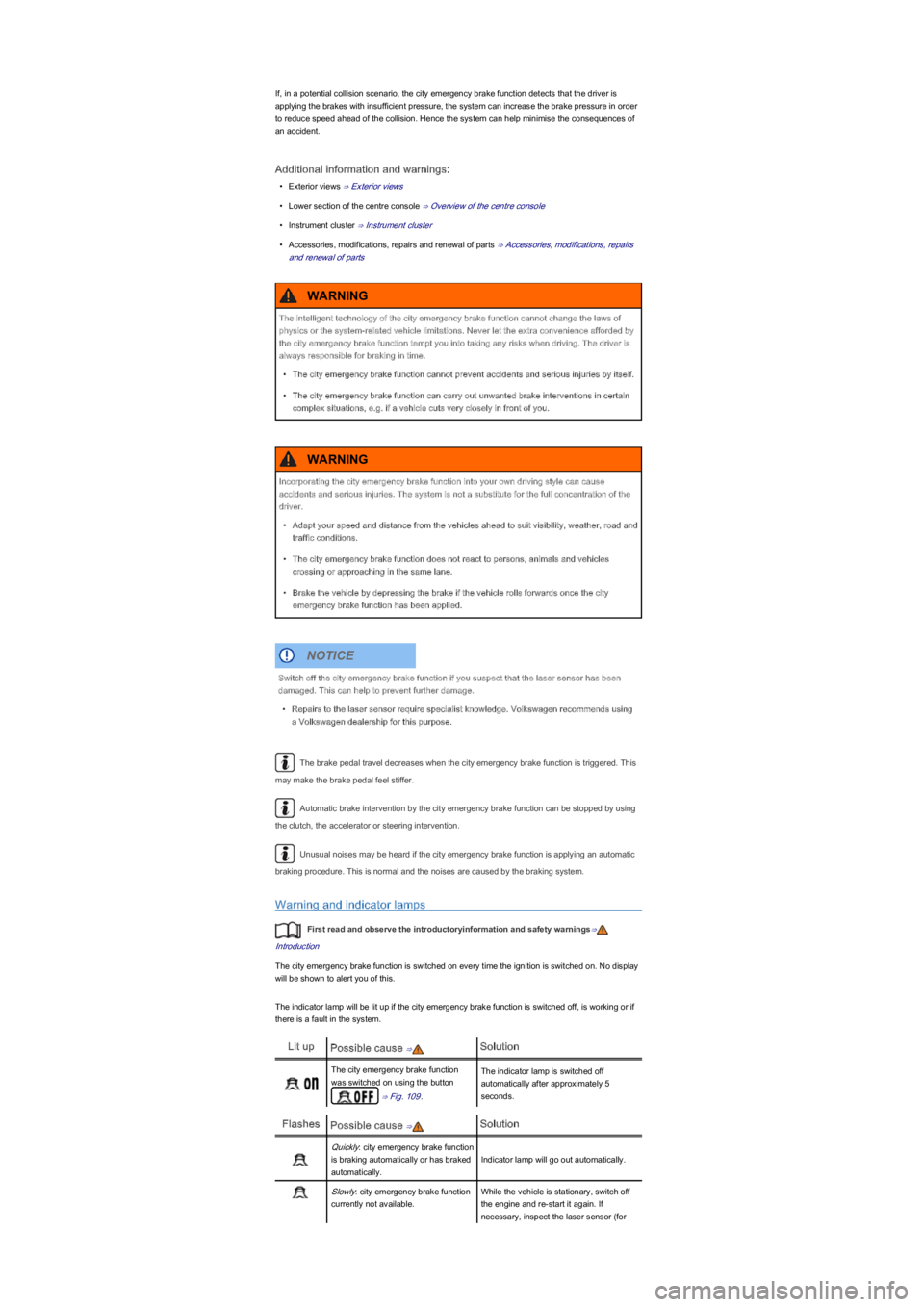
The city emergency brake function is switched on every time the ignition is switched on. No display
will be shown to alert you of this.
The indicator lamp will be lit up if the city emergency brake function is switched off, is working or if
there is a fault in the system.
Lit upPossible cause ⇒Solution
The city emergency brake function
was switched on using the button
⇒ Fig. 109.
The indicator lamp is switched off
automatically after approximately 5
seconds.
FlashesPossible cause ⇒Solution
Quickly: city emergency brake function
is braking automatically or has braked
automatically.
Indicator lamp will go out automatically.
Slowly: city emergency brake function
currently not available.
While the vehicle is stationary, switch off
the engine and re-start it again. If
necessary, inspect the laser sensor (for
The intelligent technology of the city emergency brake function cannot change the laws of
physics or the system-related vehicle limitations. Never let the extra convenience afforded by
the city emergency brake function tempt you into taking any risks when driving. The driver is
always responsible for braking in time.
•The city emergency brake function cannot prevent accidents and serious injuries by itself.
•The city emergency brake function can carry out unwanted brake interventions in certain
complex situations, e.g. if a vehicle cuts very closely in front of you.
WARNING
Incorporating the city emergency brake function into your own driving style can cause
accidents and serious injuries. The system is not a substitute for the full concentration of the
driver.
•Adapt your speed and distance from the vehicles ahead to suit visibility, weather, road and
traffic conditions.
•The city emergency brake function does not react to persons, animals and vehicles
crossing or approaching in the same lane.
•Brake the vehicle by depressing the brake if the vehicle rolls forwards once the city
emergency brake function has been applied.
WARNING
Switch off the city emergency brake function if you suspect that the laser sensor has been
damaged. This can help to prevent further damage.
•Repairs to the laser sensor require specialist knowledge. Volkswagen recommends using
a Volkswagen dealership for this purpose.
NOTICE