2021 TOYOTA RAV4 PRIME horn
[x] Cancel search: hornPage 232 of 618

2324-4. Adjusting the steering wheel and mirrors
4-4.Adjusting the steering wheel and mirrors
1Hold the steering wheel and
push the lever down.
2 Adjust to the ideal position by
moving the steering wheel
horizontally and vertically.
After adjustment, pull the lever up
to secure the steering wheel.
To sound the horn, press on or
close to the mark.
Steering wheel
Adjustment procedure
WARNING
■Caution while driving
Do not adjust the steering wheel
while driving.
Doing so may cause the driver to
mishandle the vehicle and cause
an accident, resul ting in death or
serious injury.
■After adjusting the steering
wheel
Make sure that the steering wheel
is securely locked.
Otherwise, the steering wheel
may move suddenly, possibly
causing an accident, and resulting
in death or serious injury. Also,
the horn may not sound if the
steering wheel is not securely
locked.
Sounding the horn
Page 360 of 618

3605-5. Using the driving support systems
detection distance may shorten,
or detection may be impossible.
• Detection may be impossible if
static objects draw too close to the
sensor.
• There will be a short delay
between static object detection
and display (warning buzzer
sounds). Even at low speeds,
there is a possibilit y that the object
will come within 9.8 in. (25 cm)
before the display is shown and
the warning buzzer sounds.
• It might be difficult to hear the buzzer due to the volume of the
audio system or air flow noise of
the air conditioning system.
• It may be difficult to hear the
sound of this system due to the
buzzers of other systems.
■Conditions under which the
function may not function cor-
rectly
Certain vehicle conditions and the
surrounding environment may affect
the ability of a sensor to correctly
detect objects. Particular instances
where this may occur are listed
below.
●There is dirt, snow or ice on a sen-
sor. (Cleaning the sensors will
resolve this problem.)
●A sensor is frozen. (Thawing the
area will resolve this problem.)
In especially cold weather, if a
sensor is frozen the sensor dis-
play may be displayed abnor-
mally, or objects, such as a wall,
may not be detected.
●A sensor is covered in any way.
●When a sensor or the area around
a sensor is extremely hot or cold.
●On an extremely bumpy road, on
an incline, on gravel, or on grass.
●The vicinity of the vehicle is noisy
due to vehicle horns, motorcycle
engines, air brakes of large vehi-
cles, or other l oud noises produc-
ing ultrasonic waves.
●There is another vehicle equipped with parking assist
sensors in the
vicinity.
●A sensor is coated with a sheet of
spray or heavy rain.
●If a sensor is hit by a large amount
of water, such as when driving on
a flooded road.
●If the vehicle is significantly tilted.
●The vehicle is approaching a tall
or curved curb.
●If objects draw too close to the
sensor.
■Objects which may not be prop-
erly detected
The shape of the object may pre-
vent the sensor from detecting it.
Pay particular atte ntion to the fol-
lowing objects:
●Wires, fences, ropes, etc.
●Cotton, snow and other materials
that absorb sound waves
●Sharply-angled objects
●Low objects
●Tall objects with upper sections
projecting outwards in the direc-
tion of your vehicle
People may not be detected if they
are wearing certain types of cloth-
ing.
■Certification (Canada only)
This ISM device complies with
Canadian ICES-001.
Page 372 of 618
3725-5. Using the driving support systems
of water, such as when driving on
a flooded road
• When loaded on ships or trucks
• Moving type aut omatic car wash
• Lift type parking area or multi- story parking lot
• Underground parking area
• Structures on the ground (speed bumps, cat’s eyes, etc.)
• Differences in height
• When moving straight ahead or turning right
• Snow-melting pipes
• Devices for detecting vehicles, such as traffic lights, devices for
detecting traffic congestion, or
devices for detecting empty
spaces in parking areas
• Railroad tracks
• H-shaped steel
• When there are vehicles on both sides, or there is a vehicle that
resembles this vehicle
●Weather
• If a sensor is covered with ice, snow, dirt, etc. (when cleared, the
system will return to normal)
• If heavy rain or water strikes a sensor
• When driving in inclement weather such as fog, snow or a sandstorm
• Strong wind is blowing
●Other sonic wave sources
• When vehicle horns, vehicle
detectors, motorcycle engines, air
brakes of large vehicles, the clear-
ance sonar of other vehicles or
other devices which produce ultra-
sonic waves are near the vehicle
• If a sticker or an electronic compo-
nent, such as a backlit license
plate (especially fluorescent type),
fog lights, fender pole or wireless
antenna is insta lled near a sensor
●Changes in the vehicle posture
• If the vehicle is significantly tilted
• If the front of the vehicle is raised
or lowered due to the carried load
• If the orientation of a sensor has
been changed due t o a collision or
other impact
■Situations in wh ich the Parking
Support Brake function (static
objects) may not operate prop-
erly
In some situations, such as the fol-
lowing, this functi on may not oper-
ate properly.
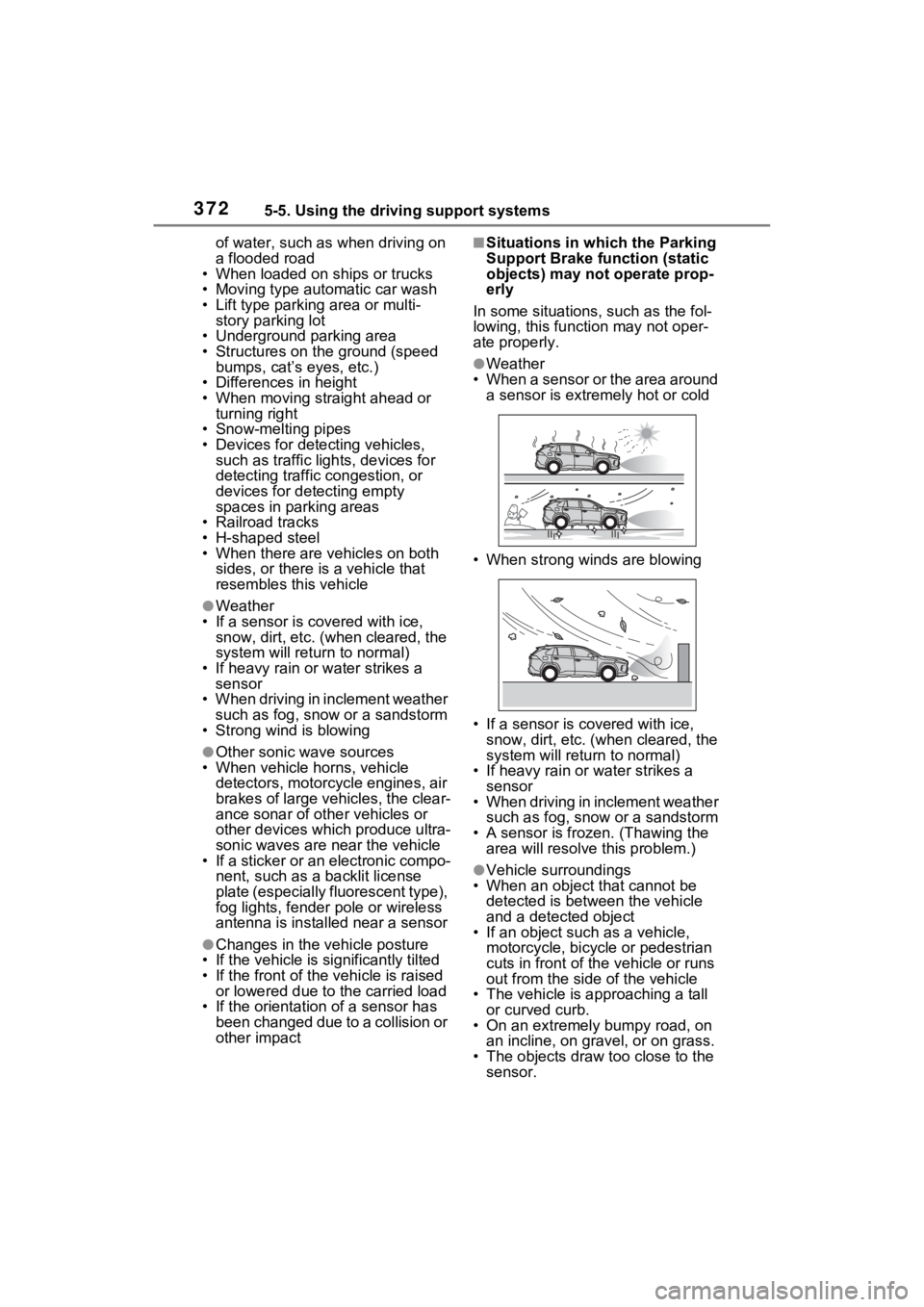
●Weather
• When a sensor or the area around a sensor is extremely hot or cold
• When strong winds are blowing
• If a sensor is covered with ice, snow, dirt, etc. (when cleared, the
system will return to normal)
• If heavy rain or water strikes a sensor
• When driving in inclement weather
such as fog, snow or a sandstorm
• A sensor is froz en. (Thawing the
area will resolve this problem.)
●Vehicle surroundings
• When an object that cannot be
detected is between the vehicle
and a detected object
• If an object such as a vehicle,
motorcycle, bicycle or pedestrian
cuts in front of the vehicle or runs
out from the side of the vehicle
• The vehicle is approaching a tall or curved curb.
• On an extremely bumpy road, on an incline, on gravel, or on grass.
• The objects draw too close to the sensor.
Page 373 of 618

3735-5. Using the driving support systems
5
Driving
●Other sonic waves sources
• When vehicle horns, vehicle detectors, motorcycle engines, air
brakes of large vehicles, the clear-
ance sonar of other vehicles or
other devices which produce ultra-
sonic waves are near the vehicle
• If a sticker or an electronic compo- nent, such as a backlit license
plate (especially fluorescent type),
fog lights, fender pole or wireless
antenna is insta lled near a sensor
●Changes in the vehicle
• If the vehicle is significantly tilted
• If the front of the vehicle is raised
or lowered due to the carried load
• If the orientation of a sensor has
been changed due t o a collision or
other impact
• When equipment that may
obstruct a sensor is installed, such
as a towing eyelet, bumper pro-
tector (an additi onal trim strip,
etc.), bicycle carrier, or snow plow
• If the suspension has been modi- fied or tires of a size other than
specified are installed
• If paint or a sticker is applied to the sensor
*: If equipped
This function will operate in situ-
ations such as the following if a
vehicle is detected in the travel-
ing direction of the vehicle.
■When reversing, a vehicle is
approaching and the brake
pedal is not depressed, or
is depressed late
Parking Suppo rt Brake
function (rear-crossing
vehicles)
*
If a rear radar sensor
detects a vehicle approach-
ing from the right or left at
the rear of the vehicle and
the system determines that
the possibility of a collision
is high, this function will
perform brake control to
reduce the likelihood of an
impact with the approach-
ing vehicle.
Examples of function
operation
Page 535 of 618

5358-2. Steps to take in an emergency
8
When trouble arises
function, an interim measure
is available to start the hybrid
system. (P.535)
There is a possibility that the
temperature of the hybrid bat-
tery (traction battery) is
extremely low (approximately
below -22°F [-30°C]).
( P.280)
One of the following may be the
cause of the problem:
The 12-volt battery may be
discharged. ( P.539)
The 12-volt battery terminal
connections may be loose or
corroded. ( P.467)
One of the following may be the
cause of the problem:
The 12-volt battery may be
discharged. ( P.539)
One or both of the 12-volt bat-
tery terminals may be discon-
nected. ( P.467)
Contact your Toyota dealer if
the problem cannot be repaired,
or if repair procedures are unknown.
When the hybrid system does
not start, the following steps can
be used as an interim measure
to start the hybrid system if the
power switch is functioning nor-
mally.
Do not use this starting proce-
dure except in cases of emer-
gency.
1
Pull the parking brake switch
to check that the parking
brake is set. ( P.290)
Parking brake indicator will come
on.
2 Shift the shift lever to P.
3 Turn the power switch to
ACC.
4 Press and hold the power
switch for about 15 seconds
while depressing the brake
pedal firmly.
Even if the hybrid system can be
started using the above steps,
the system may be malfunction-
ing. Have the vehicle inspected
by your Toyota dealer.
The interior lights and
headlights are dim, or the
horn does not sound or
sounds at a low volume
The interior lights and
headlights do not turn on,
or the horn does not
sound
Starting the hybrid sys-
tem in an emergency
Page 597 of 618

597What to do if... (Troubleshooting)
tem can be started in a tem-
porary way. (P.538)
Is the 12-volt battery dis-
charged? ( P.539)
Is the power switch in ON?
If you cannot release the shift
lever by depressing the brake
pedal with the power switch in
ON ( P.286)
It is locked automatically to
prevent theft of the vehicle.
( P.280)
Is the window lock switch
pressed?
The power window except for
the one at the driver’s seat
cannot be operated if the win-
dow lock switch is pressed.
( P.248)
The auto power off function
will be operated if the vehicle
is left in ACC or ON (the
hybrid system is not operat- ing) for a period of time.
(
P.283)
The seat belt reminder light is
flashing
Are the driver and the passengers
wearing the seat belts? (
P.518,
519
)
The parking brake indicator is
on
Is the parking br ake released?
(
P.290)
Depending on the situation,
other types of warning buzzer
may also sound. ( P.511, 523)
Did anyone inside the vehicle
open a door during setting the
alarm?
The sensor detects it and the
alarm sounds. ( P.73)
To stop the alarm, turn the power
switch to ON or start the hybrid sys-
tem.
Is the message displayed on
the multi-information display?
Check the message on the
multi-information display.
The shift lever cannot be
shifted from P even if you
depress the brake pedal
The steering wheel can-
not be turned after the
hybrid system is stopped
The windows do not open
or close by operating the
power window switches
The power switch is
turned off automatically
A warning buzzer sounds
during driving
An alarm is activated and
the horn sounds (if
equipped)
A warning buzzer sounds
when leaving the vehicle
Page 605 of 618

Alphabetical Index605
Heated steering wheel ......... 407
Hybrid battery (traction battery)........................................... 115
Outside rear view mirrors ..... 398
Seat heaters ......................... 407
High coolant temperature warn- ing light ................................. 512
High mounted stoplight Replacing light bulbs ............ 497
High voltage components ....... 87
Hill-start assist control .......... 381
Hood ........................................ 457 Warning message ................ 523
Hooks Cargo hooks ......................... 417
Coat hooks ........................... 435
Retaining hooks (floor mat) .... 26
Horn ......................................... 232
HV mode .................................... 77
Hybrid battery (tr action battery)
Charging............................... 123
Location.................................. 87
Specification ......................... 552
Hybrid battery (traction battery) charge mode ........................... 79
Hybrid system ACC...................................... 283
Acoustic Vehicle Alerting System............................................. 85
Brake Override System ........ 259
Drive-Start Control ............... 259
Emergency shut off system .... 91
Energy monitor/consumption screen ................................ 187
High voltage components....... 87
How to start the hybrid system ........................................... 279
Hybrid System Indicator ....... 165
If the hybrid sy stem will not start
........................................... 534
If your vehicle has to be stopped in an emergency................. 505 Ignition switch (power switch)
...........................................279
Overheating ..........................544
Plug-in hybrid system precau- tions ......................................87
Plug-in hybrid vehicle driving tips .............................................92
Power (ignition) switch .........279
Regenerative braking .............82
Starting the hybrid system ....279
Hybrid System Indicator ........165
Hybrid transmissio n ...............285
S mode .................................288
I
I/M test .....................................454
Identification Engine ..................................551
Vehicle..................................550
Ignition switch (power switch) ...............................................279Auto power off fun ction.........283
Changing the power switch modes.................................283
If your vehicle has to be stopped in an emergency .................505
Starting the hybrid system ....279
Immobilizer system ..................72
Indicators ................................160
Initialization Items to initialize ...................582
Maintenance .........................451
Moon roof .............................250
Panoramic moon r oof ...........253
Power back door ..................212
Power windows ....................246
Tire pressure warning system ...........................................474
Inside rear view m irror ...233, 234
Instrument panel light control ...............................................169
Interior lights...........................410