2021 TOYOTA RAV4 PRIME engine
[x] Cancel search: enginePage 277 of 618

2775-1. Before driving
5
Driving
4Apply the parking brake
firmly.
5 Shift into P and turn off the
hybrid system.
When restarting after parking
on a slope:
1 With the transmission in P,
start the hybrid system. Be
sure to keep the brake pedal
depressed.
2 Shift into a forward gear. If
reversing, shift into R.
3 If the parking brake is in man-
ual mode, release the park-
ing brake. ( P.290)
4 Release the brake pedal, and
slowly pull or back away from
the wheel blocks. Stop and
apply the brakes.
5 Have someone retrieve the
blocks.
■Break-in schedule
If your vehicle is new or equipped
with any new power train compo-
nents (such as an engine, transmis-
sion, differential or wheel bearing),
Toyota recommends that you do not
tow a trailer unt il the vehicle has
been driven for over 500 miles (800
km).
After the vehicle has been driven for
over 500 miles (800 km), you can
start towing. However, for the next
500 miles (800 km), drive the vehi-
cle at a speed of less than 45 mph
(72 km/h) when towing a trailer, and
avoid full throttle acceleration.
■Maintenance
●If you tow a traile r, your vehicle
will require more f requent mainte-
nance due to the additional load. (See “Scheduled Maintenance
Guide” or “Owner
’s Manual Sup-
plement”.)
●Retighten the fixing bolts of the
towing ball and bracket after
approximately 600 miles (1000
km) of tra iler towing.
■If trailer sway occurs
One or more factors (crosswinds,
passing vehicles, rough roads, etc.)
can adversely affect handling of
your vehicle and t railer, causing
instability.
●If trailer swaying occurs:
• Firmly grip the steering wheel. Steer straight ahead.
Do not try to contr ol trailer sway-
ing by turning the steering wheel.
• Begin releasing the accelerator
pedal immediately but very gradu-
ally to reduce speed.
Do not increase speed. Do not
apply vehicle brakes.
If you make no extreme correction
with the steering or brakes, your
vehicle and trailer should stabilize (if
enabled, Trailer Sway Control can
also help to stabilize the vehicle and
trailer.).
●After the trailer swaying has
stopped:
• Stop in a safe place. Get all occu-
pants out of the vehicle.
• Check the tires of the vehicle and the trailer.
• Check the load in the trailer. Make sure the load has not
shifted.
Make sure the tongue weight is
appropriate, if possible.
• Check the load in the vehicle.
Make sure the vehicle is not over-
loaded after occupants get in.
If you cannot find any problems, the
speed at which trailer swaying
occurred is beyond the limit of your
particular vehicle-trailer combina-
tion. Drive at a lower speed to pre-
vent instability. Remember that
Page 285 of 618

2855-2. Driving procedures
5
Driving
*1: To improve fuel efficiency and reduce noise, shift the shift lever
to D for normal driving.
*2: Vehicles with paddle shift switches only: S electing shift
ranges in the D position allows
suitable use of engine braking.
( P.287)
*3: By selecting shift ranges using S
mode, you can control accelerat-
ing force and engine braking
force.
■When driving with dynamic
radar cruise control with full-
speed range activated
Even when performing the following
actions with the in tent of enabling
engine braking, e ngine braking will
not activate because dynamic radar
cruise control with full-speed range will not be canceled.
●While driving in S mode, down-
shifting to 5 or 4. (
P.288)
●When switching th e driving mode
to sport mode while driving in D
position. ( P.377)
■Restraining sudden start (Drive-
Start Control)
P.259
Hybrid transmission
Select the shift position
depending on your purpose
and situation.
Shift position purpose
and functions
Shift
positionObjective or function
P
Parking the vehi-
cle/starting the hybrid system
RReversing
NNeutral
DNormal driving*1, 2
SS mode driving*3
WARNING
■When driving on slippery
road surfaces
Be careful of downshifting and
sudden acceleration, as this could
result in the vehicle skidding to
the side or spinning.
NOTICE
■Hybrid battery (traction bat-
tery) charge
If the shift lever is in N, the hybrid
battery (traction battery) will not
be charging, even when the
engine is running. Therefore, if
the vehicle is left with the shift
lever in N for a long period of
time, the hybrid battery (traction
battery) will discharge, and this
may result in the vehicle not being
able to start.
Page 287 of 618

2875-2. Driving procedures
5
Driving
The shift lever can be shifted
while both buttons are pressed.
P.377
To drive using temporary shift
range selection, operate the “-”
paddle shift switch. The shift
range can then be selected by
operating the “-” and “+” paddle
shift switches. Changing the
shift range allows restriction of
the highest gear, preventing upshifting and enabling the level
of engine braking force to be
selected.
1
Upshifting
2 Downshifting
The selected shift range, from D1 to
D6, will be display ed on the multi-
information display.
■Shift ranges and their functions
●You can choose from 6 levels of
accelerating force and engine
braking force.
●A lower shift range will provide
greater accelerating force and
engine braking force than a higher
shift range, and t he engine revolu-
tions will also increase.
■Downshifting restriction warn-
ing buzzer
To help ensure safety and driving
performance, dow nshifting opera-
tion may sometimes be restricted. In
some circumstances, downshifting
may not be possible even when the
paddle shift switch is operated. (A
buzzer will sound twice.)
■Automatic deactivation of shift
range selection in the D posi-
tion
Shift range selection in the D posi-
tion will be deactivated in the follow-
ing situations:
●When the vehicle comes to a stop
●If the accelerator pedal is
WARNING
■To prevent an accident when
releasing the shift lock
Before pressing the shift lock
override button, make sure to set
the parking brake and depress the
brake pedal.
If the accelerator pedal is acci-
dentally depressed instead of the
brake pedal when the shift lock
override button is pressed and the
shift lever is shifted out of P, the
vehicle may suddenly start, possi-
bly leading to an accident result-
ing in death or serious injury.
Selecting the driving
mode
Selecting shift ranges in
the D position (vehicles
with paddle shift
switches)
Page 288 of 618

2885-2. Driving procedures
depressed for more than a certain
period of time
●When the shift lever is shifted to a
position other than D
●When the “+” paddle shift switch is
held down for a period of time
When the shift lever is in the S
position, the shift lever or paddle
shift switches (if equipped) can
be operated as follows:
1Upshifting
2 Downshifting
The selected shift range, from S1 to
S6, will be displayed on the multi-
information display.
The initial shift range in S mode
is set automatically to S4.
*
*: It is set to S3 when the driving
mode is set to sport mode.
( P.377)
■S mode
●You can choose from 6 levels of
accelerating force and engine
braking force.
●A lower shift range will provide
greater accelerating force and
engine braking force than a higher
shift range, and t he engine revolu-
tions will also increase.
●To prevent the e ngine from over-
revving, upshifting may automati-
cally occur when the shift range is
3 or lower.
●When the shift range is 4 or lower,
holding the shift lever toward “+”
sets the shift range to 6.
■Downshifting restriction warn-
ing buzzer
To help ensure safety and driving
performance, dow nshifting opera-
tion may sometimes be restricted. In
some circumstances, downshifting
may not be possible even when the
shift lever or paddle shift switches (if
equipped) is oper ated. (A buzzer
will sound twice.)
■If the “S” indi cator does not
come on or the “D” indicator is
displayed even after shifting the
shift lever to S
This may indicate a malfunction in
the transmission system. Have the
vehicle inspected by your Toyota
dealer immediately. (In this situa-
tion, the transmission will operate in
the same manner as when the shift
lever is in D.)
Changing shift ranges in
S mode
Page 360 of 618

3605-5. Using the driving support systems
detection distance may shorten,
or detection may be impossible.
• Detection may be impossible if
static objects draw too close to the
sensor.
• There will be a short delay
between static object detection
and display (warning buzzer
sounds). Even at low speeds,
there is a possibilit y that the object
will come within 9.8 in. (25 cm)
before the display is shown and
the warning buzzer sounds.
• It might be difficult to hear the buzzer due to the volume of the
audio system or air flow noise of
the air conditioning system.
• It may be difficult to hear the
sound of this system due to the
buzzers of other systems.
■Conditions under which the
function may not function cor-
rectly
Certain vehicle conditions and the
surrounding environment may affect
the ability of a sensor to correctly
detect objects. Particular instances
where this may occur are listed
below.
●There is dirt, snow or ice on a sen-
sor. (Cleaning the sensors will
resolve this problem.)
●A sensor is frozen. (Thawing the
area will resolve this problem.)
In especially cold weather, if a
sensor is frozen the sensor dis-
play may be displayed abnor-
mally, or objects, such as a wall,
may not be detected.
●A sensor is covered in any way.
●When a sensor or the area around
a sensor is extremely hot or cold.
●On an extremely bumpy road, on
an incline, on gravel, or on grass.
●The vicinity of the vehicle is noisy
due to vehicle horns, motorcycle
engines, air brakes of large vehi-
cles, or other l oud noises produc-
ing ultrasonic waves.
●There is another vehicle equipped with parking assist
sensors in the
vicinity.
●A sensor is coated with a sheet of
spray or heavy rain.
●If a sensor is hit by a large amount
of water, such as when driving on
a flooded road.
●If the vehicle is significantly tilted.
●The vehicle is approaching a tall
or curved curb.
●If objects draw too close to the
sensor.
■Objects which may not be prop-
erly detected
The shape of the object may pre-
vent the sensor from detecting it.
Pay particular atte ntion to the fol-
lowing objects:
●Wires, fences, ropes, etc.
●Cotton, snow and other materials
that absorb sound waves
●Sharply-angled objects
●Low objects
●Tall objects with upper sections
projecting outwards in the direc-
tion of your vehicle
People may not be detected if they
are wearing certain types of cloth-
ing.
■Certification (Canada only)
This ISM device complies with
Canadian ICES-001.
Page 372 of 618
3725-5. Using the driving support systems
of water, such as when driving on
a flooded road
• When loaded on ships or trucks
• Moving type aut omatic car wash
• Lift type parking area or multi- story parking lot
• Underground parking area
• Structures on the ground (speed bumps, cat’s eyes, etc.)
• Differences in height
• When moving straight ahead or turning right
• Snow-melting pipes
• Devices for detecting vehicles, such as traffic lights, devices for
detecting traffic congestion, or
devices for detecting empty
spaces in parking areas
• Railroad tracks
• H-shaped steel
• When there are vehicles on both sides, or there is a vehicle that
resembles this vehicle
●Weather
• If a sensor is covered with ice, snow, dirt, etc. (when cleared, the
system will return to normal)
• If heavy rain or water strikes a sensor
• When driving in inclement weather such as fog, snow or a sandstorm
• Strong wind is blowing
●Other sonic wave sources
• When vehicle horns, vehicle
detectors, motorcycle engines, air
brakes of large vehicles, the clear-
ance sonar of other vehicles or
other devices which produce ultra-
sonic waves are near the vehicle
• If a sticker or an electronic compo-
nent, such as a backlit license
plate (especially fluorescent type),
fog lights, fender pole or wireless
antenna is insta lled near a sensor
●Changes in the vehicle posture
• If the vehicle is significantly tilted
• If the front of the vehicle is raised
or lowered due to the carried load
• If the orientation of a sensor has
been changed due t o a collision or
other impact
■Situations in wh ich the Parking
Support Brake function (static
objects) may not operate prop-
erly
In some situations, such as the fol-
lowing, this functi on may not oper-
ate properly.
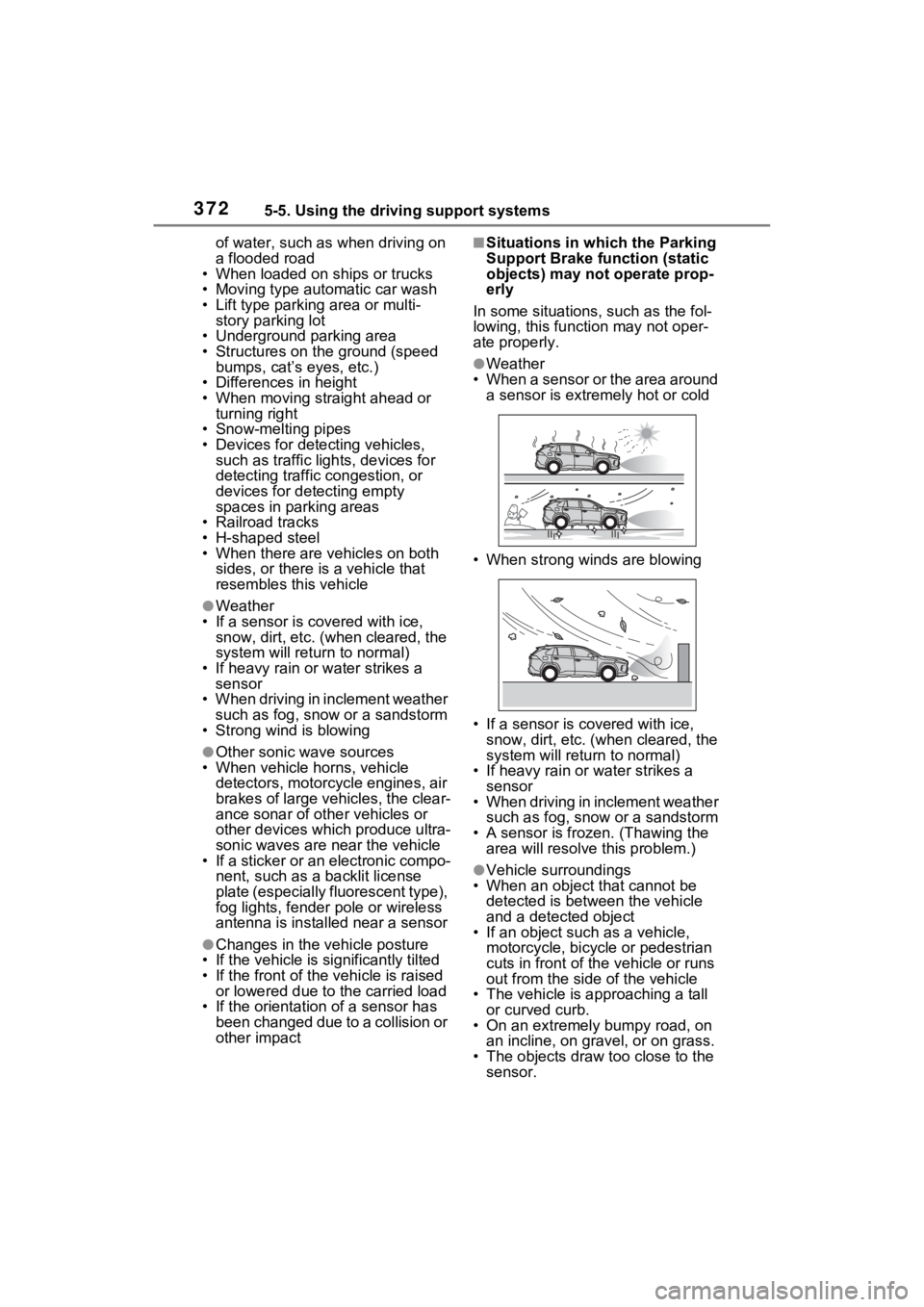
●Weather
• When a sensor or the area around a sensor is extremely hot or cold
• When strong winds are blowing
• If a sensor is covered with ice, snow, dirt, etc. (when cleared, the
system will return to normal)
• If heavy rain or water strikes a sensor
• When driving in inclement weather
such as fog, snow or a sandstorm
• A sensor is froz en. (Thawing the
area will resolve this problem.)
●Vehicle surroundings
• When an object that cannot be
detected is between the vehicle
and a detected object
• If an object such as a vehicle,
motorcycle, bicycle or pedestrian
cuts in front of the vehicle or runs
out from the side of the vehicle
• The vehicle is approaching a tall or curved curb.
• On an extremely bumpy road, on an incline, on gravel, or on grass.
• The objects draw too close to the sensor.
Page 373 of 618

3735-5. Using the driving support systems
5
Driving
●Other sonic waves sources
• When vehicle horns, vehicle detectors, motorcycle engines, air
brakes of large vehicles, the clear-
ance sonar of other vehicles or
other devices which produce ultra-
sonic waves are near the vehicle
• If a sticker or an electronic compo- nent, such as a backlit license
plate (especially fluorescent type),
fog lights, fender pole or wireless
antenna is insta lled near a sensor
●Changes in the vehicle
• If the vehicle is significantly tilted
• If the front of the vehicle is raised
or lowered due to the carried load
• If the orientation of a sensor has
been changed due t o a collision or
other impact
• When equipment that may
obstruct a sensor is installed, such
as a towing eyelet, bumper pro-
tector (an additi onal trim strip,
etc.), bicycle carrier, or snow plow
• If the suspension has been modi- fied or tires of a size other than
specified are installed
• If paint or a sticker is applied to the sensor
*: If equipped
This function will operate in situ-
ations such as the following if a
vehicle is detected in the travel-
ing direction of the vehicle.
■When reversing, a vehicle is
approaching and the brake
pedal is not depressed, or
is depressed late
Parking Suppo rt Brake
function (rear-crossing
vehicles)
*
If a rear radar sensor
detects a vehicle approach-
ing from the right or left at
the rear of the vehicle and
the system determines that
the possibility of a collision
is high, this function will
perform brake control to
reduce the likelihood of an
impact with the approach-
ing vehicle.
Examples of function
operation
Page 379 of 618

3795-5. Using the driving support systems
5
Driving
Press the Trail Mode switch
When the switch is pressed, Trail
Mode turns on and the Trail Mode
indicator illuminates on the multi-
information display.
When the switch is pressed again,
the Trail Mode indicator turns off.
■Trail Mode
●Trail Mode is intended for use
when driving on bumpy rough
roads. Do not turn the switch on in
other situations.
●Trail Mode controls the vehicle so
that it can use the maximum
amount of drive force when driving
on bumpy roads.
●If Trail Mode is continuously used
for a long period of time, the load
on related parts increases and the
system may be unable to operate
effectively.
■When Trail Mode is canceled
In the following si tuations, Trail
Mode is automatically canceled
even if it is turned on.
●When the driving mode is
changed ( P.377)
●When the power switch is turned
off
■During Trail Mode operation
The following types of situations
may occur, but they are not mal-
functions.
●Vibrations may be felt throughout
the vehicle or steering wheel
●Operating noise may be heard
from the engine compartment
■When an inspection at your
Toyota dealer is necessary
In the following situ ations, the sys-
tem may be malf unctioning. Have
the vehicle inspected by your
Toyota dealer immediately.
Trail Mode
Trail Mode is a system that
performs integrated control
for the AWD, brake and
drive force control systems
to assist the drive power on
bumpy roads, etc.
WARNING
■Before using Trail Mode
Make sure to observe the follow-
ing precautions. Failure to
observe these precautions may
result in an unexpected accident.
●Check that the Trail Mode indi-
cator is illumina ted before driv-
ing. Trail Mode will not operate
when the indicator is off.
●Trail Mode is not intended to
expand the limits of the vehicle.
Thoroughly check the road con-
ditions and drive with caution.
●Thoroughly check the road con-
ditions before driving. As Trail
Mode is suitable for driving on
bumpy roads, such as those
where the tire on one side
spins, there is a chance that
Trail Mode may not be the most
appropriate for other road con-
ditions.
Turning Trail Mode on