2021 TOYOTA RAV4 PHEV mirror
[x] Cancel search: mirrorPage 174 of 666

1723-1. Instrument cluster
*1: This light illuminates on the multi-
information display with a message.
*2: Depending on the operating condi -
tion, the color and illuminating/flash -
ing state of t he light change.
*3: The light comes on when the system
is turned off.
*4: Toyota parking assist-sensor OFF
indicator turns on when the power
switch is turned to ON while the
Toyota parking a ssist-sensor func-
tion is on. It will t urn off after a few
seconds.
*5: These lights turn on when the power
switch is turned to ON to indicate
that a system check is being per -
formed. They will turn off after the
hybrid system is on , or after a few
seconds. There may be a malfunc-
tion in a system if the lights do not
turn on, or turn off. Have the vehicle
inspected by any authorized Toyota
retailer or Toyota authorized
repairer, or any reliable repairer.
*6: This light illuminates on the outside
rear view mirrors.
*7: When the outside temperature is
approximately 3°C (37°F) or lower,
(Flashes)
Slip indicator light*5
( →P.439)
VSC OFF indicator*3, 5
( →P.439)
PCS warning light*3, 5 ( i f
equipped) ( →P.357)
BSM outside rear view
mirror indicators*5, 6 (if
equipped) ( →P.393)
BSM OFF indicator*3, 5
(if equipped) ( →P.393)
RCTA OFF indicator*3, 5
(if equipped) ( →P.393)
Brake hold standby indi -
cator*5 ( →P.329)
Brake hold operated
indicator*5 ( →P.329)
Security indicator
( →P.76, 78)
“READY” indicator
( →P.317)
Low outside tempera -
ture indicator*7
( →P.177)
EV indicator ( →P.90)
Parking brake indicator
( →P.326)
EV drive mode indica -
tor*8 ( →P.86)
AUTO EV/HV mode
indicator*8 ( →P.86)
HV drive mode indica -
tor*8 ( →P.86)
Hybrid battery charge
mode indicator*8
( →P.87)
Eco drive mode indica -
tor ( →P.434)
Sport mode indicator
( →P.434)
Trail Mode indicator
( →P.435)
“PASSENGER AIR BAG”
indicator*5, 9 ( i f e q u i p p e d )
( →P.48)
Page 175 of 666

173
3
3-1. Instrument cluster
Vehicle status information and indicators
the indicator will flash for approxi -
mately 10 seconds, then stay on.
*8: The displayed indicator changes
according to the current plug-in
hybrid system operation mode.
*9: This light illumina tes on the center
panel.
■BSM (Blind Spot Mo nitor) outside
rear view mirror indicators (if equipped)
In order to confirm operation, the BSM
outside rear view mirror indicators illumi - nate when the power switch is turned to
ON, or when the BSM function/RCTA
function is enabled while the power switch is in ON.
If the system is functi oning correctly, the
BSM outside rear view mirror indicators will turn off afte r a few seconds.
If the BSM outside re ar view mirror indi-
cators do not illuminate or do not turn off, there may be a m alfunction in the
system.
If this occurs, have the vehicle inspected by any authorized T oyota retailer or
Toyota authorized repairer, or any reli -
able repairer.
Page 188 of 666
1863-1. Instrument cluster
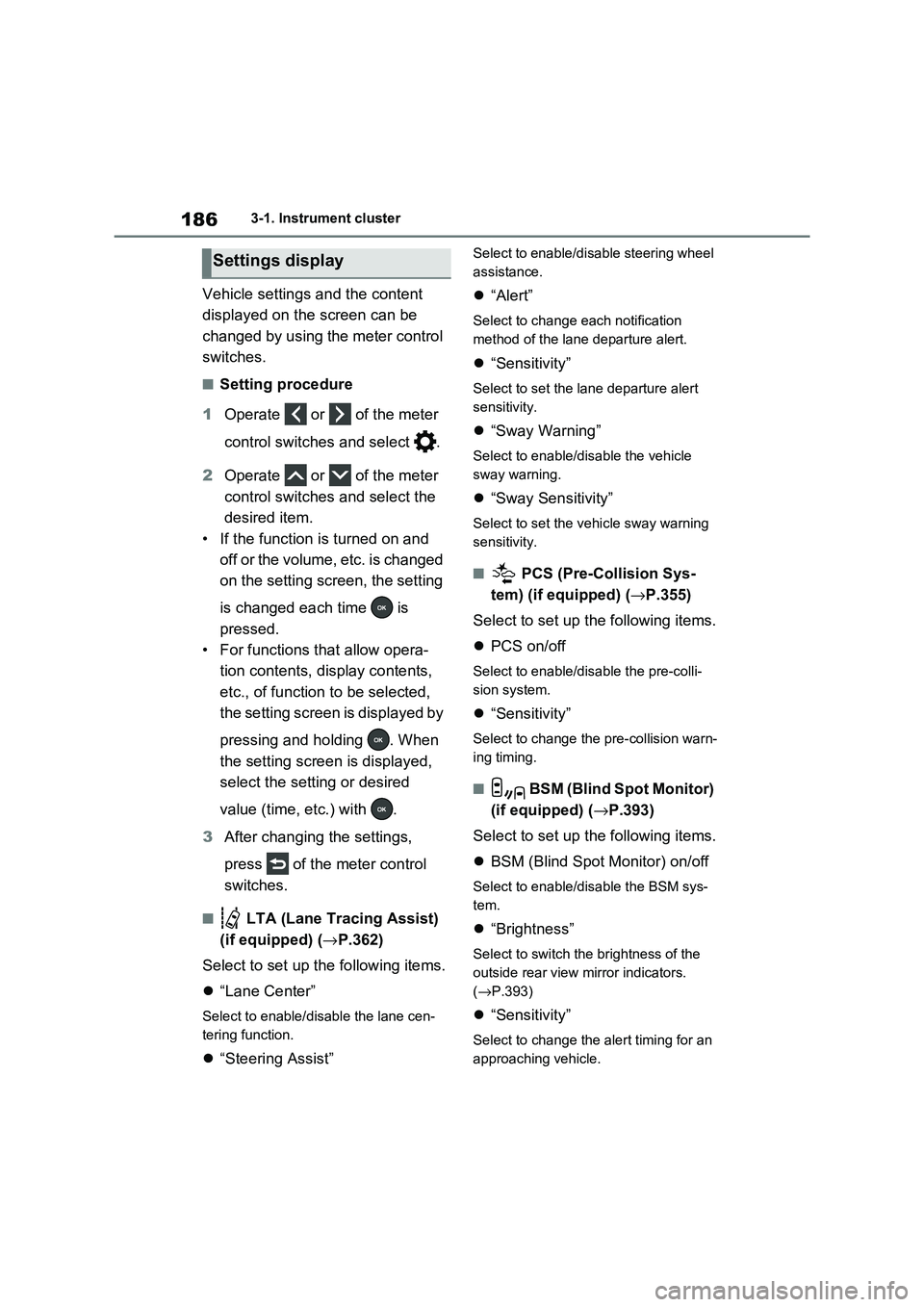
Vehicle settings and the content
displayed on the screen can be
changed by using the meter control
switches.
■Setting procedure
1 Operate or of the meter
control switches and select .
2 Operate or of the meter
control switches and select the
desired item.
• If the function is turned on and
off or the volume, etc. is changed
on the setting screen, the setting
is changed each time is
pressed.
• For functions that allow opera -
tion contents, display contents,
etc., of function to be selected,
the setting screen is displayed by
pressing and holding . When
the setting screen is displayed,
select the setting or desired
value (time, etc.) with .
3 After changing the settings,
press of the meter control
switches.
■ LTA (Lane Tracing Assist)
(if equipped) ( →P.362)
Select to set up t he following items.
“Lane Center”
Select to enable/disable the lane cen-
tering function.
“Steering Assist”
Select to enable/disable steering wheel
assistance.
“Alert”
Select to change each notification
method of the lane departure alert.
“Sensitivity”
Select to set the lane departure alert
sensitivity.
“Sway Warning”
Select to enable/disable the vehicle
sway warning.
“Sway Sensitivity”
Select to set the vehicle sway warning
sensitivity.
■ PCS (Pre-Collision Sys -
tem) (if equipped) ( →P.355)
Select to set up t he following items.
PCS on/off
Select to enable/disable the pre-colli-
sion system.
“Sensitivity”
Select to change the pre-collision warn-
ing timing.
■ BSM (Blind Spot Monitor)
(if equipped) ( →P.393)
Select to set up t he following items.
BSM (Blind Spot Monitor) on/off
Select to enable/disable the BSM sys-
tem.
“Brightness”
Select to switch the brightness of the
outside rear view mirror indicators.
( →P.393)
“Sensitivity”
Select to change the alert timing for an
approaching vehicle.
Settings display
Page 203 of 666

4
201
4
Before driving
Before driving
4-1. Key information
Keys.................................. 202
4-2. Opening, closing and locking
the doors
Side doors ........................ 205
Back door ......................... 210
Smart entry & start system 223
4-3. Adjusting the seats
Front seats........................ 270
Rear seats ........................ 271
Driving position memory ... 273
Head restraints ................. 276
4-4. Adjusting the steering wheel
and mirrors
Steering wheel .................. 278
Inside rear view mirror ...... 279
Digital Rear-view Mirror .... 280
Outside rear view mirrors . 289
4-5. Opening, closing the win -
dows and moon roof
Power windows................. 291
Panoramic moon roof ....... 294
Page 280 of 666

2784-4. Adjusting the steering wheel and mirrors
4-4.Adjusting the steering wheel and mirrors
1Hold the steering wheel and
push the lever down.
2 Adjust to the ideal position by
moving the steering wheel hori -
zontally and vertically.
After adjustment, pull the lever up to
secure the steering wheel.
To sound the horn, press on or
close to the mark.
Steering wheel
Adjustment procedure
WARNING
■Caution while driving
Do not adjust the steering wheel while driving.
Doing so may cause the driver to mis -
handle the vehicle and cause an acci - dent, resulting in death or serious
injury.
■After adjusting the steering wheel
Make sure that the s teering wheel is
securely locked. Otherwise, the steering wheel may
move suddenly, possibly causing an
accident, and resulting in death or serious injury. Also, the horn may not
sound if the steering wheel is not
securely locked.
Sounding the horn
Page 281 of 666

279
4
4-4. Adjusting the steering wheel and mirrors
Before driving
*: If equipped
The height of the rear view mirror
can be adjusted to suit your driving
posture.
Adjust the height of the rear view
mirror by moving it up and down.
Responding to the level of bright -
ness of the headlights of vehicles
behind, the reflecte d light is auto-
matically reduced.
Changing automat ic anti-glare
function mode on/off
When the automatic anti-glare function
is in ON mode, the indicator illumi-
nates.
The function will set to ON mode each
time the power swit ch is turned to ON.
Pressing the button turns the function
to OFF mode. (The indicator also
turns off.)
■To prevent sensor error
To ensure that the sensors operate
properly, do not touch or cover them.
Inside rear view mirror*
The rear view mirror’s position
can be adjusted to enable suf -
ficient confirmation of the rear
view.
Adjusting the height of rear
view mirror
WARNING
■Caution while driving
Do not adjust the position of the mir-
ror while driving. Doing so may lead to mishandling of
the vehicle and c ause an accident,
resulting in death or serious injury.
Anti-glare function
A
A
Page 282 of 666

2804-4. Adjusting the steering wheel and mirrors
*: If equipped
Icon display area
Displays icons, adjusting gauge, etc.
( →P.282)
Lever
Operate to change between digital mir-
ror mode and optical mirror mode.
Menu button
Press to display the icon display area
and select the item you want to adjust.
Select/adjust button
Press to change the setting of the item
you want to adjust.
Camera indicator
Indicates that the c amera is operating
normally.
Operate the lever to change
between digital mirror mode and
optical mirror mode.
Digital Rear-view Mirror*
The Digital Rear-view Mirror is
a system that uses the camera
on the rear of the vehicle and
displays its image on the dis -
play of the Digital Rear-view
Mirror.
The Digital Rear-view Mirror
can be changed between opti -
cal mirror mode and digital
mirror mode by operating the
lever.
The Digital Rear-view Mirror
allows the driver to see the
rear view despite obstructions,
such as the head restraints or
luggage, ensuring rear visibil -
ity. Also, the rear seats are not
displayed and privacy of the
passengers is enhanced.
WARNING
Observe the following precautions.
Failure to do so may result in death or
serious injury.
■Before using the Digital Rear-
view Mirror
●Make sure to adjust the mirror
before driving. ( →P.282)
• Change to optical mirror mode and adjust the position of the Digital
Rear-view Mirror so that the area
behind your vehicle can be viewed properly.
• Change to digital mirror mode and
adjust the display settings.
●As the range of the image displayed by the Digital Rea r-view Mirror is
different from that of the optical mir -
ror, make sure to check this differ - ence before driving.
System components
Changing modes
A
B
C
D
E
Page 283 of 666

281
4
4-4. Adjusting the steering wheel and mirrors
Before driving
1 Digital mirror mode
Displays an image of the area behind
the vehicle.
will illuminate in this mode.
2 Optical mirror mode
Turns off the display of the Digital Rear-
view Mirror allows it to be used as an
optical mirror.
■Digital mirror mode operating con - dition
The power switch is turned to ON.
When the power switch is changed from ON to OFF or ACC, the image will dis -
appear after several seconds.
■When using the Digital Rear-view
Mirror in digit al mirror mode
●If it is difficult to see the displayed
image due to light r eflected off the Digital Rear-view Mirror, the camera
being dirty or covered with water drop -
lets, or if lights of a vehicle behind your vehicle or the displayed image
are bothering you, change to optical
mirror mode.
●When the back door is open, the Digi -
tal Rear-view Mirro r image may not display properly. Before driving, make
sure the back door is closed.
●If the display is diffi cult to see due to
reflected light, close the electronic
sunshade for the panoramic moon roof (if equipped).
●Any of the followin g conditions may occur when driving in the dark, such
as at night. None of them indicates
that a malfunction has occurred. • Colors of objects in the displayed
image may differ from their actual
color. • Depending on the hei ght of the lights
of the vehicle behind, the area around
the vehicle may appear white and blurry.
• Automatic image adjustment for
brighter surrounding image may cause flickering.
If it is difficult to see the displayed image
or flickering bothers you, change to opti- cal mirror mode.
●The Digital Rear-v iew Mirror may become hot while it is in digital mirror
mode.
This is not a malfunction.
●Depending on your physical condition
or age, it may take longer than usual to focus on the displayed image. In
this case, change t o optical mirror
mode.
●Do not let passengers stare at the dis -
played image when the vehicle is being driven, as doi ng so may cause
motion sickness.
■When the system malfunctions
If the symbol shown in the illustration is displayed when using the Digital Rear-
view Mirror in digit al mirror mode, the
system may be malf unctioning. The symbol will disappear in a few seconds.
Operate the lever, c hange to optical mir-
ror mode and ha ve the vehicle inspected by any a uthorized Toyota
retailer or Toyota authorized repairer, or
any reliable repairer.