2021 TOYOTA RAV4 PHEV height
[x] Cancel search: heightPage 281 of 666

279
4
4-4. Adjusting the steering wheel and mirrors
Before driving
*: If equipped
The height of the rear view mirror
can be adjusted to suit your driving
posture.
Adjust the height of the rear view
mirror by moving it up and down.
Responding to the level of bright -
ness of the headlights of vehicles
behind, the reflecte d light is auto-
matically reduced.
Changing automat ic anti-glare
function mode on/off
When the automatic anti-glare function
is in ON mode, the indicator illumi-
nates.
The function will set to ON mode each
time the power swit ch is turned to ON.
Pressing the button turns the function
to OFF mode. (The indicator also
turns off.)
■To prevent sensor error
To ensure that the sensors operate
properly, do not touch or cover them.
Inside rear view mirror*
The rear view mirror’s position
can be adjusted to enable suf -
ficient confirmation of the rear
view.
Adjusting the height of rear
view mirror
WARNING
■Caution while driving
Do not adjust the position of the mir-
ror while driving. Doing so may lead to mishandling of
the vehicle and c ause an accident,
resulting in death or serious injury.
Anti-glare function
A
A
Page 284 of 666

2824-4. Adjusting the steering wheel and mirrors
■Adjusting the mirror height
The height of the rear view mirror
can be adjusted to suit your driving
posture.
Change to optical mirror mode,
adjusting the height of the rear view
mirror by moving it up and down.
■Display settings (digital mir-
ror mode)
Settings of the display in the digital
mirror mode, on/off operation of the
automatic anti-glare function, etc.
can be changed.
1 Press the menu button.
The icons will be displayed.
2Press the menu button repeat-
edly and select the item you
want to adjust.
3 Press or to
change the setting.
The icons will disap pear if a button is
not operated for approximately 5 sec -
onds or more.
*: This is a function for the optical mirror
mode, however, the setting can also
be changed while using the digital
mirror mode.
■Enabling/disabling the auto -
matic anti-glare function (opti -
cal mirror mode)
The automatic anti-glare function in
the optical mirror mode can be
enabled/disabled. The setting can
be changed in both the digital mir -
Adjusting the mirror
IconsSettings
Select to adjust the brightness
of the display.
Select to adjus t the area dis-
played up/down.
Select to adjus t the area dis-
played to the left/right.
Select to adjust the angle of
the displayed image.
Select to zoom in/out the dis -
played image.
Select to enable/disable the
automatic anti-glare function.*
Responding to the brightness
of the headlights of vehicles
behind, the refl ected light is
automatically adjusted.
The automatic anti-glare func -
tion is enabled each time the
power switch is changed to
ON.
Page 363 of 666
361
5
5-5. Using the driving support systems
Driving
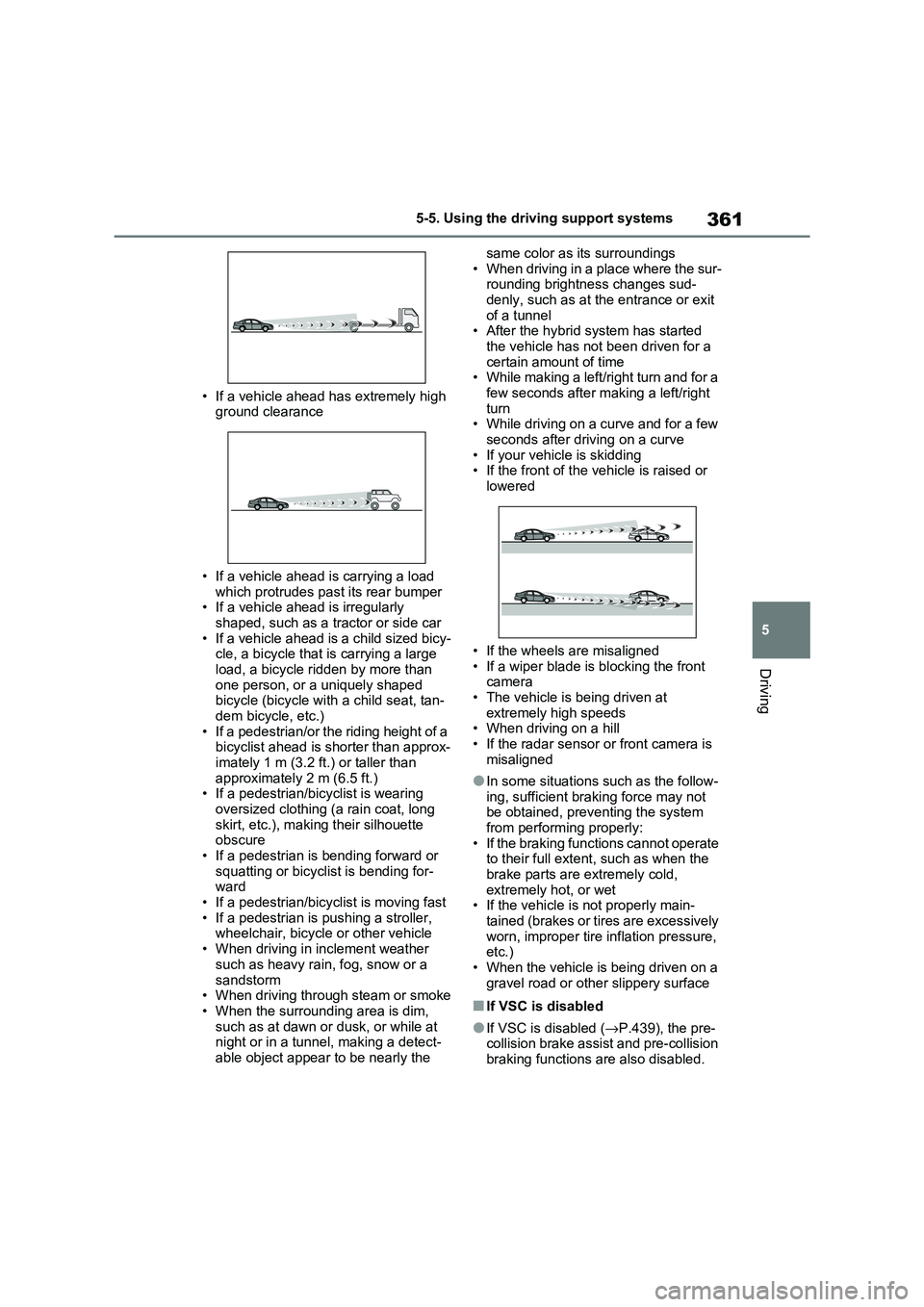
• If a vehicle ahead has extremely high
ground clearance
• If a vehicle ahead is carrying a load
which protrudes pa st its rear bumper • If a vehicle ahead is irregularly
shaped, such as a tractor or side car
• If a vehicle ahead is a child sized bicy - cle, a bicycle that is carrying a large
load, a bicycle ridden by more than
one person, or a uniquely shaped bicycle (bicycle with a child seat, tan-
dem bicycle, etc.)
• If a pedestrian/or the riding height of a bicyclist ahead is shorter than approx -
imately 1 m (3.2 ft.) or taller than
approximately 2 m (6.5 ft.) • If a pedestrian/bi cyclist is wearing
oversized clothing (a rain coat, long
skirt, etc.), maki ng their silhouette obscure
• If a pedestrian is bending forward or
squatting or bicyclist is bending for - ward
• If a pedestrian/bicy clist is moving fast
• If a pedestrian is pushing a stroller, wheelchair, bicycle or other vehicle
• When driving in inclement weather
such as heavy rain , fog, snow or a
sandstorm • When driving through steam or smoke
• When the surrounding area is dim,
such as at dawn or dusk, or while at night or in a tunnel, making a detect -
able object appear to be nearly the
same color as its surroundings
• When driving in a place where the sur - rounding brightness changes sud -
denly, such as at the entrance or exit
of a tunnel • After the hybrid system has started
the vehicle has not been driven for a
certain amount of time • While making a left/right turn and for a
few seconds after making a left/right
turn • While driving on a curve and for a few
seconds after driving on a curve
• If your vehicle is skidding • If the front of the v ehicle is raised or
lowered
• If the wheels are misaligned
• If a wiper blade is blocking the front
camera • The vehicle is being driven at
extremely high speeds
• When driving on a hill • If the radar sensor or front camera is
misaligned
●In some situations such as the follow -
ing, sufficient braking force may not
be obtained, preventing the system from performing properly:
• If the braking functions cannot operate
to their full extent, such as when the brake parts are extremely cold,
extremely hot, or wet
• If the vehicle is not properly main - tained (brakes or ti res are excessively
worn, improper tire i nflation pressure,
etc.)
• When the vehicle is being driven on a gravel road or other slippery surface
■If VSC is disabled
●If VSC is disabled (→P.439), the pre- collision brake assist and pre-collision
braking functions are also disabled.
Page 412 of 666

4105-5. Using the driving support systems
■The BSM function is operational when
The BSM function is operational when
all of the following conditions are met:
●The BSM function is on.
●The shift lever is in a position other
than R.
●The vehicle speed is greater than
approximately 16 km/h (10 mph).
■The BSM function will detect a
vehicle when
The BSM function will detect a vehicle
present in the detection area in the fol -
lowing situations:
●A vehicle in an adjacent lane over -
takes your vehicle.
●You overtake a vehicle in an adjacent
lane slowly.
●Another vehicle enters the detection
area when it changes lanes.
■Conditions under which the BSM function will not detect a vehicle
The BSM function is not designed to
detect the following types of vehicles and/or objects:
●Small motorcycles, bicycles, pedestri -
ans, etc.*
●Vehicles traveling in the opposite
direction
●Guardrails, walls, signs, parked vehi -
cles and similar stationary objects*
●Following vehicles that are in the
same lane*
●Vehicles traveling 2 lanes away from
your vehicle*
●Vehicles which are being overtaken
rapidly by your vehicle*: Depending on the conditions, detec -
tion of a vehicle and/or object may
occur.
■Conditions under which the BSM
function may not function correctly
●The BSM function may not detect
vehicles correctly in the following situ - ations:
• When the sensor is misaligned due to
a strong impact to the sensor or its surrounding area
• When mud, snow, ice, a sticker, etc. is
covering the sensor or surrounding area on the rear bumper
• When driving on a road surface that is
wet with standing water during bad weather, such as heavy rain, snow, or
fog
• When multiple veh icles are approach- ing with only a small gap between
each vehicle
• When the distance between your vehi - cle and a following vehicle is short
• When there is a significant difference
in speed between your vehicle and the vehicle that enters the detection
area
• When the difference in speed between your vehicle and another
vehicle is changing
• When a vehicle enters a detection area traveling at about the same
speed as your vehicle
• As your vehicle starts from a stop, a vehicle remains in the detection area
• When driving up and down consecu-
tive steep inclines, such as hills, dips in the road, etc.
• When driving on roads with sharp
bends, consecutive curves, or uneven surfaces
• When vehicle lanes are wide, or when
driving on the edge of a lane, and the vehicle in an adjacent lane is far away
from your vehicle
• When an accessory (such as a bicycle
carrier) is installed to the rear of the vehicle
• When there is a significant difference
in height between your vehicle and the vehicle that enters the detection
area
• Immediately afte r the BSM func- tion/RCTA function are turned on
• When towing a trailer
Page 428 of 666

4265-5. Using the driving support systems
■The Parking Support Brake func- tion (static object) will operate
when
The function will operate when the
PKSB OFF indicator is not illuminated ( →P.170, 171) and all of the following
conditions are met:
●Hybrid system outpu t restriction con-
trol
• The Parking Support Brake is enabled.
• The vehicle speed is approximately 15
km/h (9 mph) or less. • There is a static object in the traveling
direction of the v ehicle and approxi-
mately 2 to 4 m (6 to 13 ft.) away. • The Parking Support Brake deter -
mines that a stronger-than-normal
brake operation is n ecessary to avoid a collision.
●Brake control• Hybrid system outpu t restriction con-
WARNING
●If the area around a radar sensor is
subjected to an im pact, the system
may not operate properly due to a sensor malfunction. Have the vehi -
cle inspected by any authorized
Toyota retailer or Toyota authorized repairer, or any reliable repairer.
■Handling the suspension
Do not modify the suspension, as changes to the height or inclination of
the vehicle may pr event the sensors
from detecting objects correctly or cause the system to not operate or
operate unnecessarily.
■If the Parking Support Brake
function (static objects) operates
unnecessarily, such as at a rail - road crossing
In the event that the Parking Support
Brake function (sta tic objects) oper- ates unnecessarily, such as at a rail-
road crossing, brake control will be
canceled after appr oximately 2 sec- onds, allowing you to proceed forward
and leave the area, brake control can
also be canceled by depressing the brake pedal. Depressing the acceler -
ator pedal after brake control is can -
celed will allow you to proceed forward and leav e the area.
■Notes when washing the vehicle
Do not apply intensive bursts of water
or steam to the sensor area.
Doing so may resul t in the sensor malfunctioning.
●When using a high pressure washer to wash the vehicle, do not
spray the sensors directly, as doing
so may cause a sensor to malfunc - tion.
●When using steam to clean the vehicle, do not direct steam too
close to the sensors as doing so
may cause a sensor to malfunction.
■When to disable the Parking Sup - port Brake
In the following situations, disable the
Parking Support Brake as the system may operate even t hough there is no
possibility of a collision.
●When inspecting t he vehicle using
a chassis roller, chassis dynamo or
free roller
●When loading the vehicle onto a
boat, truck or other transport vessel
●If the suspension has been modi -
fied or tires of a size other than specified are installed
●If the front of the vehicle is raised or lowered due to the carried load
●When equipment that may obstruct a sensor is instal led, such as a tow-
ing eyelet, bumper protector (an
additional trim st rip, etc.), bicycle carrier, or snow plow
●When using an autom atic car wash
Page 430 of 666

4285-5. Using the driving support systems
• When driving on a gravel road or in an
area with tall grass
• When driving toward a banner, flag,
low-hanging branch or boom barrier (such as those used at railroad cross-
ings, toll gates and parking lots)
• When there is a structure on the road - side (such as when driving in a narrow
tunnel, on a narrow bridge or on a nar -
row road) • When parallel parking
• When there is a rut o r hole in the sur-
face of the road • When driving on a metal cover (grat -
ing), such as those used for drainage
ditches • When driving up or down a steep
slope
• If a sensor is hit by a large amount of water, such as when driving on a
flooded road
• When loaded on ships or trucks • Moving type automatic car wash
• Lift type parking area or multi-story
parking lot • Underground parking area
• Structures on the ground (speed
bumps, cat’s eyes, etc.)
• Differences in height • When moving straight ahead or turn -
ing right
• Snow-melting pipes • Devices for detecting vehicles, such
as traffic lights, dev ices for detecting
traffic congestion, or devices for
detecting empty spaces in parking areas
• Railroad tracks
• H-shaped steel • When there are vehicles on both
sides, or there is a vehicle that resem -
bles this vehicle
●Weather
• If a sensor is covered with ice, snow, dirt, etc. (when c leared, the system
will return to normal)
• If heavy rain or water strikes a sensor • When driving in inclement weather
such as fog, snow or a sandstorm
• Strong wind is blowing
●Other sonic wave sources
• When vehicle horns, vehicle detec - tors, motorcycle engines, air brakes of
large vehicles, the clearance sonar of
other vehicles or other devices which produce ultrasonic waves are near the
vehicle
• If a sticker or an electronic compo - nent, such as a backlit license plate
(especially fluorescent type), fog
lights, fender pole or wireless antenna is installed near a sensor
●Changes in the vehicle posture• If the vehicle is significantly tilted
• If the front of the v ehicle is raised or
lowered due to the carried load • If the orientation of a sensor has been
changed due to a collision or other
impact
■Situations in which the Parking Support Brake function (static
objects) may not operate properly
In some situations, s uch as the follow- ing, this function m ay not operate prop-
erly.
●Weather • When a sensor or the area around a
sensor is extremely hot or cold
Page 450 of 666

4485-6. Driving tips
Specific design characteristics
give it a higher center of gravity
than ordinary passenger cars.
This vehicle design feature
causes this type of vehicle to be
more likely to rollover. And, utility
vehicles have a significantly
higher rollover rate than other
types of vehicles.
An advantage of the higher
ground clearance is a better view
of the road allowing you to antici -
pate problems.
It is not designed for cornering at
the same speeds as ordinary
passenger cars any more than
low-slung sports cars are
designed to perform satisfactorily
under off-road conditions. There -
fore, sharp turns at excessive
speeds may cause the vehicle to
rollover.
When driving your vehicle off-road,
please observe the following pre -
Utility vehicle precau-
tions
This vehicle belongs to the
utility vehicle class, which has
higher ground clearance and
narrower tread i n relation to
the height of its center of grav -
ity to make it capable of per -
forming in a wide variety of off-
road applications.
Utility vehicle feature
WARNING
■Utility vehicle precautions
Always observe the following precau -
tions to minimize the risk of death, serious injury or damage to your vehi-
cle:
●In a rollover crash, an unbelted per - son is significantly more likely to die
than a person wearing a seat belt.
Therefore, the driver and all pas -
sengers should alwa ys fasten their seat belts.
●Avoid sharp turns or abrupt maneu - vers, if at all possible.
Failure to operate this vehicle cor-
rectly may result in loss of control or vehicle rollover causing death or
serious injury.
●Loading cargo on the roof luggage
carrier (if equipped) will make the
center of the vehicle gravity higher. Avoid high speeds, sudden starts,
sharp turns, sudden braking or
abrupt maneuvers, otherwise it may result in loss of control or vehicle
rollover due to failure to operate this
vehicle correctly.
●Always slow down in gusty cross -
winds. Because of its profile and higher center of gravity, your vehi -
cle is more sensitive to side winds
than an ordinary passenger car. Slowing down will allow you to have
better control.
●Do not drive horizontally across
steep slopes. Driving straight up or
straight down is preferred. Your vehicle (or any sim ilar off-road vehi-
cle) can tip over sideways much
more easily than forward or back- ward.
Off-road driving
Page 534 of 666

5327-3. Do-it-yourself maintenance
Left-hand drive vehicles
1 Turn the power switch off.
Confirm that the charging connector is not connected. Also, do not use the
Remote Air Conditioning System during
the procedure.
2 Open the front passenger’s
door.
By keeping the door open, unexpected
operation of the Re mote Air Condition- ing System can be prevent. ( →P.460)
3Open the glove box and slide off
the damper.
4 Push in each side of the glove
box to disconnect the claws, and
then slowly and fully open the
glove box while s upporting it.
5 With the glove box fully open,
slightly lift up the glove box and
pull toward the seat to detach
the bottom of the glove box.
Do not use excessive f orce if the glove
box does not detac h when lightly
pulled. Instead, pul l toward the seat while slightly adjusting the height of the
glove box.
6 Unlock the filter cover ( ), pull
the filter cover out of the claws
Air conditioning filter
The air conditioning filter must
be changed regularly to main -
tain air conditioning efficiency.
Removal method
A