2021 TOYOTA PROACE CITY VERSO EV battery
[x] Cancel search: batteryPage 240 of 320
240
Disconnecting/reconnecting
the battery
In order to maintain an adequate state of charge for starting the engine, we recommend disconnecting the battery if the vehicle is to be unused for an extended period.Before disconnecting the battery:► Close all openings (doors, boot, windows, roof).► Switch off all electricity-consuming devices (audio system, wipers, lamps, etc.).► Switch off the ignition and wait for 4 minutes.After accessing the battery, it is only necessary to disconnect the (+) terminal.
Quick-release terminal clamp
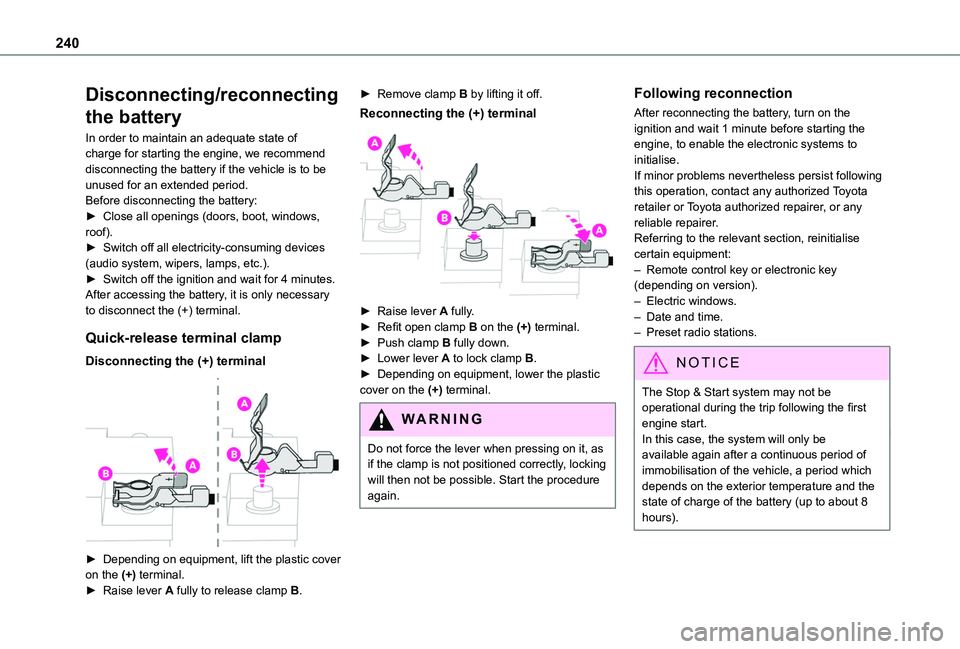
Disconnecting the (+) terminal
► Depending on equipment, lift the plastic cover on the (+) terminal.► Raise lever A fully to release clamp B.
► Remove clamp B by lifting it off.
Reconnecting the (+) terminal
► Raise lever A fully.► Refit open clamp B on the (+) terminal.► Push clamp B fully down.► Lower lever A to lock clamp B.► Depending on equipment, lower the plastic cover on the (+) terminal.
WARNI NG
Do not force the lever when pressing on it, as if the clamp is not positioned correctly, locking will then not be possible. Start the procedure again.
Following reconnection
After reconnecting the battery, turn on the ignition and wait 1 minute before starting the engine, to enable the electronic systems to initialise.If minor problems nevertheless persist following this operation, contact any authorized Toyota retailer or Toyota authorized repairer, or any reliable repairer.Referring to the relevant section, reinitialise certain equipment:– Remote control key or electronic key (depending on version).– Electric windows.– Date and time.– Preset radio stations.
NOTIC E
The Stop & Start system may not be operational during the trip following the first engine start.In this case, the system will only be
available again after a continuous period of immobilisation of the vehicle, a period which depends on the exterior temperature and the state of charge of the battery (up to about 8 hours).
Page 242 of 320
242
NOTIC E
In case of battery or electric parking brake failure, it is essential to call a professional using flatbed recovery vehicles (excluding manual gearbox).
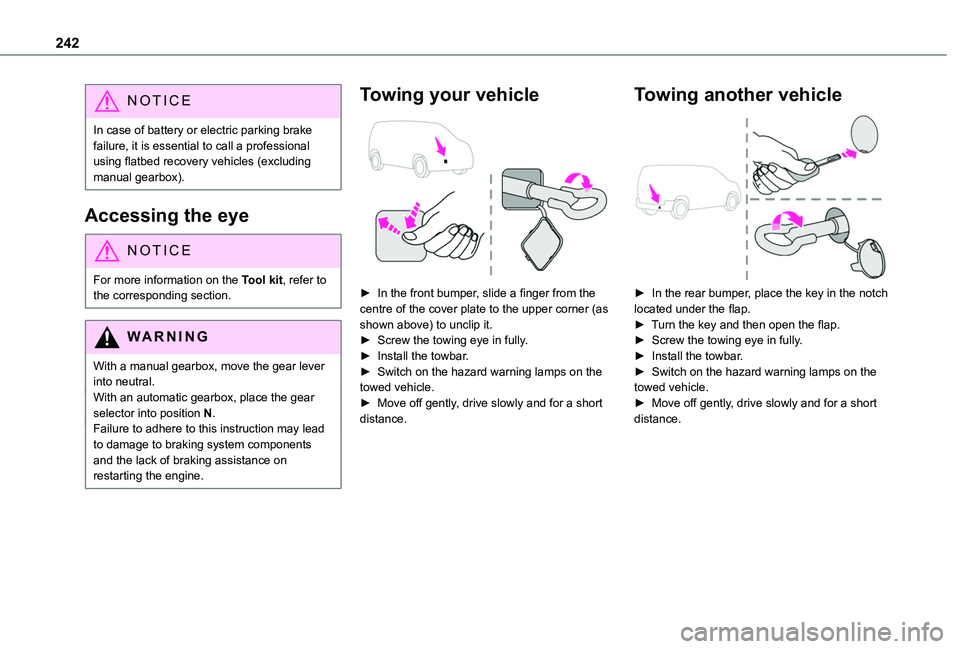
Accessing the eye
NOTIC E
For more information on the Tool kit, refer to the corresponding section.
WARNI NG
With a manual gearbox, move the gear lever into neutral.With an automatic gearbox, place the gear selector into position N.Failure to adhere to this instruction may lead to damage to braking system components and the lack of braking assistance on restarting the engine.
Towing your vehicle
► In the front bumper, slide a finger from the centre of the cover plate to the upper corner (as shown above) to unclip it.► Screw the towing eye in fully.► Install the towbar.► Switch on the hazard warning lamps on the towed vehicle.► Move off gently, drive slowly and for a short distance.
Towing another vehicle
► In the rear bumper, place the key in the notch located under the flap.► Turn the key and then open the flap.► Screw the towing eye in fully.► Install the towbar.► Switch on the hazard warning lamps on the towed vehicle.► Move off gently, drive slowly and for a short distance.
Page 253 of 320
253
Technical data
9
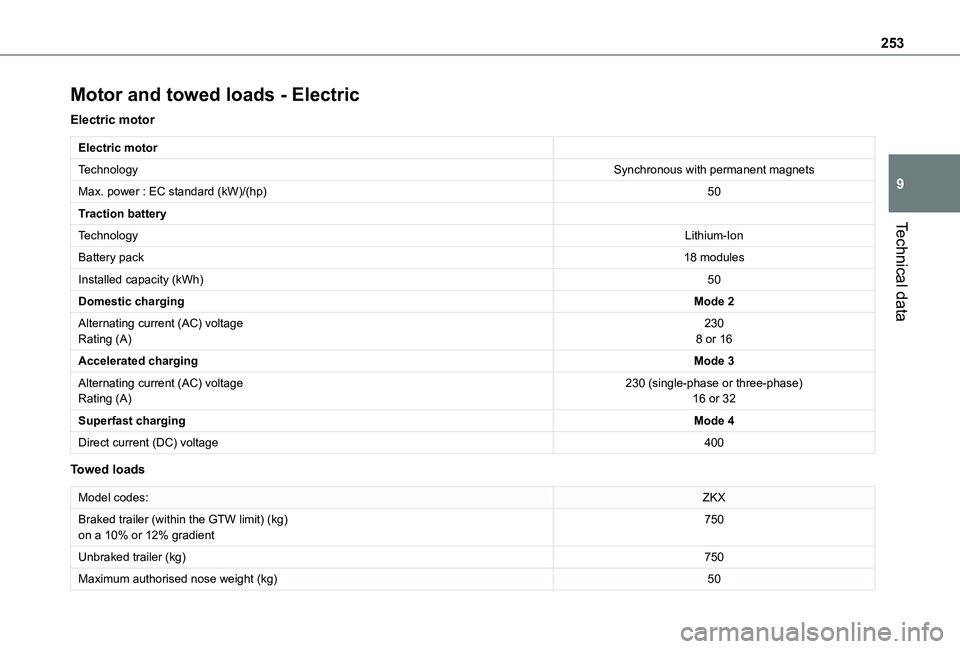
Motor and towed loads - Electric
Electric motor
Electric motor
TechnologySynchronous with permanent magnets
Max. power : EC standard (kW)/(hp)50
Traction battery
TechnologyLithium-Ion
Battery pack18 modules
Installed capacity (kWh)50
Domestic chargingMode 2
Alternating current (AC) voltageRating (A)2308 or 16
Accelerated chargingMode 3
Alternating current (AC) voltageRating (A)230 (single-phase or three-phase)16 or 32
Superfast chargingMode 4
Direct current (DC) voltage400
Towed loads
Model codes:ZKX
Braked trailer (within the GTW limit) (kg)on a 10% or 12% gradient750
Unbraked trailer (kg)750
Maximum authorised nose weight (kg)50
Page 264 of 320
264
► Press the "Radio Settings" button then select "Update list". The radio reception is cut off while searching for available stations (approximately 30 seconds).
Media
Playback of my USB memory stick starts only after a very long wait (around 2 to 3 minutes).Some files supplied with the memory stick may greatly slow down access to reading the memory stick (multiplication by 10 of the cataloguing time).► Delete the files supplied with the memory stick and limit the number of sub-folders in the file structure on the memory stick. Some characters in information about the currently playing media are not displayed correctly.The audio system is unable to process certain types of character.► Use standard characters to name tracks and folders.Playback of streaming files does not start.
The connected device does not automatically launch playback.► Start playback from the device.Track names and playing times are not displayed on the audio streaming screen.The Bluetooth profile does not allow the transfer of this information.
Telephone
I cannot connect my Bluetooth telephone.The telephone's Bluetooth function may be switched off or the telephone may not be visible.► Check that the telephone has Bluetooth switched on.► Check in the telephone settings that it is "visible to all".The Bluetooth telephone is not compatible with the system.► Check the compatibility of the telephone on the Brand's website (services).The volume of the telephone connected in Bluetooth mode is inaudible.The volume depends on both the system and the telephone.Ambient noise affects the quality of the telephone call.► Increase the volume of the audio system, to maximum if required, and increase the volume of the telephone if necessary.► Reduce ambient noise (close windows,
reduce ventilation, slow down, etc.).The contacts are not listed in alphabetical order.Some telephones offer display options. Depending on the settings chosen, contacts can be transferred in a specific order.► Modify the telephone directory display settings.
Settings
When the treble and bass settings are changed, the ambience is deselected.When the ambience is changed, the treble and bass settings are reset.Selecting an ambience imposes the treble and bass settings, and vice versa.► Modify the treble and bass or ambience settings to obtain the desired musical ambience.There is a difference in sound quality between audio sources.To allow for optimal listening quality, the sound settings can be tailored to different audio sources, which can generate audible differences when changing source.► Check that the sound settings are appropriate to the sources listened to. Adjust the sound functions to the middle position.When the engine is off, the system switches off after several minutes of use.When the engine is switched off, the system's operating time depends on the state of charge of
the battery.The switch-off is normal: the system automatically goes into energy economy mode and switches off to maintain an adequate charge in the battery.► Start the vehicle’s engine to increase the charge of the battery.
Page 278 of 320
278
The Bluetooth profile does not allow the transfer of this information.
Telephone
I cannot connect my Bluetooth telephone.The telephone's Bluetooth function may be switched off or the device may not be visible.► Check that the telephone has Bluetooth switched on.► Check in the telephone settings that it is "visible to all".The Bluetooth telephone is not compatible with the system.► Check the compatibility of the telephone on the Brand's website (services).Android Auto and/or CarPlay do not work.Android Auto and CarPlay may not activate if the USB cables are of poor quality.► Use genuine USB cables to ensure compatibility.Android Auto and/or CarPlay do not work.Android Auto and CarPlay are not available in all countries.
► Check the Google Android Auto or Apple website to see which countries are supported.The volume of the telephone connected in Bluetooth mode is inaudible.The volume depends on both the system and the telephone.► Increase the volume of the audio system, to maximum if required, and increase the volume of the telephone if necessary.
Ambient noise affects the quality of the telephone call.► Reduce ambient noise (close windows, turn down ventilation, slow down, etc.).The contacts are not listed in alphabetical order.Some telephones offer display options. Depending on the settings chosen, contacts can be transferred in a specific order.► Modify the telephone directory display settings.
Settings
When the treble and bass settings are changed, the ambience is deselected.When the ambience is changed, the treble and bass settings are reset.Selecting an ambience imposes the treble and bass settings, and vice versa.► Modify the treble and bass or ambience settings to obtain the desired musical ambience.When the balance settings are changed, the distribution is deselected.
When the distribution setting is changed, the balance settings are deselected.Selecting a distribution setting imposes the balance settings, and vice versa.► Modify the balance setting or the distribution setting to obtain the desired sound quality.There is a difference in sound quality between audio sources.To allow for optimal listening quality, the sound
settings can be tailored to different audio
sources, which can generate audible differences when changing source.► Check that the sound settings are appropriate to the sources listened to. Adjust the sound functions to the middle position.When the engine is off, the system switches off after several minutes of use.When the engine is switched off, the system's operating time depends on the state of charge of the battery.The switch-off is normal: the system automatically goes into energy economy mode and switches off to maintain an adequate charge in the battery.► Start the vehicle’s engine to increase the charge of the battery.
Page 305 of 320
305
TOYOTA Connect Nav
12
► Increase the volume of the audio system, to maximum if required, and increase the volume of the telephone if necessary.Ambient noise affects the quality of the telephone call.► Reduce the ambient noise level (close windows, turn down ventilation, slow down, etc.).Some contacts are duplicated in the list.The options for synchronising contacts are: synchronise the contacts on the SIM card, the contacts on the telephone, or both. When both synchronisations are selected, some contacts may be duplicated.► Select "Display SIM card contacts" or "Display telephone contacts".The contacts are not listed in alphabetical order.Some telephones offer display options. Depending on the settings chosen, contacts can be transferred in a specific order.► Modify the telephone directory display settings.The system does not receive SMS.
Bluetooth mode does not allow SMS text messages to be sent to the system.
Settings
When the treble and bass settings are changed, the ambience is deselected.When the ambience is changed, the treble and bass settings are reset.Selecting an ambience imposes the treble and
bass settings, and vice versa.
► Modify the treble and bass or ambience settings to obtain the desired musical ambience.When the balance settings are changed, the distribution is deselected.When the distribution setting is changed, the balance settings are deselected.Selecting a distribution setting imposes the balance settings, and vice versa.► Modify the balance setting or the distribution setting to obtain the desired sound quality.There is a difference in sound quality between audio sources.To allow for optimal listening quality, the sound settings can be tailored to different audio sources, which can generate audible differences when changing source.► Check that the sound settings are appropriate to the sources listened to. We recommend setting the sound functions (Bass:, Treble:, Balance) to the middle position, setting the musical ambience to "None", setting loudness correction to "Active" in USB mode and "Inactive" in Radio mode.
► In all cases, after applying sound settings, adjust the volume level on the portable device (to a high level) first. Then adjust the volume level on the audio system.When the engine is off, the system switches off after several minutes of use.When the engine is switched off, the system's operating time depends on the state of charge of the battery.
The switch-off is normal: the system automatically goes into energy economy mode and switches off to maintain an adequate charge in the battery.► Start the vehicle’s engine to increase the charge of the battery.The date and time cannot be set.Setting of the date and time is only available if the synchronisation with the satellites is deactivated.► Settings menu / Options / Time-Date setting. Select the "Time" tab and deactivate the "GPS synchronisation" (UTC).
Page 306 of 320
306
A
ABS 103Accelerated charging unit (Wallbox) 195Accessories 99Access to the 3rd row 61Access to the spare wheel 225Active Safety Brake 167–170AdBlue® 215AdBlue® tank 217Additive, Diesel 213–214Adjusting headlamps 95Adjusting head restraints 62Adjusting seat 53, 61Adjusting the air distribution 81Adjusting the air flow 81Adjusting the date 275, 300Adjusting the height and reach of the steering wheel 55Adjusting the lumbar support 53Adjusting the temperature 81Adjusting the time 261, 274, 300
Advice on care and maintenance 193, 219Advice on driving 6, 127–128Airbags 11 2, 11 4–11 5, 11 7Airbags, curtain 11 3–11 5Airbags, front 11 2–11 4, 11 8Airbags, lateral 11 3–11 4Air conditioning 78, 82, 85Air conditioning, digital 83Air conditioning, dual-zone automatic 81
Air conditioning, electronic (with display screen) 85Air conditioning, manual 79–80Air intake 81Air vents 78Alarm 47–48Alarm, volumetric 47Android Auto connection 271, 289Anti-lock braking system (ABS) 103Antitheft / Immobiliser 33Apple CarPlay connection 270, 289Applications 290Area, loading 33–34, 43, 71Armrest 53Armrest, front 63Assistance call 100Assistance, emergency braking 169Audible warning 102Audio streaming (Bluetooth) 257–258, 269, 294
B
Battery 235Battery, 12 V 204, 213, 235–238Battery, ancillaries 235Battery, charging 237Battery, remote control 40–41, 87Bench seat, one-piece, fixed 61Blind spot sensors 174
Bluetooth (hands-free) 259, 271–272, 295–296Bluetooth (telephone) 259–260, 271–272, 295–296Bodywork 220Bonnet 209–210Boot lid 37–38, 40Bottle holder 63Brake discs 214–215Brake lamps 233Brakes 214–215Braking 146Braking assistance system 103Braking, automatic emergency 167–170Braking, dynamic emergency 135–137Brightness 260, 273Bulbs 229Bulbs (changing) 228–229Bulbs (changing, type) 229
C
Cable, audio 294Cable, Jack 294Capacity, fuel tank 190–192Cap, fuel filler 191–192Care of the bodywork 220CD 257CD, MP3 257Central locking 31, 37–38Changing a bulb 228–229
Page 307 of 320
307
Alphabetical index
Changing a fuse 234Changing a wheel 222, 225Changing a wiper blade 97Changing the remote control battery 40Changing to free-wheeling 239Charger, induction 66Charger, wireless 66Charging cable 196Charging cable (Electric) 195Charging connector (Electric) 194, 200–201, 203Charging flap (Electric) 194, 200–201, 203Charging system (Electric) 5, 7, 29, 193, 2 11Charging the traction battery (Electric) 193, 200–201, 203Checking the levels 2 11–212Checking tyre pressures (using the kit) 223–224Checks 210, 213–215Checks, routine 213–215Child lock 126Children 111, 120, 124–126
Children (safety) 126Child seats 111, 11 5–11 7, 11 9–121, 124–125Child seats, conventional 11 9Child seats, i-Size 125Child seats, ISOFIX 124–126Cleaning (advice) 193, 219–220Closing the doors 31, 37–38Collision Risk Alert 167–169Configuration, vehicle 28–29Connected applications 290
Connection, Bluetooth 259–260, 271–272, 290–291, 295–296Connection, Wi-Fi network 291Connectivity 289Consumption figures 29Container, AdBlue® 216–217Control, emergency boot release 40Control, emergency door 32, 39Control, heated seats 55Control stalk, lighting 90–91Control stalk, wipers 95–98Control unit 195–196Courtesy lamp 88Courtesy lamp, front 89Courtesy lamp, rear 89Courtesy lamps 89Cover, load space 69Cruise control 156–157, 160–163, 167Cruise control, adaptive 163Cruise control by speed limit recognition 156–157Cruise control, dynamic
with Stop function 156–157Cup holder 63
D
DAB (Digital Audio Broadcasting) - Digital radio 257, 268, 293Date (setting) 275, 300Daytime running lamps 92, 229, 231
Deactivating the passenger airbag 11 3, 11 7–11 8Deactivation of DSC (ESC) 104Deadlocking 38Deferred charging 29, 202Deferred charging (Electric) 29, 194, 200Defrosting 56, 83Demisting 83Demisting, rear 56, 84Demisting, rear screen 56, 84Dimensions 241Dipstick 2 11Direction indicators 91, 229, 232–233Display, head-up 151–152Domestic charging 196Domestic charging (Electric) 201, 203, 251Doors, side 45Doors, side-hinged 37–38Driver’s attention warning 176–177Drive selector (Electric) 145, 214Driving 127–128Driving aids camera (warnings) 153
Driving aids (recommendations) 152Driving economically 6Driving modes 146Dynamic stability control (DSC) 103, 105–106
E
EBFD 103Eco-driving (advice) 6