2021 TOYOTA PROACE CITY Towing a trailer
[x] Cancel search: Towing a trailerPage 84 of 272
84
Turn the thumbwheel to this position.
The indicator lamp in the button or thumbwheel goes off.
Malfunction
In the event of a system malfunction, this warning lamp comes on, accompanied by an onscreen message and audible signal.Contact a TOYOTA dealer or a qualified workshop to have the systems checked.
WARNI NG
ASR / DSCThese systems enhance safety during normal driving, but should not encourage the driver to take extra risks or drive at high speed.It is in conditions of reduced grip (rain, snow, ice) that the risk of loss of grip increases. It is therefore important for your safety to keep these systems activated in all conditions, and particularly in difficult conditions.
Correct operation of these systems depends on compliance with the manufacturer's recommendations relating to the wheels (tyres and rims), braking and electronic components, as well as the assembly and repair procedures used by TOYOTA dealers.The use of snow tyres is recommended, to ensure that these systems remain effective in winter conditions. All four wheels must be fitted with tyres approved for the vehicle.
Trailer stability assist (TSA)
When towing, this system reduces the risk of the vehicle or trailer snaking.
Operation
The system is activated automatically when the ignition is switched on.The electronic stability control system (ESC) must not have any faults.At speeds between 60 and 160 km/h (37 and 99 mph), if the system detects oscillating trailer movements (snaking), it acts on the brakes to stabilise the trailer and, if necessary, reduces engine power to slow the vehicle.This warning lamp flashes on the instrument panel and the brake lamps light up to draw attention to this corrective action.For information on weights and towed loads, refer to the Engine Technical Data and Towed Loads section or your vehicle’s registration certificateTo ensure safe driving with a Towing device,
refer to the corresponding section.
Malfunction
If a fault occurs, this warning lamp comes on in the instrument panel, accompanied by a message and an audible signal.If you wish to continue towing a trailer, reduce your speed and drive carefully!Contact a TOYOTA dealer or a qualified workshop to have the system checked.
WARNI NG
The trailer stability assist system offers enhanced safety in normal driving, provided that the recommendations on towing a trailer are observed. It should not encourage the driver to take risks, such as towing a trailer in adverse operating conditions (overloading, failure to observe the trailer nose weight, worn or under-inflated tyres, faulty braking system, etc.), or to drive at excessive speeds.In certain cases, the system may not detect trailer snaking, particularly with a light trailer.When driving on slippery or poor surfaces, the system may not be able to prevent sudden trailer snaking.
Page 100 of 272
100
On leaving the flooded road, as soon as safety conditions allow, make several light brake applications to dry the brake discs and pads.If in doubt about the state of your vehicle, contact a TOYOTA dealer or a qualified workshop.
In case of towing
WARNI NG
Driving with a trailer places greater demands on the towing vehicle and requires extra care from the driver.
NOTIC E
Respect the maximum towable weights.At altitude: reduce the maximum load by 10% per 1,000 metres (3,280 ft) of altitude; the density of the air decreases with altitude and the performance of the engine reduces.
WARNI NG
New vehicle: do not pull a trailer before having driven at least 1,000 kilometres (620 miles).
NOTIC E
If the outside temperature is high, let the engine idle for 1 to 2 minutes after the vehicle comes to a stop, to help it to cool.
Before setting off
Nose weight
► Distribute the load in the trailer so that the heaviest items are as close as possible to the axle and the nose weight (at the point where it joins your vehicle) approaches the maximum permitted without exceeding it.
Tyres
► Check the tyre pressures of the towing vehicle and of the trailer, observing the recommended pressures.
Lighting
► Check the electrical signalling on the trailer and the headlamp beam height of your vehicle.
NOTIC E
If a genuine TOYOTA towing device is used, the rear parking sensors will be deactivated automatically to avoid the audible signal.
When driving
Cooling
Towing a trailer uphill increases the temperature of the coolant. The maximum towable load depends on the gradient and the exterior temperature. The cooling capacity of the fan does not increase with engine speed.► Reduce speed and lower the engine speed, so as to limit the heating-up.In all cases, pay attention to the coolant temperature.If this warning lamp and the STOP warning lamp come on, stop the vehicle and switch off the engine as soon as possible.
Brakes
Braking distances are increased when towing a trailer. To avoid overheating of the brakes, the use of engine braking is recommended.
Side wind
Bear in mind the increased susceptibility to the wind that the vehicle will have.
Page 133 of 272
133
Driving
6
WARNI NG
If the vehicle has undergone any of the following modifications, do not use the system:– Carrying long objects on roof bars or a roof rack.– Towing.– Front end of the vehicle modified (for example by adding long-range headlamps or painting the front bumper).
Malfunction
In the event of a cruise control malfunction, dashes are displayed instead of the cruise control speed setting.This warning lamp comes on, accompanied by an audible signal and an onscreen message, to indicate a system malfunction.Have the system checked by a TOYOTA dealer or a qualified workshop.
NOTIC E
The adaptive cruise control deactivates automatically if the use of a “space-saver” type spare wheel is detected or in the event of a malfunction of the lateral brake lamps or trailer brake lamps (for approved trailers).
Memorising speeds
This function, used only for the speed limiter and programmable cruise control, lets you save speed settings that will subsequently be proposed for the purpose of configuring these two systems.You can memorise multiple speed settings for each of the two systems.By default, some speed settings are already memorised.
WARNI NG
As a safety measure, the driver must only change speed settings when stationary.
Changing a speed setting
In the Driving / Vehicle touch screen menu, select "Driving functions" then "Memorised speed settings".
"MEM" button
With this button, you can select a memorised speed setting to use with the speed limiter or the programmable cruise control.For more information on the Speed limiter or Programmable cruise control, refer to the corresponding section.
Active Safety Brake with
Collision Risk Alert and
Intelligent emergency
braking assistance
Refer to the General recommendations on the use of driving and manoeuvring aids.
This system allows:– the driver to be warned that their vehicle is at risk of collision with the vehicle in front,– a collision to be prevented, or its severity to be limited, by reducing the vehicle’s speed.This system is comprised of three functions:– Collision Risk Alert,– Intelligent emergency braking assistance,– Active Safety Brake (automatic emergency braking).
Page 134 of 272
134
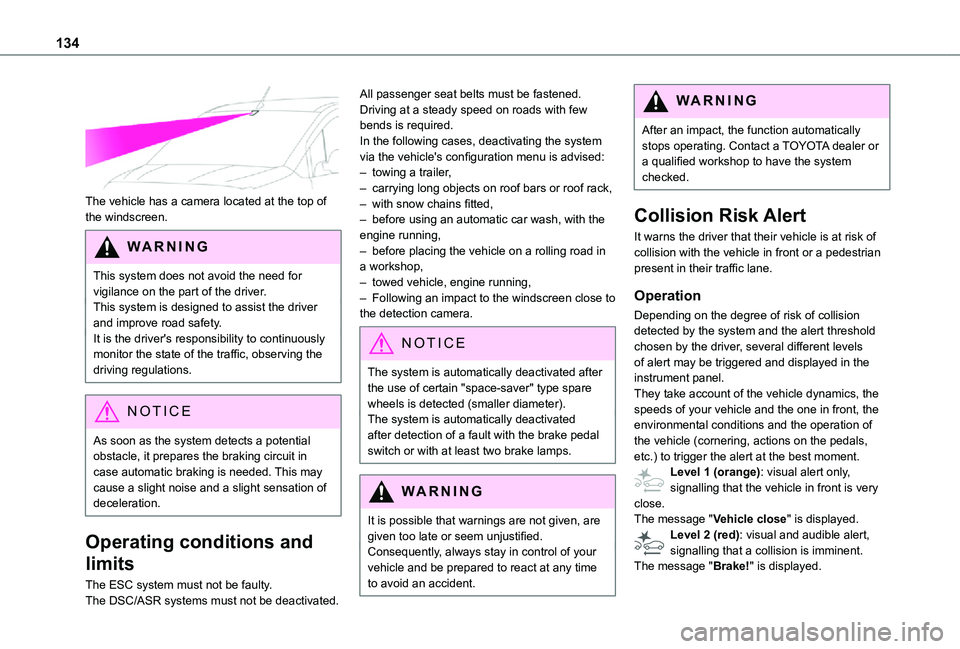
The vehicle has a camera located at the top of the windscreen.
WARNI NG
This system does not avoid the need for vigilance on the part of the driver.This system is designed to assist the driver and improve road safety.It is the driver's responsibility to continuously monitor the state of the traffic, observing the driving regulations.
NOTIC E
As soon as the system detects a potential
obstacle, it prepares the braking circuit in case automatic braking is needed. This may cause a slight noise and a slight sensation of deceleration.
Operating conditions and
limits
The ESC system must not be faulty.The DSC/ASR systems must not be deactivated.
All passenger seat belts must be fastened.Driving at a steady speed on roads with few bends is required.In the following cases, deactivating the system via the vehicle's configuration menu is advised:– towing a trailer,– carrying long objects on roof bars or roof rack,– with snow chains fitted,– before using an automatic car wash, with the engine running,– before placing the vehicle on a rolling road in a workshop,– towed vehicle, engine running,– Following an impact to the windscreen close to the detection camera.
NOTIC E
The system is automatically deactivated after the use of certain "space-saver" type spare wheels is detected (smaller diameter).The system is automatically deactivated after detection of a fault with the brake pedal switch or with at least two brake lamps.
WARNI NG
It is possible that warnings are not given, are given too late or seem unjustified.
Consequently, always stay in control of your vehicle and be prepared to react at any time to avoid an accident.
WARNI NG
After an impact, the function automatically stops operating. Contact a TOYOTA dealer or a qualified workshop to have the system checked.
Collision Risk Alert
It warns the driver that their vehicle is at risk of collision with the vehicle in front or a pedestrian present in their traffic lane.
Operation
Depending on the degree of risk of collision detected by the system and the alert threshold chosen by the driver, several different levels of alert may be triggered and displayed in the instrument panel.They take account of the vehicle dynamics, the speeds of your vehicle and the one in front, the environmental conditions and the operation of the vehicle (cornering, actions on the pedals,
etc.) to trigger the alert at the best moment.Level 1 (orange): visual alert only, signalling that the vehicle in front is very close.The message "Vehicle close" is displayed.Level 2 (red): visual and audible alert, signalling that a collision is imminent.The message "Brake!" is displayed.
Page 140 of 272
140
– flashing, after a delay of about one second, when overtaking a vehicle slowly, and when the direction indicator is used.
Activation / Deactivation
Activation or deactivation is set via the vehicle configuration menu.
NOTIC E
The system state remains in memory when the ignition is switched off.
NOTIC E
The system is automatically deactivated when towing with a towbar approved by TOYOTA.
Conditions for operation
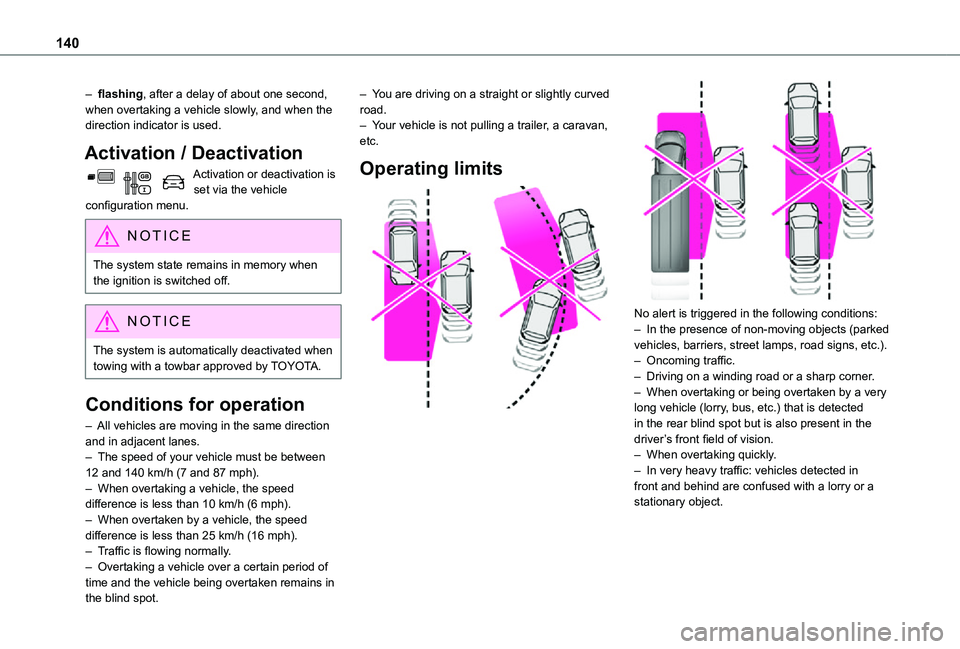
– All vehicles are moving in the same direction and in adjacent lanes.– The speed of your vehicle must be between 12 and 140 km/h (7 and 87 mph).– When overtaking a vehicle, the speed difference is less than 10 km/h (6 mph).– When overtaken by a vehicle, the speed difference is less than 25 km/h (16 mph).– Traffic is flowing normally.– Overtaking a vehicle over a certain period of time and the vehicle being overtaken remains in the blind spot.
– You are driving on a straight or slightly curved road.– Your vehicle is not pulling a trailer, a caravan, etc.
Operating limits
No alert is triggered in the following conditions:– In the presence of non-moving objects (parked vehicles, barriers, street lamps, road signs, etc.).– Oncoming traffic.– Driving on a winding road or a sharp corner.– When overtaking or being overtaken by a very long vehicle (lorry, bus, etc.) that is detected in the rear blind spot but is also present in the driver’s front field of vision.– When overtaking quickly.– In very heavy traffic: vehicles detected in front and behind are confused with a lorry or a stationary object.
Page 145 of 272
145
Driving
6
NOTIC E
The rear parking sensors system will be deactivated automatically if a trailer or bicycle carrier is connected to a towing device installed in accordance with the manufacturer's recommendations.In this case, the outline of a trailer is displayed at the rear of the image of the vehicle.
Operating limits
If the boot is heavily loaded, the vehicle may tilt, affecting distance measurements.
Malfunction
In the event of a malfunction when changing into reverse, this warning lamp comes on on the instrument panel, accompanied by an onscreen message and an audible signal (short beep).Contact a TOYOTA dealer or a qualified workshop to have the system checked.
Reversing camera
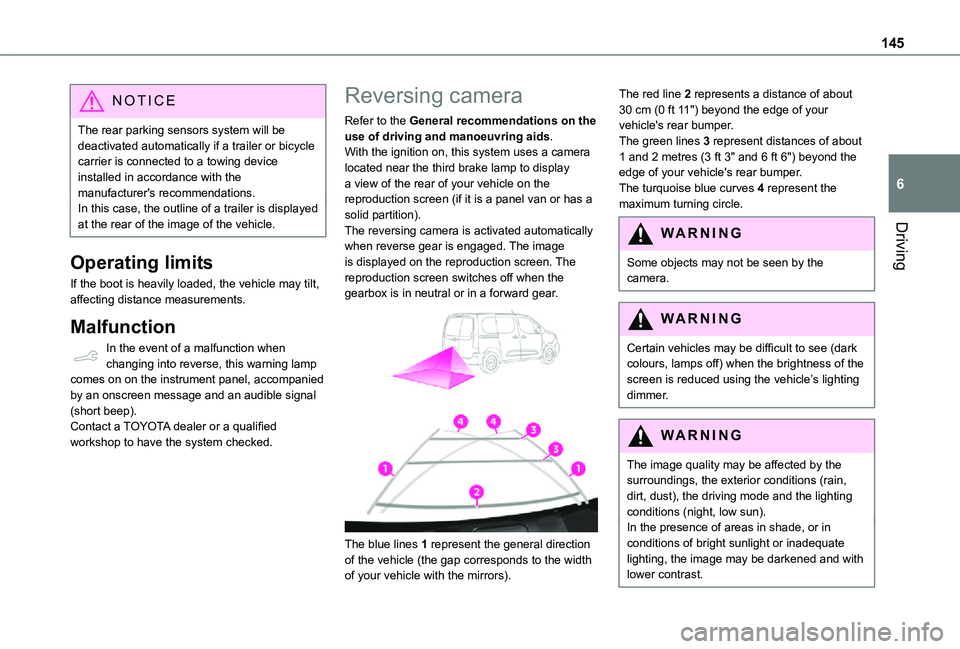
Refer to the General recommendations on the use of driving and manoeuvring aids.With the ignition on, this system uses a camera located near the third brake lamp to display a view of the rear of your vehicle on the reproduction screen (if it is a panel van or has a solid partition).The reversing camera is activated automatically when reverse gear is engaged. The image is displayed on the reproduction screen. The reproduction screen switches off when the gearbox is in neutral or in a forward gear.
The blue lines 1 represent the general direction
of the vehicle (the gap corresponds to the width of your vehicle with the mirrors).
The red line 2 represents a distance of about 30 cm (0 ft 11") beyond the edge of your vehicle's rear bumper.The green lines 3 represent distances of about 1 and 2 metres (3 ft 3" and 6 ft 6") beyond the edge of your vehicle's rear bumper.The turquoise blue curves 4 represent the maximum turning circle.
WARNI NG
Some objects may not be seen by the camera.
WARNI NG
Certain vehicles may be difficult to see (dark colours, lamps off) when the brightness of the screen is reduced using the vehicle’s lighting dimmer.
WARNI NG
The image quality may be affected by the surroundings, the exterior conditions (rain, dirt, dust), the driving mode and the lighting conditions (night, low sun).In the presence of areas in shade, or in conditions of bright sunlight or inadequate lighting, the image may be darkened and with lower contrast.
Page 153 of 272
153
Practical information
7
NOTIC E
It is strongly recommended that before you leave, you practise fitting the snow chains on a level and dry surface.
WARNI NG
Avoid driving with snow chains on roads that
have been cleared of snow to avoid damaging your vehicle's tyres and the road surface. If your vehicle is fitted with alloy wheels, check that no part of the chain or its fixings is in contact with the wheel rim.
Use only the chains designed to be fitted to the type of wheel fitted to your vehicle:
Original tyre sizeMaximum link size (mm)
195/65 R159
205/60 R16
205/55 R17
215/65 R16
215/60 R17cannot be fitted with chains
You can also use snow socks.For more information, contact a TOYOTA dealer or a qualified workshop.
Towing device
Load distribution► Distribute the load in the trailer so that the heaviest items are as close as possible to the axle and the nose weight approaches the maximum permitted without exceeding it.Air density decreases with altitude, thus reducing engine performance. The maximum towed load must be reduced by 10 % for every 1,000 metres (3,280 ft) of altitude.
NOTIC E
Use towing devices and their unmodified harnesses approved by TOYOTA. It is recommended that the installation be performed by a TOYOTA dealer or a qualified workshop.If the towing device is not fitted by a TOYOTA dealer, it must still be fitted in accordance with the vehicle manufacturer's instructions.Certain driving assistance or manoeuvring assistance functions are automatically disabled if an approved towbar is used.
WARNI NG
Observe the maximum authorised towable weight, indicated on your vehicle's registration certificate, the manufacturer's label as well as in the Technical data section of this guide.Complying with the maximum authorised nose weight (towball) also includes the use of accessories (bicycle carriers, tow boxes, etc.).
WARNI NG
Observe the legislation in force in the country in which you are driving.
Page 154 of 272
154
Towing devices
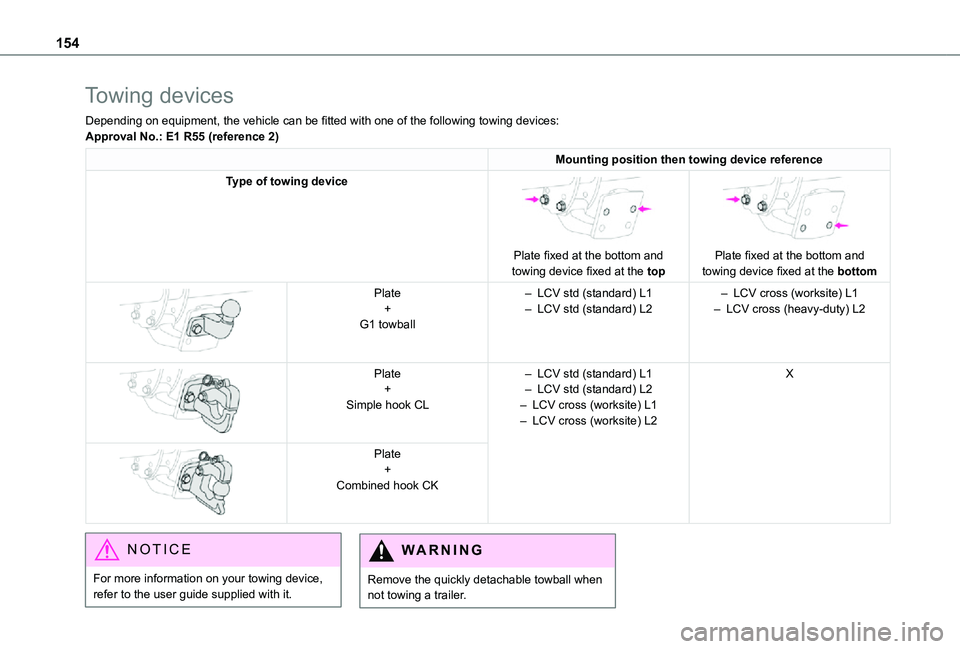
Depending on equipment, the vehicle can be fitted with one of the following towing devices:Approval No.: E1 R55 (reference 2)
Mounting position then towing device reference
Type of towing device
Plate fixed at the bottom and towing device fixed at the top
Plate fixed at the bottom and towing device fixed at the bottom
Plate+G1 towball
– LCV std (standard) L1– LCV std (standard) L2– LCV cross (worksite) L1– LCV cross (heavy-duty) L2
Plate+Simple hook CL
– LCV std (standard) L1– LCV std (standard) L2– LCV cross (worksite) L1– LCV cross (worksite) L2
X
Plate+Combined hook CK
NOTIC E
For more information on your towing device, refer to the user guide supplied with it.
WARNI NG
Remove the quickly detachable towball when not towing a trailer.