2021 TOYOTA PROACE CITY remote control
[x] Cancel search: remote controlPage 104 of 272
104
Key left in the ignition
NOTIC E
When opening the driver's door, an alert message is displayed, accompanied by an audible signal, to remind you that the key is still in the ignition switch at position 1 (Stop).If the key has been left in the ignition switch at position 2 (Ignition on), the ignition will be
switched off automatically after one hour.To switch the ignition back on, turn the key to position 1 (Stop), then back to position 2 (Ignition on).
With Keyless Entry and Starting
► With the remote control in the recognition zone, press the "START/STOP" button.With a manual gearbox, the engine switches off and the steering column locks.With the EAT8 automatic gearbox, the engine switches off.
NOTIC E
If the vehicle is not immobilised, the engine will not stop.
Switching on the ignition
with Keyless Entry and
Starting
With the Keyless Entry and Starting system’s electronic key inside the vehicle, pressing the "START/STOP" button, with no action on the pedals, allows the ignition to be switched on.► Pressing this button again switches off the ignition and allows the vehicle to be locked.
Back-up starting with
Keyless Entry and Starting
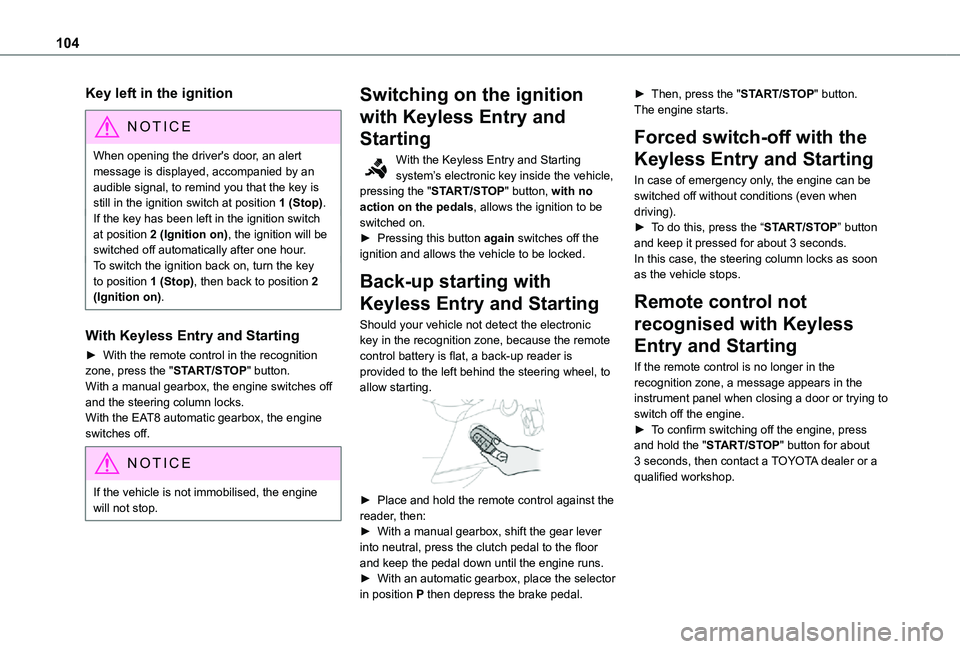
Should your vehicle not detect the electronic key in the recognition zone, because the remote control battery is flat, a back-up reader is provided to the left behind the steering wheel, to allow starting.
► Place and hold the remote control against the reader, then:► With a manual gearbox, shift the gear lever into neutral, press the clutch pedal to the floor and keep the pedal down until the engine runs.► With an automatic gearbox, place the selector in position P then depress the brake pedal.
► Then, press the "START/STOP" button.The engine starts.
Forced switch-off with the
Keyless Entry and Starting
In case of emergency only, the engine can be switched off without conditions (even when driving).► To do this, press the “START/STOP” button and keep it pressed for about 3 seconds.In this case, the steering column locks as soon as the vehicle stops.
Remote control not
recognised with Keyless
Entry and Starting
If the remote control is no longer in the recognition zone, a message appears in the instrument panel when closing a door or trying to switch off the engine.► To confirm switching off the engine, press
and hold the "START/STOP" button for about 3 seconds, then contact a TOYOTA dealer or a qualified workshop.
Page 111 of 272
111
Driving
6
When you move the selector or press button M, the corresponding gear and indicator lamp are shown on the instrument panel.The "-" symbol is displayed if a value is invalid.► If the message "Foot on the brake" is displayed on the instrument panel, press the brake pedal firmly.
Moving off
► With your foot on the brake, select position P.► Start the engine.If the conditions are not met, there is an audible signal, accompanied by a message on the instrument panel screen.► Release the parking brake.► Select position R, N or D.
WARNI NG
When moving off on a steep slope with a loaded vehicle, press the brake pedal, select position D, release the parking brake, then release the brake pedal.
► Gradually release the brake pedal.The vehicle moves off immediately.
NOTIC E
If P is displayed on the instrument panel but the selector is in another position, place the selector in position P to allow the engine to be started.If position N is selected inadvertently while driving, allow the engine to return to idle, then select position D to accelerate.
WARNI NG
When the engine is running at idle with the brakes released, if position R, D or M is selected, the vehicle moves even without the accelerator being pressed.Never leave children unsupervised inside the vehicle.As a safety measure, never leave the vehicle without taking your key or remote control with you, even for a short time.When carrying out maintenance with the engine running, apply the parking brake and select position P.
WARNI NG
With an automatic gearbox, never try to start
the engine by pushing the vehicle.
Automatic operation
► Select position D for automatic changing of the gears.The gearbox then operates in auto-adaptive mode, without any intervention on the part of the driver. It continuously selects the most suitable gear according to the driving style, the road profile and the load in the vehicle.For maximum acceleration without touching the selector, press the accelerator fully down (kick-down). The gearbox changes down automatically or holds the gear selected until the maximum engine speed is reached.When braking, the gearbox changes down automatically to provide effective engine braking.If the accelerator pedal is sharply released, the gearbox will not shift to a higher gear for safety reasons.
WARNI NG
Never select position N while the vehicle is moving.Never select positions P or R unless the vehicle is completely stationary.
Page 183 of 272
183
In the event of a breakdown
8
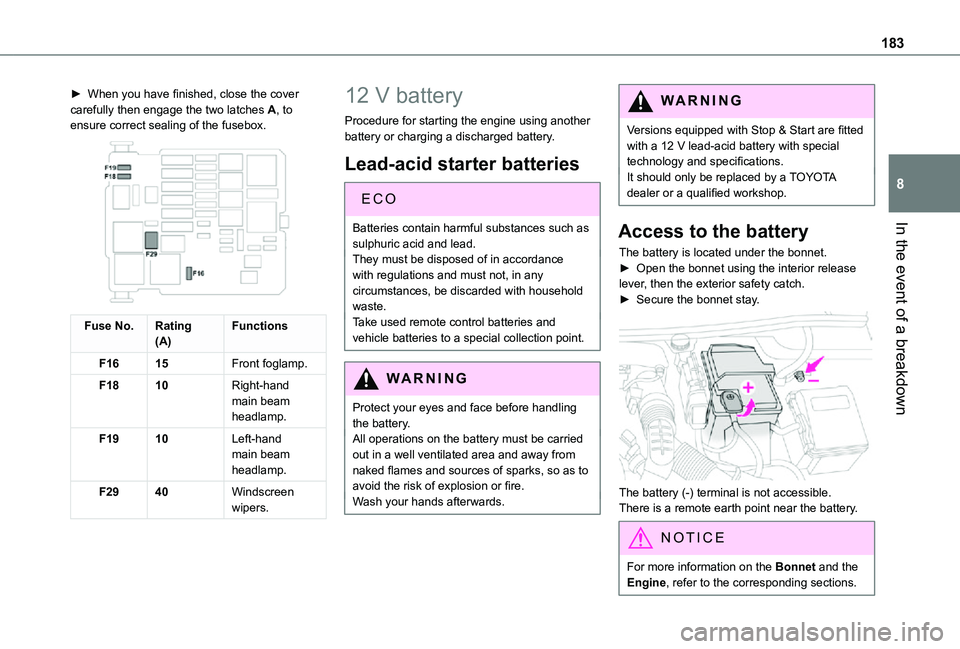
► When you have finished, close the cover carefully then engage the two latches A, to ensure correct sealing of the fusebox.
Fuse No.Rating(A)Functions
F1615Front foglamp.
F1810Right-hand main beam headlamp.
F1910Left-hand main beam headlamp.
F2940Windscreen wipers.
12 V battery
Procedure for starting the engine using another battery or charging a discharged battery.
Lead-acid starter batteries
EC O
Batteries contain harmful substances such as
sulphuric acid and lead.They must be disposed of in accordance with regulations and must not, in any circumstances, be discarded with household waste.Take used remote control batteries and vehicle batteries to a special collection point.
WARNI NG
Protect your eyes and face before handling the battery.All operations on the battery must be carried out in a well ventilated area and away from naked flames and sources of sparks, so as to avoid the risk of explosion or fire.Wash your hands afterwards.
WARNI NG
Versions equipped with Stop & Start are fitted with a 12 V lead-acid battery with special technology and specifications.It should only be replaced by a TOYOTA dealer or a qualified workshop.
Access to the battery
The battery is located under the bonnet.► Open the bonnet using the interior release lever, then the exterior safety catch.► Secure the bonnet stay.
The battery (-) terminal is not accessible.There is a remote earth point near the battery.
NOTIC E
For more information on the Bonnet and the Engine, refer to the corresponding sections.
Page 186 of 272
186
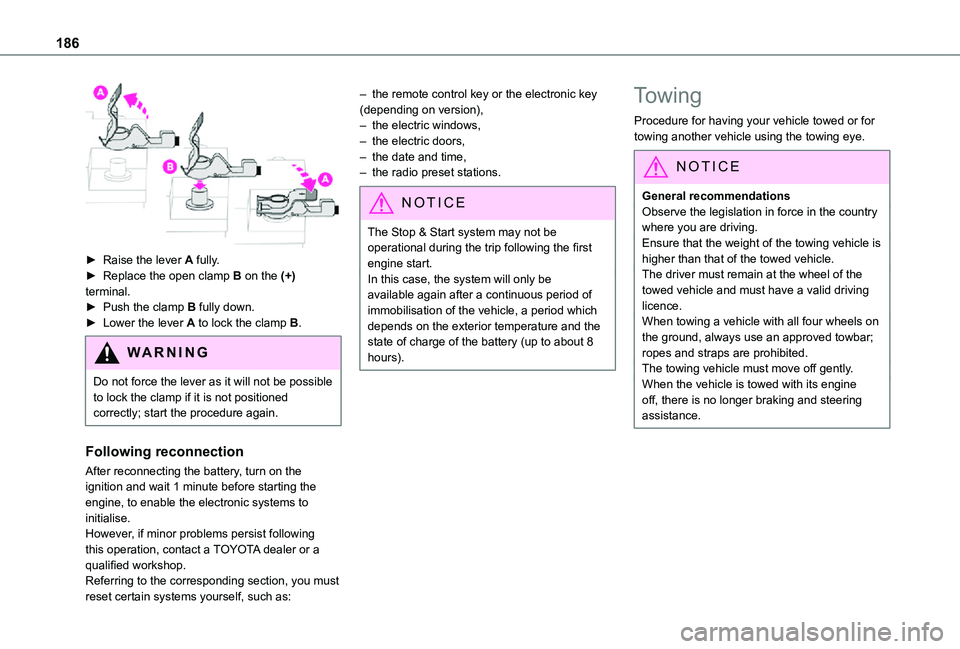
► Raise the lever A fully.► Replace the open clamp B on the (+) terminal.► Push the clamp B fully down.► Lower the lever A to lock the clamp B.
WARNI NG
Do not force the lever as it will not be possible to lock the clamp if it is not positioned correctly; start the procedure again.
Following reconnection
After reconnecting the battery, turn on the ignition and wait 1 minute before starting the engine, to enable the electronic systems to initialise.However, if minor problems persist following this operation, contact a TOYOTA dealer or a qualified workshop.Referring to the corresponding section, you must reset certain systems yourself, such as:
– the remote control key or the electronic key (depending on version),– the electric windows,– the electric doors,– the date and time,– the radio preset stations.
NOTIC E
The Stop & Start system may not be operational during the trip following the first engine start.In this case, the system will only be available again after a continuous period of immobilisation of the vehicle, a period which depends on the exterior temperature and the state of charge of the battery (up to about 8 hours).
Towing
Procedure for having your vehicle towed or for towing another vehicle using the towing eye.
NOTIC E
General recommendationsObserve the legislation in force in the country where you are driving.Ensure that the weight of the towing vehicle is higher than that of the towed vehicle.The driver must remain at the wheel of the towed vehicle and must have a valid driving licence.When towing a vehicle with all four wheels on the ground, always use an approved towbar; ropes and straps are prohibited.The towing vehicle must move off gently.When the vehicle is towed with its engine off, there is no longer braking and steering assistance.
Page 252 of 272
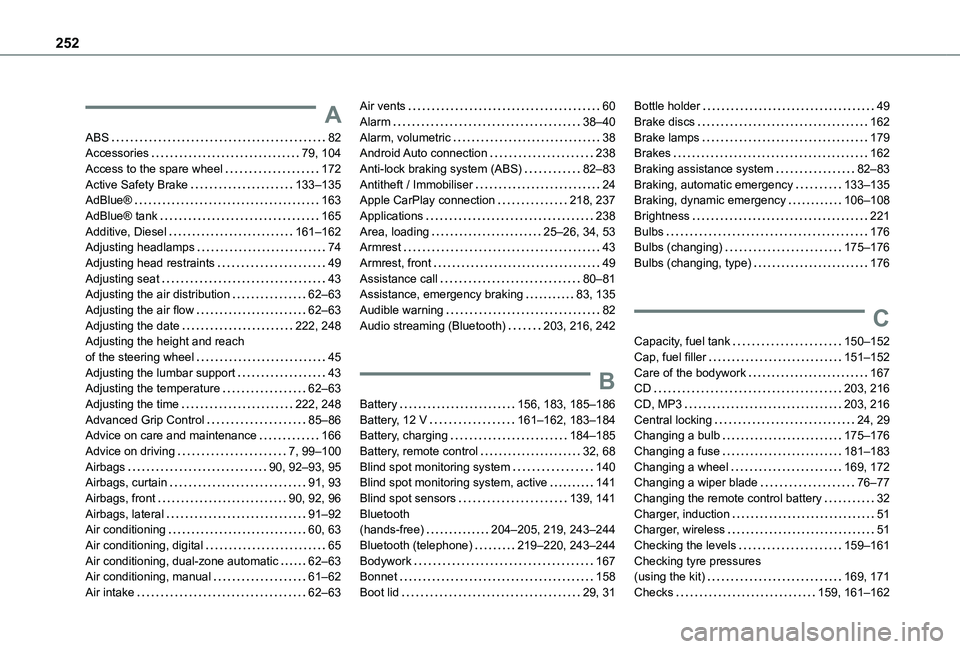
252
A
ABS 82Accessories 79, 104Access to the spare wheel 172Active Safety Brake 133–135AdBlue® 163AdBlue® tank 165Additive, Diesel 161–162Adjusting headlamps 74Adjusting head restraints 49Adjusting seat 43Adjusting the air distribution 62–63Adjusting the air flow 62–63Adjusting the date 222, 248Adjusting the height and reach of the steering wheel 45Adjusting the lumbar support 43Adjusting the temperature 62–63Adjusting the time 222, 248Advanced Grip Control 85–86Advice on care and maintenance 166
Advice on driving 7, 99–100Airbags 90, 92–93, 95Airbags, curtain 91, 93Airbags, front 90, 92, 96Airbags, lateral 91–92Air conditioning 60, 63Air conditioning, digital 65Air conditioning, dual-zone automatic 62–63Air conditioning, manual 61–62Air intake 62–63
Air vents 60Alarm 38–40Alarm, volumetric 38Android Auto connection 238Anti-lock braking system (ABS) 82–83Antitheft / Immobiliser 24Apple CarPlay connection 218, 237Applications 238Area, loading 25–26, 34, 53Armrest 43Armrest, front 49Assistance call 80–81Assistance, emergency braking 83, 135Audible warning 82Audio streaming (Bluetooth) 203, 216, 242
B
Battery 156, 183, 185–186Battery, 12 V 161–162, 183–184Battery, charging 184–185
Battery, remote control 32, 68Blind spot monitoring system 140Blind spot monitoring system, active 141Blind spot sensors 139, 141Bluetooth (hands-free) 204–205, 219, 243–244Bluetooth (telephone) 219–220, 243–244Bodywork 167Bonnet 158Boot lid 29, 31
Bottle holder 49Brake discs 162Brake lamps 179Brakes 162Braking assistance system 82–83Braking, automatic emergency 133–135Braking, dynamic emergency 106–108Brightness 221Bulbs 176Bulbs (changing) 175–176Bulbs (changing, type) 176
C
Capacity, fuel tank 150–152Cap, fuel filler 151–152Care of the bodywork 167CD 203, 216CD, MP3 203, 216Central locking 24, 29Changing a bulb 175–176
Changing a fuse 181–183Changing a wheel 169, 172Changing a wiper blade 76–77Changing the remote control battery 32Charger, induction 51Charger, wireless 51Checking the levels 159–161Checking tyre pressures (using the kit) 169, 171Checks 159, 161–162
Page 254 of 272
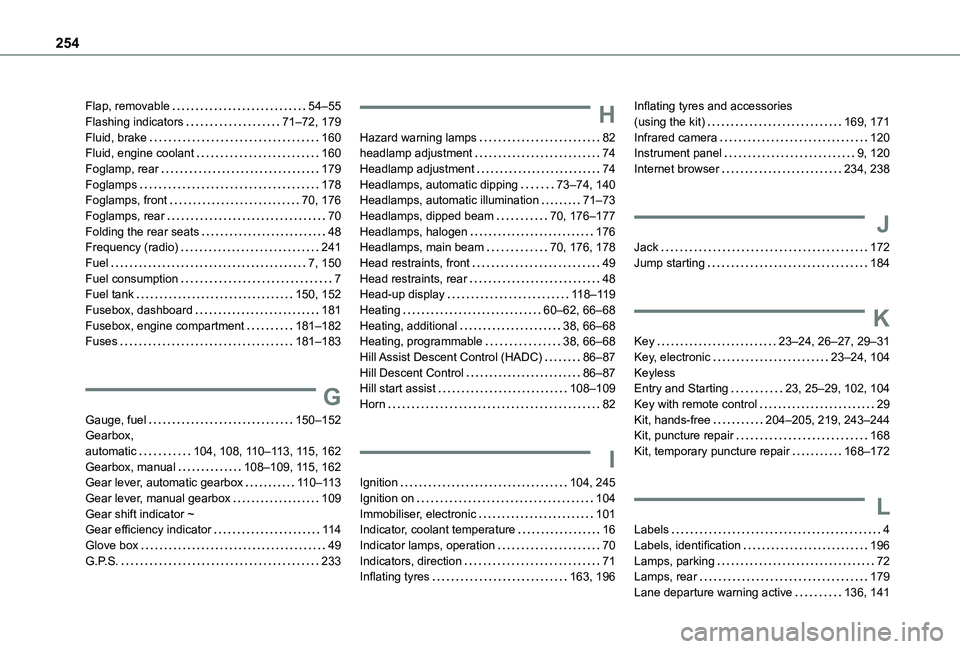
254
Flap, removable 54–55Flashing indicators 71–72, 179Fluid, brake 160Fluid, engine coolant 160Foglamp, rear 179Foglamps 178Foglamps, front 70, 176Foglamps, rear 70Folding the rear seats 48Frequency (radio) 241Fuel 7, 150Fuel consumption 7Fuel tank 150, 152Fusebox, dashboard 181Fusebox, engine compartment 181–182Fuses 181–183
G
Gauge, fuel 150–152Gearbox,
automatic 104, 108, 11 0–11 3, 11 5, 162Gearbox, manual 108–109, 11 5, 162Gear lever, automatic gearbox 11 0–11 3Gear lever, manual gearbox 109Gear shift indicator ~ Gear efficiency indicator 11 4Glove box 49G.P.S. 233
H
Hazard warning lamps 82headlamp adjustment 74Headlamp adjustment 74Headlamps, automatic dipping 73–74, 140Headlamps, automatic illumination 71–73Headlamps, dipped beam 70, 176–177Headlamps, halogen 176Headlamps, main beam 70, 176, 178Head restraints, front 49Head restraints, rear 48Head-up display 11 8–11 9Heating 60–62, 66–68Heating, additional 38, 66–68Heating, programmable 38, 66–68Hill Assist Descent Control (HADC) 86–87Hill Descent Control 86–87Hill start assist 108–109Horn 82
I
Ignition 104, 245Ignition on 104Immobiliser, electronic 101Indicator, coolant temperature 16Indicator lamps, operation 70Indicators, direction 71Inflating tyres 163, 196
Inflating tyres and accessories (using the kit) 169, 171Infrared camera 120Instrument panel 9, 120Internet browser 234, 238
J
Jack 172Jump starting 184
K
Key 23–24, 26–27, 29–31Key, electronic 23–24, 104Keyless Entry and Starting 23, 25–29, 102, 104Key with remote control 29Kit, hands-free 204–205, 219, 243–244Kit, puncture repair 168
Kit, temporary puncture repair 168–172
L
Labels 4Labels, identification 196Lamps, parking 72Lamps, rear 179Lane departure warning active 136, 141
Page 256 of 272
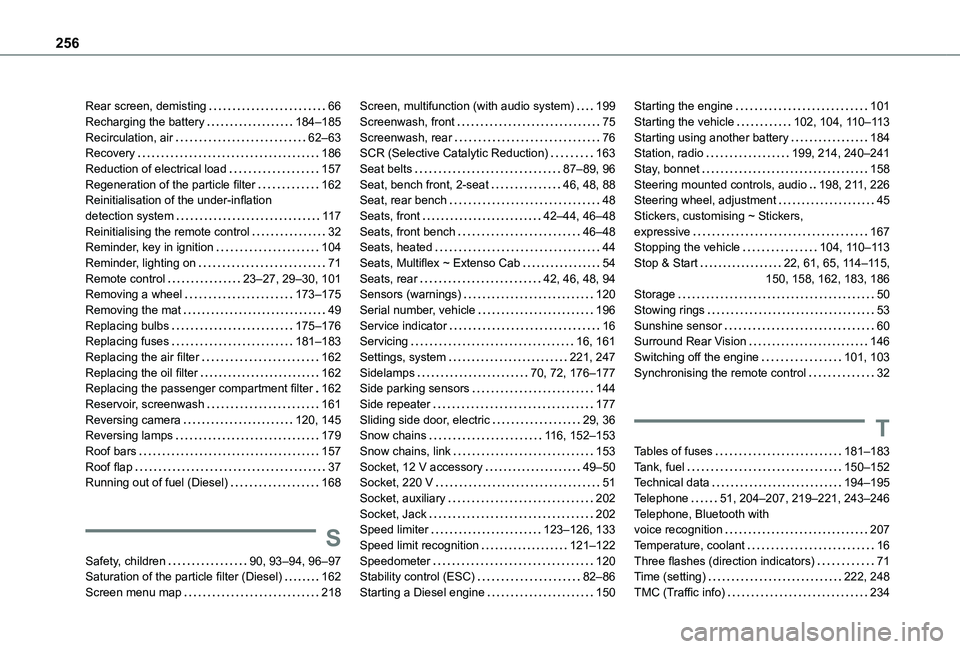
256
Rear screen, demisting 66Recharging the battery 184–185Recirculation, air 62–63Recovery 186Reduction of electrical load 157Regeneration of the particle filter 162Reinitialisation of the under-inflation detection system 11 7Reinitialising the remote control 32Reminder, key in ignition 104Reminder, lighting on 71Remote control 23–27, 29–30, 101Removing a wheel 173–175Removing the mat 49Replacing bulbs 175–176Replacing fuses 181–183Replacing the air filter 162Replacing the oil filter 162Replacing the passenger compartment filter 162Reservoir, screenwash 161Reversing camera 120, 145Reversing lamps 179
Roof bars 157Roof flap 37Running out of fuel (Diesel) 168
S
Safety, children 90, 93–94, 96–97Saturation of the particle filter (Diesel) 162Screen menu map 218
Screen, multifunction (with audio system) 199Screenwash, front 75Screenwash, rear 76SCR (Selective Catalytic Reduction) 163Seat belts 87–89, 96Seat, bench front, 2-seat 46, 48, 88Seat, rear bench 48Seats, front 42–44, 46–48Seats, front bench 46–48Seats, heated 44Seats, Multiflex ~ Extenso Cab 54Seats, rear 42, 46, 48, 94Sensors (warnings) 120Serial number, vehicle 196Service indicator 16Servicing 16, 161Settings, system 221, 247Sidelamps 70, 72, 176–177Side parking sensors 144Side repeater 177Sliding side door, electric 29, 36Snow chains 11 6, 152–153
Snow chains, link 153Socket, 12 V accessory 49–50Socket, 220 V 51Socket, auxiliary 202Socket, Jack 202Speed limiter 123–126, 133Speed limit recognition 121–122Speedometer 120Stability control (ESC) 82–86Starting a Diesel engine 150
Starting the engine 101Starting the vehicle 102, 104, 11 0–11 3Starting using another battery 184Station, radio 199, 214, 240–241Stay, bonnet 158Steering mounted controls, audio 198, 2 11, 226Steering wheel, adjustment 45Stickers, customising ~ Stickers, expressive 167Stopping the vehicle 104, 11 0–11 3Stop & Start 22, 61, 65, 11 4–11 5, 150, 158, 162, 183, 186Storage 50Stowing rings 53Sunshine sensor 60Surround Rear Vision 146Switching off the engine 101, 103Synchronising the remote control 32
T
Tables of fuses 181–183Tank, fuel 150–152Technical data 194–195Telephone 51, 204–207, 219–221, 243–246Telephone, Bluetooth with voice recognition 207Temperature, coolant 16Three flashes (direction indicators) 71Time (setting) 222, 248TMC (Traffic info) 234