2021 TOYOTA PROACE CITY sensor
[x] Cancel search: sensorPage 144 of 272
144
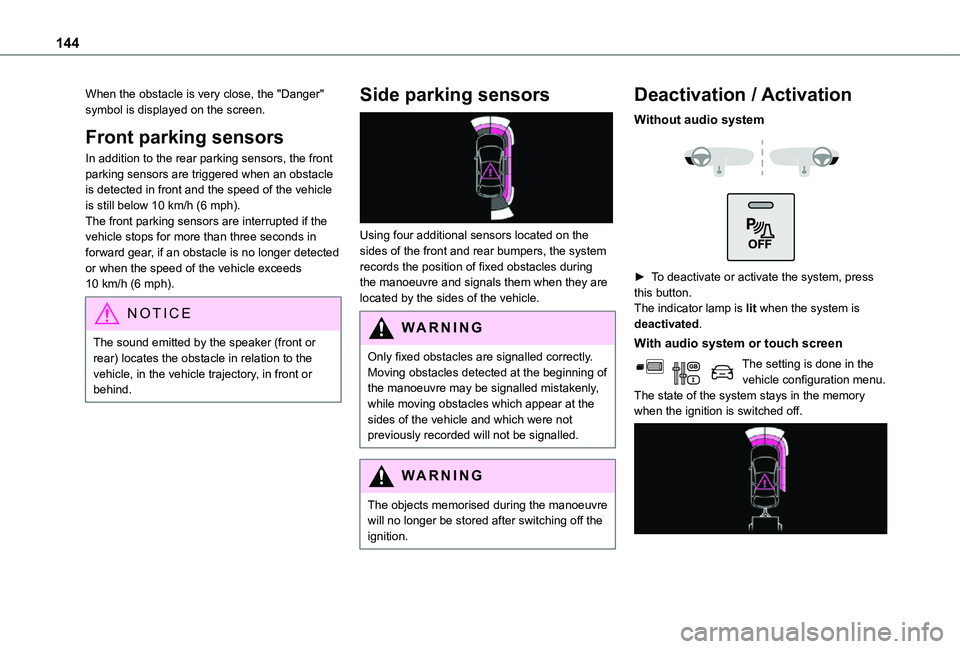
When the obstacle is very close, the "Danger" symbol is displayed on the screen.
Front parking sensors
In addition to the rear parking sensors, the front parking sensors are triggered when an obstacle is detected in front and the speed of the vehicle is still below 10 km/h (6 mph).The front parking sensors are interrupted if the vehicle stops for more than three seconds in forward gear, if an obstacle is no longer detected or when the speed of the vehicle exceeds 10 km/h (6 mph).
NOTIC E
The sound emitted by the speaker (front or rear) locates the obstacle in relation to the vehicle, in the vehicle trajectory, in front or behind.
Side parking sensors
Using four additional sensors located on the sides of the front and rear bumpers, the system records the position of fixed obstacles during the manoeuvre and signals them when they are located by the sides of the vehicle.
WARNI NG
Only fixed obstacles are signalled correctly. Moving obstacles detected at the beginning of the manoeuvre may be signalled mistakenly, while moving obstacles which appear at the sides of the vehicle and which were not previously recorded will not be signalled.
WARNI NG
The objects memorised during the manoeuvre will no longer be stored after switching off the ignition.
Deactivation / Activation
Without audio system
► To deactivate or activate the system, press this button.The indicator lamp is lit when the system is deactivated.
With audio system or touch screen
The setting is done in the vehicle configuration menu.The state of the system stays in the memory when the ignition is switched off.
Page 145 of 272
145
Driving
6
NOTIC E
The rear parking sensors system will be deactivated automatically if a trailer or bicycle carrier is connected to a towing device installed in accordance with the manufacturer's recommendations.In this case, the outline of a trailer is displayed at the rear of the image of the vehicle.
Operating limits
If the boot is heavily loaded, the vehicle may tilt, affecting distance measurements.
Malfunction
In the event of a malfunction when changing into reverse, this warning lamp comes on on the instrument panel, accompanied by an onscreen message and an audible signal (short beep).Contact a TOYOTA dealer or a qualified workshop to have the system checked.
Reversing camera
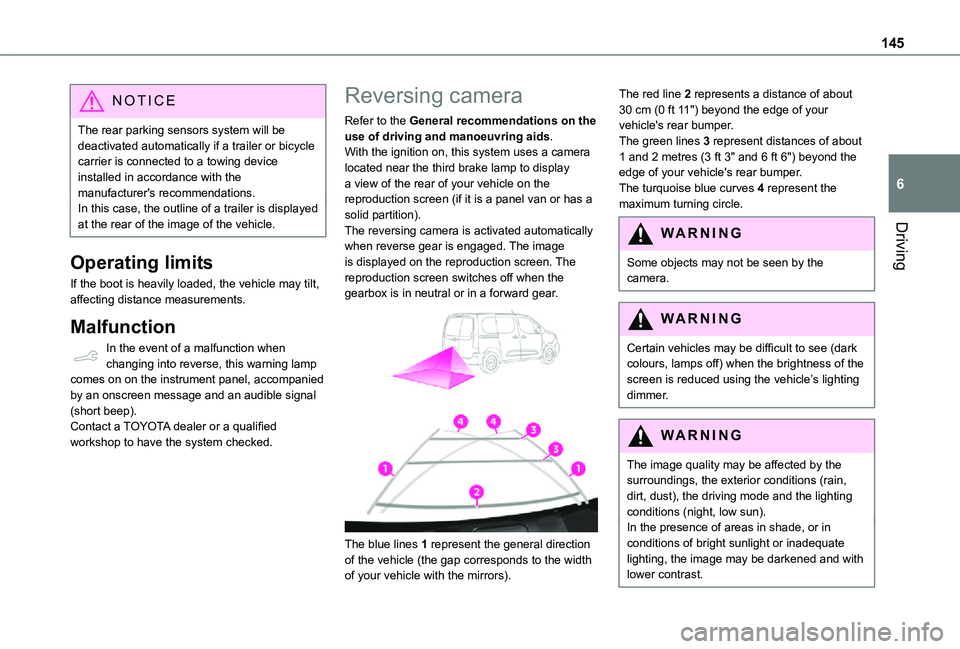
Refer to the General recommendations on the use of driving and manoeuvring aids.With the ignition on, this system uses a camera located near the third brake lamp to display a view of the rear of your vehicle on the reproduction screen (if it is a panel van or has a solid partition).The reversing camera is activated automatically when reverse gear is engaged. The image is displayed on the reproduction screen. The reproduction screen switches off when the gearbox is in neutral or in a forward gear.
The blue lines 1 represent the general direction
of the vehicle (the gap corresponds to the width of your vehicle with the mirrors).
The red line 2 represents a distance of about 30 cm (0 ft 11") beyond the edge of your vehicle's rear bumper.The green lines 3 represent distances of about 1 and 2 metres (3 ft 3" and 6 ft 6") beyond the edge of your vehicle's rear bumper.The turquoise blue curves 4 represent the maximum turning circle.
WARNI NG
Some objects may not be seen by the camera.
WARNI NG
Certain vehicles may be difficult to see (dark colours, lamps off) when the brightness of the screen is reduced using the vehicle’s lighting dimmer.
WARNI NG
The image quality may be affected by the surroundings, the exterior conditions (rain, dirt, dust), the driving mode and the lighting conditions (night, low sun).In the presence of areas in shade, or in conditions of bright sunlight or inadequate lighting, the image may be darkened and with lower contrast.
Page 146 of 272
146
WARNI NG
Obstacles may appear further away than they actually are.During parking manoeuvres and lane changes, it is important to check the sides of the vehicle using the mirrors.The rear parking sensors also supplement the information on the vehicle's surroundings.
Operating limits
The system may be disrupted (or even damaged) and not work in the following situations:– Installation of a bicycle carrier on the tailgate or side-hinged door (depending on version).– Attachment of a trailer to the towball.– Driving with a door open.
WARNI NG
Please note, the camera must not be obscured (by a sticker, a bicycle carrier, etc.).
NOTIC E
The field of vision of the camera may vary depending on the load in vehicle.
Maintenance
recommendations
In bad or wintry weather, ensure that the camera is not covered by mud, frost or snow.Check the cleanliness of the camera lens regularly.If necessary, clean the camera with a soft, dry cloth.When washing the vehicle using a high-pressure jet, keep the spray directed at least 30 cm (0 ft 11") away from the camera.
Surround Rear Vision
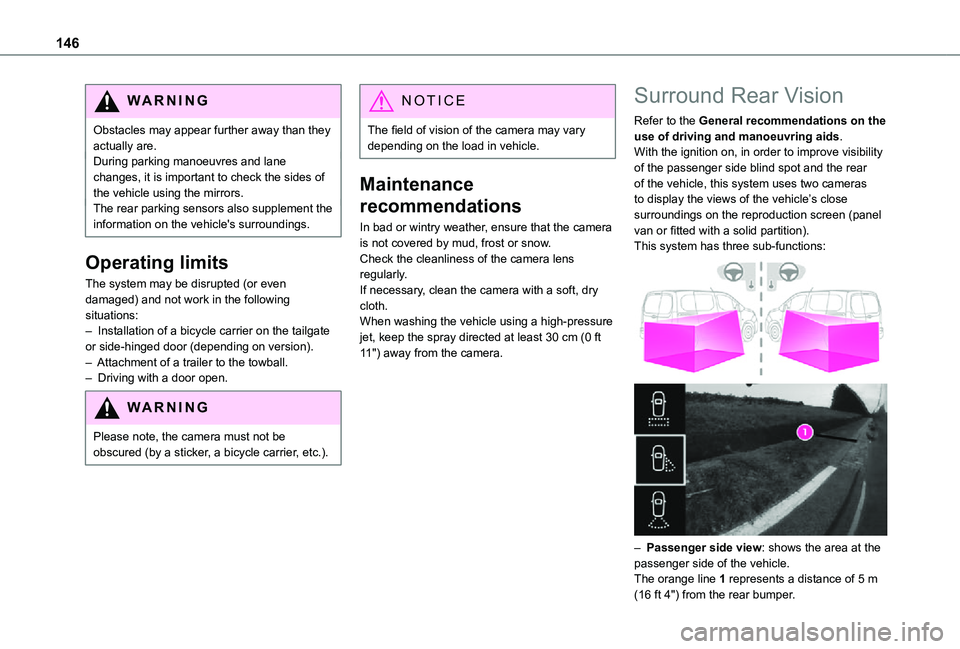
Refer to the General recommendations on the use of driving and manoeuvring aids.With the ignition on, in order to improve visibility of the passenger side blind spot and the rear of the vehicle, this system uses two cameras to display the views of the vehicle’s close surroundings on the reproduction screen (panel van or fitted with a solid partition).This system has three sub-functions:
– Passenger side view: shows the area at the passenger side of the vehicle.The orange line 1 represents a distance of 5 m (16 ft 4") from the rear bumper.
Page 148 of 272
148
WARNI NG
Obstacles may appear further away than they actually are.During parking manoeuvres and lane changes, it is important to check the sides of the vehicle using the mirrors.The rear parking sensors also supplement the information on the vehicle's surroundings.
Activation / Deactivation
The system starts when the ignition is switched on.
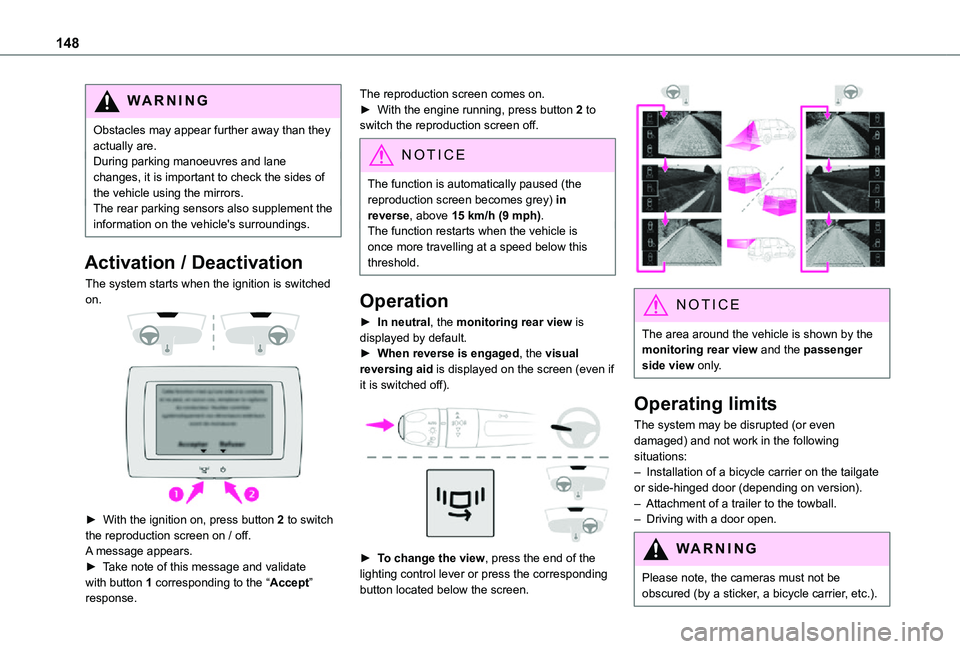
► With the ignition on, press button 2 to switch the reproduction screen on / off.
A message appears.► Take note of this message and validate with button 1 corresponding to the “Accept” response.
The reproduction screen comes on.► With the engine running, press button 2 to switch the reproduction screen off.
NOTIC E
The function is automatically paused (the reproduction screen becomes grey) in reverse, above 15 km/h (9 mph).The function restarts when the vehicle is
once more travelling at a speed below this threshold.
Operation
► In neutral, the monitoring rear view is displayed by default.► When reverse is engaged, the visual reversing aid is displayed on the screen (even if it is switched off).
► To change the view, press the end of the lighting control lever or press the corresponding button located below the screen.
NOTIC E
The area around the vehicle is shown by the monitoring rear view and the passenger side view only.
Operating limits
The system may be disrupted (or even damaged) and not work in the following situations:– Installation of a bicycle carrier on the tailgate or side-hinged door (depending on version).– Attachment of a trailer to the towball.– Driving with a door open.
WARNI NG
Please note, the cameras must not be obscured (by a sticker, a bicycle carrier, etc.).
Page 149 of 272
149
Driving
6
NOTIC E
The field of vision of the rear camera (surveillance rear view and visual reversing aid) may vary depending on the load in the vehicle.
NOTIC E
If the side-hinged door is opened during use of the surveillance rear view or the visual aid for reversing, in forward gear or reverse gear, the output screen becomes grey.If the front passenger door is opened during use of the passenger side view, in forward gear or reverse gear, the output screen becomes grey.
NOTIC E
If a trailer is attached to the towball, when reverse gear is engaged the visual reversing aid will no longer work until the trailer is disconnected. The surveillance rear view becomes the default view.
NOTIC E
If the system develops a malfunction, go to a TOYOTA dealer to avoid any safety problems.
Maintenance
recommendations
In bad or wintry weather, ensure that the sensors and cameras are not covered with mud, ice or snow.Regularly inspect the camera lenses to check that they are clean.If necessary, clean the cameras with a soft, dry cloth.
Page 167 of 272
167
Practical information
7
NOTIC E
When washing the vehicle at an automatic roller-brush car wash, be sure to lock the doors and, depending on version, remove the electronic key.When using a pressure washer, hold the lance at least 30 cm (0 ft 11") from the vehicle (particularly when cleaning areas containing chipped paint, sensors or seals).Promptly clean up any stains containing chemicals liable to damage the vehicle's paint (including tree resin, bird droppings, insect secretions, pollen and tar).If justified by the environment, clean the vehicle more frequently to remove salty deposits (in coastal areas), soot (in industrial estates) and mud (in wet or cold areas). These substances can be highly corrosive.Contact a TOYOTA dealer or a qualified workshop if you require advice on removing stubborn stains requiring special products (such as tar or insect removers).
Preferably, have paint touch-ups performed by a TOYOTA dealer or a qualified workshop.
Interior
WARNI NG
When washing the vehicle, never use a water hose or high-pressure washer to clean the interior.Liquids carried in cups or other open containers can spill, presenting a risk of damage if they come into contact with the
controls in the dashboard and centre console. Take care!
Bodywork
High-gloss paint
WARNI NG
Do not use abrasive products or solvents, petrol or oil to clean the bodywork.Never use an abrasive sponge to clean stubborn stains. Risk of scratching the paintwork!Do not apply polish in strong sunshine, or to plastic or rubber parts.
NOTIC E
Use a soft sponge and soapy water or a pH neutral product.Gently wipe the bodywork with a clean microfibre cloth.Apply polish with the vehicle clean and dry.Comply with the instructions for use stated on the product.
Decals
(Depending on version)
WARNI NG
Do not use a high pressure washer to clean the vehicle. Risk of damaging or detaching the decals!
NOTIC E
Use a high-flow hose at a temperature between 25°C and 40°C.Sweep the jet of water across the surface to be cleaned, perpendicular to it.Rinse the vehicle with demineralised water.
Page 252 of 272
252
A
ABS 82Accessories 79, 104Access to the spare wheel 172Active Safety Brake 133–135AdBlue® 163AdBlue® tank 165Additive, Diesel 161–162Adjusting headlamps 74Adjusting head restraints 49Adjusting seat 43Adjusting the air distribution 62–63Adjusting the air flow 62–63Adjusting the date 222, 248Adjusting the height and reach of the steering wheel 45Adjusting the lumbar support 43Adjusting the temperature 62–63Adjusting the time 222, 248Advanced Grip Control 85–86Advice on care and maintenance 166
Advice on driving 7, 99–100Airbags 90, 92–93, 95Airbags, curtain 91, 93Airbags, front 90, 92, 96Airbags, lateral 91–92Air conditioning 60, 63Air conditioning, digital 65Air conditioning, dual-zone automatic 62–63Air conditioning, manual 61–62Air intake 62–63
Air vents 60Alarm 38–40Alarm, volumetric 38Android Auto connection 238Anti-lock braking system (ABS) 82–83Antitheft / Immobiliser 24Apple CarPlay connection 218, 237Applications 238Area, loading 25–26, 34, 53Armrest 43Armrest, front 49Assistance call 80–81Assistance, emergency braking 83, 135Audible warning 82Audio streaming (Bluetooth) 203, 216, 242
B
Battery 156, 183, 185–186Battery, 12 V 161–162, 183–184Battery, charging 184–185
Battery, remote control 32, 68Blind spot monitoring system 140Blind spot monitoring system, active 141Blind spot sensors 139, 141Bluetooth (hands-free) 204–205, 219, 243–244Bluetooth (telephone) 219–220, 243–244Bodywork 167Bonnet 158Boot lid 29, 31
Bottle holder 49Brake discs 162Brake lamps 179Brakes 162Braking assistance system 82–83Braking, automatic emergency 133–135Braking, dynamic emergency 106–108Brightness 221Bulbs 176Bulbs (changing) 175–176Bulbs (changing, type) 176
C
Capacity, fuel tank 150–152Cap, fuel filler 151–152Care of the bodywork 167CD 203, 216CD, MP3 203, 216Central locking 24, 29Changing a bulb 175–176
Changing a fuse 181–183Changing a wheel 169, 172Changing a wiper blade 76–77Changing the remote control battery 32Charger, induction 51Charger, wireless 51Checking the levels 159–161Checking tyre pressures (using the kit) 169, 171Checks 159, 161–162
Page 255 of 272
255
Alphabetical index
LEDs - Light-emitting diodes 72, 176Level, AdBlue® 161Level, brake fluid 160Level, Diesel additive 161–162Level, engine coolant 16, 160Level, engine oil 159Levels and checks 159–161Level, screenwash fluid 76, 161Light-emitting diodes - LEDs 72, 176Lighting 70Lighting, exterior 70Lighting, guide-me home 72–73Lighting, welcome 73Loading 53, 157Load reduction mode 157Load restraint 52Locating your vehicle 24Locking 23–24, 29Locking from the inside 33–34Long load support bar 37Low fuel level 150–152Lumbar 43
M
Maintenance (advice) 166Maintenance, routine 120, 161Manoeuvring aids (recommendations) 11 9Markings, identification 196Mat 49, 120Memorising a speed 133
Menu 218Menu, main 199Menus (audio) 212–213, 226–227Messages 245Messages, quick 246Mirror, rear view 46Mirrors, door 45–46, 66, 139Misfuel prevention 152MP3 CD 203
N
Navigation 232–234Navigation, connected 234–236Number plate lamps 180
O
Obstacle detection 143Oil change 159
Oil consumption 159OIl, engine 159On-board tools 168–169Opening the bonnet 158Opening the boot 23Opening the doors 23Overhead storage 50
P
Pads, brake 162Paint 167, 196Paint colour code 196Parking brake 105, 162Parking brake, electric 105–108, 162Parking sensors, audible and visual 143Parking sensors, front 144Parking sensors, rear 143Plates, identification 196Player, Apple® 204, 216, 243Player, MP3 CD 203Player, USB 202, 216, 242Port, USB 50, 202, 216, 237, 242Pressures, tyres 163, 171, 175, 196Pre-tensioning seat belts 89Priming the fuel system 168Profiles 221, 247Programmable cruise control 127Protecting children 90, 93–94, 96–97Puncture 169–170, 172
R
Radar (warnings) 11 9Radio 199–200, 214, 216, 240Radio, digital (Digital Audio Broadcasting - DAB) 200, 215, 241Range, AdBlue 161RDS 214, 241