Page 18 of 68

16
FEATURES & OPERATIONS
Multi-Information Display (MID)
VEHICLES EQUIPPED WITH 4.2-in DISPLAY
VEHICLES EQUIPPED WITH 7-in DISPLAY
Press meter control switches to change and select information in the following:
Press meter control switches to change and select information in the following:
Refer to the Owner’s Manual for more details.Drive information
Warning message display
Warning message display
Audio system-linked display
Audio system-linked display
Eco-friendly driving information
Settings display
Vehicle information
Driving assist system information
Driving assist system informationSettings display
IndicatorsRSA
Menu icons
Shift position Outside temperatureSpeed limit display (with navigation system*)/RSA
Clock Dynamic Radar Cruise Control (DRCC)
or Full-Speed Range DRCC and
LDA/LTA display
Return to the
previous screen
Return to the
previous screen
Speedometer IndicatorsContent
display area Menu icon
display area Shift position
IndicatorsRSA
Press: Enter/Set
Press and hold: Reset
Press: Enter/Set
Press and hold: Reset/
Display next screen
Scroll/search screens
Scroll/search screens
“ODO/TRIP” switch
“ODO/TRIP” switch
Odometer/trip meter
Content display area Odometer/
trip meter
* If equipped
Page 21 of 68
19
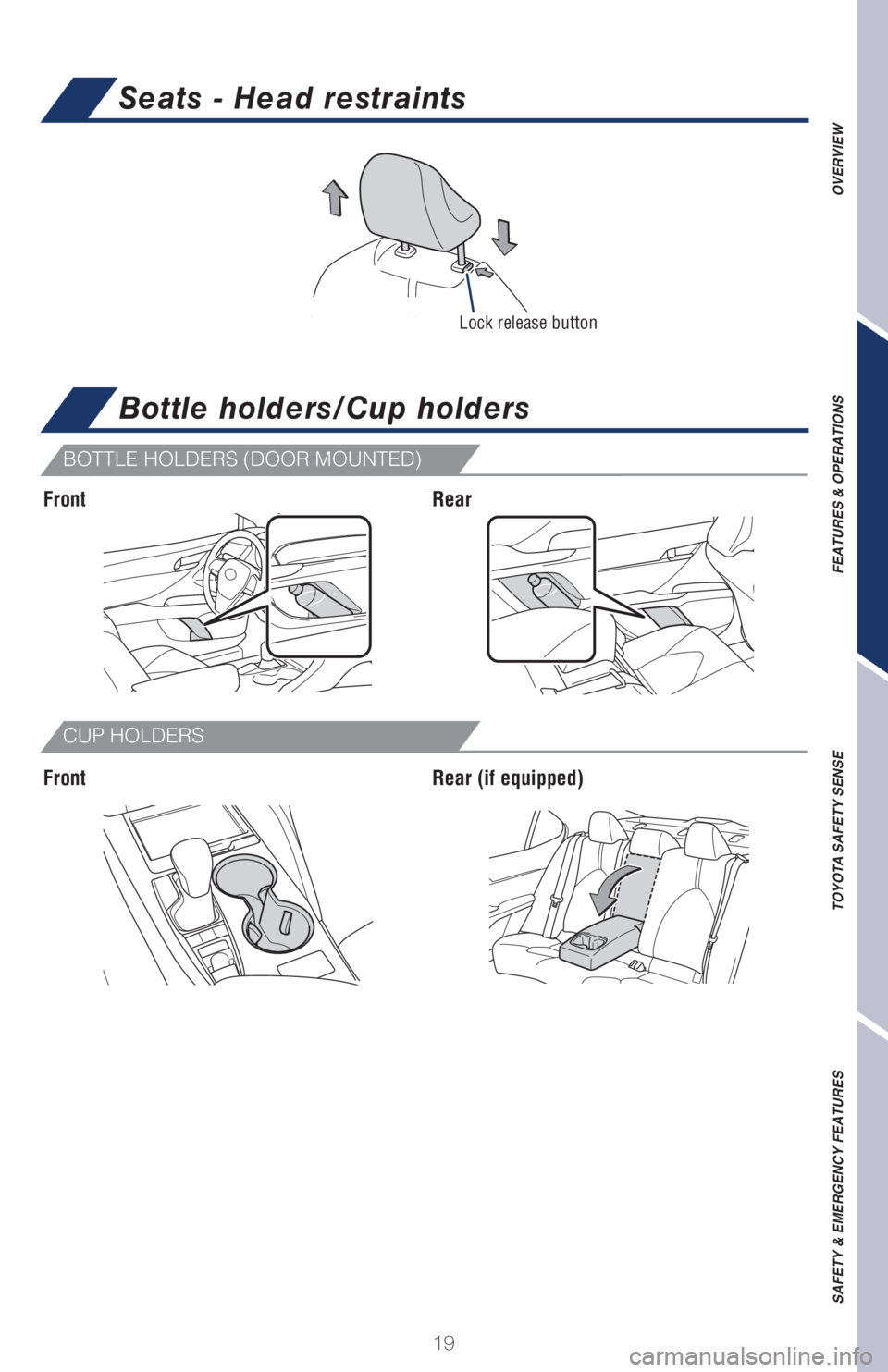
Seats - Head restraints
OVERVIEW FEATURES & OPERATIONS TOYOTA SAFETY SENSE SAFETY & EMERGENCY FEATURES
BOTTLE HOLDERS (DOOR MOUNTED)
CUP HOLDERS
Bottle holders/Cup holders
Front
FrontRear
Rear (if equipped)
Lock release button
Page 22 of 68
20
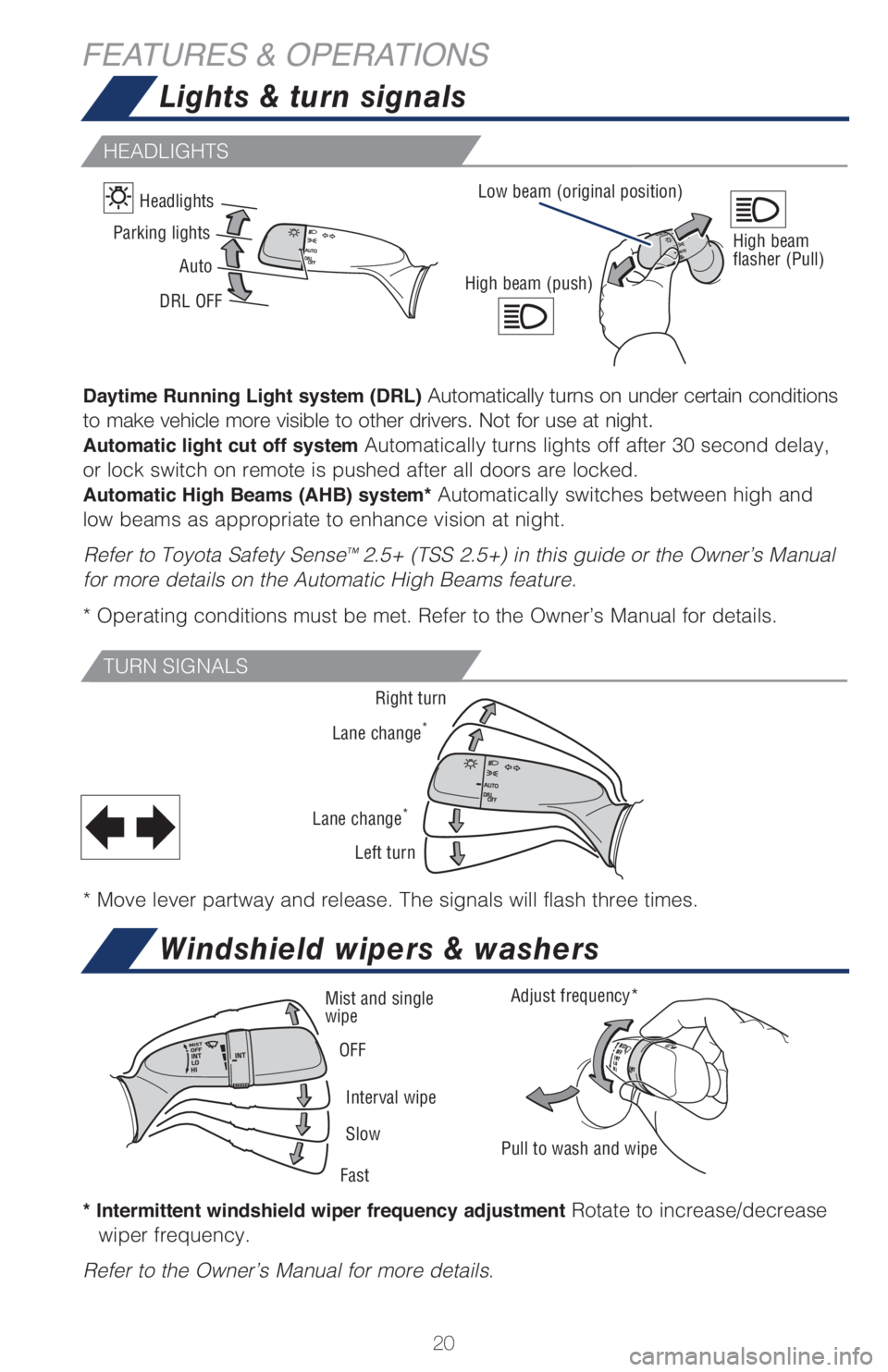
HEADLIGHTS
TURN SIGNALS
* Intermittent windshield wiper frequency adjustment Rotate to increase/decrease
wiper frequency.
Refer to the Owner’s Manual for more details.
Lights & turn signals
Windshield wipers & washers
FEATURES & OPERATIONS
Daytime Running Light system (DRL) Automatically turns on under certain conditions
to make vehicle more visible to other drivers. Not for use at night.
Automatic light cut off system Automatically turns lights off after 30 second delay,
or lock switch on remote is pushed after all doors are locked.
Automatic High Beams (AHB) system* Automatically switches between high and
low beams as appropriate to enhance vision at night.
Refer to Toyota Safety Sense
™ 2.5+ (TSS 2.5+) in this guide or the Owner’s Manual
for more details on the Automatic High Beams feature.
* Operating conditions must be met. Refer to the Owner’s Manual for details.
* Move lever partway and release. The signals will flash three times.
Right turn
Lane change
*
Lane change*
Left turn
High beam (push)
Adjust frequency*
Pull to wash and wipe Mist and single
wipe
Interval wipe OFF
Slow
Fast
High beam
flasher (Pull)Parking lights
Auto Headlights
DRL OFFLow beam (original position)
Page 23 of 68
21
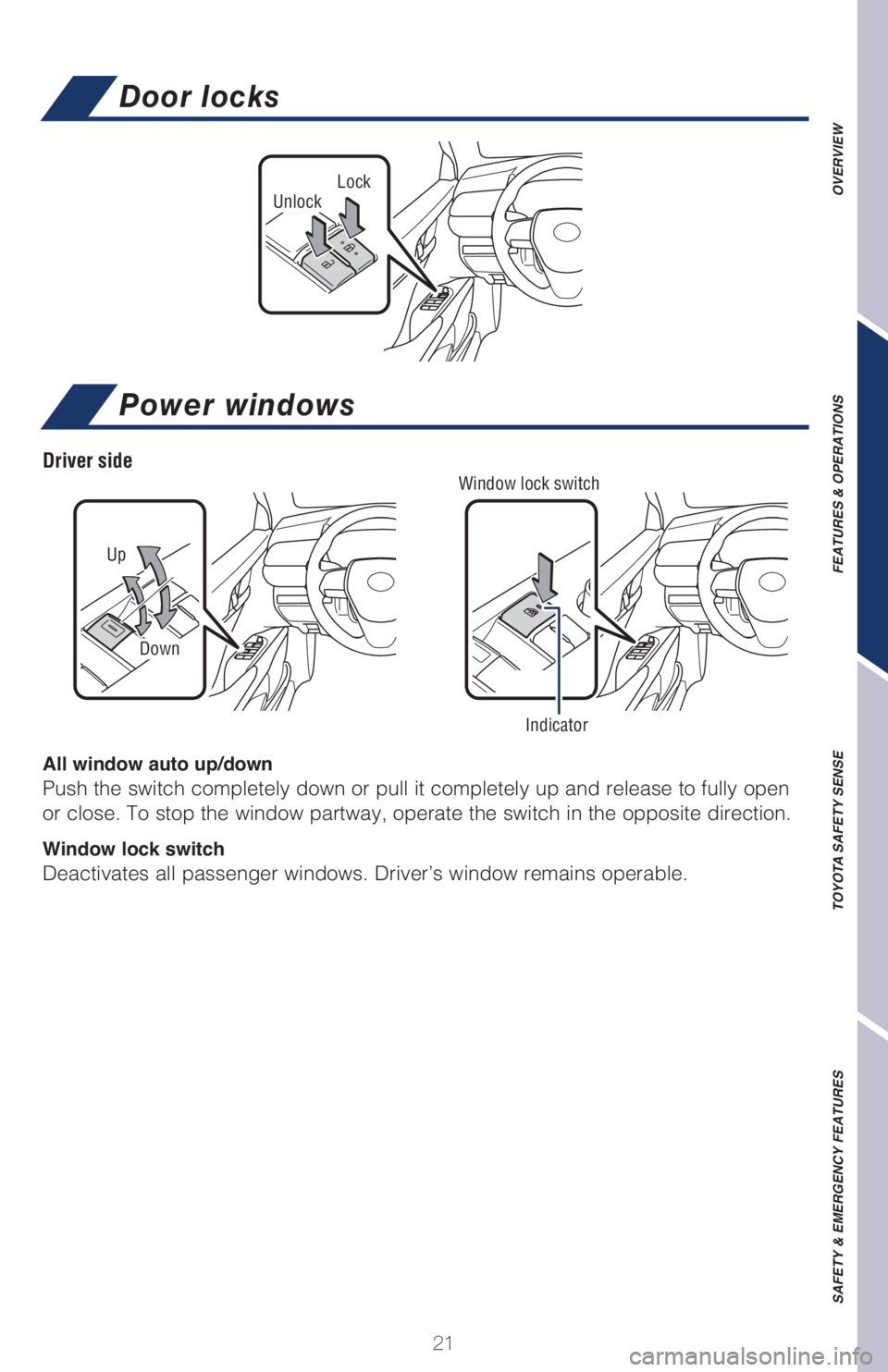
OVERVIEW FEATURES & OPERATIONS TOYOTA SAFETY SENSE SAFETY & EMERGENCY FEATURESLockUnlock
Door locks
All window auto up/down
Push the switch completely down or pull it completely up and release to fully open
or close. To stop the window partway, operate the switch in the opposite direction.
Window lock switch
Deactivates all passenger windows. Driver’s window remains operable.
Power windows
Up
Down
Window lock switch
Indicator
Driver side
Page 25 of 68
23
OVERVIEW FEATURES & OPERATIONS TOYOTA SAFETY SENSE SAFETY & EMERGENCY FEATURES
Moonroof (if equipped)
Recommended open position
to minimize wind noise. Push once to open partway.
Push again to open completely.
SLIDING OPERATION
TILTING OPERATION
Lightly press either side of the moonroof switch while opening/tilting is in progress,
the moonroof stops partway.
Push once to open completely.
TiltClose
OpenClose
1) Push “MENU” button next to the screen.
2) Select “Setup” or “General” in the touchscreen to access the general setting
screen.
3) Select “Clock.”
4) Select desired items to be set.
Refer to the “Navigation and Multimedia System Owner’s Manual” for more details.
1 Premium Audio only2 Audio Plus/Premium Audio only
Clock
Select to change the time zone.
Select to set daylight saving
time ON/OFF/Auto1.
Select to set automatic GPS
adjustment of clock.2
Select to set the 24 hour time
format on/off.
Page 55 of 68
53
OVERVIEW FEATURES & OPERATIONS TOYOTA SAFETY SENSE SAFETY & EMERGENCY FEATURES
Safety Connect®
Safety Connect is a subscription-based telematics service that uses Global
Positioning System (GPS) data and embedded cellular technology to provide safety
and security features to subscribers. Safety Connect is staffed with live agents at
the Toyota response center, which operates 24 hours per day, 7 days per week.
Services for subscribers include:
• Automatic collision notification
• Stolen vehicle locator
• Emergency assistance (“SOS” button)
• Enhanced roadside assistance
For limitations and additional information, refer to the “Owner’s Manual” or visit
www.toyota.com/connected-services.
Rear door child safety locks
Moving the lever downward will allow the door to be opened only from the outside.
Rear door
Lock
Unlock
Microphone
LED light indicators
(Green is Active)“SOS” button
Page 56 of 68
54
SAFETY & EMERGENCY FEATURES
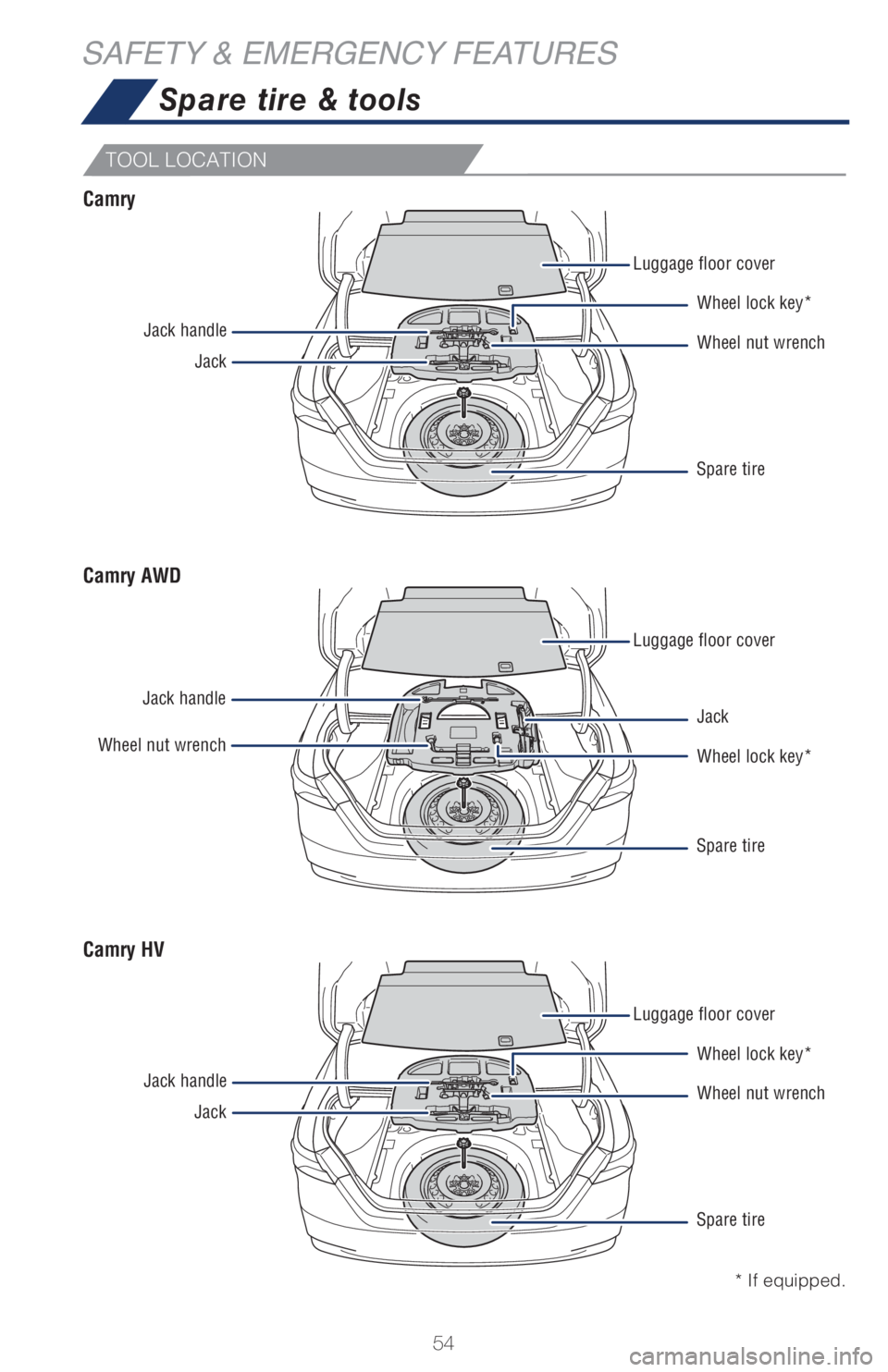
TOOL LOCATION
Spare tire & tools
Luggage floor cover
Luggage floor cover
Luggage floor cover Jack handle
Jack handle
Jack handleJack
Wheel nut wrench
JackWheel nut wrench
Wheel lock key* Wheel lock key*
Wheel lock key* Jack
Wheel nut wrench Spare tire
Spare tire
Spare tire
Camry
Camry AWD
Camry HV
* If equipped.
Page 59 of 68
57
OVERVIEW FEATURES & OPERATIONS TOYOTA SAFETY SENSE SAFETY & EMERGENCY FEATURES
Star Safety System™
ANTI-LOCK BRAKE SYSTEM (ABS)
Toyota’s ABS sensors detect which wheels are locking up and limits wheel lockup
by “pulsing” each wheel’s brakes independently. Pulsing releases brake pressure
repeatedly for fractions of a second. This helps the tires attain the traction that
current road conditions will allow, helping you to stay in directional control.
BRAKE ASSIST (BA)
Brake Assist is designed to detect sudden or “panic” braking, and then add braking
pressure to help decrease the vehicle’s stopping distance. When there’s only a split
second to react, Brake Assist can add additional brake pressure more quickly than
just the driver alone can.
ELECTRONIC BRAKE FORCE DISTRIBUTION (EBD)
Toyota’s ABS technology has Electronic Brake-force Distribution (EBD) to help
maintain control and balance when braking. EBD responds to sudden stops by
redistributing brake force to enhance the braking effectiveness of all four wheels. Your vehicle comes standard with the Star Safety System
TM, which combines Anti-
lock Braking System (ABS), Brake Assist (BA), Electronic Brake-force Distribution
(EBD), Smart Stop Technology (SST), Traction Control (TRAC) and Vehicle Stability
Control (VSC).
5HIHU�WR�WKH�2ZQHU