2021 TOYOTA AVALON HYBRID wheel
[x] Cancel search: wheelPage 260 of 560
2604-5. Using the driving support systems
■Temporary cancellation of functions
When the operation conditions are no longer met, a function may be tempo-
rarily canceled. However, when the operation conditions are met again, oper-
ation of the function is automatically restored. (P. 259)
■Steering control function
Depending on the vehicle speed, lane departure situation, road conditions,
etc., the driver may not feel the function is operating or the function may not
operate at all.
■Lane departure alert function
The warning buzzer may be difficult to hear due to external noise, audio play-
back, etc.
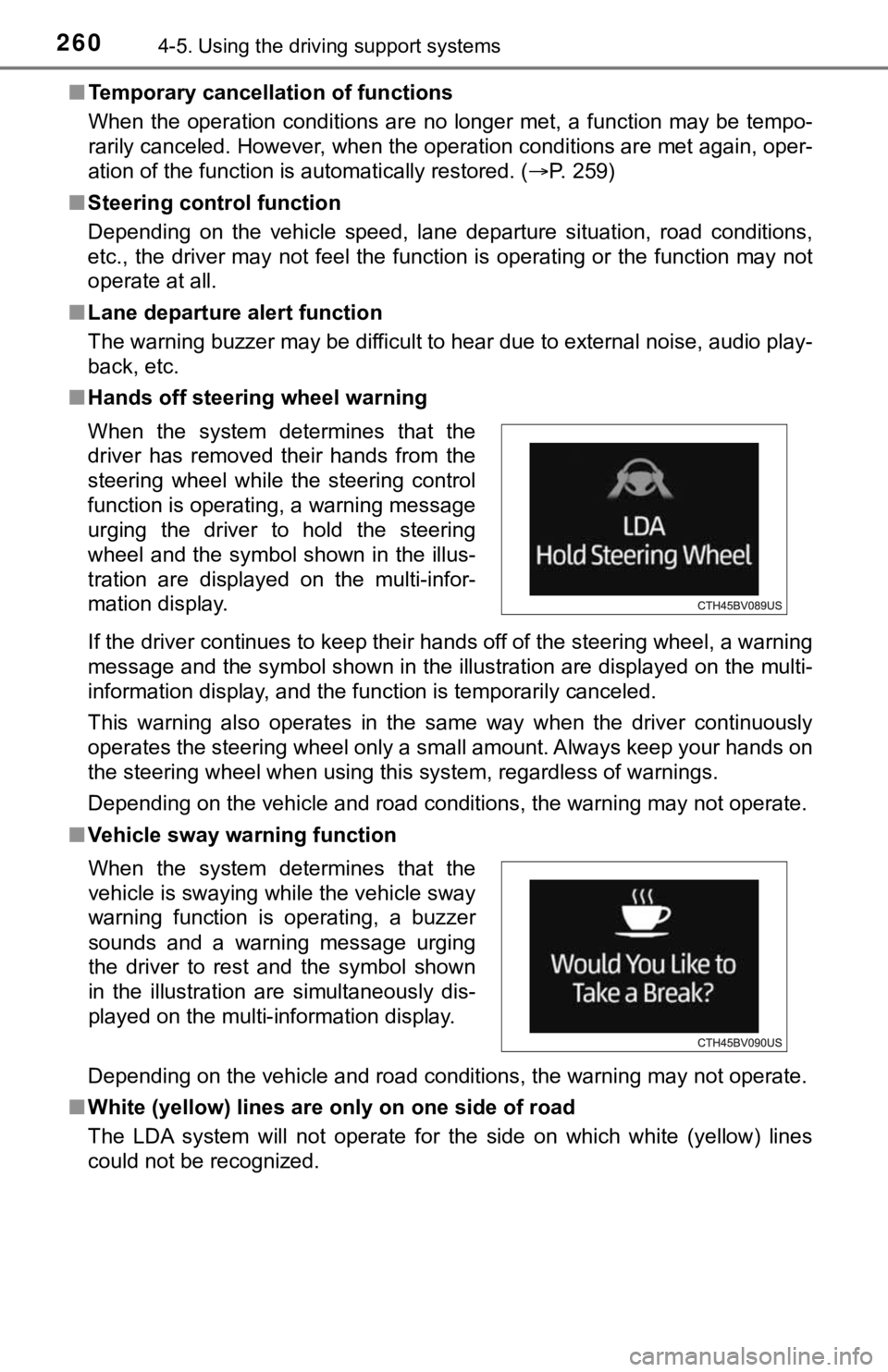
■Hands off steering wheel warning
If the driver continues to keep their hands off of the steering wheel, a warning
message and the symbol shown in the illustration are displayed on the multi-
information display, and the function is temporarily canceled.
This warning also operates in the same way when the driver continuously
operates the steering wheel only a small amount. Always keep your hands on
the steering wheel when using this system, regardless of warnings.
Depending on the vehicle and road conditions, the warning may not operate.
■Vehicle sway warning function
Depending on the vehicle and road conditions, the warning may not operate.
■White (yellow) lines are only on one side of road
The LDA system will not operate for the side on which white (yellow) lines
could not be recognized. When the system determines that the
driver has removed their hands from the
steering wheel while the steering control
function is operating, a warning message
urging the driver to hold the steering
wheel and the symbol shown in the illus-
tration are displayed on the multi-infor-
mation display.
When the system determines that the
vehicle is swaying while the vehicle sway
warning function is operating, a buzzer
sounds and a warning message urging
the driver to rest and the symbol shown
in the illustration are simultaneously dis-
played on the multi-information display.
Page 275 of 560

2754-5. Using the driving support systems
4
Driving
●Motorcycles traveling in the same lane
●When water or snow thrown up by the surrounding vehicles hinders the
detecting of the sensor
■Conditions under which the vehicle-to-vehicle distance control mode
may not function correctly
In the case of the following conditions, operate the brake pedal (or accelera-
tor pedal, depending on the situation) as necessary.
As the sensor may not be able to correctly detect vehicles ahead, the system
may not operate properly.
●When the vehicle ahead of you decelerates suddenly
●When driving on a road surrounded by a structure, such as in a tunnel or on
a bridge
●While the vehicle speed is decreasing to the set speed after the vehicle
accelerates by depressing the accelerator pedal ●When your vehicle is pointing upwards
(caused by a heavy load in the luggage
compartment, etc.)
●Preceding vehicle has an extremely
high ground clearance
●When the road curves or when the
lanes are narrow
●When steering wheel operation or your
position in the lane is unstable
Page 290 of 560

2904-5. Using the driving support systems
■If “Clean dirt from lens” is displayed on the audio system screen
A rear camera lens may be dirty or covered with snow or ice. In such cases, if
it is removed from the rear camera lens, the system should return to normal.
(It may be necessary to drive the vehicle for some time before the system
returns to normal.)
■If “RCD unavailable” is displayed on the audio system screen
●If this message is displayed after the 12-volt battery has been disconnected
and reconnected, fully turn the steering wheel to the left and then the right
on level ground.
●If this message is displayed only when the R shift position is selected, the
rear camera lens may be dirty. Clean the rear camera lens.
■Situations in which the system may not operate properly
●Some pedestrians, such as the following, may not be detected by the rear
camera detection function, preventing the function from operating properly:
• Pedestrians who are squatting
• Pedestrians who are lying down
• Pedestrians who are running
• Pedestrians who suddenly enter the detection area
• Pedestrians riding a bicycle, skateboard, or other light vehicle
• Pedestrians wearing unusual clothing, such as a costume
• Pedestrians whose body is partially hidden by a cart or other object
• Pedestrians which are obscured by darkness, such as at night
●In some situations, such as the following, pedestrians may not be detected
by the rear camera detection function, preventing the function from operat-
ing properly:
• When backing up in inclement weather (rain, snow, fog, etc.)
• When the rear camera is obscured (dirt, snow, ice, etc. are attached) or
scratched
• When a very bright light, such as the sun, or the headlights of another
vehicle, shines directly into the rear camera
• When backing up in a place where the surrounding brightness changes
suddenly, such as at the entrance or exit of a garage or underground
parking lot
Page 323 of 560

3234-5. Using the driving support systems
4
Driving
◆ECB (Electronically Controlled Brake System)
The electronically controlled system generates braking force corre-
sponding to the brake operation
◆ABS (Anti-lock Brake System)
Helps to prevent wheel lock when the brakes are applied suddenly,
or if the brakes are applied while driving on a slippery road surface
◆Brake assist
Generates an increased level of braking force after the brake pedal
is depressed when the system detects a panic stop situation
◆VSC (Vehicle Stability Control)
Helps the driver to control skidding when swerving suddenly or
turning on slippery road surfaces.
◆Enhanced VSC (Enhanced Vehicle Stability Control)
Provides cooperative control of the ABS, TRAC, VSC and EPS.
Helps to maintain directional stability when swerving on slippery
road surfaces by controlling steering performance.
◆TRAC (Traction Control)
Helps to maintain drive power and prevent the drive wheels from
spinning when starting the vehicle or accelerating on slippery roads
◆Hill-start assist control
Helps to reduce the backward movement of the vehicle when start-
ing on an uphill
Driving assist systems
To keep driving safety and performance, the following systems
operate automatically in response to various driving situations.
Be aware, however, that these systems are supplementary and
should not be relied upon too heavily when operating the vehi-
cle.
Page 324 of 560

3244-5. Using the driving support systems
◆EPS (Electric Power Steering)
Employs an electric motor to reduce the amount of effort needed to
turn the steering wheel
◆The Secondary Collision Brake
When the SRS airbag sensor detects a collision and the system
operates, the brakes and stop lights are automatically controlled to
reduce the vehicle speed and help reduce the possibility of further
damage due to a secondary collision.
The slip indicator light will flash
while the TRAC/VSC/ABS sys-
tems are operating.
If the vehicle gets stuck in mud, dirt or snow, the TRAC system may
reduce power from the hybrid system to the wheels. Pressing to
turn the system off may make it easier for you to rock the vehicle in
order to free it.
To turn the TRAC system off,
quickly press and release .
The “Traction Control Turned Off”
will be shown on the multi-informa-
tion display.
Press again to turn the sys-
tem back on.
When the TRAC/VSC/ABS systems are operating
Disabling the TRAC system
Page 326 of 560

3264-5. Using the driving support systems
■Sounds and vibrations caused by the ABS, brake assist, VSC, TRAC,
and hill-start assist control systems
●A sound may be heard from the engine compartment when the brake pedal
is depressed repeatedly, when the hybrid system is started or just after the
vehicle begins to move. This sound does not indicate that a malfunction has
occurred in any of these systems.
●Any of the following conditions may occur when the above systems are
operating. None of these indicates that a malfunction has occurred.
• Vibrations may be felt through the vehicle body and steering.
• A motor sound may be heard also after the vehicle comes to a stop.
■ECB brake operation
Braking power may be stronger than normal for a short time after the hybrid
system is started.
■ECB operating sound
ECB operating sound may be heard in the following cases, but it does not
indicate that a malfunction has occurred.
●Operating sound heard from the engine compartment when the brake pedal
is operated.
●Motor sound of the brake system heard from the front part of the vehicle
when the driver’s door is opened.
●Operating sound heard from the engine compartment when one or two min-
utes passed after the stop of the hybrid system.
■EPS operation sound
When the steering wheel is operated, a motor sound (whirring sound) may be
heard. This does not indicate a malfunction.
Page 327 of 560

3274-5. Using the driving support systems
4
Driving
■Automatic reactivation of TRAC and VSC systems
After turning the TRAC and VSC systems off, the systems will be automati-
cally re-enabled in the following situations:
●When the power switch is turned off
●If only the TRAC system is turned off, the TRAC will turn on when vehicle
speed increases
If both the TRAC and VSC systems are turned off, automatic re-enabling will
not occur when vehicle speed increases
■Secondary Collision Brake operating conditions
The system operates when the SRS airbag sensor detects a collision while
the vehicle is in motion.
However, the system does not operate in any of the following situations.
●The vehicle speed is below 6 mph (10 km/h)
●Components are damaged
■Secondary Collision Brake automatic cancellation
The system is automatically canceled in any of the following situations.
●The vehicle speed drops below approximately 6 mph (10 km/h)
●A certain amount of time elapses during operation
●The accelerator pedal is depressed a large amount
■Reduced effectiveness of the EPS system
The effectiveness of the EPS system is reduced to prevent the system from
overheating when there is frequent steering input over an extended period of
time. The steering wheel may feel heavy as a result. Should this occur, refrain
from excessive steering input or stop the vehicle and turn the hybrid system
off. The EPS system should return to normal within 10 minutes.
Page 329 of 560

3294-5. Using the driving support systems
4
Driving
WARNING
■Replacing tires
Make sure that all tires are of the specified size, brand, tread pattern and
total load capacity. In addition, make sure that the tires are inflated to the
recommended tire inflation pressure level.
The ABS, TRAC and VSC systems will not function correctly if different tires
are installed on the vehicle.
Contact your Toyota dealer for further information when replacing tires or
wheels.
■Handling of tires and the suspension
Using tires with any kind of problem or modifying the suspension will affect
the driving assist systems, and may cause a system to malfunction.
■Secondary Collision Brake
Do not rely solely upon the Secondary Collision Brake. This system is
designed to help reduce the possibility of further damage due to a second-
ary collision, however, that effect changes according to various conditions.
Overly relying on the system may result in death or serious injury.