5-18
OTHER CONTROLS AND EQUIPMENT
76MH1-74E
76MH1-74E
Auto store Hold down the AS button (7) for 2 seconds or longer.Six stations in good reception will automat- ically be stored to the Preset buttons (6) in order, starting from a station whose fre-quency is the lowest.
NOTE: • Auto store can be released by pressing AS button (7) while auto store is under way.• When the auto store is performed, the station previously stored in the memory at the position is overwritten.• When there are fewer than 6 stations that can be stored even if 1 round of auto store operation is performed, nostation will be stored at the remaining Preset buttons (6). • 6 stations can be preset for FM1 andFM2 in common, and 6 stations for AM in auto store mode.
Auto store mode on/off Press the AS button (7). Each time the button is pressed, the modeis switched as follows:
Radio Reception Radio reception can be affected by envi- ronment, atmospheric conditions, or radiosignal’s power and distance from the sta- tion. Nearby mountains and buildings may interfere or deflect radio reception, causingpoor reception. Poor reception or radio static can also be caused by electric cur- rent from overhead wires or high voltagepower lines.
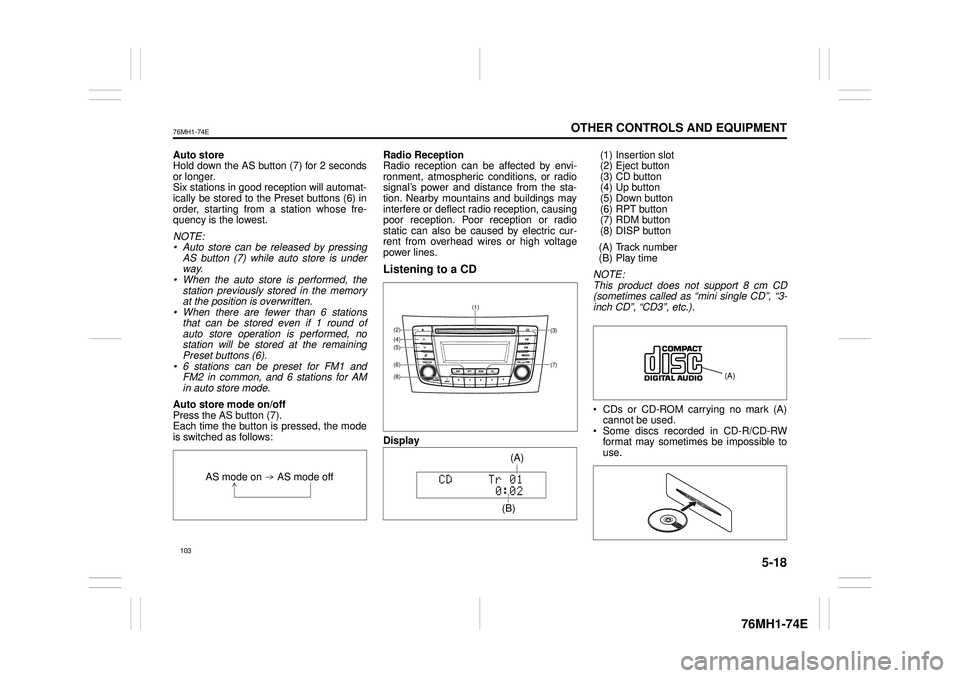
Listening to a CD
Display
(1) Insertion slot (2) Eject button (3) CD button(4) Up button (5) Down button (6) RPT button(7) RDM button (8) DISP button
(A) Track number (B) Play time
NOTE: This product does not support 8 cm CD (sometimes called as “mini single CD”, “3-inch CD”, “CD3”, etc.).
CDs or CD-ROM carrying no mark (A) cannot be used. Some discs recorded in CD-R/CD-RWformat may sometimes be impossible to use.
AS mode on AS mode off
(7)
(3)
(8)
(6)
(5)(4)(2)
(1)
(B)
(A)
5-22
OTHER CONTROLS AND EQUIPMENT
76MH1-74E
76MH1-74E
Points to remember when making MP3/ WMA/AAC files Common High bit rate and high sampling fre- quency are recommended for high qual- ity sounds. Selecting VBR (Variable Bit Rate) is not recommended. Selecting VBR may cause display of in correct playing time and jumpiness of playback. Playback sound quality varies depending on the encoding environment. Fordetails, refer to the user manual of the encoding software and the writing soft- ware in use.
Recording MP3/WMA/ AAC files on a CD media It is recommended not to write both CD- DA files and MP3/WMA/AAC files on adisc. If both CD-DA files and MP3/WMA/AAC files are on the same disc, tracks maynot be played in the correct order or some tracks may not be played at all.
When storing both MP3 data and WMA data on the same disc, sort and place them in different folders. Do not write files other than MP3/WMA/ AAC files and unnecessary folders on a disc. MP3/WMA/AAC files should be named to meet the standards and the file sys- tem specifications as shown below. The file extension “.mp3”, “.wma” or “.m4a” should be assigned to files based on their format independently. You may encounter a trouble in playing MP3/WMA/AAC files or displaying infor- mation of MP3/WMA/AAC files depend-ing on the writing software or CD recorder in use. This unit does not have a play list func-tion. It is recommended to write discs in Disc- at-Once mode even though Multi-ses-sion mode is supported.
Compression formats MP3 Bit rate: MPEG1 Audio Layer III: 32 k - 320 kbpsMPEG2 Audio Layer III: 8 k - 160 kbps MPEG2.5 Audio Layer III: 8 k - 160 kbps Sampling frequency: MPEG1 Audio Layer III: 32 k/44.1 k/ 48 kHz MPEG2 Audio Layer III: 16 k/22.05 k/24 kHz MPEG2.5 Audio Layer III: 8 k/11.025 k/ 12 kHz
WMA (Ver. 7, Ver. 8, Ver. 9*) Bit rate: CBR 32 k - 320 kbps Sampling frequency: 32 k/44.1 k/48 kHz* WMA 9 Professional/LossLess/Voice are not supported.
AAC* Bit rate: ABR 16k - 320 kbbs Sampling frequency: 32 k/44.1 k/48 kHz* Apple Lossless is not supported.
Supported file systems ISO 9660 Level 1/Level 2, Joliet, Romeo
Maximum number of files/folders Maximum number of files: 512 Maximum number of files in a folder: 255 Maximum depth of tree structure: 8 Maximum number of folders: 255 (Root folder is included.)
NOTICE
Never assign the “.mp3”, “.wma”, or “.m4a” file name extension to a file ifit is not in th e MP3/WMA/AAC format file. Failure to observe this may result in damage to the speaker due tonoise production.
107