2021 RAM 1500 audio
[x] Cancel search: audioPage 279 of 496
MULTIMEDIA277
Voice Commands (Dial by Saying a Name,
Call by Saying a Phonebook Name, Redial or
Call Back)
Favorites
Mobile Phonebook
Recent Call Log
SMS Message Viewer
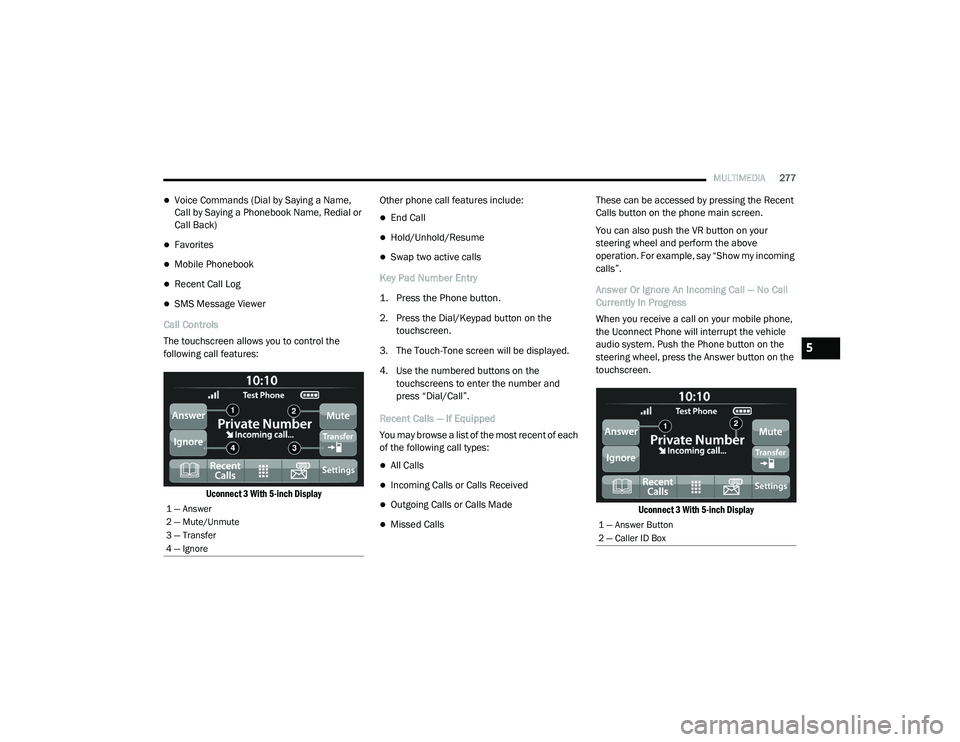
Call Controls
The touchscreen allows you to control the
following call features:
Uconnect 3 With 5-inch Display
Other phone call features include:
End Call
Hold/Unhold/Resume
Swap two active calls
Key Pad Number Entry
1. Press the Phone button.
2. Press the Dial/Keypad button on the touchscreen.
3. The Touch-Tone screen will be displayed.
4. Use the numbered buttons on the touchscreens to enter the number and
press “Dial/Call”.
Recent Calls — If Equipped
You may browse a list of the most recent of each
of the following call types:
All Calls
Incoming Calls or Calls Received
Outgoing Calls or Calls Made
Missed Calls These can be accessed by pressing the Recent
Calls button on the phone main screen.
You can also push the VR button on your
steering wheel and perform the above
operation. For example, say “Show my incoming
calls”.
Answer Or Ignore An Incoming Call — No Call
Currently In Progress
When you receive a call on your mobile phone,
the Uconnect Phone will interrupt the vehicle
audio system. Push the Phone button on the
steering wheel, press the Answer button on the
touchscreen.
Uconnect 3 With 5-inch Display
1 — Answer
2 — Mute/Unmute
3 — Transfer
4 — Ignore
1 — Answer Button
2 — Caller ID Box
5
21_DT_OM_EN_USC_t.book Page 277
Page 281 of 496

MULTIMEDIA279
If two calls are in progress (one active and one
on hold), press the Swap Calls button on the
phone main screen. Only one call can be placed
on hold at a time.
You can also push the Phone button to toggle
between the active and held phone call.
Join Calls
When two calls are in progress (one active and
one on hold), press the Join/Merge Calls Call
button the Phone main screen to combine all
calls into a conference call.
Call Termination
To end a call in progress, momentarily press the
End Call button on the touchscreen or the
Phone End button on the steering wheel. Only
the active call(s) will be terminated and if there
is a call on hold, it will become the new active
call.
Redial
Push the VR button and after the “Listening”
prompt and the following beep, say “Redial.”
The Uconnect Phone will call the last number
that was dialed from your mobile phone. Call Continuation
Call continuation is the progression of a phone
call on the Uconnect Phone after the vehicle
ignition has been switched to OFF.
NOTE:
The call will remain within the vehicle audio
system until the phone becomes out of range
for the Bluetooth® connection. It is recom
-
mended to press the Transfer button on the
touchscreen when leaving the vehicle.
Advanced Phone Connectivity
Transfer Call To And From Mobile Phone
The Uconnect Phone allows ongoing calls to be
transferred from your mobile phone without
terminating the call. To transfer an ongoing call
from your connected mobile phone to the
Uconnect Phone or vice versa, press the
Transfer button on the Phone main screen.
Things You Should Know About Uconnect
Phone
Voice Command
For the best performance:
Always wait for the beep before speaking
Speak normally, without pausing, just as you
would speak to a person sitting a few feet/
meters away from you
Ensure that no one other than you is
speaking during a voice command period
Low-To-Medium Blower Setting
Low-To-Medium Vehicle Speed
Low Road Noise
Smooth Road Surface
Fully Closed Windows
Dry Weather Conditions
Even though the system is designed for many
languages and accents, the system may not
always work for some.
WARNING!
ALWAYS drive safely with your hands on the
wheel. You have full responsibility and
assume all risks related to the use of the
Uconnect features and applications in this
vehicle. Only use Uconnect when it is safe to
do so. Failure to do so may result in an
accident involving serious injury or death.
5
21_DT_OM_EN_USC_t.book Page 279
Page 282 of 496

280MULTIMEDIA
NOTE:
It is recommended that you do not store names
in your Favorites phonebook while the vehicle is
in motion.
Number and name recognition rate is optimized
when the entries are not similar. You can say
“O” (letter “O”) for “0” (zero).
Even though international dialing for most
number combinations is supported, some
shortcut dialing number combinations may not
be supported.
Audio Performance
Audio quality is maximized under:
Low-To-Medium Blower Setting
Low-To-Medium Vehicle Speed
Low Road Noise
Smooth Road Surface
Fully Closed Windows
Dry Weather Conditions
Operation From The Driver's Seat Performance such as audio clarity, echo, and
loudness to a large degree rely on the phone
and network, and not the Uconnect Phone.
Echo at the far end can sometimes be reduced
by lowering the in-vehicle audio volume.
Phone Voice Commands
Making and answering hands-free phone calls
is easy with Uconnect. When the Phonebook
button is illuminated on your touchscreen, your
system is ready. Check UconnectPhone.com for
mobile phone compatibility and pairing
instructions.
Push the Phone button and wait for the beep
to say a command. See some examples below:
“ Call John Smith”
“Dial 123 456 7890”
“Redial ” (call previous outgoing phone
number)
“ Call back ” (call previously answered
incoming phone number) Did You Know:
When providing a Voice
Command, push the Phone button and say
“ Call ”, then pronounce the name exactly as it
appears in your phone book. When a contact
has multiple phone numbers, you can say “ Call
John Smith work”.
Voice Text Reply — If Equipped
Uconnect can announce incoming text
messages. Push the VR button or Phone
button and say:
1. “
Listen
” to have the system read an
incoming text message. (Must have
compatible mobile phone paired to
Uconnect system.)
2. “ Reply ” after an incoming text message has
been read.
Listen to the Uconnect prompts. After the
beep, repeat one of the predefined messag -
es and follow the system prompts.
21_DT_OM_EN_USC_t.book Page 280
Page 289 of 496

MULTIMEDIA287
How It Works
1. Push the SOS Call button; the indicator light will turn green indicating a call has
been placed.
NOTE:
In case the SOS Call button is accidentally
pushed, there is a 10-second delay before
the SOS call is placed. The system will
verbally alert you that a call is about to be
made. To cancel the SOS Call connection,
push the SOS Call button on the rearview
mirror or press the Cancel button on the
touchscreen within 10 seconds.
During an SOS Call, the Bluetooth® paired
phone is disconnected so incoming or
outgoing calls will go through your mobile
device versus the hands-free system which is
not available due to the SOS Call.
2. Once a connection between the vehicle and a SiriusXM Guardian™ Customer Care agent is
made, the agent will stay on the line with you.
NOTE:
Calls between the vehicle occupants and the
SiriusXM Guardian™ Customer Care center may
be recorded or monitored for quality assurance purposes. Through your enrollment in and use
of the SiriusXM Guardian™ services, you
consent to being recorded.
SOS Call System Limitations
Vehicles that have been purchased in the US
and that travel into Mexico and Canada may
have limited services. In particular, responses
to SOS calls or other emergency services may
be unavailable or very limited. Vehicles
purchased outside the United States and
Canada are unable to receive SiriusXM
Guardian™ services.
If the SOS Call system detects a malfunction,
any of the following may occur at the time the
malfunction is detected:
The light will continuously be illuminated red.
The screen will display the following message
“Vehicle phone requires service. Please
contact your dealer.”
An in-vehicle audio message will state
“Vehicle phone requires service. Please
contact your dealer.”
Even if the SOS Call system is fully functional,
factors beyond FCA US LLC’s control may
prevent or stop SOS Call system operation. These include, but are not limited to, the
following factors:
The ignition key is in OFF position.
The vehicle’s electrical systems are not
intact.
The vehicle battery loses power or becomes
disconnected during a vehicle crash.
The SOS Call system software and/or hard
-
ware is damaged during a vehicle crash.
LTE (voice/data) or 3G or 4G (data) coverage
and/or GPS signals are unavailable or
obstructed.
Network congestion.
Weather conditions.
Buildings, structures, geographic terrain, or
tunnels.
If your vehicle loses battery power for any
reason (including during or after an accident)
the SOS Call System, among other vehicle
systems, will not operate.
5
21_DT_OM_EN_USC_t.book Page 287
Page 376 of 496

374IN CASE OF EMERGENCY
NOTE:
Your vehicle may be transmitting data as
authorized by the subscriber Ú page 482.
The ASSIST and SOS buttons will only func -
tion if you are connected to an operable LTE
(voice/data) or 4G (data) network, which
comes as a built in function. Other Uconnect
services will only be operable if your SiriusXM
Guardian™ service is active and connected
to an operable LTE (voice/data) or 4G (data)
network. ASSIST Call
The ASSIST Button is used to automatically
connect you to any one of the following support
centers:
Roadside Assistance – If you get a flat tire, or
need a tow, just push the ASSIST button and
you’ll be connected to someone who can
help. Roadside Assistance will know what
vehicle you’re driving and its location. Addi
-
tional fees may apply for roadside assis -
tance.
SiriusXM Guardian™ Customer Care –
In-vehicle support for SiriusXM Guardian™.
Vehicle Customer Care – Total support for all
other vehicle issues.
SOS Call
1. Push the SOS Call button on the overhead console.
NOTE:
In case the SOS Call button is pushed in error,
there will be a ten second delay before the SOS
Call system initiates a call to a SOS operator. To
cancel the SOS Call connection, push the SOS
call button on the overhead console or press the cancellation button on the Device Screen.
Termination of the SOS Call will turn off the
green LED light on the overhead console.
2. The LED lights located within the ASSIST
and SOS buttons on the overhead console
will turn green once a connection to a SOS
operator has been made.
3. Once a connection between the vehicle and a SOS operator is made, the SOS Call
system may transmit the following
important vehicle information to a SOS
operator:
Indication that the occupant placed a
SOS Call
The vehicle brand
The last known GPS coordinates of the
vehicle
4. You should be able to speak with the SOS operator through the vehicle audio system
to determine if additional help is needed.
WARNING!
ALWAYS obey traffic laws and pay attention to
the road. ALWAYS drive safely with your hands
on the steering wheel. You have full
responsibility and assume all risks related to
the use of the features and applications in
this vehicle. Only use the features and
applications when it is safe to do so. Failure
to do so may result in an accident involving
serious injury or death.
21_DT_OM_EN_USC_t.book Page 374
Page 378 of 496

376IN CASE OF EMERGENCY
SOS Call System Limitations
Vehicles sold in Mexico DO NOT have SOS Call
system capabilities.
SOS or other emergency line operators in
Mexico may not answer or respond to SOS
system calls.
If the SOS Call system detects a malfunction,
any of the following may occur at the time the
malfunction is detected, and at the beginning of
each ignition cycle:
The overhead console lights located within
the ASSIST and SOS buttons will continuously
illuminate red.
The Device Screen will display the following
message: “Vehicle device requires service.
Please contact an authorized dealer.”
An In-Vehicle Audio message will state
“Vehicle device requires service. Please
contact an authorized dealer.” Even if the SOS Call system is fully functional,
factors beyond FCA US LLC’s control may
prevent or stop the SOS Call system operation.
These include, but are not limited to, the
following factors:
The ignition is in the OFF position
The vehicle’s electrical systems are not intact
The SOS Call system software and/or hard
-
ware are damaged during a crash
The vehicle battery loses power or becomes
disconnected during a vehicle crash
LTE (voice/data) or 4G (data) network and/or
Global Positioning Satellite signals are
unavailable or obstructed
Equipment malfunction at the SOS operator
facility
Operator error by the SOS operator
LTE (voice/data) or 4G (data) network
congestion
Weather
Buildings, structures, geographic terrain, or
tunnels
WARNING!
Ignoring the overhead console light could
mean you will not have SOS Call services. If
the overhead console light is illuminated,
have an authorized dealer service the SOS
Call system immediately.
The Occupant Restraint Control module
turns on the air bag Warning Light on the
instrument panel if a malfunction in any
part of the system is detected. If the Air Bag
Warning Light is illuminated, have an
authorized dealer service the Occupant
Restraint Control system immediately.
WARNING!
ALWAYS obey traffic laws and pay attention to
the road. ALWAYS drive safely with your hands
on the steering wheel. You have full
responsibility and assume all risks related to
the use of the features and applications in
this vehicle. Only use the features and
applications when it is safe to do so. Failure
to do so may result in an accident involving
serious injury or death.
21_DT_OM_EN_USC_t.book Page 376
Page 435 of 496

SERVICING AND MAINTENANCE433
F09––Spare
F10 40 Amp Green –HVAC Blower Motor
F11 –5 Amp Tan Output to Under-hood Power Distribution Center (UPDC) Run Coil
F12 –25 Amp Clear Mod Audio Amplifier / Active Noise Cancellation / SW Inverter
F13 –20 Amp Yellow Mod Seat Heater Front (Driver)
F14 –15 Amp Blue Mod Seat Heater Front (Steering Wheel)
F15 ––Spare
F16 ––Spare
F17 –20 Amp Yellow LT Spot Lamp — If Equipped
F18 30 Amp Pink –Motor Sunshade Sunroof
F19 ––Spare
F20 –20 Amp Yellow Comfort Rear Seat Module (CRSM) (Heat Rear RT)
F21 ––Spare
F22 ––Spare
F23 ––Spare
F24 –15 Amp Blue Mod RF Hub / Mod Ignition / Mod Cluster
F25 40 Amp Green –Mod Integrated Trailer Brake
F26 –15 Amp Blue Mod Cluster CCN / Mod Cyber Security
F27 –5 Amp Tan Mod Cluster CCN / Mod SGW
F28 –10 Amp Red Mod ORC
CavityCartridge Fuse Micro Fuse Description
8
21_DT_OM_EN_USC_t.book Page 433
Page 485 of 496

483
INDEX
A
Adaptive Cruise Control (ACC) (Cruise
Control)
................................................ 177, 179Adding Engine Coolant (Antifreeze)............... 422Adding Fuel.......................................... 208, 210Additives, Fuel............................................... 469AdjustDown........................................................... 36Forward....................................................... 36Rearward..................................................... 36Up................................................................ 36Adjustable Pedals............................................ 43Advance Phone Connectivity......................... 279Air BagAir Bag Operation...................................... 344Air Bag Warning Light...................... 342, 345Enhanced Accident Response......... 353, 394Event Data Recorder (EDR)....................... 394Front Air Bag............................................. 345If Deployment Occurs................................ 352Knee Impact Bolsters................................ 349Maintaining Your Air Bag System.............. 354Maintenance............................................. 354Redundant Air Bag Warning Light.............343Transporting Pets...................................... 369Air Bag Light............................... 126, 342, 369
Air Cleaner, Engine (Engine Air Cleaner
Filter)............................................................ 411Air Conditioner Maintenance........................ 415Air Conditioner Refrigerant........................... 415Air Conditioner System................................. 415Air Conditioning................................................ 63Air Conditioning Filter..............................67, 415Air Conditioning System................................... 65Air Conditioning, Operating Tips....................... 66Air Filter........................................................ 411Air PressureTires......................................................... 450Air Suspension..................................... 165, 169AlarmSecurity Alarm....................................26, 127Alterations/ModificationsVehicle......................................................... 11Antifreeze (Engine Coolant)................. 422, 474Disposal................................................... 423Anti-Lock Brake System (ABS)...................... 310Anti-Lock Warning Light................................ 132Assist, Hill Start............................................. 317Audio Settings............................................... 266Audio Systems (Radio).................................. 236Auto Down Power Windows............................. 78Automatic Door Locks...................................... 30
Automatic Headlights.......................................54Automatic High Beams.....................................53Automatic Tailgate Release.............................85Automatic Temperature Control (ATC)..............65Automatic Transmission....................... 156, 426Adding Fluid.............................................. 426Fluid And Filter Change............................. 426Fluid Change............................................. 426Fluid Level Check...................................... 426Fluid Type........................................ 426, 478Special Additives...................................... 426Automatic Transmission Limp Home Mode... 159AutoPark....................................................... 141AUX Camera......................................... 204, 208Auxiliary Driving Systems.............................. 318Axle Fluid.............................................. 426, 478Axle Lubrication............................................ 426
B
Back-Up......................................................... 202Back-Up Camera........................................... 202Battery................................................. 128, 409Charging System Light.............................. 128Keyless Key Fob Replacement....................18Battery Saver Feature......................................57Belts, Seat.................................................... 369
11
21_DT_OM_EN_USC_t.book Page 483