2021 RAM 1500 ABS
[x] Cancel search: ABSPage 266 of 496
264MULTIMEDIA
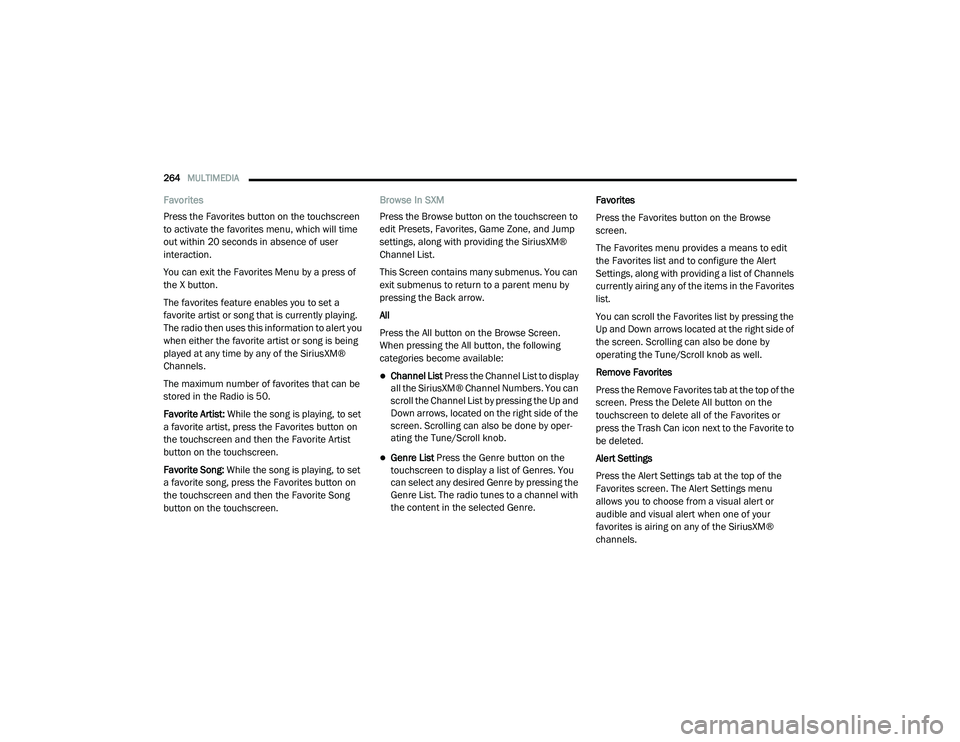
Favorites
Press the Favorites button on the touchscreen
to activate the favorites menu, which will time
out within 20 seconds in absence of user
interaction.
You can exit the Favorites Menu by a press of
the X button.
The favorites feature enables you to set a
favorite artist or song that is currently playing.
The radio then uses this information to alert you
when either the favorite artist or song is being
played at any time by any of the SiriusXM®
Channels.
The maximum number of favorites that can be
stored in the Radio is 50.
Favorite Artist: While the song is playing, to set
a favorite artist, press the Favorites button on
the touchscreen and then the Favorite Artist
button on the touchscreen.
Favorite Song: While the song is playing, to set
a favorite song, press the Favorites button on
the touchscreen and then the Favorite Song
button on the touchscreen. Browse In SXM
Press the Browse button on the touchscreen to
edit Presets, Favorites, Game Zone, and Jump
settings, along with providing the SiriusXM®
Channel List.
This Screen contains many submenus. You can
exit submenus to return to a parent menu by
pressing the Back arrow.
All
Press the All button on the Browse Screen.
When pressing the All button, the following
categories become available:
Channel List Press the Channel List to display
all the SiriusXM® Channel Numbers. You can
scroll the Channel List by pressing the Up and
Down arrows, located on the right side of the
screen. Scrolling can also be done by oper
-
ating the Tune/Scroll knob.
Genre List Press the Genre button on the
touchscreen to display a list of Genres. You
can select any desired Genre by pressing the
Genre List. The radio tunes to a channel with
the content in the selected Genre. Favorites
Press the Favorites button on the Browse
screen.
The Favorites menu provides a means to edit
the Favorites list and to configure the Alert
Settings, along with providing a list of Channels
currently airing any of the items in the Favorites
list.
You can scroll the Favorites list by pressing the
Up and Down arrows located at the right side of
the screen. Scrolling can also be done by
operating the Tune/Scroll knob as well.
Remove Favorites
Press the Remove Favorites tab at the top of the
screen. Press the Delete All button on the
touchscreen to delete all of the Favorites or
press the Trash Can icon next to the Favorite to
be deleted.
Alert Settings
Press the Alert Settings tab at the top of the
Favorites screen. The Alert Settings menu
allows you to choose from a visual alert or
audible and visual alert when one of your
favorites is airing on any of the SiriusXM®
channels.
21_DT_OM_EN_USC_t.book Page 264
Page 301 of 496

MULTIMEDIA299
Here are a few of the many questions you can
ask Alexa®:
“Alexa®, ask
“Alexa®, ask
“Alexa®, ask
1000 Chrysler Drive, Auburn Hills, Michigan
to my
“Alexa®, ask
level of my
An active subscription to SiriusXM Guardian™ is
required. To use Amazon Alexa®, first, register
for SiriusXM Guardian™ Ú page 283.
Next, link the Uconnect system on your vehicle
to Amazon Alexa®:
1. Download the Amazon Alexa® app on your mobile device (Apple® or Android™).
2. Once in the app, tap MENU and go to SKILLS.
3. Search for
5. Link the vehicle brand name to the
6. Log in using your Owner Account credentials. This will be the same user
name and password you used when
registering for SiriusXM Guardian™
Connected Services.
7. CONFIRM account to return to the
You can now begin using the
Skill on Alexa®!
Google Assistant — If Equipped
With the Google Assistant, you can get help and
keep tabs on your car. The Assistant is available
across your devices, including Android™
phones, iPhone® devices, or voice-activated
speakers, like Google Home. If you need
assistance, ask Google for help, or for a
complete list of commands by saying: “Hey
Google, ask
car.” Here are a few examples of commands:
“Hey Google, ask
“Hey Google, ask
“Hey Google, ask
1000 Chrysler Drive, Auburn Hills, Michigan
to my
“Hey Google, ask
fuel level of my
To link your Uconnect account with Google
Assistant, follow these steps:
1. Download and install the Google Assistant app on your smart phone from the App
Store® or Google Play.
2. After installation, log in to the Google Assistant app with your Gmail ID. Verify your
account by pressing the icon in the upper
right hand corner.
3. Press the Discover button in the bottom left corner of the screen. Enter the vehicle
brand name.
5
21_DT_OM_EN_USC_t.book Page 299
Page 312 of 496

310 (Continued)
SAFETY
SAFETY FEATURES
ANTI-LOCK BRAKE SYSTEM (ABS)
The ABS provides increased vehicle stability
and brake performance under most braking
conditions. The system automatically prevents
wheel lock, and enhances vehicle control during
braking.
The ABS performs a self-check cycle to ensure
that the ABS is working properly each time the
vehicle is started and driven. During this
self-check, you may hear a slight clicking sound
as well as some related motor noises.
The ABS is activated during braking when the
system detects one or more wheels are
beginning to lock. Road conditions such as ice,
snow, gravel, bumps, railroad tracks, loose
debris, or panic stops may increase the
likelihood of ABS activation(s).You also may experience the following normal
characteristics when ABS activates:
ABS motor noise or clicking sounds (you may
continue to hear for a short time after the
stop)
Brake pedal pulsations
A slight drop of the brake pedal at the end of
the stop
The ABS is designed to function with the
Original Equipment Manufacturer (OEM) tires.
Modification may result in degraded ABS
performance.
WARNING!
The ABS contains sophisticated electronic
equipment that may be susceptible to inter -
ference caused by improperly installed or
high output radio transmitting equipment.
This interference can cause possible loss of
anti-lock braking capability. Installation of
such equipment should be performed by
qualified professionals.
Pumping of the Anti-Lock Brakes will
diminish their effectiveness and may lead
to a collision. Pumping makes the stopping
distance longer. Just press firmly on your
brake pedal when you need to slow down or
stop.
The ABS cannot prevent the natural laws of
physics from acting on the vehicle, nor can
it increase braking or steering efficiency
beyond that afforded by the condition of the
vehicle brakes and tires or the traction
afforded.
The ABS cannot prevent collisions,
including those resulting from excessive
speed in turns, following another vehicle
too closely, or hydroplaning.
The capabilities of an ABS equipped vehicle
must never be exploited in a reckless or
dangerous manner that could jeopardize
the user’s safety or the safety of others.
WARNING! (Continued)
21_DT_OM_EN_USC_t.book Page 310
Page 313 of 496

SAFETY311
Anti-Lock Brake System (ABS) Warning
Light
The yellow ABS Warning Light will turn on when
the ignition is placed in the ON/RUN mode and
may stay on for as long as four seconds.
If the ABS Warning Light remains on or comes
on while driving, it indicates that the anti-lock
portion of the brake system is not functioning
and that service is required. However, the
conventional brake system will continue to
operate normally if the ABS Warning Light is on.
If the ABS Warning Light is on, the brake system
should be serviced as soon as possible to
restore the benefits of anti-lock brakes. If the
ABS Warning Light does not come on when the
ignition is placed in the ON/RUN mode, have
the light repaired as soon as possible.
ELECTRONIC BRAKE CONTROL (EBC)
S
YSTEM
Your vehicle is equipped with an advanced
Electronic Brake Control (EBC) system. This
system includes Anti-Lock Brake System (ABS),
Brake Assist System (BAS), Electronic Brake
Force Distribution (EBD), Electronic Roll
Mitigation (ERM), Electronic Stability Control
(ESC), Hill Start Assist (HSA), and Traction Control System (TCS). These systems work
together to enhance both vehicle stability and
control in various driving conditions.
Your vehicle may also be equipped with Trailer
Sway Control (TSC) and Hill Descent Control
(HDC).
Brake Assist System (BAS)
The BAS is designed to optimize the vehicle’s
braking capability during emergency braking
maneuvers. The system detects an emergency
braking situation by sensing the rate and
amount of brake application, and then applies
optimum pressure to the brakes. This can help
reduce braking distances. The BAS
complements the Anti-Lock Brake System
(ABS). Applying the brakes very quickly results
in the best BAS assistance. To receive the
benefit of the system, you must apply
continuous braking pressure during the
stopping sequence (do not “pump” the brakes).
Do not reduce brake pedal pressure unless
braking is no longer desired. Once the brake
pedal is released, the BAS is deactivated.
Brake System Warning Light
The red Brake System Warning Light will turn on
when the ignition is placed in the ON/RUN
mode and may stay on for as long as four
seconds.
If the Brake System Warning Light remains on or
comes on while driving, it indicates that the
brake system is not functioning properly and
that immediate service is required. If the Brake
System Warning Light does not come on when
the ignition is placed in the ON/RUN mode,
have the light repaired as soon as possible.
WARNING!
The Brake Assist System (BAS) cannot
prevent the natural laws of physics from
acting on the vehicle, nor can it increase the
traction afforded by prevailing road
conditions. BAS cannot prevent collisions,
including those resulting from excessive
speed in turns, driving on very slippery
surfaces, or hydroplaning. The capabilities of
a BAS-equipped vehicle must never be
exploited in a reckless or dangerous manner,
which could jeopardize the user's safety or
the safety of others.
6
21_DT_OM_EN_USC_t.book Page 311
Page 314 of 496

312SAFETY
Electronic Brake Force Distribution (EBD)
EBD manages the distribution of the braking
torque between the front and rear axles by
limiting braking pressure to the rear axle. This is
done to prevent overslip of the rear wheels to
avoid vehicle instability, and to prevent the rear
axle from entering the Anti-Lock Brake System
(ABS) before the front axle.
Electronic Roll Mitigation (ERM)
The ERM system anticipates the potential for
wheel lift by monitoring the driver’s steering
wheel input and the speed of the vehicle. When
ERM determines that the rate of change of the
steering wheel angle and vehicle’s speed are
sufficient to potentially cause wheel lift, it then
applies the appropriate brake and may also
reduce engine power to lessen the chance that
wheel lift will occur. ERM can only reduce the
chance of wheel lift occurring during severe or
evasive driving maneuvers; it cannot prevent
wheel lift due to other factors, such as road
conditions, leaving the roadway, striking objects
or other vehicles.
Electronic Stability Control (ESC)
ESC enhances directional control and stability
of the vehicle under various driving conditions.
ESC corrects for oversteering or understeering
of the vehicle by applying the brake of the
appropriate wheel(s) to counteract the above
conditions. Engine power may also be reduced
to help the vehicle maintain the desired path.
Oversteer — when the vehicle is turning more
than appropriate for the steering wheel posi -
tion.
Understeer — when the vehicle is turning less
than appropriate for the steering wheel posi -
tion.
ESC uses sensors in the vehicle to determine
the vehicle path intended by the driver and
compares it to the actual path of the vehicle.
When the actual path does not match the
intended path, ESC applies the brake of the
appropriate wheel to assist in counteracting the
oversteer or understeer condition.
The ESC Activation/Malfunction Indicator Light
located in the instrument cluster will start to
flash as soon as the ESC system becomes
active. The ESC Activation/Malfunction
Indicator Light also flashes when the TCS is
active. If the ESC Activation/Malfunction
Indicator Light begins to flash during
acceleration, ease up on the accelerator and
apply as little throttle as possible. Be sure to
adapt your speed and driving to the prevailing
road conditions.
WARNING!
Many factors, such as vehicle loading, road
conditions and driving conditions, influence
the chance that wheel lift or rollover may
occur. ERM cannot prevent all wheel lift or roll
overs, especially those that involve leaving
the roadway or striking objects or other
vehicles. The capabilities of an
ERM-equipped vehicle must never be
exploited in a reckless or dangerous manner
which could jeopardize the user's safety or
the safety of others.
21_DT_OM_EN_USC_t.book Page 312
Page 351 of 496

SAFETY349
for any reason, take the vehicle to an authorized
dealer. Only FCA US LLC approved seat
accessories may be used.
The following requirements must be strictly
followed:
Do not modify the front passenger seat
assembly or components in any way.
Do not use prior or future model year seat
covers or cushions not designated by FCA US
LLC for the specific model being repaired.
Always use the correct seat cover and
cushion specified for the vehicle.
Do not replace the seat cover or cushion with
an aftermarket seat cover or cushion.
Do not add a secondary seat cover or mat.
At no time should any Supplemental
Restraint System (SRS) component or SRS
related component or fastener be modified
or replaced with any part except those which
are approved by FCA US LLC.Knee Impact Bolsters
The Knee Impact Bolsters help protect the
knees of the driver and front passenger, and
position the front occupants for improved
interaction with the front air bags.
Supplemental Side Air Bags
Supplemental Seat-Mounted Side Air Bags
(SABs)
This vehicle is equipped with Supplemental
Seat-Mounted Side Air Bags (SABs).
Supplemental Seat-Mounted Side Air Bags
(SABs) are located in the outboard side of the
front seats. The SABs are marked with “SRS
AIRBAG” or “AIRBAG” on a label or on the seat
trim on the outboard side of the seats.
The SABs may help to reduce the risk of
occupant injury during certain side impacts, in
addition to the injury reduction potential
provided by the seat belts and body structure.
WARNING!
Unapproved modifications or service proce -
dures to the passenger seat assembly, its
related components, seat cover or cushion
may inadvertently change the air bag
deployment in case of a frontal collision.
This could result in death or serious injury
to the front passenger if the vehicle is
involved in a collision. A modified vehicle
may not comply with required Federal
Motor Vehicle Safety Standards (FMVSS)
and/or Canadian Motor Vehicle Safety
Standards (CMVSS).
If it is necessary to modify the air bag
system for persons with disabilities,
contact an authorized dealer.
WARNING!
Do not drill, cut, or tamper with the knee
impact bolsters in any way.
Do not mount any accessories to the knee
impact bolsters such as alarm lights,
stereos, citizen band radios, etc.
6
21_DT_OM_EN_USC_t.book Page 349
Page 364 of 496

362SAFETY
Locating The LATCH Anchorages
The lower anchorages are round bars
that are found at the rear of the seat
cushion where it meets the seatback,
below the anchorage symbols on the
seatback. They are just visible when you lean
into the rear seat to install the child restraint.
You will easily feel them if you run your finger
along the gap between the seatback and seat
cushion.
Rear Outboard Seats Driver Side (Example Shown)
Locating The Upper Tether Anchorages
There are tether strap anchorages
located behind each of the rear seats.
Outboard Tether Anchorage
Center Tether Anchorage Over Head Rest
LATCH-compatible child restraint systems will
be equipped with a rigid bar or a flexible strap
on each side. Each will have a hook or
connector to attach to the lower anchorage and
a way to tighten the connection to the
anchorage. Forward-facing child restraints and some rear-facing child restraints will also be
equipped with a tether strap. The tether strap
will have a hook at the end to attach to the top
tether anchorage and a way to tighten the strap
after it is attached to the anchorage.
Center Seat LATCH
All Quad Cabs Or Crew Cab Full Bench Rear
Seat: No Lower Center LATCH Anchorages
Available
WARNING!
Do not install a child restraint in the center
position using the LATCH system. This posi
-
tion is not approved for installing child
seats using the LATCH attachments. You
must use the seat belt and tether anchor to
install a child seat in the center seating
position.
Never use the same lower anchorage to
attach more than one child restraint
Ú page 363.
21_DT_OM_EN_USC_t.book Page 362
Page 418 of 496

416SERVICING AND MAINTENANCE
The cabin air filter is located in the fresh air inlet
behind the glove compartment. Perform the
following procedure to replace the filter:
1. Open the glove compartment and remove
all contents.
2. With the glove compartment door open, remove the glove compartment tension
tether and tether clip by sliding the clip
toward the face of the glove compartment
door. Lift the clip out of glove compartment
door and release into dash panel.
Right Side Of Glove Compartment
3. There are glove compartment travel stops
on both sides of the glove compartment
door. Push inward on both sides of the glove
compartment to release the glove
compartment travel stops.
Glove Compartment
4. Disengage the glove compartment door from its hinges by opening the glove
compartment past the travel stop and
pulling it toward you. 5. Remove the filter cover by pushing in on the
finger tabs on each end of the filter cover.
Filter Cover
Filter Cover Removal
1 — Glove Compartment Door
2 — Glove Compartment Tension Tether
1 — Glove Compartment Travel Stop
2 — Glove Compartment Tension Tether
3 — Glove Compartment Door
1 — Finger Tabs
21_DT_OM_EN_USC_t.book Page 416