2021 PEUGEOT PARTNER change instrument screen
[x] Cancel search: change instrument screenPage 7 of 260

5
Overview
Instruments and controls
1.Bonnet release
2. Dashboard fuses
3. Horn
4. Instrument panel 5.
Alarm
Courtesy lamp
Interior rear view mirror or Surround Rear
Vision display screen
Emergency and assistance call buttons
6. Monochrome screen with audio system
Touch screen with PEUGEOT Connect
Radio or PEUGEOT Connect Nav
7. USB port
8. Heating
Manual air conditioning
Dual-zone automatic air conditioning
Front demisting - defrosting
Rear screen demisting – defrosting
9. Electric parking brake
"START/STOP" button
10. Gearbox
11 . 12 V socket
12. 230 V accessory socket
13. Glove box
USB port (inside the glove box)
14. Storage compartment
15. Front passenger airbag deactivation (on the
side of the glove box, with the door open)
Steering mounted controls
1.External lighting / direction indicators control
stalk
Button to change the Surround Rear Vision
view / voice recognition activation button
2. Wiper / screenwash / trip computer control
stalk
3. Controls to select the multimedia source
(SRC), manage music (LIST) and manage
phone calls (" telephone" symbol)
4. Speed Limiter / Programmable Cruise Control
/ Adaptive cruise control controls
5. Instrument panel display mode selection
wheel
6. Voice control
Volume adjustment
7. Audio system setting controls
Page 10 of 260

8
Eco-driving
Eco mode
This mode optimises the heating and
air conditioning functions to reduce fuel
consumption.
Activation/Deactivation
► To activate or deactivate this mode, press this
button.
The indicator lamp is illuminated when the
system is activated.
Eco-coaching
This function provides you with advice and
information to help you adopt a more economical
and environmentally friendly driving style.
It takes into account multiple parameters,
including braking optimisation, acceleration
management, gear changes, tyre inflation and
use of the heating/air conditioning systems.
Information displayed on the instrument
panel
By selecting the "Eco-coaching" tab of
the central display in the matrix instrument panel, you can assess your driving in
real time with the braking and acceleration
indicator.
Information displayed on the touch screen
The four tabs - "Trip", "Air conditioning
",
"Maintenance" and "Driving" - provide tips to
help you optimise your driving style.
Information relating to the driving style may also
be displayed in real time.
The "Report" tab assesses your driving style on
a daily basis and gives an overall score for the
week.
You can reset this report at any time by pressing
"Reset ".
With PEUGEOT Connect Radio
► In the " Applications " menu, select
"Eco-coaching".
With PEUGEOT Connect Nav
► In the " Applications " menu, then the
"Vehicle Apps" tab, select
"Eco-coaching".
Page 11 of 260
9
Instruments
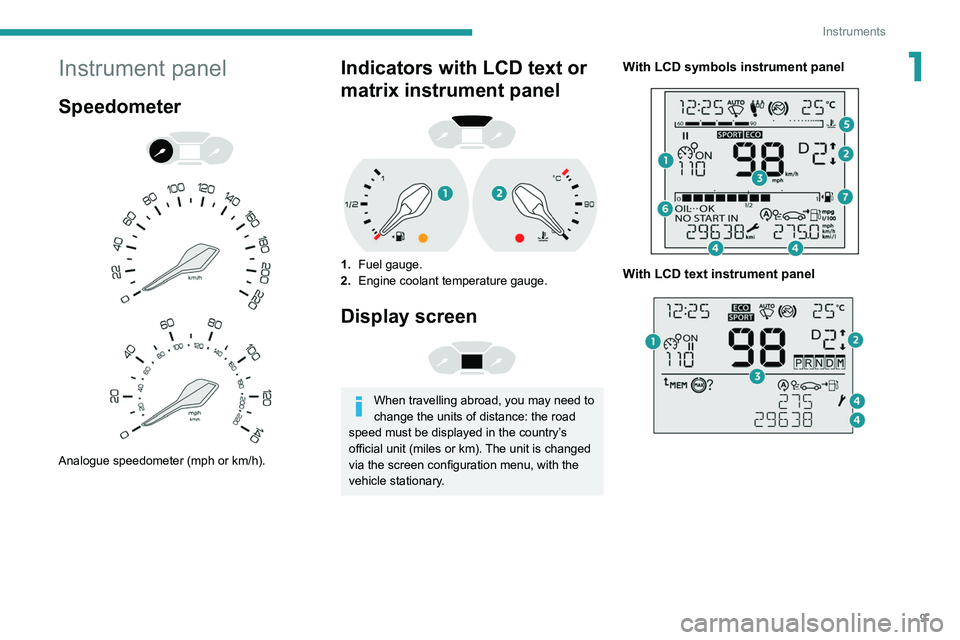
1Instrument panel
Speedometer
Analogue speedometer (mph or km/h).
Indicators with LCD text or
matrix instrument panel
1. Fuel gauge.
2. Engine coolant temperature gauge.
Display screen
When travelling abroad, you may need to
change the units of distance: the road
speed must be displayed in the country’s
official unit (miles or km). The unit is changed
via the screen configuration menu, with the
vehicle stationary.
With LCD symbols instrument panel
With LCD text instrument panel
Page 12 of 260

10
Instruments
Rev counter
Rev counter (x 1000 rpm).
Warning and indicator
lamps
Displayed as symbols, the warning and indicator
lamps inform the driver of the occurrence of a
malfunction (warning lamps) or of the operating
status of a system (operation or deactivation
indicator lamps). Certain lamps light up in two
ways (fixed or flashing) and/or in several colours.
Associated warnings
The illumination of a lamp may be accompanied
by an audible signal and/or a message displayed
in a screen.
Relating the type of alert to the operating status
of the vehicle allows you to determine whether
the situation is normal or whether a fault has
With matrix instrument panel
1. Cruise control or speed limiter settings.
2. Gear shift indicator.
Gear with an automatic gearbox.
3. Digital speedometer (mph or km/h) with LCD
symbols and LCD text instrument panel.
Display area with matrix instrument panel:
alert or function status message, trip
computer, digital speedometer (mph or km/h),
etc.
4. Service indicator, then total distance recorder
(miles or km) and trip distance recorder
(miles or km).
Display area with LCD text instrument
panel: alert or function status message, trip
computer, etc.
5. Engine coolant temperature gauge.
6. Engine oil level indicator.
7. Fuel gauge.
Control buttons
With LCD symbols instrument panel
A.Lighting dimmer.
After a long press on SET: change the set
time values and the units.
B. Reminder of servicing information or the
driving range with the SCR system and the
AdBlue
®.
Reset the function selected (service indicator
or trip distance recorder).
After a long press: change the set time values
and the units.
With LCD text instrument panel
With matrix instrument panel
A. Temporary reminder of servicing information,
or reminder of the driving range with the SCR
system and the AdBlue
®.
Depending on version: go back up a level or
cancel the current operation.
B. Lighting dimmer.
Depending on version: browse a menu or list,
or change a value.
C. Reset the trip distance recorder (long press).
Reset the service indicator.
Depending on version: enter the configuration
menu and confirm a choice (short press).
Page 18 of 260

16
Instruments
Fixed, accompanied by the message
‘Parking brake fault’.
Automatic release of the electric parking brake is
unavailable.
Carry out (2).
Service warning lamp fixed and
service spanner flashing then
fixed.
The servicing interval has been exceeded.
The vehicle must be serviced as soon as
possible.
Only with BlueHDi Diesel engines.
Rear foglampFixed.
The lamp is on.
Green warning/indicator lamps
Stop & Start
Fixed.
When the vehicle stops the Stop & Start
puts the engine into STOP mode.
Flashing temporarily.
STOP mode is momentarily unavailable
or START mode is automatically triggered.
Hill Assist Descent ControlFixed.
The system has been activated, but the
conditions for regulation are not met (gradient,
speed too high, gear engaged).
Flashing indicator.
The function is starting regulation.
The vehicle is being braked; the brake lamps
come on during the descent.
Eco modeFixed.
ECO mode is active.
Certain parameters are adjusted with a view to
reducing fuel consumption.
Automatic wipingFixed.
Automatic windscreen wiping is activated.
Front foglampsFixed.
The front foglamps are lit.
SidelampsFixed.
The lamps are on.
Direction indicatorsDirection indicators with audible signal.
The direction indicators are on.
Dipped beam headlampsFixed.
The lamps are on.
Automatic headlamp dipping
Fixed.
The function has been activated
via the touch screen (Driving
/ Vehicle menu).
The lighting control stalk is in the "AUTO"
position.
Blue warning/indicator lamps
Main beam headlamps
Fixed.
The lamps are on.
Black/white warning lamps
Foot on brake
Fixed.
Omission or insufficient pressure on the
brake pedal.
With an automatic gearbox, with the engine
running, before releasing the parking brake, to
move out of position P.
Foot on the clutchFixed.
Stop & Start: the change to START mode
is rejected because the clutch pedal is not fully
depressed.
Fully depress the clutch pedal.
Automatic wipingFixed.
Automatic front wiping is activated.
Indicators
Service indicator
The service indicator is displayed on the
instrument panel. Depending on the vehicle
version:
–
the distance recorder display line indicates
the distance remaining before the next service
is due, or the distance travelled since it was due
preceded by the sign “-”.
–
an alert message indicates the distance
remaining, as well as the period before the next
service is due or how long it is overdue.
Page 67 of 260

65
Lighting and visibility
4Daytime running lamps /
Sidelamps
The front lamps light up automatically when the
engine starts.
They provide the following functions:
–
Daytime running lamps (lighting control stalk in
the "
AUTO" position with adequate light level).
–
Sidelamps (lighting control stalk in the " AUT
O"
position with low light levels or "Sidelamps only”
or "Dipped/main beam headlamps").
The LEDs are brighter when operating as daytime running lamps.
Parking lamps
Side markers for the vehicle by illumination of
the sidelamps on the traffic side only.
►
Depending on version, within one minute of
switching off the ignition, operate the lighting
control stalk up or down depending on the traffic
side (for example: when parking on the left; lighting control stalk upwards; the right-hand
sidelamps come on).
This is confirmed by an audible signal and
illumination of the corresponding direction
indicator lamp in the instrument panel.
T
o switch off the parking lamps, return the
lighting control stalk to the central position.
Guide-me-home lighting
Manual
Switching on/off
► With the ignition off, "flash" the headlamps
using the lighting control stalk to switch the
function on or off.
Manual guide-me-home lighting goes off
automatically at the end of a given period of
time.
Automatic
With the ring in the "AUTO" position, when the
light is poor, the dipped beam headlamps come
on automatically when the ignition is switched
off.
The activation, deactivation and duration of guide-me-
home lighting are set in the vehicle configuration
menu.
Automatic exterior welcome lighting
With the "Automatic headlamp illumination"
function activated, when the light is poor, the
sidelamps and dipped beam headlamps come
on automatically when the vehicle is unlocked.
Activation, deactivation and
the duration of the exterior
welcome lighting are set in the vehicle
configuration menu.
Automatic headlamp dipping
This system automatically changes between
dipped and main beam headlamps according to
the brightness and driving conditions, using a
camera located at the top of the windscreen.
This system is a driving aid.
The driver remains responsible for
the vehicle's lighting, its correct use for the
prevailing conditions of light, visibility and
traffic, and for observation of driving and
vehicle regulations.
Page 68 of 260

66
Lighting and visibility
Headlamp beam height
adjustment
To avoid inconvenience to other road users,
the height of the halogen headlamps should be
adjusted according to the load in the vehicle.
0Unladen.
1 Partial load.
2 Medium load.
3 Maximum authorised load.
4 5 6 Not used.
The initial setting is position 0.
Wiper control stalk
Programming
Your vehicle may also include some functions
that can be activated/deactivated:
– automatic windscreen wipers,
– rear wiping on engaging reverse gear.
The system will be operational as soon
as you exceed 16 mph (25 km/h).
If the speed drops below 9 mph (15
km/h), the
system no longer operates.
Activation/Deactivation
Activation and deactivation are done via the vehicle
configuration menu.
When deactivated, the lighting system changes
to "automatic illumination of headlamps" mode.
The state of the system stays in the memory
when switching off the ignition.
Operation
If the ambient light level is sufficient and/or the
traffic conditions do not allow the main beam
headlamps to be lit:
– The dipped beam headlamps
remain lit. These indicator lamps
come on on the instrument panel.
If the ambient light level is very low and traffic
conditions permit:
– The main beam headlamps
come on automatically . These
indicator lamps come on on the instrument
panel.
The function is deactivated if the fog lamps are
switched on or the system detects dense fog.
When the fog lamps are switched off or the
vehicle leaves the area of dense fog, the function
is automatically reactivated.
This indicator lamp goes out when the function is deactivated.
Pause
If the situation requires a change of headlamp
beam, the driver can take over at any time.
► A "headlamp flash" pauses the
function and the system changes to
"automatic illumination of headlamps" mode:
–
if the "AUT
O" and "Dipped beam" indicator
lamps were on, the system changes to main
beam,
–
if the "AUT
O" and "Main beam" indicator
lamps were on, the system changes to dipped
beam.
To reactivate the system, flash the headlamps
again.
The system may suffer interference or not work correctly:
–
under conditions of poor visibility (snow
,
heavy rain, etc.),
– if the windscreen in front of the camera is
dirty , misted or obscured (for example, by a
sticker, etc.),
–
if the vehicle is facing highly reflective
signs.
When the system detects thick fog, it
temporarily deactivates the function.
The system is not able to detect:
–
road users that do not have their own
lighting, such as pedestrians,
–
vehicles whose lighting is obscured (for
example: vehicles running behind a safety
barrier on a motorway),
–
vehicles at the top or bottom of a steep
slope, on winding roads, on crossroads.
Clean the windscreen regularly,
particularly the area in front of the
camera.
The internal surface of the windscreen can
also become misted around the camera.
In humid and cold weather, demist the
windscreen regularly.
Do not allow snow to accumulate on the
bonnet or roof of the vehicle as this could
obstruct the detection camera.
Page 80 of 260

78
Safety
On a descent, with the vehicle stationary, if you
release the accelerator and brake pedals, the
system will release the brakes to set the vehicle
gradually in motion.
The brake lamps light up automatically when the
system is regulating.
If the speed exceeds 19 mph (30 km/h),
regulation is paused automatically, the
indicator lamp goes back to grey in the
instrument panel, but the green indicator lamp in
the button remains on.
Regulation resumes automatically when the
speed falls below 19 mph (30 km/h) again, if the
slope and pedal release conditions are met.
You can depress the accelerator or brake pedal
again at any time.
Off
► Press the button until its indicator lamp goes
off; the indicator lamp on the instrument panel
also goes off.
At speeds above 43 mph (70 km/h), the system
is automatically deactivated; the indicator lamp in
the button goes off.
Malfunction
In the event of a system malfunction, this
warning lamp comes on on the instrument
panel, accompanied by an onscreen message.
Have the system checked by a PEUGEOT
dealer or a qualified workshop.
You can deactivate the ASR and DSC systems by turning the knob to the "OFF"
position.
The ASR and DSC systems will no longer act on the operation of the engine
or of the brakes in the event of a change of
trajectory.
These systems are reactivated automatically
from 31 mph (50
km/h) and whenever the
ignition is switched on.
Recommendations
Your vehicle is designed principally to
drive on tarmac roads but it allows you to
occasionally drive on other less passable
terrain.
However, it does not permit off-road driving
such as:
–
crossing and driving on terrain which
could damage the underbody or strip away
components (fuel pipe, fuel cooler
, etc.) due
to obstacles or stones in particular,
–
driving on terrain with steep gradients and
poor grip,
–
crossing a stream.
Hill Assist Descent
Control
System that provides assistance when
descending on loose or soft surfaces (gravel,
mud, etc.) or a steep gradient.
This system reduces the risk of slip or loss of
control of the vehicle when descending, whether
going forward or in reverse.
During a descent, it assists the driver in
maintaining a constant speed, depending on the
gear engaged, while progressively releasing the
brakes.
For the system to activate, the slope
must be greater than 5%.
The system can be used with the gearbox in
neutral.
Otherwise engage a gear corresponding to
the speed to prevent the engine stalling.
With an automatic gearbox, the system can
be used with the selector at N, D or R.
When the system is regulating, the Active
Safety Brake system is automatically
deactivated.
The system is not available: – if the speed of the vehicle is above 43
mph (70
km/h),
–
if the speed of the vehicle is being
controlled by the
Adaptive Cruise Control,
depending on the type of gearbox.
Switching on
By default, the system is not selected.
The state of the function is not saved when the
ignition is switched off.
The driver can select the system when the
engine is running, when the vehicle is stationary
or when moving at speeds up to approximately
31 mph (50
km/h).
► To select the system, at speeds below
31 mph (50 km/h), press this button until
its indicator lights up; this lamp appears in green
in the instrument panel.
The system becomes active at speeds below 19
mph (30
km/h).
►
When the vehicle begins its descent, you can
release the accelerator and brake pedals; the
system regulates the speed:
– if the gearbox is in first or second gear ,
the speed decreases and the
indicator
lamp flashes rapidly,
–
if the gearbox is in neutral or if the clutch pedal
is depressed, the speed decreases and the
indicator
lamp flashes slowly; in this case, the
maintained descent speed is lower.