2021 Peugeot 308 start stop button
[x] Cancel search: start stop buttonPage 28 of 244

26
Access
For all work on the alarm system, contact a
PEUGEOT dealer or a qualified workshop.
Locking the vehicle with full
alarm system
Activation
► Switch off the engine and exit the vehicle.► Lock the vehicle using the remote
control.
or
► Lock the vehicle with the " Keyless Entry and
Starting" system.
The monitoring system is active: the indicator
lamp in the button flashes once per second and
the direction indicators come on for about 2
seconds.
After an instruction to lock the vehicle using
the remote control or the " Keyless Entry
and Starting" system, the exterior perimeter
monitoring is activated after 5 seconds, the
interior volumetric monitoring after 45 seconds.
If a door, boot, bonnet, etc. is not properly
closed, the vehicle is not locked but monitoring
will be activated after 45 seconds.
Deactivation
► Press this unlocking button on the
remote control.
or
* Only cases valid for GTi vehicles fitted with just the anti-tilt alarm.
when moving (speed above 6 mph (10 km/h)), a
message appears for a few seconds.
In the event of a fault or difficulties felt in
manoeuvring the tailgate when opening
or closing it, have it quickly checked by a
PEUGEOT dealer or a qualified workshop to
stop this issue getting worse and so as to not
cause the tailgate to drop, and serious
injuries.
Back-up control
System allowing the mechanical unlocking of the
boot in the event of a battery or central locking
system malfunction.
Unlocking
► Fold the rear seats down to gain access to
the lock from inside the boot.
►
Insert a small screwdriver into hole A
in the
lock to unlock the boot.
► Move the latch to the right.
Locking again after closing
If the fault persists after closing again, the boot
will remain locked.
Bicycle/accessory carrier
Do not fit an accessory carrier to the
tailgate.
Alarm
System which protects and provides a deterrent
against theft and break-ins.
It provides the following types of monitoring:
Exterior perimeter
The system checks for opening of the vehicle.
The alarm is triggered if anyone tries to open a
door, the boot or the bonnet.
Interior volumetric
The system checks for any variation in volume in
the passenger compartment.
The alarm is triggered if anyone breaks a
window, enters the passenger compartment or
moves inside the vehicle.
For vehicles that are fitted with it, interior
volumetric monitoring is incompatible
with programmed thermal preconditioning.
Anti-tilt
(On GTi version.)
The system checks for any change in the attitude
of the vehicle.
The alarm is triggered if the vehicle is lifted,
moved or knocked.
Self-protection function
The system checks for any malfunction
in its components.
The alarm is triggered if the battery, button or
siren wiring is disconnected or damaged.
Page 30 of 244
28
Access
If the indicator lamp is on, the rear controls are
deactivated.
If the indicator lamp is off, the rear controls are
activated.
Reinitialising the electric
windows
Following reconnection of the battery, the safety
anti-pinch function must be reinitialised.
The anti-pinch function is disabled during the
following operations:
– bring the window down completely, then bring
it back up. It will go up by a few centimetres with
each press. Perform the operation again until the
window is fully closed,
– continue to pull the switch upwards for at least
one second after reaching the window closed
position.
Always remove the key when leaving the vehicle, even for a short time.
In the event of contact (pinching) during
operation of the windows, you must reverse
the movement of the window. To do this,
press the switch concerned.
When operating the passenger electric
window controls, the driver must ensure
that no one is preventing the closing of the
windows.
The driver must ensure that passengers use
the electric windows correctly.
Be aware of children when operating the
windows.
Triggering of the alarm
This is indicated by sounding of the siren and
flashing of the direction indicators for thirty
seconds.
The monitoring functions remain active until
the alarm has been triggered eleven times in
succession.
When the vehicle is unlocked using the
remote control or the " Keyless Entry and
Starting" system, rapid flashing of the indicator
lamp in the button informs you that the alarm
was triggered during your absence.
When the ignition is switched on, this flashing
stops immediately
.
Failure of the remote control
To deactivate the monitoring functions:
► Unlock the vehicle using the key (built into
the remote control) in the driver's door lock.
►
Open the door; this sets off the alarm.
►
Switch the ignition on; the alarm stops.
The
indicator lamp in the button
goes off.
Locking the vehicle without
activating the alarm
► Lock or deadlock the vehicle using the key
(built into the remote control) in the driver's door
lock.
Malfunction
When the ignition is switched on, fixed
illumination of the indicator lamp in the
button indicates a fault with the system.
Have the system checked by a PEUGEOT
dealer or a qualified workshop.
Electric windows
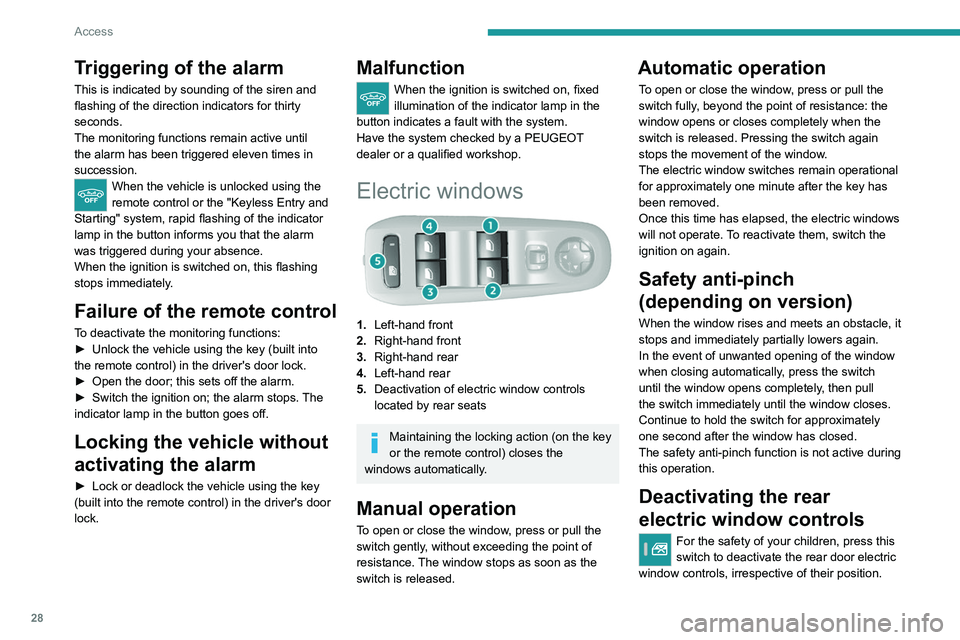
1. Left-hand front
2. Right-hand front
3. Right-hand rear
4. Left-hand rear
5. Deactivation of electric window controls
located by rear seats
Maintaining the locking action (on the key
or the remote control) closes the
windows automatically.
Manual operation
To open or close the window, press or pull the
switch gently, without exceeding the point of
resistance. The window stops as soon as the
switch is released.
Automatic operation
To open or close the window, press or pull the
switch fully, beyond the point of resistance: the
window opens or closes completely when the
switch is released. Pressing the switch again
stops the movement of the window.
The electric window switches remain operational
for approximately one minute after the key has
been removed.
Once this time has elapsed, the electric windows
will not operate. To reactivate them, switch the
ignition on again.
Safety anti-pinch
(depending on version)
When the window rises and meets an obstacle, it
stops and immediately partially lowers again.
In the event of unwanted opening of the window
when closing automatically, press the switch
until the window opens completely, then pull
the switch immediately until the window closes.
Continue to hold the switch for approximately
one second after the window has closed.
The safety anti-pinch function is not active during
this operation.
Deactivating the rear
electric window controls
For the safety of your children, press this
switch to deactivate the rear door electric
window controls, irrespective of their position.
Page 35 of 244
33
Ease of use and comfort
3
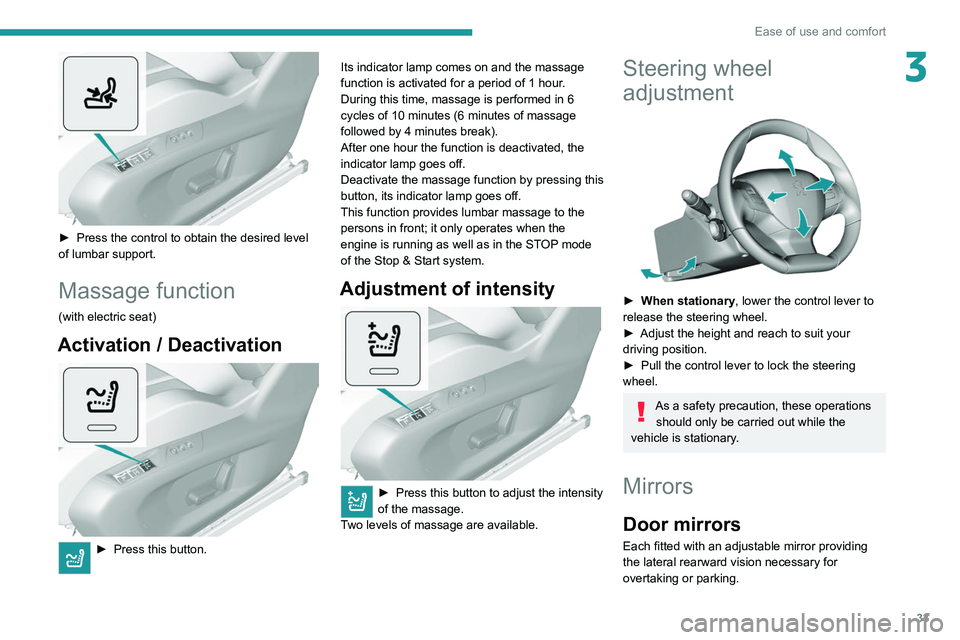
► Press the control to obtain the desired level
of lumbar support.
Massage function
(with electric seat)
Activation / Deactivation
► Press this button. Its indicator lamp comes on and the massage
function is activated for a period of 1 hour
.
During this time, massage is performed in 6
cycles of 10 minutes (6 minutes of massage
followed by 4 minutes break).
After one hour the function is deactivated, the
indicator lamp goes off.
Deactivate the massage function by pressing this
button, its indicator lamp goes off.
This function provides lumbar massage to the persons in front; it only operates when the
engine is running as well as in the STOP mode
of the Stop & Start system.
Adjustment of intensity
► Press this button to adjust the intensity
of the massage.
T
wo levels of massage are available.
Steering wheel
adjustment
► When stationary , lower the control lever to
release the steering wheel.
►
Adjust the height and reach to suit your
driving position.
►
Pull the control lever to lock the steering
wheel.
As a safety precaution, these operations should only be carried out while the
vehicle is stationary.
Mirrors
Door mirrors
Each fitted with an adjustable mirror providing
the lateral rearward vision necessary for
overtaking or parking.
Page 48 of 244
46
Ease of use and comfort
Avoid driving for too long with the ventilation off (risk of misting and
deterioration of air quality).
Air distribution adjustment
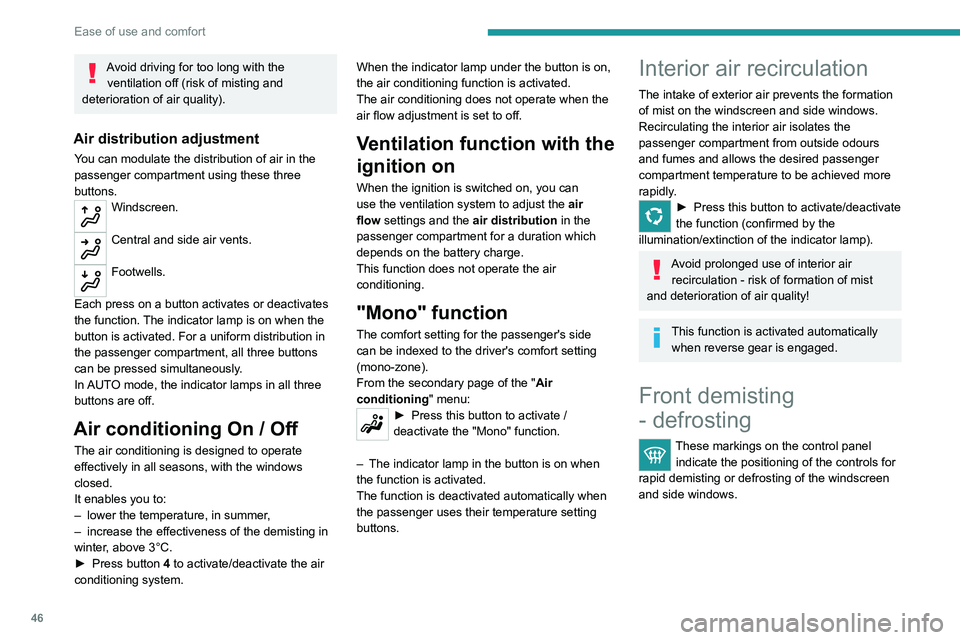
You can modulate the distribution of air in the
passenger compartment using these three
buttons.
Windscreen.
Central and side air vents.
Footwells.
Each press on a button activates or deactivates
the function. The indicator lamp is on when the
button is activated. For a uniform distribution in
the passenger compartment, all three buttons
can be pressed simultaneously.
In AUTO mode, the indicator lamps in all three
buttons are off.
Air conditioning On / Off
The air conditioning is designed to operate
effectively in all seasons, with the windows
closed.
It enables you to:
–
lower the temperature, in summer
,
–
increase the effectiveness of the demisting in
winter
, above 3°C.
►
Press button
4 to activate/deactivate the air
conditioning system. When the indicator lamp under the button is on,
the air conditioning function is activated.
The air conditioning does not operate when the
air flow adjustment is set to off.
Ventilation function with the
ignition on
When the ignition is switched on, you can
use the ventilation system to adjust the
air
flow settings and the air distribution in the
passenger compartment for a duration which
depends on the battery charge.
This function does not operate the air
conditioning.
"Mono" function
The comfort setting for the passenger's side
can be indexed to the driver's comfort setting
(mono-zone).
From the secondary page of the " Air
conditioning " menu:
► Press this button to activate /
deactivate the "Mono" function.
–
The indicator lamp in the button is on when
the function is activated.
The function is deactivated automatically when
the passenger uses their temperature setting
buttons.
Interior air recirculation
The intake of exterior air prevents the formation
of mist on the windscreen and side windows.
Recirculating the interior air isolates the
passenger compartment from outside odours
and fumes and allows the desired passenger
compartment temperature to be achieved more
rapidly.
► Press this button to activate/deactivate
the function (confirmed by the
illumination/extinction of the indicator lamp).
Avoid prolonged use of interior air recirculation - risk of formation of mist
and deterioration of air quality!
This function is activated automatically when reverse gear is engaged.
Front demisting
- defrosting
These markings on the control panel indicate the positioning of the controls for
rapid demisting or defrosting of the windscreen
and side windows.
► Press this button to demist or defrost the
windscreen and side windows more quickly.
The system automatically manages the air
conditioning, air flow and air intake, and provides
optimum distribution towards the windscreen and
side windows.
► To turn it off, press this button again or press
"AUTO".
The system restarts with the values in use before
it was deactivated.
With Stop & Start, when demisting
- defrosting has been activated, STOP
mode is not available.
Page 49 of 244
47
Ease of use and comfort
3
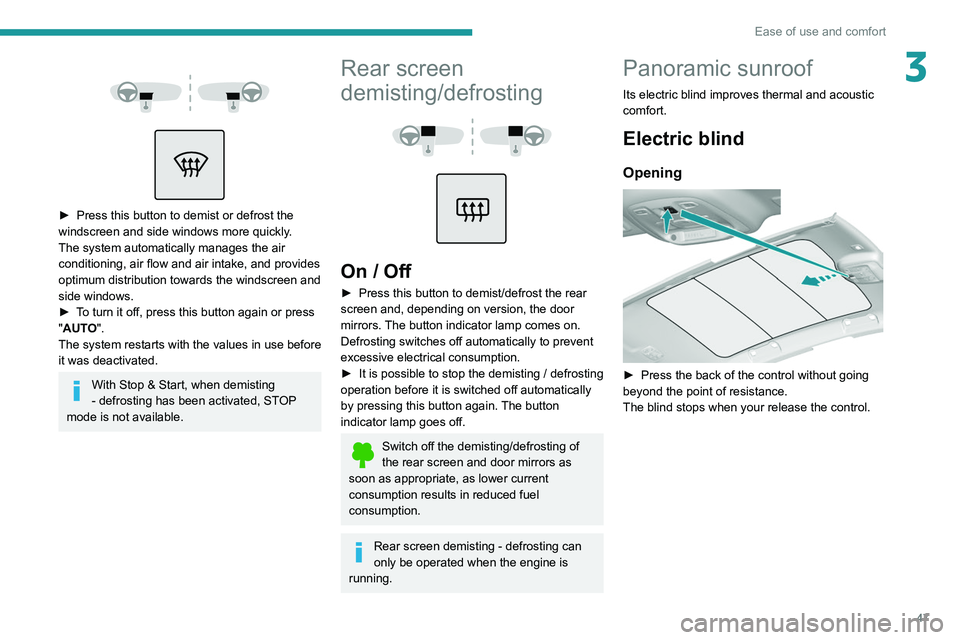
► Press this button to demist or defrost the
windscreen and side windows more quickly.
The system automatically manages the air
conditioning, air flow and air intake, and provides
optimum distribution towards the windscreen and
side windows.
►
T
o turn it off, press this button again or press
"AUTO".
The system restarts with the values in use before
it was deactivated.
With Stop & Start, when demisting
- defrosting has been activated, STOP
mode is not available.
Rear screen
demisting/defrosting
On / Off
► Press this button to demist/defrost the rear
screen and, depending on version, the door
mirrors. The button indicator lamp comes on.
Defrosting switches off automatically to prevent
excessive electrical consumption.
►
It is possible to stop the demisting / defrosting
operation before it is switched off automatically
by pressing this button again.
The button
indicator lamp goes off.
Switch off the demisting/defrosting of
the rear screen and door mirrors as
soon as appropriate, as lower current
consumption results in reduced fuel
consumption.
Rear screen demisting - defrosting can
only be operated when the engine is
running.
Panoramic sunroof
Its electric blind improves thermal and acoustic
comfort.
Electric blind
Opening
► Press the back of the control without going
beyond the point of resistance.
The blind stops when your release the control.
Page 86 of 244
84
Driving
► Press the "START/STOP" button; the
instrument panel comes on but the engine does
not start.
► Press the button again to switch off the
ignition and allow the vehicle to be locked.
With the ignition on, the system
automatically goes into energy economy
mode to maintain an adequate state of charge
in the battery.
Key not detected
Back-up starting
down on its blade in the ignition switch and
could cause a malfunction.
Key left in
If the key has been left in the ignition
switch at position 2 (Ignition on), the ignition
will be switched off automatically after one
hour.
To switch the ignition back on, turn the key
to position 1 (Stop), then back to position 2
(Ignition on) .
Starting/switching off the
engine,"
Keyless
Entry
and Starting"
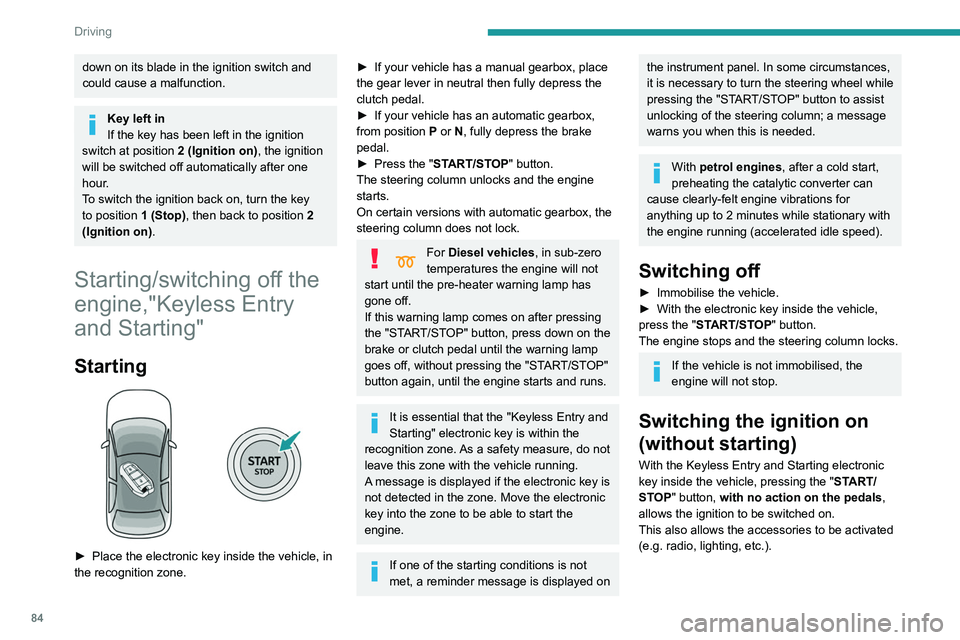
Starting
► Place the electronic key inside the vehicle, in
the recognition zone.
► If your vehicle has a manual gearbox, place
the gear lever in neutral then fully depress the
clutch pedal.
►
If your vehicle has an automatic gearbox,
from position
P or N, fully depress the brake
pedal.
►
Press the "
START/STOP" button.
The steering column unlocks and the engine
starts.
On certain versions with automatic gearbox, the
steering column does not lock.
For Diesel vehicles, in sub-zero
temperatures the engine will not
start until the pre-heater warning lamp has
gone off.
If this warning lamp comes on after pressing
the "START/STOP" button, press down on the
brake or clutch pedal until the warning lamp
goes off, without pressing the "START/STOP"
button again, until the engine starts and runs.
It is essential that the " Keyless Entry and
Starting" electronic key is within the
recognition zone.
As a safety measure, do not
leave this zone with the vehicle running.
A message is displayed if the electronic key is
not detected in the zone. Move the electronic
key into the zone to be able to start the
engine.
If one of the starting conditions is not
met, a reminder message is displayed on
the instrument panel. In some circumstances,
it is necessary to turn the steering wheel while
pressing the "START/STOP" button to assist
unlocking of the steering column; a message
warns you when this is needed.
With petrol engines , after a cold start,
preheating the catalytic converter can
cause clearly-felt engine vibrations for
anything up to 2 minutes while stationary with
the engine running (accelerated idle speed).
Switching off
► Immobilise the vehicle.
► With the electronic key inside the vehicle,
press the "
START/STOP" button.
The engine stops and the steering column locks.
If the vehicle is not immobilised, the
engine will not stop.
Switching the ignition on
(without starting)
With the Keyless Entry and Starting electronic
key inside the vehicle, pressing the " START/
STOP" button, with no action on the pedals ,
allows the ignition to be switched on.
This also allows the accessories to be activated
(e.g. radio, lighting, etc.).
Page 87 of 244
85
Driving
6► Press the "START/STOP" button; the
instrument panel comes on but the engine does
not start.
►
Press the button again to switch off the
ignition and allow the vehicle to be locked.
With the ignition on, the system
automatically goes into energy economy
mode to maintain an adequate state of charge
in the battery.
Key not detected
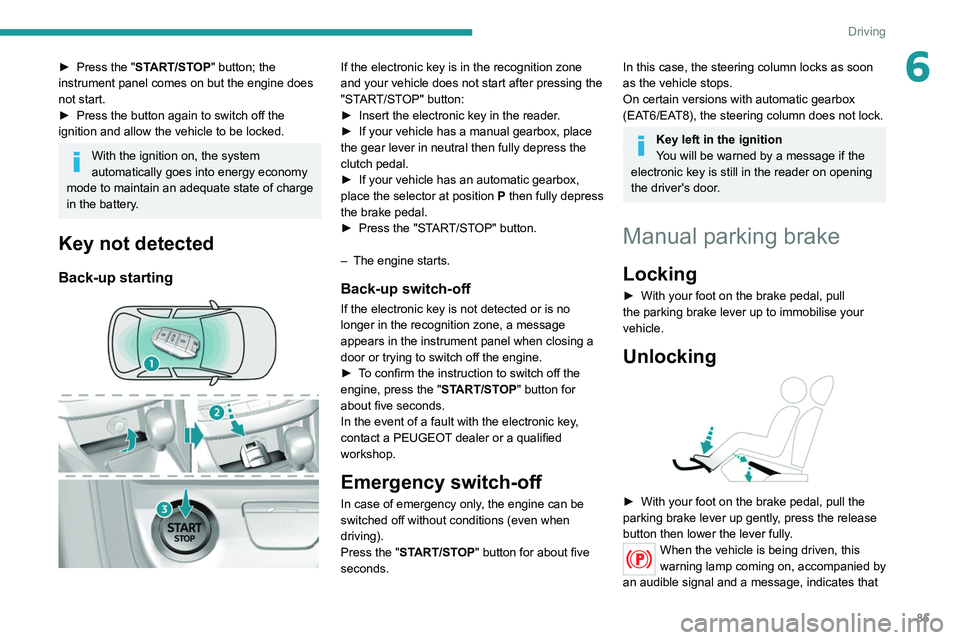
Back-up starting
If the electronic key is in the recognition zone
and your vehicle does not start after pressing the
"START/STOP" button:
►
Insert the electronic key in the reader
.
►
If your vehicle has a manual gearbox, place
the gear lever in neutral then fully depress the
clutch pedal.
►
If your vehicle has an automatic gearbox,
place the selector at position
P then fully depress
the brake pedal.
►
Press the "ST
ART/STOP" button.
–
The engine starts.
Back-up switch-off
If the electronic key is not detected or is no
longer in the recognition zone, a message
appears in the instrument panel when closing a
door or trying to switch off the engine.
►
T
o confirm the instruction to switch off the
engine, press the " START/STOP" button for
about five seconds.
In the event of a fault with the electronic key,
contact a PEUGEOT dealer or a qualified
workshop.
Emergency switch-off
In case of emergency only, the engine can be
switched off without conditions (even when
driving).
Press the "START/STOP" button for about five
seconds.
In this case, the steering column locks as soon
as the vehicle stops.
On certain versions with automatic gearbox
(EAT6/EAT8), the steering column does not lock.
Key left in the ignition
You will be warned by a message if the
electronic key is still in the reader on opening
the driver's door.
Manual parking brake
Locking
► With your foot on the brake pedal, pull
the parking brake lever up to immobilise your
vehicle.
Unlocking
► With your foot on the brake pedal, pull the
parking brake lever up gently , press the release
button then lower the lever fully.
When the vehicle is being driven, this
warning lamp coming on, accompanied by
an audible signal and a message, indicates that
Page 94 of 244

92
Driving
Malfunction
In the event of a malfunction, this warning
lamp comes on and a message is
displayed, when the ignition is switched on.
In this case, the gearbox goes into back-up
mode and is locked in 3
rd gear. It is possible to
feel a significant jolt (without risk for the gearbox)
while changing from P to R and from N to R.
Do not exceed 62 mph (100 km/h), local speed
restrictions permitting.
Have it checked by a PEUGEOT dealer or a
qualified workshop.
There is a risk of damaging the gearbox: – If the accelerator and brake pedals are
pressed simultaneously.
– In the event of a battery failure, forcing the
selector from position P to another position.
With an automatic gearbox, never try to
start the engine by pushing the vehicle.
EAT8 automatic gearbox
Automatic 8 speed gearbox with a push selector.
It also offers a manual mode with gear changes
via control paddles situated behind the steering
wheel.
or holds the gear selected until the maximum
engine speed is reached.
When braking, the gearbox changes down
automatically to provide effective engine braking.
If you release the accelerator sharply, the
gearbox will not shift to a higher gear for safety
reasons.
Never select position N while the vehicle
is moving.
Never select positions P or R unless the
vehicle is completely stationary.
"Sport" and "Snow" programmes
These two special programmes supplement the
automatic operation in specific conditions of use.
"Sport"
► Press this button, once the engine has
started.
"
S" appears on the instrument panel.
The gearbox automatically favours a dynamic
style of driving.
On versions fitted with the
Driver Sport Pack, the
"S" button is replaced by the " SPORT" button.
"Snow"
► Press this button, once the engine has
started.
"T" appears on the instrument panel.
The gearbox adapts to driving on slippery roads.
This programme improves starting and traction
when grip is poor.
Driver Sport Pack
This function favours a dynamic style of driving.► Press the " SPORT" button, after
starting the engine.
"S" appears in the instrument panel.
For more information on Driver Sport Pack,
refer to the corresponding section.
Return to automatic operation
► At any time, press the selected button ( "S or
"T") again to quit the activated programme and
return to auto-adaptive mode.
Manual operation
To limit fuel consumption during an extended standstill with the engine
running (for example, in a traffic jam), set the
gear selector to N and apply the parking
brake.
►
Selecting position
M
enables sequential
shifting between the six gears.
►
Push backwards to shift up a gear
.
►
Push forwards to shift down a gear
.
The gearbox only changes gear if the road
speed and engine speed permit; apart from
this condition, the rules for automatic operation
temporarily apply.
D disappears, and the gears engaged
appear in succession on the instrument
panel.
If the engine speed is too low or too high, the
selected gear flashes for a few seconds, then the
gearactually activated is displayed.
It is possible to change from position D to
position M
at any time.
When the vehicle is stationary or moving
very slowly, the gearbox selects gear M1
automatically.
The Sport and Snow programmes are inactive
in manual operation.
This symbol is displayed if a gear is not engaged correctly (gear selector between
two positions).
Switching the vehicle off
Before switching off the engine, it is possible to
engage position P or N to place the gearbox in
neutral.
In both cases, apply the parking brake to
immobilise the vehicle, unless it is programmed
to automatic mode.
If the selector is not in position P, when
the driver's door is opened or
approximately 45 seconds after the ignition is
switched off, an audible signal sounds and a
message appears.
►
Return the gear selector to P
; the audible
signal stops and the message disappears.