2021 NISSAN ROGUE lights
[x] Cancel search: lightsPage 370 of 556

5-116Starting and driving
Steering Assist limitations
WARNING
.In the following situations, the
camera may not detect lane mar-
kers correctly or may detect lane
markers incorrectly and the
Steering Assist may not operate
properly:
— When driving on roads where
there are multiple parallel
lane markers, lane markers
that are faded or not painted
clearly, non-standard lane
markers, or lane markers cov-
ered with water, dirt, snow,
etc.
— When driving on roads with discontinued lane markers
— When driving on roads with a widening or narrowing lane
width
— When driving on roads where there are multiple lanes or
unclear lane markers due to
road construction
— When driving on roads where there are sharply contrasting
objects, such as shadows, snow, water, wheel ruts,
seams, or lines remaining
after road repairs (the Steer-
ing Assist could detect these
items as lane markers)
— When driving on roads where the traveling lane merges or
separates
. Do not use the Steering Assist
under the following conditions
because the system may not
properly detect lane markers.
Doing so could cause a loss of
vehicle control and result in an
accident.
— During bad weather (rain, fog,
snow, dust, etc.)
— When rain, snow, sand, etc., is thrown up by the wheels of
other vehicles
— When dirt, oil, ice, snow, water, or another object adheres to
the camera unit
— When the lens of the camera unit is foggy
— When strong light (for exam- ple, sunlight or high beams
from oncoming vehicles)
shines on the camera — When the headlights are not
bright due to dirt on the lens
or the headlights are off in
tunnels or darkness
— When a sudden change in brightness occurs (for exam-
ple, when the vehicle enters or
exits a tunnel or is under a
bridge)
— When driving on roads where the traveling lane merges or
separates or where there are
temporary lane markers be-
cause of road construction
— When there is a lane closure due to road repairs
— When driving on a bumpy road surface, such as an uneven
dirt road
— When driving on sharp curves or winding roads
— When driving on repeated up- hill and downhill roads
. Do not use the Steering Assist
under the following conditions
because the system will not op-
erate properly:
— When driving with a tire that is
not within normal tire condi-
Page 378 of 556

5-124Starting and driving
erly.
NOTE:
The vehicle’s stop lights come on when
braking is performed by the AEB with
pedestrian detection system.
Depending on vehicle speed and distance
to the vehicle, pedestrian or cyclists
ahead, as well as driving and roadway
conditions, the system may help the
driver avoid a forward collision or may
help mitigate the consequences of a
collision should one be unavoidable.
If the driver is handling the steering
wheel, accelerating or braking, the AEB
with pedestrian detection system will
function later or will not function.
The automatic braking will cease under
the following conditions:
.When the steering wheel is turned as
far as necessary to avoid a collision.
. When the accelerator pedal is de-
pressed.
. When there is no longer a vehicle,
pedestrian detected ahead.
If the AEB with pedestrian detection
system has stopped the vehicle, the
vehicle will remain at a standstill for
approximately 2 seconds before the
brakes are released.
When the brake pedal is depressed while the brake is applied by the system, you
may feel the pedal effort is changed and
may hear a sound and vibration noise.
This is normal and does not indicate a
malfunction. In addition, the braking force
can be increased by adding the pedal
effort.
Page 380 of 556

5-126Starting and driving
AEB WITH PEDESTRIAN DETECTION
SYSTEM LIMITATIONS
WARNING
Listed below are the system limita-
tions for the AEB with pedestrian
detection system. Failure to operate
the vehicle in accordance with these
system limitations could result in
serious injury or death.
.The AEB with pedestrian detec-
tion system cannot detect all
vehicles, pedestrians or cyclists
under all conditions.
. The AEB with pedestrian detec-
tion system does not detect the
following:
— Pedestrians that are small (for
example, children), in a sitting
position, operating toys/ska-
teboards, on scooters or in
wheelchairs, or not in an up-
right standing or walking po-
sition.
— Animals of any size.
— Obstacles (for example, cargo or debris) on the roadway or
roadside. — Oncoming or crossing vehi-
cles.
— Vehicles where the tires are difficult to see or the shape of
the rear of the vehicle is un-
clear or obstructed.
— Parked vehicles.
. The AEB with pedestrian detec-
tion system has some perfor-
mance limitations.
— If a stationary vehicle is in the
vehicle’s path, the system will
not function when the vehicle
approaches the stationary ve-
hicle at speeds over approxi-
mately 50 MPH (80 km/h).
— Pedestrian and cyclist detec- tion will not function when the
vehicle is driven at speeds
over approximately 37 MPH
(60 km/h) or below approxi-
mately 6 MPH (10 km/h).
. For pedestrians, the AEB with
pedestrian detection system will
not issue the first warning.
. The AEB with pedestrian detec-
tion system may not function
properly or detect a vehicle, pe-
destrian or cyclist ahead in the
following conditions: — In poor visibility conditions
(such as rain, snow, fog, dust
storms, sand storms, smoke,
and road spray from other
vehicles).
— If dirt, ice, snow, fog or other material is covering the radar
sensor area or camera area of
the windshield.
— If strong light (for example, sunlight or high beams) en-
ters the front camera or a
sudden change in brightness
occurs (for example, entering
a tunnel or driving in light-
ning).
— In dark or dimly lit conditions, such as at night or in tunnels,
including cases where your
vehicle’s headlights are off or
dim, or the tail lights of the
vehicle ahead are off.
— When the direction of the camera is misaligned.
— When driving on a steep downhill slope, on roads with
sharp curves, and/or bumpy
or dirt roads.
Page 382 of 556

5-128Starting and driving
override the system.
. The AEB with pedestrian detec-
tion system may operate when a
pattern, object, shadow or lights
are detected that are similar to
the outline of vehicles, pedes-
trians or cyclists, or if they are
the same size and position as a
vehicle or motorcycle’s tail lights.
. The system may keep operating
when the vehicle ahead is turning
right or left.
. The system may operate when
your vehicle is approaching and
passing a vehicle ahead.
. Depending on the road shape
(curved road, entrance and exit
of the curve, winding road, lane
regulation, under construction,
etc.), the system may operate
temporarily for the oncoming ve-
hicle in front of your vehicle.
. The AEB with pedestrian detec-
tion system may react to:
— objects on the roadside (traf-
fic sign, guardrail, pedestrian,
cyclist, motorcycle, vehicle,
etc.)
— objects above road (low
bridge, traffic sign, etc.)
— objects on the road surface (railroad track, grate, steel
plate, etc.)
— objects in the parking garage (beam, pillar, etc.)
— pedestrians, cyclists or motor- cycles approaching the travel-
ing lane
— vehicles, pedestrians, cyclists, motorcycles or objects in ad-
jacent lanes or close to the
vehicle
— oncoming pedestrians, cy- clists — objects on the road (such as
trees)
. Braking distances increase on
slippery surfaces.
. Excessive noise will interfere with
the warning chime sound, and
the chime may not be heard.
Page 399 of 556
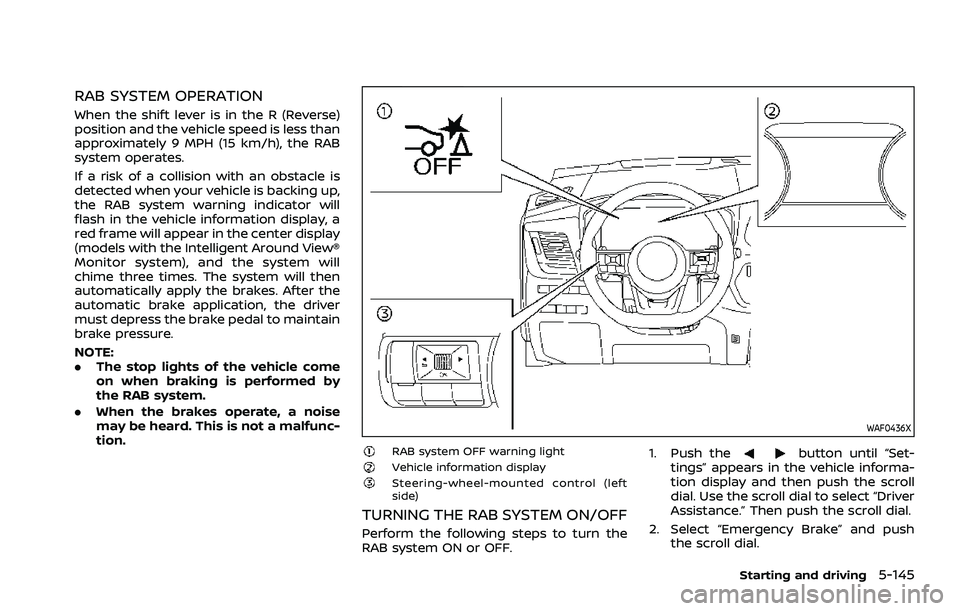
RAB SYSTEM OPERATION
When the shift lever is in the R (Reverse)
position and the vehicle speed is less than
approximately 9 MPH (15 km/h), the RAB
system operates.
If a risk of a collision with an obstacle is
detected when your vehicle is backing up,
the RAB system warning indicator will
flash in the vehicle information display, a
red frame will appear in the center display
(models with the Intelligent Around View®
Monitor system), and the system will
chime three times. The system will then
automatically apply the brakes. After the
automatic brake application, the driver
must depress the brake pedal to maintain
brake pressure.
NOTE:
.The stop lights of the vehicle come
on when braking is performed by
the RAB system.
. When the brakes operate, a noise
may be heard. This is not a malfunc-
tion.
WAF0436X
RAB system OFF warning lightVehicle information displaySteering-wheel-mounted control (left
side)
TURNING THE RAB SYSTEM ON/OFF
Perform the following steps to turn the
RAB system ON or OFF. 1. Push the
button until “Set-
tings” appears in the vehicle informa-
tion display and then push the scroll
dial. Use the scroll dial to select “Driver
Assistance.” Then push the scroll dial.
2. Select “Emergency Brake” and push the scroll dial.
Starting and driving5-145
Page 403 of 556

.When washing the vehicle using a
high-pressure washer, do not apply
direct washer pressure on the sonar
sensors. This may cause a malfunction
of the sonar sensors.
CAUTION
During the first 1,200 miles (2,000
km), follow these recommendations
to obtain maximum engine perfor-
mance and ensure the future relia-
bility and economy of your new
vehicle. Failure to follow these re-
commendations may result in shor-
tened engine life and reduced engine
performance.
. Avoid driving for long periods at con-
stant speed, either fast or slow. Do not
run the engine over 4,000 rpm.
. Do not accelerate at full throttle in any
gear.
. Avoid quick starts.
. Avoid hard braking as much as possi-
ble.
. Do not tow a trailer for the first 500
miles (800 km). Your engine, axle or
other parts could be damaged. Follow these easy-to-use Fuel Efficient
Driving Tips to help you achieve the most
fuel economy from your vehicle.
1. Use smooth accelerator and brake
pedal application.
.Avoid rapid starts and stops..Use smooth, gentle accelerator andbrake application whenever possi-
ble.
.Maintain constant speed whilecommuting and coast whenever
possible.
2. Maintain constant speed.
.Look ahead to try and anticipate and minimize stops.
.Synchronizing your speed with traf-fic lights allows you to reduce your
number of stops.
.Maintaining a steady speed canminimize red light stops and im-
prove fuel efficiency.
3. Use air conditioning (A/C) at higher vehicle speeds.
.Below 40 MPH (64 km/h), it is moreefficient to open windows to cool
the vehicle due to reduced engine
load.
.Above 40 MPH (64 km/h), it is more
efficient to use A/C to cool the
vehicle due to increased aerody-
namic drag.
Starting and driving5-149
BREAK-IN SCHEDULE FUEL EFFICIENT DRIVING TIPS
Page 413 of 556
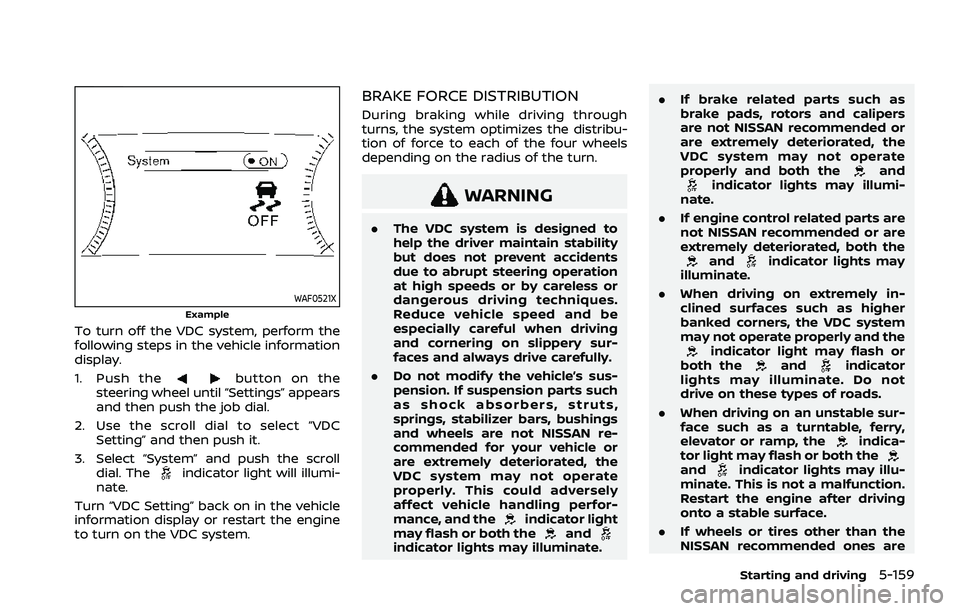
WAF0521XExample
To turn off the VDC system, perform the
following steps in the vehicle information
display.
1. Push the
button on the
steering wheel until “Settings” appears
and then push the job dial.
2. Use the scroll dial to select “VDC Setting” and then push it.
3. Select “System” and push the scroll dial. The
indicator light will illumi-
nate.
Turn “VDC Setting” back on in the vehicle
information display or restart the engine
to turn on the VDC system.
BRAKE FORCE DISTRIBUTION
During braking while driving through
turns, the system optimizes the distribu-
tion of force to each of the four wheels
depending on the radius of the turn.
WARNING
. The VDC system is designed to
help the driver maintain stability
but does not prevent accidents
due to abrupt steering operation
at high speeds or by careless or
dangerous driving techniques.
Reduce vehicle speed and be
especially careful when driving
and cornering on slippery sur-
faces and always drive carefully.
. Do not modify the vehicle’s sus-
pension. If suspension parts such
as shock absorbers, struts,
springs, stabilizer bars, bushings
and wheels are not NISSAN re-
commended for your vehicle or
are extremely deteriorated, the
VDC system may not operate
properly. This could adversely
affect vehicle handling perfor-
mance, and the
indicator light
may flash or both theandindicator lights may illuminate. .
If brake related parts such as
brake pads, rotors and calipers
are not NISSAN recommended or
are extremely deteriorated, the
VDC system may not operate
properly and both the
andindicator lights may illumi-
nate.
. If engine control related parts are
not NISSAN recommended or are
extremely deteriorated, both the
andindicator lights may
illuminate.
. When driving on extremely in-
clined surfaces such as higher
banked corners, the VDC system
may not operate properly and the
indicator light may flash or
both theandindicator
lights may illuminate. Do not
drive on these types of roads.
. When driving on an unstable sur-
face such as a turntable, ferry,
elevator or ramp, the
indica-
tor light may flash or both the
andindicator lights may illu-
minate. This is not a malfunction.
Restart the engine after driving
onto a stable surface.
. If wheels or tires other than the
NISSAN recommended ones are
Starting and driving5-159
Page 414 of 556
5-160Starting and driving
used, the VDC system may not
operate properly and the
indicator light may flash or both
theandindicator lights
may illuminate.
. The VDC system is not a substi-
tute for winter tires or tire chains
on a snow covered road. The chassis control is an electric control
module that includes the following func-
tions:
.
Intelligent Trace Control
. Active Ride Control
INTELLIGENT TRACE CONTROL
This system senses driving based on the
driver’s steering and acceleration/braking
patterns, and controls brake pressure at
individual wheels to aid tracing at corners
and help smooth vehicle response.
When the VDC system is turned off, the
Intelligent Trace Control is also turned off.
Amount of brake control is changed
based on Drive Mode selector.
When Intelligent Trace Control is not
functioning properly, the master warning
light illuminates, and warning message
“Chassis Control System Error” will also
appear in the vehicle information display.
If the chassis control warning message
appears in the vehicle information dis-
play, it may indicate that the Intelligent
Trace Control is not functioning properly.
Have the system checked as soon as
possible. It is recommended that you visit
a NISSAN dealer for this service. (See
“Vehicle information display warnings
and indicators” (P.2-34).)
WARNING
The Intelligent Trace Control may not
be effective depending on the driv-
ing condition. Always drive carefully
and attentively.
When the Intelligent Trace Control is
operating, you may feel a pulsation in
the brake pedal, sense slight deceleration,
or hear a noise. This is normal and
indicates that Intelligent Trace Control is
operating properly.
ACTIVE RIDE CONTROL
This system senses upper body motion
and controls four wheel brake pressure.
This will enhance ride comfort in effort to
restrain uncomfortable upper body
movement when passing over undulated
road surfaces. When the VDC system is
turned off, the Active Ride Control is also
turned off.
If the chassis control warning message
appears in the vehicle information dis-
play, it may indicate that the Active Ride
Control is not functioning properly. Have
the system checked as soon as possible.
It is recommended that you visit a NISSAN
dealer for this service.
CHASSIS CONTROL