2021 NISSAN ROGUE start stop button
[x] Cancel search: start stop buttonPage 360 of 556

5-106Starting and driving
WAF0583XExample
System display and indicators:
1. Road information indicatorAppears when the system adjusts the
speed depending on turns or exits.
Curves and junctions
Exits
How to activate or deactivate the sys-
tem:
1. Push the
button on the
steering wheel until “Settings” appears
in the vehicle information display, and
push the scroll dial.
2. Use the scroll dial to select “Driver Assistance”. Then push the scroll dial.
3. Select “Speed Adjust by Route” and push the scroll dial to turn the system
on or off.
NOTE:
The system will retain current settings
in the vehicle information display even
if the engine is restarted.
ICC system limitations
WARNING
Listed below are the system limita-
tions for the ICC system. Failure to
operate the vehicle in accordance
with these system limitations could
result in serious injury or death:
. The ICC system is primarily in-
tended for use on highways and
freeways. It is not advisable to
use the ICC system in city/urban
traffic. .
The ICC system will not adapt
automatically to road conditions.
This system should be used in
evenly flowing traffic. Do not use
the system on roads with sharp
curves or on icy roads, in heavy
rain or in fog.
. As there is a performance limit to
the distance control function,
never rely solely on the ICC sys-
tem. This system does not correct
careless, inattentive or absent-
minded driving or overcome poor
visibility in rain, fog, or other bad
weather. Decelerate the vehicle
speed by depressing the brake
pedal, depending on the distance
to the vehicle ahead and the
surrounding circumstances in or-
der to maintain a safe distance
between vehicles.
. When the ICC system automati-
cally brings the vehicle to a stop,
your vehicle can automatically
accelerate if the vehicle is
stopped for less than approxi-
mately 3 seconds. Be prepared
to stop your vehicle if necessary.
. For vehicles equipped with ProPI-
LOT Assist with Navi-link and only
when on a limited access freeway
(as identified in the navigation
Page 365 of 556

structed, the ICC system will automati-
cally be canceled.
The chime will sound and the “Forward
Driving Aids temporarily disabled Front
Sensor blocked” warning message will
appear in the vehicle information display.
Action to take:
If the warning message appears, stop the
vehicle in a safe place, push the park
button to engage the P (Park) position,
and turn the engine off. When the radar
signal is temporarily interrupted, clean
the sensor area and restart the engine. If
the warning message continues to ap-
pear, have the system checked. It is
recommended that you visit a NISSAN
dealer for this service.
Condition D:
When driving on roads with limited road
structures or buildings (for example, long
bridges, deserts, snow fields, driving next
to long walls), the system may display the
“Forward Driving Aids temporarily dis-
abled Front Sensor blocked” message.
Action to take:
When the above driving conditions no
longer exist, turn the system back on.ICC system malfunction
If the ICC system malfunctions, it will be
turned off automatically, a chime will
sound, and the speed control status
warning (orange) will illuminate.
Action to take:
If the warning illuminates, stop the vehicle
in a safe place. Turn the engine off, restart
the engine and set the ICC system again.
If it is not possible to set the ICC system or
the warning stays on, it may be a
malfunction. Although the normal driving
can be continued, the ICC system should
be inspected. It is recommended that you
visit a NISSAN dealer for this service.
NOTE:
If the ICC system is temporarily unavail-
able, the conventional cruise control
mode may still be used. For additional
information, see “Conventional (fixed
speed) cruise control mode” (P.5-118).
ICC sensor maintenance
The radar sensor is located on the front of
the vehicle.
To keep the ICC system operating prop-
erly, be sure to observe the following:
.Always keep the sensor area clean.
. Do not strike or damage the areas
around the sensor.
. Do not attach a sticker (including
transparent material) or install an
accessory near the sensor. This could
cause failure or malfunction.
. Do not attach metallic objects near
the sensor area (brush guard, etc.).
This could cause failure or malfunc-
tion.
. Do not alter, remove, or paint the front
bumper.
Before customizing or restoring the front
bumper, it is recommended that you visit
a NISSAN dealer.
The camera sensor is located above the
inside mirror.
To keep the proper operation of the
systems and prevent a system malfunc-
tion, be sure to observe the following:
. Always keep the windshield clean.
. Do not attach a sticker (including
transparent material) or install an
accessory near the camera unit.
Starting and driving5-111
Page 372 of 556

5-118Starting and driving
Action to take:
Turn the ICC system off using the CANCEL
switch. When the conditions listed above
are no longer present, turn the ICC
system on again.
Steering Assist malfunction
When the system malfunctions, it turns
off automatically. The Steering Assist
status warning (orange) illuminates. A
chime may sound depending on the
situation.
Action to take:
Stop the vehicle in a safe location, push
the park button to shift to the P (Park)
position, turn the engine off, restart the
engine, resume driving, and set the ICC
system again. If the warning (orange)
continues to illuminate, the Steering As-
sist is malfunctioning. Although the vehi-
cle is still drivable under normal
conditions, have the system checked. It
is recommended that you visit a NISSAN
dealer for this service.
Steering Assist maintenance
The camera is located above the inside
mirror.
To keep the proper operation of the
system and prevent a system malfunc-
tion, be sure to observe the following:.
Always keep the windshield clean.
. Do not attach a sticker (including
transparent material) or install an
accessory near the camera unit.
. Do not place reflective materials, such
as white paper or a mirror, on the
instrument panel. The reflection of
sunlight may adversely affect the
camera unit’s capability of detecting
the lane markers.
. Do not strike or damage the areas
around the camera unit. Do not touch
the camera lens or remove the screw
located on the camera unit.
If the camera unit is damaged due to an
accident, it is recommended that you visit
a NISSAN dealer.
For additional information, see “Common
troubleshooting guide” (P.5-39).
CONVENTIONAL (fixed speed)
CRUISE CONTROL MODE
NOTE:
ProPILOT Assist provides no approach
warnings, automatic braking, or Steer-
ing Assist in the conventional (fixed
speed) cruise control mode.
This mode allows driving at a speed
between 20 to 90 MPH (30 to 144 km/h)
without keeping your foot on the accel-
erator pedal.
WARNING
. In the conventional (fixed speed)
cruise control mode, a warning
chime does not sound to warn
you if you are too close to the
vehicle ahead, as neither the pre-
sence of the vehicle ahead nor
the vehicle-to-vehicle distance is
detected.
. Pay special attention to the dis-
tance between your vehicle and
the vehicle ahead of you or a
collision could occur.
. Always confirm the setting in the
ICC system display.
. Do not use the conventional
(fixed speed) cruise control mode
when driving under the following
conditions:
— When it is not possible to keep
the vehicle at a set speed
— In heavy traffic or in traffic that varies in speed
— On winding or hilly roads
— On slippery roads (rain, snow, ice, etc.)
Page 393 of 556

SYSTEM TEMPORARILY UNAVAIL-
ABLE
Condition A
When the radar sensor picks up interfer-
ence from another radar source, making
it impossible to detect a vehicle ahead,
the I-FCW system is automatically turned
off. The AEB system OFF warning light
(orange) will flash.
Action to take:
When the above conditions no longer
exist, the I-FCW system will resume auto-
matically.
Condition B
Under the following conditions, making it
impossible to detect a vehicle ahead, the
I-FCW system is automatically turned off.
The AEB system OFF warning light (or-
ange) will flash and the “Forward Driving
Aids temporarily disabled Front Sensor
blocked” warning message will appear in
the vehicle information display.
.When the sensor area of the front of
the vehicle is covered with dirt or is
obstructed
Action to take:
If the warning light (orange) flashes, stop
the vehicle in a safe place, push the park
button to engage the P (Park) position and turn the engine off. Clean the radar
cover on the front of the vehicle with a
soft cloth, and restart the engine. If the
warning light continues to illuminate,
have the I-FCW system checked. It is
recommended you visit a NISSAN dealer
for this service.
.
When driving on roads with limited
road structures or buildings (for ex-
ample, long bridges, deserts, snow
fields, driving next to long walls)
Action to take:
When the above conditions no longer
exist, the I-FCW system will resume auto-
matically.SYSTEM MALFUNCTION
If the I-FCW system malfunctions, it will be
turned off automatically, a chime will
sound, the AEB system OFF warning light
(orange) will illuminate and the "Malfunc-
tion" warning message will appear in the
vehicle information display.
Action to take:
If the warning light (orange) illuminates,
stop the vehicle in a safe location. Turn
the engine off and restart the engine. If
the warning light continues to illuminate,
have the I-FCW system checked. It is
recommended you visit a NISSAN dealer
for this service.
WAF0646X
SYSTEM MAINTENANCE
The radar sensoris located on the front
of the vehicle.
To keep the system operating properly,
be sure to observe the following:
. Always keep the sensor area on the
front of the vehicle clean.
. Do not strike or damage the areas
around the sensor.
. Do not cover or attach stickers or
similar objects on the front bumper
near the sensor area. This could cause
failure or malfunction.
. Do not attach metallic objects near
the sensor area (brush guard, etc.).
This could cause failure or malfunc-
Starting and driving5-139
Page 399 of 556
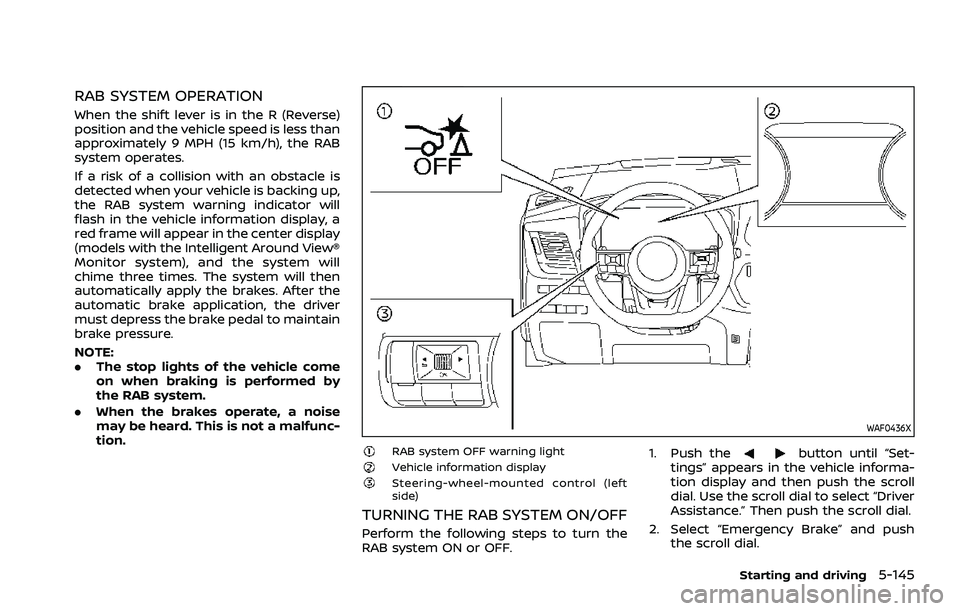
RAB SYSTEM OPERATION
When the shift lever is in the R (Reverse)
position and the vehicle speed is less than
approximately 9 MPH (15 km/h), the RAB
system operates.
If a risk of a collision with an obstacle is
detected when your vehicle is backing up,
the RAB system warning indicator will
flash in the vehicle information display, a
red frame will appear in the center display
(models with the Intelligent Around View®
Monitor system), and the system will
chime three times. The system will then
automatically apply the brakes. After the
automatic brake application, the driver
must depress the brake pedal to maintain
brake pressure.
NOTE:
.The stop lights of the vehicle come
on when braking is performed by
the RAB system.
. When the brakes operate, a noise
may be heard. This is not a malfunc-
tion.
WAF0436X
RAB system OFF warning lightVehicle information displaySteering-wheel-mounted control (left
side)
TURNING THE RAB SYSTEM ON/OFF
Perform the following steps to turn the
RAB system ON or OFF. 1. Push the
button until “Set-
tings” appears in the vehicle informa-
tion display and then push the scroll
dial. Use the scroll dial to select “Driver
Assistance.” Then push the scroll dial.
2. Select “Emergency Brake” and push the scroll dial.
Starting and driving5-145
Page 407 of 556

SSD0488
WARNING
.Do not stop or park the vehicle
over flammable materials such as
dry grass, waste paper or rags.
They may ignite and cause a fire.
. Never leave the engine running
while the vehicle is unattended.
. Do not leave children unattended
inside the vehicle. They could
unknowingly activate switches
or controls. Unattended children
could become involved in serious
accidents. .
To help avoid risk of injury or
death through unintended opera-
tion of the vehicle and/or its
systems, do not leave children,
people who require the assis-
tance of others or pets unat-
tended in your vehicle.
Additionally, the temperature in-
side a closed vehicle on a warm
day can quickly become high
enough to cause a significant risk
of injury or death to people and
pets.
. Safe parking procedures require
that both the parking brake be
applied and the transmission placed into P (Park). Failure to
do so could cause the vehicle to
move unexpectedly or roll away
and result in an accident.
. Make sure the shift lever cannot
be moved without depressing the
foot brake pedal.
1. Apply the parking brake.
2. Push the park button to shift to the P (Park) position.
3. To help prevent the vehicle from roll- ing into the street when parked on a
sloping drive way, it is a good practice
to turn the wheels as illustrated.
.HEADED DOWNHILL WITH CURB:
Turn the wheels into the curb and
move the vehicle forward until the
curb side wheel gently touches the
curb.
.HEADED UPHILL WITH CURB:
Turn the wheels away from the
curb and move the vehicle back
until the curb side wheel gently
touches the curb.
.HEADED UPHILL OR DOWNHILL, NO
CURB:
Turn the wheels toward the side of
the road so the vehicle will move
away from the center of the road if
it moves.
Starting and driving5-153
PARKING/PARKING ON HILLS
Page 442 of 556

6-14In case of emergency
If your vehicle is overheating (indicated by
an extremely high temperature gauge
reading), or if you feel a lack of engine
power, detect abnormal noise, etc., take
the following steps:
1. Move the vehicle safely off the roadand apply the parking brake.
2. Push the park button to shift to the P (Park) position.
Do not stop the engine.
3. Turn off the air conditioner (if so equipped). Open all the windows,
move the heater or air conditioner
temperature control to maximum hot
and fan control to high speed.
4. Get out of the vehicle. Look and listen for steam or coolant escaping from
the radiator before opening the hood.
(If steam or coolant is escaping, turn
off the engine.) Do not open the hood
further until no steam or coolant can
be seen.
5. Open the engine hood.
WARNING
If steam or water is coming from the
engine, stand clear to prevent get-
ting burned.
6. Visually check the drive belt for da- mage or looseness. Also check if the
cooling fan is running. The radiator
hoses and radiator should not leak
water. If coolant is leaking or the
cooling fan does not run, stop the
engine.
WARNING
Be careful not to allow your hands,
hair, jewelry or clothing to come into
contact with, or get caught in, engine
belts or the engine cooling fan. The
engine cooling fan can start at any
time. 7. After the engine cools down, check
the coolant level in the reservoir with
the engine running. Add coolant to
the reservoir if necessary. Have your
vehicle repaired. It is recommended
you visit a NISSAN dealer for this
service.
Page 536 of 556

10-24Technical and consumer information
vehicle.
. Determine the overall height of the
vehicle and trailer so the required
clearance is known.
Trailer towing tips
In order to gain skill and an understand-
ing of the vehicle’s behavior, you should
practice turning, stopping and backing up
in an area which is free from traffic.
Steering stability, and braking perfor-
mance will be somewhat different than
under normal driving conditions.
.Always secure items in the trailer to
prevent load shift while driving.
. Lock the trailer hitch coupler with a
pin or lock to prevent the coupler from
inadvertently becoming unlatched.
. Avoid abrupt starts, acceleration or
stops.
. Avoid sharp turns or lane changes.
. Always drive your vehicle at a moder-
ate speed. Some states or provinces
have specific speed limits for vehicles
that are towing trailers. Obey the local
speed limits.
. When backing up, hold the bottom of
the steering wheel with one hand.
Move your hand in the direction in
which you want the trailer to go. Make
small corrections and back up slowly.
If possible, have someone guide you when you are backing up.
Always block the wheels on both vehicle
and trailer when parking. Parking on a
slope is not recommended; however, if
you must do so:CAUTION
If you push the park button to
engage the P (Park) position before
blocking the wheels and applying
the parking brake, transmission da-
mage could occur.
1. Apply and hold the brake pedal.
2. Have someone place blocks on the downhill side of the vehicle and trailer
wheels.
3. After the wheel blocks are in place, slowly release the brake pedal until
the blocks absorb the vehicle load.
4. Apply the parking brake.
5. Push the park button to engage the P (Park) position.
6. Turn off the engine.
To drive away:
1. Apply and hold the brake pedal.
2. Start the engine. 3. Shift the transmission into gear.
4. Release the parking brake.
5. Drive slowly until the vehicle and
trailer are clear from the blocks.
6. Apply and hold the brake pedal.
7. Have someone retrieve and store the blocks.
. While going downhill, the weight of the
trailer pushing on the tow vehicle may
decrease overall stability. Therefore, to
maintain adequate control, reduce
your speed and shift to a lower gear.
Avoid long or repeated use of the
brakes when descending a hill, as this
reduces their effectiveness and could
cause overheating. Shifting to a lower
gear instead provides “engine braking”
and reduces the need to brake as
frequently.
. If the engine coolant temperature
rises to a high temperature, see “If
your vehicle overheats” (P.6-13).
. Trailer towing requires more fuel than
normal circumstances.
. Avoid towing a trailer for your vehicle’s
first 500 miles (800 km).
. For the first 500 miles (800 km) that
you do tow, do not drive over 50 MPH
(80 km/h).