Page 312 of 556
5-58Starting and driving
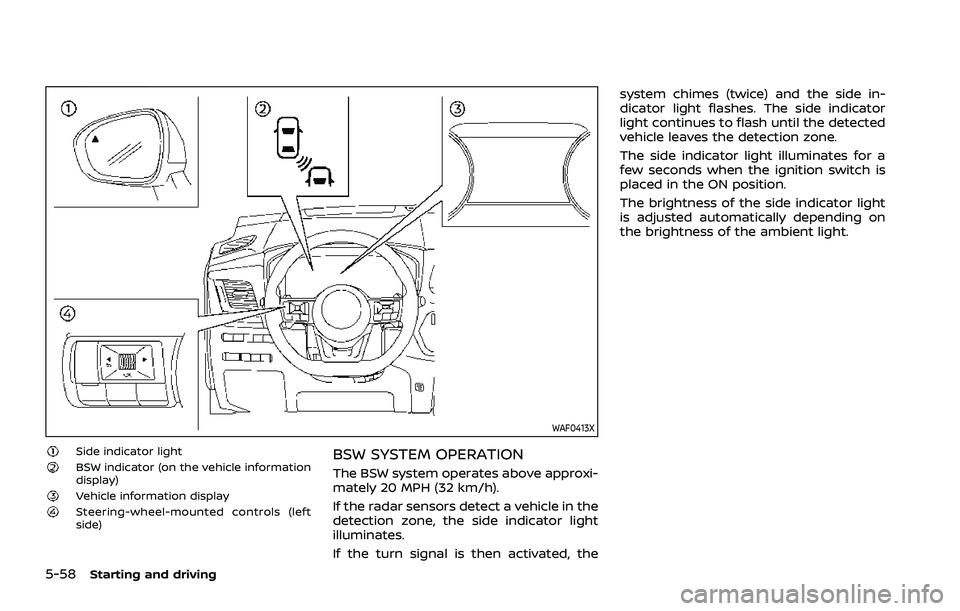
WAF0413X
Side indicator lightBSW indicator (on the vehicle information
display)
Vehicle information displaySteering-wheel-mounted controls (left
side)
BSW SYSTEM OPERATION
The BSW system operates above approxi-
mately 20 MPH (32 km/h).
If the radar sensors detect a vehicle in the
detection zone, the side indicator light
illuminates.
If the turn signal is then activated, thesystem chimes (twice) and the side in-
dicator light flashes. The side indicator
light continues to flash until the detected
vehicle leaves the detection zone.
The side indicator light illuminates for a
few seconds when the ignition switch is
placed in the ON position.
The brightness of the side indicator light
is adjusted automatically depending on
the brightness of the ambient light.
Page 315 of 556
JVS0737XIllustration 1 – Approaching from behind
Another vehicle approaching from
behind
Illustration 1: The side indicator light
illuminates if a vehicle enters the detec-
tion zone from behind in an adjacent lane.
JVS0738XIllustration 2 – Approaching from behind
Illustration 2: If the driver activates the
turn signal while another vehicle is in the
detection zone, then the system chimes
(twice) and the side indicator light flashes.
NOTE:
.The radar sensors may not detect
vehicles which are approaching ra-
pidly from behind.
JVS0739XIllustration 3 – Overtaking another vehicle
Overtaking another vehicle
Illustration 3: The side indicator light
illuminates if you overtake a vehicle and
that vehicle stays in the detection zone
for approximately 2 seconds.
Starting and driving5-61
Page 316 of 556
5-62Starting and driving
JVS0740XIllustration 4 – Overtaking another vehicle
Illustration 4: If the driver activates the
turn signal while another vehicle is in the
detection zone, then the system chimes
(twice) and the side indicator light flashes.
NOTE:
.When overtaking several vehicles in
a row, the vehicles after the first
vehicle may not be detected if they
are traveling close together.
. The radar sensors may not detect
slower moving vehicles if they are
passed quickly.
. If the driver activates the turn signal
before a vehicle enters the detection
zone, the side indicator light will
flash but no chime will sound when the other vehicle is detected.
JVS0741XIllustration 5 – Entering from the side
Entering from the side
Illustration 5: The side indicator light
illuminates if a vehicle enters the detec-
tion zone from either side.
Page 317 of 556

WAF0555XIllustration 6 – Entering from the side
Illustration 6: If the driver activates the
turn signal while another vehicle is in the
detection zone, then the system chimes
(twice) and the side indicator light flashes.
NOTE:
.The radar sensors may not detect a
vehicle which is traveling at about
the same speed as your vehicle
when it enters the detection zone.
SYSTEM TEMPORARILY UNAVAIL-
ABLE
When radar blockage is detected, the BSW
system will be turned off automatically, a
chime will sound and the “Unavailable
Side Radar Obstruction” warning mes-
sage will appear in the vehicle informa-
tion display.
The system is not available until the
conditions no longer exist.
The radar sensors may be blocked by
temporary ambient conditions such as
splashing water, mist or fog. The blocked
condition may also be caused by objects
such as ice, frost or dirt obstructing the
radar sensors.
NOTE:
If the BSW system stops working, the
Intelligent Blind Spot Intervention (I-
BSI) (if so equipped) and the Rear Cross
Traffic Alert (RCTA) systems will also
stop working.
Action to take:
When the above conditions no longer
exist, the system will resume automati-
cally.
SYSTEM MALFUNCTION
When the BSW system malfunctions, it will
be turned off automatically, the BSW
indicator illuminates and the “Not Avail-
able System Malfunction” warning mes-
sage will appear in the vehicle
information display.
NOTE:
If the BSW system stops working, the
Intelligent Blind Spot Intervention (I-
BSI) (if so equipped) and Rear Cross
Traffic Alert (RCTA) systems will also
stop working.
Action to take:
Stop the vehicle in a safe location, turn
the engine off and restart the engine. If
the message continues to appear, have
the BSW system checked. It is recom-
mended that you visit a NISSAN dealer for
this service.
Starting and driving5-63
Page 320 of 556
5-66Starting and driving
SSD1030Detection zone
The radar sensors can detect vehicles on
either side of your vehicle within the
detection zone shown as illustrated.
This detection zone starts from the out-
side mirror of your vehicle and extends
approximately 10 ft (3.0 m) behind the
rear bumper, and approximately 10 ft (3.0
m) sideways.
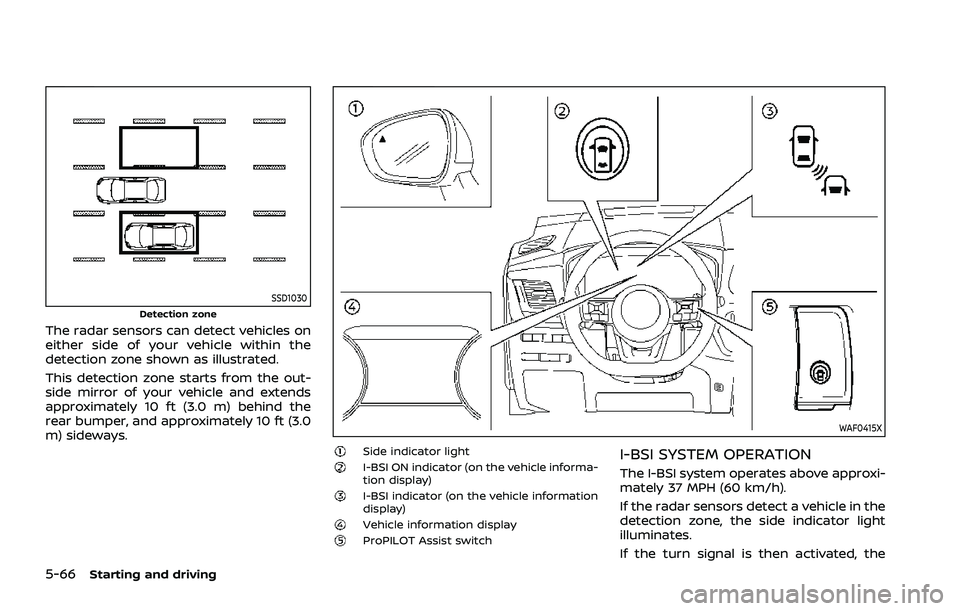
WAF0415X
Side indicator lightI-BSI ON indicator (on the vehicle informa-
tion display)
I-BSI indicator (on the vehicle information
display)
Vehicle information displayProPILOT Assist switch
I-BSI SYSTEM OPERATION
The I-BSI system operates above approxi-
mately 37 MPH (60 km/h).
If the radar sensors detect a vehicle in the
detection zone, the side indicator light
illuminates.
If the turn signal is then activated, the
Page 321 of 556

system chimes (twice) and the side in-
dicator light flashes. The side indicator
light continues to flash until the detected
vehicle leaves the detection zone.
If the I-BSI system is ON and your vehicle
approaches a lane marker while another
vehicle is in the detection zone, the
system chimes (three times) and the side
indicator light flashes. The I-BSI system
activates to help return the vehicle back
to the center of the driving lane. The I-BSI
system operates regardless of turn signal
usage.
To turn on the I-BSI system, push the
ProPILOT Assist switch on the steering
wheel after starting the engine. The I-BSI
ON indicator on the vehicle information
display will illuminate. Push the ProPILOT
Assist switch again to turn off the I-BSI
system.
NOTE:
.I-BSI warning and system applica-
tion will only be activated if the side
indicator light is already illuminated
when your vehicle approaches a
lane marker. If another vehicle
comes into the detection zone after
your vehicle has crossed a lane
marker, no I-BSI warning or system
application will be activated. (For
additional information, see “I-BSI
driving situations” (P.5-70).) .
The I-BSI system is typically acti-
vated earlier than the Intelligent
Lane Intervention (I-LI) system when
your vehicle is approaching a lane
marker.
Starting and driving5-67
Page 323 of 556

— Pedestrians, bicycles, animals.
— Vehicles such as motorcycles,low height vehicles, or high
ground clearance vehicles.
— Vehicles remaining in the de- tection zone when you accel-
erate from a stop.
— Oncoming vehicles.
— A vehicle merging into an adjacent lane at a speed ap-
proximately the same as your
vehicle.
— A vehicle approaching rapidly from behind.
— A vehicle which your vehicle overtakes rapidly.
— A vehicle that passes through the detection zone quickly.
. The radar sensor’s detection zone
is designed based on a standard
lane width. When driving in a
wider lane, the radar sensors
may not detect vehicles in an
adjacent lane. When driving in a
narrow lane, the radar sensors
may detect vehicles driving two
lanes away. .
The radar sensors are designed
to ignore most stationary objects,
however objects such as guard-
rails, walls, foliage and parked
vehicles may occasionally be de-
tected. This is a normal operation
condition.
. The following conditions may re-
duce the ability of the radar to
detect other vehicles:
— Severe weather
— Road spray
— Ice/frost/dirt build-up on the
vehicle
. Do not attach stickers (including
transparent material), install ac-
cessories or apply additional
paint near the radar sensors.
These conditions may reduce the
ability of the radar to detect other
vehicles.
. The camera may not detect lane
markers in the following situa-
tions and the I-BSI system may
not operate properly.
— On roads where there are
multiple parallel lane markers;
lane markers that are faded or
not painted clearly; yellow
painted lane markers; non- standard lane markers; lane
markers covered with water,
dirt, snow, etc.
— On roads where discontinued lane markers are still detect-
able.
— On roads where there are sharp curves.
— On roads where there are sharply contrasting objects,
such as shadows, snow,
water, wheel ruts, seams or
lines remaining after road re-
pairs.
— On roads where the traveling lane merges or separates.
— When the vehicle’s traveling direction does not align with
the lane markers.
— When traveling close to the vehicle in front of you, which
obstructs the lane camera
unit detection range.
— When rain, snow or dirt ad- heres to the windshield in
front of a lane camera unit.
— When the headlights are not bright due to dirt on the lens
or if aiming is not adjusted
Starting and driving5-69
Page 324 of 556

5-70Starting and driving
properly.
— When strong light enters a lane camera unit. (For exam-
ple: light directly shines on the
front of the vehicle at sunrise
or sunset.)
— When a sudden change in brightness occurs. (For exam-
ple: when the vehicle enters or
exits a tunnel or under a
bridge.)
. Do not use the I-BSI system under
the following conditions because
the system may not function
properly.
— During bad weather. (For ex-
ample: rain, fog, snow, etc.)
— When driving on slippery roads, such as on ice or snow,
etc.
— When driving on winding or uneven roads.
— When there is a lane closure due to road repairs.
— When driving in a makeshift or temporary lane.
— When driving on roads where the lane width is too narrow. — When driving with a tire that is
not within normal tire condi-
tions (for example, tire wear,
low tire pressure, installation
of spare tire, tire chains, non-
standard wheels).
— When the vehicle is equipped with non-original steering
parts or suspension parts.
— When towing a trailer or other vehicle.
. Excessive noise (for example,
audio system volume, open vehi-
cle window) will interfere with the
chime sound, and it may not be
heard.I-BSI DRIVING SITUATIONS
Indicator on
Indicator off
Indicator flashing