2021 NISSAN MURANO engine
[x] Cancel search: enginePage 272 of 508
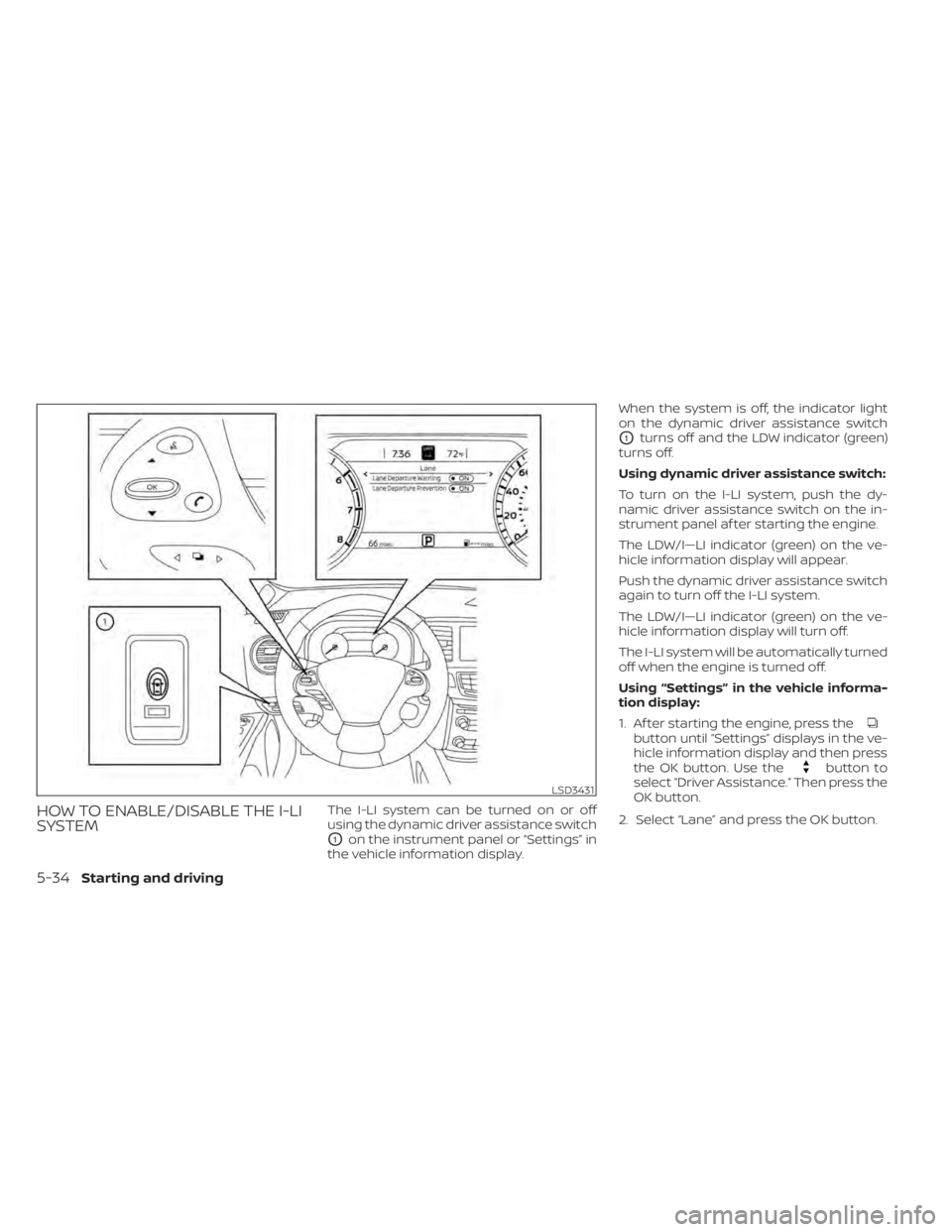
HOW TO ENABLE/DISABLE THE I-LI
SYSTEMThe I-LI system can be turned on or off
using the dynamic driver assistance switch
O1on the instrument panel or “Settings” in
the vehicle information display. When the system is off, the indicator light
on the dynamic driver assistance switch
O1turns off and the LDW indicator (green)
turns off.
Using dynamic driver assistance switch:
To turn on the I-LI system, push the dy-
namic driver assistance switch on the in-
strument panel af ter starting the engine.
The LDW/I—LI indicator (green) on the ve-
hicle information display will appear.
Push the dynamic driver assistance switch
again to turn off the I-LI system.
The LDW/I—LI indicator (green) on the ve-
hicle information display will turn off.
The I-LI system will be automatically turned
off when the engine is turned off.
Using “Settings” in the vehicle informa-
tion display:
1. Af ter starting the engine, press the
button until “Settings” displays in the ve-
hicle information display and then press
the OK button. Use the
button to
select “Driver Assistance.” Then press the
OK button.
2. Select “Lane” and press the OK button.
LSD3431
5-34Starting and driving
Page 275 of 508
![NISSAN MURANO 2021 Owner´s Manual Temporary disabled status at high
temperature:
If the vehicle is parked in direct sunlight
under high temperature conditions (over
approximately 104°F [40°C]) and then the
I-LI system is turned on,](/manual-img/5/40352/w960_40352-274.png "NISSAN MURANO 2021 Owner´s Manual Temporary disabled status at high
temperature:
If the vehicle is parked in direct sunlight
under high temperature conditions (over
approximately 104°F [40°C]) and then the
I-LI system is turned on,")
Temporary disabled status at high
temperature:
If the vehicle is parked in direct sunlight
under high temperature conditions (over
approximately 104°F [40°C]) and then the
I-LI system is turned on, the I-LI system
may be deactivated automatically and the
following message will appear on the ve-
hicle information display: “Unavailable: High
Cabin Temperature.” When the interior
temperature is reduced, the system will re-
sume operating automatically.
SYSTEM MALFUNCTION
If the I-LI system malfunctions, it will cancel
automatically. The LDW indicator (orange)
will illuminate in the display. If the LDW indi-
cator (orange) illuminates in the display,
pull off the road to a safe location and stop
the vehicle. Turn the engine/motor off and
restart the engine/motor. If the LDW indica-
tor (orange) continues to illuminate, have
the I-LI system checked. It is recom-
mended that you visit a NISSAN dealer for
this service.
SYSTEM MAINTENANCE
The lane camera unitO1for the I-LI system
is located above the inside mirror. To keep
the proper operation of the I-LI system and
prevent a system malfunction, be sure to
observe the following:
• Always keep the windshield clean.
• Do not attach a sticker (including trans- parent material) or install an accessory
near the camera unit. • Do not place reflective materials, such as
white paper or a mirror, on the instru-
ment panel. The reflection of sunlight
may adversely affect the camera unit’s
capability of detecting the lane markers.
• Do not strike or damage the areas around the camera unit. Do not touch the
camera lens or remove the screw located
on the camera unit. If the camera unit is
damaged due to an accident, it is recom-
mended that you visit a NISSAN dealer.
LSD3375
Starting and driving5-37
Page 278 of 508
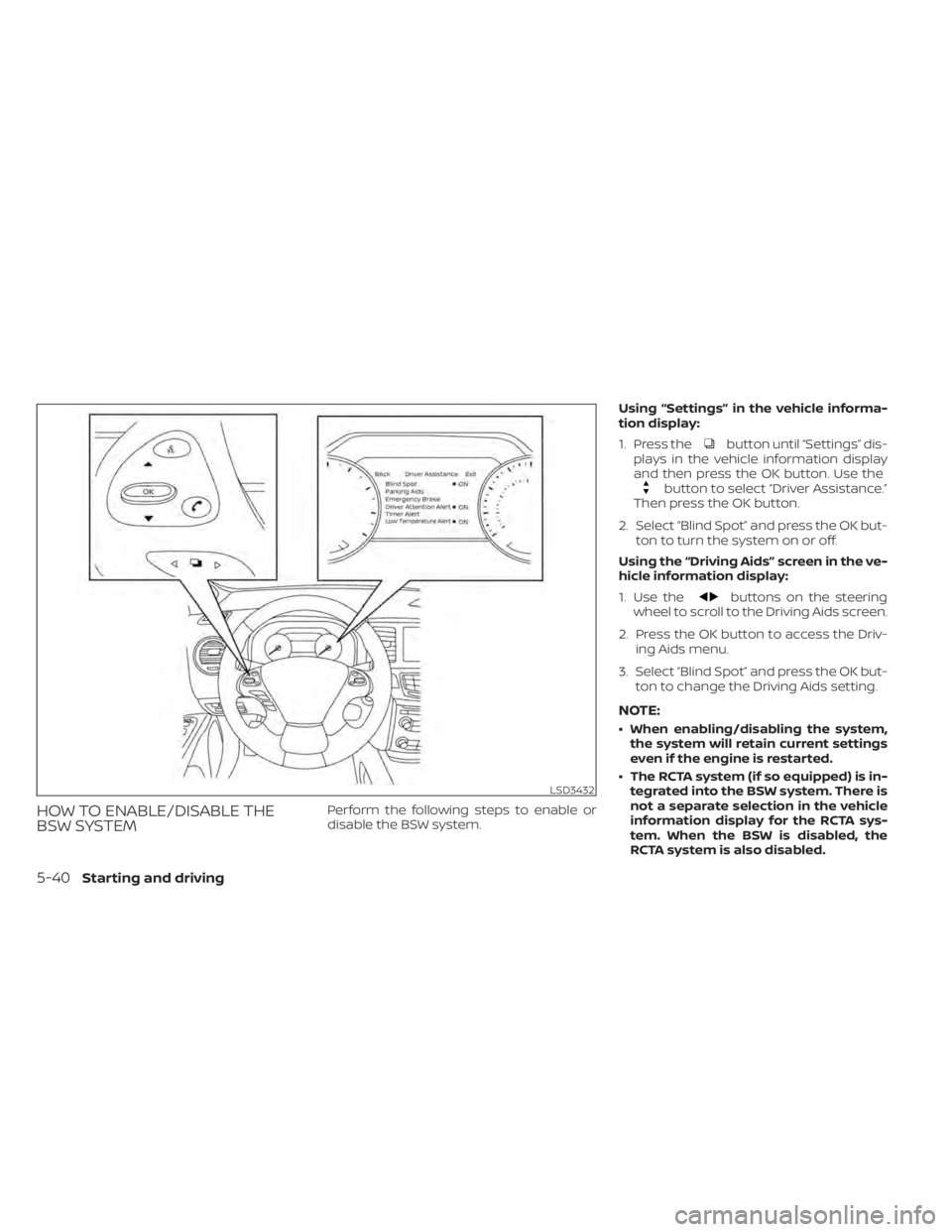
HOW TO ENABLE/DISABLE THE
BSW SYSTEMPerform the following steps to enable or
disable the BSW system.Using “Settings” in the vehicle informa-
tion display:
1. Press the
button until “Settings” dis-
plays in the vehicle information display
and then press the OK button. Use the
button to select “Driver Assistance.”
Then press the OK button.
2. Select “Blind Spot” and press the OK but- ton to turn the system on or off.
Using the “Driving Aids” screen in the ve-
hicle information display:
1. Use the
buttons on the steering
wheel to scroll to the Driving Aids screen.
2. Press the OK button to access the Driv- ing Aids menu.
3. Select “Blind Spot” and press the OK but- ton to change the Driving Aids setting.
NOTE:
• When enabling/disabling the system,the system will retain current settings
even if the engine is restarted.
• The RCTA system (if so equipped) is in- tegrated into the BSW system. There is
not a separate selection in the vehicle
information display for the RCTA sys-
tem. When the BSW is disabled, the
RCTA system is also disabled.
LSD3432
5-40Starting and driving
Page 284 of 508
Action to take:
Stop the vehicle in a safe location, place the
vehicle in the P (Park) position, turn the en-
gine off and restart the engine. If the mes-
sage continues to appear, have the system
checked. It is recommended that you visit a
NISSAN dealer for this service.
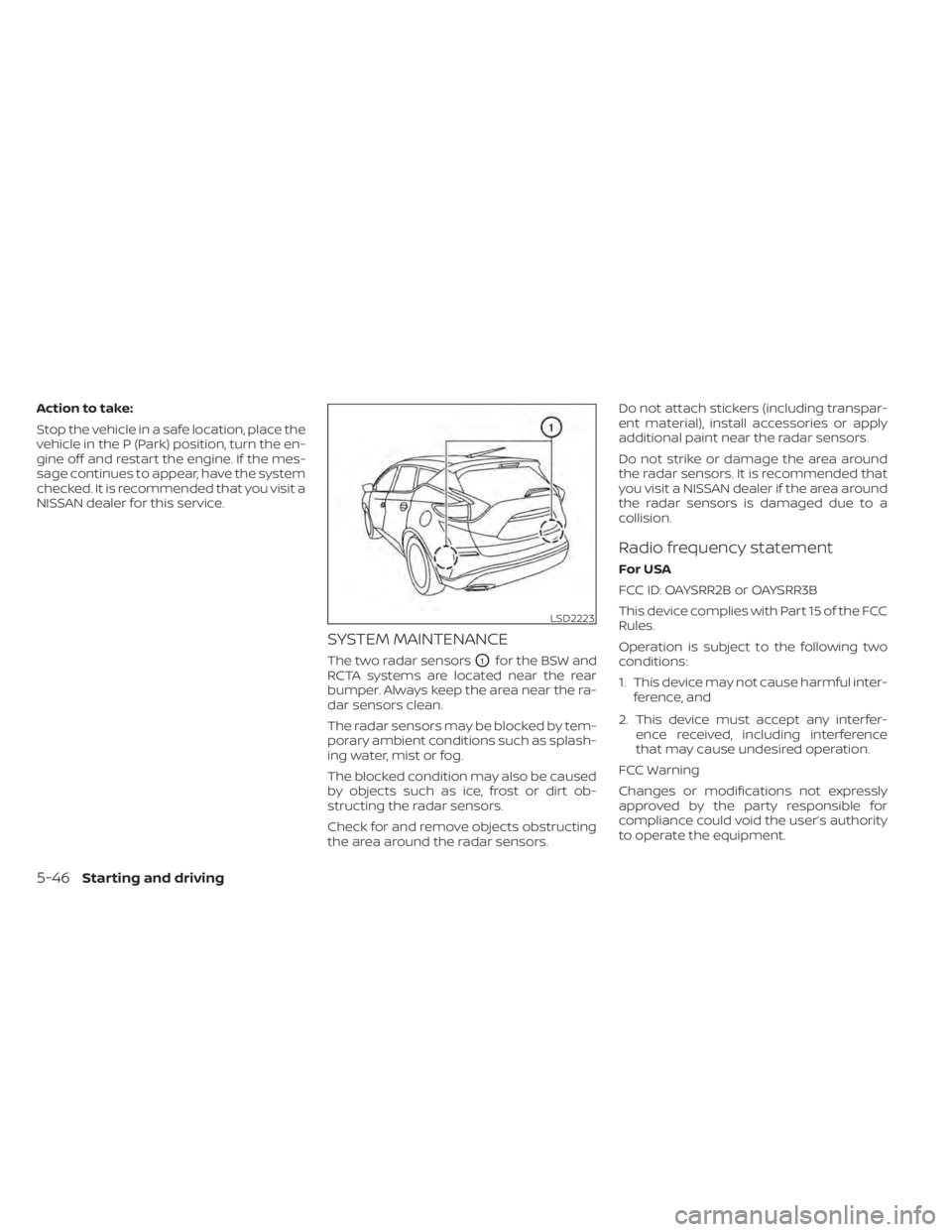
SYSTEM MAINTENANCE
The two radar sensorsO1for the BSW and
RCTA systems are located near the rear
bumper. Always keep the area near the ra-
dar sensors clean.
The radar sensors may be blocked by tem-
porary ambient conditions such as splash-
ing water, mist or fog.
The blocked condition may also be caused
by objects such as ice, frost or dirt ob-
structing the radar sensors.
Check for and remove objects obstructing
the area around the radar sensors. Do not attach stickers (including transpar-
ent material), install accessories or apply
additional paint near the radar sensors.
Do not strike or damage the area around
the radar sensors. It is recommended that
you visit a NISSAN dealer if the area around
the radar sensors is damaged due to a
collision.
Radio frequency statement
For USA
FCC ID: OAYSRR2B or OAYSRR3B
This device complies with Part 15 of the FCC
Rules.
Operation is subject to the following two
conditions:
1. This device may not cause harmful inter-
ference, and
2. This device must accept any interfer- ence received, including interference
that may cause undesired operation.
FCC Warning
Changes or modifications not expressly
approved by the party responsible for
compliance could void the user’s authority
to operate the equipment.
LSD2223
5-46Starting and driving
Page 288 of 508
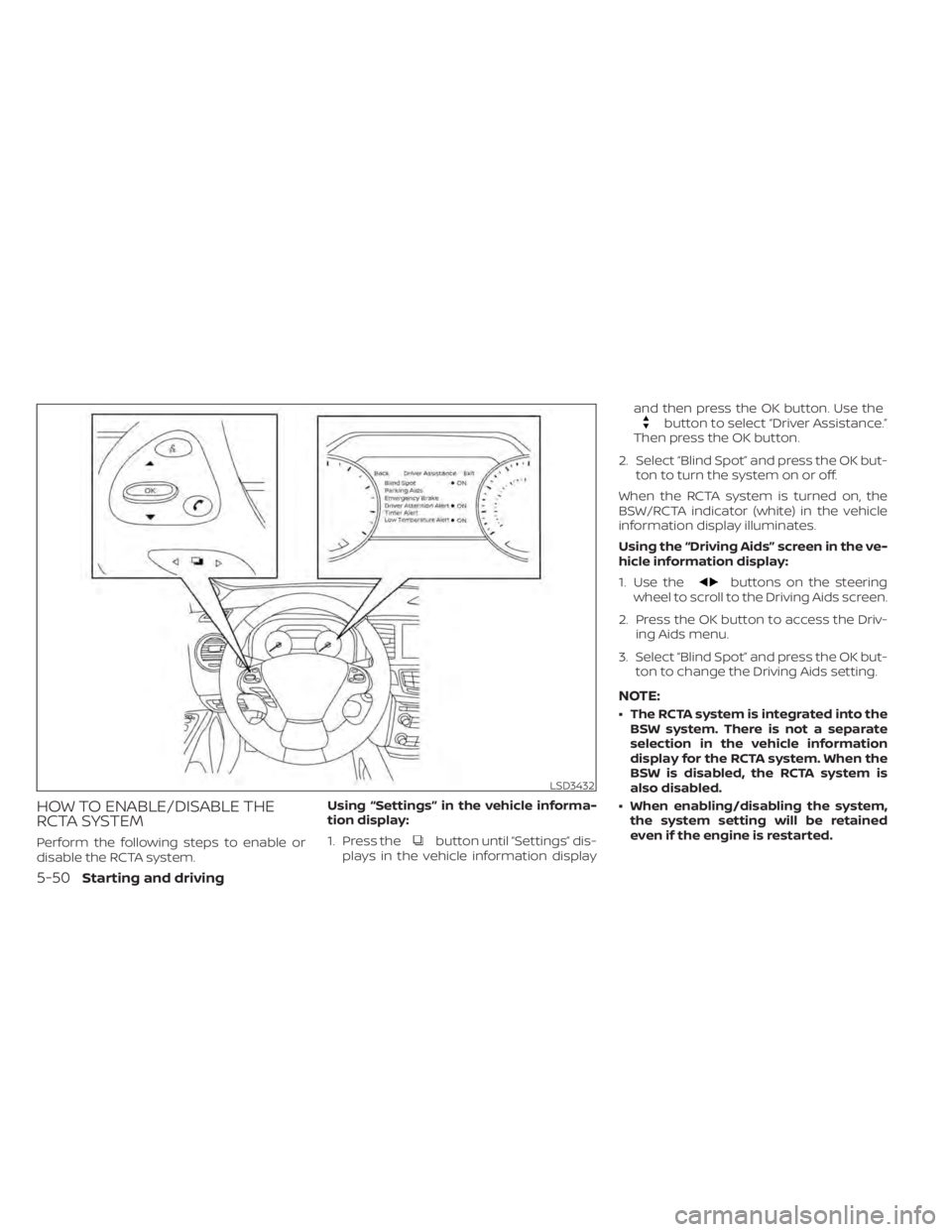
HOW TO ENABLE/DISABLE THE
RCTA SYSTEM
Perform the following steps to enable or
disable the RCTA system.Using “Settings” in the vehicle informa-
tion display:
1. Press thebutton until “Settings” dis-
plays in the vehicle information display and then press the OK button. Use the
button to select “Driver Assistance.”
Then press the OK button.
2. Select “Blind Spot” and press the OK but- ton to turn the system on or off.
When the RCTA system is turned on, the
BSW/RCTA indicator (white) in the vehicle
information display illuminates.
Using the “Driving Aids” screen in the ve-
hicle information display:
1. Use the
buttons on the steering
wheel to scroll to the Driving Aids screen.
2. Press the OK button to access the Driv- ing Aids menu.
3. Select “Blind Spot” and press the OK but- ton to change the Driving Aids setting.
NOTE:
• The RCTA system is integrated into theBSW system. There is not a separate
selection in the vehicle information
display for the RCTA system. When the
BSW is disabled, the RCTA system is
also disabled.
• When enabling/disabling the system, the system setting will be retained
even if the engine is restarted.
LSD3432
5-50Starting and driving
Page 292 of 508
Action to take
Stop the vehicle in a safe location, place the
vehicle in the P (Park) position, turn the en-
gine off and restart the engine. If the mes-
sage continues to appear, have the system
checked. It is recommended that you visit a
NISSAN dealer for this service.
SYSTEM MAINTENANCE
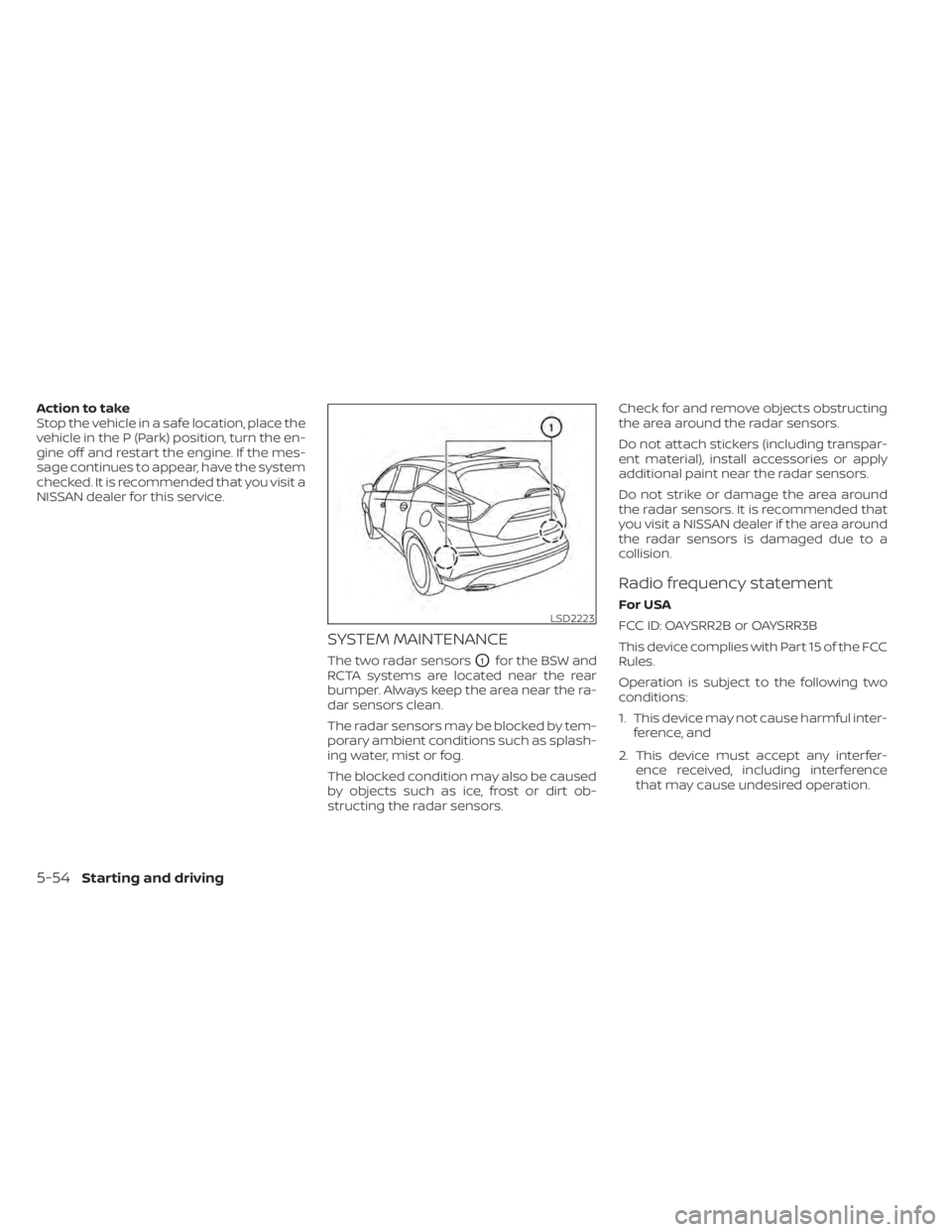
The two radar sensorsO1for the BSW and
RCTA systems are located near the rear
bumper. Always keep the area near the ra-
dar sensors clean.
The radar sensors may be blocked by tem-
porary ambient conditions such as splash-
ing water, mist or fog.
The blocked condition may also be caused
by objects such as ice, frost or dirt ob-
structing the radar sensors. Check for and remove objects obstructing
the area around the radar sensors.
Do not attach stickers (including transpar-
ent material), install accessories or apply
additional paint near the radar sensors.
Do not strike or damage the area around
the radar sensors. It is recommended that
you visit a NISSAN dealer if the area around
the radar sensors is damaged due to a
collision.
Radio frequency statement
For USA
FCC ID: OAYSRR2B or OAYSRR3B
This device complies with Part 15 of the FCC
Rules.
Operation is subject to the following two
conditions:
1. This device may not cause harmful inter-
ference, and
2. This device must accept any interfer- ence received, including interference
that may cause undesired operation.LSD2223
5-54Starting and driving
Page 307 of 508
![NISSAN MURANO 2021 Owner´s Manual Distance Approximate distance at60 mph (100 km/h)
[f t (m)]
1. Long 200 (60)
2. Middle 150 (45)
3. Short 90 (30)
• The distance to the vehicle ahead will change according to the vehicle speed.
The h](/manual-img/5/40352/w960_40352-306.png "NISSAN MURANO 2021 Owner´s Manual Distance Approximate distance at60 mph (100 km/h)
[f t (m)]
1. Long 200 (60)
2. Middle 150 (45)
3. Short 90 (30)
• The distance to the vehicle ahead will change according to the vehicle speed.
The h")
Distance Approximate distance at60 mph (100 km/h)
[f t (m)]
1. Long 200 (60)
2. Middle 150 (45)
3. Short 90 (30)
• The distance to the vehicle ahead will change according to the vehicle speed.
The higher the vehicle speed, the longer
the distance.
• The distance setting will remain at the current setting even if the engine is
restarted.
Approach warning
If your vehicle comes closer to the vehicle
ahead due to rapid deceleration of that ve-
hicle or if another vehicle cuts in, the sys-
tem warns the driver with the chime and
ICC system display. Decelerate by depress-
ing the brake pedal to maintain a safe ve-
hicle distance if:
• The chime sounds.
• The vehicle ahead detection indicatorblinks.
The warning chime may not sound in
some cases when there is a short distance
between vehicles. Some examples are:
• When the vehicles are traveling at the same speed and the distance between
vehicles is not changing.
• When the vehicle ahead is traveling faster and the distance between vehicles is
increasing.
• When a vehicle cuts in near your vehicle.
The warning chime will not sound when:
• The vehicle approaches other vehicles that are parked or moving slowly.
• The accelerator pedal is depressed, over- riding the system.
NOTE:
The approach warning chime may sound
and the system display may blink when
the ICC sensor detects objects on the
side of the vehicle or on the side of the
road. This may cause the ICC system to
decelerate or accelerate the vehicle. The
ICC sensor may detect these objects
when the vehicle is driven on winding
roads, narrow roads, hilly roads, or when
entering or exiting a curve. In these
cases you will have to manually control
the proper distance ahead of your
vehicle.
Also, the radar sensor sensitivity can be
affected by vehicle operation (steering ma-
neuver or driving position in the lane) or
traffic or vehicle condition (for example, if a
vehicle is being driven with some damage).
Automatic cancellation
A chime sounds under the following condi-
tions and the control is automatically can-
celed:
• When the vehicle ahead is not detectedand your vehicle is traveling below the
speed of 15 mph (24 km/h)
• When the system judges the vehicle is at a standstill
LSD2752
Starting and driving5-69
Page 313 of 508
Condition B
When there is inclement weather (rain, fog,
snow, etc.) blocking the front radar sensor,
the ICC system will automatically be can-
celed, the chime will sound and the “For-
ward Driving Aids Temporarily Disabled
Front Sensor Blocked See Owner’s Manual”
warning message will appear in the vehicle
information display.
Action to take
When the conditions listed above are no
longer present, the warning message will
no longer be available in the vehicle infor-
mation display and the system will operate
normally. If the “Forward Driving Aids Tem-
porarily Disabled Front Sensor Blocked See
Owner’s Manual” warning message contin-
ues to be displayed, have the system
checked. It is recommended that you visit a
NISSAN dealer for this service.
Condition C
When the radar sensor area of the front
bumper is covered with mud, dirt, snow, ice,
etc., or is obstructed, the ICC system will
automatically be canceled.The chime will sound and the “Forward
Driving Aids Temporarily Disabled Front
Sensor Blocked See Owner’s Manual”
warning message will appear in the vehicle
information display.
Action to take
If the warning message appears, stop the
vehicle in a safe place, place the shif t lever
in the P (Park) position, and turn the engine
off. When the radar signal is temporarily
interrupted, clean the sensor area of the
front bumper and restart the engine. If the
“Forward Driving Aids Temporarily Disabled
Front Sensor Blocked See Owner’s Manual”
warning message continues to be dis-
played, have the system checked. It is rec-
ommended that you visit a NISSAN dealer
for this service.
Condition D
When driving on roads with limited road
structures (for example, long bridges, des-
erts, snow fields, driving next to long walls),
the system may illuminate the system
warning light and display the “Forward
Driving Aids Temporarily Disabled Front
Sensor Blocked See Owner’s Manual”
message.Action to take
When the above driving conditions no lon-
ger exist, turn the system back on.
Condition E
When the ICC system is not operating
properly, a chime sounds and the ICC sys-
tem warning light (orange) will come on.
Starting and driving5-75