2021 NISSAN MAXIMA trunk
[x] Cancel search: trunkPage 113 of 476

• Using the steering wheel switch, a drivercan select “Dismiss Message” to clear the
display for a period of time. If no selection
is made, this message automatically
turns off af ter a period of time.
• Using the steering wheel switch, a driver can select “Disable Alert” to disable the
selected alert for the remainder of the
current trip.
WARNING
Selecting “Dismiss Message” during a
stop within a trip temporarily dis-
misses the message for that stop with-
out turning the system off. Alerts can
be provided for other stops during the
trip. Selecting “Disable Alert” turns off
the Rear Door Alert system for the re-
mainder of a trip and no audible alert
will be provided.
NOTE:
This system is disabled until a driver en-
ables it using the vehicle information
display. For additional information, see
“How to use the vehicle information dis-
play ” (P. 2-18).
For additional information, see “Rear Door
Alert” (P. 2-58).
Check Rear Seat For All Articles
When the system is enabled, this message
appears when the vehicle comes to a com-
plete stop, the vehicle is transitioned from
the D (Drive) position to P (Park) position,
and the driver exits the vehicle. This mes-
sage alerts the driver, af ter a period of time,
to check for items in the rear seat af ter the
audible alert has been provided.
NOTE:
This system is disabled until a driver en-
ables it using the vehicle information
display. For additional information, see
“How to use the vehicle information dis-
play ” (P. 2-18).
For additional information, see “Rear Door
Alert” (P. 2-58).
Door/Trunk Open
This warning appears when a door or the
trunk has been opened.
Headlight System Error: See Owner’s
Manual
This warning appears when there is an er-
ror with the system. For additional informa-
tion, see “Headlight and turn signal switch”
(P. 2-45).
Loose Fuel Cap
This warning appears when the fuel-filler
cap is not tightened correctly af ter the ve-
hicle has been refueled. For additional in-
formation, see “Fuel-filler cap” (P. 3-22).
Low Fuel
This warning appears when the fuel level in
the fuel tank is getting low. Refuel as soon
as it is convenient, preferably before the
fuel gauge reaches 0 (Empty). There will be
a small reserve of fuel in the tank when
the fuel gauge needle reaches 0 (Empty).
Low Outside Temperature
This warning appears if the outside tem-
perature is below 37°F (3°C). The tempera-
ture can be changed to display in Celsius or
Fahrenheit. For additional information, see
“Settings” (P. 2-19).
Low Washer Fluid
This warning appears when the
windshield-washer fluid is at a low level.
Add windshield-washer fluid as necessary.
For additional information, see
“Windshield-washer fluid” (P. 8-12).
Instruments and controls2-27
Page 125 of 476

NAVIGATION SWIPE TO METER (if
so equipped)
Turn-by-turn route guidance can also be
viewed in the vehicle information display by
using Navigation Swipe to Meter. This can
be done by programming a route, touching
the turn-by-turn route icon on the center
display, and swiping towards the general
direction of the vehicle information display.The turn-by-turn route icon will move
across the center display and transfer the
route information to the vehicle informa-
tion display when the vehicle is not moving.
The icon will not move across the screen if
the vehicle is moving over speeds of 4 mph
(7 km/h), yet the information will still trans-
fer to the vehicle information display.
The turn-by-turn route guidance cannot
be transferred to the vehicle information
display if the navigation screen is already
shown or if a warning is present.
For additional information, refer to the
separate NissanConnect® Owner’s Manual.
Your vehicle has two types of security
systems:
• Vehicle security system
• NISSAN Vehicle Immobilizer System
VEHICLE SECURITY SYSTEM
The vehicle security system provides visual
and audible alarm signals if someone
opens the doors, trunk, or hood when the
system is armed. It is not, however, a mo-
tion detection type system that activates
when a vehicle is moved or when a vibra-
tion occurs.
LIC4158LIC2930
SECURITY SYSTEMS
Instruments and controls2-39
Page 126 of 476

The system helps deter vehicle thef t but
cannot prevent it, nor can it prevent the
thef t of interior or exterior vehicle compo-
nents in all situations. Always secure your
vehicle even if parking for a brief period.
Never leave your Intelligent Key in the ve-
hicle, and always lock the vehicle when un-
attended. Be aware of your surroundings,
and park in secure, well-lit areas whenever
possible.
Many devices offering additional protec-
tion, such as component locks, identifica-
tion markers, and tracking systems, are
available at auto supply stores and spe-
cialty shops. A NISSAN dealer may also offer
such equipment. Check with your insur-
ance company to see if you may be eligible
for discounts for various thef t protection
features.
How to arm the vehicle security
system
1. Close all windows.(The system can be
armed even if the windows are open.)
2. Remove the Intelligent Key from the vehicle. 3. Close all doors, hood and trunk. Lock all
doors. The doors can be locked with the
Intelligent Key or door handle request
switch.
4. Confirm that the
security indicator
light stays on for about 30 seconds. The
vehicle security system is now pre-
armed. The vehicle security system will
automatically shif t into the armed
phase. The
security light begins to
flash once every three seconds. If during
the pre-armed phase one of the follow-
ing occurs, the system will not arm:
• Any door is unlocked with the Intelligent Key or door request switch.
• Ignition switch is placed in ACC or ON position.
• Even when the driver and/or passen-
gers are in the vehicle, the system will
activate with all the doors, hood and
trunk lid locked with the ignition switch
placed in the LOCK position. When plac-
ing the ignition switch in the ACC or ON
position, the system will be released.
Vehicle security system activation
The vehicle security system will give the
following alarm:
• The headlights blink and the horn sounds intermittently but synchronously.
• The alarm automatically turns off af ter a period of time. However, the alarm reacti-
vates if the vehicle is tampered with
again.
The alarm is activated by:
• opening any door or hood without using the Intelligent Key (even if the door is un-
locked by releasing the door inside lock
knob).
How to stop an activated alarm
The alarm stops only by pushing thebutton on the Intelligent Key, or pushing the
request switch on the driver's or passen-
ger's door with the Intelligent Key in range
of the door handle.
2-40Instruments and controls
Page 144 of 476

The Rear Door Alert system functions un-
der certain conditions to indicate there
may be an object or passenger in the rear
seat(s). Check the seat(s) before exiting the
vehicle.
The Rear Door Alert system is initially dis-
abled. The driver can enable the system
using the vehicle information display. For
additional information, see “Vehicle infor-
mation display warnings and indicators”
(P. 2-26).
When the system is enabled:
• The system is activated when a rear dooris opened and closed within 10 minutes of
the vehicle being driven. When the driver
door is closed and the system is acti-
vated, a visual message appears in the
vehicle information display. For additional
information, see “Rear Door Alert is acti-
vated” (P. 2-26).
• If a rear door is opened and closed but the vehicle is not driven within approxi-
mately 10 minutes, the system will not be
activated. A rear door must be opened
and closed and the car driven within 10
minutes for the system to activate. When the Rear Door Alert system is acti-
vated:
• When the driver puts the vehicle in the P
(Park) position, a notification message
appears in the vehicle information dis-
play with the options to “Dismiss Mes-
sage” or “Disable Alert” if desired.• Select “Disable Alert” to temporarily disable for that stop.
• No selection or ‘Dismiss Message” will keep the alert enabled for that stop.
• If the alert is enabled when a driver exits the vehicle, a message will appear in the
vehicle information display that states
“Check Rear Seat for All Articles.”
If “Horn & Alert” setting is selected:
• An audible horn sound will occur af ter a short time unless a rear door is
opened and closed within a short time
to deactivate the alert.
• If the doors are locked before the alert is deactivated by opening a rear door,
the horn will sound.
• If the trunk is opened before a rear door is opened, the horn will be de-
layed until af ter the trunk is closed.NOTE:
If “Alert Only ” setting is selected, the
message alert will still be shown in the
vehicle information display but the horn
will not sound.
WARNING
• If the driver selects “Disable Alert”, no
audible alert will be provided regard-
less of rear door open/close status.
• There may be times when there is an
object or passenger in the rear
seat(s) but the audible alert does not
sound. For example, this may occur if
rear seat passengers enter or exit the
vehicle during a trip.
• The system does not directly detect
objects or passengers in the rear
seat(s). Instead, it can detect when a
rear door is opened and closed, indi-
cating that there may be something
in the rear seat(s).
NOTE:
There may be times when the horn
sounds but there are no objects or pas-
sengers in the rear seat(s).
For additional information, see “Rear Door
Alert is activated” (P. 2-26)
REAR DOOR ALERT
2-58Instruments and controls
Page 159 of 476

PERSONAL LIGHTS
To turn the rear personal lights on, push the
switch. To turn them off, push the switch
again.The light illuminates when the trunk lid is
opened. When the trunk lid is closed, the
light goes off. For additional information,
see “Exterior and interior lights” (P. 8-24).
The HomeLink® Universal Transceiver pro-
vides a convenient way to consolidate the
functions of up to three individual hand-
held transmitters into one built-in device.
HomeLink® Universal Transceiver:
• Will operate most radio frequency de-
vices such as garage doors, gates, home
and office lighting, entry door locks and
security systems.
• Is powered by your vehicle's battery. No separate batteries are required. If the ve-
hicle's battery is discharged or is discon-
nected, HomeLink® will retain all
programming.
When the HomeLink® Universal Trans-
ceiver is programmed, retain the original
transmitter for future programming pro-
cedures (Example: new vehicle pur-
chases). Upon sale of the vehicle, the
programmed HomeLink® Universal
Transceiver buttons should be erased for
security purposes. For additional infor-
mation, see “Programming HomeLink®”
(P. 2-74).
LIC3907
TRUNK LIGHT HOMELINK® UNIVERSAL
TRANSCEIVER (if so equipped)
Instruments and controls2-73
Page 165 of 476

3 Pre-driving checks and adjustments
Keys.............................................3-2NISSAN Intelligent Key® .......................3-2
NISSAN Vehicle Immobilizer System
keys..........................................3-4
Doors ...........................................3-4
Locking with key .............................3-5
Locking with power door lock switch .........3-6
Automatic door locks ........................3-6
Child safety rear door lock ....................3-6
NISSAN Intelligent Key® .......................... 3-7
Operating range .............................3-8
Door locks/unlocks precaution ...............3-8
NISSAN Intelligent Key® Operation ............3-9
How to use the remote keyless entry
function ..................................... 3-13
Warning signals ............................. 3-15
Troubleshooting guide ......................3-16
Remote Engine Start ........................... 3-18
Remote Engine Start operating range .......3-18
Remote starting the vehicle .................3-18
Extending engine run time ..................3-19
Canceling a Remote Engine Start ...........3-19
Conditions the Remote Engine Start will
notwork .................................... 3-19Hood
........................................... 3-20
Trunk lid ........................................ 3-21
Opener operation ........................... 3-21
Interior trunk lid release .....................3-21
Interior trunk access ........................ 3-22
Fuel-filler door .................................. 3-22
Opening the fuel-filler door ..................3-22
Fuel-filler cap ................................ 3-23
Steering wheel ................................. 3-24
Manual operation (if so equipped) ...........3-25
Automatic operation (if so equipped) ........3-25
Sun visors ...................................... 3-26
Vanity mirrors ............................... 3-27
Mirrors ......................................... 3-27
Automatic anti-glare rearview mirror ........3-27
Outside mirrors ............................. 3-28
Memory seat (if so equipped) ...................3-30
Memory storage function (key-link) ..........
3-30
Memor
y storage function (switch) ...........3-31
Entry/exit function .......................... 3-32
System operation ........................... 3-32
Page 172 of 476
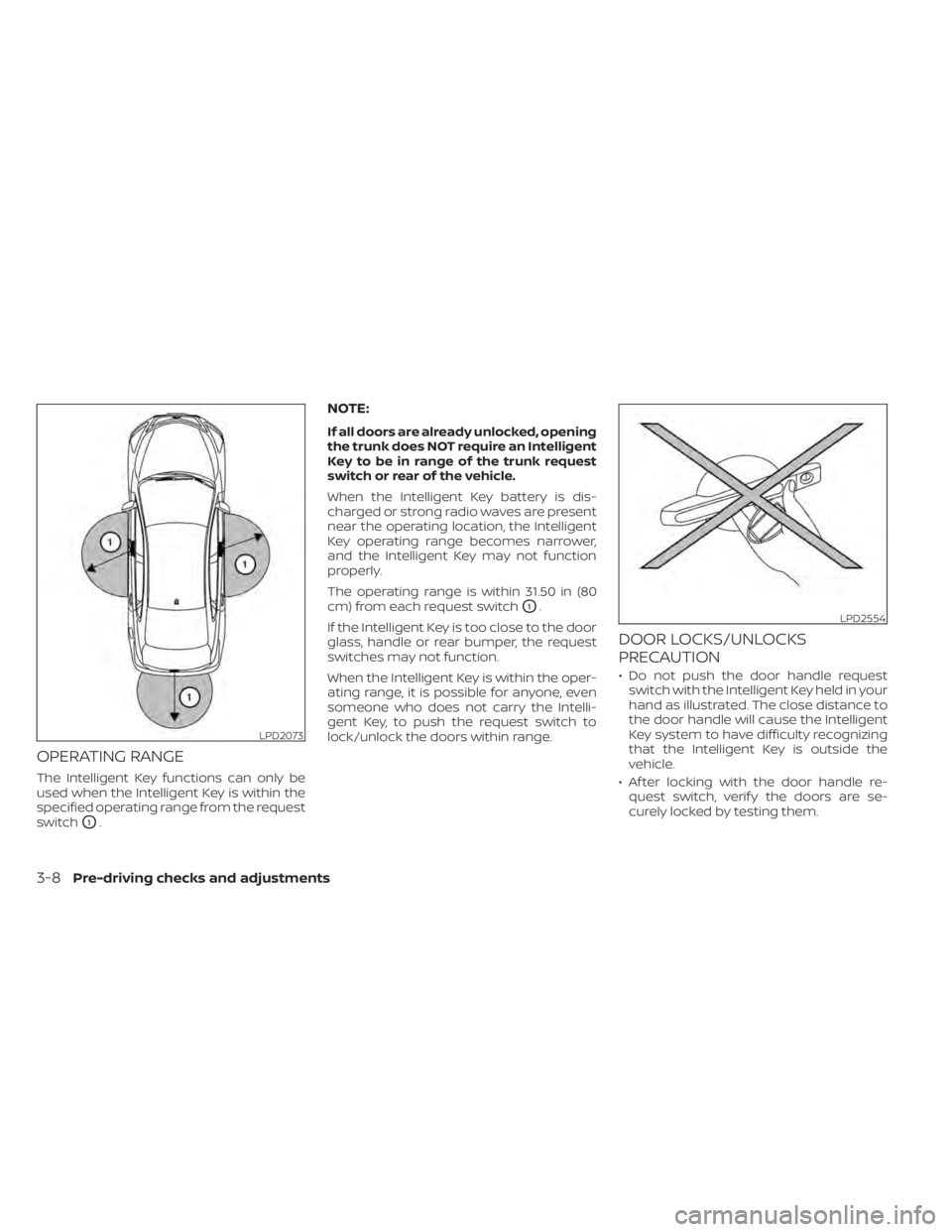
OPERATING RANGE
The Intelligent Key functions can only be
used when the Intelligent Key is within the
specified operating range from the request
switch
O1.
NOTE:
If all doors are already unlocked, opening
the trunk does NOT require an Intelligent
Key to be in range of the trunk request
switch or rear of the vehicle.
When the Intelligent Key battery is dis-
charged or strong radio waves are present
near the operating location, the Intelligent
Key operating range becomes narrower,
and the Intelligent Key may not function
properly.
The operating range is within 31.50 in (80
cm) from each request switch
O1.
If the Intelligent Key is too close to the door
glass, handle or rear bumper, the request
switches may not function.
When the Intelligent Key is within the oper-
ating range, it is possible for anyone, even
someone who does not carry the Intelli-
gent Key, to push the request switch to
lock/unlock the doors within range.
DOOR LOCKS/UNLOCKS
PRECAUTION
• Do not push the door handle request switch with the Intelligent Key held in your
hand as illustrated. The close distance to
the door handle will cause the Intelligent
Key system to have difficulty recognizing
that the Intelligent Key is outside the
vehicle.
• Af ter locking with the door handle re- quest switch, verif y the doors are se-
curely locked by testing them.
LPD2073
LPD2554
3-8Pre-driving checks and adjustments
Page 176 of 476

• Switching the Auto Room Lamp featureto the OFF position in the “Vehicle Set-
tings” menu on the vehicle information
display. For additional information, see
“Vehicle information display” (P. 2-17).
Opening the trunk lid
1. Push the trunk opener request switchOA
for more than 1 second while carrying
the Intelligent Key with you.
2. The trunk will unlatch. A chime will sound four times.
3. Raise the trunk lid to open the trunk.
Lockout protection
To prevent the Intelligent Key from being
accidentally locked in the trunk, lockout
protection is equipped with the Intelligent
Key.
When all doors are locked and the trunk lid
is closed with the Intelligent Key inside the
trunk, the outside buzzer will sound and the
trunk will open.
LPD2968
3-12Pre-driving checks and adjustments