Page 264 of 476

–On roads where there are sharp
curves.
– On roads where there are sharply
contrasting objects, such as shad-
ows, snow, water, wheel ruts,
seams or lines remaining af ter
road repairs. (The I-LI system
could detect these items as lane
markers.)
– On roads where the traveling lane
merges or separates.
– When the vehicle’s traveling direc-
tion does not align with the lane
marker.
– When traveling close to the ve-
hicle in front of you, which ob-
structs the lane camera unit de-
tection range.
– When rain, snow or dirt adheres to
the windshield in front of the lane
camera unit.
– When the headlights are not
bright due to dirt on the lens or if
the aiming is not adjusted
properly.
– When strong light enters the lane
camera unit. (For example, the
light directly shines on the front of
the vehicle at sunrise or sunset.) –
When a sudden change in bright-
ness occurs. (For example, when
the vehicle enters or exits a tunnel
or under a bridge.)
While the I-LI system is operating, you may
hear a sound of brake operation. This is
normal and indicates that the I-LI system is
operating properly.
SYSTEM TEMPORARILY
UNAVAILABLE
Condition A:
The warning and assist functions of the I-LI
system are not designed to work under the
following conditions:
• When you operate the lane change signal and change the traveling lanes in the di-
rection of the signal. (The I-LI system will
be deactivated for approximately 2 sec-
onds af ter the lane change signal is
turned off.)
• When the vehicle speed lowers to less than approximately 37 mph (60 km/h).
Af ter the above conditions have finished
and the necessary operating conditions
are satisfied, the warning and assist func-
tions will resume. Condition B:
The assist function of the I-LI system is not
designed to work under the following con-
ditions (warning is still functional):
• When the brake pedal is depressed.
•
When the steering wheel is turned as far as
necessary for the vehicle to change lanes.
• When the vehicle is accelerated during I-LI system operation.
• When the Intelligent Cruise Control (ICC) approach warning occurs.
• When the hazard warning flashers are operated.
• When driving on a curve at high speed.
Af ter the above conditions have finished
and the necessary operating conditions
are satisfied, the I-LI system application of
the brakes will resume.
Condition C:
If the following messages appear in the
vehicle information display, the I-LI system
will be turned off automatically.
• “Unavailable Road is Slippery”: When the VDC system (except Traction
Control System [TCS] function) or ABS
operates.
• “Currently Unavailable”: When the VDC system is turned off.
5-34Starting and driving
Page 268 of 476

HOW TO ENABLE/DISABLE THE
BSW SYSTEMPerform the following steps to enable or
disable the BSW system.Using the “Settings” in the vehicle infor-
mation display:
1. Press the
buttons until “Settings”
displays in the vehicle information dis-
play and then press the OK button. Use
the
button to select “Driver Assis-
tance.” Then press the OK button.
2. Select “Blind Spot” and press the OK button.
Using the “Driving Aids” screen in the ve-
hicle information display:
1. Use the
buttons on the steering
wheel to scroll to the Driving Aids screen.
2. Press the OK button to access the Driv- ing Aids menu.
3. Select “Blind Spot” and press the OK to change the Driving Aids setting.
NOTE:
• When enabling/disabling the system,the system will retain current settings
even if the engine is restarted.
• The RCTA system is integrated into the BSW system. There is not a separate
selection in the vehicle information
display for the RCTA system. When the
BSW is disabled, the RCTA system is
also disabled.
LSD3350
5-38Starting and driving
Page 278 of 476
HOW TO ENABLE/DISABLE THE
RCTA SYSTEMPerform the following steps to enable or
disable the RCTA system.Using the “Settings” in the vehicle infor-
mation display:
1. Press the
buttons until “Settings”
displays in the vehicle information dis-
play and then press the OK button. Use
the
button to select “Driver Assis-
tance.” Then press the OK button.
2. Select “Blind Spot” and press the OK button.
When the BSW system is turned on, the
BSW/RCTA indicator (white) in the vehicle
information display illuminates.
Using the “Driving Aids” screen in the ve-
hicle information display:
1. Use the
buttons on the steering
wheel to scroll to the Driving Aids screen.
2. Press the OK button to access the Driv- ing Aids menu.
3. Select “Blind Spot” and press the OK but- ton to change the Driving Aids setting.
LSD3350
5-48Starting and driving
Page 291 of 476

Normally when controlling the distance to
a vehicle ahead, this system automatically
accelerates or decelerates your vehicle ac-
cording to the speed of the vehicle ahead.
Depress the accelerator to properly accel-
erate your vehicle when acceleration is re-
quired for a lane change. Depress the brake
pedal when deceleration is required to
maintain a safe distance to the vehicle
ahead due to its sudden braking or if a
vehicle cuts in. Always stay alert when us-
ing the ICC system.
VEHICLE-TO-VEHICLE DISTANCE
CONTROL MODE SWITCHES
The system is operated by the ICC switch
and four control switches, all mounted on
the steering wheel.
1.CANCEL switch:
Deactivates the system without erasing
the set speed.
2. RES+ switch:
Resumes set speed or increases speed
incrementally. 3.
DISTANCE
switch:
Changes the vehicle’s following
distance: • Long
• Middle
• Short
4. ICC switch:
Master switch to activate/deactivate
the system.
5. SET- switch:
Sets desired cruise speed or reduces
speed incrementally.
LSD3391
Starting and driving5-61
Page 309 of 476
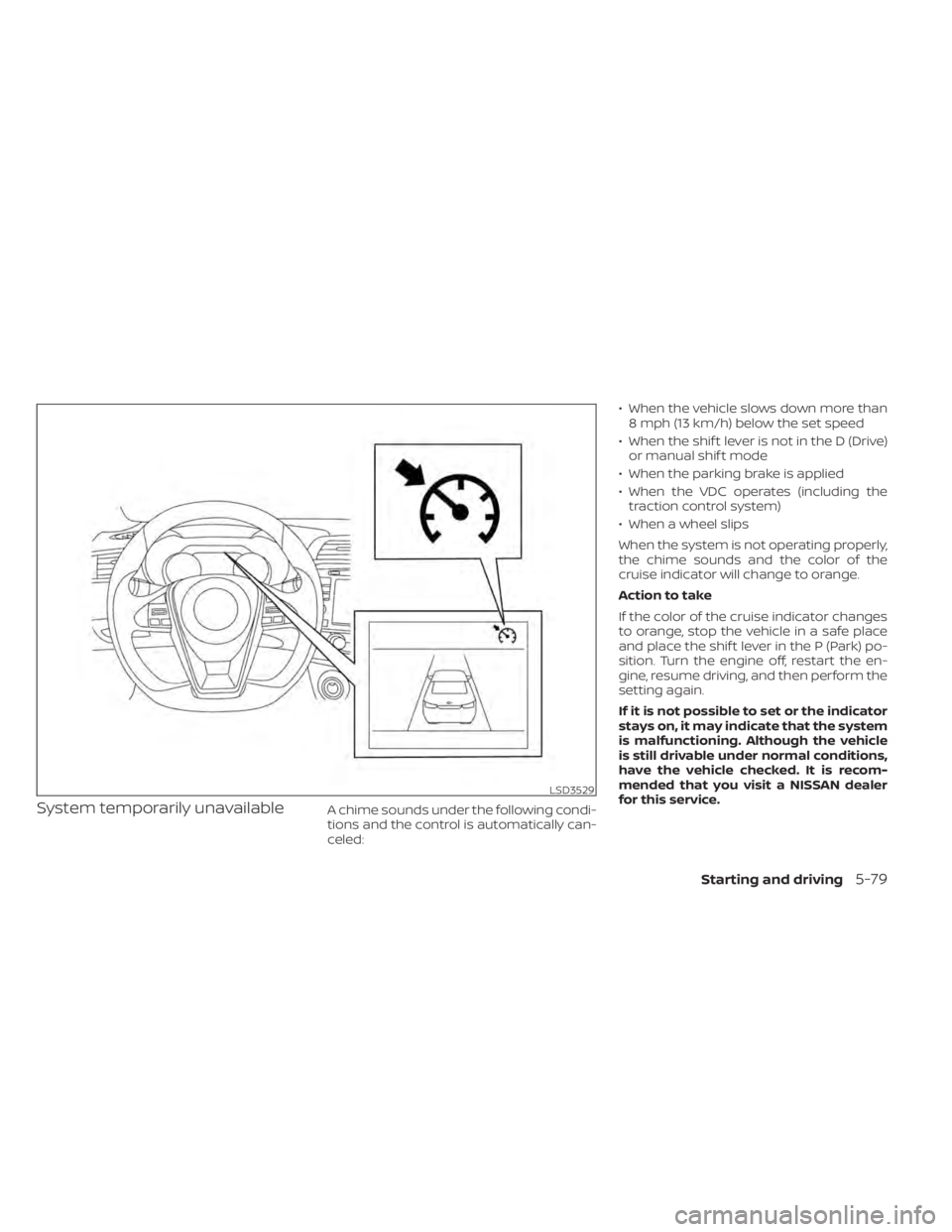
System temporarily unavailableA chime sounds under the following condi-
tions and the control is automatically can-
celed:• When the vehicle slows down more than
8 mph (13 km/h) below the set speed
• When the shif t lever is not in the D (Drive) or manual shif t mode
• When the parking brake is applied
• When the VDC operates (including the traction control system)
• When a wheel slips
When the system is not operating properly,
the chime sounds and the color of the
cruise indicator will change to orange.
Action to take
If the color of the cruise indicator changes
to orange, stop the vehicle in a safe place
and place the shif t lever in the P (Park) po-
sition. Turn the engine off, restart the en-
gine, resume driving, and then perform the
setting again.
If it is not possible to set or the indicator
stays on, it may indicate that the system
is malfunctioning. Although the vehicle
is still drivable under normal conditions,
have the vehicle checked. It is recom-
mended that you visit a NISSAN dealer
for this service.
LSD3529
Starting and driving5-79
Page 314 of 476

–The vehicle is turned sharply by
turning the steering wheel fully.
– Snow chains are used.
– Wheels or tires other than NISSAN
recommended are used.
– The brakes are cold at low ambi-
ent temperatures or immediately
af ter driving has started.
– The braking force becomes poor
due to wet brakes af ter driving
through a puddle or washing the
vehicle.
• Turn the RAB system off in the follow-
ing conditions to prevent the occur-
rence of an unexpected accident re-
sulting from sudden system
operation:
– The vehicle is towed.
– The vehicle is carried on a flatbed
truck.
– The vehicle is on the chassis
dynamometer.
– The vehicle drives on an uneven
road surface.
– The vehicle is towing an object (if
so equipped). –Suspension parts other than those
designated as Genuine NISSAN
parts are used. (If the vehicle height
or the vehicle body inclination is
changed, the system may not de-
tect an obstacle correctly.)
• Excessive noise (e.g., audio system
volume, an open vehicle window) will
interfere with the chime sound, and it
may not be heard.
SYSTEM MALFUNCTION
If the RAB system malfunctions, it will be
turned off automatically, and the RAB sys-
tem warning light will illuminate in the ve-
hicle information display.
Action to take
If the warning light illuminates, park the ve-
hicle in a safe location, turn the engine off,
and restart the engine. If the warning light
continues to illuminate, have the RAB sys-
tem checked. It is recommended that you
visit a NISSAN dealer for this service.
NOTE:
If the RAB system cannot be operated
temporarily, the RAB system warning
light blinks.
SYSTEM MAINTENANCE
Observe the following items to ensure
proper operation of the system:
• Always keep the parking sensors
O1
clean.
• If the parking sensors are dirty, wipe them off with a sof t cloth while being careful to
not damage them.
LSD3380
5-84Starting and driving
Page 348 of 476
While the vehicle is moving the audible alert
will stop af ter 3 seconds when an obstacle
is detected by only the corner sensor and
distance does not change. The audible
alert will also stop when the obstacle
moves away from the vehicle. At any time
the lef t side button of the steering wheel (
buttons) is available to cancel the au-
dible alert.
When the object is detected, the indicator
(green) appears and blinks and the tone
sounds intermittently. When the vehicle
moves closer to the object, the color of the
indicator turns yellow and the rate of the
blinking increases. When the vehicle is very
close to the object, the indicator stops
blinking and turns red, and the tone
sounds continuously. When the corner of the vehicle moves
closer to an object, the corner sonar indi-
cator
OAappears.The system indicators
OAwill appear when
the vehicle moves closer to an object.
LSD2428LSD2137
5-118Starting and driving
Page 356 of 476

CHANGING A FLAT TIRE
If you have a flat tire, follow the instructions
below:
Stopping the vehicle
1. Safely move the vehicle off the road andaway from traffic.
2. Turn on the hazard warning flashers.
3. Park on a level surface and apply the parking brake. Move the shif t lever to P
(Park).
4. Turn off the engine.
5. Raise the hood to warn other traffic and to signal professional road assistance
personnel that you need assistance.
6. Have all passengers get out of the ve- hicle and stand in a safe place, away
from traffic and clear of the vehicle.
WARNING
• Make sure the parking brake is se-
curely applied and the Continuously
Variable Transmission (CVT) is
shif ted into P (Park).
• Never change tires when the vehicle
is on a slope, ice or slippery areas.
This is hazardous.
• Never change tires if oncoming traf-
fic is close to your vehicle. Wait for
professional road assistance.
Blocking wheels
Place suitable blocks at both the front and
back of the wheel diagonally opposite the
flat tire to prevent the vehicle from moving
when it is jacked up.
WARNING
Be sure to block the wheel as the ve-
hicle may move and result in personal
injury.
LCE2142
A. Blocks
B. Flat tire
6-4In case of emergency

