2021 NISSAN LEAF steering wheel
[x] Cancel search: steering wheelPage 327 of 602

OFF-ROAD RECOVERY
While driving, the right side or lef t side
wheels may unintentionally leave the road
surface. If this occurs, maintain control of
the vehicle by following the procedure be-
low. Please note that this procedure is only
a general guide. The vehicle must be driven
as appropriate based on the conditions of
the vehicle, road and traffic.
1. Remain calm and do not overreact.
2. Do not apply the brakes.
3. Maintain a firm grip on the steeringwheel with both hands and try to hold a
straight course.
4. When appropriate, slowly release the ac- celerator pedal to gradually slow the
vehicle.
5. If there is nothing in the way, steer the vehicle to follow the road while the ve-
hicle speed is reduced. Do not attempt
to drive the vehicle back onto the road
surface until the vehicle speed is
reduced. 6. When it is safe to do so, gradually turn
the steering wheel until both tires return
to the road surface. When all tires are on
the road surface, steer the vehicle to
stay in the appropriate driving lane.
• If you decide that it is not safe to return the vehicle to the road surface based
on vehicle, road or traffic conditions,
gradually slow the vehicle to a stop in
a safe place off the road.
RAPID AIR PRESSURE LOSS
Rapid air pressure loss or a “blow-out” can
occur if the tire is punctured or is damaged
due to hitting a curb or pothole. Rapid air
pressure loss can also be caused by driving
on under-inflated tires.
Rapid air pressure loss can affect the han-
dling and stability of the vehicle, especially
at highway speeds.
Help prevent rapid air pressure loss by
maintaining the correct air pressure and
visually inspecting the tires for wear and
damage. For additional information, see
“Wheels and tires” (P. 8-25).
If a tire rapidly loses air pressure or “blows-
out” while driving, maintain control of the
vehicle by following the procedure below.
Please note that this procedure is only a general guide. The vehicle must be driven
as appropriate based on the conditions of
the vehicle, road and traffic.
WARNING
The following actions can increase the
chance of losing control of the vehicle if
there is a sudden loss of tire air pres-
sure. Losing control of the vehicle may
cause a collision and result in personal
injury.
• The vehicle generally moves or pulls
in the direction of the flat tire.
• Do not rapidly apply the brakes.
• Do not rapidly release the accelerator
pedal.
• Do not rapidly turn the steering
wheel.
1. Remain calm and do not overreact.
2. Maintain a firm grip on the steering wheel with both hands and try to hold a
straight course.
3. When appropriate, slowly release the ac- celerator pedal to gradually slow the
vehicle.
5-8Starting and driving
Page 345 of 602
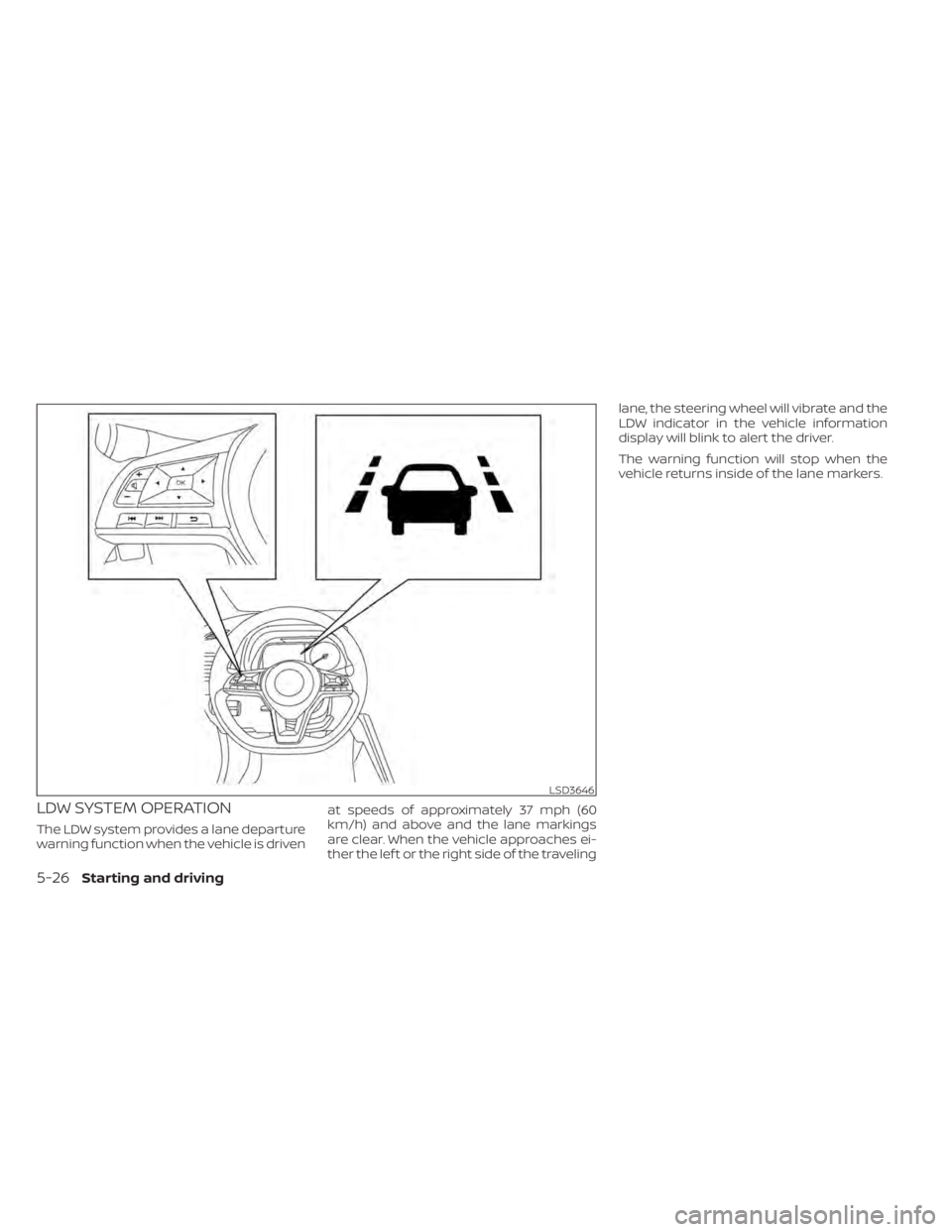
LDW SYSTEM OPERATION
The LDW system provides a lane departure
warning function when the vehicle is drivenat speeds of approximately 37 mph (60
km/h) and above and the lane markings
are clear. When the vehicle approaches ei-
ther the lef t or the right side of the travelinglane, the steering wheel will vibrate and the
LDW indicator in the vehicle information
display will blink to alert the driver.
The warning function will stop when the
vehicle returns inside of the lane markers.
LSD3646
5-26Starting and driving
Page 349 of 602
WARNING
Failure to follow the warnings and in-
structions for proper use of the I-LI sys-
tem could result in serious injury or
death.
• The I-LI system will not steer the ve-
hicle or prevent loss of control. It is
the driver’s responsibility to stay
alert, drive safely, keep the vehicle in
the traveling lane, and be in control of
the vehicle at all times. •
The I-LI system is primarily intended
for use on well-developed freeways
or highways. It may not detect the
lane markers in certain road,
weather, or driving conditions.
The I-LI system must be turned on with the
ProPILOT Assist switch on the steering
wheel (models with ProPILOT Assist) or the
dynamic driver assistance switch (models
without ProPILOT Assist) every time the
power switch is placed in the ON position.
The I-LI system will operate when the ve-
hicle is driven at speeds of approximately
37 mph (60 km/h) and above, and only
when the lane markings are clearly visible
on the road.
The I-LI system warns the driver when the
vehicle has lef t the center of the traveling
lane with an indicator in the vehicle infor-
mation display and a steering vibration.
The system helps assist the driver to return
the vehicle to the center of the traveling
lane by applying the brakes to the lef t or
right wheels individually (for a short period
of time).
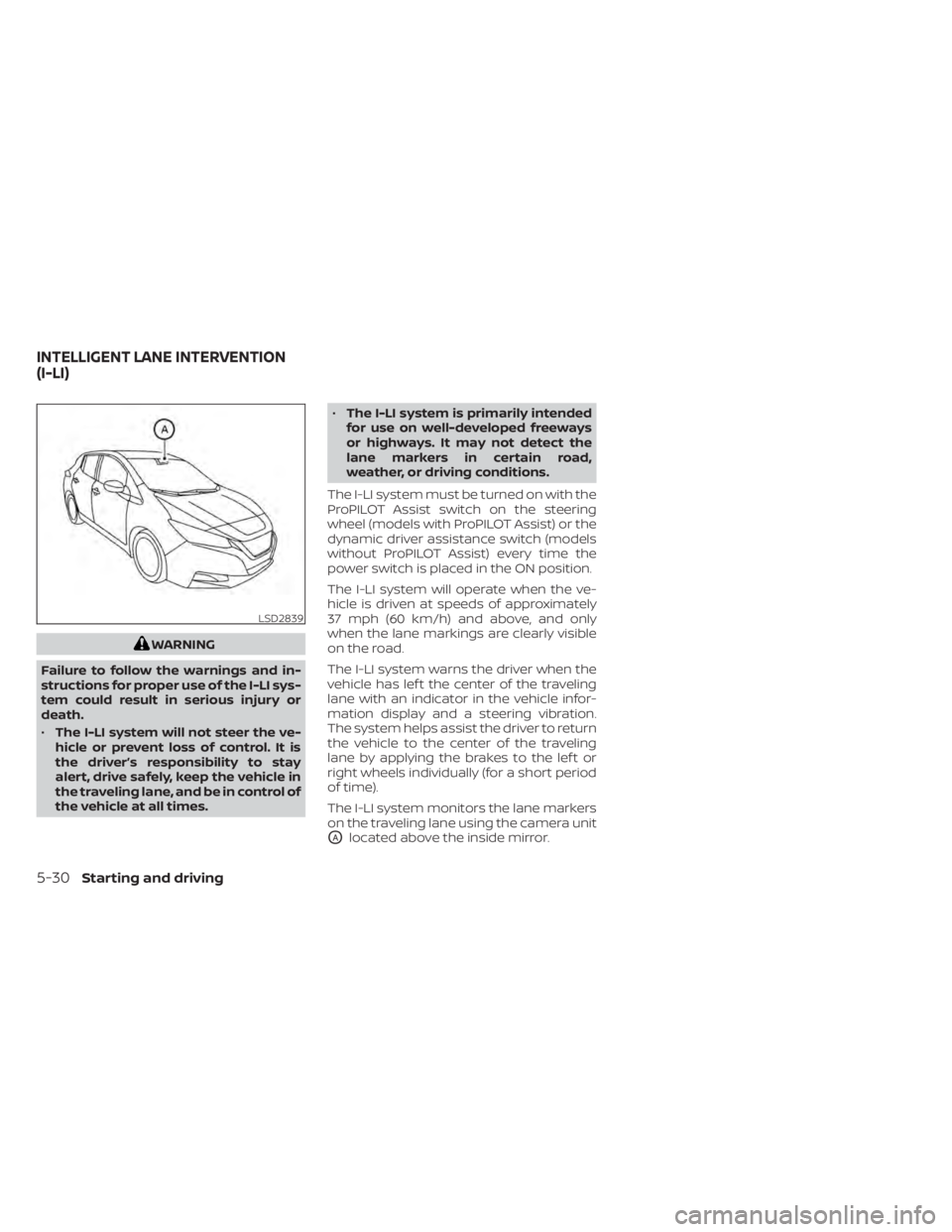
The I-LI system monitors the lane markers
on the traveling lane using the camera unit
OAlocated above the inside mirror.
LSD2839
INTELLIGENT LANE INTERVENTION
(I-LI)
5-30Starting and driving
Page 350 of 602
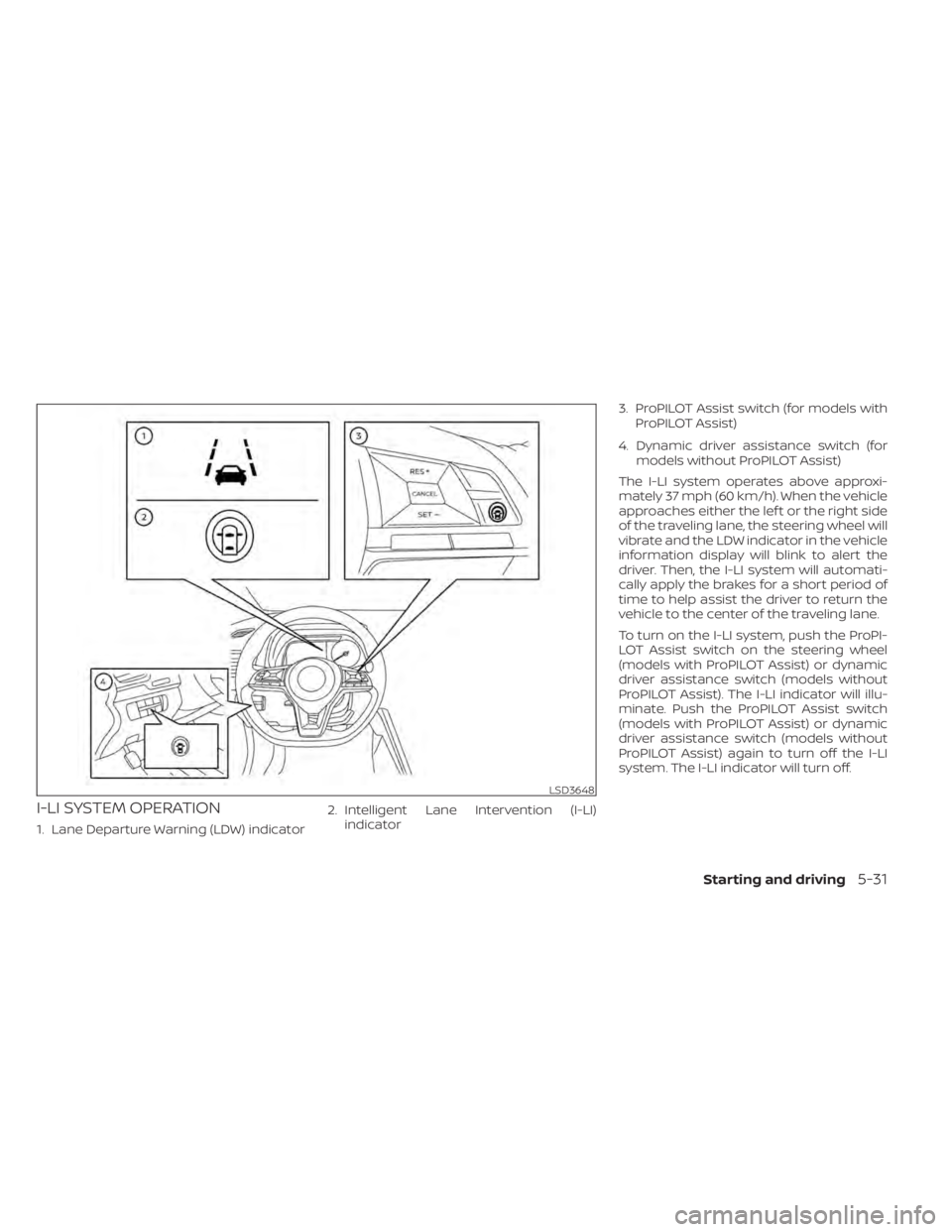
I-LI SYSTEM OPERATION
1. Lane Departure Warning (LDW) indicator2. Intelligent Lane Intervention (I-LI)
indicator 3. ProPILOT Assist switch (for models with
ProPILOT Assist)
4. Dynamic driver assistance switch (for models without ProPILOT Assist)
The I-LI system operates above approxi-
mately 37 mph (60 km/h). When the vehicle
approaches either the lef t or the right side
of the traveling lane, the steering wheel will
vibrate and the LDW indicator in the vehicle
information display will blink to alert the
driver. Then, the I-LI system will automati-
cally apply the brakes for a short period of
time to help assist the driver to return the
vehicle to the center of the traveling lane.
To turn on the I-LI system, push the ProPI-
LOT Assist switch on the steering wheel
(models with ProPILOT Assist) or dynamic
driver assistance switch (models without
ProPILOT Assist). The I-LI indicator will illu-
minate. Push the ProPILOT Assist switch
(models with ProPILOT Assist) or dynamic
driver assistance switch (models without
ProPILOT Assist) again to turn off the I-LI
system. The I-LI indicator will turn off.
LSD3648
Starting and driving5-31
Page 352 of 602
I-LI SYSTEM LIMITATIONS
WARNING
Listed below are the system limitations
for the I-LI system. Failure to follow the
warnings and instructions for proper
use of the I-LI system could result in
serious injury or death.
• The I-LI system may activate if you
change lanes without first activating
your turn signal or, for example, if a
construction zone directs traffic to
cross an existing lane marker. If this
occurs you may need to apply correc-
tive steering to complete your lane
change.
• Because the I-LI may not activate un-
der the road, weather, and lane
marker conditions described in this
section, it may not activate every
time your vehicle begins to leave its
lane and you will need to apply cor-
rective steering.
• When the I-LI system is operating,
avoid excessive or sudden steering
maneuvers. Otherwise, you could
lose control of the vehicle. •
The I-LI system will not operate at
speeds below approximately 37 mph
(60 km/h) or if it cannot detect lane
markers.
• Do not use the I-LI system under the
following conditions as it may not
function properly:
– During bad weather (rain, fog,
snow, etc.).
– When driving on slippery roads,
such as on ice or snow.
– When driving on winding or un-
even roads.
– When there is a lane closure due to
road repairs.
– When driving in a makeshif t or
temporary lane.
– When driving on roads where the
lane width is too narrow.
– When driving without normal tire
conditions (for example, tire wear,
low tire pressure, installation of
spare tire, tire chains, nonstan-
dard wheels).
– When the vehicle is equipped with
nonoriginal brake parts or sus-
pension parts. –
On roads where there are multiple
parallel lane markers; lane mark-
ers that are faded or not painted
clearly; yellow painted lane mark-
ers; non-standard lane markers;
or lane markers covered with wa-
ter, dirt, snow, etc.
– On roads where discontinued lane
markers are still detectable.
– On roads where there are sharp
curves.
– On roads where there are sharply
contrasting objects, such as shad-
ows, snow, water, wheel ruts,
seams or lines remaining af ter
road repairs. (The I-LI system
could detect these items as lane
markers.)
– On roads where the traveling lane
merges or separates.
– When the vehicle’s traveling direc-
tion does not align with the lane
marker.
– When traveling close to the ve-
hicle in front of you, which ob-
structs the lane camera unit de-
tection range.
Starting and driving5-33
Page 353 of 602
–When rain, snow or dirt adheres to
the windshield in front of the lane
camera unit.
– When the headlights are not
bright due to dirt on the lens or if
the aiming is not adjusted
properly.
– When strong light enters the lane
camera unit (for example, the light
directly shines on the front of the
vehicle at sunrise or sunset).
– When a sudden change in bright-
ness occurs (for example, when
the vehicle enters or exits a tunnel
or under a bridge).
While the I-LI system is operating, you may
hear a sound of brake operation. This is
normal and indicates that the I-LI system is
operating properly.SYSTEM TEMPORARILY
UNAVAILABLE
Condition A:
The warning and assist functions of the I-LI
system are not designed to work under the
following conditions:
• When you operate the lane change signal and change the traveling lanes in the di-
rection of the signal. (The I-LI system will
be deactivated for approximately 2 sec-
onds af ter the lane change signal is
turned off.)
• When the vehicle speed lowers to less than approximately 37 mph (60 km/h).
Af ter the above conditions have finished
and the necessary operating conditions
are satisfied, the warning and assist func-
tions will resume.
Condition B:
The assist function of the I-LI system is not
designed to work under the following con-
ditions (warning is still functional):
• When the brake pedal is depressed.
• When the steering wheel is turned as far as necessary for the vehicle to change
lanes.
• When the vehicle is accelerated during I-LI system operation. • When the Intelligent Cruise Control (ICC)
approach warning occurs.
• When the hazard warning flashers are operated.
• When driving on a curve at high speed.
Af ter the above conditions have finished
and the necessary operating conditions
are satisfied, the I-LI system application of
the brakes will resume.
Condition C:
If the following messages appear in the
vehicle information display, a chime will
sound and the I-LI system will be turned off
automatically.
• “Not Available - Poor Road Conditions”: When the Vehicle Dynamic Control (VDC)
system (except Traction Control System
[TCS] function) or ABS operates.
• “Currently not available”: When the VDC system is turned off.
Action to take:
When the above conditions no longer exist,
turn off the I-LI system. Push the ProPILOT
Assist switch (models with ProPILOT Assist)
or dynamic driver assistance switch (mod-
els without ProPILOT Assist) to turn the I-LI
system back on.
5-34Starting and driving
Page 367 of 602
NOTE:
• I-BSI warning and system applicationwill only be activated if the side indica-
tor light is already illuminated when
your vehicle approaches a lane marker.
If another vehicle comes into the de-
tection zone af ter your vehicle has
crossed a lane marker, no I-BSI warn-
ing or system application will be acti-
vated. (For additional information, see
“I-BSI driving situations” (P. 5-50).).
• The I-BSI system is typically activated earlier than the Intelligent Lane Inter-
vention (I-LI) system when your vehicle
is approaching a lane marker.
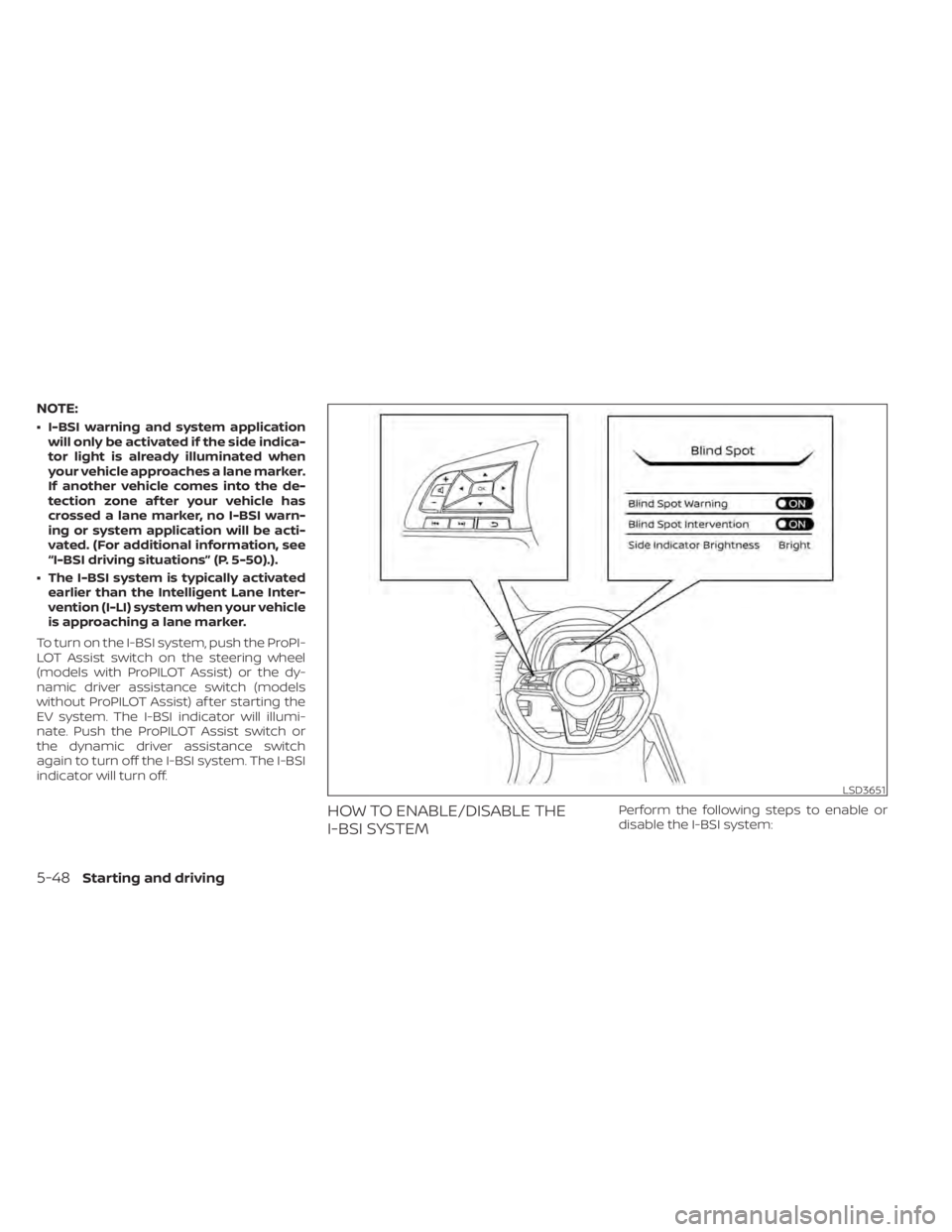
To turn on the I-BSI system, push the ProPI-
LOT Assist switch on the steering wheel
(models with ProPILOT Assist) or the dy-
namic driver assistance switch (models
without ProPILOT Assist) af ter starting the
EV system. The I-BSI indicator will illumi-
nate. Push the ProPILOT Assist switch or
the dynamic driver assistance switch
again to turn off the I-BSI system. The I-BSI
indicator will turn off.
HOW TO ENABLE/DISABLE THE
I-BSI SYSTEMPerform the following steps to enable or
disable the I-BSI system:
LSD3651
5-48Starting and driving
Page 391 of 602
Normally when controlling the distance to
a vehicle ahead, this system automatically
accelerates or decelerates your vehicle ac-
cording to the speed of the vehicle ahead.
Depress the accelerator to properly accel-
erate your vehicle when acceleration is re-
quired for a lane change. Depress the brake
pedal when deceleration is required to
maintain a safe distance to the vehicle
ahead due to its sudden braking or if a
vehicle cuts in. Always stay alert when us-
ing the ICC system.
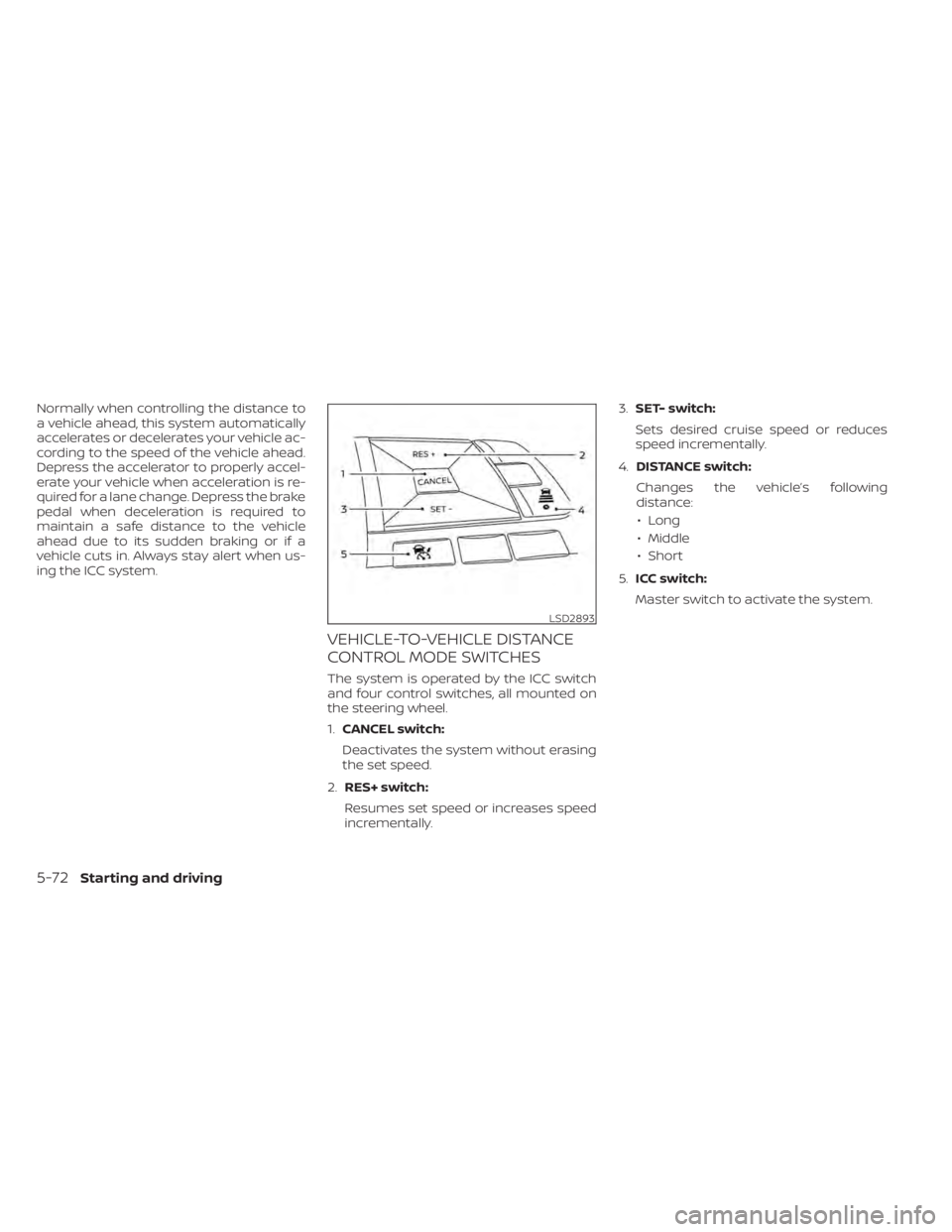
VEHICLE-TO-VEHICLE DISTANCE
CONTROL MODE SWITCHES
The system is operated by the ICC switch
and four control switches, all mounted on
the steering wheel.
1.CANCEL switch:
Deactivates the system without erasing
the set speed.
2. RES+ switch:
Resumes set speed or increases speed
incrementally. 3.
SET- switch:
Sets desired cruise speed or reduces
speed incrementally.
4. DISTANCE switch:
Changes the vehicle’s following
distance: • Long
• Middle
• Short
5. ICC switch:
Master switch to activate the system.
LSD2893
5-72Starting and driving