2021 NISSAN LEAF navigation system
[x] Cancel search: navigation systemPage 204 of 602

STARTUP DISPLAY
With the vehicle in the ON position, the ve-
hicle information display may display the
following screens:
• Battery information
• Audio
• Navigation
• Energy Economy
• Driving Aids
• Warnings
• Settings
Warnings will only display if there are any
present. For additional information, see
“Vehicle information display warnings and
indicators” (P. 2-34).
To control which items display in the ve-
hicle information display, see “How to use
the vehicle information display” (P. 2-26).
SETTINGS
The settings mode allows you to change
the information displayed in the vehicle in-
formation display as well as enable and
disable various vehicle features and sys-
tems. The settings include:
• VDC Setting
• Driver Assistance
• Customize Display
• Vehicle Settings
• EV Settings
• TPMS Settings
• Maintenance
• Clock
• Unit/Language
• Factory Reset
VDC Setting
The VDC setting menu allows the user to the adjust the VDC settings.
Menu ItemExplanation
System Allows user to turn the Vehicle Dynamic Control (VDC) system on or off.
Instruments and controls2-27
Page 218 of 602
For additional information, see "Rear Auto-
matic Braking (RAB) (P. 5-132).
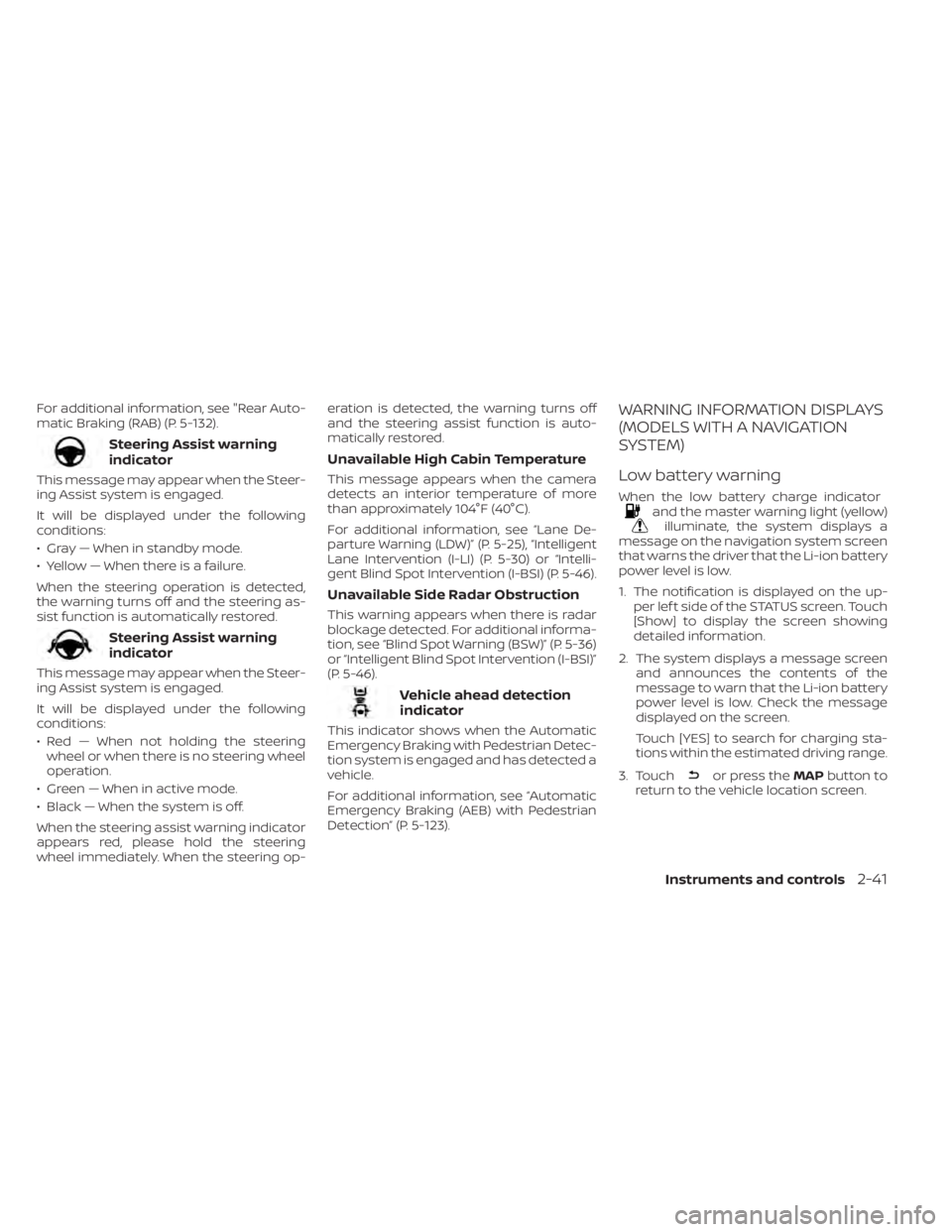
Steering Assist warning
indicator
This message may appear when the Steer-
ing Assist system is engaged.
It will be displayed under the following
conditions:
• Gray — When in standby mode.
• Yellow — When there is a failure.
When the steering operation is detected,
the warning turns off and the steering as-
sist function is automatically restored.
Steering Assist warning
indicator
This message may appear when the Steer-
ing Assist system is engaged.
It will be displayed under the following
conditions:
• Red — When not holding the steeringwheel or when there is no steering wheel
operation.
• Green — When in active mode.
• Black — When the system is off.
When the steering assist warning indicator
appears red, please hold the steering
wheel immediately. When the steering op- eration is detected, the warning turns off
and the steering assist function is auto-
matically restored.
Unavailable High Cabin Temperature
This message appears when the camera
detects an interior temperature of more
than approximately 104°F (40°C).
For additional information, see “Lane De-
parture Warning (LDW)” (P. 5-25), “Intelligent
Lane Intervention (I-LI) (P. 5-30) or “Intelli-
gent Blind Spot Intervention (I-BSI) (P. 5-46).
Unavailable Side Radar Obstruction
This warning appears when there is radar
blockage detected. For additional informa-
tion, see “Blind Spot Warning (BSW)” (P. 5-36)
or “Intelligent Blind Spot Intervention (I-BSI)”
(P. 5-46).
Vehicle ahead detection
indicator
This indicator shows when the Automatic
Emergency Braking with Pedestrian Detec-
tion system is engaged and has detected a
vehicle.
For additional information, see “Automatic
Emergency Braking (AEB) with Pedestrian
Detection” (P. 5-123).
WARNING INFORMATION DISPLAYS
(MODELS WITH A NAVIGATION
SYSTEM)
Low battery warning
When the low battery charge indicatorand the master warning light (yellow)illuminate, the system displays a
message on the navigation system screen
that warns the driver that the Li-ion battery
power level is low.
1. The notification is displayed on the up- per lef t side of the STATUS screen. Touch
[Show] to display the screen showing
detailed information.
2. The system displays a message screen and announces the contents of the
message to warn that the Li-ion battery
power level is low. Check the message
displayed on the screen.
Touch [YES] to search for charging sta-
tions within the estimated driving range.
3. Touch
or press the MAPbutton to
return to the vehicle location screen.
Instruments and controls2-41
Page 258 of 602
WARNING
• Radio waves could adversely affect
electric medical equipment. Those
who use a pacemaker should contact
the electric medical equipment
manufacturer for the possible influ-
ences before use.
• The Intelligent Key transmits radio
waves when the buttons are pressed.
The FAA advises the radio waves may
affect aircraf t navigation and com-
munication systems. Do not operate
the Intelligent Key while on an air-
plane. Make sure the buttons are not
operated unintentionally when the
unit is stored for a flight.
• Never leave the Intelligent Key in the
vehicle when you leave the vehicle.
The Intelligent Key system can operate all
the door locks using the remote control
function or pushing the request switch on
the vehicle without taking the key out from
a pocket or purse. The operating environ-
ment and/or conditions may affect the In-
telligent Key system operation.
Be sure to read the following before using
the Intelligent Key system.CAUTION
Be sure to carry the Intelligent Key with
you when operating the vehicle.
The Intelligent Key is capable of receiving
and transmitting radio waves. The Intelli-
gent Key system transmits weak radio
waves from various distances. Environ-
mental conditions may interfere with the
operation of the Intelligent Key system un-
der the following operating conditions:
• When operating near a location where strong radio waves are transmitted, such
as a TV tower, power station and broad-
casting station.
• When in possession of wireless equip- ment, such as a cellular telephone, trans-
ceiver or a CB radio.
• When the Intelligent Key is in contact with or covered by metallic materials.
• When any type of radio wave remote con- trol is used nearby.
• When the Intelligent Key is placed near an electric appliance such as a personal
computer.
• When the vehicle is parked near a parking meter. In such cases, correct the operating condi-
tions before using the Intelligent Key func-
tion or use the mechanical key.
Although the life of the battery varies de-
pending on the operating conditions, the
battery’s life is approximately two years. If
the battery is discharged, replace it with a
new one.
When the Intelligent Key battery is low, the
“Key Battery Low” indicator illuminates in
the vehicle information display. For addi-
tional information, see “Key Battery Low”
(P. 2-34).
Since the Intelligent Key is capable of re-
ceiving radio waves, if the key is lef t near
equipment which transmits strong radio
waves, such as signals from a TV and per-
sonal computer, the battery life may be-
come shorter.
For additional information, see “NISSAN In-
telligent Key® battery replacement” (P. 8-19).
Pay special attention that the vehicle bat-
tery is not completely discharged.
NISSAN INTELLIGENT KEY® SYSTEM
Pre-driving checks and adjustments3-7
Page 263 of 602
Using the interior lights
The interior lights illuminate for a period of
time when a door is unlocked and the
room light switch is in the DOOR position.
The lights can be turned off without waiting
by performing one of the following
operations:
• Placing the power switch in the ONposition.
• Locking the doors with the Intelligent Key.
• Switching the room light switch to the “OFF” position.
For additional information, see “Interior
lights” (P. 2-68).
Opening rear hatch
1. Carry the Intelligent Key.
2. Push the rear hatch opener switch
OC.
3. The rear hatch will unlock and open.
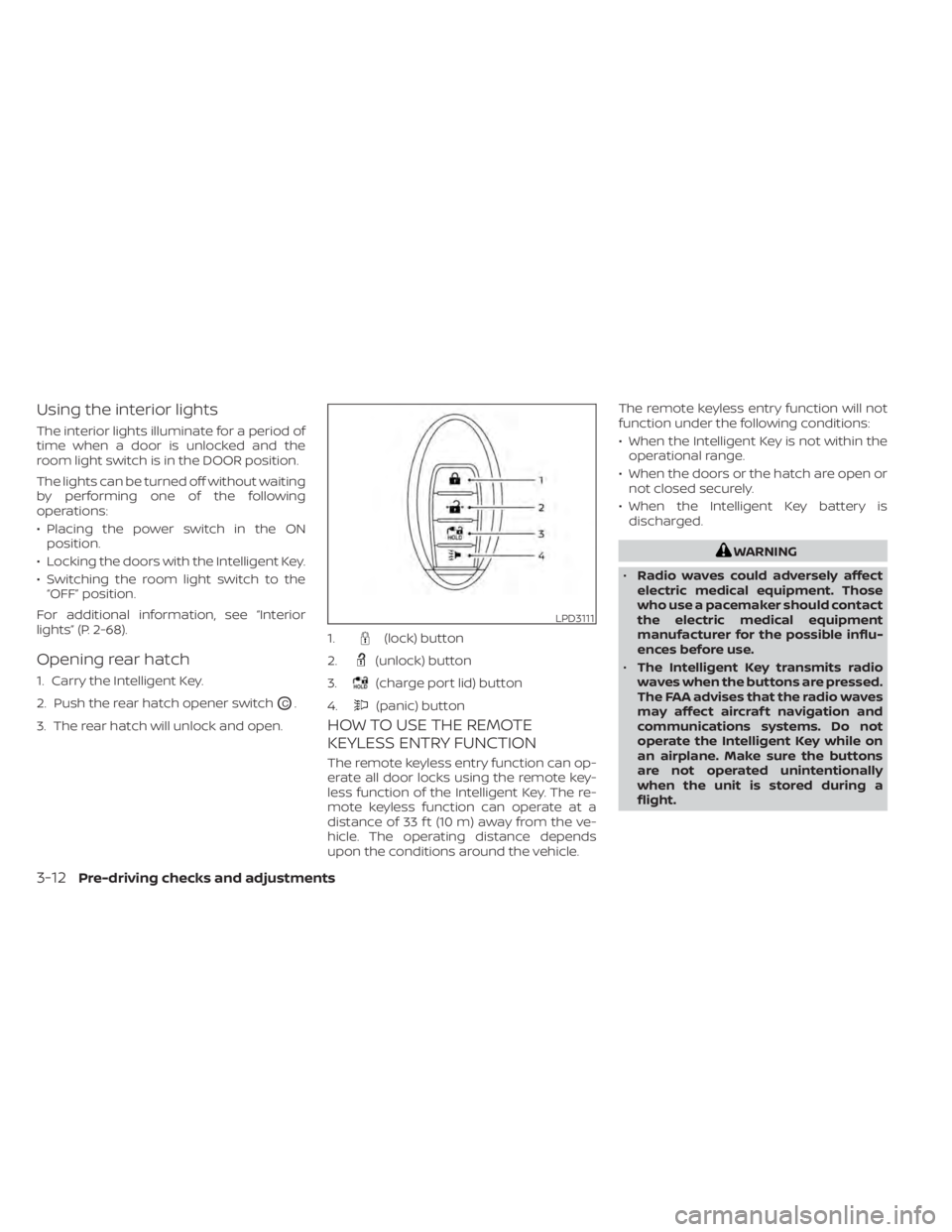
HOW TO USE THE REMOTE
KEYLESS ENTRY FUNCTION
The remote keyless entry function can op-
erate all door locks using the remote key-
less function of the Intelligent Key. The re-
mote keyless function can operate at a
distance of 33 f t (10 m) away from the ve-
hicle. The operating distance depends
upon the conditions around the vehicle. The remote keyless entry function will not
function under the following conditions:
• When the Intelligent Key is not within the
operational range.
• When the doors or the hatch are open or not closed securely.
• When the Intelligent Key battery is discharged.
WARNING
• Radio waves could adversely affect
electric medical equipment. Those
who use a pacemaker should contact
the electric medical equipment
manufacturer for the possible influ-
ences before use.
• The Intelligent Key transmits radio
waves when the buttons are pressed.
The FAA advises that the radio waves
may affect aircraf t navigation and
communications systems. Do not
operate the Intelligent Key while on
an airplane. Make sure the buttons
are not operated unintentionally
when the unit is stored during a
flight.
LPD3111
1.(lock) button
2.
(unlock) button
3.
(charge port lid) button
4.
(panic) button
3-12Pre-driving checks and adjustments
Page 278 of 602
4 Monitor, climate, audio, phone and
voice recognition systems
NissanConnect® Manual........................4-2
RearView Monitor (if so equipped) ...............4-3
RearView Monitor system operation ..........4-4
How to read the displayed lines ..............4-5
Difference between predicted and
actual distances .............................4-5
How to park with predicted course
lines ..........................................4-7
Adjusting the screen .........................4-8
How to turn on and off predicted
course lines ..................................4-9
RearView Monitor system limitations .........4-9
System maintenance ....................... 4-10
Intelligent Around View Monitor
(if so equipped) .................................. 4-11
Intelligent Around View Monitor system
operation ................................... 4-12
Difference between predicted and
actual distances ............................ 4-13
How to park with predicted course
lines ......................................... 4-14
How to switch the display ...................4-15
Adjusting the screen ........................ 4-16
Intelligent Around View Monitor system
limitations .................................. 4-17System maintenance
....................... 4-19
Moving Object Detection (MOD)
(if so equipped) ................................. 4-20
MOD system operation ......................4-21
Turning MOD ON and OFF ...................4-23
MOD system limitations .....................4-23
System maintenance .......................4-24
Vents .......................................... 4-25
Heater and air conditioner (automatic) .........4-26
Displaying climate control system
status screen (models with navigation
system) ..................................... 4-27
Operating tips ............................... 4-27
In-cabin microfilter .......................... 4-28
Automatic climate control
(models without Navigation System) ........4-29
Automatic climate control
(models with Navigation System) ............4-32
Climate ctrl. timer ........................... 4-35
USB/iPod® charging ports ......................4-40
Antenna ........................................ 4-40
Car phone or CB radio .......................... 4-41
iPod®/iPhone® ................................. 4-41
Page 279 of 602

Refer to the NissanConnect® Manual that
includes the following information.
• EV-Specific functions
• Audio
• Hands-Free Phone
• NissanConnect® EV & Services (if soequipped)
• Apple CarPlay®
• Android Auto™
• Navigation (if so equipped)
• Voice recognition
• Information and settings viewable on the system
NISSANCONNECT® MANUAL
4-2Monitor, climate, audio, phone and voice recognition systems
Page 303 of 602
WARNING
• The air conditioning cooling function
operates only when the power
switch is in the ON position or when
the READY to drive indicator light is
ON.
• Do not leave children or adults who
would normally require the assis-
tance of others alone in your vehicle.
Pets should also not be lef t alone.
They could accidentally injure them-
selves or others through inadvertent
operation of the vehicle. Also, on hot,
sunny days, temperatures in a closed
vehicle could quickly become high
enough to causes severe or possibly
fatal injuries to people or animals. •
Do not use the recirculation mode for
long periods as it may cause the inte-
rior air to become stale and the win-
dows to fog up.
NOTE:
• Odors from inside and outside the ve- hicle can build up in the air conditioner
unit. Odor can enter the passenger
compartment through the vents.
• When parking, set the heater or air conditioner controls to turn off air re-
circulation to allow fresh air into the
passenger compartment. This should
help reduce odors inside the vehicle. The climate control system (air conditioner
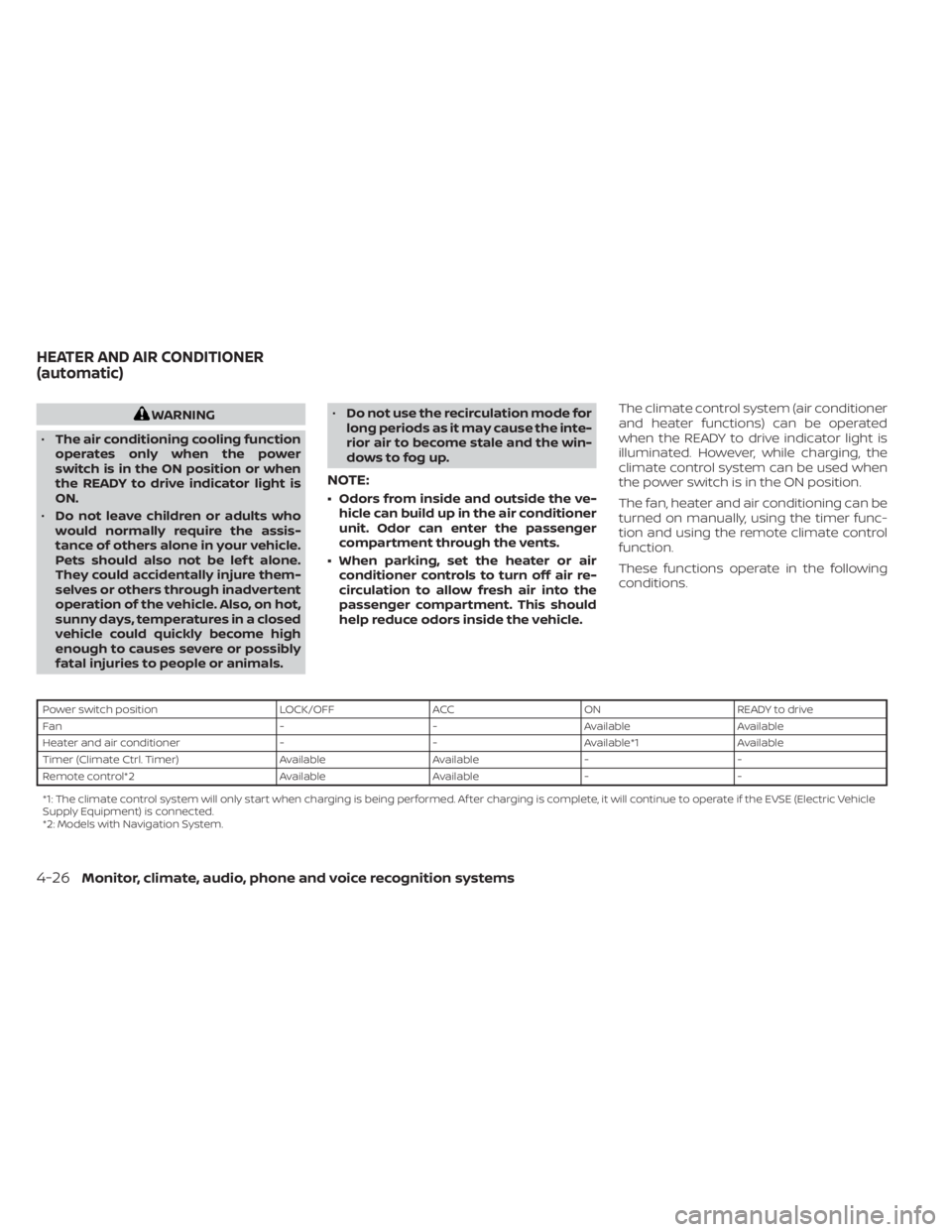
and heater functions) can be operated
when the READY to drive indicator light is
illuminated. However, while charging, the
climate control system can be used when
the power switch is in the ON position.
The fan, heater and air conditioning can be
turned on manually, using the timer func-
tion and using the remote climate control
function.
These functions operate in the following
conditions.
Power switch position
LOCK/OFFACCON READY to drive
Fan --Available Available
Heater and air conditioner --Available*1 Available
Timer (Climate Ctrl. Timer) AvailableAvailable- -
Remote control*2 AvailableAvailable- -
*1: The climate control system will only start when charging is being performed. Af ter charging is complete, it will continue to operate if the EVSE (El ectric Vehicle
Supply Equipment) is connected.
*2: Models with Navigation System.
HEATER AND AIR CONDITIONER
(automatic)
4-26Monitor, climate, audio, phone and voice recognition systems
Page 304 of 602
NOTE:
• A series of operation sounds may beheard immediately af ter climate con-
trol ON/OFF operation. This is not a
malfunction.
• Compressor and motor fan may sud- denly start to operate during charging
operation. This is not a malfunction.
• Condensation forms inside the air con- ditioning unit when the air conditioner
is running, and is safely discharged un-
derneath your vehicle. Traces of water
on the ground are therefore normal.
Water may drop underneath the ve-
hicle when climate control is operating.
DISPLAYING CLIMATE CONTROL
SYSTEM STATUS SCREEN (models
with navigation system)
The climate control system status screen
can be displayed as a widget. For details of
the widget, refer to the NissanConnect®
Manual.
NOTE:
• If the READY to drive indicator light isilluminated and the EVSE (Electric Ve-
hicle Supply Equipment) is connected
to the vehicle, the power switch will
change to the ON position. At the same
time, the climate control system will
stop operating. However, the fan will
continue to operate. If you want to turn
on climate control again, place the
power switch in the OFF position and
then place it in the ON position again
af ter confirming that the vehicle has
started charging.
• When the power switch is in the ON position, if the power supply from the
EVSE (Electric Vehicle Supply Equip-
ment) is interrupted due to an electri-
cal outage, etc., the system will operate
in the following ways.– If it occurs while charging is being performed:
The climate control system will stop
once. If the power supply is restored
within approximately 5 minutes, the
climate control system will restart.
However, if more than 5 minutes have
elapsed, the climate control system
will not restart.
–
If it occurs af ter charging has finished:The climate control system will stop.
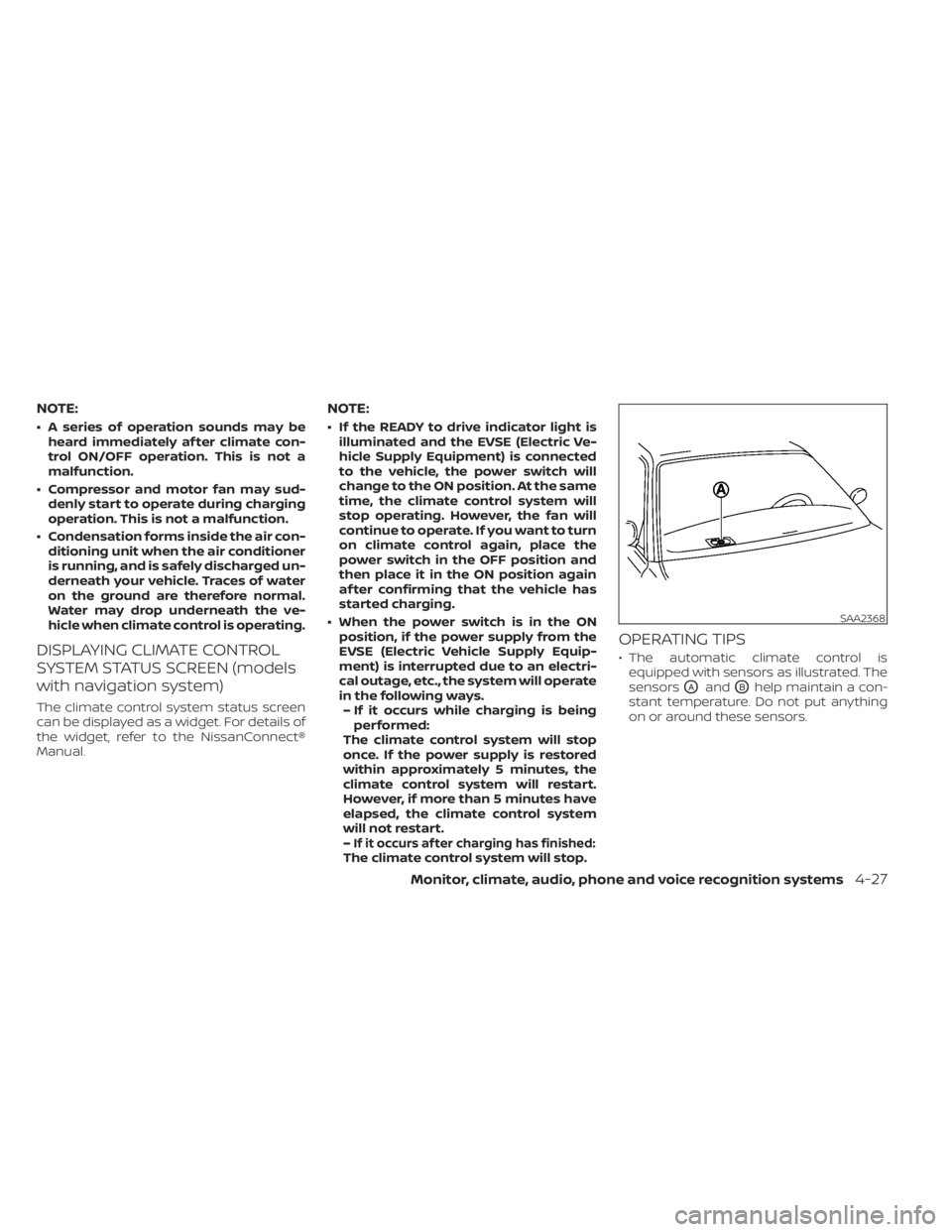
OPERATING TIPS
• The automatic climate control is equipped with sensors as illustrated. The
sensors
OAandOBhelp maintain a con-
stant temperature. Do not put anything
on or around these sensors.
SAA2368
Monitor, climate, audio, phone and voice recognition systems4-27