2021 NISSAN LEAF display
[x] Cancel search: displayPage 97 of 602

IMMEDIATE CHARGE
When a charging timer is not turned on,
charging automatically starts when a nor-
mal or trickle charge connector is con-
nected to the vehicle.
Use the immediate charge mode anytime
you want to start charging when a charg-
ing timer is turned on by performing the
following:
1. Place the power switch in the OFFposition.
2. Push the immediate charge switch.
3. Connect the normal or trickle chargecable when the charging status indica-
tor light changes to display immediate
charge mode. For additional informa-
tion, see “Charging status indicator
lights” (P. CH-49).
NOTE:
• You have 15 minutes to connect a nor-mal or trickle charge connector to the
vehicle af ter the immediate charge
switch is pushed. If a charge connector
is not connected to the vehicle within
15 minutes, the vehicle automatically
returns to the previous setting.
•
To cancel immediate charge mode push
the immediate charge switch again.
• If the charge cable is disconnected, the Li-ion battery automatically switches
to charging timer. To perform an im-
mediate charge again, push the imme-
diate charge switch and connect the
charge cable.
• If the charge cable is already con- nected, push the immediate charge
switch to start performing an immedi-
ate charge.
CHARGING RELATED REMOTE
FUNCTION (models with
Navigation System)
This vehicle incorporates a communica-
tion device that is called a TCU (Telematics
Communication Unit). The communication
connection between this unit and NISSAN
Data Center allows for various remote
function services.
LCH2125
CH-48Charging
Page 98 of 602
•Remote battery status check:
The charging status of the Li-ion battery
can be checked using the
“NissanConnect® EV & Services”, or
“NissanConnect®”, or Owners Portal even
if you are not in the vehicle.
• Remote start charge:
The function of starting the Li-ion battery
charge or starting the heater and air con-
ditioner is available using your personal
computer or internet enabled smart
phone.
• Plug-in reminder:
A notification e-mail will be sent to your
personal computer or internet enabled
smart phone if the plug is not connected
at the specific time you selected, af ter
turning off the power switch.
NOTE:
• Establishing the NissanConnect® EV & Services, or NissanConnect® is neces-
sary before using this service. For addi-
tional information, refer to the
NissanConnect® Manual.
• To check the Li-ion battery charging status using an internet enabled smart
phone or personal computer, the fol-
lowing conditions must be met: – The vehicle must be located in a cel-
lular phone coverage area.
– The cellular phone must be located in an area with cellular phone
coverage.
– If using a computer, the computer must be connected to the internet.
– Some cellular phones are not com- patible and cannot be used to check
the Li-ion battery charging status.
Please confirm beforehand.
• Certain remote functions require a compatible smart phone, which is not
included with the vehicle.
• NissanConnect® EV & Services, or NissanConnect® information system
features are included through a sub-
scription service which requires owner
consent to activate. The subscription
must be active to use these features.
• NissanConnect® EV & Services, or NissanConnect® communications may
be received at a verified e-mail address
or by SMS/text messaging-enabled
mobile phone.
• Standard text rates and/or data usage may apply depending on your carrier.
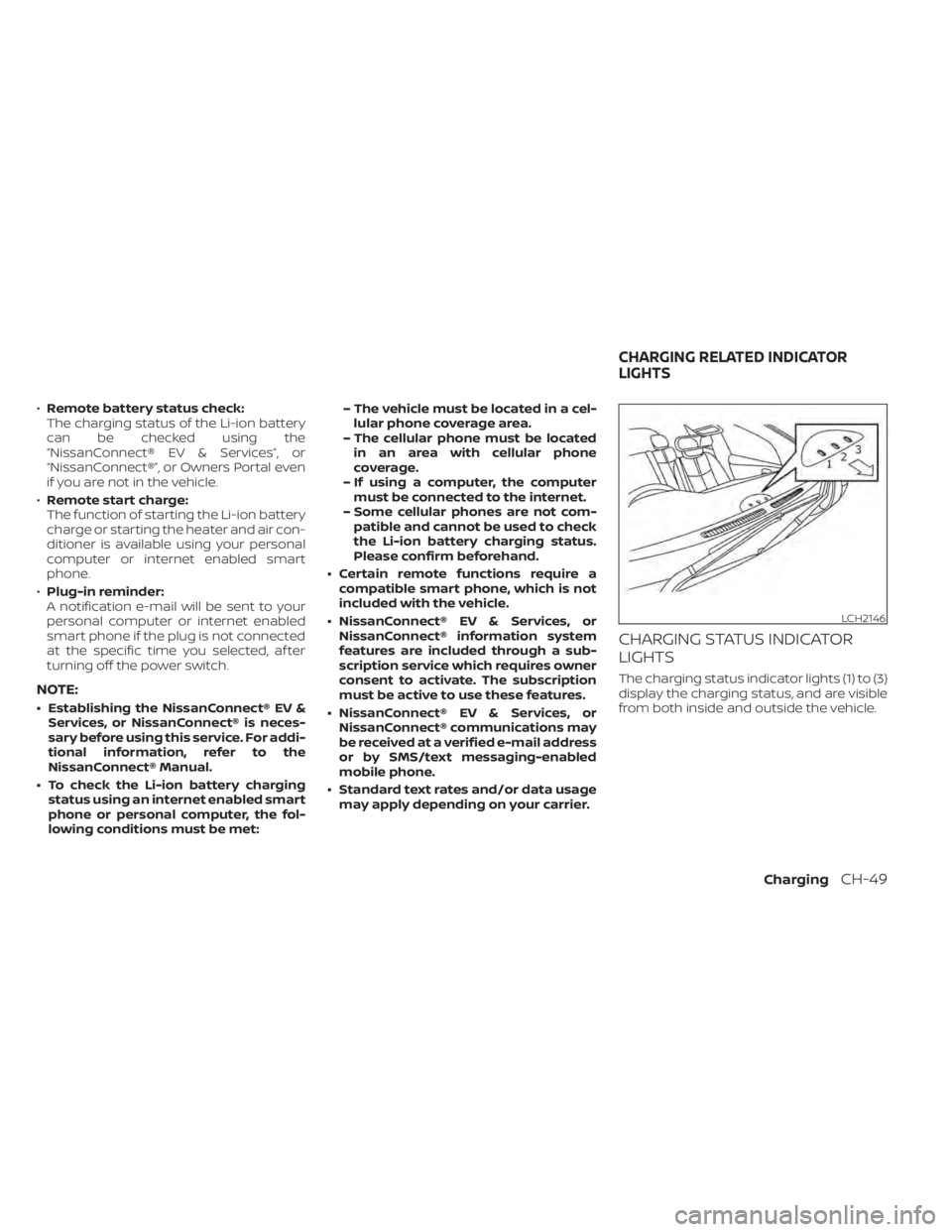
CHARGING STATUS INDICATOR
LIGHTS
The charging status indicator lights (1) to (3)
display the charging status, and are visible
from both inside and outside the vehicle.
LCH2146
CHARGING RELATED INDICATOR
LIGHTS
ChargingCH-49
Page 100 of 602

When charging
When the Li-ion battery is being charged,
the charging status indicator lights will
change depending on the amount the Li-
ion battery is charged.
* : This value is also displayed by the battery
available charge gauge on the vehicle in-
formation display.When fully charged
All of the indicator lights (1) to (3) illuminate
when the Li-ion battery is fully charged to
the selected charging mode level.
The indicator lights turn off af ter approxi-
mately 5 minutes or when the charge con-
nector is removed.
When the indicator light (3) flashes
The indicator light (3) flashes when the 12-
volt battery is being charged. For additional
information, see “Charging the 12-volt bat-
tery” (P. EV-5).
The indicator light will also flash for up to 5
minutes if the electrical power from the
EVSE or charging device is interrupted dur-
ing charging. Charging will restart auto-
matically when the electrical power from
the EVSE or charging device is restored if
the normal charge connector is con-
nected. The charge start beep will not
sound when charging restarts.
LCH2150LCH2151LCH2152
ChargingCH-51
Page 105 of 602

SymptomPossible cause Possible solution
All types of charging can- not be performed. The vehicle power switch is in the ON posi-
tion.
Before charging, place the vehicle power switch in the OFF position.
Both the normal charge connector and the
quick charge connector (if so equipped) are
connected at the same time. The normal charge connector and the quick charge connector cannot be connected at
the same time.
The Li-ion battery is already fully charged. Confirm the available Li-ion battery capacity remaining by checking the Li-ion battery
available charge gauge. If the Li-ion battery charge gauge reaches 100%, the Li-ion bat-
tery is already fully charged and cannot be charged. Charging automatically turns off if
the Li-ion battery is fully charged.
The temperature of the Li-ion battery is too
hot or cold to charge. Confirm the Li-ion battery temperature by checking the Li-ion battery temperature
gauge. If the gauge indicates the Li-ion battery is too hot (red zone) or too cold (blue
zone), charging is not possible. Allow the Li-ion battery to cool or warm up before charg-
ing. For additional information, see “Li-ion battery temperature gauge” (P. 2-7).
The 12-volt battery is discharged. If the vehicle electrical systems cannot be turned on even when the power switch is
turned on, the 12V battery may be discharged. Charge or replace the 12V battery.
The vehicle has a malfunction. The vehicle may have a malfunction. Confirm if the warning light on the meter is illumi-
nated. If a warning is displayed, stop charging. It is recommended that you visit a NISSAN
certified LEAF dealer.
Normal charge or trickle charge cannot be per- formed. There is no electrical power coming from
the outlet.
Confirm that there has not been a power failure. Make sure the breaker is on. If an outlet
with a timer device installed is used, power will only be available at the time set by the
timer.
The EVSE or charging device may have a
malfunction. If Genuine NISSAN EVSE is used, see “Charging troubleshooting guide” (P. CH-56) for the
device.
The charge connector is not connected
correctly. Confirm the charge connector is connected correctly.
Plug might not be connected correctly. Confirm if the plug is connected correctly.
There is no electric power coming from the
normal charging station. Confirm operation procedure of charging station.
The outlet (that the EVSE is connected to)
is not connected to the power source cor-
rectly. Confirm the condition according to the illumination pattern of the indicator light on the
EVSE. For additional information, see "EVSE (Electric Vehicle Supply Equipment) control
box indicator light" (P. CH-52).
CHARGING TROUBLESHOOTING
GUIDE
CH-56Charging
Page 106 of 602

SymptomPossible cause Possible solution
Immediate charge can- not be performed. Charging timer has been set.
Turn off the charging timer. For additional information, see “Charging timer” (P. CH-43).
Charging timer cannot be performed. The charge cable is not connected. Connect the charge cable.
The time on the clock is wrong.
The charging timer function does not start charging based on the clock located on the
vehicle information display. Adjust the clock. For additional information, see “Clock”
(P. 2-12). If the 12-volt battery is discharged or if the Li-ion battery is disconnected, the
time setting must be updated.
The immediate charge switch has been
pushed. Charging timer does not operate when immediate charge is selected.
Charging timer has not been set. Set the charging timer schedule. For additional information, see “Charging timer”
(P. CH-43).
Charging does not start because the
charging timer start time and end time are
set and the current time is before the set
start time. Confirm when the charging timer time is set to start charging. Change the charging
timer setting to the desired charge time or push the immediate charge switch. For addi-
tional information, see “Charging timer” (P. CH-43).
The charge cable is not connected. Connect the charge cable beforehand.
Normal charge stops in the middle of charging. There is no power coming from the outlet.
There may have been an electrical power failure, or the breaker may have failed. Charg-
ing will resume when the power source is reset.
The charge cable has been disconnected. Check that the charge cable has not been disconnected.
Both the normal charge connector and the
quick charge connector were connected at
the same time. If the normal charge connector and the quick charge connector are connected at the
same time, charging will be stopped.
Charging timer end time has been
reached. When the charging timer is set and the charge end time is reached, charging will be
stopped, even if the Li-ion battery is not fully charged.
The temperature of the Li-ion battery is too
hot or too cold to charge. Confirm the Li-ion battery temperature by checking the Li-ion battery temperature
gauge. If the gauge indicates the Li-ion battery is too hot (red zone) or too cold (blue
zone), charging is not possible. Allow the Li-ion battery to cool or warm up before charg-
ing. For additional information, see “Li-ion battery temperature gauge” (P. 2-7).
The electric power supply from the normal
charging station was stopped. Confirm operation procedure of charging station.
ChargingCH-57
Page 173 of 602

light” (P. 1-66). If the operation of the supple-
mental air bag warning light indicates
there is a malfunction, have the system
checked. It is recommended that you visit a
NISSAN certified LEAF dealer for this service.
When selling your vehicle, we request that
you inform the buyer about the preten-
sioner system and guide the buyer to the
appropriate sections in this Owner’s Manual.
SUPPLEMENTAL AIR BAG WARNING
LABELSSUPPLEMENTAL AIR BAG WARNING
LIGHTThe supplemental air bag warning light,
displayingin the instrument panel,
monitors the circuits of the Air bag Control
Unit (ACU), satellite sensors, crash zone
sensor, occupant classification sensor, the
supplemental front-impact air bag, front
and rear outboard seat-mounted side-
impact supplemental air bag, roof-
mounted curtain side-impact supplemen-
tal air bag, knee air bag and seat belt
LRS2620
A. Supplemental front-impact air bag system warning labels
SPA1097
1-66Safety–Seats, seat belts and supplemental restraint system
Page 177 of 602

2 Instruments and controls
Cockpit.........................................2-2
Instrument Panel ................................2-4
Meters and Gauges .............................2-5
Speedometer and odometer .................2-5
Li-ion battery temperature gauge ............ 2-7
Power meter ................................. 2-7
Driving range .................................2-8
Li-ion battery available charge gauge ........2-9
Li-ion battery capacity level gauge ..........2-12
Outside air temperature .....................2-12
Clock ........................................ 2-12
ECO mode indicator ......................... 2-13
e-Pedal system indicator ....................2-13
Warning lights, indicator lights and audible
reminders ...................................... 2-14
Checking lights .............................. 2-15
Warning/Indicator lights (red) ...............2-15
Warning/Indicator lights (yellow) ............2-18
Warning/Indicator lights (other) .............2-24
Audible reminders ........................... 2-25
Vehicle information display .....................2-26
How to use the vehicle information
display ...................................... 2-26
Startup display .............................. 2-27
Settings ..................................... 2-27
Vehicle information display warnings
and indicators ............................... 2-34Warning information displays (MODELS
WITH A NAVIGATION SYSTEM)
................2-41
Security systems ............................... 2-42
Vehicle security system .....................2-42
NISSAN Vehicle Immobilizer System .........2-43
Wiper and washer switch .......................2-45
Washer operation ........................... 2-46
Rear wiper operation ........................ 2-46
Rear window and outside mirror
(if so equipped) defroster switch ...............2-47
Headlight and turn signal switch ...............2-48
Headlight switch ............................ 2-48
LED Daytime Running Lights (DRL)
system (Type A) (if so equipped) .............2-52
LED Daytime Running Lights (DRL)
system (Type B) (if so equipped) .............
2-52
Instrument
brightness control ..............2-53
Turn signal switch ........................... 2-53
Fog light switch (if so equipped) ................2-54
Horn ........................................... 2-54
ECO switch ..................................... 2-55
Heated seat switches (if so equipped) ..........2-55
Heated steering wheel switch (if so equipped) . . 2-56
E-call (SOS) button (if so equipped) .............2-57
Charge port lid switch .......................... 2-57
Immediate Charge switch ......................2-58
Page 179 of 602

1. TRIP RESET switch for twin tripodometer (P. 2-5)
Instrument brightness control switch
(P. 2-53) 2. Headlight, fog light (if so equipped) and
turn signal switch (P. 2-48) 3. Steering-wheel-mounted controls (lef t
side)
Audio control*
Vehicle information display controls
(P. 2-26)
4. Steering wheel (P. 3-22) Power steering system (P. 5-156)
Horn (P. 2-54)
Driver's supplemental air bag (P. 1-45)
5. Wiper and washer switch (P. 2-45)
6. Steering-wheel-mounted controls
(right side)
Cruise control switches (if so equipped)
(P. 5-65)
Intelligent Cruise Control (ICC) switches
(if so equipped) (P. 5-67)
ProPILOT Assist switch (if so equipped)
(P. 5-91)
Bluetooth® Hands-Free Phone System
control*
7. Shif t lever (P. 5-14) ECO switch (P. 2-55)
e-Pedal switch (P. 5-21)
8. Console box (P. 2-61)
9. Parking brake (switch type)
(if so equipped) (P. 5-18)
10. Tilt and telescopic steering wheel lever
(P. 3-23)
LII2624
COCKPIT
2-2Instruments and controls