2021 MERCEDES-BENZ GT COUPE USB port
[x] Cancel search: USB portPage 78 of 422

#
Allow vehicle partsto cool down before
to uc hin gth em. The
driving charact eristic sof your vehicle are
dependent onthedis tribution oftheload within
th eve hicle. Yousho uld bear thefo llo wing in
min dwhen loading theve hicle:
R Neverex ceed theper missible gross mass or
th egr oss axle weight rating forth eve hicle
(including occupants). Thevalues arespec i‐
fi ed on theve hicle identif ication plateon the
ve hicle's B-pillar.
R Position heavyloads asfarfo rw ards asposs i‐
ble and aslow do wn inthecar gocom part‐
ment aspossible.
R The load mustno tpr otru de abo vetheupper
edg eof theseat backres ts.
R Alw aysatt achth epar tition netwhen trans‐
por ting objec tsinthecar gocom partmen t.
R Alw aysplace theload behind unoccupied
seats ifpossible.
R Secur eth eload withsuf ficie ntly tear-resis t‐
ant and wear-resis tant tie downs .Pa dshar p
edg esforpr otect ion. St
ow agespace sin theve hicl eint erior Ov
ervie wof thefront storage com partmen ts 1
Stor ag espace inthedoor s
2 Stor ag ecom partmen tbeneat hth ear mr est
wit hmultimedia connect ionunit withan SD
car dslo t,tw oUSB connect ions andtheigni‐
tion lock
Depen dingontheve hicle's equipment, ther e
ma ybe a12 Vsoc ketin thestor ag ecom‐
par tmen t
3 Stor ag ecom partmen tin thefront cent er
con sole withaUSB port
4 Glovebox Ext
ending/r etra ctin gth ecar gocom part‐
men tco ver &
WARNIN GRisk ofinju ryor deat hdue to
poor lysecur edobjec ts
The cargocom partmen tco veralo ne canno t
secur eor restra in hea vyobje cts, items of
lugg ageor hea vyloads.
Yo uco uld behit byan uns ecur edload, par‐
tic ular lyin theev ent ofabr uptch ang esin
dir ect ion,sudden brakin gor an acc iden t. #
Alw aysst ow object sin suc hawa yth at
th ey canno tbe thro wn around. #
Sec ureobj ect s,lugg ageor loads
ag ains tslippin gor tipp ingover,e.g. by
usin gtie downs ,eve nif yo uar eusin g
th ecar gocom partmen tco ver. *
NO
TEDama getothecar gocom part‐
ment coverwhen loading theve hicle The
cargocom partment coverma ybe dam‐
ag ed when theve hicle isbeing loaded. 76
Seatsand stow ing
Page 126 of 422
R
Mor edr ive to rq ue istrans ferred tothewheel
or wheels withtra ction. Ac
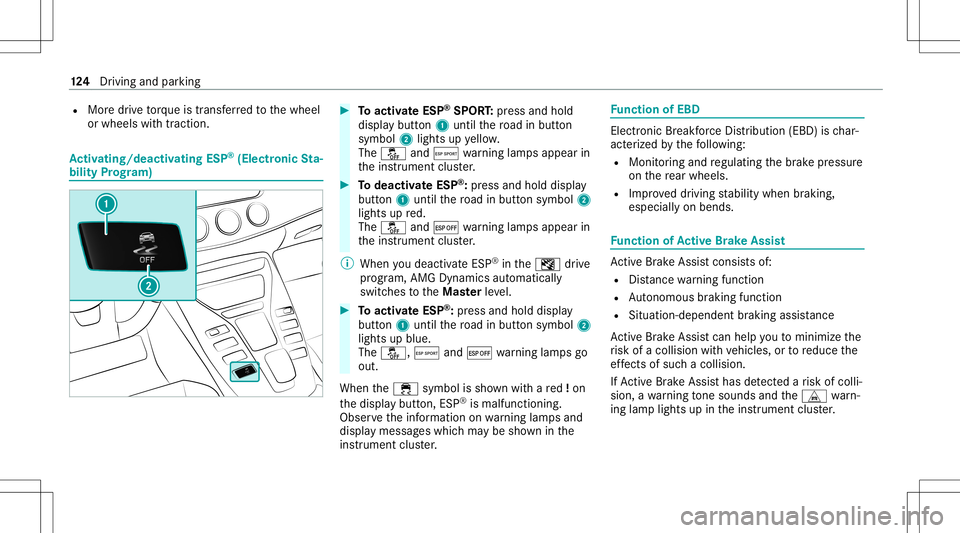
tiv atin g/deac tivatin gES P®
(E lectr onicSta‐
bil ity Prog ram) #
Toactiv ateESP ®
SPORT :pr ess and hold
dis pla ybutt on1 until thero ad inbutt on
symbo l2 light sup yello w.
The 00BB andÆ warning lam psappear in
th eins trument cluster. #
Todeac tivateES P®
:pr ess and holddispl ay
butt on1 until thero ad inbutt onsymbo l2
light sup red.
The 00BB and¤ warning lam psappear in
th eins trument cluster.
% When youdeac tivateES P®
in theI drive
pr og ram, AMG Dynamics automatical ly
switc hestotheMas terle ve l. #
Toactiv ateESP ®
:pr ess and hold displa y
butt on1 until thero ad inbutt onsymbo l2
light sup blue.
The 00BB, Æand¤ warning lam psgo
out.
When the00E5 symbol issho wnwithare d!on
th edispla ybutt on,ESP®
is malfunct ioning.
Obser vetheinf ormation onwarning lam psand
displa ymess ages whic hma ybe sho wninthe
ins trumen tclus ter. Fu
nction ofEBD Elect
ronic Brea kfor ce Dis trib uti on (EBD) isch ar‐
act erize dby thefo llo wing:
R Mon itor ing and regulating thebr ak epr essur e
on there ar wheels .
R Improv ed driving stabilit ywhen brakin g,
espe ciallyon ben ds. Fu
nction ofActiv eBr ak eAs sist Ac
tiveBr ak eAssi stconsi stsof:
R Distance warning func tion
R Autonomo usbraki ng func tion
R Situ ation-d epend ent braki ng assist anc e
Ac tiveBr ak eAssi stcan helpyo uto minimize the
ri sk ofacollision withve hicles, ortoreduce the
ef fects ofsuch acol lision .
If Ac tiveBr ak eAssi sthas detected arisk ofcolli‐
sion, awa rning tone sou nds and theL warn‐
ing lam plight sup intheins trument cluster. 12
4
Driving and parking
Page 180 of 422

Im
por ting/e xportin gda ta
* NO
TELos sof data due toprematur e
re mo val #
Donotre mo vethedat ast or ag e
medium whendatais being expor ted.
Mer cedes- Benzis no tliable foran yloss of
dat a. Re
quirement s:
R The vehicle isstatio nary.
R The ignition isswitc hedonortheve hicle has
been star ted.
R The SDcardis inser ted(/ page24 0) or the
USB device isconnec ted(/ page24 2).
Mul timedi asy stem:
4 System 5
System Backup #
Select Import DataorExport Data.
Im por ting #
Select adat ast or ag emedium.
A pr om ptappear sask ing whe ther youre all y
wish tooverwr ite th ecur rent data.If da ta or
iginat esfrom another vehicle, this isrecog‐
nized during data readin g.
The mult imed iasystem isrestar tedonc eth e
dat ahas been impor ted.
% Current vehicle settin gscan beedit edafte r
th eim por t.
Expor ting
If PIN protect ion isactiv ated, your PIN isrequ es‐
te d. #
Enterth efo ur -di git PIN. #
Select adat ast or ag emedium.
The datais ex por ted. The dataex por tma y
ta ke severalmin utes. Ac
tiv atin g/deac tivatin gPI N protection Re
quirement s:
To unlo ckthePIN:
R Ther eis an Interne tcon nect ion.
R AMer cedes meaccount exists at htt ps:/ /
me. secur e.mercedes -benz.com.
R The Perso nalization service isact ive
(/ page17 9). Mul
timedi asy stem:
4 System 5
PIN Protec tion
Se tting thePIN #
Sele ctSet PIN. #
Entera fo ur -di git PIN. #
Enterth efo ur -di git PIN again.
If bo th PINs match,PIN protect ion isactiv e.
Changing thePIN #
Sele ctChang eSet tings. #
Enterth ecur rent PIN . #
Select Chang ePIN . #
Seta ne wPIN .
Ac tiv atin gPI N protection fordat aex por t #
Select Change Setting s.
Co nfirm with thePIN. #
Select ProtectData Export .
Ac tivate0073 ordeacti vate 0053 thefunc tion.
Un bloc king thePIN
If th ePIN has been entered incor rectl yth re e
tim es,th ePIN willbebloc ked. Youcan have a 17
8
Multimedia system
Page 182 of 422
Multimedia
system:
4 System 5
g Person alization
5 Manual Export/ Import
Im por ting auser profile #
Select Import Profiles fromServer.
The Theprofile dataimport overwrit esall
exist ingprofile data.Doyou want tocon -
tinue? messag eappear s. #
Select Yes.
User profiles areim por ted.
Expor tingauser profile #
Select Export Profiles tothe Serv er.
User profiles areex por ted.
% Onlyindividual profiles can beimpor tedor
ex por ted. The individual profiles arealw ays
coll ectiv elyimpor tedor expor ted.
% Certain settings ,suc has addr essbook
ent ries orprev ious destination sfrom the
na vig ation system, areno tex por ted. Se
tting user profile options
Multimedia system:
4 System 5
g Person alization #
Highlight apr ofile. #
Select ¥option s.
The follo wing option sar eav ailable:
R Renam e
R Delete
R Reset
% The gues tpr ofile can notbe dele tedor
re nam ed. So
ftwa reupdat es Inf
ormation onsof twareupdat es
The multimedi asy stem displa ysacor responding
messag ewhen asof twareupda teisavailable. Depend
ingonthesour ce,youcan perform
va rious updates: Sour
ceofthe
updat e Up
dat etype
Up dat esvia mobile
phone Na
vig ation map,sys‐
te m upd ates, Digit al
Oper ator's Manua l
Up dat esvia anexter‐
nal stor ag emedium,
e.g. aUSB flash drive Na
vig ation maps %
Softwareupd ates via mobil ephone requ ire
an act ive Int erne tcon nection forth eve hicle.
This isno tav ailable inall coun tries. Forfur‐
th er information oncon nect ingtotheInt er‐
ne t,see (/page235).
Ad vantag esofsof twareupd ates
Sof twareupdat esensur eyo ur vehicle's tech nol ‐
ogy isup -to-d ate.
In orde rto cons tantl yimpr ovethequ alit yof our
ser vices youwill recei vefutur esof twareupd ates
fo ryo ur mult imed iasystem, theMer cedes me
con nect services andyour vehicle's communica‐ 18
0
Multimedia system
Page 186 of 422

%
The follo wing values canbesetfo rpar ame‐
te rs 1and 2,forex am ple:
R Spe ed
R Lon gitudin al/lat eral acc eler ation
R Steer ing ang le
R Engine speed
R Engine oil/tir ete mp eratur e
Based ontheanal ysis yo ucan checkand opti‐
mize driving charact eristic sfo ran yposi tion on
th etra ck.
Expor tingtrac ks orraces (USB ) #
Select AllTrac ks.
An ove rview of all stor ed trac ks and races
ap pea rs. #
High light desired trac ks orraces. #
Sele ctÜ Options . #
Sele ctExport .
The select edtrac ks orraces can beexpor ted
to aUS Bstor ag ede vice conn ectedtothe
ve hicle. Editing
trac ks and recor dings #
Select AllTrac ks. #
Highligh tth edesir edtrac k. #
Select Ü options . #
Select Rename orDele te.
or #
Select atrac k. #
High light thedesir edrecor ding. #
Sele ctÜ options . #
Sele ctWea ther orDele te. Se
tting Drag Race Mult
imed iasystem:
4 Vehicle 5
TRACK PACE5
Drag Race
Measur ingacceler ation #
Select Acceleration.
Measur ementbegins whentheve hicle accel‐
er ates. Measur ementisincr ement al,insteps
of 30 mph(50 km/h) toamax imum of
18 0mp h(300 km/h) orup tothese tmaxi‐
mum speed. Measur
ementcanbestopped earlyby
selecting Stoporby stopping theve hicle.
Quar ter-mil era ce #
Select Quar terMile.
The timemeas uremen tru ns unti la mil eha s
be en trave led orapr ev iousl yse tdis tance
(e .g. quartermile ,th ird mile orhalf mile) has
been reac hed.
% The poss iblevalues forse tting theend dis‐
ta nce arede term ined bythesy stem and
cann otbe freel ych osen.
Measur ementcanbestopped earlyby selecting
Stop orby stopping theve hicle.
Manual star tfo rac ce lera tio nand quarter-
mil era ce #
Select Accel erat ionorQuar terMile . #
Select Man ualstart .
Thr eeredtraf fic lights appea rone afte rth e
ot her .The react ion timemeas uremen tst ar ts
when they chang eto green atthesame time.
The react ion timeis displa yedas soon asyou
dr ive of f.Ifyo udr ive of fto oear ly,th eJump 18
4
Multimedia system
Page 225 of 422

Mer
cede s-Benz link Ov
ervie wof Mer cede s-Benz Link &
WARNIN GRisk ofdist ra ction from infor‐
mati onsystems andcomm unication s
eq uipment
If yo uoper ateinf ormat ionand comm unic a‐
tio neq uipme ntintegratedin theve hicle
when driving, youwill bedistract ed from the
tr af fic situ ation. Thiscou ldalso cau seyouto
lose control of theve hicle. #
Onlyoper ateth is eq uipmen twhen the
tr af fic situ ation per mits. #
Ifyo ucan notbe sur eof this, stop the
ve hicle whilstpa ying attention toroad
and traffic condi tions andoperate the
eq uipment withth eve hicle statio nary. Using
Mercedes-Benz Link,va rious funct ions
and select edmobile phoneappscanbetransf er‐
re dto themedia display.
The Mercedes-B enzLink controlbo xsupplemen ‐
ta ry equipment isrequ ired forth is. Youcan obt
ain this at an aut hor ized Mercedes -Benz Cen‐
te r.
% The Mercedes-B enzLink controlbo xuses
th eAn droid oper ating system.
% The service prov ider isresponsible forth ese
apps andtheser vices andcontent conne c‐
te dto it.
Connecting Mercedes-B enzLink withth e
mu ltim edia system #
Conn ecttheMer cedes- BenzLinkcontrol bo x
wit hth eç USBportof themultimedia
con nect ionunit using asuit able connect ing
cable.
% Asuit able connect ingcable isavailable sep‐
ar atelyat an aut hor izedMer cedes-Ben zCen‐
te r.
Using Mercedes-Benz Link
Re quirement s:
R The Mercedes- BenzLink control bo xis con ‐
nec tedwit hth emultimedia system using the
ç USBport. Multimedi
asy stem:
4 Connec t5
Mercedes- BenzLink #
Select MBLink.
The mobile phonefunctionsand apps are
av ailable andshownonthemedia display.
Yo ucan find mor einf orma tionin theMer cedes-
Benz Linkcontrol bo xoper ating instruction s.
Ending Mercedes-Benz Link
Multimedia system:
4 Connec t5
Mercedes- BenzLink #
Select Disconnect.
The connect ionisended.
The mobile phonecontinues tobe supplied
wit helect ricity .
or #
Disco nnect thecon nect ingcable between
th eMer cedes- BenzLinkcontrol bo xand the
multime diasystem.
% Mer cedes- Benzrecomme ndsdisconnecti ng
th econ nect ingcable onlywhen theve hicle
is statio nary. Multimedia
system 223
Page 226 of 422
App
leCar Play® Ov
ervie wof App leCar Play® &
WARNIN GRisk ofdist ra ction from infor‐
mati onsystems andcomm unication s
eq uipment
If yo uoper ateinf ormat ionand comm unic a‐
tio neq uipme ntintegratedin theve hicle
when driving, youwill bedistract edfrom the
tr af fic situ ation. Thiscou ldalso cau seyouto
lose control of theve hicle. #
Onlyoper ateth is eq uipmen twhen the
tr af fic situ ation per mits. #
Ifyo ucan notbe sur eof this, stop the
ve hicle whilstpa ying attention toroad
and traffic condi tions andoperate the
eq uipment withth eve hicle statio nary. Yo
umus tobse rveth eleg alrequ iremen tsforth e
cou ntryin whi chyouar ecur rentl ydr ivi ng when
op erati ng themultimedia system.
iPhone ®
func tionscan beused viathemultime‐
dia system using Apple CarPla y®
.The yar eoper‐
at ed using thecent ralcon trol elemen tor the Sir
i®
vo ice- oper ated con trol system. Youcan
act ivat eth evo ice- oper ated con trol system by
pr essing andholding the00E3 buttononthe
multifu nctionsteer ing wheel.
When usingApple CarPla y®
via thevo ice- oper‐
at ed con trol system, themultimedia system can
st ill be oper ated via theVo ice Cont rolSy stem
(/ page15 0).
On lyone mobile phoneatatime canbeconn ec‐
te dvia Apple CarPla y®
to themultimedia sys‐
te m.
The availabilit yof App leCarPla y®
ma yva ry
acc ordin gto thecount ry.
The service prov ider isresponsible forth is appli‐
cat ion and theser vices andcontent conne cted
to it.
Apple CarPla y®
is are gis tere dtra demar kof
Apple Inc.
Inf ormat iononApple CarPla y®
While usingApple CarPla y®
va rious funct ionsof
th emultimedia system, e.g.telephon yor the
media sourcesBlue tooth®
audio andiPod ®
,ar e
una vailable. Onl
yone routeguidan cecan beact ive at atim e.
If ro uteguidan ceisact ive on themultimedia sys‐
te m, itis closed whenrouteguidan ceisstar ted
on themobile phone.
Connecting aniPhone ®
via Apple CarPla y®
Re quirement s:
R Apple ®
oper atingsy stem version iOS 8.3or
abo veisins talled ontheiPhone ®
.
R AnInterne tcon nect ionisrequ ired forth efull
ra ng eof func tions forApple CarPla y®
.
R The iPho ne®
is connect edtothemultimedia
sy stem viatheUSB portç using asuit a‐
ble cable (/page24 2).
Mul timediasystem:
4 Connec t5
Apple CarPlay
Se tting automat icor manu alstar t
A messa geappear swhen connectedfo rth efirs t
tim e. #
Automatic star t:select Automatically.
Start Automatically isactiv ated 0073. 22
4
Multimedia system
Page 228 of 422

usin
gth ecent ralcon trol elemen tor thevo ice
con trol. Youcan activat eth evo ice- opera tedcon ‐
tr ol system bypressing andholding the00E3
butt ononthemultifunc tionsteer ing wheel.
When usingAndroid Autovia thevo ice- opera ted
contr olsystem, themultimedia system can still
be opera tedvia theVo ice Cont rolSy stem
(/ page15 0).
On lyone mobile phoneatatime canbeconn ec‐
te dvia Android Auto tothemultimedia system.
The availabilit yof An droid Autoand Android Auto
App sma yva ry acc ordin gto thecount ry.
The service prov ider isresponsible forth is appli‐
cat ion and theser vices andcontent conne cted
to it.
Inf orma tion onAndr oidAuto
While usingAndroid Auto,va rious funct ionsof
th emultimedia system, forex am ple themedia
sour ceBlue tooth®
audio, areno tav ailable.
On lyone routeguidan cecan beact ive at atim e.
If ro uteguidan ceisact ive on themultimedia sys‐
te m, itis closed whenrouteguidan ceisstar ted
on themobile phone. Connecting
amobile phoneviaAndr oidAuto
Re quirement s:
R The firs tacti vatio nof Andr oid Au toon the
multime diasystem mus tbe car ried out when
th eve hicle isstatio naryfo rsaf etyre ason s.
R The mobi lephon esuppo rts Andr oidAuto
fr om Andr oid5.0.
R The Andr oidAutoapp isins talled onthe
mobil ephone.
R Inorder touse thete lephon efunc tions,the
mobil ephone mustbe connect edtothemul‐
timedia system viaBlue tooth®
(/ pag e21 4).
If th er ewa sno prior Interne tconn ection, this
is es tablished withth euse ofthemobile
phone withAn droid Auto.
R The mobile phoneisconn ectedtothemulti‐
media system viatheUSB portç using a
suit able cable (/page24 2).
R AnInterne tconnection isrequ ired forth efull
ra ng eof func tions forAndr oidAuto. Multimedia
system:
4 Connec t5
Android Auto #
Select themobile phonefrom thede vice list.
Ac cep ting/r eject ingtheda ta protection reg‐
ulat ions
A messag ewit hth edat apr otect ion regulations
appear s. #
Select Accept &Start .
or #
Select Decline &End.
Ac tiv atin gaut omati cst ar t #
Select StartAutoma tically0073.
St arting manuall y #
Select themobile phonefrom thede vice list.
Exiting AndroidAuto #
Press the00E2 buttonon themultifunc tion
st eer ing wheel, forex am ple. 226
Multimed iasystem