2021 MERCEDES-BENZ GT COUPE ECU
[x] Cancel search: ECUPage 134 of 422

&
WARNIN GRisk ofacci dent dueto Active
Dis tance AssistDIS TRONI Cstill being
act ivat ed when youlea vethedr iver's
seat
If yo ulea vethedr iver's seat while theve hicle
is being brak ed byActiveDis tan ceAssi st
DIS TRONI Conly ,th eve hicle canrollaw ay. #
Alw aysdeactiv ateAc tiveDis tance
Assi stDIS TRONI Cand secureth eve hi‐
cle topreve ntitfrom rolling away
bef oreyo ulea vethedr iver's seat. #
Select Owithth elef tro ck er switc h.
% Ifyo ubr ak e, deac tivateES P®
or ifES P®
int erve nes, ActiveDis tance Assist
DIS TRONI Cis de acti vated.
Incr easing ordecr easing thespeed #
1mp h(1 km/h) :pr ess rock er switc h1 up
M ordown N tothepr essur epoint .
or #
5mp h(1 0 km/h) :pr ess rock er switc h1 up
M ordown N beyond thepr essur e
point .
or #
Accel erateth eve hicle tothedesir edspeed
and press rock er switc h1 upM.
Changing thespecif ieddistance totheve hi‐
cle infront #
Toreduce thespecified distance: press
th eright rock er switc hup (Ñ). #
Toincr ease thespecif ieddistance: press
th eright rock er switc hdo wn (Ò). Fu
nction ofHill StartAss ist Hill
StartAs sis tholds theve hicle fora shor t
time when pulling away on ahill under thefo l‐
lo wing condition s:
R The transmiss ionisin posit ion005Bor005E.
R The elect ric pa rking brak eis released.
This gives youen ough timeto mo veyour foot
fr om thebr ak epedal totheaccelera torpeda l and
depr essitbef oreth eve hicle begins toroll
aw ay. &
WARNIN GRisk ofacci dent andinjury
due totheve hicle rolling away
Af tera shor ttime, HillStartAs sis tno longer
holds theve hicle. #
Swif tly mo veyour foot from thebr ak e
pedal totheaccelera torpeda l.Do not
lea vetheve hicle when itis being held
by HillSt artAs sis t. HOLD
functi on HOLD
functi on
The HOL Dfun ction holds theve hicle atast and‐
st ill wit hout requ iring youto depr essthebr ak e
pedal, e.g.while waitin gin traf fic.
The HOLD functionisonly anaid. The responsi‐
bility forth eve hicle safely standi ngstill remains
wit hth edr iver .
Sy stem limit s
The HOL Dfun ction isonl yint end edtoprov ide
assis tance when drivi ng and isno ta su fficien t 13
2
Driving and parking
Page 135 of 422

means
ofsaf egua rding theve hicle agains tro lling
aw ay when statio nary.
R The incline mustno tbe great erthan 30%.
Ac tiv atin g/deac tivatin gthe HOL Dfun ction &
WARNIN GRisk ofan acci dent dueto the
HOLD functio nbei ng activ ewhe nyo u
lea vetheve hicle
If th eve hicle isonl ybr ak ed withth eHOLD
func tion itcould, inthefo llo wing situat ions,
ro llaw ay:
R Ifth er eis amalfunct ioninthesy stem or
in thepo we rsupp ly.
R Ifth eHOLD function isdeactiv ated by
depr essing theaccelera torpeda lor brak e
peda l,e.g. byave hicle occupant. #
Alw ayssecur eth eve hicle agains tro ll‐
ing away bef oreyo ulea veit. Re
quirement s:
R The vehicle isstatio nary. R
The driver's door isclosed ortheseat belton
th edr iver's side isfastened.
R The engine isrunning orhasbe en automati‐
cally switc hedoffby theEC Ostar t/ stop
funct ion.
R The electr icpar king brak eis released.
R ActiveDis tance AssistDIS TRONI Cis de acti ‐
va ted.
R The transmis sionisin position 005B,005Eor005C.
Ac tiv atin gthe HOL Dfunc tion #
Dep ress thebr ak epedal, andafte ra shor t
time quickl ydepr essfurther until the00D9
displa yappear sin themultifunc tiondispla y. #
Release thebr ak epedal.
Deactiv atingtheHOLD function #
Depr esstheacceler ator pedal topull away.
or #
Depr essthebr ak epedal untilthe00D9 dis‐
pla ydisappear sfrom themultifunc tiondis‐
pla y. The
HOLD functionisdeactiv ated inthefo llo w‐
ing situat ions:
R ActiveDis tance AssistDIS TRONI Cis acti va‐
te d.
R The transmission isshif tedto position 005D.
R The vehicle issecur edwithth eelectr icpar k‐
ing brak e.
In thefo llo wing situat ions,th eve hicle isheld by
tr ans missi on positio n005D and /or bytheelectr ic
par king brak e:
R The seat beltisunf astened andthedr iver's
door isopened.
R The vehicle isswitc hedoff.
R Ther eis amalfunction inthesy stem orthe
po we rsupp lyis insuf ficie nt. RA
CE START Fu
nction ofRA CE START
RA CE STAR Tena bles optima lve hicle acceler a‐
tion from ast ands till.Fo rth is, asuit ablyhigh-
gr ip road sur face isrequ ired, thetir es and vehi‐
cle mus talso beingood condition. Dr
iving andparking 13
3
Page 143 of 422

1
Front camer a,wide-ang levie w
2 Front camer a,standar dvie w
3 Rear vie wcam era, standar dvie w
4 Rear vie wcam era, wide- anglevie w
Dyn amic guide linesin thecamer aimag esho w
th epat hth eve hicle willtake wit hth esteer ing
wheel inits cur rent positio n.Thi shel psyouto
or ient yourself and toavoid obstacles when
mane uvering. 1
Yello wlane markingth ecour sethetir es will
ta ke atthecur rent steer ing wheel angle
(dynamic)
2 Yello wguide line,vehicle width(dr iven sur‐
fa ce) dep endi ngon thecur rent steer ing
wheel angle(dynamic)
3 Redguide lineatadis tance ofapprox imat ely
1 in (0. 3m) from there ar area
4 Markat adis tance ofappr ox.3.3 ft(1.0 m)
The guide linesinthemedia displaysho wthe
dis tances toyour vehicle. Thedistances dis‐
pl ay ed onlyapply toroad leve l. Sy
stem limit s
The cam eras will notfun ction orwill onlypar ti‐
ally function inthefo llo wing situat ions:
R Ther eis hea vyrain, sno wor fog.
R The ambient lightcondit ionsarepoor ,e.g. at
night.
R The respectiv ecamer alens isobs truct ed,
dir tyor fogg ed up. Obser vetheno teson
cleaning thecamer as(/ page27 1).
R Cam eras, orvehicle component sin whic h
th ecamer asareins talled, aredamag ed.In
th is eve nt,have thecamer as,their position s
and their setting checkedat aqu alif ied spe‐
cialis two rkshop.
The field ofvision andother funct ionsofthere ar
vie wcam erama ybe restrict ed dueto addit ional
acc esso ries (e.g. license platebr ac ketor bicy cle
ra ck ).
% The displa ycon tras tma ybe impair eddue to
inc ident sunligh tor other light sources. In
th is case, paypar ticular attent ion. Dr
ivin gand parking 14
1
Page 148 of 422
No
teson theIns trum ent Displa yand on-
boar dcom puter &
WARNIN GRisk ofacci dent dueto an
In stru ment Displa ymalfu nction
If th eIns trument Displayhas failed ormal‐
func tioned,thefunc tion restrictions applying
to saf etyre leva nt systems areno tvisible.
The oper ating safetyof your vehicle maybe
im pair ed. #
Drive on car efull y. #
Have theve hicle checkedimmediat ely
at aqu alif ied spec ialistwo rkshop. &
WARNIN GRisk ofdist ra ction from infor‐
mati onsystems andcomm unication s
eq uipment
If yo uoper ateinf ormat ionand comm unic a‐
tio neq uipme ntintegratedin theve hicle
when driving, youwill bedistract ed from the
tr af fic situ ation. Thiscou ldalso cau seyouto
lose control of theve hicle. #
Onlyoper ateth is eq uipmen twhen the
tr af fic situ ation per mits. #
Ifyo ucan notbe sur eof this, stop the
ve hicle whilstpa ying attention toroad
and traffic condi tions andoperate the
eq uipment withth eve hicle statio nary. Yo
umus tobse rveth eleg alrequ iremen tsforth e
cou ntryin whi chyouar ecur rentl ydr ivi ng when
op erati ng theon- boar dcom puter.
The on-boar dcom putersho wsonlydispla ymes‐
sag esand warnings from spec ific systems on
th emultifunc tiondispla y.Yo umus tth er efor e
ensur eth at your vehicle isalw aysre liable.
If th eoper ating safetyof your vehicle is
im pair ed,parkth eve hicle immediat elyand
saf ely. Con tact aqu alif ied spec ialistwo rkshop. 14
6
Instrument Displayand on-boar dcom puter
Page 150 of 422
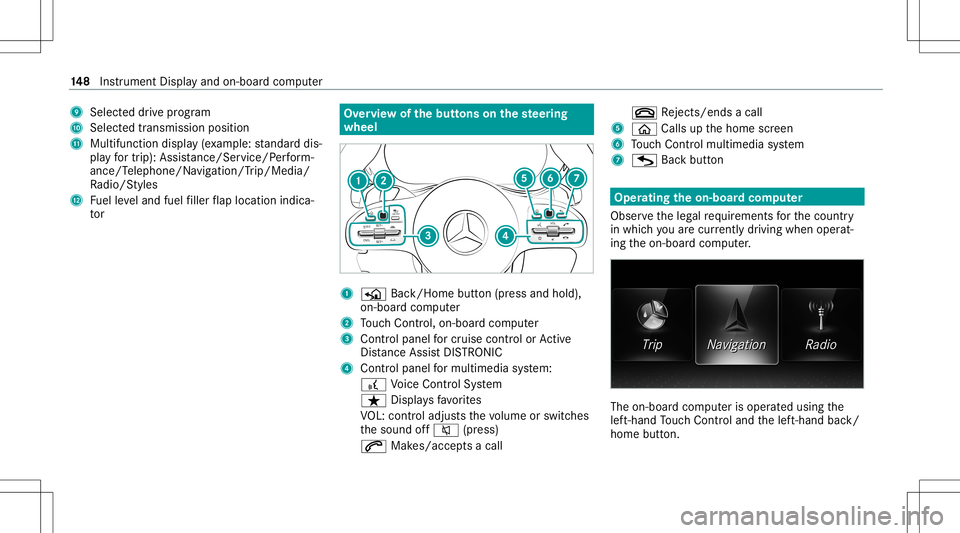
9
Selecteddrive pr ogr am
A Selectedtransm ission pos ition
B Multifuncti ondispl ay(exa mp le:standar ddis‐
pla yfo rtr ip) :Assis tance/Se rvice/ Perfor m‐
ance/T elephone/N avigation /Trip/Media/
Ra dio/S tyles
C Fuelleve land fuel filler flap locatio nind ica‐
to r Ov
ervie wof thebut tons on thest eer ing
wheel 1
P Back/Hom ebutt on(press and hold),
on- boar dcom puter
2 Touc hCon trol, on-bo ardco mp uter
3 Con trol pan elforcr uis econtr olor Active
Dis tance AssistDIS TRONI C
4 Contr olpa nel formulti media system:
£ Voice Cont rolSy stem
ß Displa ysfavo rite s
VO L:contr oladjus tsthevo lume orswitc hes
th esound off0063 (press)
0061 Makes/acc epts acall 0076
Rejects /end sa cal l
5 00E2 Calls up thehome screen
6 Touc hCon trol mult imed iasystem
7 G Backbutt on Oper
ating theon-boa rdcom puter
Obser vetheleg alrequ iremen tsforth ecount ry
in whic hyo uar ecur rently drivi ng when operat‐
ing theon- boar dcom puter. The
on-boar dcom puterisoper ated using the
lef t-hand Touc hCon trol and thelef t-hand back/
home button. 14
8
Instrument Displayand on-boar dcom puter
Page 153 of 422

3
Press thero ck er switc hup: 0061 makes/
accep tsacall
Pr ess thero ck er switc hdo wn: 0076 rejects /
end sa cal l(e nds theVo ice Cont rolSy stem) Conducting
adialog withth eVo ice Contr ol
Sy stem #
Tostar tor continue adialo g:on themulti‐
func tion steer ing wheel, press the£
ro ck er switc hup.
Yo ucan saya vo ice com mand afte ran
acou stic sign al. #
Tocor rect an ent ry:sa yth eCorrect ion
vo ice com mand . #
Toselect anentr yfrom theselecti onlist:
sa yth eline number orthecon tents. #
Tobrows eth eselection list:sa yth eNext
or Back voice com mand . #
Tointerru pt thedia log: sayth ePause voice
com mand . #
Tocancel thedia log: sayth eCancel voice
com mand . Oper
ablefunct ions Yo
ucan usetheVo ice Cont rolSy stem tooper ate
th efo llo wing equipmen tdepen dingonthefe a‐
tur es:
R Telephon e
R Text mes sage s
R Navig ation
R Address book
R Radio
R Audio (memor ycar d,Media Interface, USB
and Bluetoo th®
audio)
R Vehicle Ov
ervie wof types ofvoice comm and A
dis tinction ismade between thefo llo wing
vo ice com mand s:
R Global voice comm andscan besaid atany
time andrega rdless ofthecur rent applica ‐
tio n,e.g .th evo ice com mand sNavigat eto,
Call orText mess ageto. R
App licat ion-sp ecificvo ice comm andsar e
onl yav ailable forth eactiv eapplication.
Onc eth eVo ice Cont rolSy stem isstar tedan
aut ocue issho wn. Apar tfr om theav ailable voice
com mand sfo rth eapplication currently active,
th is also cites exam ple voice com mand sfo r
ot her appli cations whichar eno tactiv e.In this
wa y,yo uwill befamili armor equ ickl ywit hth e
av ailable voice com mand s.The listcan bescrol‐
led oritcan beopera tedby speec hor thecon ‐
tr oller/t ouchpad. Inf
ormat iononthelangu agese tting Yo
ucan chang eth elanguag eof theVo ice Con‐
tr ol Sy stem viathesy stem languag ese ttings. If
th ese tsy stem languag eis no tsuppor tedby the
Vo ice Cont rolSy stem, English will beselec ted.
The Voice Cont rolSy stem isavailable inEn glish,
Fr enc h,Po rtuguese andSpan ish. Vo
ice Cont rolSy stem 15
1
Page 160 of 422
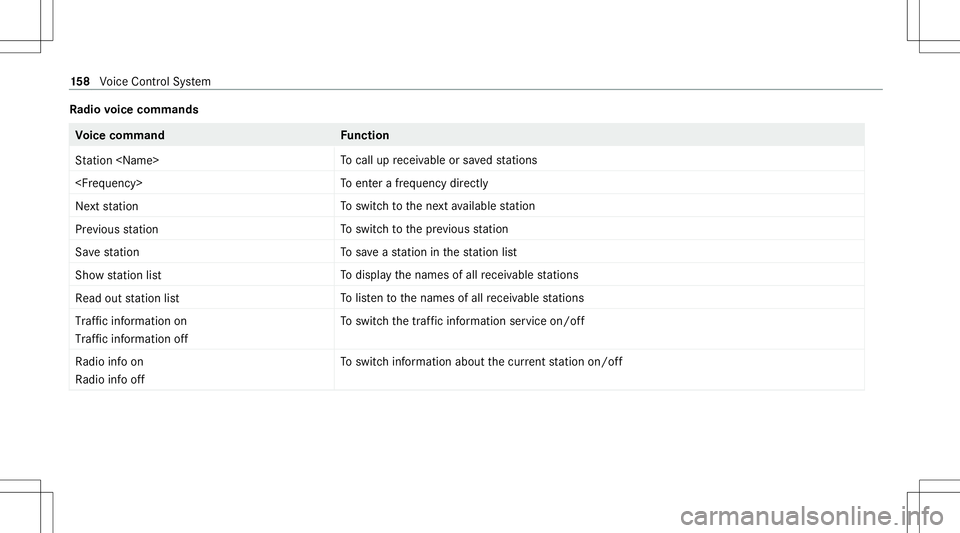
Ra
dio voice comm ands Vo
ice comm and Function
St ation
cal lup recei vable orsave dstatio ns
ent erafreq uency direct ly
Next station To
switc hto thene xt available statio n
Prev ious statio n To
switc hto thepr ev ious statio n
Sav est atio n To
save ast atio nin thest atio nlis t
Sh ow statio nlist To
displa yth enames ofall recei vable statio ns
Read outstatio nlist To
listento thenames ofall recei vable statio ns
Traf ficinform ationon
Traf ficinform ationoff To
switc hth etraf fic inf ormati onser vice on/of f
Ra dio info on
Ra dio info off To
switc hinf ormation aboutthecur rent statio non /of f 15
8
Voice Cont rolSy stem
Page 165 of 422
Ov
ervie wand oper ation Ov
ervie wof themu ltim edia system &
WARNIN GRisk ofdist ra ction from infor‐
mati onsystems andcomm unication s
eq uipment
If yo uoper ateinf ormat ionand comm unic a‐
tio neq uipme ntintegratedin theve hicle
when driving, youwill bedistract ed from the
tr af fic situ ation. Thiscou ldalso cau seyouto
lose control of theve hicle. #
Onlyoper ateth is eq uipmen twhen the
tr af fic situ ation per mits. #
Ifyo ucan notbe sur eof this, stop the
ve hicle whilstpa ying attention toroad
and traffic condi tions andoperate the
eq uipment withth eve hicle statio nary. Yo
umus tobse rveth eleg alrequ iremen tsforth e
cou ntryin whi chyouar ecur rentl ydr ivi ng when
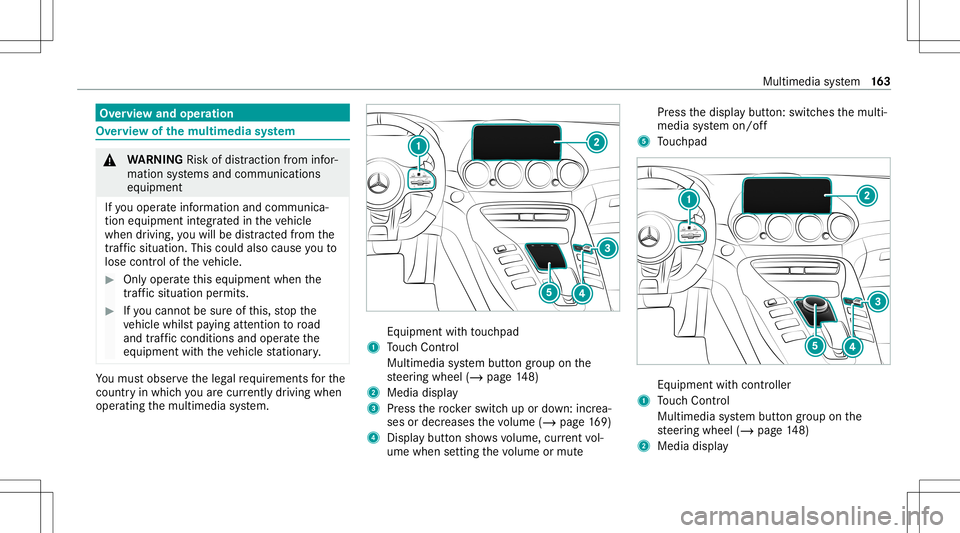
op erati ng themultimedia system. Eq
uipment withto uc hpad
1 Touc hCon trol
Mult imed iasystem butt ongroup onthe
st eer ing wheel (/page14 8)
2 Medi adisp lay
3 Press thero ck er switc hup ordown: increa‐
ses ordecr eases thevo lume (/page16 9)
4 Displ aybutt onsho wsvolume, current vol‐
ume when setting thevo lume ormut e Pr
ess thedispla ybutt on:switc hesthemulti‐
media system on/ off
5 Touc hpad Eq
uipme ntwit hco ntro ller
1 Touc hCon trol
Mult imed iasystem butt ongroup onthe
st eer ing wheel (/page14 8)
2 Medi adisp lay Mul
timedi asy stem 16
3