2021 MERCEDES-BENZ GLS position
[x] Cancel search: positionPage 282 of 510
Selec
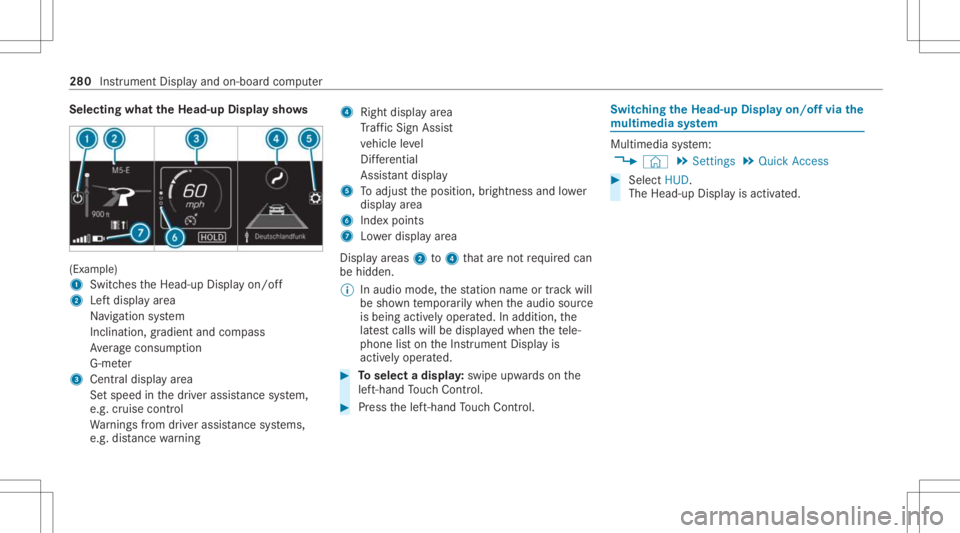
tingwhat theHead -upDispla ysho ws (Ex
am ple)
1 Switc hestheHead-up Displayon/ off
2 Leftdispla yar ea
Na vig ation system
Inc lination ,gr adient andcompass
Av erag econ sum ption
G-me ter
3 Centraldispl ayarea
Se tspee din thedr iver assis tance system,
e.g. cruise control
Wa rnings from driver assis tance systems,
e.g. distance warning 4
Right displa yar ea
Tr af fic Sign Assist
ve hicle leve l
Dif fere ntia l
Assi stant displa y
5 Toadjus tth eposition ,br ightn essand lowe r
displa yar ea
6 Inde xpoint s
7 Lowe rdisp lay ar ea
Displa yar eas 2to4 that areno tre qu ired can
be hidden .
% Inaudio mode, thest atio nnam eor trac kwill
be sho wntemp orarily when theaudio source
is being activelyoper ated. Inaddition, the
lat estcalls willbedispla yedwhen thete le‐
phon elis ton theIns trument Displayis
activ elyoper ated. #
Toselect adispla y:swipe upwards on the
lef t-hand Touc hCon trol. #
Press thelef t-hand Touc hCon trol. Swit
ching theHead -upDispla yon/of fvia the
mu ltim edia system Multi
media system:
4 © 5
Set ting s5
Quick Access #
Select HUD.
The Head-up Displayis activ ated. 280
Instrument Displayand on-boar dcom puter
Page 288 of 510
The
MBUX Inte rior Assis tantsupportsthefo llo wing interactions: Int
eraction area Interaction Description
In front ofthemedia displayor
abo vetheto uc hpad Pr
ox imit yto thecon trol element TheInterior Assis tant recogni zestheappr oachof thehand towa rdsa con‐
tr ol element.
Depending ontheactiv eapplication, thedispla ywill beadjus tedin the
media display. Some functionsdiffer ent iatebe tween driver and front
passeng er.
No specif ichand position isrequ ired.
Abo vethecent ercon sole Defined poses With def ined poses afunc tion istrigg ered dependin gon theapplication
activ e.
Belo wtheinside rear vie wmir rorB rief up and down movements With brief vertical upand down movements belowtheinside rear vie wmir ‐
ro rth ere adin glight forth edr iver or thefront passeng erisswitc hedonand
of f.
Fr ont passeng erseat Stretching outa ha nd above the
fr ont passeng ersea t By
stre tching outa ha nd above thefront passeng erseat thesear chlight is
switc hedon.Ifyo uwit hdra wahan dfrom this area, thesear chlight is
switc hedoffag ain. Switc
hingthere ading light and sear chlight
and onoroff Re
quirement s: R
Forthe reading light:th efunc tion isavaila‐
ble when itis dar k.
R The hand movement take splace intheint er‐
action area belo wtheinside rear vie wmir ror. R
Forthe search light :th efunc tion isavaila‐
ble when itis dar k.
R The hand movement take splace intheint er‐
action area abo vethefront passeng erseat. 286
MBUX multimedia system
Page 289 of 510
R
The seat beltonthefront passeng erseat
mus tno tbe inser tedin theseat beltbuckle.
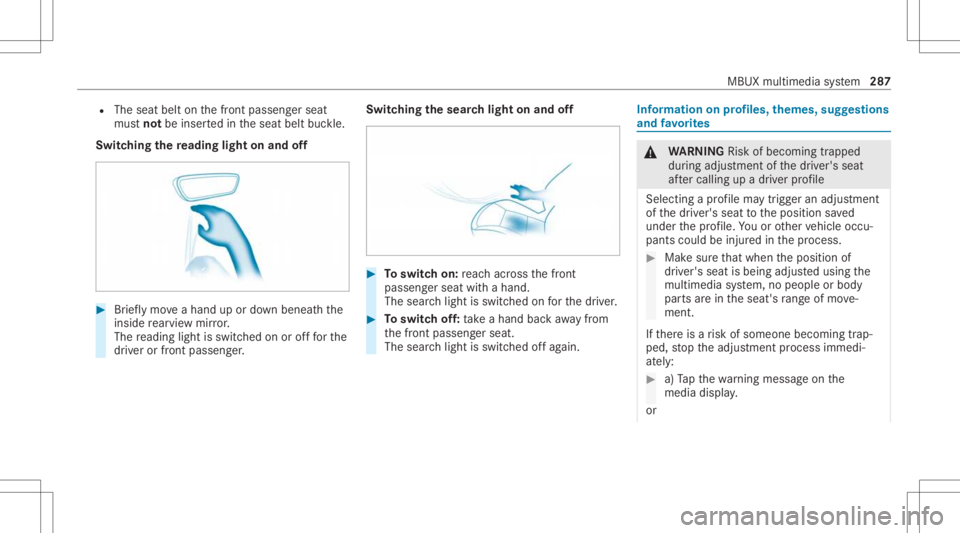
Switc hingthere ading light on and off #
Brief lymo veahan dup ordown ben eathth e
inside rear vie wmir ror.
The readin glight isswit ched on orofffo rth e
dr iver or front passeng er. Switc
hingthesear chlight onand off #
Toswitc hon: reac hacr oss thefront
passeng erseat withahand.
The sear chlight isswitc hedonforth edr iver . #
Toswitc hof f:take ahan dbac kaw ay from
th efront passeng erseat.
The sear chlight isswitc hedoffag ain. Inf
orma tion onprofiles, themes, suggestions
and favo rite s &
WARNIN GRisk ofbeco ming trap ped
du ring adjus tment ofthedr iver's seat
af te rcall ing upadr iver profile
Selecting apr ofile ma ytrigg eran adju stment
of thedr iver's seat totheposition save d
und erthepr ofile. Youor other vehicle occu‐
pants couldbeinjur edinthepr ocess. #
Mak esur eth at when theposition of
dr iver's seat isbeing adjustedusing the
multime diasystem, nopeople orbody
par tsarein theseat's rang eof mo ve‐
ment.
If th er eis arisk ofsomeone becoming trap‐
ped, stop theadjus tmentpr ocess immedi‐
at ely: #
a)Tapth ewa rning mess ageon the
media display.
or MBUX
multimedia system 28
7
Page 290 of 510
#
b)Press amemor yposition buttonora
seat adjus tmentswitc hon thedr iver's
door .
The adjus tmentpr ocess isstopped. The
driver's seat iseq uipped withan access pre‐
ve nter.
If th edr iver's door isopen, thedr iver's seat will
no tbe setaf te rcall ing upthedr iver's profile.
Pr ofiles stor eyo ur vehicle settin gsand settin gs
fo rth emultimedia system. Ifth eve hicle isused
by severaldr iver s, thedr iver can select their
ow npr ofile wi thout needing tochang eth ese t‐
ting sof other driver s.
% Information onprofiles from Mer cedes me
conn ectcan befound intheDigita lOper a‐
to r's Manua l.
Ve hicle settin gsare, forex am ple, driver' sseat ,
st eer ing wheel andmirrorse ttings, climatecon‐
tr ol and amb ient lighti ng.Forth ese ttings ofthe
multime diasystem, youcan select,fo rex am ple,
ra dio statio ns,pr ev ious destination sas wellas
th emes, suggestion sand favo rite s. Fo
rre cur ring drivi ng situa tions, such aslon g
dr ives on thefree wa y,yo ucan save your prefer‐
re dse ttings inath eme intheve hicle. Inath eme
yo ucan save thedispla yof thedigit almap, your
pr efer redra dio statio nand prefer reddr ive pr o‐
gr am, forex am ple.
The vehicle canlearnth ehabits ofthedr iver .It
th en offers sugg estions forth emos tpr obable
na vig ation destinat ions, media sources, radio
st atio nsorcon tacts. Therequ iremen tsforth at
ar eth eselect ionofapr ofile, your consen tto the
re cor ding ofdata and sufficie ntcoll ecteddata.
Fa vorite spr ov ide quick acc ess toapplic ations
th at areused often. Youcan selectfavo rite s
fr om categor iesoradd them direct lyto an appli‐
cat ion. Conf
iguringprofiles, themes andsugg es‐
tions Multi
media system:
4 © 5
f Profiles
Cr eating ane wprofile #
Select 0081Create Profile. #
Select anavatar. #
Enterth ename andconfirm with0076. #
Sele ctCont inue 0048 . #
Sele ctCurren tSet tings. #
Sele ctSav e. #
ActivateBlu etoo th®
and selec tCon nect
Phon e,to connect amob ile pho newith the
user profile . #
Select Finish.
Select ingprofile optio ns #
Select 0062 fora pr ofile .
The follo wing functionsar eav ailable:
R Editing,rese ttin gor dele ting apr ofile
R Resettin gth emes orfavo rite s 288
MBUX multimedia system
Page 295 of 510
#
Alw ayske ep aneyeon theactual traf fic
situation. #
Avoid extende dob ser vatio nof thecam‐
er aimag e. &
WARNIN GRisk ofacci dent andinjury
due toimprecise positioningof addi‐
tion alinf ormatio n
The addition alinf ormatio nfrom theaugmen‐
te dre alit ydispla yis no ta subs titutefo r
obser vingtheactual driving situation . #
Alw ayske ep aneyeon theactual traf fic
situation whencarrying out alldrivin g
mane uvers. Switc
hingnavig ation on Multim
ediasystem:
4 © 5
Navigation (Navigation ) #
Alternat ivel y: press thez button.
The map showstheve hicle's current posi‐
tio n.The navig ation menu issho wn. The
navig ation menu ishidd en ifro uteguid‐
anc eis act ive. #
Tosho w:tapon theto uc hsc reen.
The menu ishidden automaticall y. MBUX
multimedia system 293
Page 296 of 510
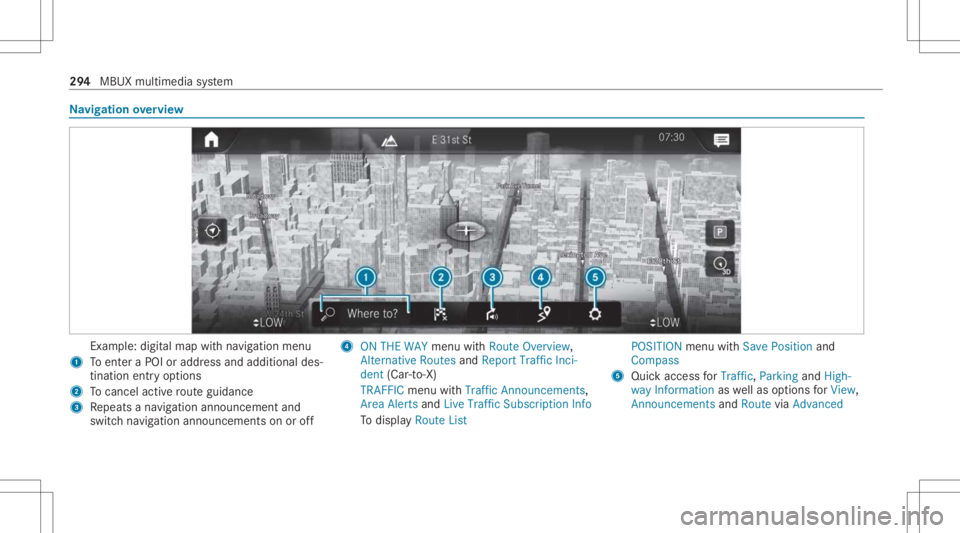
Na
vig ation overview Ex
am ple: digit almap withna vig ation menu
1 Toent eraPOI oraddr essand additional des‐
tinat ionentryoptions
2 Tocance lacti verouteguidan ce
3 Repeats ana vig ation announ cementand
switc hna vig ation announ cementson oroff 4
ONTHE WAY menu withRoute Overview,
Alt ernat iveRoutes andReport TrafficInci-
dent (Car-to-X)
TRAFF ICmenu withTraffic Announc ement s,
Area Alertsand Live Traffic Subscr iptionInfo
To displa yRoute List POSIT
IONmenu withSave Position and
Compass
5 Quic kaccess forTraffi c,Parking andHigh-
way Information aswellas option sfo rView,
Announcements andRoutevia Advanced 29
4
MBUX multimedia system
Page 311 of 510
Smar
tphone integratio n Wi
th Smar tphoneIntegr ation, youcan usecer‐
ta in func tionson your mob ilephon evia themul‐
timedia system displa y.
Onl yone mobile phoneatatime canbeconnec ‐
te dvia Smar tphon eInt egratio nto themultime‐
dia system. Also foruse withtw ophone mode
wit hsmar tphone integr ation, onlyoneadditional
mobil ephone canbeconnect edusing Blue ‐
to oth®
wit hth emultimedia system.
The fullrang eof func tions forSmar tphone Inte‐
gr ation isonly possi blewithan Interne tconnec‐
tion. Theappropr iat eapplication mustbe down‐
loaded onthemobile phonetouse Smartphon e
In te gr ation. Themobile phonemustbe switc hed
on and conn ectedtoaUS Bpor twit hth eç
symbol onthemultimedia system using asuit a‐
ble cable.
Apps forSmar tphone Integr ation
R Mer cedes-Benz Link(impleme ntation ofthe
function using theMer cedes- BenzLinkcon‐
tr ol bo x)
R Apple CarPla y® R
Android Auto
Yo ucan star tSm artphon eIn te gr atio nusin gth e
Mercedes me&Apps menu.
Yo ucan endSm artphon eIn te gr atio nby discon ‐
nec tingth econ nect ingcable between the
mobil ephone andmultime diasystem.
Ov ervie wof transf erre dve hicl edata
When using Smar tphone Integr ation, certain
ve hicle datais transf erredto themobile phone.
This enables youto get thebes tout ofselect ed
mobile phoneservices. Vehicle datais no t
dir ectl yaccessible.
The follo wing system information istransmit ted:
R Softwarere lease ofthemultimedia system
R System ID(anon ymized)
The transf erofthis dat ais used toalter how
con tent isdispl ayed tocor respond tothedr iving
situation .
The follo wing positiondatais transm itted:
R Coor dinat es
R Speed R
Com pass direct ion
R Accel erati on dire ction
Thi sda ta isused bythemobile phoneto
im prove theaccur acyofthena vig ation (e.g.for
continu ation inatunnel ). Mer
cedes -Ben zeme rgency callsystem Inf
orma tion ontheMer cedes- Benzemer‐
ge ncy callsystem Yo
ur vehicle iseq uipped withth eMer cedes- Benz
emer gency callsy stem ("eCall ").This featur ecan
help save lives intheeve ntofan acci dent. eCall
in no wayre places assistance prov ided from
dialing 911.
Mer cedes-Ben zeCal lonl yfunct ionsinareas
wher emobile phonecoverage isavailable from
th ewir eless service prov ider s.Insuf ficie ntnet‐
wo rkcoverage from thewir eless service prov id‐
er sma yre sult inan emerg encycallnotbeing
tr ansmitt ed.
eCal lis ast andar dfeatur ein your Mer cedes-
Ben zve hicle. Inorder tofunction asintended ,
th esy stem relies onthetra nsmiss ionofdat a MBUX
multimedia system 309
Page 313 of 510
The
emer gency callha sbe en ma de:
R Avo ice con nection ismade tothe
Mer cedes‑Ben zemer gency callcent er.
R Ames sage withacc iden tdat ais transm itted
to theMer cedes‑ Benzemergency callcent er.
The Mercedes‑B enzeme rgency callcent er
can trans mit theve hicle position datato one
of theemer gency callcent ers.
The SOS button intheove rhead control panel
fl ashes untilth eemer gency callis finis hed .
It is no tpo ssi ble to immed iatelyend anaut o‐
matic emergency call.
If no conne ctioncan bemade totheemer gency
ser vice sei th er,a cor responding message
appea rsinthemedia display. #
Dialth elocal emergency num beron your
mob ilephon e.
If an eme rgency callhas been initiat ed:
R Remain intheve hicle ifth ero ad and traffic
condi tions permit youto do sountil avo ice
con nection ises tablished withth eemer‐
ge ncy callcent eroperator. R
Bas edon thecall, theoper ator decides
whe ther itis neces saryto cal lre scue teams
and/ orthepolice totheacciden tsit e.
R Ifno vehicle occupant answers, an ambu‐
lance issent totheve hicle immediat ely. Tr
igg ering ama nual Mercedes-B enzemer ‐
ge ncy call #
Touse theSOS buttonin theov erhead
contr olpa nel: press and hold theSOS but‐
to nfo rat lea stone second (/page304). #
Touse thevo ice contr olsystem: usethe
Vo ice Cont rolSy stem voice com mand s.
The emer gency callha sbe en ma de:
R Avo ice con nection ismade totheMer cedes-
Benz emergency callcent er.
R Ames sage withacc iden tdat ais transm itted
to theMer cedes- Benzemergency callcent er.
The Mercedes-B enzeme rgency callcent er
can trans mit theve hicle position datato one
of theemer gency callcent ers. R
Remain intheve hicle ifth ero ad and traffic
condi tions permit youto do sountil avo ice
con nection ises tablished withth eemer‐
ge ncy callcent eroperator .
R Bas edon thecall, theoper ator decides
whe ther itis neces saryto cal lre scue teams
and/ orthepolice totheacciden tsit e.
If no con nect ioncan bemade totheemer gency
ser vice sei th er,a cor responding message
appea rsinthemedia display. #
Dialth elocal emergency num beron your
mob ilephon e.
End inganunin tentionall ytrigg ered manu al
Mer cedes-Benz emergency call #
On themu ltifunct ionsteer ing wheel:
selec t0076. Depress thebutt onforse veral
seconds. MBUX
multimedia system 31
1