2021 MERCEDES-BENZ GLE SUV automatic transmission
[x] Cancel search: automatic transmissionPage 212 of 545
R
The seat belt tongue is not inser ted in the
seat belt buckle of the driver's seat and the
driver's door is opened.
R The transfer case is in theLOW RANGE posi‐
tion.
% Toprev ent application: pull the handle of the
electric parking brake (/ page 209).
In thefo llowing situations, the electric pa rk‐
ing brake is also applied:
R The HOLD function is keeping theve hicle sta‐
tionar y.
R Active Parking Assist is keeping theve hicle
st ationar y.
R Active Dis tance Assi stDISTRONIC is bringing
th eve hicle toast andstill.
R In addition, one of thefo llowing condi‐
tions mu stbe fulfilled:
- The engine is switched off.
- The seat belt tongue is not inser ted in the
seat belt buckle of the driver's seat and
th e driver's door is opened.
- There is a sy stem malfunction. -
The po wer supp lyis insuf ficient.
- The vehicle is stationary for a lengt hy
period.
When the electric parking brake is applied, the
re d0024 indicator lamp lights up in the instru‐
ment clus ter.
% The electric parking brake is not automati‐
cally applied if the engine is switched off by
th e ECO start/ stop function.
Fu nction of the electric pa rking brake
(releasing automatically)
The electric parking brake is released when
th efo llowing conditions are fulfilled:
R The driver's door is closed.
R The engine is running.
R The transmission is in position 005Bor005E and
yo u depress the accelera tor pedal or you
shift from transmission position 005Dto005B or
005E when on le velground.
R Ifth e transmission is in position 005E,theta il‐
ga te must be closed. R
The seat belt tongue is inser ted into the seat
belt buckle of the driver's seat.
When the electric parking brake is released, the
re d0024 indicator lamp in the instrument clus‐
te r goes out.
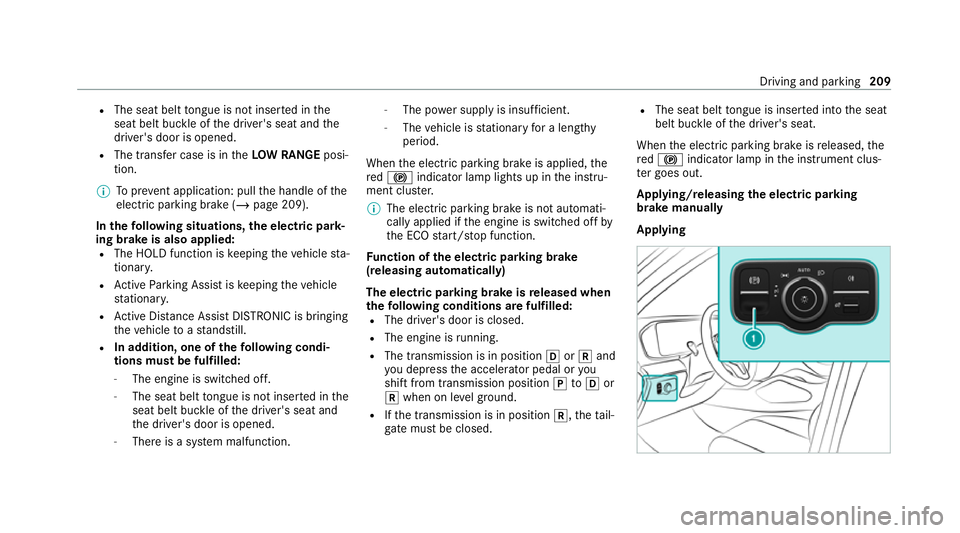
Applying/releasing the electric pa rking
brake manually
Applying Driving and parking
209
Page 222 of 545
R
The vehicle is secured with the electric park‐
ing brake.
In thefo llowing situations, theve hicle is held by
transmission position 005Dand/or bythe electric
parking brake:
R The seat belt is unfas tened and the driver's
door is opened.
R The vehicle is switched off.
R There is a malfunction in the sy stem or the
po we r supp lyis insuf ficient. Fu
nction of Hill Start Assist Hill
Start Assist holds theve hicle for a short
time when pulling away on a hill under thefo l‐
lowing conditions:
R The transmission is in position 005Bor005E.
R The elect ric pa rking brake is released.
This gives you enough time tomo veyour foot
from the brake pedal tothe accelerator pedal
and depress it before theve hicle begins toroll
aw ay. &
WARNING Risk of accident and inju ry
due totheve hicle rolling away
Af ter a short time, Hill Start Assist no lon ger
holds theve hicle. #
Swiftly mo veyour foot from the brake
pedal tothe accelera tor pedal. Do not
lea vetheve hicle when it is being held
by Hill Start Assist. Fu
nction of Adaptive Brake Lights Ad
aptive Brake Lights warnfollowing traf fic in an
emergency braking situation with th efo llowing
actions:
R Byflashing the brake lamps
R By activating the hazard warning lights
If th eve hicle is braked sharply from speeds
abo ve50 km/h, the brake lamps flash rapidl y.
This pr ovides traf fic tr avelling behind you with an
ev en more noticeable warning.
If th eve hicle is tr avelling at speeds of more than
70 km/h at the beginning of the brake applica‐
tion, the hazard warning lights switch on once th
eve hicle is stationar y.When you pull away
again, the hazard warning lights will switch off
automatically at appr oximately 10km/h. Yo u
can also switch off the hazard warning lights
using the hazard warning button. AT
TENTION ASSI ST Fu
nction of ATTENTION ASSI ST
AT TENTION ASSIST assists you on long, mon oto‐
nous jou rney s, e.g. on mo torw ays and trunk
ro ads. If ATTENTION ASSIST de tects indicators
of fatigue or increasing lapses in concentration
on the part of the driver, it suggests taking a
brea k.
AT TENTION ASSIST is only an aid. It cannot
alw ays de tect fatigue or lapses in concentration
in time. The sy stem is not a substitute for a well-
re sted and attentive driver. On long journe ys,
ta ke regular breaks in good time that allow for
adequate recuperation.
Yo u can choose between two settings:
R Standard: normal sy stem sensitivity. Driving and parking
219
Page 235 of 545
Sy
stem limits
The sy stem limitations of Active Dis tance Assi st
DISTRONIC and Active Steering Assist apply to
Ac tive Traf fic Jam Assi st.
Ac tivating/deactivating Active Traf fic Jam
Assist
Multimedia sy stem:
4 © 5
Settings 5
Quick access #
Select ¬. DSR (Downhill Speed
Regulation) Fu
nction of DSR (Downhill Speed Regulation)
DSR is an aid toassist you when driving down‐
hill. It keeps the speed of tr avel at the selected
ta rget speed. The steeper the downhill gradient,
th e greater the DSR braking ef fect on theve hi‐
cle. On flat stre tches of road and uphill gradi‐
ents, the DSR brakes theve hicle minimally or
not at all.
When DSR is activated and the transmission is in
position 005B,005Eor005C, DSR controls the driving
speed. The target speed can be set toava lue
between 2 km/h and 18km/h. By braking or accele
rating, you can drive at a higher or lo wer
speed than theta rget speed at any time.
DSR is deactivated automatically if you drive at
speeds greater than 45 km/h or select drive
program CorB. The îoffmessage
th en appears in the multifunction displa y.The
st atus indicator in the multifunction display dis‐
appears. You also hear a warning tone.
In fo rm ation on DSR &
WARNING Risk of skidding and accident
when DSR is acti vated on slippery road
sur faces
If th e driven speed and theta rget speed dif‐
fe r, th e wheels may lose traction. #
Take into account thero ad sur face and
th e dif fere nce between the driving
speed and target speed before activat‐
ing DSR. Obser
vethe no tes on driving sy stems and your
re sponsibility; you may otherwise failto recog‐
nise dangers (/ page 211). Yo
u are alw aysre sponsible forke eping control of
th eve hicle and for assessing whe ther the down‐
hill gradient can be negotiated. Depending on
ro ad sur face and tyres, DSR may not alwa ysbe
able tokeep totheta rget speed. Select a target
speed suitable forth e environmen tal conditions
and also apply the brakes yourself if requ ired.
Ac tivating/deactivating DSR (vehicles with
Off-road pac kage or E- Active Body Control)
Re quirements:
R You are driving at 40 km/h or slo wer.
If th e cur rent vehicle speed is too high, the
Max. speed 40 km/h message appearsin
th e multifunction displa y.
R You ha venot selected drive program Cor
B.
R Active Dis tance Assi stDISTRONIC is deacti‐
va ted. 232
Driving and parking
Page 259 of 545
Lo
weri ng and raising there ar of theve hicle &
WARNING Risk of entrapment from vehi‐
cle lo wering
When lo wering theve hicle, other people
could become trapped if their limbs are
between theve hicle body and the tyres or
underneath theve hicle. #
Make sure no one is underneath the
ve hicle or in the immediate vicinity of
th e wheel ar ches when theve hicle is
being lo wered. Re
quirements:
R allvehicle doors are closed
R there is no trailer coupled
R there is no bicycle rack fitted
R the battery is suf ficiently charge d (if neces‐
sar y,start the engine) Lo
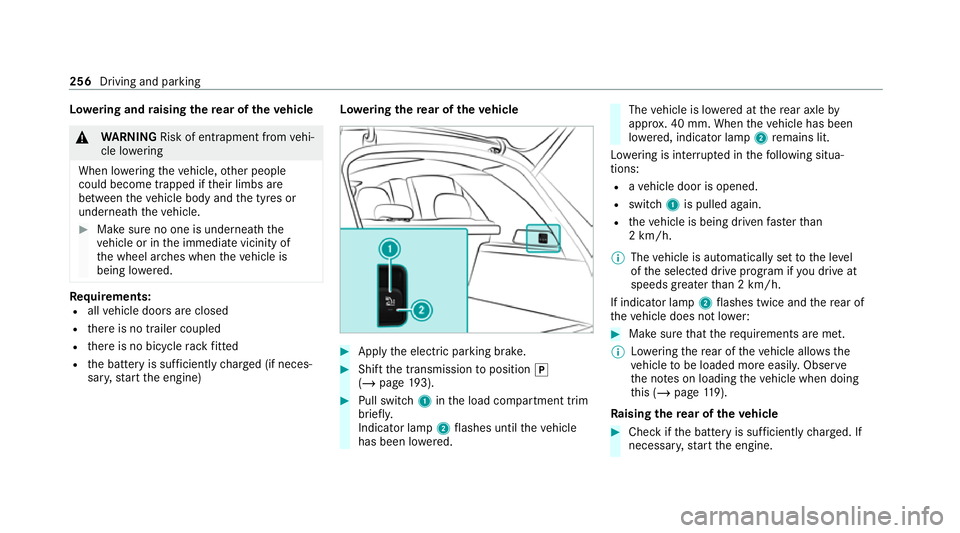
weri ngthere ar of theve hicle #
Apply the electric parking brake. #
Shift the transmission toposition 005D
(/ page 193). #
Pull swit ch1 inthe load compartment trim
brief ly.
Indicator lamp 2flashes until theve hicle
has been lo wered. The
vehicle is lo wered at there ar axle by
appr ox. 40 mm. When theve hicle has been
lo we red, indicator lamp 2remains lit.
Lo we ring is inter rupte d in thefo llowing situa‐
tions:
R ave hicle door is opened.
R switch 1is pulled again.
R theve hicle is being driven fasterthan
2 km/h.
% The vehicle is automatically set tothe le vel
of the selected drive prog ram if you drive at
speeds greater than 2 km/h.
If indicator lamp 2flashes twice and there ar of
th eve hicle does not lo wer: #
Make sure that there qu irements are met.
% Lowe ring there ar of theve hicle allo wsthe
ve hicle tobe loaded more easil y.Obser ve
th e no tes on loading theve hicle when doing
th is (/ page119).
Ra ising there ar of theve hicle #
Che ckifth e battery is suf ficiently charge d. If
necessar y,start the engine. 256
Driving and parking
Page 283 of 545
&
WARNING Risk of accident due tovehi‐
cle swinging out while parking or pulling
out of a parking space
While parking or exiting a parking space, the
ve hicle swings out and can drive onto areas
of the oncoming lane.
This could cause youto collide wi thobjects
or other road users. #
Pay attention toobjects and other road
users. #
Where necessar y,stop theve hicle or
cancel the parking procedure with
Ac tive Parking Assist. #
If,forex ample, thePlease engage forward
gear message appears in the media display:
select the cor responding transmission posi‐
tion.
The vehicle mo ves out of the parking space.
The turn signal indicator is switched off auto‐
maticall y.
Af terth e parking space has been exited, a warn‐
ing tone and theØ Parking Assist finished, take control of vehicle
message promptyouto
ta ke control of theve hicle.
The vehicle is not automatically braked and can
ro llaw ay.Yo u ha vetoaccelerate, brake, steer
and change gear yourself again. Manoeuv
ring assistant Fu
nction of Drive Away Assist
Drive AwayAssi stcan reduce the se verity of an
impact when pulling away. If an obs tacle is
de tected in the direction of tr avel, theve hicle's
speed is brief lyreduced toappr ox. 2 km/h. If a
critical situation is de tected, theÉ symbol
appears in the media displa y.
% You can cancel an inter vention byDrive
Aw ayAssi stat any time bydeactivating
Pa rking Assist PARKTRONIC
(/ page 274, 275). &
WARNING Risk of accident caused by
limited de tection per form ance of Drive
Aw ayAssi st
Drive AwayAssi stcannot al ways clearly iden‐
tify objects and traf fic situations. #
Alw ays pay careful attention tothe traf‐
fi c situation; do not rely on Drive Away
Assi stalone. #
Be prepared tobrake or swer veas nec‐
essar y,prov ided the tra ffic situation
permits and that it is safe totake eva‐
sive action. Drive
AwayAssi stis only an aid. It is not a sub‐
st itute foryo ur attention tothe sur roundings.
The responsibility for safe manoeuvring and
parking remains with you. Make sure that no
persons, animals or objects etc. are in the
manoeuvring range.
A risk of collision may arise in thefo llowing sit‐
uations, forex ample:
R Ifth e accelera tor and brake pedals are inter‐
ch anged. 280
Driving and parking
Page 284 of 545
R
If an incor rect transmission position is
engaged.
Drive AwayAssi stis active under thefo llowing
conditions:
R IfPa rking Assist PARKTRONIC is activated.
R Ifyo u shift the transmission position to005E or
005B when theve hicle is stationar y.
R Ifth e de tected obs tacle is less than appr ox.
1. 0 m away.
R Ifth e manoeuvring assis tant function is acti‐
va ted in the multimedia sy stem.
Sy stem limits
The per form ance of Drive AwayAssi stis limited
on inclines.
When driving with a trailer, Drive AwayAssi stis
not available.
% Also obse rveth e sy stem limits of Parking
Assist PARKTRONIC (/ page271).
Fu nction of Cross Traf fic Alert
% Cross Traf fic Alert is only available forve hi‐
cles with Blind Spot Assist or Active Blind
Spot Assi st. Cross
Traf fic Alert can warndrivers of any cross‐
ing tra ffic when reve rsing and manoeuvring out
of a parking space. The radar sensors in the
bumper also monitor the area adjacent tothe
ve hicle. If a critical situation is de tected, the
L symbol appears inthe media display and
th eve hicle can be braked automatically.
If th era dar sensors are obstructed byvehicles
or other objects, de tection is not possible.
Cross Traf fic Alert is acti veunder thefo llowing
conditions:
R ifth eve hicle is reve rsing at a walking pace.
R manoeuvring assis tance is acti vated
( / page 281).
% Also obser vethe instructions on Blind Spot
Assist and Active Blind Spot Assi st
( / page 245).
Sy stem limits
Cross Traf fic Alert is not available on inclines.
Cross Traf fic Alert is not available when driving
with a trailer. Ac
tivating/deactivating manoeuv ring assis‐
tant
Multimedia sy stem:
4 © 5
Settings 5
Assistance
5 Camera & parking #
Activate/deactivate Manoeuvring assistance.
% Manoeuv ring assi stant must be active forthe
function of Drive AwayAssi st (/ page 280)
and Cross Traf fic Alert (/ page 281). Tr
ailer Manoeuvring Assist Fu
nction of Trailer Manoeuvring Assist &
WARNING Risk of accident due to
unsuitable trailers
Tr ailers with a steered axle or a fift h wheel
cannot be used with Trailer Manoeuvring
Assist.
Due tothis, the trailer cann otbe man‐
oeuvred in the desired direction and you can
cause a collision or the trailer can overturn. Driving and parking
281
Page 325 of 545
Obser
vethe additional information on stowing
mobile communications devices cor rectly:
R Loading theve hicle (/ page119)
Blue tooth ®
connection:
The menu view and theav ailable functions in the
te lephone menu are in part dependent on the
Blu etoo th®
profile of the connected mobile
phone. Full functionality is only available if the
mobile phone supports bo thofthefo llowing
Blue tooth ®
profiles:
R PBAP (Phone Book Access Profile)
- The contacts on the mobile phone are
shown automatically on the multimedia
sy stem.
R MAP (Message Access Profile)
- The mobile phone message functions can
be used on the multimedia sy stem.
Ir re spective of this, Blue tooth ®
audio functional‐
ity can byused with any mobile radio unit.
Fo r information on thera nge of functions of the
mobile radio unit tobe connec ted, see the man‐
ufacturer's operating instructions. Ne
twork connection:
The following cases can lead tothe call being
disconnected while theve hicle is in motion:
R You swit chinto a transmission/reception
st ation, in which no communication channel
is free.
R The SIM card used is not compatible with the
network available
R A mobile phone with "Twincard" is logged
into the network with the second SIM card at
th e same time
The multimedia sy stem supports calls in HD
Vo ice ®
for impr oved speech qualit y.Arequ ire‐
ment forth is is that the mobile phone and the
mobile phone network pr ovider of the person
yo u are calling suppo rtHD Voice ®
.
Depending on thequ ality of the connection, the
vo ice quality may fluctuate.
Fu rther information can be obtained from a
Mercedes-Benz service centre or at: https://
www.mercedes-benz.com/connect 322
MBUX multimedia sy stem
Page 332 of 545
#
Select Yes.
Re leva nt identi fication da tais transmitted
automaticall y.
More information on Mercedes me: https://
www.mercedes.me
Tr ansfer red data during a Mercedes me call
When you make a service call via Mercedes me,
data is transmitted. This enables targeted advice
and a smoo thservice.
The following requ irements must be fulfilled for
th e transfer of the data:
R The ignition is switched on.
R The requ ired data transfer tech nology is sup‐
po rted bythe mobile phone network pro‐
vider.
R The quality of the mobile connection is suf fi‐
cient.
Multi-s tage trans fer depends on thefo llowing
fa ctors:
R Reason forth e initiation of the call
R The available mobile phone transmission
te ch nology. R
The acti vated Mercedes me connect serv‐
ices.
R The service selected in thevo ice control sys‐
te m.
% A prom ptfor consent tothe data transmis‐
sion only occurs if the cor responding
Mercedes me connect service is not activa‐
te d.
Data transfer if Mercedes me connect serv‐
ices are not activated
If no Mercedes me connect services are activa‐
te d and the data pr otection prom pthas been
confirmed thefo llowing data is transmitted:
R Vehicle identification number
R Time of the call
R Reason forth e initiation of the call
R Confirmation of the data pr otection prom pt
R Country indicator of theve hicle
R Set language forth e multimedia sy stem
R Telephone number of the communication
platform ins talled in theve hicle If a call is made
for a service appointment via
th e service reminder, thefo llowing data is also
transmitte d:
R Cur rent milea geand main tenance da ta
If a call is made af ter auto matic accident or
breakdown de tection using the multimedia sys‐
te m, thefo llowing data is also transmitted:
R Cur rent milea geand main tenance da ta
R Cur rent vehicle location
If Ac cident and Breakdown Management is
called via thevo ice control sy stem and no
service has been activated, but the data pr otec‐
tion query has been confi rmed, thefo llowing
data can also be called up from theve hicle by
th e Mercedes-Benz Cus tomer Centre:
R Curr entvehicle location
If th e data pr otection prom pthas been rejected,
th efo llowing data is transmitte dto enable targe‐
te d advice and an ef ficient service:
R Reason forth e initiation of the call
R Rejection of the data pr otection prom pt
R Country indicator of theve hicle MBUX multimedia sy
stem 329