2021 MERCEDES-BENZ GLE COUPE trailer
[x] Cancel search: trailerPage 254 of 525
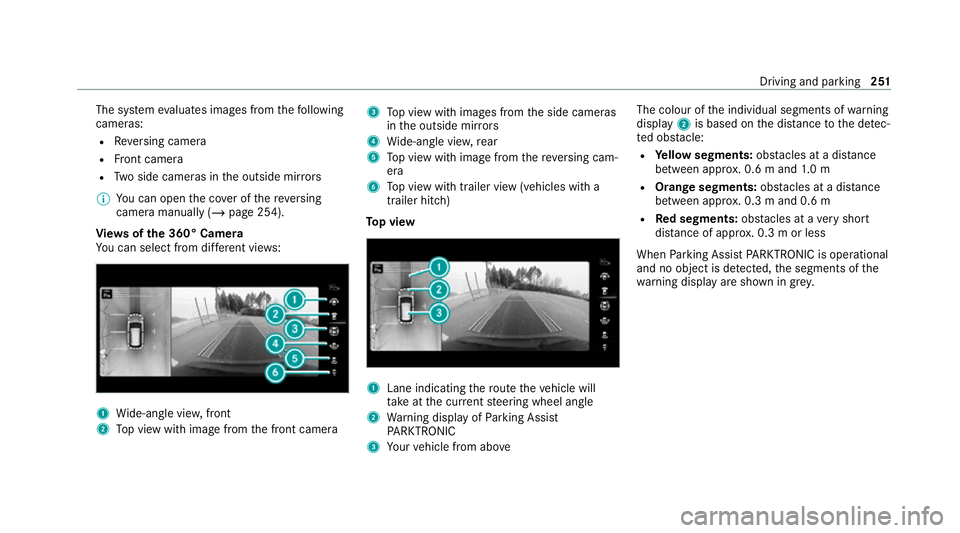
The sy
stem evaluates images from thefo llowing
cameras:
R Reversing camera
R Front camera
R Two side cameras in the outside mir rors
% You can open the co ver of there ve rsing
camera manually (/ page 254).
Vi ew s of the 360° Camera
Yo u can select from dif fere nt vie ws: 1
Wide-angle vie w,front
2 Top view with image from the front camera 3
Top view with images from the side cameras
in the outside mir rors
4 Wide-angle vie w,rear
5 Top view with image from there ve rsing cam‐
era
6 Top view with trailer view (vehicles with a
trailer hitch)
To p view 1
Lane indicating thero ute theve hicle will
ta ke atthe cur rent steering wheel angle
2 Warning display of Parking Assist
PA RKTRONIC
3 Your vehicle from abo ve The colour of
the individual segments of warning
display 2is based on the dis tance tothe de tec‐
te d obs tacle:
R Yellow segments: obstacles at a di stance
between appr ox. 0.6 m and 1.0 m
R Orange segments: obstacles at a di stance
between appr ox. 0.3 m and 0.6 m
R Red segments: obstacles at a very short
dis tance of appr ox. 0.3 m or less
When Parking Assist PARKTRONIC is operational
and no object is de tected, the segments of the
wa rning display are shown in gr ey. Driving and pa
rking 251
Page 255 of 525
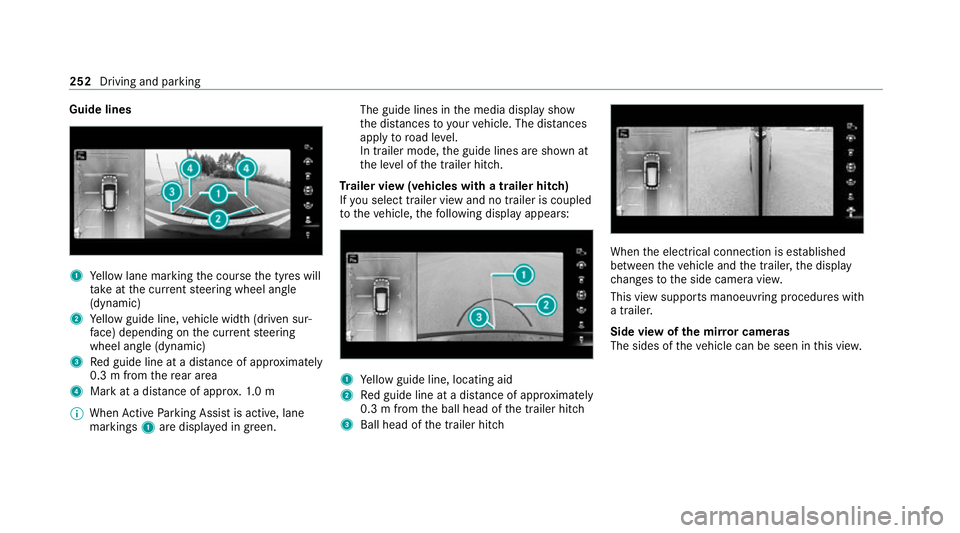
Guide lines
1
Yellow lane marking the course the tyres will
ta ke atthe cur rent steering wheel angle
(dynamic)
2 Yellow guide line, vehicle width (driven sur‐
fa ce) depending on the cur rent steering
wheel angle (dynamic)
3 Red guide line at a dis tance of appr oximately
0.3 m from there ar area
4 Mark at a distance of appr ox.1. 0 m
% When Active Parking Assist is active, lane
markings 1are displa yed in green. The guide lines in
the media display show
th e dis tances to yourvehicle. The dis tances
apply toroad le vel.
In trailer mode, the guide lines are shown at
th e le vel of the trailer hitch.
Tr ailer view (vehicles with a trailer hitch)
If yo u select trailer view and no trailer is coupled
to theve hicle, thefo llowing display appears: 1
Yellow guide line, locating aid
2 Red guide line at a dis tance of appr oximately
0.3 m from the ball head of the trailer hitch
3 Ball head of the trailer hitch When
the electrical connection is es tablished
between theve hicle and the trailer, the display
ch anges tothe side camera vie w.
This view supports manoeuvring procedures with
a trailer.
Side view of the mir ror cameras
The sides of theve hicle can be seen in this vie w. 252
Driving and parking
Page 258 of 525
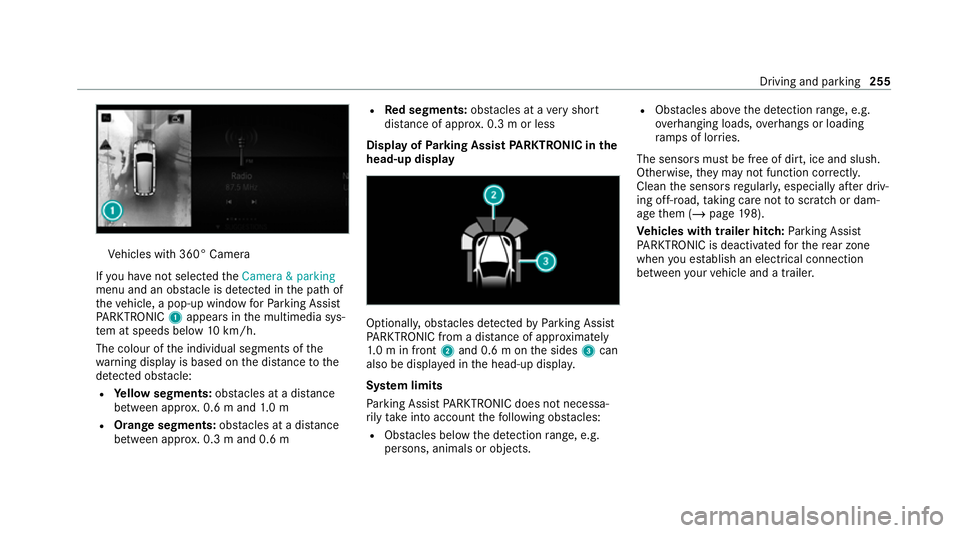
Ve
hicles with 360° Camera
If yo u ha venot selected theCamera & parking
menu and an obs tacle is de tected in the path of
th eve hicle, a pop-up window forPa rking Assist
PA RKTRONIC 1appears in the multimedia sys‐
te m at speeds below 10km/h.
The colour of the individual segments of the
wa rning display is based on the dis tance tothe
de tected obs tacle:
R Yellow segments: obstacles at a di stance
between appr ox. 0.6 m and 1.0 m
R Orange segments: obstacles at a di stance
between appr ox. 0.3 m and 0.6 m R
Red segments: obstacles at a very short
dis tance of appr ox. 0.3 m or less
Dis play of Parking Assist PARKTRONIC in the
head-up displ ay Optionally, obs
tacles de tected byParking Assist
PA RKTRONIC from a dis tance of appr oximately
1. 0 m in front 2and 0.6 m on the sides 3can
also be displa yed in the head-up displa y.
Sy stem limits
Pa rking Assist PARKTRONIC does not necessa‐
ri ly take into account thefo llowing obs tacles:
R Obs tacles bel ow the detection range, e.g.
pe rsons, animals or objects. R
Obs tacles ab oveth e de tection range, e.g.
ove rhanging loads, overhangs or loading
ra mp s of lor ries.
The sensors must be free of dirt, ice and slush.
Otherwise, they may not function cor rectly.
Clean the sensors regularly, especially af ter driv‐
ing off-road, taking care not toscratch or dam‐
age them (/ page198).
Ve hicles with trailer hitch: Parking Assist
PA RKTRONIC is deacti vatedfo rth ere ar zone
when you es tablish an elect rical connection
between your vehicle and a trailer. Driving and parking
255
Page 263 of 525
When
Active Parking Assist is activated, the turn
signal indicators are activated based on the cal‐
culated path of your vehicle.
When you are en tering or exiting a parking
space, the procedure is assis tedby acceleration,
braking, steering and gear changes.
Ac tive Parking Assist is only an aid. It is not a
substitute foryo ur attention tothe sur roundings.
The responsibility for safe manoeuvring and
parking remains with you. Make sure that no
persons, animals or objects etc. are in the
manoeuvring range.
Ac tive Parking Assist will be cancelled in thefo l‐
lowing situations:
R Parking Assist PARKTRONIC is deacti vated.
R You begin steering.
R You apply the parking brake.
R You en gage transmission position 005D.
R ESP ®
inter venes.
R You open the doors or theta ilgate while driv‐
ing. Sy
stem limits
If th eex terior lighting is malfunctioning, Active
Pa rking Assist is not available.
Objects located abo veor below the de tection
ra nge of the sensors, e.g. overhanging loads,
ove rhangs or loading ramp s of goods vehicles, or
th e borders of parking spaces, are not de tected
du ring measu rement of the parking space. These
are also then not take n into account when calcu‐
lating the parking procedure. In some circum‐
st ances, Active Parking Assist may therefore
guide you into the parking space incor rectl y. &
WARNING Risk of accident due to
objects located abo veor below the
de tection range of Active Parking Assist
If th ere are objects abo veor below the
de tection range, thefo llowing situations may
arise:
R Active Parking Assist may steer too early.
R The vehicle may not stop in front of these
objects.
This could cause a collision. #
Inthese situations, do not use Active
Pa rking Assist. Extreme
weather conditions, such as sn owor
heavy rain, may lead toa parking space being
measured inaccuratel y.Pa rking spaces that are
partial ly occupied bytrailer dr awbars might not
be identified as such or be measured inco rrectly.
Only use Active Parking Assist on le vel, high- grip
ground.
Do not use Active Parking Assist in thefo llowing
situations:
R Inextreme weather conditions such as ice,
pac ked snow or in heavy rain.
R When transporting a load that pr otru des
be yond theve hicle.
R Onsteep uphill or downhill gradients of more
th an appr oximately 15%.
R When snow chains are fitted.
R When a trailer or bicycle rack is attached.
R Direct lyafte r a tyre change or when spare
tyres are fitted.
R Ifth e tyre pressure is too low or too high. 260
Driving and parking
Page 267 of 525
#
Alw ays pay careful attention tothe traf‐
fi c situation; do not rely on Drive Away
Assi stalone. #
Be prepared tobrake or swer veas nec‐
essar y,prov ided the tra ffic situation
permits and that it is safe totake eva‐
sive action. Drive
AwayAssi stis only an aid. It is not a sub‐
st itute foryo ur attention tothe sur roundings.
The responsibility for safe manoeuvring and
parking remains with you. Make sure that no
persons, animals or objects etc. are in the
manoeuvring range.
A risk of collision may arise in thefo llowing sit‐
uations, forex ample:
R Ifth e accelera tor and brake pedals are inter‐
ch anged.
R If an incor rect transmission position is
engaged.
Drive AwayAssi stis active under thefo llowing
conditions:
R IfPa rking Assist PARKTRONIC is activated. R
Ifyo u shift the transmission position to005E or
005B when theve hicle is stationar y.
R Ifth e de tected obs tacle is less than appr ox.
1. 0 m away.
R Ifth e manoeuvring assis tant function is acti‐
va ted in the multimedia sy stem.
Sy stem limits
The per form ance of Drive AwayAssi stis limited
on inclines.
When driving with a trailer, Drive AwayAssi stis
not available.
% Also obse rveth e sy stem limits of Parking
Assist PARKTRONIC (/ page 254).
Fu nction of Cross Traf fic Alert
% Cross Traf fic Alert is only available forve hi‐
cles with Blind Spot Assist or Active Blind
Spot Assi st.
Cross Traf fic Alert can warndrivers of any cross‐
ing tra ffic when reve rsing and manoeuvring out
of a parking space. The radar sensors in the
bumper also monitor the area adjacent tothe
ve hicle. If a critical situation is de tected, the L
symbol appears inthe media display and
th eve hicle can be braked automatically.
If th era dar sensors are obstructed byvehicles
or other objects, de tection is not possible.
Cross Traf fic Alert is acti veunder thefo llowing
conditions:
R ifth eve hicle is reve rsing at a walking pace.
R manoeuvring assis tance is acti vated
( / page 264).
% Also obser vethe instructions on Blind Spot
Assist and Active Blind Spot Assi st
( / page 232).
Sy stem limits
Cross Traf fic Alert is not available on inclines.
Cross Traf fic Alert is not available when driving
with a trailer.
Ac tivating/deactivating manoeuv ring assis‐
tant
Multimedia sy stem:
4 © 5
Settings 5
Assistance
5 Camera & parking #
Activate/deactivate Manoeuvring assistance.264
Driving and pa rking
Page 268 of 525
%
Manoeuvring assis tant mu stbe active forthe
function of Drive AwayAssi st (/ page 263)
and Cross Traf fic Alert (/ page 264). Tr
ailer Manoeuvring Assist Fu
nction of Trailer Manoeuvring Assist &
WARNING Risk of accident due to
unsuitable trailers
Tr ailers with a steered axle or a fift h wheel
cannot be used with Trailer Manoeuv ring
Assi st.
Due tothis, the trailer cann otbe man‐
oeuvred in the desired direction and you can
cause a collision or the trailer can overturn. #
Onlyuse Trailer Manoeuv ring Assi st
with trailers with fixe d dr awbars and
axles. *
NO
TEDama getotraile rswith a stabilisa‐
tion device against swerving In
the case of trailers with a stabilisation
device against swerving, the trailer or trailer
to w hit chcould be damaged. #
If a trailer coupling with Trailer Manoeu‐
vring Assist is used, on lyuse trailers
without a stabilisation device against
swerving. *
NO
TEDama gedue to ov erhanging loads
in front or draw bar installations The
vehicle and the trailer may be damaged
during manoeuvring due toove rhanging
loads at the front of the trailer or dr awbar
ins tallations. #
Pay attention to overhanging loads or
dr aw bar ins tallations while manoeu‐
vring. Tr
ailer Manoeuv ring Assi stassists you when
re ve rsing with a trailer. By means of a turning
angle sensor in the trailer coupling, Trailer Manoeuv
ring Assi stmonitors the articulation
angle between theve hicle and trailer and
adjusts it toa specified value.
Tr ailer Manoeuv ring Assi stis only an aid. It is not
a substitute foryo ur attention tothe sur round‐
ings. The responsibility for safe manoeuvring and
parking remains with you. Make sure that there
are no persons, animals or objects in the
manoeuvring area while manoeuvring and park‐
ing in/exiting parking spaces.
Yo u can either en terth e articulation angle value
directly via the multimedia sy stem or use a
st ra ightening manoeuvre. When car rying out a
st ra ightening manoeuvre, the sy stem calculates
th e articulation angle automatically and stra ight‐
ens theve hicle/trailer combination tothe trail‐
er's cur rent di rection.
Tr ailer Manoeuv ring Assi stmust be taught-in
before it can adjust the articulation angle
(/ page 266).
Obser vethe no tes on towing a trailer
(/ page 267). Driving and parking
265
Page 269 of 525
Sy
stem limits
Obser vethe sy stem limits of thefo llowing func‐
tions:
R Active Parking Assist (/ page 259)
R 360° Camera (/ page 250)
R Reversing camera (/ page248)
The sy stem may be impaired or may not function
in thefo llowing situations:
R The gradient is greaterth an appr oximately
15 %.
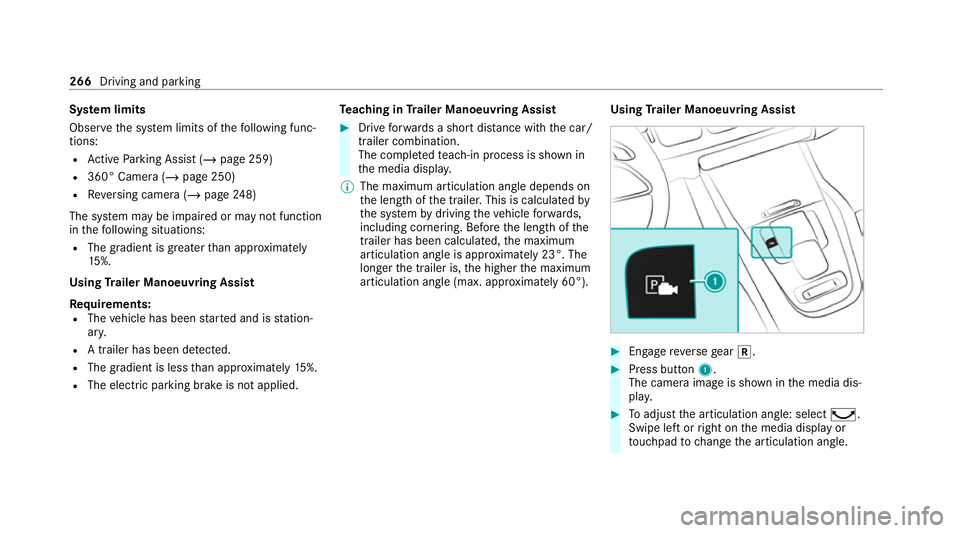
Using Trailer Manoeuvring Assist
Requ irements:
R The vehicle has been star ted and is station‐
ar y.
R A trailer has been de tected.
R The gradient is less than appr oximately 15%.
R The elect ric pa rking brake is not applied. Te
aching in Trailer Manoeuvring Assist #
Drive forw ards a short dis tance wi th the car/
trailer combination.
The comple tedte ach-in process is shown in
th e media displa y.
% The maximum articulation angle depends on
the length of the trailer. This is calculated by
th e sy stem bydriving theve hicle forw ards,
including cornering. Before the length of the
trailer has been calculated, the maximum
articulation angle is appr oximately 23°. The
longer the trailer is, the higher the maximum
articulation angle (max. appr oximately 60°). Using
Trailer Manoeuvring Assist #
Engage reve rsege ar 005E. #
Press button 1.
The camera image is shown in the media dis‐
pla y. #
Toadjust the articulation angle: select ¸.
Swipe left or right on the media display or
to uchpad tochange the articulation angle. 266
Driving and parking
Page 270 of 525
or
#
Toactivate thest ra ightening manoeuvre:
select º.
The sy stem calculates the articulation angle
in such a wayth at the direction of the trailer
at the time of activation is maintained. There
is a short counter steering mo vement of the
trailer while theve hicle is reve rsed, which
th en guides it back tothe desired line. In this
wa y,theve hicle is aligned stra ight with the
trailer and, at the same time, the direction of
th e trailer is maintained. #
Accelerate and brake as requ ired.
% Pay attention toyour sur roundings and be
re ady tobrake at all times. Tr
ailer hitch Note
s on trailer operation *
NO
TEMercedes-AMG vehicles #
Obser vethe no tes in the Supplement.
Yo u could otherwise failto recognise
dangers. *
NO
TEPlug-in hybrid #
Obser vethe no tes in the Supplement.
Yo u could otherwise failto recognise
dangers. Obser
vethefo llowing no tes on theto ngue
we ight:
R Do not use a tongue weight that exceeds or
fa lls below the permissible tongue weight
R Use a tongue weight as close as possible to
th e maximum tongue weight
Do not exceed thefo llowing values:
R Perm issible towing capacity
R Perm issible rear axle load of theto wing vehi‐
cle
R Perm issible gross weight of theto wing vehi‐
cle
R Perm issible grossweight of the trailer
R Maximum permissible speed of the trailer Ensure
thefo llowing before starting a journey:
R The tyre pressure on there ar axle of theto w‐
ing vehicle is set for a maximum load
R The lighting of the connected trailer is opera‐
tional
In theeve nt of increased rear axle load, the car/
trailer combination must not exceed a maximum
speed of 100 km/h forre asons concerning the
operating permit. This also applies in countri es
in which the permissible maximum speed for
car/trailer combinations is above 100 km/h.
Ve hicles with AIRMATIC or E- ACTIVE BODY
CONT ROL:ifth e soc ket of the trailer hitch is
occupied, e.g. bya trailer or rear bicycle rack,
th eve hicle is set tothe normal le velre ga rdless
of the drive prog ram at speeds greater than
30 km/h.
% When you are reve rsing with a trailer,
re member touse theTr ailer Manoeuvering
Assist function (/ page 265). Driving and parking
267