2021 MERCEDES-BENZ E WAGON USB
[x] Cancel search: USBPage 33 of 466
If
yo uuse services, suchas repair services and
maint enanc ewo rk,st or ed oper ational dataas
we llas theve hicle identif ication number canbe
re ad out and used. Theycan beread out by
ser vice networkem ployees, suchas workshops
and manuf acturersor third par ties ,suc has
br eakdo wnservice s.The same istrue inthe
case ofwa rrant yclaim sand qualit yassur ance
meas ures.
In gener al,th ere ad out isper form ed via the
leg allypr escr ibed portfo rth ediagnos ticscon‐
nect ionintheve hicle. Theoper ational datath at
ar ere ad out documen tte ch nica lst at es ofthe
ve hicle orofindividua lcom ponent sand assis tin
th ediagnosis ofmalfunct ions,compliance with
wa rrant yoblig ationsand qualit yim prove ment.
To that end ,th ese data,in par ticular information
about componen tloads, tech nica leve nts, mal‐
func tions and other faults maybe trans mitted
alon gwit hth eve hicle identif ication number to
th emanuf acturer.Fu rther mor e,themanuf ac‐
tur erissubject toproduct liability .Fo rth is rea‐
son themanuf actureralso uses operational data
fr om theve hicle, forex am ple, forre cal ls. The se da
ta can also be used toexamin eth ecus tom‐
er's warrant yand guar anteeclaim s.
Fa ult mem ories intheve hicle canberese tby a
ser vice outle tor atyour requ estas par tof repair
or maint enanc ewo rk.
Con venience andinfotainme ntfuncti ons
Yo ucan stor econ venie nce settings andindivid‐
ua lse ttings intheve hicle andchang eor rese t
th em atanytime.
Depen dingontheve hicle equipment, this
inc ludes thefo llo wing settings ,fo rex am ple:
R Seat andsteer ing wheel position s
R Suspension andclimat econ trol settings
R Individual settings, suchas interior lighting
Depen dingontheselect edequipment, youcan
im por tdata intove hicle infotainm entfunction s
yo urself .
De pen dingon theve hicle equipment, this
inc ludes thefo llo wing data,forex am ple:
R Mult imed iadat a,suc has music ,fi lms orpho‐
to sfo rpla yba ckinan integr ated multim edia
sy stem R
Address book datafo ruse inconnection with
an integr ated hands-fr eesystem oran inte‐
gr ated navig ation system
R Entere dna vig ation destinations
R Dat aabout theuse ofInt erne tser vices
These datafo rcon venie nce and infotainm ent
fun ction sma ybe save dlocally intheve hicle or
th ey ma ybe locat edon ade vice whichyo uha ve
connect edtotheve hicle, suchas asmar tphone,
USB flash drive or MP3 player.If yo uha ve
ent ered these datayo urself ,yo ucan deletethem
at anytime.
This datais tra nsmit tedfrom theve hicle tothird
par ties onlyat your requ est.This applies, inpar‐
ticular ,when youuse onlineser vices inacc ord‐
anc ewit hth ese ttings that youha ve select ed.
Smar tphone integratio n(e .g. Android Au toor
App leCar Play)
If yo ur vehicle isaccor dinglyeq uipped, youcan
co nn ect your smar tphon eor ano ther mobile end
de vice totheve hicle. Youcan then con trol them
by means ofthecon trol element sint egr ated in
th eve hicle. Imagesand audiofrom thesmar t‐
phone canbeoutput viathemultimedia system. Gener
alno tes 31
Page 112 of 466
The
driving charact eristic sof your vehicle are
dependent onthedis tribution oftheload within
th eve hicle. Yousho uld bear thefo llo wing in
min dwhen loading theve hicle:
R Neverex ceed theper missible gross mass or
th egr oss axle weight rating forth eve hicle
(including occupants). Thevalues arespec i‐
fi ed on theve hicle identif ication plateon the
ve hicle's B-pillar.
R The load mustno tpr otru de abo vetheupper
edg eof theseat backres ts.
R When transpor tingobjec tsinthecar gocom‐
par tmen t,alw aysins tallth ecombin edcar go
co verand net.
R Alw aysplace theload behind unoccupied
seats ifpossible.
R Secur eth eload using thetie-do wneyes and
dis tribut eth eload evenly. St
ow agespace sin theve hicl eint erior Ov
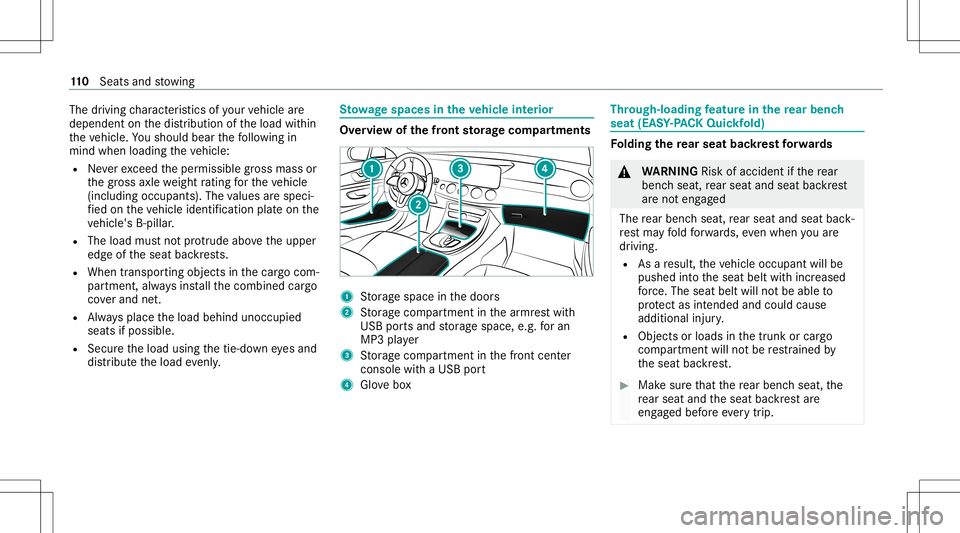
ervie wof thefront storage com partmen ts 1
Stor ag espace inthedoor s
2 Stor ag ecom partmen tin thear mr estwit h
USB portsand stor ag espace, e.g.foran
MP3 player
3 Stor ag ecom partmen tin thefront cent er
con sole withaUSB port
4 Glovebox Thr
ough-load ingfeatur ein there ar ben ch
seat (EASY-PA CK Quic kfold) Fo
lding there ar seat backres tfo rw ards &
WARNIN GRisk ofacci dent ifth ere ar
ben chseat, rear seat andseat backres t
ar eno teng aged
The rear ben chseat, rear seat andseat back‐
re st ma yfo ld forw ards, evenwh en youar e
dr ivin g.
R Asare sult, theve hicle occupant willbe
pushed intoth eseat beltwithincr eased
fo rc e. The seat beltwillnotbe able to
pr otect asintended andcould cause
additional injury.
R Objects orloads inthetrunk orcar go
com partmen twill notbe restra ined by
th eseat backres t. #
Mak esur eth at there ar ben chseat, the
re ar seat andtheseat backres tar e
eng aged bef oreeve rytrip . 11
0
Sea tsand stow ing
Page 125 of 466

#
Open flap 3. #
Inser tth eplug ofthede vice into11 5V
soc ket1.
Wh entheon- boar delectr icalsystem voltag e
is suf ficie nt, indi catorlamp 2light sup. USB
portin there ar passe nger comp artment Yo
ucan charge aUS Bde vic e,suc has amobi le
phon e,at theUSB portsusing asuit able charg‐
ing cable .
The devic es can becharge dwit h5 V (up to3A)
and whenth eignition isswitc hedon. Wi
reless chargin gof themobil eph one and
connecti onwit hth eex terior ant enna No
teson wir elessl ych argin gth emobil e
ph one &
WARNIN GRisk ofinju rydue toobject s
being stowe dincor rectl y
If obje ctsintheve hicle interior arestowe d
inc orrectly ,th ey can slide orbe throw n
ar oun dand hitvehicle occupants. Inaddi‐
tion, cupholder s,open stow agespac esand
mobi lephon ere cep tacle scanno tal wa ys
re tain all obje ctswit hin.
Ther eis arisk ofinjur y,par ticular lyin the
ev ent ofsudden braking orasudden chang e
in dir ect ion. #
Alw aysst ow object sso that they can‐
no tbe throw nar ou nd insuch situa‐
tions. #
Alw aysmak esur eth at obj ect sdo not
pr otru de from stow agespac es,parcel
ne ts or stow agene ts. #
Close theloc kable stow agespac es
bef orest ar tin gajo ur ne y. #
Alw aysst ow and securehea vy,har d,
poin ted, shar p-edg ed,fragile orbulky
objec tsinthetrunk/ cargocom part‐
ment . Obser
vetheno teson loadi ngtheve hicle. &
WARNIN GRisk offire from placing
objects inthemobile phonestor ag e
com partmen t
Placing other object sin themobile phone
st or ag ecom partmen tcould constituteafire
hazar d. #
Apar tfr om amobile phone, donot
place anyot her object sin themobile Seats
andstow ing 12
3
Page 206 of 466

If
alane chang eis no tposs ible, thear row is
fa ded outafte ra fe w sec ond sand ane wlane
ch ang emus tbe init iated. Animm ediat elane
ch ang eis on lypo ssible on free wa ysec tion s
wit hout speedlimi ts.
If th esy stem isim pair ed,ActiveLa ne Chang e
Assi stma ybe canceled .The Lane Change Can-
celed messa geappear sin themultifunc tiondis‐
pla y.
In addi tion, awa rning tone maysou nd, depend‐
ing onthesituation . &
WARNIN GRisk ofacci dent whench ang ‐
ing lane toan occ upied adjacentlane
Lan eChan geAssi stcanno tal wa ys cle arly
de tect ifth eadjacen tlane isfree.
The lane chang emigh tbe init iated although
th eadjacen tlane isno tfr ee. #
Beforech ang inglane s,mak esur eth at
th eneighbor inglane isfree and ther eis
no dang ertoother road user s. #
Mon itor thelane chang e. &
WARNIN GRisk ofacci dent ifLane
Ch ang eAssi stune xpectedl yst ops func‐
tionin g
If th esy stem limit ations forLane Change
Assis tha ve been reac hed, ther eis no guar‐
ant eethat thesy stem will remain active.
Lane ChangeAssis tcanno tth en assis tyo u
by appl ying steer ing torq ue. #
Alw aysmonit orthelane chang eand
ke ep your han dson thesteer ing wheel.
Obser vethetra ffic con dition sand steer
and/or brak eif neces sary. Sy
stem limit s
The system limit ations ofActiveSt eer ing Assis t
apply toActiveLa ne Chang eAssi st
( / pag e200).
The system mayalso beimpair edorma yno t
func tion inthefo llo wing situat ions:
R The sensorsin there ar bum peraredir ty,
damag edorcoveredby ast icke ror ice and
sno w,forex am ple.
R The exterior lighting showsadef ect. %
The ActiveLa ne Chang eAssi stsensor s
adjus taut omaticall ywhile acer tain dis tance
is be ing driven afte rth eve hicle hasbeen
deliv ered. ActiveLa ne Chang eAssi stis
una vailable oronl ypar tiall yav ailable during
th is teac h-in proce ss;noarro w appear sne xt
to theØ ActiveSt eer ing Assis tsymbol
when thetur nsignal indicat orisactiv ated.
Ac tiv atin g/deac tivatin gAc tiv eLan eCha nge
As sist
Multimedia system:
4 © 5
Set ting s5
Assist ance
5 Act ive Lane Change Assist #
Activateor deacti vate thefunc tion. Ac
tiv eBr ak eAs sist Fu
nction ofActiv eBr ak eAs sist
Ac tiveBr ak eAssi stconsi stsof thefo llo wing
func tions:
R Distance warning func tion
R Autonomo usbraki ng func tion
R Situ ation-d epend ent braki ng assist anc e 20
4
Drivin gand parking
Page 207 of 466
R
Vehicl eswith Drivin gAss istanc ePa ck‐
ag e:Evasi ve Steer ing Assis tand corner ing
func tion
Ac tiveBr ak eAssi stcan helpyo uto minimize the
ri sk ofacollision withve hicles, cyclis tsor
pedes trians ortoreduce theef fects ofsuch a
coll ision.
If Ac tiveBr ak eAssi sthas detected arisk ofcolli‐
sion, awa rning tone sou nds and theL dis‐
ta nce warning lam plight sup intheins trument
clus ter.
If yo udo notre act tothewa rning, autono mous
br akin gcan beinit iated incritic alsituat ions.
In espec iallycritic alsituat ions,Ac tiveBr ak e
Assi stcan initia te aut onomo usbrakin gdir ect ly.
In this case, thewa rning lam pand warning tone
occu rsi mu ltane ously with thebr aking applica‐
tion .
If yo uappl yth ebr ak eyo urself inacr itical situa‐
tio nor appl yth ebr ak edur ing autonomous brak‐
ing, situation -dependen tbr aking assistance
occu rs.The brak epr ess ureincr eases uptomax‐
imum full-sto pbr aking ifnec essar y. Obser
vetheno teson driving systems andyour
re sponsibili ty;yo uma yot her wise failto recog‐
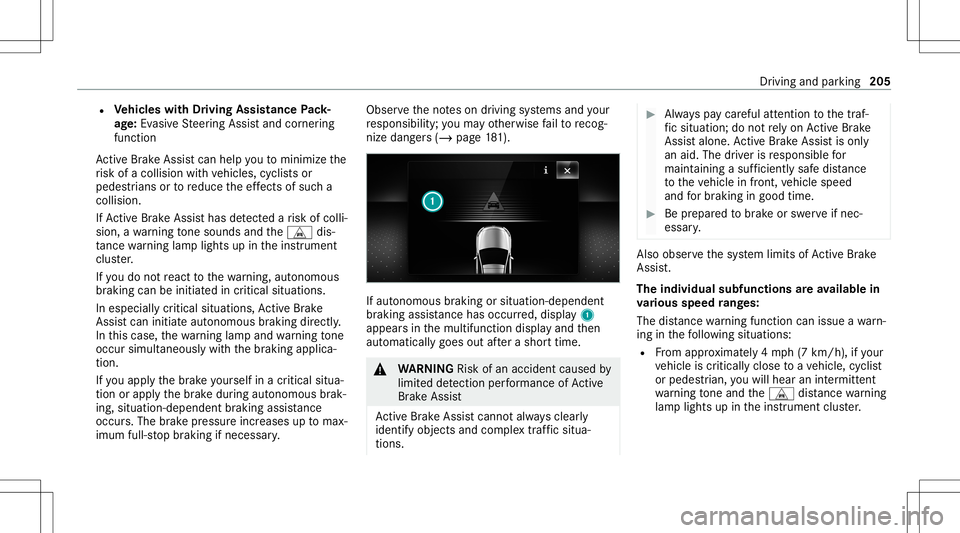
nize dangers(/ page 181). If
aut onom ous brak ing or situa tion-de pende nt
br aki ng assist anc ehas occurred, displa y1
appear sin themultifunc tiondispla yand then
aut omaticall ygoes outafte ra shor ttime. &
WARNIN GRisk ofan acci dent caused by
limit eddetection perform anc eof Active
Br ak eAssi st
Ac tiveBr ak eAssi stcanno tal wa ys cle arly
ident ifyobje ctsand complextraf fic situ a‐
tions . #
Alw ayspa ycar eful attention tothetra f‐
fi c situ ation; donotre ly on ActiveBr ak e
Assi stalon e.Ac tiveBr ak eAssi stisonl y
an aid. Thedriver isresponsible for
maint ainingasuf ficie ntly safedist anc e
to theve hicle infront, vehicle speed
and forbr aking ingood time. #
Beprepa redto brak eor sw erve ifnec ‐
essar y. Als
oob ser vethesy stem limits ofActiveBr ak e
Assi st.
The indiv idua lsub functionsar eav ailab lein
va rious speed rang es:
The distance warning func tion canissue awa rn‐
ing inthefo llo wing situat ions:
R From appr oximat ely4 mp h(7 km/h), ifyo ur
ve hicle iscritically closetoave hicle, cyclis t
or pedes trian, youwill hear anintermit tent
wa rning tone and theL distance warning
lam plight sup intheins trument cluster. Dr
iving and parking 205
Page 210 of 466

R
Activati on byan abr uptst eer ing movement
dur ing asw erving maneu ver.
R Assi stanc edur ing swervin gand stra ight enin g
of theve hicle.
R React ion from aspee dof appr oximat ely
12 mp h(20 km/h) uptoaspee dof appr ox‐
imat ely43 mph(70 km/h).
Yo ucan preve nttheassis tance atanytime by
act ivel yst eer ing.
Cor nering function (onlyve hicl eswith Driv‐
ing Assistanc ePa ckag e)
If adang erofcoll ision from anoncoming vehicle
is de tected whe ntur ning across anoncomi ng
la ne, autonomo usbraki ng can beinitia tedat
speeds below9mp h(1 5 km/h) beforeyo uha ve
lef tth elane inwhic hyo uar edr ivin g. &
WARNIN GRisk ofacci dent despite Eva‐
si ve Steer ing Assis t
Ev asiv eSt eer ing Assis tcann otalw aysre cog‐
nize objectsorcom plex traf fic situ ations
cle arly. Mor
eover,th esteer ing suppor tpr ov ided by
Ev asive St eer ing Assis tis no tsuf ficie ntto
av oid acollision. #
Alw ayspa ycar eful attention tothetra f‐
fi c situ ation; donotre ly on Evasiv e
St eer ing Assis talone. #
Beprepar edtobrak eor sw erve ifnec ‐
essar y. #
End thesuppor tby act ivel yst eer ing in
non -critical situation s. #
Drive at an appr opriatespeed ifth er e
ar epedes trians close tothepat hof
yo ur vehicle. Sy
stem limit s
Fu llsy stem perform anc eis no tav ailable fora
fe w sec ond saf te rswitc hingontheignition or
af te rdr iving off.
If Ac tiveBr ak eAssi stisim pair edorinope rativ e
du eto amalf unction,the00C7 warning lam p
appear sin themultifunc tiondispla y. The
system maybe impair edorma yno tfunc ‐
tion ,par ticular lyin thefo llo wing situat ions:
R Insno w,rain, fog, hea vyspr ay,if th er eis
gl ar e, indir ect sunlight oringrea tly varying
ambien tlight .
R Ifth esensor sar edir ty,fo gg ed up, damag ed
or covered.
R Ifth esensor sar eim pair eddue tointerfer‐
ence from other radar sour ces, e.g.stro ng
ra dar reflect ions inpar king garage s.
R Ifaloss oftirepr essur eor afa ulty tirehas
been detected and displ ayed.
R Incom plextraf fic situ ations whereobject s
cann otalw aysbe clear lyidentif ied.
R Ifpedes trians orvehicles movequickl yint o
th esensor detection rang e.
R Ifpe destrians arehidde nby other objects .
R Ifth etypical outline ofapedes trian cann ot
be distinguished from thebac kground.
R Ifapedes trian isno tde tected assuch ,e.g.
due tospecial clothing orother objects .
R Ifth edr iver's seat beltisno tfa stened. 208
Driving andparking
Page 280 of 466
Symbol
Designation Function
Z Settings Selecttomak ese ttings.
© HomeSelecttoretur nto thehome screen.
j MessagingSelecttocal lup mess aging.
2 Fullscr een Selectto switc hto full screen mode. The
follo wing functionsand settings areav aila‐
ble inthemedia menu:
R Connec tingextern al dat ast or ag emedia with
th emultimedia system (e.g. using USBor
Blue tooth®
)
R Playing backaudio orvideo files Au
thorizing aBlu etoo th®
audio devic efo r
medi apla yba ck Re
quirement s:
R Blue tooth®
is act ivat ed on themultimedia
sy stem and audio equipment. R
The audio equipment supportstheBlue‐
to oth®
audio profiles A2DP and AVRC P.
R The audio equipment is"visible" forot her
de vices.
Multimedia system:
4 © 5
Media 5
Bluetoot h5
00A5
Wi th Blu etoo th®
audio, youcan playbac kmusi c
fi les from anextern al dat ast or ag emedium, e.g.
yo ur smar tphon e,usin gth eMBUX multimedia
sy stem. #
Topla ybac kaudio files using themultimedia
sy stem, author ize theex tern al dat ast or ag e
medium ontheMBUX multimedia system. Au
thorizing ane wBlu etoo th®
audio devic e #
Select Connect NewDevice . #
Select anaudio device.
Au thor ization star ts.A cod eis displa yedon
th emultimedia system and onthemobile
phone. #
Ifth ecodes areidentic al,con firm onthe
audio equipme nt. #
Select Onlyas Bluet oothAudi oDe vic e.
The Blue tooth®
audio equipme ntiscon nec‐
te dwit hth emultimedia system. 27
8
MBUX multimedia system
Page 436 of 466

USB
port.......................................... ....1 23
Chass isleve l(AIR BODY CONT ROL)
Se tting ............................................ .....2 19
Child safetyloc k
Re ar door s.............................................6 2
Re ar side windows <0011001100110011001100110011001100110011001100110011001100110011
0011001100110011001100110011001100110011001100110011001100110011
0011> 63
Chi ldseat
At tach ing (notes) ................................... 54
Basi cins tructi ons <0011001100110011001100110011001100110011001100110011001100110011
00110011001100110011> .............50
Fr ont- passeng erseat (notes) ......... ........ 60
LA TC H-type (ISOFIX )(ins talling) ...... ...... 55
No teson risk sand dang ers ...................5 1
Secu ring on thefront passeng erseat ....6 1
Secu ring on there ar seat .............. ........ 59
To pTe ther ....................................... .......5 7
Child ren
Av oiding dangersin theve hicle .............. 51
Basi cins tructi ons <0011001100110011001100110011001100110011001100110011001100110011
00110011001100110011> .............50
Speci alsea tbel tre tract or ........... .......... 55
Ch ock ........... ........... ................................. 344
St or ag elocation ..................................3 44
Choc k
see Choc k City
lighting.............................................1 30
Cle anin g
see Care
Clim atecontr ol........................................ 144
Ac tivati ng/d eactiv ating ........... ............145
Ac tivati ng/d eactiv ating theA/C
func tion (cont rolpanel) .......................1 45
Ac tivati ng/d eactiv ating theA/C
func tion (MBUX multimedia system) ...145
Ac tivati ng/d eactiv ating thesync hro‐
nizat ionfunc tion (cont rolpanel) .......... 146
Ac tivati ng/d eactiv ating thesync hro‐
nizat ionfunc tion (MBUX multimedia
sy stem) .......................................... ...... 146
Air -reci rculati onmod e.................... .....1 47
Au tomatic control..... ...........................146
Callin gup theair con ditionin gmenu ...145
Climat est yle func tion .......................... 146
Con trol pan elfor3-zone automatic
clima tecontr ol<0011001100110011001100110011001100110011001100110011001100110011
001100110011001100110011001100110011001100110011> ........144
Con trol pan elfordua l-zone auto‐
matic climatecontr ol<0011001100110011001100110011001100110011001100110011001100110011
00110011001100110011001100110011001100110011> 144
Defr osting thewindshield .................... 144
Fil ling cap acityforPA Goil .............. .....3 62
Fr ont airvents <0011001100110011001100110011001100110011001100110011001100110011
0011001100110011001100110011001100110011> ...........149 Glo
veboxair vent <0011001100110011001100110011001100110011001100110011001100110011
00110011001100110011001100110011> ........150
Inser ting/r emoving theflacon (fra‐
gr anc esy stem) .................................... 148
Ionization ............................................. 147
No te <0011001100110011001100110011001100110011001100110011001100110011
0011001100110011001100110011001100110011001100110011001100110011
0011001100110011001100110011001100110011001100110011001100110011
0011001100110011> 144
Re ar air vents <0011001100110011001100110011001100110011001100110011001100110011
00110011001100110011001100110011> ..............150
Re frig er ant ...........................................361
Re frig er ant filling capac ity...................3 62
Re mo ving condensatio nfrom the
windo ws<0011001100110011001100110011001100110011001100110011001100110011
0011001100110011001100110011001100110011001100110011001100110011
00110011001100110011001100110011001100110011001100110011> 147
Re sidua lheat ....................................... 147
Se tting (MBU Xmul time diasy stem) ..... 145
Se tting theair distribution ...................1 44
Se tting theair flow <0011001100110011001100110011001100110011001100110011001100110011
001100110011001100110011001100110011001100110011001100110011> 144
Se tting theclimat est yle ......................1 46
Se tting thefragr ance system ............... 147
Se tting theve hicle interior temp era‐
tur e...................................................... 144
Swi tching there ar wind owheat er
on/of f.................................................1 44
Ve ntil ating theve hicle (convenie nce
op eni ng) <0011001100110011001100110011001100110011001100110011001100110011
001100110011001100110011001100110011> <0011001100110011001100110011001100110011001100110011001100110011
0011001100110011001100110011> 79
Wi ndsh ield hea ter ..... ...........................149
Clim atest yle
Fu nctio n<0011001100110011001100110011001100110011001100110011001100110011
001100110011001100110011001100110011> <0011001100110011001100110011001100110011001100110011001100110011
00110011001100110011>146 43
4
Inde x